Workflow Integration
"A workflow transition triggers a distributed task. A completed task triggers a workflow transition. Neither system knows the other's internals."
The Workflow DSL Lives Inside Diem
The Workflow DSL was built as part of Diem — the Content Management Framework. It defines editorial workflows with stages, transitions, role gates, and approval requirements. It works well for content pipelines: Draft → Review → Approved → Published.
But the DSL is entangled with Diem-specific concerns. Locale tracking, content type bindings, translation state — none of these belong in a general-purpose workflow engine. And DistributedTask needs workflow composition without pulling in the entire CMF.
The solution: extract the Workflow DSL as a standalone package.
The Standalone Workflow DSL
The extracted DSL keeps the core workflow primitives and drops everything Diem-specific:
Kept
| Attribute | Purpose |
|---|---|
[Workflow] |
Declares a workflow definition |
[Stage] |
A named state in the workflow |
[Transition] |
A directed edge between stages |
[RequiresRole] |
Gate: only users with this role can trigger the transition |
[RequiresApproval] |
Gate: N approvers must confirm before the transition executes |
[ScheduledTransition] |
Automatic transition after a time delay or at a cron schedule |
Dropped
LocaleTrackingStage— Diem-specific, tracks translation completeness per localeContentTypeBinding— ties a workflow to a Diem content typeTranslationReadyTransition— auto-transitions when all locales are translated
The standalone package is Workflow.Dsl. Diem keeps its own Diem.Workflow.Dsl that extends the standalone version with the locale and content type features.
A Standalone Workflow
[Workflow("EditorialPublishing")]
public partial class EditorialPublishingWorkflow
{
    [Stage("Draft", IsInitial = true)]
    public partial class Draft { }

    [Stage("Review")]
    public partial class Review { }

    [Stage("Approved")]
    public partial class Approved { }

    [Stage("Published", IsTerminal = true)]
    public partial class Published { }

    [Transition("Draft", "Review")]
    [RequiresRole("Editor")]
    public partial class SubmitForReview { }

    [Transition("Review", "Approved")]
    [RequiresRole("Reviewer")]
    [RequiresApproval(MinApprovers = 2)]
    public partial class Approve { }

    [Transition("Approved", "Published")]
    [RequiresRole("Publisher")]
    public partial class Publish { }
}
The source generator produces IWorkflowEngine<EditorialPublishingWorkflow>, transition validators, role checks, approval tracking, and DI registration. No Diem dependency.
Bidirectional Composition
The integration between Workflow and DistributedTask flows in both directions. Each direction uses a single attribute and a generated event handler.
Direction 1: Workflow → DistributedTask
A workflow transition triggers a distributed task. The [TriggerDistributedTask] attribute on a [Transition] tells the generator to emit an event handler that submits a task when the transition executes.
[Workflow("EditorialPublishing")]
public partial class EditorialPublishingWorkflow
{
    [Stage("Draft", IsInitial = true)]
    public partial class Draft { }

    [Stage("Review")]
    public partial class Review { }

    [Stage("Approved")]
    public partial class Approved { }

    [Stage("Packaging")]
    public partial class Packaging { }

    [Stage("Published", IsTerminal = true)]
    public partial class Published { }

    [Transition("Draft", "Review")]
    [RequiresRole("Editor")]
    public partial class SubmitForReview { }

    [Transition("Review", "Approved")]
    [RequiresRole("Reviewer")]
    [RequiresApproval(MinApprovers = 2)]
    public partial class Approve { }

    // ── This transition triggers a distributed task ──
    [Transition("Approved", "Packaging")]
    [TriggerDistributedTask("CreateZipFromFiles")]
    public partial class StartPackaging { }

    [Transition("Packaging", "Published")]
    public partial class CompletePublishing { }
}
The [TriggerDistributedTask("CreateZipFromFiles")] attribute tells the generator: when StartPackaging executes, submit a CreateZipFromFiles task. The generator emits an event handler that wires this automatically.
Direction 2: DistributedTask → Workflow
A completed distributed task triggers a workflow transition. The [OnTaskCompleted] attribute on a [Transition] makes the transition fire automatically when the named task reaches its terminal state.
// On the workflow side:
[Transition("Packaging", "Published")]
[OnTaskCompleted("CreateZipFromFiles")]
public partial class CompletePublishing { }
When the CreateZipFromFiles saga completes successfully, the generated event handler calls IWorkflowEngine.TransitionAsync to move the workflow instance from Packaging to Published.
Workflow → DistributedTask Handler
// ── Generated: EditorialPublishingWorkflow.StartPackaging.Handler.g.cs ──

public sealed class StartPackagingTransitionHandler
    : ITransitionHandler<EditorialPublishingWorkflow.StartPackaging>
{
    private readonly IDistributedTaskSubmitter _submitter;
    private readonly IWorkflowContextAccessor _contextAccessor;

    public StartPackagingTransitionHandler(
        IDistributedTaskSubmitter submitter,
        IWorkflowContextAccessor contextAccessor)
    {
        _submitter = submitter;
        _contextAccessor = contextAccessor;
    }

    public async Task HandleAsync(
        TransitionContext<EditorialPublishingWorkflow.StartPackaging> context,
        CancellationToken ct)
    {
        var workflowInstance = _contextAccessor.Current;

        var request = new CreateZipRequest
        {
            // The developer provides a mapping method
            // to populate the task request from workflow context
        };

        var taskId = await _submitter.SubmitAsync(request, ct);

        // Store the task ID on the workflow instance for correlation
        workflowInstance.SetMetadata("CreateZipFromFiles:TaskId", taskId);
    }
}
The developer provides the mapping between workflow context and task request by implementing a partial method:
public partial class EditorialPublishingWorkflow
{
    // Developer implements this to map workflow data → task request
    public static partial CreateZipRequest MapToCreateZipRequest(
        WorkflowInstance instance)
    {
        var files = instance.GetMetadata<List<FileReference>>("AttachedFiles");
        return new CreateZipRequest
        {
            Files = files,
            OutputFileName = $"{instance.Id}-package.zip"
        };
    }
}
DistributedTask → Workflow Handler
// ── Generated: CreateZipFromFiles.WorkflowCompletionHandler.g.cs ──

public sealed class CreateZipCompletionWorkflowHandler
    : IDistributedTaskCompletionHandler<CreateZipFromFilesSaga>
{
    private readonly IWorkflowEngine<EditorialPublishingWorkflow> _workflowEngine;

    public CreateZipCompletionWorkflowHandler(
        IWorkflowEngine<EditorialPublishingWorkflow> workflowEngine)
    {
        _workflowEngine = workflowEngine;
    }

    public async Task HandleAsync(
        TaskCompletedEvent<CreateZipFromFilesSaga> completedEvent,
        CancellationToken ct)
    {
        // Retrieve the workflow instance ID from task metadata
        var workflowInstanceId = completedEvent.Metadata
            .GetCorrelation<Guid>("WorkflowInstanceId");

        // Trigger the "CompletePublishing" transition
        await _workflowEngine.TransitionAsync(
            workflowInstanceId,
            new EditorialPublishingWorkflow.CompletePublishing(),
            ct);
    }
}
The Full Flow
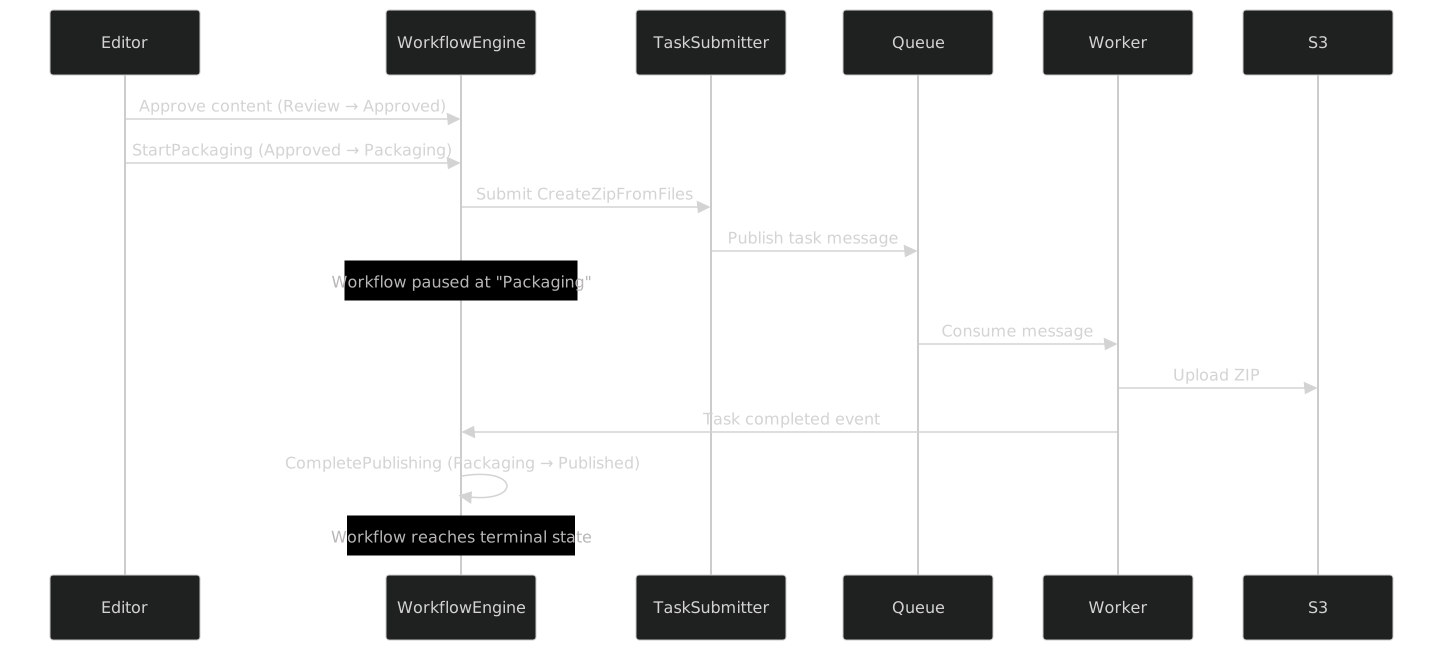
The editorial workflow pauses at the Packaging stage while the distributed task runs. No polling. No manual intervention. The completion event bridges the two systems.
State Diagram

Failure Handling
What happens when the distributed task fails?
The [OnTaskFailed] attribute adds a transition for the failure case:
[Transition("Packaging", "Review")]
[OnTaskFailed("CreateZipFromFiles")]
public partial class PackagingFailed { }
If the CreateZipFromFiles saga exhausts its retries and enters a terminal failure state, the workflow transitions back to Review — sending the content back for editorial correction.
// ── Generated: CreateZipFromFiles.WorkflowFailureHandler.g.cs ──

public sealed class CreateZipFailureWorkflowHandler
    : IDistributedTaskFailureHandler<CreateZipFromFilesSaga>
{
    private readonly IWorkflowEngine<EditorialPublishingWorkflow> _workflowEngine;
    private readonly ILogger<CreateZipFailureWorkflowHandler> _logger;

    public CreateZipFailureWorkflowHandler(
        IWorkflowEngine<EditorialPublishingWorkflow> workflowEngine,
        ILogger<CreateZipFailureWorkflowHandler> logger)
    {
        _workflowEngine = workflowEngine;
        _logger = logger;
    }

    public async Task HandleAsync(
        TaskFailedEvent<CreateZipFromFilesSaga> failedEvent,
        CancellationToken ct)
    {
        _logger.LogWarning(
            "CreateZipFromFiles task {TaskId} failed. " +
            "Transitioning workflow back to Review.",
            failedEvent.TaskId);

        var workflowInstanceId = failedEvent.Metadata
            .GetCorrelation<Guid>("WorkflowInstanceId");

        await _workflowEngine.TransitionAsync(
            workflowInstanceId,
            new EditorialPublishingWorkflow.PackagingFailed(),
            ct);
    }
}
DI Registration
The generated AddWorkflowDistributedTaskIntegration method registers all the handlers:
// ── Generated: WorkflowDistributedTaskIntegration.g.cs ──

public static class WorkflowDistributedTaskIntegrationExtensions
{
    public static IServiceCollection AddWorkflowDistributedTaskIntegration(
        this IServiceCollection services)
    {
        // Workflow → Task handlers
        services.AddTransient<
            ITransitionHandler<EditorialPublishingWorkflow.StartPackaging>,
            StartPackagingTransitionHandler>();

        // Task → Workflow handlers
        services.AddTransient<
            IDistributedTaskCompletionHandler<CreateZipFromFilesSaga>,
            CreateZipCompletionWorkflowHandler>();
        services.AddTransient<
            IDistributedTaskFailureHandler<CreateZipFromFilesSaga>,
            CreateZipFailureWorkflowHandler>();

        return services;
    }
}
One call in Program.cs:
builder.Services
    .AddWorkflowDsl()
    .AddDistributedTaskDsl()
    .AddWorkflowDistributedTaskIntegration();
The Developer's Surface
The developer writes:
- The workflow definition with
[TriggerDistributedTask]and[OnTaskCompleted]attributes - The mapping method from workflow context to task request
- The distributed task definition (as in previous articles)
The generator produces:
- Transition handlers that submit tasks
- Completion handlers that trigger transitions
- Failure handlers that trigger fallback transitions
- Correlation metadata management
- DI registration for all handlers
Two independent DSLs. One generated integration layer. No coupling at the domain level.
What's Next
Part XIII explores how DistributedTask becomes a building block for Business Process Modeling — task chaining with [DependsOn], shared process variables, and condition-driven DAG execution.