Part XIII: The Contributor Pattern -- Composable Service Definitions
Each service is a self-contained contributor -- add PostgreSQL in one line, get image + volume + healthcheck + environment + networking.
That is the headline, and I mean it literally. One DI registration. One class. One method call. And the output is a fully configured service with its volume declared, its network attached, its healthcheck wired, its environment variables set, and its restart policy configured. No YAML templates. No string interpolation. No copy-pasting blocks between projects.
Why Contributors Exist
The Compose Bundle (Part X-Part XII) gives us typed models. The Compose CLI wrapper (Part VIII) executes commands. But typing new ComposeFileBuilder().WithService(...) for every service in every project defeats the purpose. The contributor pattern makes services reusable, testable, and composable.
Think about how many times you have written a PostgreSQL service definition in a docker-compose.yml file. I have done it probably fifty times across different projects. Each time, the same image tag, the same environment variables (with slightly different passwords), the same healthcheck command, the same volume mount. Each time, I copy from a previous project and adapt. Each time, I forget the start_period on the healthcheck, or I use always instead of unless-stopped for the restart policy, or I forget to declare the volume at the top level.
The contributor pattern makes that impossible. You write the PostgreSQL service definition once, you test it, you publish it in a shared library, and you never write it again. Every project gets the same battle-tested configuration with one line of code.
The Interface
public interface IComposeFileContributor
{
    void Contribute(ComposeFile composeFile);
}
One interface. One method. A contributor receives a ComposeFile and adds whatever it needs to add -- a service, a volume, a network, all three, or even just labels on an existing service. The interface does not return anything. It mutates the model in place. This is a deliberate choice: contributors compose by side effect, which means order matters (later contributors can see what earlier contributors added) and the ComposeFile is the single accumulator that collects everything.
Why an interface and not a builder extension method? Four reasons.
First, contributors are registered in DI. That means they can depend on IOptions<T>, on IConfiguration, on IHostEnvironment, on anything the container can provide. A builder extension method would need all its configuration passed as parameters.
Second, contributors can be unit tested in isolation. Create a contributor, call Contribute on an empty ComposeFile, assert the result. No DI container needed in the test.
Third, contributors can be conditionally included. Register the monitoring contributor only in production. Register the debug contributor only in development. The composition logic does not change -- only the DI registrations.
Fourth, contributors are discoverable. IEnumerable<IComposeFileContributor> gives you every registered contributor, in registration order, without knowing which concrete types exist.
Here are the extension methods that make applying contributors ergonomic:
public static class ComposeFileExtensions
{
    public static ComposeFile Apply(this ComposeFile file, IComposeFileContributor contributor)
    {
        contributor.Contribute(file);
        return file;
    }

    public static ComposeFile ApplyAll(this ComposeFile file, IEnumerable<IComposeFileContributor> contributors)
    {
        foreach (var contributor in contributors)
            contributor.Contribute(file);
        return file;
    }
}
The fluent return enables chaining: file.Apply(postgres).Apply(redis).Apply(app). The ApplyAll variant takes the full IEnumerable<IComposeFileContributor> from DI and iterates through them. Both are trivial. Both save you from writing the loop every time.
Service Name Constants
Before building any contributors, we need a shared vocabulary. Service names appear in depends_on, in network aliases, in healthcheck references, in log output. If PostgreSQL is called "db" in one contributor and "postgres" in another, the depends_on will fail silently at runtime. Constants fix this at compile time.
public static class ServiceNames
{
    public const string Postgres = "db";
    public const string Redis = "cache";
    public const string App = "web";
    public const string Worker = "worker";
    public const string Traefik = "proxy";
}

public static class VolumeNames
{
    public const string PgData = "pgdata";
    public const string RedisData = "redisdata";
}

public static class NetworkNames
{
    public const string Backend = "backend";
    public const string Frontend = "frontend";
}
Why constants and not an enum? Because Docker Compose service names are strings in the YAML output. An enum would require .ToString() everywhere and the string value would be the enum member name (e.g., Postgres instead of db). Constants give you the compiler-checked references you want while producing the exact string values you need.
If you rename ServiceNames.Postgres from "db" to "postgres", every depends_on reference, every Networks key, every log message updates automatically. Try that with string literals scattered across fifty lines of YAML.
Contributor 1: PostgresContributor
This is the full contributor. Not a simplified example -- the actual code I run.
public sealed class PostgresOptions
{
    public string Version { get; set; } = "16";
    public string Database { get; set; } = "app";
    public string Username { get; set; } = "postgres";
    public string Password { get; set; } = "changeme";
    public bool ExposePort { get; set; } = false;
    public int HostPort { get; set; } = 5432;
}
The options class has sensible defaults. In development, you probably do not change them. In staging or production, you bind them from configuration. The ExposePort flag defaults to false because you almost never want PostgreSQL accessible from the host in a deployed stack -- the application connects over the Docker network.
public sealed class PostgresContributor : IComposeFileContributor
{
    private readonly PostgresOptions _options;

    public PostgresContributor(IOptions<PostgresOptions> options)
    {
        _options = options.Value;
    }

    public void Contribute(ComposeFile file)
    {
        file.Services ??= new();
        file.Services[ServiceNames.Postgres] = new ComposeService
        {
            Image = $"postgres:{_options.Version}",
            Restart = "unless-stopped",
            Ports = _options.ExposePort
                ? [new() { Target = 5432, Published = _options.HostPort.ToString() }]
                : null,
            Environment = new()
            {
                ["POSTGRES_DB"] = _options.Database,
                ["POSTGRES_USER"] = _options.Username,
                ["POSTGRES_PASSWORD"] = _options.Password,
            },
            Volumes =
            [
                new()
                {
                    Type = "volume",
                    Source = VolumeNames.PgData,
                    Target = "/var/lib/postgresql/data"
                }
            ],
            Healthcheck = new ComposeHealthcheck
            {
                Test =
                [
                    "CMD-SHELL",
                    $"pg_isready -U {_options.Username} -d {_options.Database}"
                ],
                Interval = "10s",
                Timeout = "5s",
                Retries = 5,
                StartPeriod = "30s",
            },
            Networks = new() { [NetworkNames.Backend] = new() },
        };

        // Ensure volume and network exist at the top level
        file.Volumes ??= new();
        file.Volumes.TryAdd(VolumeNames.PgData, new ComposeVolume { Driver = "local" });
        file.Networks ??= new();
        file.Networks.TryAdd(NetworkNames.Backend, new ComposeNetwork { Driver = "bridge" });
    }
}
Notice a few things.
The ??= pattern on file.Services, file.Volumes, and file.Networks makes the contributor safe to call on an empty ComposeFile. The first contributor to touch these dictionaries creates them. Subsequent contributors find them already initialized.
TryAdd on volumes and networks is intentional. If two contributors both need the backend network, the first one creates it and the second one is a no-op. No duplicate key exception. No overwriting.
The healthcheck uses pg_isready, which is the correct way to check PostgreSQL readiness. Not a TCP socket check, not a SELECT 1 -- pg_isready checks whether the server is accepting connections, which is what depends_on: condition: service_healthy needs to know.
The StartPeriod of 30 seconds gives PostgreSQL time to initialize on first run (creating the database, running initdb). Without it, the healthcheck starts failing immediately and Docker might restart the container before it finishes initializing.
Contributor 2: RedisContributor
Redis is simpler than PostgreSQL but follows the same structure.
public sealed class RedisOptions
{
    public string Version { get; set; } = "7-alpine";
    public string MaxMemory { get; set; } = "256mb";
    public string MaxMemoryPolicy { get; set; } = "allkeys-lru";
    public bool ExposePort { get; set; } = false;
    public int HostPort { get; set; } = 6379;
    public bool Persistence { get; set; } = true;
}public sealed class RedisContributor : IComposeFileContributor
{
private readonly RedisOptions _options;
public RedisContributor(IOptions<RedisOptions> options)
{
_options = options.Value;
}
public void Contribute(ComposeFile file)
{
file.Services ??= new();
var command = new List<string>
{
"redis-server",
"--maxmemory", _options.MaxMemory,
"--maxmemory-policy", _options.MaxMemoryPolicy,
};
if (_options.Persistence)
{
command.AddRange(["--appendonly", "yes"]);
}
file.Services[ServiceNames.Redis] = new ComposeService
{
Image = $"redis:{_options.Version}",
Restart = "unless-stopped",
Command = command,
Ports = _options.ExposePort
? [new() { Target = 6379, Published = _options.HostPort.ToString() }]
: null,
Volumes = _options.Persistence
? [new() { Type = "volume", Source = VolumeNames.RedisData, Target = "/data" }]
: null,
Healthcheck = new ComposeHealthcheck
{
Test = ["CMD", "redis-cli", "ping"],
Interval = "10s",
Timeout = "5s",
Retries = 5,
StartPeriod = "10s",
},
Networks = new() { [NetworkNames.Backend] = new() },
};
if (_options.Persistence)
{
file.Volumes ??= new();
file.Volumes.TryAdd(VolumeNames.RedisData, new ComposeVolume { Driver = "local" });
}
file.Networks ??= new();
file.Networks.TryAdd(NetworkNames.Backend, new ComposeNetwork { Driver = "bridge" });
}
}The Redis contributor shares the Backend network with PostgreSQL. Because both use TryAdd, whichever contributor runs first creates the network, and the second one simply finds it already there. No coordination needed. No ordering constraints.
The Command property passes --maxmemory and --maxmemory-policy directly to redis-server. I default to allkeys-lru because in most application caches, evicting the least-recently-used key when memory is full is the right behavior. If you need a different policy, change the option.
The healthcheck uses redis-cli ping, which returns PONG when the server is ready. The StartPeriod is shorter than PostgreSQL because Redis starts almost instantly -- 10 seconds is generous.
Contributor 3: AppServiceContributor
The application service is the interesting one because it has build configuration, environment variables from IConfiguration, and depends_on with health conditions.
public sealed class AppServiceOptions
{
    public string DockerfilePath { get; set; } = "src/MyApp/Dockerfile";
    public string BuildContext { get; set; } = ".";
    public int HostPort { get; set; } = 8080;
    public int ContainerPort { get; set; } = 80;
    public string? BuildConfiguration { get; set; } = "Release";
    public Dictionary<string, string> AdditionalEnvironment { get; set; } = new();
}public sealed class AppServiceContributor : IComposeFileContributor
{
private readonly AppServiceOptions _options;
private readonly IConfiguration _configuration;
public AppServiceContributor(
IOptions<AppServiceOptions> options,
IConfiguration configuration)
{
_options = options.Value;
_configuration = configuration;
}
public void Contribute(ComposeFile file)
{
file.Services ??= new();
var environment = new Dictionary<string, string>
{
["ASPNETCORE_ENVIRONMENT"] = "Production",
["ConnectionStrings__DefaultConnection"] =
$"Host={ServiceNames.Postgres};Database=app;Username=postgres;Password=changeme",
["ConnectionStrings__Redis"] =
$"{ServiceNames.Redis}:6379",
};
// Merge additional environment variables from options
foreach (var (key, value) in _options.AdditionalEnvironment)
{
environment[key] = value;
}
// Pull overrides from IConfiguration
var envOverrides = _configuration.GetSection("AppService:Environment");
foreach (var child in envOverrides.GetChildren())
{
if (child.Value is not null)
environment[child.Key] = child.Value;
}
var buildArgs = new Dictionary<string, string>();
if (_options.BuildConfiguration is not null)
{
buildArgs["CONFIGURATION"] = _options.BuildConfiguration;
}
file.Services[ServiceNames.App] = new ComposeService
{
Build = new ComposeServiceBuildConfig
{
Context = _options.BuildContext,
Dockerfile = _options.DockerfilePath,
Args = buildArgs.Count > 0 ? buildArgs : null,
},
Restart = "unless-stopped",
Ports =
[
new()
{
Target = _options.ContainerPort,
Published = _options.HostPort.ToString()
}
],
Environment = environment,
DependsOn = new()
{
[ServiceNames.Postgres] = new ComposeDependsOnCondition
{
Condition = "service_healthy"
},
[ServiceNames.Redis] = new ComposeDependsOnCondition
{
Condition = "service_healthy"
},
},
Networks = new()
{
[NetworkNames.Backend] = new(),
[NetworkNames.Frontend] = new(),
},
};
file.Networks ??= new();
file.Networks.TryAdd(NetworkNames.Backend, new ComposeNetwork { Driver = "bridge" });
file.Networks.TryAdd(NetworkNames.Frontend, new ComposeNetwork { Driver = "bridge" });
}
}Several things worth noting here.
The connection strings reference ServiceNames.Postgres and ServiceNames.Redis as hostnames. Inside a Docker network, service names are DNS hostnames. This is why the constants matter -- the connection string must match the service name exactly, and the compiler ensures they do.
The depends_on block uses condition: service_healthy. This means Docker Compose will not start the application container until both PostgreSQL and Redis report healthy via their respective healthchecks. Without this, your application would start, try to connect to a database that is still initializing, and crash. The contributor pattern makes this reliable because the healthchecks are defined in the same codebase as the depends_on references.
The AppServiceContributor joins both the Backend and Frontend networks. It needs Backend to reach the database and cache. It needs Frontend so the reverse proxy can reach it. This two-network topology is a security pattern -- the proxy cannot talk to the database directly because they share no network.
Contributor 4: TraefikContributor
Traefik is the reverse proxy. It discovers services via Docker labels and routes traffic automatically.
public sealed class TraefikOptions
{
    public string Version { get; set; } = "v3.0";
    public bool EnableDashboard { get; set; } = false;
    public int DashboardPort { get; set; } = 8081;
    public bool EnableHttps { get; set; } = true;
    public string? AcmeEmail { get; set; }
}public sealed class TraefikContributor : IComposeFileContributor
{
private readonly TraefikOptions _options;
public TraefikContributor(IOptions<TraefikOptions> options)
{
_options = options.Value;
}
public void Contribute(ComposeFile file)
{
file.Services ??= new();
var ports = new List<ComposeServicePort>
{
new() { Target = 80, Published = "80" },
};
if (_options.EnableHttps)
{
ports.Add(new() { Target = 443, Published = "443" });
}
if (_options.EnableDashboard)
{
ports.Add(new()
{
Target = 8080,
Published = _options.DashboardPort.ToString()
});
}
var command = new List<string>
{
"--providers.docker=true",
"--providers.docker.exposedByDefault=false",
"--providers.docker.network=" + NetworkNames.Frontend,
"--entrypoints.web.address=:80",
};
if (_options.EnableHttps)
{
command.AddRange(
[
"--entrypoints.websecure.address=:443",
"--certificatesresolvers.letsencrypt.acme.httpchallenge=true",
"--certificatesresolvers.letsencrypt.acme.httpchallenge.entrypoint=web",
]);
if (_options.AcmeEmail is not null)
{
command.Add(
$"--certificatesresolvers.letsencrypt.acme.email={_options.AcmeEmail}");
}
}
if (_options.EnableDashboard)
{
command.Add("--api.dashboard=true");
}
file.Services[ServiceNames.Traefik] = new ComposeService
{
Image = $"traefik:{_options.Version}",
Restart = "unless-stopped",
Command = command,
Ports = ports,
Volumes =
[
new()
{
Type = "bind",
Source = "/var/run/docker.sock",
Target = "/var/run/docker.sock",
ReadOnly = true,
}
],
Networks = new() { [NetworkNames.Frontend] = new() },
Labels = new()
{
["traefik.enable"] = "false",
},
};
file.Networks ??= new();
file.Networks.TryAdd(NetworkNames.Frontend, new ComposeNetwork { Driver = "bridge" });
}
}The Docker socket mount (/var/run/docker.sock) is how Traefik discovers other containers. It watches Docker events and reads container labels to configure routing rules. The ReadOnly = true is a security measure -- Traefik needs to read the socket, not write to it.
The --providers.docker.exposedByDefault=false flag means containers are not automatically exposed through Traefik. You must add traefik.enable=true as a label on services you want routed. This is important because you do not want your database or Redis cache accessible through the reverse proxy.
The Labels on the Traefik service itself sets traefik.enable=false -- the proxy does not proxy itself.
The Architecture
Here is how contributors flow into a running stack:

Four contributors, each encapsulating a single concern, all feeding into one ComposeFile model, which serializes to YAML, which the typed CLI wrapper executes. Every step is typed. Every step is testable.
The service dependencies look like this:

The two-network topology is deliberate. The frontend network connects the proxy to the application. The backend network connects the application to its data stores. The proxy cannot reach the database. The database cannot reach the proxy. The application bridges both networks because it needs to receive traffic and access data.
Contributor Composition via DI
Registration is one line per contributor:
services.Configure<PostgresOptions>(config.GetSection("Postgres"));
services.Configure<RedisOptions>(config.GetSection("Redis"));
services.Configure<AppServiceOptions>(config.GetSection("AppService"));
services.Configure<TraefikOptions>(config.GetSection("Traefik"));

services.AddSingleton<IComposeFileContributor, PostgresContributor>();
services.AddSingleton<IComposeFileContributor, RedisContributor>();
services.AddSingleton<IComposeFileContributor, AppServiceContributor>();
services.AddSingleton<IComposeFileContributor, TraefikContributor>();
The ComposeFileFactory consumes the full set:
public sealed class ComposeFileFactory
{
    private readonly IEnumerable<IComposeFileContributor> _contributors;

    public ComposeFileFactory(IEnumerable<IComposeFileContributor> contributors)
    {
        _contributors = contributors;
    }

    public ComposeFile Create()
    {
        var file = new ComposeFile { Name = "my-app" };
        file.ApplyAll(_contributors);
        return file;
    }
}
That is it. The factory does not know about PostgreSQL, Redis, Traefik, or the application. It knows there are contributors, and it applies them. Adding a new service to the stack means registering one more contributor. Removing a service means removing one registration. The factory code never changes.
Here is the DI composition sequence in detail:
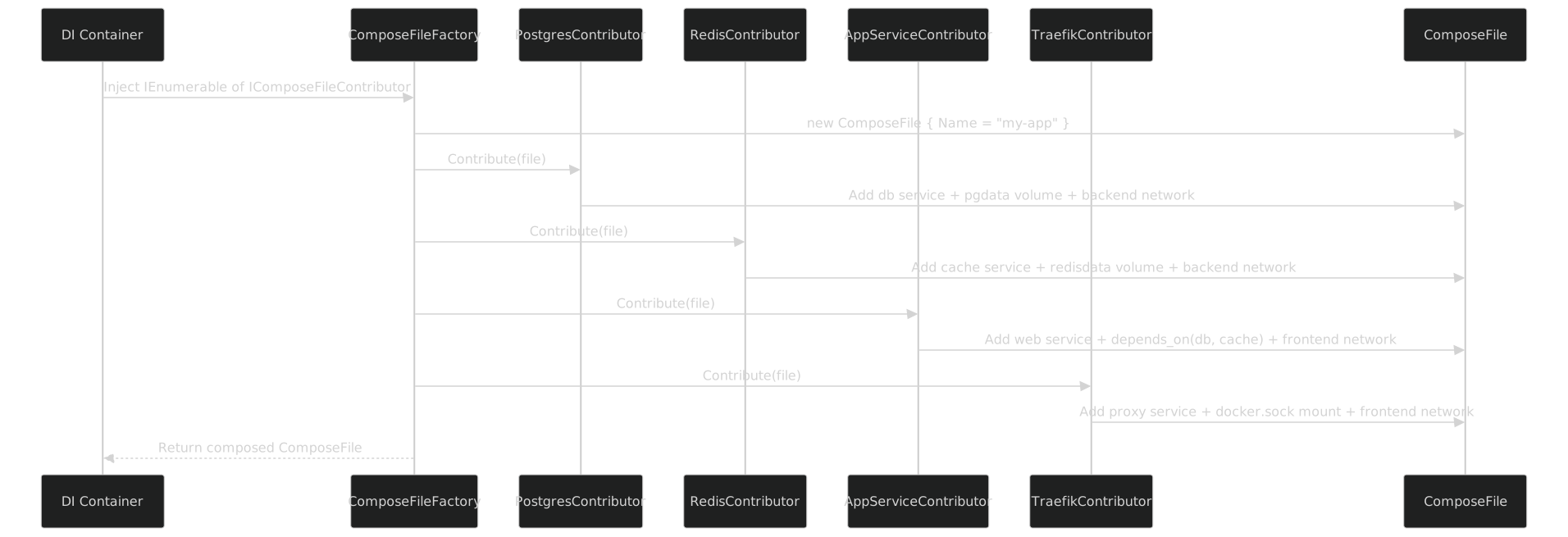
Each contributor adds its piece. The ComposeFile accumulates. Networks and volumes are created by the first contributor that needs them and reused by subsequent ones. The final ComposeFile contains the complete stack definition.
The Full Flow
Here is the complete pipeline from contributors to running containers:
// 1. Build the ComposeFile from contributors
var composeFile = factory.Create();

// 2. Serialize to YAML
var yaml = ComposeFileSerializer.Serialize(composeFile);
await File.WriteAllTextAsync("docker-compose.yml", yaml);

// 3. Execute with typed Docker Compose CLI
var binding = await BinaryBinding.DetectAsync("docker-compose");
var client = DockerCompose.Create(binding);
var executor = new CommandExecutor(new SystemProcessRunner());

var upCmd = client.Up(b => b
    .WithFile(["docker-compose.yml"])
    .WithDetach(true)
    .WithWait(true)
    .WithBuild(true));

await foreach (var evt in executor.StreamAsync(binding, upCmd, new ComposeUpParser()))
{
    switch (evt)
    {
        case ComposeServiceStarted s:
            Console.WriteLine($"  {s.Service} started ({s.Seconds:F1}s)");
            break;
        case ComposeStackReady r:
            Console.WriteLine($"All {r.ServiceCount} services ready");
            break;
    }
}
Step 1 runs the four contributors against a fresh ComposeFile. Step 2 serializes the typed model to YAML using the serializer from Part XII. Step 3 uses the generated Docker Compose client from Part VIII to execute docker compose up with --detach, --wait, and --build flags -- all typed, all compiler-checked.
The event stream gives you real-time feedback as each service starts. No parsing stdout with regex. No guessing whether the stack is ready. The ComposeUpParser produces strongly-typed events.
Here is what the generated YAML looks like:
name: my-app
services:
  db:
    image: postgres:16
    restart: unless-stopped
    environment:
      POSTGRES_DB: app
      POSTGRES_USER: postgres
      POSTGRES_PASSWORD: changeme
    volumes:
      - type: volume
        source: pgdata
        target: /var/lib/postgresql/data
    healthcheck:
      test: ["CMD-SHELL", "pg_isready -U postgres -d app"]
      interval: 10s
      timeout: 5s
      retries: 5
      start_period: 30s
    networks:
      backend: {}
  cache:
    image: redis:7-alpine
    restart: unless-stopped
    command:
      - redis-server
      - --maxmemory
      - 256mb
      - --maxmemory-policy
      - allkeys-lru
      - --appendonly
      - "yes"
    volumes:
      - type: volume
        source: redisdata
        target: /data
    healthcheck:
      test: ["CMD", "redis-cli", "ping"]
      interval: 10s
      timeout: 5s
      retries: 5
      start_period: 10s
    networks:
      backend: {}
  web:
    build:
      context: .
      dockerfile: src/MyApp/Dockerfile
      args:
        CONFIGURATION: Release
    restart: unless-stopped
    ports:
      - target: 80
        published: "8080"
    environment:
      ASPNETCORE_ENVIRONMENT: Production
      ConnectionStrings__DefaultConnection: "Host=db;Database=app;Username=postgres;Password=changeme"
      ConnectionStrings__Redis: "cache:6379"
    depends_on:
      db:
        condition: service_healthy
      cache:
        condition: service_healthy
    networks:
      backend: {}
      frontend: {}
  proxy:
    image: traefik:v3.0
    restart: unless-stopped
    command:
      - --providers.docker=true
      - --providers.docker.exposedByDefault=false
      - --providers.docker.network=frontend
      - --entrypoints.web.address=:80
      - --entrypoints.websecure.address=:443
      - --certificatesresolvers.letsencrypt.acme.httpchallenge=true
      - --certificatesresolvers.letsencrypt.acme.httpchallenge.entrypoint=web
    ports:
      - target: 80
        published: "80"
      - target: 443
        published: "443"
    volumes:
      - type: bind
        source: /var/run/docker.sock
        target: /var/run/docker.sock
        read_only: true
    labels:
      traefik.enable: "false"
    networks:
      frontend: {}
volumes:
  pgdata:
    driver: local
  redisdata:
    driver: local
networks:
  backend:
    driver: bridge
  frontend:
    driver: bridge
That entire file was produced by four contributors. No hand-written YAML. No templates. No copy-paste. Each contributor owns its section, and the serializer assembles them into a valid Compose file.
Testing Contributors in Isolation
Because contributors are plain classes with a single method, testing them is straightforward.
[Fact]
public void PostgresContributor_AddsServiceWithHealthcheck()
{
    // Arrange
    var options = Options.Create(new PostgresOptions
    {
        Version = "16",
        Database = "test"
    });
    var contributor = new PostgresContributor(options);
    var file = new ComposeFile();

    // Act
    contributor.Contribute(file);

    // Assert
    Assert.Contains(ServiceNames.Postgres, file.Services!.Keys);
    Assert.Equal("postgres:16", file.Services[ServiceNames.Postgres].Image);
    Assert.NotNull(file.Services[ServiceNames.Postgres].Healthcheck);
    Assert.Contains(VolumeNames.PgData, file.Volumes!.Keys);
    Assert.Contains(NetworkNames.Backend, file.Networks!.Keys);
}[Fact]
public void PostgresContributor_ExposesPort_WhenOptionEnabled()
{
var options = Options.Create(new PostgresOptions
{
ExposePort = true,
HostPort = 5433
});
var contributor = new PostgresContributor(options);
var file = new ComposeFile();
contributor.Contribute(file);
Assert.NotNull(file.Services![ServiceNames.Postgres].Ports);
Assert.Single(file.Services[ServiceNames.Postgres].Ports!);
Assert.Equal("5433", file.Services[ServiceNames.Postgres].Ports![0].Published);
}[Fact]
public void PostgresContributor_DoesNotExposePort_ByDefault()
{
var options = Options.Create(new PostgresOptions());
var contributor = new PostgresContributor(options);
var file = new ComposeFile();
contributor.Contribute(file);
Assert.Null(file.Services![ServiceNames.Postgres].Ports);
}[Fact]
public void RedisContributor_SkipsPersistence_WhenDisabled()
{
var options = Options.Create(new RedisOptions { Persistence = false });
var contributor = new RedisContributor(options);
var file = new ComposeFile();
contributor.Contribute(file);
Assert.Null(file.Services![ServiceNames.Redis].Volumes);
Assert.Null(file.Volumes);
}[Fact]
public void MultipleContributors_ShareBackendNetwork()
{
var pgOptions = Options.Create(new PostgresOptions());
var redisOptions = Options.Create(new RedisOptions());
var file = new ComposeFile();
new PostgresContributor(pgOptions).Contribute(file);
new RedisContributor(redisOptions).Contribute(file);
// Only one backend network, shared by both
Assert.Single(file.Networks!, n => n.Key == NetworkNames.Backend);
Assert.Contains(NetworkNames.Backend,
file.Services![ServiceNames.Postgres].Networks!.Keys);
Assert.Contains(NetworkNames.Backend,
file.Services[ServiceNames.Redis].Networks!.Keys);
}[Fact]
public void AppServiceContributor_DependsOnHealthyDbAndCache()
{
var pgOptions = Options.Create(new PostgresOptions());
var redisOptions = Options.Create(new RedisOptions());
var appOptions = Options.Create(new AppServiceOptions());
var config = new ConfigurationBuilder().Build();
var file = new ComposeFile();
new PostgresContributor(pgOptions).Contribute(file);
new RedisContributor(redisOptions).Contribute(file);
new AppServiceContributor(appOptions, config).Contribute(file);
var dependsOn = file.Services![ServiceNames.App].DependsOn!;
Assert.Equal("service_healthy", dependsOn[ServiceNames.Postgres].Condition);
Assert.Equal("service_healthy", dependsOn[ServiceNames.Redis].Condition);
}These tests run in milliseconds. No Docker daemon. No YAML parsing. No file I/O. Just objects in memory. Each test verifies one behavior of one contributor. If the PostgreSQL healthcheck changes from pg_isready to something else, exactly one test breaks and tells you exactly what changed.
The composition test (MultipleContributors_ShareBackendNetwork) verifies that the TryAdd pattern works -- two contributors that both need the backend network produce exactly one network definition. This is the kind of integration behavior that would be invisible in YAML but is trivially testable with the contributor pattern.
Conditional Contributors
Not every environment needs every service. The contributor pattern makes conditional composition trivial because it is just DI registration:
// Core services -- always present
services.AddSingleton<IComposeFileContributor, PostgresContributor>();
services.AddSingleton<IComposeFileContributor, RedisContributor>();
services.AddSingleton<IComposeFileContributor, AppServiceContributor>();

// Reverse proxy -- only in staging and production
if (!env.IsDevelopment())
{
    services.AddSingleton<IComposeFileContributor, TraefikContributor>();
}

// Monitoring -- only in production
if (env.IsProduction())
{
    services.AddSingleton<IComposeFileContributor, PrometheusContributor>();
    services.AddSingleton<IComposeFileContributor, GrafanaContributor>();
    services.AddSingleton<IComposeFileContributor, LokiContributor>();
}

// Debug tools -- only in development
if (env.IsDevelopment())
{
    services.AddSingleton<IComposeFileContributor, PgAdminContributor>();
    services.AddSingleton<IComposeFileContributor, RedisCommanderContributor>();
    services.AddSingleton<IComposeFileContributor, MailHogContributor>();
}
In development, you get the core services plus database admin tools and a fake SMTP server. In staging, you get the core services plus a reverse proxy. In production, you get everything plus monitoring. The ComposeFileFactory does not change. The contributors do not change. Only the registrations change.
This is not something you can do with YAML files. You would need docker-compose.yml, docker-compose.dev.yml, docker-compose.staging.yml, docker-compose.prod.yml, and the -f flag to compose them. And even then, the override files are fragile -- they reference services by string name, and a typo means a silent no-op.
With contributors, you add or remove services the same way you add or remove application services from your DI container. The pattern is identical. The mental model is identical. The testing strategy is identical.
Ordering and Contributor Dependencies
Contributors run in registration order. This matters when one contributor needs to modify what another has added. For example, a TraefikLabelsContributor that adds routing labels to the application service must run after the AppServiceContributor that creates the service.
The simple approach: register them in the right order. This works for small stacks.
For larger stacks where ordering gets complex, you can add an Order property:
public interface IOrderedComposeFileContributor : IComposeFileContributor
{
    int Order { get; }
}

public static class ComposeFileExtensions
{
    public static ComposeFile ApplyAll(
        this ComposeFile file,
        IEnumerable<IComposeFileContributor> contributors)
    {
        var ordered = contributors
            .OrderBy(c => c is IOrderedComposeFileContributor o ? o.Order : 0);

        foreach (var contributor in ordered)
            contributor.Contribute(file);

        return file;
    }
}
Contributors that do not implement IOrderedComposeFileContributor get order 0 and run first. Contributors that need to run later set a higher order. I have not needed this in practice -- registration order has been sufficient for every stack I have built -- but the escape hatch exists.
Beyond Single Services
A contributor does not have to add a single service. It can add a group of related services. A MonitoringContributor might add Prometheus, Grafana, and Alertmanager as a unit. An ELKContributor might add Elasticsearch, Logstash, and Kibana.
public sealed class MonitoringContributor : IComposeFileContributor
{
    public void Contribute(ComposeFile file)
    {
        file.Services ??= new();

        file.Services["prometheus"] = new ComposeService
        {
            Image = "prom/prometheus:latest",
            Volumes =
            [
                new()
                {
                    Type = "bind",
                    Source = "./prometheus.yml",
                    Target = "/etc/prometheus/prometheus.yml",
                    ReadOnly = true,
                }
            ],
            Ports = [new() { Target = 9090, Published = "9090" }],
            Networks = new() { [NetworkNames.Backend] = new() },
        };

        file.Services["grafana"] = new ComposeService
        {
            Image = "grafana/grafana:latest",
            Environment = new()
            {
                ["GF_SECURITY_ADMIN_PASSWORD"] = "admin",
            },
            Volumes =
            [
                new()
                {
                    Type = "volume",
                    Source = "grafana-data",
                    Target = "/var/lib/grafana"
                }
            ],
            Ports = [new() { Target = 3000, Published = "3000" }],
            DependsOn = new()
            {
                ["prometheus"] = new ComposeDependsOnCondition
                {
                    Condition = "service_started"
                },
            },
            Networks = new() { [NetworkNames.Backend] = new() },
        };

        file.Volumes ??= new();
        file.Volumes.TryAdd("grafana-data", new ComposeVolume { Driver = "local" });
        file.Networks ??= new();
        file.Networks.TryAdd(NetworkNames.Backend, new ComposeNetwork { Driver = "bridge" });
    }
}
The guideline I follow: one contributor per logical concern. PostgreSQL is one concern. Redis is one concern. Monitoring (Prometheus + Grafana) is one concern. If you always deploy Prometheus and Grafana together, put them in one contributor. If you sometimes deploy Grafana without Prometheus (pointed at a remote Prometheus instance), split them.
How This Relates to the GitLab Series
The GitLab Docker Compose series shows five GitLab-specific contributors: GitLab CE, PostgreSQL, Redis, GitLab Runner, and MinIO. Those contributors use the exact same IComposeFileContributor interface described here. The PostgreSQL contributor in that series is nearly identical to the one in this post -- same healthcheck pattern, same volume pattern, same network pattern. The only difference is the options (the GitLab stack uses different database names and credentials).
This part covers the general pattern. That series covers the specific application. If you want to see contributors used in anger on a real infrastructure project, the GitLab series is the reference.
What Contributors Buy You
Let me list the concrete benefits, because I think the pattern undersells itself when described abstractly.
Reusability. The PostgresContributor works in every project that needs PostgreSQL. Publish it in a NuGet package. Share it across your organization. Every team gets the same healthcheck, the same restart policy, the same volume configuration.
Testability. Each contributor is tested in isolation with fast, deterministic unit tests. No Docker daemon needed. No YAML files to parse. No containers to start and stop.
Composability. Add a service: register a contributor. Remove a service: remove the registration. Swap PostgreSQL for MySQL: swap the contributor. The rest of the stack does not change.
Type safety. Service names are constants. Connection strings reference those constants. depends_on references those constants. If a service is renamed, the compiler finds every reference.
Configuration. Contributors read from IOptions<T>, which binds to IConfiguration, which reads from appsettings.json, environment variables, command-line arguments, or any other configuration source. The same contributor works differently in development and production without code changes.
Visibility. The DI container is the source of truth for what services exist. IEnumerable<IComposeFileContributor> tells you exactly what will be in the stack. No scanning YAML files, no chasing -f overrides, no guessing which docker-compose.*.yml files are active.
Closing
One interface. One method. Self-contained services. The contributor pattern turns Docker Compose configuration into reusable, testable, composable units -- the same way you compose application services with DI. Each contributor owns its service definition completely: image, volumes, networks, healthchecks, environment. The ComposeFile model accumulates contributions. The serializer produces YAML. The typed CLI wrapper runs it.
No YAML templates. No string interpolation. No copy-pasting between projects. Add PostgreSQL in one line, get image + volume + healthcheck + environment + networking.
Part XIV puts it all together: a complete typed Docker stack from contributors to running containers, with the change-compile-deploy loop in action.