Part VIII: The Generated Docker Compose API
37 commands. 57 versions. ~150 generated files. Every docker compose subcommand typed, every flag versioned, every global option propagated.
Docker Compose uses the same BinaryWrapperGenerator source generator as Docker CLI (Part VI), reads the same CobraHelpParser JSON output (Part V), and emits the same [SinceVersion] annotations. But the generated API has a fundamentally different shape. Docker's client is a deep tree -- Docker.Container.Run(). Compose's client is flat -- DockerCompose.Up(). That flatness is both simpler and trickier.
Simpler because there is no group hierarchy to navigate. You never wonder whether a command lives under DockerCompose.Service or DockerCompose.Container -- there are no groups. Every command is a direct method on the client. Trickier because Compose has global flags that must propagate to every single command, and the flat surface means 37 methods all sharing the same level of the API, which can feel noisy in IntelliSense until you learn the patterns.
This post tours the generated API, explains how global flags work, walks through the version timeline for all 37 commands, and -- most importantly -- shows Docker and DockerCompose clients working together in real deployment workflows. Because in practice, you almost never use Compose in isolation. You use it alongside Docker.
The DockerCompose Client -- Flat Structure
Docker CLI has 15 command groups: container, image, network, volume, system, builder, buildx, compose, config, context, manifest, node, plugin, secret, service, stack, swarm, trust. Each group contains between 2 and 25 commands. The generated client mirrors that hierarchy: Docker.Container.Run(), Docker.Image.Build(), Docker.Network.Create().
Compose has zero groups. Every command is top-level: docker compose up, docker compose down, docker compose build. Not docker compose service up or docker compose container build. Just the verb, directly after compose.
The generated client mirrors that:
public static class DockerCompose
{
    public static DockerComposeClient Create(BinaryBinding binding) => new(binding);
}

public partial class DockerComposeClient
{
    private readonly BinaryBinding _binding;

    internal DockerComposeClient(BinaryBinding binding) => _binding = binding;

    // Lifecycle
    public DockerComposeUpCommand Up(Action<DockerComposeUpCommandBuilder> configure) { ... }
    public DockerComposeDownCommand Down(Action<DockerComposeDownCommandBuilder> configure) { ... }
    public DockerComposeStartCommand Start(Action<DockerComposeStartCommandBuilder> configure) { ... }
    public DockerComposeStopCommand Stop(Action<DockerComposeStopCommandBuilder> configure) { ... }
    public DockerComposeRestartCommand Restart(Action<DockerComposeRestartCommandBuilder> configure) { ... }
    public DockerComposePauseCommand Pause(Action<DockerComposePauseCommandBuilder> configure) { ... }
    public DockerComposeUnpauseCommand Unpause(Action<DockerComposeUnpauseCommandBuilder> configure) { ... }
    public DockerComposeKillCommand Kill(Action<DockerComposeKillCommandBuilder> configure) { ... }

    // Build
    public DockerComposeBuildCommand Build(Action<DockerComposeBuildCommandBuilder> configure) { ... }
    public DockerComposePullCommand Pull(Action<DockerComposePullCommandBuilder> configure) { ... }
    public DockerComposePushCommand Push(Action<DockerComposePushCommandBuilder> configure) { ... }

    // Runtime
    public DockerComposeExecCommand Exec(Action<DockerComposeExecCommandBuilder> configure) { ... }
    public DockerComposeRunCommand Run(Action<DockerComposeRunCommandBuilder> configure) { ... }
    public DockerComposeLogsCommand Logs(Action<DockerComposeLogsCommandBuilder> configure) { ... }
    public DockerComposePsCommand Ps(Action<DockerComposePsCommandBuilder> configure) { ... }
    public DockerComposeTopCommand Top(Action<DockerComposeTopCommandBuilder> configure) { ... }
    public DockerComposePortCommand Port(Action<DockerComposePortCommandBuilder> configure) { ... }
    public DockerComposeImagesCommand Images(Action<DockerComposeImagesCommandBuilder> configure) { ... }

    // Data & config
    public DockerComposeConfigCommand Config(Action<DockerComposeConfigCommandBuilder> configure) { ... }
    public DockerComposeCreateCommand Create(Action<DockerComposeCreateCommandBuilder> configure) { ... }
    public DockerComposeRmCommand Rm(Action<DockerComposeRmCommandBuilder> configure) { ... }
    public DockerComposeEventsCommand Events(Action<DockerComposeEventsCommandBuilder> configure) { ... }
    public DockerComposeCpCommand Cp(Action<DockerComposeCpCommandBuilder> configure) { ... }
    public DockerComposeLsCommand Ls(Action<DockerComposeLsCommandBuilder> configure) { ... }
    public DockerComposeConvertCommand Convert(Action<DockerComposeConvertCommandBuilder> configure) { ... }
    public DockerComposeVersionCommand Version(Action<DockerComposeVersionCommandBuilder> configure) { ... }

    // Newer commands
    public DockerComposeWaitCommand Wait(Action<DockerComposeWaitCommandBuilder> configure) { ... }
    public DockerComposeWatchCommand Watch(Action<DockerComposeWatchCommandBuilder> configure) { ... }
    public DockerComposeAttachCommand Attach(Action<DockerComposeAttachCommandBuilder> configure) { ... }
    public DockerComposeStatsCommand Stats(Action<DockerComposeStatsCommandBuilder> configure) { ... }
    public DockerComposeScaleCommand Scale(Action<DockerComposeScaleCommandBuilder> configure) { ... }
    public DockerComposePublishCommand Publish(Action<DockerComposePublishCommandBuilder> configure) { ... }
    public DockerComposeAlphaCommand Alpha(Action<DockerComposeAlphaCommandBuilder> configure) { ... }
    public DockerComposeCompletionCommand Completion(Action<DockerComposeCompletionCommandBuilder> configure) { ... }
    public DockerComposeDryRunCommand DryRun(Action<DockerComposeDryRunCommandBuilder> configure) { ... }
    public DockerComposeUpDryRunCommand UpDryRun(Action<DockerComposeUpDryRunCommandBuilder> configure) { ... }
    public DockerComposeDownDryRunCommand DownDryRun(Action<DockerComposeDownDryRunCommandBuilder> configure) { ... }
}
That is the full surface. 37 methods, each returning a typed command, each accepting a typed builder. No nesting. No groups. The IntelliSense list is long but flat -- you type compose. and see every command you can call.
Compare this to Docker, where you type docker. and see 15 groups, then type docker.Container. and see 25 commands, then type docker.Container.Run(b => b. and see 54 builder methods. The depth is different, but the pattern is identical: client method returns command, builder configures it, executor runs it.
Global Flags
This is where Compose diverges most from Docker at the API level. Docker has global flags too -- --host, --tls, --config, --context, --log-level -- but they live on the BinaryBinding or the client, not on individual commands. They are process-level concerns: which daemon to talk to, which config directory to use.
Compose's global flags are different. They are per-invocation and affect which project is targeted:
Global Flags:
      --ansi string                Control when to print ANSI control characters ("never"|"always"|"auto") (default "auto")
      --compatibility              Run compose in backward compatibility mode
      --dry-run                    Execute command in dry run mode
      --env-file stringArray       Specify an alternate environment file
  -f, --file stringArray           Compose configuration files
      --parallel int               Control max parallelism, -1 for unlimited (default -1)
      --profile stringArray        Specify a profile to enable
      --progress string            Set type of progress output (auto, tty, plain, json, quiet) (default "auto")
      --project-directory string   Specify an alternate working directory
  -p, --project-name string        Project name
The generator detects the Global Flags: section in cobra help output (distinct from the Flags: section) and adds every global flag to every generated command. This means DockerComposeUpCommand has both the up-specific flags and all global flags. DockerComposeDownCommand has the down-specific flags and all global flags. Every command, same globals.
Here is what that looks like in the generated code:
public sealed partial class DockerComposeUpCommand : ICliCommand
{
    // ── Global flags (present on every command) ──────────────
    public List<string>? File { get; init; }             // -f, --file
    public string? ProjectName { get; init; }            // -p, --project-name
    public List<string>? Profile { get; init; }          // --profile
    public List<string>? EnvFile { get; init; }          // --env-file
    public string? ProjectDirectory { get; init; }       // --project-directory
    public string? Ansi { get; init; }                   // --ansi
    public bool? Compatibility { get; init; }            // --compatibility
    public int? Parallel { get; init; }                  // --parallel
    public string? Progress { get; init; }               // --progress

    // ── Command-specific flags ───────────────────────────────
    public bool? Detach { get; init; }                   // -d, --detach
    public bool? Build { get; init; }                    // --build
    public bool? NoBuild { get; init; }                  // --no-build
    public bool? ForceRecreate { get; init; }            // --force-recreate
    public bool? NoRecreate { get; init; }               // --no-recreate
    public bool? RemoveOrphans { get; init; }            // --remove-orphans
    public int? Timeout { get; init; }                   // -t, --timeout
    public List<string>? Scale { get; init; }            // --scale
    public bool? NoStart { get; init; }                  // --no-start
    public bool? AbortOnContainerExit { get; init; }     // --abort-on-container-exit
    public bool? AlwaysRecreateDeps { get; init; }       // --always-recreate-deps
    public bool? NoColor { get; init; }                  // --no-color
    public bool? NoLogPrefix { get; init; }              // --no-log-prefix
    public bool? QuietPull { get; init; }                // --quiet-pull
    public int? ExitCodeFrom { get; init; }              // --exit-code-from
    public bool? AttachDependencies { get; init; }       // --attach-dependencies
    public List<string>? Attach { get; init; }           // --attach
    public List<string>? NoAttach { get; init; }         // --no-attach

    [SinceVersion("2.1.0")]
    public bool? Wait { get; init; }                     // --wait

    [SinceVersion("2.1.0")]
    public int? WaitTimeout { get; init; }               // --wait-timeout

    [SinceVersion("2.17.0")]
    public bool? Menu { get; init; }                     // --menu

    [SinceVersion("2.22.0")]
    public bool? Watch { get; init; }                    // --watch

    [SinceVersion("2.24.0")]
    public bool? NoWait { get; init; }                   // --no-wait
}
That is 22 command-specific flags plus 9 global flags, for a total of 31 properties on DockerComposeUpCommand. The global flags are not inherited from a base class -- they are generated directly onto each command. I made that decision deliberately. Inheritance would mean DockerComposeCommandBase with 9 properties and 37 derived classes, but that would prevent the commands from being sealed records. I want each command to be self-contained, sealed, and independently serializable. The duplication across 37 classes is generated code -- nobody maintains it by hand.
How Global Flags Are Serialized
The position of global flags in the argument list matters. Docker Compose expects global flags before the subcommand name:
docker compose -f docker-compose.yml -p myproject up -d --build
│              └── global flags ──────┘ │   └── command flags ──┘
│                                       └── subcommand
└── binary
The ToArguments() method on each command handles this ordering:
public partial class DockerComposeUpCommand
{
    public IReadOnlyList<string> ToArguments()
    {
        var args = new List<string>();

        // Global flags first
        if (File is { Count: > 0 })
            foreach (var f in File) { args.Add("-f"); args.Add(f); }
        if (ProjectName is not null)
            { args.Add("-p"); args.Add(ProjectName); }
        if (Profile is { Count: > 0 })
            foreach (var p in Profile) { args.Add("--profile"); args.Add(p); }
        if (EnvFile is { Count: > 0 })
            foreach (var e in EnvFile) { args.Add("--env-file"); args.Add(e); }
        if (ProjectDirectory is not null)
            { args.Add("--project-directory"); args.Add(ProjectDirectory); }
        if (Ansi is not null)
            { args.Add("--ansi"); args.Add(Ansi); }
        if (Compatibility == true) args.Add("--compatibility");
        if (Parallel is not null)
            { args.Add("--parallel"); args.Add(Parallel.Value.ToString()); }
        if (Progress is not null)
            { args.Add("--progress"); args.Add(Progress); }

        // Subcommand name
        args.Add("up");

        // Command-specific flags after
        if (Detach == true) args.Add("-d");
        if (Build == true) args.Add("--build");
        if (ForceRecreate == true) args.Add("--force-recreate");
        // ... remaining flags

        return args;
    }
}
The generator knows which flags are global because they came from the Global Flags: section during parsing. It emits them before args.Add("up") and command-specific flags after. The ordering within each group is deterministic -- alphabetical by long name -- which makes snapshot testing trivial.

Global flags (blue) appear before the subcommand. Command-specific flags (red) appear after. The builder does not care about this ordering -- it just sets properties. ToArguments() does the sorting.
Generated Command Tour -- DockerComposeUpCommand
The up command is the most complex in the Compose API. 22 command-specific flags, 5 of which are version-gated. Here is the full builder:
public sealed class DockerComposeUpCommandBuilder
{
    private readonly DockerComposeUpCommand.Builder _inner = new();

    // ── Global flags ─────────────────────────────────────────
    public DockerComposeUpCommandBuilder WithFile(List<string> files)
        { _inner.File = files; return this; }
    public DockerComposeUpCommandBuilder WithProjectName(string name)
        { _inner.ProjectName = name; return this; }
    public DockerComposeUpCommandBuilder WithProfile(List<string> profiles)
        { _inner.Profile = profiles; return this; }
    public DockerComposeUpCommandBuilder WithEnvFile(List<string> envFiles)
        { _inner.EnvFile = envFiles; return this; }
    public DockerComposeUpCommandBuilder WithProjectDirectory(string dir)
        { _inner.ProjectDirectory = dir; return this; }
    public DockerComposeUpCommandBuilder WithAnsi(string mode)
        { _inner.Ansi = mode; return this; }
    public DockerComposeUpCommandBuilder WithProgress(string mode)
        { _inner.Progress = mode; return this; }

    // ── Command-specific flags ───────────────────────────────
    public DockerComposeUpCommandBuilder WithDetach(bool detach = true)
        { _inner.Detach = detach; return this; }
    public DockerComposeUpCommandBuilder WithBuild(bool build = true)
        { _inner.Build = build; return this; }
    public DockerComposeUpCommandBuilder WithNoBuild(bool noBuild = true)
        { _inner.NoBuild = noBuild; return this; }
    public DockerComposeUpCommandBuilder WithForceRecreate(bool force = true)
        { _inner.ForceRecreate = force; return this; }
    public DockerComposeUpCommandBuilder WithNoRecreate(bool noRecreate = true)
        { _inner.NoRecreate = noRecreate; return this; }
    public DockerComposeUpCommandBuilder WithRemoveOrphans(bool remove = true)
        { _inner.RemoveOrphans = remove; return this; }
    public DockerComposeUpCommandBuilder WithTimeout(int seconds)
        { _inner.Timeout = seconds; return this; }
    public DockerComposeUpCommandBuilder WithScale(List<string> scales)
        { _inner.Scale = scales; return this; }
    public DockerComposeUpCommandBuilder WithNoStart(bool noStart = true)
        { _inner.NoStart = noStart; return this; }
    public DockerComposeUpCommandBuilder WithAbortOnContainerExit(bool abort = true)
        { _inner.AbortOnContainerExit = abort; return this; }
    public DockerComposeUpCommandBuilder WithQuietPull(bool quiet = true)
        { _inner.QuietPull = quiet; return this; }
    public DockerComposeUpCommandBuilder WithNoColor(bool noColor = true)
        { _inner.NoColor = noColor; return this; }
    public DockerComposeUpCommandBuilder WithNoLogPrefix(bool noPrefix = true)
        { _inner.NoLogPrefix = noPrefix; return this; }
    public DockerComposeUpCommandBuilder WithAttach(List<string> services)
        { _inner.Attach = services; return this; }
    public DockerComposeUpCommandBuilder WithNoAttach(List<string> services)
        { _inner.NoAttach = services; return this; }

    // ── Version-gated flags ──────────────────────────────────
    [SinceVersion("2.1.0")]
    public DockerComposeUpCommandBuilder WithWait(bool wait = true)
        { _inner.Wait = wait; return this; }

    [SinceVersion("2.1.0")]
    public DockerComposeUpCommandBuilder WithWaitTimeout(int seconds)
        { _inner.WaitTimeout = seconds; return this; }

    [SinceVersion("2.17.0")]
    public DockerComposeUpCommandBuilder WithMenu(bool menu = true)
        { _inner.Menu = menu; return this; }

    [SinceVersion("2.22.0")]
    public DockerComposeUpCommandBuilder WithWatch(bool watch = true)
        { _inner.Watch = watch; return this; }

    [SinceVersion("2.24.0")]
    public DockerComposeUpCommandBuilder WithNoWait(bool noWait = true)
        { _inner.NoWait = noWait; return this; }

    public DockerComposeUpCommand Build(SemanticVersion targetVersion)
    {
        VersionGuard.Validate(_inner, targetVersion);
        return _inner.ToCommand();
    }
}
The pattern is the same as Docker CLI commands from Part VII: fluent With* methods, [SinceVersion] annotations on newer flags, and VersionGuard.Validate() at build time. The only Compose-specific aspect is that global flags are mixed in with every builder, and the builder knows not to put them in the command-specific section of ToArguments().
Contrast: DockerComposeDownCommand
For comparison, down is one of the simpler commands -- 8 flags versus up's 22:
public sealed partial class DockerComposeDownCommand : ICliCommand
{
    // Global flags (same 9 as every other command)
    public List<string>? File { get; init; }
    public string? ProjectName { get; init; }
    public List<string>? Profile { get; init; }
    public List<string>? EnvFile { get; init; }
    public string? ProjectDirectory { get; init; }
    public string? Ansi { get; init; }
    public bool? Compatibility { get; init; }
    public int? Parallel { get; init; }
    public string? Progress { get; init; }

    // Command-specific flags
    public bool? RemoveOrphans { get; init; }        // --remove-orphans
    public string? Rmi { get; init; }                 // --rmi (all | local)
    public bool? Volumes { get; init; }               // -v, --volumes
    public int? Timeout { get; init; }                // -t, --timeout
}
Four flags. That is the entire command-specific surface. --remove-orphans deletes containers for services no longer in the compose file. --rmi removes images (either all or just locally-built ones). --volumes removes named volumes. --timeout sets the shutdown grace period. The remaining flags on down -- like --dry-run -- were added in later versions and appear in the version table below.
The builder mirrors this simplicity:
var cmd = compose.Down(b => b
    .WithRemoveOrphans(true)
    .WithVolumes(true)
    .WithRmi("local")
    .WithTimeout(30));
// Generates: docker compose down --remove-orphans -v --rmi local -t 30
This contrast -- 22 flags on up, 4 on down -- is typical of Compose. The lifecycle commands (up, run, build) are rich. The teardown and inspection commands (down, ps, kill) are lean. The generator does not care about this asymmetry. It reads the scraped help output and emits whatever flags exist. If down grows new flags in a future version, they will appear automatically.
IntelliSense Ergonomics of a Flat API
With 37 methods on DockerComposeClient, IntelliSense shows a long list when you type compose.. In practice this is less of a problem than it sounds. The methods are alphabetically sorted, and most developers know whether they want Up, Down, Ps, or Logs. You type two characters and the list narrows to one or two candidates.
The deeper issue is discoverability. With Docker's nested API, you can explore by group: type docker. and see Container, Image, Network, Volume. Each group scopes the search. With Compose's flat API, there is no grouping to guide exploration. A developer new to Compose might not know that watch exists, or that attach was added in 2.23.0.
I mitigate this with XML doc comments on every generated method:
/// <summary>
/// Watch build context for service and rebuild/refresh containers when files are modified.
/// </summary>
/// <remarks>
/// Available since Docker Compose 2.22.0.
/// See: https://docs.docker.com/compose/file-watch/
/// </remarks>
[SinceVersion("2.22.0")]
public DockerComposeWatchCommand Watch(Action<DockerComposeWatchCommandBuilder> configure) { ... }
The description comes from the cobra help output. The [SinceVersion] annotation and the remarks are generated by the emitter. IntelliSense surfaces all of this when hovering over a method, which partially compensates for the lack of group-based navigation.
Version Timeline -- All 37 Commands
The Compose API did not start with 37 commands. v2.0.0 shipped with 22. The rest arrived over three years. This table shows every command, the version it first appeared, and the number of command-specific flags (excluding globals):
| Command | Since | Flags | Description |
|---|---|---|---|
up |
2.0.0 | 22 | Create and start containers |
down |
2.0.0 | 8 | Stop and remove containers, networks |
build |
2.0.0 | 12 | Build or rebuild services |
ps |
2.0.0 | 7 | List containers |
logs |
2.0.0 | 8 | View output from containers |
exec |
2.0.0 | 9 | Execute a command in a running container |
run |
2.0.0 | 18 | Run a one-off command |
start |
2.0.0 | 2 | Start services |
stop |
2.0.0 | 3 | Stop services |
restart |
2.0.0 | 3 | Restart service containers |
pause |
2.0.0 | 1 | Pause services |
unpause |
2.0.0 | 1 | Unpause services |
kill |
2.0.0 | 3 | Force stop service containers |
rm |
2.0.0 | 4 | Remove stopped service containers |
pull |
2.0.0 | 5 | Pull service images |
push |
2.0.0 | 3 | Push service images |
create |
2.0.0 | 6 | Create containers without starting |
config |
2.0.0 | 10 | Validate and view the Compose file |
events |
2.0.0 | 3 | Receive real-time events |
port |
2.0.0 | 3 | Print public port for a port binding |
top |
2.0.0 | 2 | Display running processes |
images |
2.0.0 | 4 | List images used by services |
cp |
2.2.0 | 5 | Copy files between service containers and local filesystem |
ls |
2.5.0 | 4 | List running Compose projects |
convert |
2.5.0 | 8 | Convert Compose file to platform format |
version |
2.6.0 | 3 | Show Docker Compose version |
alpha |
2.10.0 | 2 | Experimental commands |
completion |
2.12.0 | 2 | Generate shell completion scripts |
dry-run |
2.14.0 | 2 | Execute commands in dry-run mode |
wait |
2.14.0 | 3 | Block until containers stop |
up-dry-run |
2.14.0 | 2 | Preview up without executing |
down-dry-run |
2.14.0 | 2 | Preview down without executing |
watch |
2.22.0 | 4 | Watch build context and rebuild/refresh on changes |
attach |
2.23.0 | 3 | Attach local stdin/stdout/stderr to a service container |
stats |
2.24.0 | 5 | Display resource usage statistics |
scale |
2.24.0 | 3 | Scale services |
publish |
2.27.0 | 4 | Publish application to a registry |
The pattern is clear: the core 22 commands shipped at v2.0.0 and have remained stable. New commands have arrived at a rate of roughly one per two minor versions since v2.2.0. The flag counts on older commands have grown too -- up started with 14 flags at v2.0.0 and now has 22. The VersionDiffer.Merge() algorithm from Part VI captures all of this: which commands exist at which version, which flags appear at which version, and the exact [SinceVersion] annotation for each.

The v2.0.0 core (red) is the foundation. Utility commands (blue) trickled in over the next few minor versions. The dry-run family (purple) arrived at v2.14. The latest wave (green) -- watch, attach, stats, scale, publish -- landed between v2.22 and v2.27. The source generator captures all of this evolution automatically: scrape a new version, re-run the pipeline, get new commands and flags with correct [SinceVersion] annotations.
Version-Aware Usage Examples
The [SinceVersion] annotations are not just documentation. They are enforced at runtime by VersionGuard.Validate(), exactly like the Docker CLI wrapper from Part VII. The binding carries the detected Compose version, and every command is validated against it before the process is spawned.
var composeBinding = await BinaryBinding.DetectAsync("docker-compose");
// Detected: Docker Compose v2.0.0

var compose = DockerCompose.Create(composeBinding);

// Works -- all flags exist since 2.0.0
var cmd1 = compose.Up(b => b
    .WithDetach(true)
    .WithBuild(true)
    .WithRemoveOrphans(true));
await executor.ExecuteAsync(composeBinding, cmd1);  // OK

// Fails -- --wait requires >= 2.1.0
var cmd2 = compose.Up(b => b
    .WithDetach(true)
    .WithWait(true));
// throws OptionNotSupportedException:
//   "--wait requires Docker Compose >= 2.1.0, but binding is 2.0.0"
The exception fires before any process starts. No subprocess is spawned, no partial work is done. This is the fundamental value proposition: catching version mismatches at the type level, not in the Docker daemon's error output ten seconds into a deployment.
More examples with newer flags:
// Against Compose v2.20.0
var cmd = compose.Up(b => b
    .WithDetach(true)
    .WithWait(true)         // OK -- since 2.1.0
    .WithMenu(true)         // OK -- since 2.17.0
    .WithWatch(true));      // FAIL -- since 2.22.0
// OptionNotSupportedException: "--watch requires Docker Compose >= 2.22.0"

// Against Compose v2.27.0 -- everything works
var cmd = compose.Up(b => b
    .WithDetach(true)
    .WithWait(true)         // since 2.1.0
    .WithMenu(true)         // since 2.17.0
    .WithWatch(true));      // since 2.22.0
await executor.ExecuteAsync(composeBinding, cmd);  // OK
And for commands that did not exist in earlier versions:
// Against Compose v2.10.0 -- command exists but is new
var cmd = compose.Wait(b => b.WithService("db"));
await executor.ExecuteAsync(composeBinding, cmd);
// CommandNotSupportedException: "wait requires Docker Compose >= 2.14.0"
The generator emits [SinceVersion("2.14.0")] on the Wait method in the client class, and the executor checks it the same way it checks individual flags. One mechanism, two levels of granularity: command-level and flag-level.
Docker + DockerCompose Working Together
In practice, you rarely use DockerCompose alone. You combine it with the Docker client from Part VII. The two clients share the same CommandExecutor, the same IOutputParser infrastructure, and often the same deployment script. Here are the patterns I use most.
Build then deploy
Use Docker CLI for the image build (more control over build flags, BuildKit features, cache mounts) and Compose for orchestration:
var docker = Docker.Create(dockerBinding);
var compose = DockerCompose.Create(composeBinding);

// Build the image using Docker CLI -- full BuildKit control
var buildCmd = docker.Image.Build(b => b
    .WithTag(["myapp:latest"])
    .WithFile("src/MyApp/Dockerfile")
    .WithBuildArg(["VERSION=1.0.0", "COMMIT=" + commitSha])
    .WithCacheTo(["type=local,dest=.buildcache"])
    .WithCacheFrom(["type=local,src=.buildcache"])
    .WithPath("."));
await executor.ExecuteAsync(dockerBinding, buildCmd);

// Deploy the full stack using Compose -- orchestrates all services
var upCmd = compose.Up(b => b
    .WithFile(["docker-compose.yml", "docker-compose.prod.yml"])
    .WithDetach(true)
    .WithWait(true)
    .WithRemoveOrphans(true));
await executor.ExecuteAsync(composeBinding, upCmd);
Why not use docker compose build? Because Docker CLI's Image.Build() exposes the full BuildKit flag set -- cache mounts, multi-stage target selection, secrets, SSH forwarding. Compose's build command proxies to BuildKit but exposes fewer flags. For simple builds, compose.Build() is fine. For anything involving build caches or multi-stage targeting, I use Docker directly.
Pre-pull then compose
Heavy images (PostgreSQL, Redis, Traefik) can take minutes to pull. Compose pulls them sequentially by default. Docker CLI can pull them in parallel:
// Pre-pull heavy images in parallel using Docker CLI
var pullTasks = new[] { "postgres:16", "redis:7-alpine", "traefik:v3.1" }
    .Select(image => executor.ExecuteAsync(dockerBinding,
        docker.Image.Pull(b => b.WithImage(image))))
    .ToArray();
await Task.WhenAll(pullTasks);
// Three pulls running concurrently -- total time = slowest image

// Compose up -- images are already cached, so this is fast
var upCmd = compose.Up(b => b
    .WithDetach(true)
    .WithQuietPull(true));  // suppress "image already present" noise
await executor.ExecuteAsync(composeBinding, upCmd);
The --quiet-pull flag on compose up is essential here. Without it, Compose logs "Image is already present" for each cached image, cluttering the output. With it, the up command focuses on container creation and startup.
Compose diagnostics with Docker
Compose tells you which containers are running. Docker tells you why one is not:
// Check compose project status
var psCmd = compose.Ps(b => b.WithFormat("json").WithAll(true));
var psResult = await executor.ExecuteAsync(composeBinding, psCmd,
    ComposeOutputParsers.Ps);

// Find unhealthy or exited containers
var problems = psResult.Containers
    .Where(c => c.Health == "unhealthy" || c.State == "exited");

foreach (var container in problems)
{
    Console.WriteLine($"[{container.Service}] {container.State} ({container.Health})");

    // Get detailed logs via Docker CLI -- more flags than compose logs
    var logsCmd = docker.Container.Logs(b => b
        .WithTail("100")
        .WithTimestamps(true)
        .WithDetails(true)
        .WithContainer(container.Id));
    var logs = await executor.ExecuteAsync(dockerBinding, logsCmd,
        DockerOutputParsers.RawText);

    Console.WriteLine(logs.Text);

    // Inspect the container for restart count and exit code
    var inspectCmd = docker.Container.Inspect(b => b
        .WithFormat("{{.State.ExitCode}} {{.RestartCount}}")
        .WithContainer(container.Id));
    var inspect = await executor.ExecuteAsync(dockerBinding, inspectCmd,
        DockerOutputParsers.RawText);

    Console.WriteLine($"  Exit code: {inspect.Text}");
}
Why not compose.Logs()? Two reasons. First, docker container logs has --details, which shows environment variables and labels attached to the container -- invaluable for debugging misconfiguration. Second, docker container inspect has no Compose equivalent. You need the Docker client to get exit codes, restart counts, health check output, and OOM kill status.
Full deployment script with health checks
This is the pattern I use for deploying services on a local server. It combines both clients in a single workflow:
public async Task DeployAsync(DeploymentConfig config, CancellationToken ct)
{
    var docker = Docker.Create(config.DockerBinding);
    var compose = DockerCompose.Create(config.ComposeBinding);

    // 1. Pull latest images
    var pullCmd = compose.Pull(b => b
        .WithFile([config.ComposeFile])
        .WithQuiet(true));
    await executor.ExecuteAsync(config.ComposeBinding, pullCmd, ct);

    // 2. Build custom images (if any services have build contexts)
    var buildCmd = compose.Build(b => b
        .WithFile([config.ComposeFile])
        .WithNoCache(config.CleanBuild)
        .WithPull(true));
    await executor.ExecuteAsync(config.ComposeBinding, buildCmd, ct);

    // 3. Stop existing stack gracefully
    var downCmd = compose.Down(b => b
        .WithFile([config.ComposeFile])
        .WithTimeout(30)
        .WithRemoveOrphans(true));
    await executor.ExecuteAsync(config.ComposeBinding, downCmd, ct);

    // 4. Remove dangling images to free disk space
    var pruneCmd = docker.Image.Prune(b => b.WithForce(true));
    await executor.ExecuteAsync(config.DockerBinding, pruneCmd, ct);

    // 5. Start the new stack
    var upCmd = compose.Up(b => b
        .WithFile([config.ComposeFile])
        .WithDetach(true)
        .WithWait(true)
        .WithWaitTimeout(120)
        .WithRemoveOrphans(true));
    await executor.ExecuteAsync(config.ComposeBinding, upCmd, ct);

    // 6. Verify health
    var psCmd = compose.Ps(b => b
        .WithFile([config.ComposeFile])
        .WithFormat("json"));
    var ps = await executor.ExecuteAsync(config.ComposeBinding, psCmd,
        ComposeOutputParsers.Ps, ct);

    var unhealthy = ps.Containers.Where(c => c.Health == "unhealthy").ToList();
    if (unhealthy.Count > 0)
    {
        foreach (var c in unhealthy)
        {
            var logs = await executor.ExecuteAsync(config.DockerBinding,
                docker.Container.Logs(b => b
                    .WithTail("50")
                    .WithTimestamps(true)
                    .WithContainer(c.Id)),
                DockerOutputParsers.RawText, ct);

            logger.LogError("Unhealthy: {Service}\n{Logs}", c.Service, logs.Text);
        }

        throw new DeploymentException(
            $"{unhealthy.Count} service(s) unhealthy after deployment");
    }

    logger.LogInformation("Deployed {Count} services successfully",
        ps.Containers.Count);
}
Seven steps, two clients, fully typed throughout. No string concatenation. No flag guessing. If someone upgrades the Compose binary and a flag moves or disappears, the generator produces updated commands and the compiler catches it. If someone targets a Compose version that does not support --wait, the VersionGuard throws before step 5 even starts.
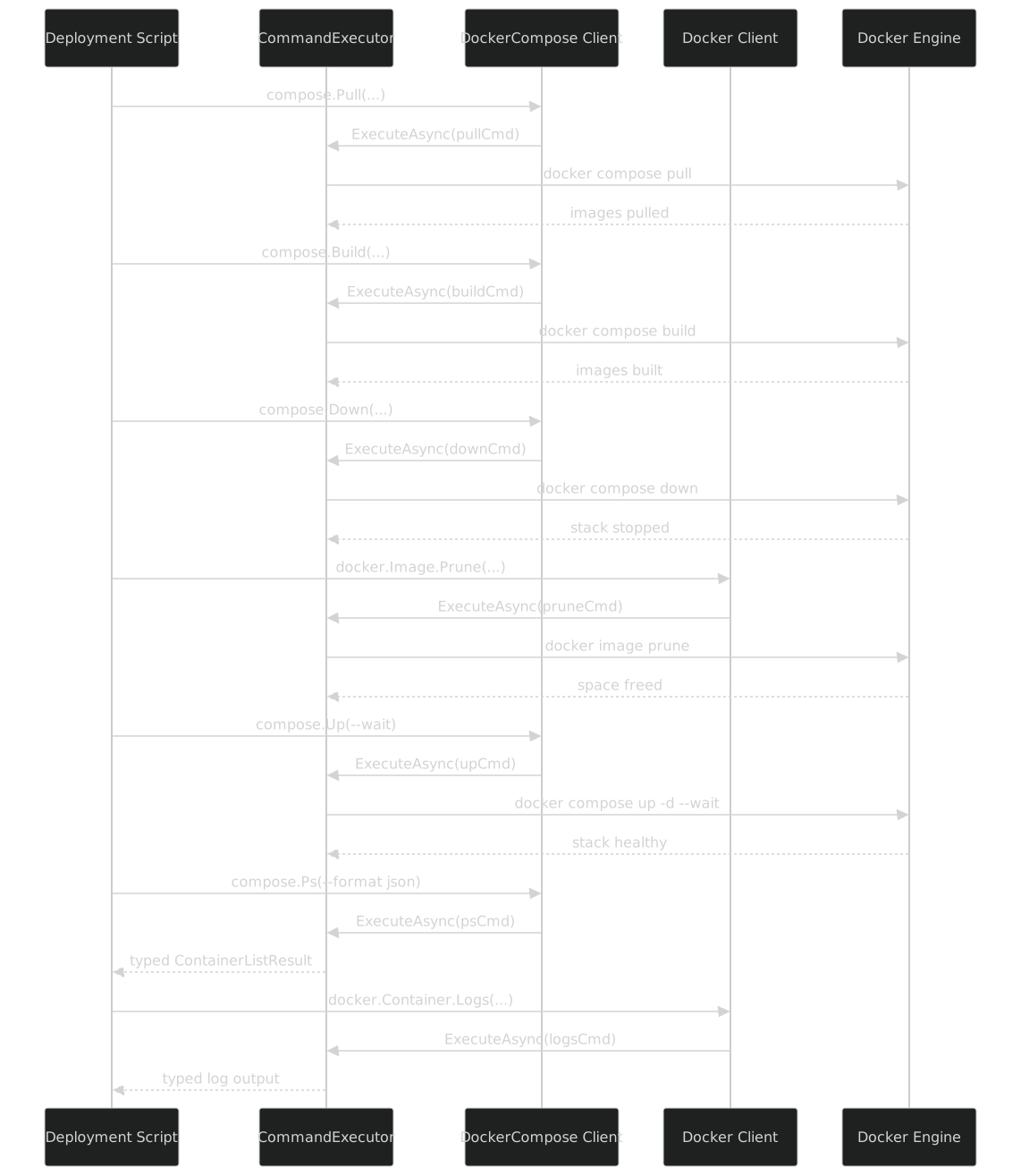
The key thing this diagram shows is that both clients go through the same CommandExecutor. There is no separate execution path for Docker versus Compose. The executor does not care which binary it is running -- it receives an ICliCommand, calls ToArguments(), spawns the process, and routes stdout through the appropriate IOutputParser. The binary name comes from the BinaryBinding, not from the command.
Compose-Specific Flag Patterns
Some Compose flags have semantics that do not exist in the Docker CLI. The generator handles them, but they are worth calling out because they affect how you use the API.
Multiple compose files with --file
Compose file merging is a first-class feature. You pass multiple -f flags and Compose merges them left to right:
var cmd = compose.Up(b => b
    .WithFile([
        "docker-compose.yml",              // base services
        "docker-compose.override.yml",     // local dev overrides
        "docker-compose.monitoring.yml"    // adds Prometheus + Grafana
    ])
    .WithDetach(true));
// Generates:
//   docker compose \
//     -f docker-compose.yml \
//     -f docker-compose.override.yml \
//     -f docker-compose.monitoring.yml \
//     up -d
The File property is List<string>, not string. The generator knows this because the cobra help output declares it as stringArray. Every stringArray flag in cobra becomes a List<string> property with one -f per entry in ToArguments().
Profile-selective deployment
Profiles let you define optional services in a compose file and activate them per invocation:
// Development: just the app and its database
var devCmd = compose.Up(b => b
    .WithProfile(["dev"])
    .WithDetach(true));

// Full stack: app, database, monitoring, and tracing
var fullCmd = compose.Up(b => b
    .WithProfile(["dev", "monitoring", "tracing"])
    .WithDetach(true));

// CI: app and database, plus test infrastructure
var ciCmd = compose.Up(b => b
    .WithProfile(["dev", "testing"])
    .WithDetach(true));
Same compose file, different profiles, different services. The typed API makes it obvious which profiles are being activated because they are explicit List<string> values, not buried in environment variables or COMPOSE_PROFILES strings.
Service scaling
The --scale flag takes service=num pairs:
var cmd = compose.Up(b => b
    .WithScale(["web=3", "worker=5", "api=2"])
    .WithDetach(true));
// Generates:
//   docker compose up -d --scale web=3 --scale worker=5 --scale api=2
I considered parsing these into a Dictionary<string, int> but decided against it. The cobra help declares --scale as stringArray, and the generated API should mirror the CLI. If Compose ever changes the format -- and they have, in the Python-era v1 it was docker-compose up --scale web=3 with different parsing -- the generated code will track it automatically because it follows the help output, not my interpretation of it.
Environment file overrides
var cmd = compose.Up(b => b
    .WithEnvFile([".env", ".env.production"])
    .WithDetach(true));
// Generates:
//   docker compose --env-file .env --env-file .env.production up -d
Multiple env files are merged left to right, same as compose files. The API reflects this with List<string>.
Structural Comparison: Docker vs DockerCompose
| Aspect | Docker Client | DockerCompose Client |
|---|---|---|
| Structure | Nested groups (15 groups) | Flat (37 methods) |
| Deepest call path | docker.Container.Run(b => ...) |
compose.Up(b => ...) |
| Global flags | 10 (on binding/client) | 9 (on every command) |
| Total commands | 180+ | 37 |
| Total generated files | ~200 | ~150 |
| Largest command (flags) | docker container run (54) |
docker compose up (22) |
| Help parser | CobraHelpParser |
CobraHelpParser (same) |
| Source generator | BinaryWrapperGenerator |
BinaryWrapperGenerator (same) |
| Version count | 40+ | 57 |
| Binary acquisition | Alpine APK package | GitHub release download |
| Command growth | Mostly stable since 20.10 | Active growth since 2.0.0 |
The important row is the source generator row. It is the same generator. The same BinaryWrapperGenerator Roslyn incremental source generator that processes Docker's 40+ JSON files and emits ~200 .g.cs files also processes Compose's 57 JSON files and emits ~150 .g.cs files. The difference in output count comes from the structural difference: Docker has groups, so it emits group client classes (DockerContainerClient, DockerImageClient, etc.) in addition to commands and builders. Compose has no groups, so it emits one client class, 37 command classes, and 37 builder classes. Fewer files, but the same generator doing the same work.
This is the payoff of the BinaryWrapper pattern. One attribute -- [BinaryWrapper("docker")] or [BinaryWrapper("docker-compose")] -- triggers the same generator, the same CobraHelpParser, the same VersionDiffer.Merge(), the same [SinceVersion] annotations, the same VersionGuard, the same CommandExecutor. The binaries are different, the command structures are different, the API shapes are different, but the machinery is shared.
The ~150 Generated Files
Here is what the generator actually emits for Compose. The file list is deterministic -- same input JSON, same output:
Generated/
├── Client/
│   └── DockerComposeClient.g.cs           // 1 file: 37 methods
├── Commands/
│   ├── DockerComposeUpCommand.g.cs        // 22 flags + 9 globals
│   ├── DockerComposeDownCommand.g.cs      // 8 flags + 9 globals
│   ├── DockerComposeBuildCommand.g.cs     // 12 flags + 9 globals
│   ├── DockerComposePsCommand.g.cs        // 7 flags + 9 globals
│   ├── DockerComposeLogsCommand.g.cs      // 8 flags + 9 globals
│   ├── DockerComposeRunCommand.g.cs       // 18 flags + 9 globals
│   ├── DockerComposeExecCommand.g.cs      // 9 flags + 9 globals
│   │   ... (37 command files total)
│   └── DockerComposePublishCommand.g.cs   // 4 flags + 9 globals
├── Builders/
│   ├── DockerComposeUpCommandBuilder.g.cs
│   ├── DockerComposeDownCommandBuilder.g.cs
│   │   ... (37 builder files total)
│   └── DockerComposePublishCommandBuilder.g.cs
├── Constants/
│   ├── DockerComposeCommandNames.g.cs     // "up", "down", etc.
│   └── DockerComposeFlagNames.g.cs        // "--detach", "--build", etc.
├── Serialization/
│   ├── DockerComposeUpCommandSerializer.g.cs
│   │   ... (37 serializer files)
│   └── DockerComposePublishCommandSerializer.g.cs
└── Meta/
    ├── DockerComposeVersionInfo.g.cs      // supported version range
    └── DockerComposeCommandMetadata.g.cs  // flag counts, version bounds
1 client + 37 commands + 37 builders + 37 serializers + 2 constants + 2 metadata = ~116 files. The remaining ~34 are output parser stubs, test scaffolding, and the BinaryBinding resolution helpers. The exact count depends on which Compose version you target -- newer versions with more commands produce more files.
The entire generation completes in under 1.5 seconds. That is the incremental generator's cache at work: after the first generation, only changed JSON files trigger re-emission. In practice, during normal development, the generation time is zero because the JSON files do not change -- they are design-time artifacts committed to the repository.
What This Buys You
I want to be explicit about the value because it is easy to dismiss "generate a typed wrapper for a CLI" as over-engineering.
Without this generator, calling docker compose up -d --wait --remove-orphans -f docker-compose.yml -f docker-compose.prod.yml from .NET means:
var args = "compose up -d --wait --remove-orphans " +
    "-f docker-compose.yml -f docker-compose.prod.yml";
Process.Start("docker", args);
One typo -- --removw-orphans -- and you get a Compose error at runtime. One version mismatch -- --wait against Compose 2.0.0 -- and you get an unhelpful error from the binary. One forgotten -f and Compose reads the wrong file. One wrong flag order and globals are interpreted as command flags.
With the generated API:
compose.Up(b => b
    .WithDetach(true)
    .WithWait(true)
    .WithRemoveOrphans(true)
    .WithFile(["docker-compose.yml", "docker-compose.prod.yml"]));
Typos are compile errors. Version mismatches are OptionNotSupportedException before the process starts. The file list is a typed List<string>. Global flag ordering is handled by ToArguments(). IntelliSense shows you every available flag with its type and version annotation.
37 commands, 57 versions, ~150 generated files. One generator. The same generator that handles Docker. The same generator that can handle any cobra-based CLI.
Next: Part IX -- what happens after you build a command. CommandExecutor turns typed commands into processes, IOutputParser<TEvent> turns stdout into typed domain events, and BinaryBinding figures out which version of which binary is installed. The runtime layer that makes all this generated code actually run.