Part 24: k8s-ha — Three Control Planes and Three Workers
"Yes, you can run HA Kubernetes on local VMs. Three control planes plus three workers fit in 48 GB. The 64 GB workstation has headroom."
Why
k8s-ha is the topology that exercises every failure mode a real production Kubernetes cluster can have. Three control planes form an etcd quorum: lose one, the cluster keeps working; lose two, etcd is degraded; lose three, the cluster is down. The API server is fronted by a VIP (managed by kube-vip in-cluster, or HAProxy out-of-cluster) so kubectl always finds some responding control plane.
The thesis: k8s-ha is six to seven VMs (3 control planes + 3 workers + optional HAProxy load balancer), fits in 48 GB of RAM, and is the topology where you rehearse kubeadm upgrade of an HA cluster — the most painful operation in production Kubernetes.
The configuration
# config-homelab.yaml
name: stage
topology: ha                # the HomeLab topology
k8s:
  distribution: kubeadm     # k3s also supports HA via --cluster-init, kubeadm is the canonical
  topology: k8s-ha
  version: "v1.31.4"
  cni: cilium
  csi: longhorn
  ingress: nginx
  ha:
    api_vip: "192.168.62.5"           # the floating IP for the API server
    api_vip_provider: "kube-vip"      # or "haproxy" — see below
vos:
  cpus: 18
  memory: 38912               # 38 GB of VM RAM
  subnet: "192.168.62"
acme:
  name: stage
  tld: lab
The resolver from Part 08 splits this into:
| VM | Role | vCPUs | RAM | IP |
|---|---|---|---|---|
stage-cp-1 |
control-plane | 2 | 4 GB | 192.168.62.11 |
stage-cp-2 |
control-plane | 2 | 4 GB | 192.168.62.12 |
stage-cp-3 |
control-plane | 2 | 4 GB | 192.168.62.13 |
stage-w-1 |
worker | 2 | 8 GB | 192.168.62.21 |
stage-w-2 |
worker | 2 | 8 GB | 192.168.62.22 |
stage-w-3 |
worker | 2 | 8 GB | 192.168.62.23 |
Total VM RAM: 36 GB. Plus host overhead (~3 GB), total is ~39 GB. The 48 GB number from Part 02 is the budget — there is room for a 7th VM (HAProxy load balancer if you do not want kube-vip in-cluster) and for some workload headroom. A 64 GB workstation runs the whole topology with ~16 GB to spare for the host OS, IDE, browser.
kube-vip vs HAProxy
The HA cluster needs an API server VIP that can fail over between control planes. Two ways:
Option 1: kube-vip (in-cluster)
kube-vip (ouvre dans une nouvelle fenêtre) runs as a static pod on each control plane. The pods elect a leader; the leader holds the VIP via ARP gratuitous broadcasts. When the leader fails, another pod takes over within seconds. No additional VM needed.
[Injectable(ServiceLifetime.Singleton)]
public sealed class KubeVipManifestContributor : IK8sManifestContributor
{
    public bool ShouldContribute() =>
        _config.K8s?.Topology == "k8s-ha" && _config.K8s?.Ha?.ApiVipProvider == "kube-vip";

    public async Task ContributeAsync(KubernetesBundle bundle, CancellationToken ct)
    {
        var staticPodManifest = KubeVipStaticPodGenerator.Generate(_config.K8s!.Ha!.ApiVip, "eth1");

        // The static pod manifest must be placed at /etc/kubernetes/manifests/kube-vip.yaml
        // on every control plane node BEFORE kubeadm init runs. The Packer node image
        // contributor handles this via a small script.
        bundle.CrdInstances.Add(new RawManifest
        {
            ApiVersion = "v1",
            Kind = "ConfigMap",
            Metadata = new() { Name = "kube-vip-static-pod", Namespace = "kube-system" },
            Data = new Dictionary<string, string> { ["manifest.yaml"] = staticPodManifest }
        });
    }
}
The kube-vip static pod manifest is also baked into the Packer node image (in /etc/kubernetes/manifests/kube-vip.yaml) so it is present before kubeadm init runs. This is a chicken-and-egg fix: the API server needs the VIP to bind to, the VIP needs kube-vip to run, kube-vip needs the kubelet to start it as a static pod. By placing the static pod manifest in the node image, the kubelet picks it up on first boot and the VIP exists by the time kubeadm init tries to bind the API server.
Option 2: HAProxy on a separate VM
HAProxy (ouvre dans une nouvelle fenêtre) is the traditional load balancer. Run it on a small dedicated VM, configure it to round-robin between the three control planes' API server endpoints, and point the cluster at the HAProxy IP.
[Injectable(ServiceLifetime.Singleton)]
public sealed class HaproxyConfigContributor : IK8sManifestContributor
{
    public bool ShouldContribute() =>
        _config.K8s?.Topology == "k8s-ha" && _config.K8s?.Ha?.ApiVipProvider == "haproxy";

    public void Contribute(KubernetesBundle bundle)
    {
        // The HAProxy config is generated by HaproxyConfigGenerator and written
        // to the lb VM's /etc/haproxy/haproxy.cfg via Vagrant provisioning.
        // The contributor doesn't add anything to the Kubernetes bundle —
        // it adds a Vagrant provisioning script via a separate IPackerBundleContributor.
    }
}
The HAProxy approach needs an extra VM (~1 GB RAM) but is more familiar to teams that already use HAProxy in production. K8s.Dsl supports both; the user picks via k8s.ha.api_vip_provider.
The bootstrap saga for HA
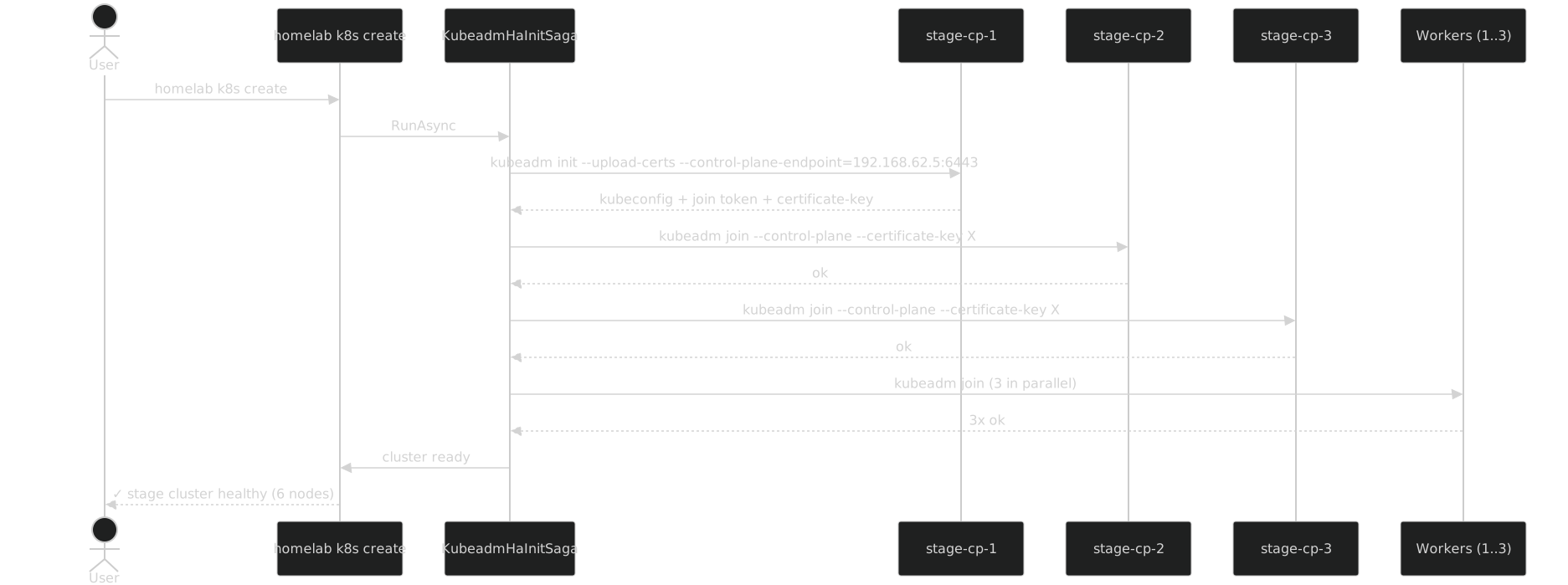
The HA bootstrap is more complex than the single-control-plane flow:
- Bootstrap the first control plane with
--upload-certsso the cluster's certificates are stored as a Secret inkube-system - Parse the join command for both worker join and control-plane join (the latter includes a
--certificate-key) - Join control planes 2 and 3 sequentially (not in parallel — joining two control planes at once can race etcd's leader election)
- Join workers in parallel (with the cap from Part 15)
- Verify the API VIP is reachable from outside the cluster
The whole thing is a saga with compensation steps that kubeadm reset --force every node on failure.
What HA enables
Five things k8s-multi cannot do:
- Surviving a control plane outage. Halt
stage-cp-2. The cluster keeps responding because etcd has quorum on cp-1 and cp-3. Bring cp-2 back; etcd resyncs. - Real etcd quorum behaviour. Halt cp-1 and cp-2 simultaneously. The cluster API stops responding (no quorum). Bring one back; quorum restored.
- kubeadm upgrade of HA. Run
homelab k8s upgrade --to v1.32.0. The saga walks the upgrade path: upgrade kubeadm on cp-1, drain cp-1, upgrade control plane on cp-1, uncordon cp-1, repeat for cp-2 and cp-3. Then drain workers in turn. The whole flow takes ~30 minutes and exercises every step of a real production upgrade. - kube-vip failover testing. With kube-vip, halt the control plane currently holding the VIP. Within 2-3 seconds, another control plane takes over and kubectl resumes. You can watch the failover with
ping 192.168.62.5and see one or two dropped packets. - HAProxy load distribution testing. With HAProxy, run
kubectl get pods --watch &(long-lived API connection). Halt the control plane HAProxy is currently routing to. The connection breaks; reconnecting picks a different control plane. Verify withtcpdumpon HAProxy.
Cost: 64 GB workstation comfortably runs ONE k8s-ha
The total VM RAM is ~38 GB. Add ~3 GB for host OS overhead and ~10 GB for the developer's IDE, browser, and other host apps. Total: ~51 GB. A 64 GB workstation has ~13 GB of headroom for builds, image pulls, log buffering, and the occasional video call.
A 128 GB workstation runs k8s-ha plus another k8s-multi (32 GB) plus another k8s-single (16 GB) plus host overhead (~16 GB) = 96 GB, leaving 32 GB of headroom. This is the freelancer's dream rig from Part 36: three real Kubernetes clusters in parallel with comfortable headroom.
What this gives you that k8s-multi doesn't
Three things k8s-multi cannot provide: surviving a control plane outage, exercising real etcd quorum, and rehearsing the HA upgrade flow. The cost is one to one-and-a-half times the RAM (48 GB vs 32 GB) and a more complex bootstrap (sequential control plane joins, kube-vip or HAProxy). The benefit is that you can practise the most expensive operation in production Kubernetes — an HA upgrade — on your laptop, with the same kubeadm flow you will use on the real cluster.
The bargain pays back the first time you do a kubeadm upgrade in dev, hit a snag, fix the snag, and then run the same upgrade in production knowing exactly what to expect.