Chapter 14 — AST Extraction and the Registry
A decorator produces two kinds of knowledge at once. One lives in arrays at runtime. The other sits in the source tree, waiting to be read statically. The trick is to know which one is authoritative for which question.
Two ground truths
Every class decorator in @frenchexdev/requirements does two things in the same keystroke. When you write:
@Satisfies(
  ReqDiscoverableTraceabilityRequirement,
  ReqDogFoodRequirement,
  ReqParallelDeliverableRequirement,
)
export abstract class FeatureTraceExplorerTuiFeature extends Feature {
  // …
}
you have produced two independent artefacts that will be read by two different kinds of consumer.
The first artefact is a runtime registry entry. When this file's module is loaded — when some other module, or a test, or the CLI, imports FeatureTraceExplorerTuiFeature — the TypeScript runtime evaluates the class declaration, which means it evaluates every decorator attached to that class. The evaluation of @Satisfies(...) pushes a record onto the satisfactionLinks array in src/decorators.ts. The array is an ordinary module-local const. After the load, any in-process consumer can call getSatisfactionLinks() and observe the link. This is the data path used by code that runs the package — an application that wants Feature.all().filter(f => f.satisfies(REQ_DOG_FOOD)).
The second artefact is a set of AST nodes. Long before any class runs, the source file already contains a ClassDeclaration node whose decorators property holds a CallExpression whose callee is an Identifier called Satisfies and whose arguments are three more Identifier nodes. A program that uses the TypeScript compiler API — ts.createSourceFile, or the ts-morph wrapper around it — can read that tree without ever running any of it. The compliance scanner uses exactly this path, in src/analysis/compliance-core.ts. It parses the file, locates the @Satisfies call, collects the three identifier texts as strings, and records the edge. The class is never constructed. The decorator body is never executed. No module is loaded.
Both paths return the same information — the Feature satisfies three Requirements. But they arrive at it by different means, at different times, with different failure modes, and with different suitability for different consumers. The rule of thumb used by every tool inside the package is:
- the runtime registry is authoritative for what this process has seen so far;
- the AST is authoritative for what the source code says, period.
These are not always the same thing. A module that has not been imported will not have contributed to the registry — but its decorators are still in the AST. A decorator whose body throws at module load will never finish registering — but its CallExpression is still in the AST. A refactor that renames a class but leaves a stale import somewhere will show a mismatch between the two.
The rest of this chapter walks both pipelines end to end, shows where they converge, and names the cases where one wins over the other. The goal is that after reading, the sentence "the scanner prefers AST" sounds not like a design preference but like a consequence you could have derived.
The runtime registry, in detail
Open packages/requirements/src/decorators.ts and look at the top of the file, the part before any exported function. There are four const declarations. They are the entire mutable surface of the module:
const registry: RequirementRef[] = [];
const excludedMethods = new Set<string>();
const satisfactionLinks: SatisfactionLink[] = [];
const refinementLinks: RefinementLink[] = [];
Each is module-local — not exported directly — and each has a paired accessor that returns it:
export function getRequirementRegistry(): RequirementRef[] { return registry; }
export function getExcludedMethods(): Set<string> { return excludedMethods; }
export function getSatisfactionLinks(): readonly SatisfactionLink[] { return satisfactionLinks; }
export function getRefinementLinks(): readonly RefinementLink[] { return refinementLinks; }
The accessors return the arrays by reference. This is deliberate — a consumer that polls getRequirementRegistry() across several module loads sees the same array growing — and it is safe because the mutation surface is guarded: only the six decorators in the file push onto these arrays, and each decorator's push is append-only.
What gets pushed, and when, is a function of how TypeScript evaluates decorators. A few pieces of mechanics matter here, and all of them are the consequence of a single rule: decorator expressions run when the class declaration evaluates. Not when the file is parsed. Not when the type-checker sees the class. When the runtime reaches the class keyword at module load time.
What populates each array
registry is populated by @Verifies. A single push per method decorator:
export function Verifies<T extends Feature>(ac: keyof T & string) {
  return function (target: any, propertyKey: string, _descriptor?: PropertyDescriptor): void {
    registry.push({
      feature: '',                            // filled in later by @FeatureTest
      ac,
      testClass: target.constructor.name,
      testMethod: propertyKey,
    });
  };
}
The feature: '' empty string is significant. Method decorators run before the class decorator in TypeScript's evaluation order — the class is not fully constructed yet when @Verifies fires. So @Verifies cannot know, at push time, which Feature the containing test class is bound to. It knows only its own class name (via target.constructor.name) and the AC it was given. The Feature is filled in later.
excludedMethods is populated by @Exclude, one add per method:
export function Exclude() {
  return function (target: any, propertyKey: string): void {
    excludedMethods.add(`${target.constructor.name}.${propertyKey}`);
  };
}
Storing the composite key ClassName.methodName rather than just the method name is the obvious right thing — methods with the same name can exist on different classes — but it means that any reader of excludedMethods has to build the same composite key to query it.
satisfactionLinks is populated by the class decorator @Satisfies. One push per decorated class:
export function Satisfies<R extends ReadonlyArray<abstract new (...args: any[]) => Requirement>>(
  ...requirements: R
) {
  return function <C extends abstract new (...args: any[]) => Feature>(target: C): C {
    const requirementClasses = requirements.map(r => r.name);
    satisfactionLinks.push({
      featureClass: target.name,
      requirementClasses,
    });
    (target as any).__satisfies = requirementClasses;
    return target;
  };
}
Two things happen in the body. The array gets a new link. And the class itself gets a __satisfies property monkey-patched onto it. The monkey-patch is the mechanism by which feature.satisfies() at runtime returns something without having to re-consult satisfactionLinks — the answer is on the class itself. The array is the global view; the property is the per-class view.
refinementLinks works identically for @Refines:
export function Refines<R extends abstract new (...args: any[]) => Requirement>(
  ...parents: readonly R[]
) {
  return function <C extends abstract new (...args: any[]) => Requirement>(target: C): C {
    const parentClasses = parents.map(p => p.name);
    refinementLinks.push({ childClass: target.name, parentClasses });
    (target as any).__refines = parentClasses;
    return target;
  };
}
Module-load order matters
A reader coming from a dependency-injection background might ask: if the arrays are global and every decorated class pushes on load, why don't we see a complete picture after startup?
Because nothing is loaded until someone imports it.
A file in requirements/features/feature-trace-explorer-tui.ts that declares @Satisfies(...) contributes to satisfactionLinks only once the JavaScript runtime has evaluated that file. If the application you're running has no reason to import that feature — say, you launched a narrow CLI command that only touches a subset of Features — the TypeScript/Node module loader will not have loaded it, and its @Satisfies call will not have fired. The registry will be silent about that Feature.
This is not a bug, and it is not a failure of the registry to be global. It is the natural consequence of lazy module loading interacting with a side-effect-based registration mechanism. It is the same reason a plugin system built on import plugin-foo will not see plugin-foo's contributions until someone imports it.
The package handles this in a specific way: anything that wants a complete runtime registry picture calls a pre-import step. A helper like loadAllFeatures() does a filesystem walk over requirements/features/ and issues dynamic import() calls for every .ts file it finds. After the await Promise.all(imports) resolves, the registry holds everything the filesystem can show. Any later call to getSatisfactionLinks() returns the complete set.
The pre-import is expensive. It reads every file, evaluates every class declaration, executes every decorator body. For 22 Requirements and 20 Features — the current totals in this project — it is fine. For a monorepo with 500 Features, the compliance scanner's need for a complete picture becomes a reason to prefer a different data path — the AST one, which can read the same 500 files in parallel without evaluating any of them.
The backfill loop
There is one more subtlety in the registry that the chapter needs to name, because it is where the two-phase order of decorator evaluation surfaces most visibly. Inside @FeatureTest:
export function FeatureTest<T extends abstract new (...args: any[]) => Feature>(
  feature: T,
  opts?: FeatureTestOptions,
) {
  return function <C extends new (...args: any[]) => any>(target: C): C {
    (target as any).__feature = feature.name;
    (target as any).__featureClass = feature;

    // Backfill feature name on registry entries that were registered before the class decorator ran
    for (const ref of registry) {
      if (ref.testClass === target.name && !ref.feature) {
        ref.feature = feature.name;
      }
    }

    // … auto-register with vitest omitted …

    return target;
  };
}
The loop is the reason the registry is eventually consistent — eventually meaning "by the time the class declaration finishes evaluating". When a test class is loaded:
- Method decorators on every
@Verifiesmethod fire in declaration order. Each pushes aRequirementRefwithfeature: ''. - The class decorator
@FeatureTestfires last. - The class decorator walks the registry and backfills every entry whose
testClassmatches and whosefeatureis still empty.
An observer who reads the registry between steps 1 and 3 would see entries with blank Feature names. In practice, nothing reads the registry during class evaluation — class evaluation is synchronous, and the public API (getRequirementRegistry()) is called by consumers after module load — so the window is invisible. But it exists. It is one of the reasons the AST scanner, which does not run this code at all, is simpler to reason about.
What the registry is authoritative for
A small list of questions for which the runtime registry is the right place to look:
- Does this live process have a binding between AC X and test method Y? The registry is literally that list.
- Was there a class decorated with
@FeatureTest(SomeFeature)loaded in this process? The class's__featuremonkey-patch or a scan ofsatisfactionLinksanswers. - Did vitest's auto-register path for this class actually fire? Only an in-process observer can tell — vitest globals need to be defined at the moment the decorator runs.
- What are the excluded methods across all Test classes loaded so far?
getExcludedMethods()returns exactly that set.
Each of these questions has a phrasing that mentions "this process" or "loaded so far". That is the signature of a registry question. If your question is "what does the source say" — without reference to what has been loaded — you want the AST.
The AST pipeline, in detail
Open packages/requirements/src/analysis/compliance-core.ts. The import at the top is telling:
import { readdir, readFile, stat } from 'fs/promises';
import * as path from 'path';
import * as ts from 'typescript';
ts is the TypeScript compiler API. No runtime import of ../decorators. No dynamic import() of any Feature file. No require. The module does its work by reading files as strings and handing them to the compiler's parser.
Parsing a single source file
The core entry is parseFeatureSource. The signature tells you everything about its purity:
export function parseFeatureSource(src: string, file: string): FeatureMeta | null {
  const sf = ts.createSourceFile(file, src, ts.ScriptTarget.ES2022, true);
  // …
}
src is the file contents as a string. file is the path, only used for diagnostic purposes. The function does not read the filesystem, does not import anything, does not have any dependency on the @frenchexdev/requirements runtime at all. It could be run inside a Web Worker or a browser tab. The only thing it needs is a string.
ts.createSourceFile returns a SourceFile node — the root of the parsed AST. From there, the function walks the tree top-down: it iterates sf.statements, keeps only ClassDeclaration nodes, filters to ones that are abstract and exported, and keeps only those whose heritage clause extends Feature:
for (const stmt of sf.statements) {
  if (!ts.isClassDeclaration(stmt) || !stmt.name) continue;
  const mods = stmt.modifiers ?? [];
  const isAbstract = mods.some(m => m.kind === ts.SyntaxKind.AbstractKeyword);
  const isExported = mods.some(m => m.kind === ts.SyntaxKind.ExportKeyword);
  if (!isAbstract || !isExported) continue;

  const extendsFeature = stmt.heritageClauses?.some(h =>
    h.token === ts.SyntaxKind.ExtendsKeyword &&
    h.types.some(t => ts.isIdentifier(t.expression) && t.expression.text === 'Feature'),
  );
  if (!extendsFeature) continue;
  // …
}
Notice the structural check. We are not executing TypeScript. We are asking the AST: "does this class declaration's heritage list contain an identifier whose text is literally Feature?" This is close to the surface. If someone writes export abstract class XFeature extends MyCustomFeature — a subclass of a local alias — the scanner will not recognise it. That is a deliberate trade-off: simplicity of the AST-level match over the full resolution that a type-checker would give.
Reading decorator arguments
Once the class passes the Feature filter, parseFeatureSource walks the class body. For each member, it asks what kind it is:
ts.isPropertyDeclaration(member)— for fields likereadonly id = 'FEATURE-TRACE-EXPLORER-TUI'. The initializer is aStringLiteral; the value is its.text.ts.isMethodDeclaration(member)plus anabstractmodifier — for ACs. The method's own name is an AC method name. The decorator list on that method is read to find@Expects(...).
For decorators, the key helper is ts.getDecorators(node). It returns a readonly Decorator[] or undefined. Each decorator has an expression property that is (for decorators with arguments) a CallExpression. The call's expression is the decorator's callee — an Identifier whose .text is the decorator name. The call's arguments are the decorator arguments — themselves AST nodes.
readSatisfiesDecorator is the canonical example, 15 lines, all types:
function readSatisfiesDecorator(stmt: ts.ClassDeclaration): readonly string[] {
  const decorators = ts.getDecorators(stmt);
  if (!decorators) return [];
  for (const dec of decorators) {
    if (!ts.isCallExpression(dec.expression)) continue;
    const callee = dec.expression.expression;
    if (!ts.isIdentifier(callee) || callee.text !== 'Satisfies') continue;
    const names: string[] = [];
    for (const arg of dec.expression.arguments) {
      if (ts.isIdentifier(arg)) names.push(arg.text);
    }
    return names;
  }
  return [];
}
Four type predicates compose the read: getDecorators, isCallExpression, isIdentifier on the callee, isIdentifier on each argument. Each of them is a compiled narrower — if it returns true, the subsequent property accesses are type-safe. No runtime resolution is needed to get the three class names ReqDiscoverableTraceabilityRequirement, ReqDogFoodRequirement, ReqParallelDeliverableRequirement as plain strings out of the @Satisfies(...) invocation. The identifier text is exactly the source text.
readExpectsDecorator is slightly richer because its arguments are not plain identifiers but PropertyAccessExpression nodes of the form TestLevel.Unit:
function readExpectsDecorator(member: ts.MethodDeclaration): TestLevel[] {
  const decorators = ts.getDecorators(member);
  if (!decorators) return ['unit'];
  for (const dec of decorators) {
    if (!ts.isCallExpression(dec.expression)) continue;
    const callee = dec.expression.expression;
    if (!ts.isIdentifier(callee) || callee.text !== 'Expects') continue;
    const levels: TestLevel[] = [];
    for (const arg of dec.expression.arguments) {
      if (ts.isPropertyAccessExpression(arg)) {
        const mapped = LEVEL_NAME_TO_VALUE[arg.name.text];
        if (mapped) levels.push(mapped);
      }
      if (ts.isStringLiteral(arg) && VALID_LEVELS.has(arg.text)) {
        levels.push(arg.text as TestLevel);
      }
    }
    if (levels.length > 0) return levels;
  }
  return ['unit'];
}
The same four-predicate shape, with a small LEVEL_NAME_TO_VALUE map that translates enum member names (Unit, EndToEnd, Accessibility) into their string values (unit, e2e, a11y). The map is the scanner's concession to enum ergonomics — the decorator source uses enum members for compiler checking, but the scanner wants the string values for downstream JSON emission.
Reading test bindings
The sister file packages/requirements/src/analysis/test-bindings-scanner.ts does the same AST work on the test side. Its job is to find every @FeatureTest(Feature) class and, inside each, every @Verifies<Feature>('acName') method. The extraction pattern is identical — getDecorators, isCallExpression, isIdentifier — but the argument shapes differ, and the file additionally resolves import aliases so that @FeatureTest(NavFeat) where NavFeat is imported as an alias for NavigationFeature still maps correctly.
The import-resolution pass is a small detail worth naming because it is where AST-only analysis reaches its natural ceiling. The scanner builds an ImportEntry map per file — a list of { localName, moduleSpec, kind } records — and when it encounters an identifier as a decorator argument, it looks up the local name in the import map to recover the canonical class name. If the import is unresolved — say, a typo, or a module that the scanner cannot open — the record goes into a warnings list rather than silently losing the edge. Warnings surface in the compliance report. They are the scanner's way of being honest about its own limits.
Walking the tree
The top-level walker is readFeatures:
export async function readFeatures(featuresDir: string): Promise<FeatureMeta[]> {
  const collected: FeatureMeta[] = [];
  const walk = async (dir: string, prefix: string): Promise<void> => {
    const entries = await readdir(dir, { withFileTypes: true });
    const work = entries.map(async (entry) => {
      const full = path.join(dir, entry.name);
      const rel = prefix ? `${prefix}/${entry.name}` : entry.name;
      if (entry.isDirectory()) {
        await walk(full, rel);
      } else if (entry.isFile() && entry.name.endsWith('.ts')) {
        const src = await readFile(full, 'utf8');
        const parsed = parseFeatureSource(src, rel);
        if (parsed) collected.push(parsed);
      }
    });
    await Promise.all(work);
  };
  await walk(featuresDir, '');
  return collected;
}
Two properties of this walker matter for the rest of the chapter. The first is that every file is read and parsed independently — Promise.all(work) over the entries — which means the scanner trivially parallelises across I/O. The second is that parseFeatureSource is pure — a string in, a FeatureMeta | null out — which means the entire walker can be called from a test with a mocked readFile, or from a completely different host, or from a build tool that already has the source in memory.
There is a parallel walker readRequirements that does the same for Requirement files, looking for classes that extend Requirement rather than Feature. The shape is identical. The only difference is the filter on the heritage clause and the shape of the returned record (RequirementMeta instead of FeatureMeta).
Why the scanner prefers AST
The four reasons the compliance scanner and the trace commands read the source tree rather than the runtime registry are each defensible on their own. Taken together they close the question.
Stability under refactor
The AST reflects the source. The registry reflects whatever has been loaded in the current process. If a refactor renames NavigationFeature to TocNavigationFeature, all the @Satisfies(NavigationFeature) call sites must be updated — the compiler will enforce this, because the identifier must resolve. An AST scan run after the refactor sees the new name everywhere; it is consistent with the source.
A runtime registry populated by an incomplete set of imports can be stale in ways the AST cannot. If one file still imports the old name via a legacy index.ts barrel that the loader has not regenerated, the registry might contain both names simultaneously. The AST, which re-parses on each scanner run, never has this problem — there is no cache, no stale copy, only the file contents at the moment of the read.
Parallel safety
The scanner runs in CI, often before tests have even been compiled to JavaScript. It must not need to execute the package to produce its report. AST extraction via ts.createSourceFile is pure parsing — no code runs. The scanner can be parallelised across CPU cores without any of the side-effect coordination that running-the-decorators would require (shared arrays, shared Sets, monkey-patched classes).
A registry-based scanner would have to load every file in a single Node process (or risk missing entries by loading them across processes). That loading serialises naturally — a Node module is loaded exactly once per process. The AST-based scanner has no such constraint. If a pre-commit hook wants to run only against the files that just changed, the scanner parses only those files, independently, in parallel.
Determinism
File enumeration order is stable: readdir with a sort, or the implicit sort the scanner applies, produces the same list every run. The AST of a given file is a function only of its bytes. So a scanner run that reads N files produces a result that is a pure function of those N files' contents.
Module-load order is not deterministic in the same way. It depends on the order of imports, which can depend on the entry point, which can depend on the CLI command being run. Two different consumers of the runtime registry can see different orderings of the same array. Equivalent under Set semantics, yes. But the ordering is not a function of the source alone.
No side-effect contamination
Executing a decorator body runs whatever the author of that decorator wrote. @FeatureTest calls globalThis.describe and globalThis.it if they are present — benign in vitest, an unwanted effect in any other host. An AST read never runs the decorator's function body. It only reads the call expression. If a future decorator ever chose to do more work — talk to the filesystem, open a socket, mutate a global — the scanner would not accidentally perform that work by scanning.
There is a weaker version of the same point that shows up even in the current codebase: decorator bodies can throw. A typo in a decorator argument, a missing import that the TypeScript compiler would have caught in a full build but not in a loose tsc --noCheck load, can cause a ReferenceError during class evaluation. The AST does not care. It sees the syntax, not the semantics.
But the two views must agree
The two pipelines are redundant on purpose. If the AST says @Satisfies(X, Y) and the registry — after a complete pre-import pass — has a SatisfactionLink with requirementClasses: ['Y'], something is wrong. The source has the edge; the runtime has lost one. That is a bug — probably an unrelated decorator throwing between the two pushes, or a monkey-patch race.
Chapter 13 introduced a fast-check property exactly for this shape: for a generated population of Features and Requirements, the AST-extracted edges and the registry-observed edges must be equal as sets. Any divergence is a regression. The property has so far caught two bugs, both in the backfill loop: one where @Verifies in a method whose name started with a symbol bypassed the composite-key build, one where a second @FeatureTest on a class that had been loaded twice via two different paths backfilled the same entry twice. Neither was observable from the outside — both were caught by the invariant.
The important framing, and the one this chapter wants to leave the reader with, is that the invariance is not "both pipelines should work". It is "both pipelines should agree". Two sources of truth that must agree are stronger than one source of truth, because agreement is checkable. A single source of truth is correct or wrong; a pair of sources is correct or wrong or mismatched, and the third case is the most informative.
The descriptor stage
Between the raw AST and the graph that the trace commands walk lies a small but important intermediate. The scanner does not hand ts.Node references to the graph builder. It hands descriptors — small, normalised, readonly records that carry only the information the graph will need.
The FeatureMeta interface in compliance-core.ts is one such descriptor:
export interface FeatureMeta {
  id: string;
  title: string;
  priority: string;
  acMethods: readonly string[];
  acDetails: readonly ACMeta[];
  enabled: boolean;
  className: string;
  file: string;
  satisfies: readonly string[];
}
And RequirementMeta is the matching descriptor for Requirements:
export interface RequirementMeta {
  id: string;
  className: string;
  file: string;
}
The test-side descriptor is ParsedTestClass inside test-bindings-scanner.ts:
export interface ParsedTestClass {
  className: string;
  featureClass: string;
  methods: MethodBinding[];
}
Three small shapes. Each is a pure-data record — no methods, no references to AST nodes, no I/O. Each carries enough information to answer the questions that the graph builder needs to pose: what Requirements does this Feature name? what AC methods does it declare? what expected test levels does each AC carry? what test class binds to what Feature, and through what method-AC pairs?
Why a descriptor stage at all
It would be possible to skip descriptors and have the graph builder walk the AST directly. It would also be a bad trade. The descriptor stage buys three things:
Shape stability. The descriptor interface is a small, documented surface. The graph builder depends on that surface, not on the TypeScript compiler API. When a new version of TypeScript changes the shape of Decorator (as happened between the experimental and the Stage-3 proposal), only the descriptor-producing code has to change. The graph builder does not know the difference.
Parse once, query many. A single graph walk — say, a chain REQ-DOG-FOOD someAc command — might follow a dozen edges. Each edge-follow is a lookup against the descriptor arrays, not a re-parse of the source file. The AST is read at most once per file per scanner run; everything downstream is a map lookup.
Serialisation. Descriptors are trivially JSON-serialisable. The binding scanners emit JSON files — packages/ssg-site/requirements-bindings.json, packages/ssg-site/requirements-bindings.inferred.json, and the diff between them — that a downstream consumer can read without any TypeScript tooling installed. The site's dev dashboard reads those files as data; it does not need the compiler API at all.
From descriptors to the graph
trace-core.ts (the CLI's trace-graph core) takes descriptors as input and returns an immutable index. The key function is buildTraceIndex:
export function buildTraceIndex(
  features: readonly FeatureMeta[],
  manifest: BindingsManifest,
  testRefs: readonly TestRef[],
): TraceIndex {
  // …
}
Three inputs — Features from readFeatures, a manifest from scanTestBindings, test refs from the compliance side — and one output, a TraceIndex with five ReadonlyMap fields:
export interface TraceIndex {
  readonly featureNodes: ReadonlyMap<string, FeatureNode>;
  readonly fileNodes: ReadonlyMap<string, FileNode>;
  readonly fileToFeatures: ReadonlyMap<string, ReadonlySet<string>>;
  readonly featureToFiles: ReadonlyMap<string, ReadonlySet<string>>;
  readonly fileToTests: ReadonlyMap<string, ReadonlySet<string>>;
  readonly featureToTests: ReadonlyMap<string, ReadonlySet<string>>;
  readonly classToId: ReadonlyMap<string, string>;
}
Six inverted indices and a class-name-to-id lookup. Every query function in trace-core.ts — queryFileToFeatures, queryFeatureToFiles, queryFileToTests, queryFeatureToTests, queryImpact, queryHotspots, queryFragile, queryGaps, queryMatrix, queryChain — hits these maps directly. No AST walks. No file reads. The whole command surface of npx requirements trace ... is answered from the descriptor-derived index.
Building the traceability graph
The graph that the trace commands walk is a typed multigraph. "Multigraph" because two nodes can be connected by more than one edge; "typed" because each edge carries a kind. There are exactly four edge kinds in the current system, each sourced from one decorator:
@Satisfies(...)produces Feature → Requirement edges.@Refines(...)produces Requirement → Requirement edges.@FeatureTest(Feature)produces TestClass → Feature edges.@Verifies(...)produces TestMethod → AC edges.
Feature → Requirement edges
For each FeatureMeta f with a non-empty f.satisfies: readonly string[], the graph builder creates one edge f.id → requirementId for every class name in f.satisfies. The requirement class name is resolved to a REQ-ID through the classToId map built from readRequirements(). If the map has no entry — because the class name is a typo, or because the Requirement file is not on the scanner's search path — the edge is recorded with a null target and surfaces in queryGaps as an unresolved satisfaction.
The chain command that asks "what Requirements does FEATURE-TRACE-EXPLORER-TUI satisfy?" walks this one-to-many edge and returns ['REQ-DISCOVERABLE-TRACEABILITY', 'REQ-DOG-FOOD', 'REQ-PARALLEL-DELIVERABLE'].
Requirement → Requirement edges
For each RequirementMeta r with a non-empty @Refines(...) (read at the descriptor stage by a readRefinesDecorator helper of the same shape as readSatisfiesDecorator), the graph builder creates one edge r.id → parentId for every parent class name. The graph is a DAG: @Refines forms a parent-child tree, and cycles would be absurd — a Requirement cannot refine itself, directly or transitively. A small cycle-detection pass runs on the descriptors before the index is built. If a cycle is present, the scanner fails with a diagnostic naming the classes in the cycle.
TestClass → Feature edges
The test-bindings scanner produces, for each test file, a list of ParsedTestClass entries. Each entry has a featureClass: string — the class name passed to @FeatureTest(SomeFeature). The graph builder resolves that name via classToId and creates the edge testClassId → featureId.
One subtlety: __feature on the class at runtime is the feature class name, not the feature id. The two differ — one is NavigationFeature, the other is NAVIGATION. The AST scanner has the resolution built in because it scans the Feature files too and knows the mapping. A runtime-registry consumer must assemble the same map if it wants the id form.
TestMethod → AC edges
The fine-grained edge. Each method inside a parsed test class that has a @Verifies('acName') decorator contributes one edge: (testClassId, methodName) → (featureId, acName). The edge is a pair-to-pair; it is what lets the compliance report say "AC navigation.tocClickLoadsPage is verified by 1 unit test and 1 e2e test".
Queries over the graph
Once the four edge kinds are populated, the graph answers questions by walking them:
trace chain REQ-X ac— start atREQ-X, walk inverse@Refinesto the sub-requirements, walk inverse@Satisfiesto Features, filter Features whoseacMethodscontainac, walk@Verifiesto test methods. Print the whole chain.trace matrix FEATURE-Y— for each AC of Feature Y, walk inverse@Verifiesto every test method, group byTestLevel, compare against the@Expectsmetadata. Print the matrix.trace gaps— for each enabled Feature, find ACs whose expected level set is not fully covered by@Verifiesedges. Print the gaps.trace impact <changedFiles>— for each file in the input, look up infileToFeatures, then walk@Verifiesto tests. Print the test set to rerun.
None of these commands goes near the runtime registry. They all go through the descriptor-derived TraceIndex. The tree of the source is the tree of the queries.
When registry wins, when AST wins
The pair of paths is not arbitrary. Each has a register of questions it answers best. A short table, for the reader who wants one:
| Question | Best path | Reason |
|---|---|---|
| What has this process seen so far? | Registry | AST does not know what was loaded. |
| Did the decorator body actually execute? | Registry | AST shows the call; only runtime confirms the push. |
| What does the source say, right now, across the whole tree? | AST | Registry depends on loading. |
| Is there a mismatch between source and loaded state? | Both, compared | The invariant the scanner's fast-check property guards. |
| Can this run in CI without compiling tests? | AST | Registry needs a running process. |
| Can I answer per changed file in parallel? | AST | Registry has to serialise the load. |
What's the current Feature.all() for this app? |
Registry | The app needs a live list, not a file scan. |
| What Requirements exist in the repo, even ones not imported? | AST | A non-imported Requirement is invisible to the registry. |
Compliance report for npx requirements compliance? |
AST | The scanner is a separate process and must not depend on the app's modules. |
| IDE hover "which AC does this test verify?"? | AST | The language service is already parsing; the registry is in a different runtime. |
| Mass refactor: rename a Requirement class across all files? | AST | A rename tool writes to source; the registry is a side effect downstream. |
Two coarse rules emerge from the table. Tool builders usually want AST. A compliance scanner, an IDE plugin, a refactor pass, a build-time report generator — all live outside the application runtime and have no application to ask. End-user libraries usually want the registry. A CMF admin panel that wants to list Features and their satisfied Requirements on a dashboard loads the package and calls getSatisfactionLinks() — faster, simpler, no file I/O.
The package surfaces both deliberately. Chapter 15 shows a case where both are used in the same scenario: a running TUI that wants a fast in-memory view (registry) plus a startup check against the source (AST) to catch the case where the app and its Feature files drift.
Diagram 1 — the AST extraction pipeline
The first pipeline, source file to traceability graph, without ever running a decorator body.

Alt: the AST extraction pipeline — source files opened by fs/promises, parsed into a SourceFile by ts.createSourceFile, filtered to Feature/Requirement class declarations, their decorators read via ts.getDecorators, argument identifiers and property-accesses resolved into plain strings, packaged into descriptor records, folded into a TraceIndex of seven read-only maps, queried by the trace commands.
Caption: Seven stages, no module loaded, no decorator executed. Each stage is a pure function of its input. Parallel safety at the file-granularity level is a property of stage B through G; stage H is a fold over all descriptors, cheap enough to be single-threaded. The trace commands (J) never re-enter the earlier stages — they hit the ReadonlyMaps in I directly.
Diagram 2 — registry ↔ scanner data flow
The sequence where both pipelines run against the same source, converge at different times, on different consumers.
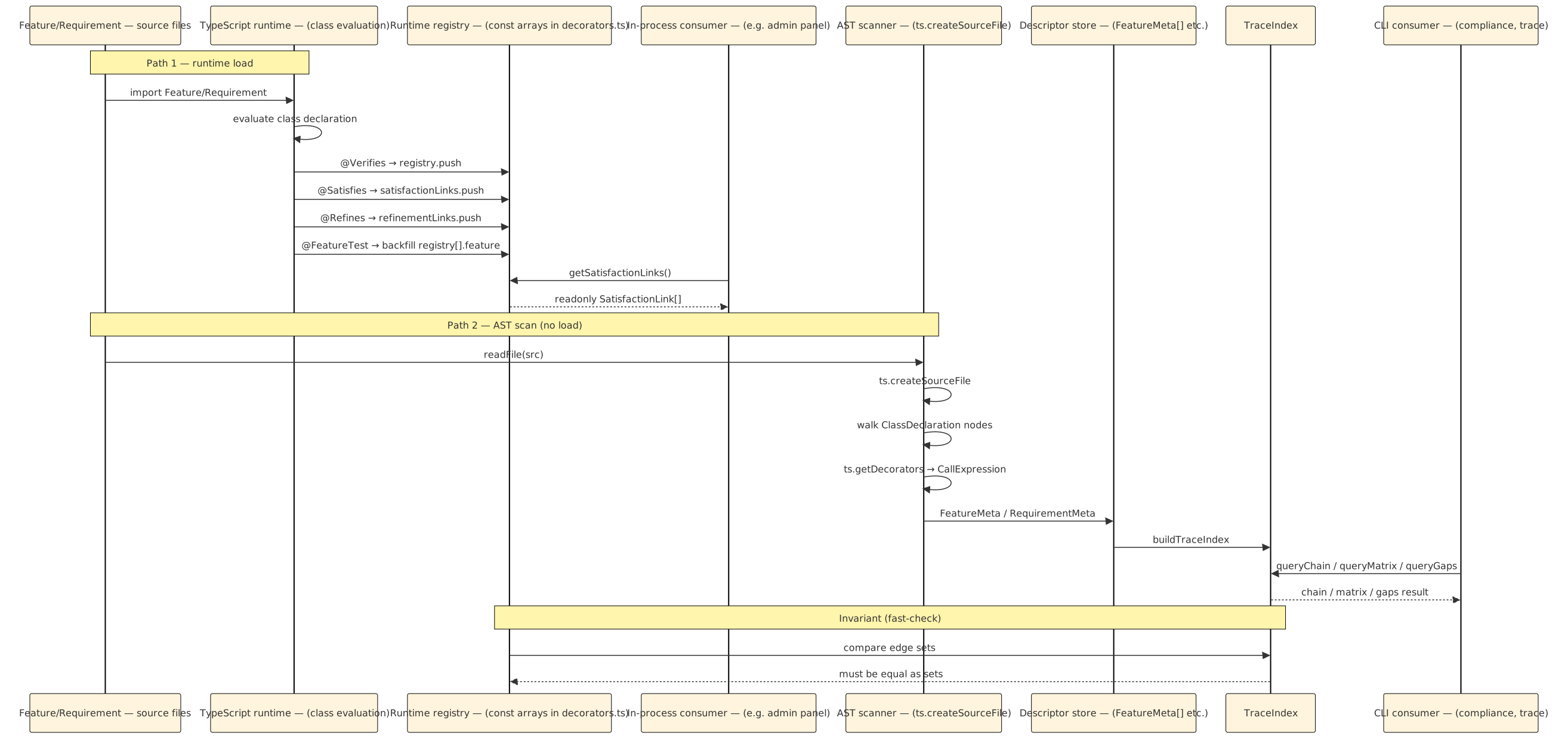
Alt: the registry-and-scanner data flow — Path 1 on top, where source files trigger TypeScript class evaluation, which fires decorator bodies that push onto four module-local arrays (registry, satisfactionLinks, refinementLinks, excludedMethods) and monkey-patch __satisfies / __refines onto classes, then in-process consumers read the arrays through accessor functions. Path 2 on bottom, where the AST scanner reads source files with readFile, parses with ts.createSourceFile, walks ClassDeclaration nodes, reads decorators via ts.getDecorators, emits descriptor records, folds them into a TraceIndex, and answers CLI queries. An invariant arrow between the two shows that their edge sets must agree — the fast-check property that catches registry/AST drift.
Caption: Two paths, one source tree, one check. The registry path is synchronous, side-effect-based, and available only in processes that have loaded the modules. The AST path is pure, file-based, and available to any process that can read the source. The invariant connecting them is the reason drift is detectable: we are not choosing between two truths, we are maintaining a provable equivalence between two views of one truth.
Running-example recap
Two views of the same Feature, side by side.
The runtime-registry view of FeatureTraceExplorerTuiFeature
A process that has imported the Feature module and called the accessors sees:
getSatisfactionLinks()
// ⇒ [
//   { featureClass: 'FeatureTraceExplorerTuiFeature',
//     requirementClasses: [
//       'ReqDiscoverableTraceabilityRequirement',
//       'ReqDogFoodRequirement',
//       'ReqParallelDeliverableRequirement',
//     ] },
//   …
// ]

FeatureTraceExplorerTuiFeature.__satisfies
// ⇒ [
//   'ReqDiscoverableTraceabilityRequirement',
//   'ReqDogFoodRequirement',
//   'ReqParallelDeliverableRequirement',
// ]
A consumer that wants all Features satisfying ReqDogFoodRequirement filters satisfactionLinks by the target class name and projects out featureClass. The code is three lines. No AST is involved. No file is read. The answer comes from the array the decorator populated at load time.
The AST-scanner view of the same file
A scanner run with readFeatures('requirements/features/') reads the same file and emits:
{
  id: 'FEATURE-TRACE-EXPLORER-TUI',
  title: '`requirements explore` — interactive TTY browser over the traceability graph',
  priority: 'low',
  acMethods: [
    'traceExplorerBuildsGraph',
    'traceExplorerHandlesArrowKeyNavigation',
    'traceExplorerDrillsDownFromAnyNode',
    'traceExplorerOpensHelpOverlayOnQuestionMark',
    'traceExplorerJumpsBackUpWithBackspace',
    'traceExplorerRefusesToStartOnNonTty',
    'traceExplorerExitsCleanlyOnCtrlC',
    'traceExplorerUsesFileSystemPortForDiscovery',
    'traceExplorerUsesPromptPortForInteraction',
    'endToEndNavigatesReqToFeatToAcToTest',
  ],
  acDetails: [ /* 10 entries, each { name, expectedLevels } */ ],
  enabled: false,
  className: 'FeatureTraceExplorerTuiFeature',
  file: 'feature-trace-explorer-tui.ts',
  satisfies: [
    'ReqDiscoverableTraceabilityRequirement',
    'ReqDogFoodRequirement',
    'ReqParallelDeliverableRequirement',
  ],
}
The same three Requirement class names. The same Feature class name. Plus a great deal more — every AC method, every AC's expected level list, the file path, the enabled: false flag. Information the runtime registry also carries, but scattered across the class's own properties and the registry's arrays. The descriptor collects it all in one flat record that is the exact shape a graph builder wants.
The invariant, concretely
For this Feature, the two views must agree on two bidirectional facts:
satisfieslists the same three class names in both views.acMethodslists the same ten AC names as the methods on which@Verifiescan later fire.
They agree. The fast-check property has never failed on this Feature since it was introduced. But the invariant is asserted every run — every npx requirements compliance execution, every dashboard build — because the day the two views disagree is the day a registration or a parse broke, and the invariant is what catches it first.
Related Reading
- Chapter 03 — The Decorator Surface — the six decorators and their runtime contracts. This chapter is the companion piece, showing how those runtime contracts project into AST-level reads.
- Chapter 03b — A Newcomer's Primer: Abstract Classes, Decorators, Registries — the ground-level account of why module-local
constarrays are the natural shape for a decorator-populated registry. Read first if the registry half of this chapter felt like it was moving fast. - Chapter 13 — Property Testing with fast-check — the source of the invariant that registry and AST must agree. Sixteen invariants, 200 runs each; the registry/AST equality one is invariant #7.
- Chapter 17 — The Compliance Pipeline End to End — shows the AST scanner running inside a real
compliance --strictinvocation, including the sub-second per-file parse and the merge with runtime coverage data. - typed-specs/06-compliance.md — the predecessor compliance scanner. A useful comparison: same AST-first stance, smaller surface (Feature-only, no Requirement layer), same four compiler-API predicates. The continuity across the two DSLs is in the tool more than in the vocabulary.
Previous: 13c — Fast-Check Shrinking and Counter-Examples Next: 15 — Scenarii and the Three FSMs