Part IX: Runtime -- Execution, Parsing, and Events
Typed events, not strings --
docker buildemitsBuildStarted,BuildLayerCached,BuildComplete, not stdout lines.
From Commands to Processes to Events
Parts VI through VIII showed how typed commands are built. This part shows what happens when you execute them: how commands become processes, how stdout becomes typed events, and how events become results.
Every previous post in this series has been about construction -- building a typed command object in C#, wiring up flags, checking version bounds. That is the compile-time story. This post is the runtime story. The moment a DockerContainerRunCommand object leaves the fluent builder, it needs to become a real process with real arguments, and the text that process spits back needs to become something the consuming code can pattern-match on without regex.
I spent more time on this layer than I expected. The naive version -- serialize command to arguments, run process, read all stdout, return string -- is what every Process.Start wrapper does, and it is what I was trying to escape. The issue is not just type safety. It is streaming. Docker build output can be hundreds of lines. Docker Compose orchestration can run for minutes. Container logs are infinite streams. You cannot buffer everything into a string and parse it afterward -- you need to parse as lines arrive, emit events as they are recognized, and let the consumer decide when to stop.
The design I landed on has three core abstractions: CommandExecutor (the bridge between typed commands and processes), IOutputParser<TEvent> (the thing that turns lines into events), and IResultCollector<TEvent, TResult> (the thing that accumulates events into a final result). Let me walk through each one.
The Full Execution Pipeline
Before diving into code, here is the whole picture:

Left to right: a typed command enters the executor. The executor flattens it to a ProcessSpec -- the executable path plus serialized arguments. The process runner starts the actual process. Lines come back as OutputLine records (text plus metadata). The parser transforms lines into domain events. The collector accumulates events into a typed result.
Every step is an interface. Every interface has a real implementation and a fake. The consumer chooses which combination they want: fire-and-forget, streaming events, or collected result. One pipeline, three consumption modes, zero string parsing at the call site.
ProcessSpec and OutputLine
Before I show the executor, I need to show the two records it operates on. These are deliberately simple -- they are data, not behavior.
public record ProcessSpec
{
    public required string ExecutablePath { get; init; }
    public IReadOnlyList<string> Arguments { get; init; } = [];
    public string? WorkingDirectory { get; init; }
    public IReadOnlyDictionary<string, string>? EnvironmentVariables { get; init; }
    public TimeSpan? Timeout { get; init; }
}
ProcessSpec is the lowest common denominator of "run this program with these arguments." No Docker knowledge, no CLI knowledge -- just a path, arguments, working directory, and optional environment variables. The Timeout property is optional; the primary timeout mechanism is CancellationToken, but sometimes you want a hard deadline baked into the spec itself.
public record OutputLine(string Text, bool IsError, DateTimeOffset Timestamp);OutputLine carries three things: the text itself, whether it came from stderr (the IsError flag), and when it arrived. The timestamp matters for performance analysis and log correlation. The IsError flag matters because Docker has a particularly annoying habit that I will cover in the error handling section: it writes progress information to stderr.
public record ProcessOutput
{
    public required int ExitCode { get; init; }
    public required string Stdout { get; init; }
    public required string Stderr { get; init; }
    public required TimeSpan Duration { get; init; }
    public required IReadOnlyList<OutputLine> Lines { get; init; }
}
ProcessOutput is the buffered variant -- everything the process produced, plus timing. This is what you get from the fire-and-forget execution mode. If you do not need streaming, you do not need to deal with IAsyncEnumerable or parsers; you just get the output and inspect it.
CommandExecutor -- The Bridge
The executor is the central piece. It has three methods, each representing a different consumption pattern:
public sealed class CommandExecutor
{
    private readonly IProcessRunner _processRunner;

    public CommandExecutor(IProcessRunner processRunner)
    {
        _processRunner = processRunner;
    }

    /// <summary>
    /// Fire-and-forget: run the command, buffer all output, return the result.
    /// </summary>
    public async Task<Result<ProcessOutput, CommandError>> ExecuteAsync(
        BinaryBinding binding,
        ICliCommand command,
        CancellationToken ct = default)
    {
        var spec = BuildProcessSpec(binding, command);
        var output = await _processRunner.RunAsync(spec, ct);

        return output.ExitCode == 0
            ? Result.Ok(output)
            : Result.Err(new CommandError(
                output.ExitCode,
                output.Stderr,
                output.Duration,
                spec));
    }

    /// <summary>
    /// Streaming: yield typed events as stdout/stderr lines arrive.
    /// </summary>
    public async IAsyncEnumerable<TEvent> StreamAsync<TEvent>(
        BinaryBinding binding,
        ICliCommand command,
        IOutputParser<TEvent> parser,
        [EnumeratorCancellation] CancellationToken ct = default)
    {
        var spec = BuildProcessSpec(binding, command);
        int exitCode = 0;

        await foreach (var line in _processRunner.StreamAsync(spec, ct))
        {
            foreach (var evt in parser.ParseLine(line))
                yield return evt;
        }

        exitCode = await _processRunner.GetExitCodeAsync(spec, ct);

        foreach (var evt in parser.Complete(exitCode))
            yield return evt;
    }

    /// <summary>
    /// Collected: stream events through a parser, accumulate via collector,
    /// return a single typed result.
    /// </summary>
    public async Task<Result<TResult, CommandError>> ExecuteAsync<TEvent, TResult>(
        BinaryBinding binding,
        ICliCommand command,
        IOutputParser<TEvent> parser,
        IResultCollector<TEvent, TResult> collector,
        CancellationToken ct = default)
    {
        int exitCode = 0;
        var spec = BuildProcessSpec(binding, command);

        await foreach (var line in _processRunner.StreamAsync(spec, ct))
        {
            foreach (var evt in parser.ParseLine(line))
                collector.OnEvent(evt);
        }

        exitCode = await _processRunner.GetExitCodeAsync(spec, ct);

        foreach (var evt in parser.Complete(exitCode))
            collector.OnEvent(evt);

        return exitCode == 0
            ? Result.Ok(collector.Complete())
            : Result.Err(new CommandError(exitCode, collector.GetErrorContext(), spec: spec));
    }

    private ProcessSpec BuildProcessSpec(BinaryBinding binding, ICliCommand command)
    {
        var args = new List<string>();

        // Some binaries require a command prefix.
        // For example, Docker Compose via the docker CLI plugin uses
        // ["compose"] as the prefix before the actual subcommand.
        if (binding.CommandPrefix is { Count: > 0 } prefix)
            args.AddRange(prefix);

        // The command path: ["container", "run"] for docker container run
        args.AddRange(command.CommandPath);

        // The serialized arguments: ["--detach", "--name", "myapp", "nginx:latest"]
        args.AddRange(command.ToArguments());

        return new ProcessSpec
        {
            ExecutablePath = binding.ExecutablePath,
            Arguments = args,
            WorkingDirectory = binding.WorkingDirectory,
            EnvironmentVariables = binding.EnvironmentVariables,
            Timeout = binding.DefaultTimeout,
        };
    }
}
Three methods, one private helper. That is the entire class.
Mode 1: Fire-and-Forget
public async Task<Result<ProcessOutput, CommandError>> ExecuteAsync(
    BinaryBinding binding,
    ICliCommand command,
    CancellationToken ct = default)
This is the simplest mode. Run the command, wait for it to finish, return everything the process produced. No parsing, no events, no streaming. The caller gets a Result<ProcessOutput, CommandError> -- either the full output or a structured error.
Use this when you do not care about intermediate output. docker tag, docker rm, docker network create -- commands that produce one line or no output, where the only thing that matters is whether they succeeded.
// Tag an image -- we only care about success/failure
var result = await executor.ExecuteAsync(binding, docker.Image.Tag(b => b
    .WithSourceImage("myapp:latest")
    .WithTargetImage("registry.example.com/myapp:v1.2.3")));

if (result.IsErr)
    logger.LogError("Tag failed: {Error}", result.Error.Stderr);
Mode 2: Streaming Events
public async IAsyncEnumerable<TEvent> StreamAsync<TEvent>(
    BinaryBinding binding,
    ICliCommand command,
    IOutputParser<TEvent> parser,
    [EnumeratorCancellation] CancellationToken ct = default)
This is the real-time mode. As Docker writes lines to stdout/stderr, the parser transforms them into typed events, and the consumer receives them one by one via IAsyncEnumerable<TEvent>. The consumer can react immediately -- update a progress bar, log a message, abort on a specific error.
Use this when you need real-time feedback. docker build (show build progress), docker compose up (show service startup), docker logs --follow (tail container output).
// Build an image with real-time progress
await foreach (var evt in executor.StreamAsync(
    binding,
    docker.Image.Build(b => b.WithTag(["myapp:latest"]).WithPath(".")),
    new DockerBuildParser()))
{
    switch (evt)
    {
        case BuildStepStarted step:
            Console.WriteLine($"[{step.Step}/{step.Total}] {step.Instruction}");
            break;
        case BuildLayerCached:
            Console.Write(" (cached)");
            break;
        case BuildComplete done:
            Console.WriteLine($"Built: {done.ImageId}");
            break;
    }
}
The [EnumeratorCancellation] attribute on the CancellationToken parameter enables the consumer to break out of the await foreach loop at any point and the underlying process will be killed. This is critical for docker logs --follow, which is an infinite stream.
Mode 3: Collected Result
public async Task<Result<TResult, CommandError>> ExecuteAsync<TEvent, TResult>(
    BinaryBinding binding,
    ICliCommand command,
    IOutputParser<TEvent> parser,
    IResultCollector<TEvent, TResult> collector,
    CancellationToken ct = default)
This is the hybrid mode. Events are parsed in real time (same as mode 2), but instead of yielding them to the consumer, they flow into a IResultCollector that accumulates them into a single typed result. The consumer gets one TResult at the end.
Use this when you need a structured result but the output is complex enough to require event-based parsing. docker ps (collect container list), docker build (collect image ID and layer cache stats), docker compose ps (collect service statuses).
// List containers and collect into a typed result
var result = await executor.ExecuteAsync<ContainerListEvent, ContainerListResult>(
    binding,
    docker.Container.List(b => b.WithFormat("json").WithAll(true)),
    new ContainerListParser(),
    new ContainerListCollector());

if (result.IsOk)
{
    foreach (var container in result.Value.Containers)
        Console.WriteLine($"{container.Names}: {container.Status}");
}
Streaming vs Collected: The Sequence
Here is how both consumption patterns flow through the same pipeline:
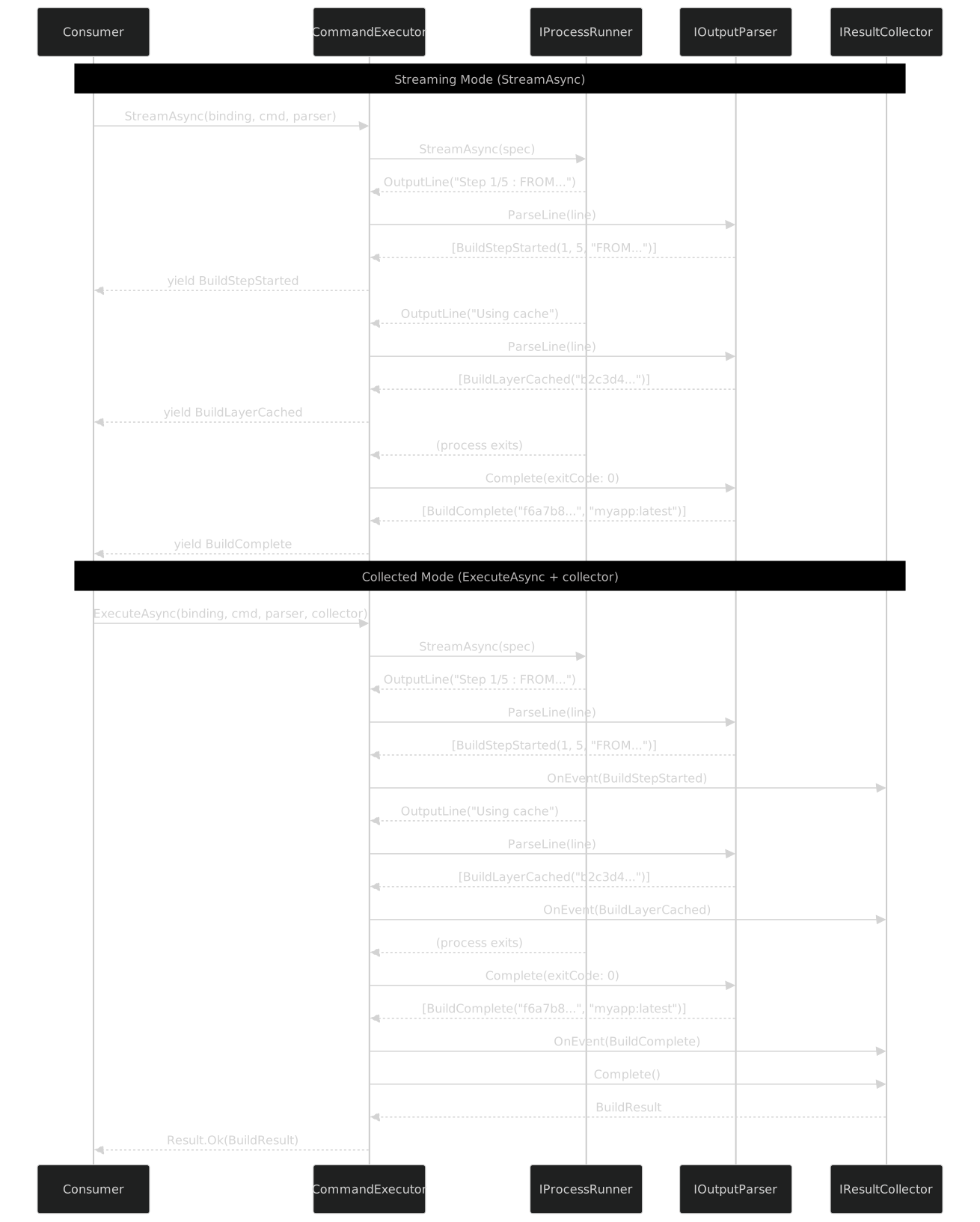
Same parser, same lines, same events. The only difference is where the events go: to the consumer directly (streaming) or through a collector first (collected). The parser does not know or care which mode is being used.
IProcessRunner Abstraction
The executor does not start processes itself. It delegates to IProcessRunner:
public interface IProcessRunner
{
    /// <summary>
    /// Run a process to completion, buffering all output.
    /// </summary>
    Task<ProcessOutput> RunAsync(ProcessSpec spec, CancellationToken ct = default);

    /// <summary>
    /// Start a process and stream output lines as they arrive.
    /// </summary>
    IAsyncEnumerable<OutputLine> StreamAsync(
        ProcessSpec spec, [EnumeratorCancellation] CancellationToken ct = default);

    /// <summary>
    /// Get the exit code of the most recently streamed process.
    /// Called after StreamAsync completes.
    /// </summary>
    Task<int> GetExitCodeAsync(ProcessSpec spec, CancellationToken ct = default);
}
Two methods for the two modes (buffered and streaming), plus one helper to retrieve the exit code after streaming completes. Why is the exit code separate? Because IAsyncEnumerable yields data -- it does not return a value when the enumeration completes. The exit code is metadata about the process, not a line of output, so it comes through a separate channel.
SystemProcessRunner -- The Real Thing
This is the implementation that actually runs Docker:
public sealed class SystemProcessRunner : IProcessRunner
{
    public async Task<ProcessOutput> RunAsync(ProcessSpec spec, CancellationToken ct)
    {
        using var process = new Process
        {
            StartInfo = CreateStartInfo(spec),
        };

        var stdoutBuilder = new StringBuilder();
        var stderrBuilder = new StringBuilder();
        var lines = new List<OutputLine>();
        var sw = Stopwatch.StartNew();

        process.OutputDataReceived += (_, e) =>
        {
            if (e.Data is null) return;
            stdoutBuilder.AppendLine(e.Data);
            lines.Add(new OutputLine(e.Data, IsError: false, DateTimeOffset.UtcNow));
        };

        process.ErrorDataReceived += (_, e) =>
        {
            if (e.Data is null) return;
            stderrBuilder.AppendLine(e.Data);
            lines.Add(new OutputLine(e.Data, IsError: true, DateTimeOffset.UtcNow));
        };

        process.Start();
        process.BeginOutputReadLine();
        process.BeginErrorReadLine();

        try
        {
            await process.WaitForExitAsync(ct);
        }
        catch (OperationCanceledException)
        {
            TryKill(process);
            throw;
        }

        sw.Stop();

        return new ProcessOutput
        {
            ExitCode = process.ExitCode,
            Stdout = stdoutBuilder.ToString(),
            Stderr = stderrBuilder.ToString(),
            Duration = sw.Elapsed,
            Lines = lines,
        };
    }

    public async IAsyncEnumerable<OutputLine> StreamAsync(
        ProcessSpec spec,
        [EnumeratorCancellation] CancellationToken ct)
    {
        using var process = new Process
        {
            StartInfo = CreateStartInfo(spec),
        };

        var channel = Channel.CreateUnbounded<OutputLine>(
            new UnboundedChannelOptions { SingleReader = true });

        process.OutputDataReceived += (_, e) =>
        {
            if (e.Data is not null)
                channel.Writer.TryWrite(
                    new OutputLine(e.Data, IsError: false, DateTimeOffset.UtcNow));
        };

        process.ErrorDataReceived += (_, e) =>
        {
            if (e.Data is not null)
                channel.Writer.TryWrite(
                    new OutputLine(e.Data, IsError: true, DateTimeOffset.UtcNow));
        };

        process.EnableRaisingEvents = true;
        process.Exited += (_, _) =>
        {
            // Give a brief window for final output events to flush
            Task.Delay(50).ContinueWith(_ => channel.Writer.TryComplete());
        };

        process.Start();
        process.BeginOutputReadLine();
        process.BeginErrorReadLine();

        _lastExitCode = null;

        await foreach (var line in channel.Reader.ReadAllAsync(ct))
        {
            yield return line;
        }

        if (!process.HasExited)
        {
            try { await process.WaitForExitAsync(ct); }
            catch (OperationCanceledException) { TryKill(process); throw; }
        }

        _lastExitCode = process.ExitCode;
    }

    private int? _lastExitCode;

    public Task<int> GetExitCodeAsync(ProcessSpec spec, CancellationToken ct)
    {
        return Task.FromResult(
            _lastExitCode ?? throw new InvalidOperationException(
                "No exit code available. Call StreamAsync first."));
    }

    private static ProcessStartInfo CreateStartInfo(ProcessSpec spec)
    {
        var psi = new ProcessStartInfo
        {
            FileName = spec.ExecutablePath,
            RedirectStandardOutput = true,
            RedirectStandardError = true,
            UseShellExecute = false,
            CreateNoWindow = true,
        };

        foreach (var arg in spec.Arguments)
            psi.ArgumentList.Add(arg);

        if (spec.WorkingDirectory is not null)
            psi.WorkingDirectory = spec.WorkingDirectory;

        if (spec.EnvironmentVariables is not null)
        {
            foreach (var (key, value) in spec.EnvironmentVariables)
                psi.Environment[key] = value;
        }

        return psi;
    }

    private static void TryKill(Process process)
    {
        try { process.Kill(entireProcessTree: true); }
        catch { /* best effort */ }
    }
}
A few things worth noting:
ArgumentList instead of Arguments. The ProcessStartInfo.ArgumentList property handles quoting and escaping correctly. The Arguments property is a single string -- the exact thing that causes bugs when paths contain spaces. Using ArgumentList means I never have to worry about quoting again. Every flag and value is a separate element in the list, and .NET handles the shell escaping.
Channel<OutputLine> for streaming. The Process class raises OutputDataReceived and ErrorDataReceived events on thread pool threads. I need to yield them from an async IAsyncEnumerable<T> method that runs on the caller's context. A Channel bridges the two worlds: events write to the channel, the async enumerator reads from it. The SingleReader optimization tells the channel that only one consumer will ever call ReadAllAsync.
Cancellation kills the process tree. When the CancellationToken fires, I call process.Kill(entireProcessTree: true). Not just the Docker process -- its entire process tree. Docker Compose can spawn multiple child processes; killing only the parent leaves zombies.
The 50ms flush delay. When the process exits, there may still be buffered output events in flight. The Exited event fires before all OutputDataReceived events have been raised. The 50ms delay is a pragmatic solution -- it gives the event handlers time to flush remaining data before the channel completes. This is not ideal, and I have explored alternatives (like counting the null-termination events from both stdout and stderr), but the delay works reliably in practice.
FakeProcessRunner -- For Testing
Every abstraction needs a testable fake. FakeProcessRunner lets me script process behavior without running any real processes:
public sealed class FakeProcessRunner : IProcessRunner
{
    private readonly Queue<ScriptedProcess> _scripts = new();
    private int _lastExitCode;

    public FakeProcessRunner Script(
        Func<ProcessSpec, bool> match,
        string[] stdoutLines,
        string[]? stderrLines = null,
        int exitCode = 0)
    {
        _scripts.Enqueue(new ScriptedProcess(
            match, stdoutLines, stderrLines ?? [], exitCode));
        return this;
    }

    public FakeProcessRunner Script(
        string expectedExecutable,
        string[] stdoutLines,
        int exitCode = 0)
    {
        return Script(
            spec => spec.ExecutablePath == expectedExecutable,
            stdoutLines,
            exitCode: exitCode);
    }

    public async Task<ProcessOutput> RunAsync(ProcessSpec spec, CancellationToken ct)
    {
        var script = DequeueMatch(spec);

        return new ProcessOutput
        {
            ExitCode = script.ExitCode,
            Stdout = string.Join(Environment.NewLine, script.StdoutLines),
            Stderr = string.Join(Environment.NewLine, script.StderrLines),
            Duration = TimeSpan.FromMilliseconds(1),
            Lines = script.StdoutLines
                .Select(l => new OutputLine(l, false, DateTimeOffset.UtcNow))
                .Concat(script.StderrLines
                    .Select(l => new OutputLine(l, true, DateTimeOffset.UtcNow)))
                .ToList(),
        };
    }

    public async IAsyncEnumerable<OutputLine> StreamAsync(
        ProcessSpec spec,
        [EnumeratorCancellation] CancellationToken ct)
    {
        var script = DequeueMatch(spec);
        _lastExitCode = script.ExitCode;

        foreach (var line in script.StdoutLines)
        {
            yield return new OutputLine(line, IsError: false, DateTimeOffset.UtcNow);
            await Task.Yield(); // simulate async arrival
        }

        foreach (var line in script.StderrLines)
        {
            yield return new OutputLine(line, IsError: true, DateTimeOffset.UtcNow);
            await Task.Yield();
        }
    }

    public Task<int> GetExitCodeAsync(ProcessSpec spec, CancellationToken ct)
        => Task.FromResult(_lastExitCode);

    private ScriptedProcess DequeueMatch(ProcessSpec spec)
    {
        if (_scripts.Count == 0)
            throw new InvalidOperationException(
                $"No scripted process for: {spec.ExecutablePath} " +
                $"{string.Join(' ', spec.Arguments)}");

        var script = _scripts.Dequeue();

        if (!script.Match(spec))
            throw new InvalidOperationException(
                $"Scripted process did not match: {spec.ExecutablePath} " +
                $"{string.Join(' ', spec.Arguments)}");

        return script;
    }

    private record ScriptedProcess(
        Func<ProcessSpec, bool> Match,
        string[] StdoutLines,
        string[] StderrLines,
        int ExitCode);
}
The API is fluent. Script the expected interactions, then hand the fake to the executor:
[Fact]
public async Task Build_Streams_Typed_Events()
{
    var runner = new FakeProcessRunner()
        .Script(
            match: spec => spec.Arguments.Contains("build"),
            stdoutLines:
            [
                "Sending build context to Docker daemon  2.048kB",
                "Step 1/3 : FROM mcr.microsoft.com/dotnet/sdk:10.0 AS build",
                " ---> a1b2c3d4e5f6",
                "Step 2/3 : COPY *.csproj .",
                " ---> Using cache",
                " ---> b2c3d4e5f6a7",
                "Step 3/3 : RUN dotnet restore",
                " ---> c3d4e5f6a7b8",
                "Successfully built c3d4e5f6a7b8",
                "Successfully tagged myapp:latest",
            ]);

    var executor = new CommandExecutor(runner);
    var events = new List<BuildEvent>();

    await foreach (var evt in executor.StreamAsync(
        TestBindings.Docker,
        docker.Image.Build(b => b.WithTag(["myapp:latest"]).WithPath(".")),
        new DockerBuildParser()))
    {
        events.Add(evt);
    }

    events.Should().ContainSingle(e => e is BuildContextSent);
    events.OfType<BuildStepStarted>().Should().HaveCount(3);
    events.OfType<BuildLayerCached>().Should().HaveCount(1);
    events.Should().ContainSingle(e => e is BuildComplete);

    var complete = events.OfType<BuildComplete>().Single();
    complete.ImageId.Should().Be("c3d4e5f6a7b8");
    complete.Tag.Should().Be("myapp:latest");
}
No Docker daemon. No process execution. No flaky CI. The parser sees exactly the lines I script, and I assert on the events it produces. This test runs in under 1ms.
IOutputParser -- Turning Lines into Events
The parser interface is deliberately minimal:
public interface IOutputParser<out TEvent>
{
    /// <summary>
    /// Parse a single line of process output.
    /// Returns zero, one, or many events.
    /// </summary>
    IEnumerable<TEvent> ParseLine(OutputLine line);

    /// <summary>
    /// Called after the process exits.
    /// Returns zero or more final events (e.g., BuildComplete, ComposeStackReady).
    /// </summary>
    IEnumerable<TEvent> Complete(int exitCode);
}
Two methods. That is it.
The out covariance on TEvent is important. It means an IOutputParser<BuildEvent> can be used where an IOutputParser<object> is expected. More practically, it means the streaming pipeline does not need generic constraints that would complicate the type hierarchy.
ParseLine returns IEnumerable<TEvent>, not a single event. One line can produce zero events (skip blank lines, skip Docker's ASCII art), one event (most cases), or multiple events (a log line that contains both a status change and a warning). The parser decides.
Complete receives the exit code. This is the parser's chance to emit summary events. A build parser emits BuildComplete or BuildFailed here. A compose parser emits ComposeStackReady. A container list parser emits nothing -- it already emitted everything line by line.
Parsers are stateful. This is a deliberate choice. Many Docker output formats span multiple lines. A build step starts on one line and its layer ID appears on the next. Multi-line log entries are common. The parser holds state between ParseLine calls to accumulate these multi-line patterns before emitting a single event.
IResultCollector -- Accumulating Events into Results
public interface IResultCollector<in TEvent, out TResult>
{
    /// <summary>
    /// Process a single event. Called for each event the parser produces.
    /// </summary>
    void OnEvent(TEvent evt);

    /// <summary>
    /// Produce the final result after all events have been processed.
    /// </summary>
    TResult Complete();

    /// <summary>
    /// Optional: provide error context if the process failed.
    /// </summary>
    string GetErrorContext() => string.Empty;
}
The collector is the simplest abstraction in the pipeline. It receives events one at a time and produces a result at the end. The in contravariance on TEvent mirrors the parser's out covariance. The optional GetErrorContext method provides diagnostic information when the process exits with a non-zero code -- the collector may have accumulated error events that give more context than raw stderr.
Here is a concrete example -- collecting container list events into a result:
public sealed class ContainerListCollector
    : IResultCollector<ContainerListEvent, ContainerListResult>
{
    private readonly List<ContainerInfo> _containers = [];

    public void OnEvent(ContainerListEvent evt)
    {
        if (evt is ContainerInfo info)
            _containers.Add(info);
    }

    public ContainerListResult Complete()
    {
        return new ContainerListResult
        {
            Containers = _containers.AsReadOnly(),
            TotalCount = _containers.Count,
            RunningCount = _containers.Count(c => c.Status.StartsWith("Up")),
        };
    }

    public string GetErrorContext()
        => $"Parsed {_containers.Count} containers before error";
}

public record ContainerListResult
{
    public required IReadOnlyList<ContainerInfo> Containers { get; init; }
    public required int TotalCount { get; init; }
    public required int RunningCount { get; init; }
}
Simple accumulation. The collector does not know anything about parsing -- it receives already-typed events and aggregates them. This separation means I can swap parsers without touching collectors, and vice versa. A JSON-format parser and a table-format parser both emit ContainerInfo events; the collector does not care which parser produced them.
Docker-Specific Parsers -- Three Real Examples
Now the interesting part. Let me show three real parsers, each demonstrating a different complexity level.
Example 1: Docker Build Output Parser
Docker's legacy builder (pre-BuildKit) produces output like this:
Sending build context to Docker daemon  2.048kB
Step 1/5 : FROM mcr.microsoft.com/dotnet/sdk:10.0 AS build
 ---> a1b2c3d4e5f6
Step 2/5 : WORKDIR /src
 ---> Using cache
 ---> b2c3d4e5f6a7
Step 3/5 : COPY *.csproj .
 ---> c3d4e5f6a7b8
Step 4/5 : RUN dotnet restore
 ---> Running in d4e5f6a7b8c9
  Determining projects to restore...
  Restored /src/MyApp.csproj
 ---> e5f6a7b8c9d0
Removing intermediate container d4e5f6a7b8c9
Step 5/5 : RUN dotnet publish -c Release -o /app
 ---> Running in f1a2b3c4d5e6
  MyApp -> /app/MyApp.dll
 ---> f6a7b8c9d0e1
Removing intermediate container f1a2b3c4d5e6
Successfully built f6a7b8c9d0e1
Successfully tagged myapp:latest
That is 17 lines. A human reads them and understands "build succeeded, some layers were cached, the image ID is f6a7b8c9d0e1." I want the parser to produce exactly that understanding, as typed events.
The event types:
public abstract record BuildEvent;

public record BuildContextSent(long SizeBytes) : BuildEvent;

public record BuildStepStarted(
    int Step, int Total, string Instruction) : BuildEvent;

public record BuildLayerCached(string LayerId) : BuildEvent;

public record BuildLayerCreated(string LayerId) : BuildEvent;

public record BuildStepOutput(
    int Step, string Text) : BuildEvent;

public record BuildIntermediateRemoved(string ContainerId) : BuildEvent;

public record BuildOutput(string Text) : BuildEvent;

public record BuildComplete(
    string ImageId, string? Tag) : BuildEvent;

public record BuildFailed(string Error) : BuildEvent;
Nine event types for nine kinds of things that can happen during a build. Each one is a record with only the data that matters. No raw text, no line numbers, no metadata pollution.
The hierarchy:

Every event is a leaf record inheriting from the abstract BuildEvent base. The consumer uses pattern matching (switch on the event type) to handle each case. The compiler enforces exhaustiveness if you use a switch expression -- miss a case and you get a warning.
The parser:
public sealed class DockerBuildParser : IOutputParser<BuildEvent>
{
    private static readonly Regex ContextPattern =
        new(@"Sending build context.*?(\d+(?:\.\d+)?)\s*(kB|MB|GB)", RegexOptions.Compiled);

    private static readonly Regex StepPattern =
        new(@"Step\s+(\d+)/(\d+)\s*:\s*(.*)", RegexOptions.Compiled);

    private static readonly Regex LayerIdPattern =
        new(@"^\s*--->\s*([0-9a-f]{12})", RegexOptions.Compiled);

    private static readonly Regex CachePattern =
        new(@"Using cache", RegexOptions.Compiled);

    private static readonly Regex SuccessPattern =
        new(@"Successfully built\s+([0-9a-f]+)", RegexOptions.Compiled);

    private static readonly Regex TagPattern =
        new(@"Successfully tagged\s+(.+)", RegexOptions.Compiled);

    private static readonly Regex RemovePattern =
        new(@"Removing intermediate container\s+([0-9a-f]+)", RegexOptions.Compiled);

    private int _currentStep;
    private bool _nextLayerIsCached;
    private string? _completedImageId;
    private string? _completedTag;

    public IEnumerable<BuildEvent> ParseLine(OutputLine line)
    {
        var text = line.Text;

        // Build context size
        var contextMatch = ContextPattern.Match(text);
        if (contextMatch.Success)
        {
            var size = double.Parse(contextMatch.Groups[1].Value);
            var unit = contextMatch.Groups[2].Value;
            var bytes = unit switch
            {
                "kB" => (long)(size * 1024),
                "MB" => (long)(size * 1024 * 1024),
                "GB" => (long)(size * 1024 * 1024 * 1024),
                _ => (long)size,
            };
            yield return new BuildContextSent(bytes);
            yield break;
        }

        // Step start
        var stepMatch = StepPattern.Match(text);
        if (stepMatch.Success)
        {
            _currentStep = int.Parse(stepMatch.Groups[1].Value);
            var total = int.Parse(stepMatch.Groups[2].Value);
            var instruction = stepMatch.Groups[3].Value.Trim();
            _nextLayerIsCached = false;
            yield return new BuildStepStarted(_currentStep, total, instruction);
            yield break;
        }

        // Cache indicator (no event yet -- sets flag for next layer ID)
        if (CachePattern.IsMatch(text))
        {
            _nextLayerIsCached = true;
            yield break;
        }

        // Layer ID
        var layerMatch = LayerIdPattern.Match(text);
        if (layerMatch.Success)
        {
            var layerId = layerMatch.Groups[1].Value;
            yield return _nextLayerIsCached
                ? new BuildLayerCached(layerId)
                : new BuildLayerCreated(layerId);
            _nextLayerIsCached = false;
            yield break;
        }

        // Intermediate container removal
        var removeMatch = RemovePattern.Match(text);
        if (removeMatch.Success)
        {
            yield return new BuildIntermediateRemoved(removeMatch.Groups[1].Value);
            yield break;
        }

        // Successfully built
        var successMatch = SuccessPattern.Match(text);
        if (successMatch.Success)
        {
            _completedImageId = successMatch.Groups[1].Value;
            yield break; // Don't emit yet -- wait for tag line or Complete()
        }

        // Successfully tagged
        var tagMatch = TagPattern.Match(text);
        if (tagMatch.Success)
        {
            _completedTag = tagMatch.Groups[1].Value;
            yield break; // Don't emit yet -- wait for Complete()
        }

        // Everything else is step output
        if (_currentStep > 0 && !string.IsNullOrWhiteSpace(text))
        {
            yield return new BuildStepOutput(_currentStep, text.TrimStart());
        }
    }

    public IEnumerable<BuildEvent> Complete(int exitCode)
    {
        if (exitCode == 0 && _completedImageId is not null)
        {
            yield return new BuildComplete(_completedImageId, _completedTag);
        }
        else if (exitCode != 0)
        {
            yield return new BuildFailed(
                $"Build failed with exit code {exitCode}");
        }
    }
}
Notice the statefulness. The parser tracks _currentStep to annotate output lines with which step produced them. It tracks _nextLayerIsCached because the "Using cache" line appears before the layer ID line -- the parser needs to remember that the next layer ID it sees is a cache hit, not a new layer. It defers BuildComplete to the Complete method because the "Successfully built" and "Successfully tagged" lines are separate, and I want a single BuildComplete event with both the image ID and the tag.
The regex patterns are compiled. Each pattern is tried in order, and the first match wins. This is a linear scan, but the patterns are short and the number of lines per build is small (typically under 100). No need for anything fancier.
Example 2: Docker Container List (JSON Format)
Modern Docker supports --format json on most listing commands. This is the easy case:
{"ID":"abc123def456","Image":"nginx:latest","Status":"Up 2 hours","Ports":"0.0.0.0:80->80/tcp","Names":"web-frontend","State":"running"}
{"ID":"def456abc789","Image":"postgres:16","Status":"Up 2 hours (healthy)","Ports":"5432/tcp","Names":"app-db","State":"running"}
{"ID":"789abc012def","Image":"redis:7","Status":"Up 2 hours","Ports":"6379/tcp","Names":"app-cache","State":"running"}
One JSON object per line, one container per object. The parser is trivial:
public abstract record ContainerListEvent;

public record ContainerInfo(
    string Id,
    string Image,
    string Status,
    string Ports,
    string Names,
    string State) : ContainerListEvent;

public record ContainerListError(string Text) : ContainerListEvent;

public sealed class ContainerListParser : IOutputParser<ContainerListEvent>
{
    private static readonly JsonSerializerOptions JsonOptions = new()
    {
        PropertyNamingPolicy = JsonNamingPolicy.CamelCase,
        PropertyNameCaseInsensitive = true,
    };

    public IEnumerable<ContainerListEvent> ParseLine(OutputLine line)
    {
        if (line.IsError)
        {
            if (!string.IsNullOrWhiteSpace(line.Text))
                yield return new ContainerListError(line.Text);
            yield break;
        }

        if (string.IsNullOrWhiteSpace(line.Text))
            yield break;

        ContainerInfo? info = null;

        try
        {
            info = JsonSerializer.Deserialize<ContainerInfo>(line.Text, JsonOptions);
        }
        catch (JsonException)
        {
            // Docker sometimes writes non-JSON lines (e.g., warnings)
            yield break;
        }

        if (info is not null)
            yield return info;
    }

    public IEnumerable<BuildEvent> Complete(int exitCode)
    {
        // Nothing to emit -- each container was emitted line-by-line
        yield break;
    }
}
This is the simplest parser possible. One line, one JSON object, one event. No state. No multi-line accumulation. The try/catch around deserialization handles the edge case where Docker writes a warning or deprecation notice mixed in with the JSON output -- which it does, more often than you would expect.
The ContainerListCollector I showed earlier accumulates these into a ContainerListResult. But the consumer could also use StreamAsync to process containers one at a time -- useful when listing thousands of containers and you want to filter early.
Example 3: Docker Compose Up Events
This is the complex case. Docker Compose interleaves service lifecycle events with container logs, and the output format changed between Compose v2.0 and v2.20:
[+] Running 3/3
 ✔ Container myapp-db-1      Created    0.0s
 ✔ Container myapp-redis-1   Created    0.0s
 ✔ Container myapp-web-1     Created    0.0s
[+] Running 3/3
 ✔ Container myapp-db-1      Started    0.5s
 ✔ Container myapp-redis-1   Started    0.4s
 ✔ Container myapp-web-1     Started    0.8s
myapp-db-1     | PostgreSQL init process complete; ready for connections
myapp-db-1     | 2026-04-05 10:00:00.000 UTC [1] LOG:  listening on IPv4 address "0.0.0.0", port 5432
myapp-redis-1  | 1:M 05 Apr 2026 10:00:00.000 * Ready to accept connections
myapp-web-1    | info: Microsoft.Hosting.Lifetime[14]
myapp-web-1    |       Now listening on: http://0.0.0.0:80
Three different kinds of output on a single stream: progress counters, service status changes, and container log lines. The events:
public abstract record ComposeEvent;

public record ComposeProgressUpdate(
    int Completed, int Total) : ComposeEvent;

public record ComposeServiceCreated(
    string Service, double Seconds) : ComposeEvent;

public record ComposeServiceStarted(
    string Service, double Seconds) : ComposeEvent;

public record ComposeServiceHealthy(
    string Service) : ComposeEvent;

public record ComposeServiceLog(
    string Service, string Text) : ComposeEvent;

public record ComposeServiceFailed(
    string Service, string Error) : ComposeEvent;

public record ComposeStackReady(
    int ServiceCount, TimeSpan TotalDuration) : ComposeEvent;

public record ComposeError(string Text) : ComposeEvent;
The parser:
public sealed class DockerComposeUpParser : IOutputParser<ComposeEvent>
{
    private static readonly Regex ProgressPattern =
        new(@"^\[\+\]\s+Running\s+(\d+)/(\d+)", RegexOptions.Compiled);

    private static readonly Regex ServiceStatusPattern =
        new(@"^\s*[✔✗]\s+Container\s+(\S+)\s+(Created|Started|Healthy|Error)\s+(\d+\.?\d*)s",
            RegexOptions.Compiled);

    private static readonly Regex LogPattern =
        new(@"^(\S+)\s+\|\s?(.*)", RegexOptions.Compiled);

    private readonly HashSet<string> _startedServices = [];
    private readonly Stopwatch _totalTimer = Stopwatch.StartNew();

    public IEnumerable<ComposeEvent> ParseLine(OutputLine line)
    {
        var text = line.Text;

        // Progress counter: [+] Running 3/3
        var progressMatch = ProgressPattern.Match(text);
        if (progressMatch.Success)
        {
            yield return new ComposeProgressUpdate(
                int.Parse(progressMatch.Groups[1].Value),
                int.Parse(progressMatch.Groups[2].Value));
            yield break;
        }

        // Service status: ✔ Container myapp-db-1  Started  0.5s
        var statusMatch = ServiceStatusPattern.Match(text);
        if (statusMatch.Success)
        {
            var service = statusMatch.Groups[1].Value;
            var status = statusMatch.Groups[2].Value;
            var seconds = double.Parse(statusMatch.Groups[3].Value);

            switch (status)
            {
                case "Created":
                    yield return new ComposeServiceCreated(service, seconds);
                    break;
                case "Started":
                    _startedServices.Add(service);
                    yield return new ComposeServiceStarted(service, seconds);
                    break;
                case "Healthy":
                    yield return new ComposeServiceHealthy(service);
                    break;
                case "Error":
                    yield return new ComposeServiceFailed(service,
                        $"Service failed after {seconds}s");
                    break;
            }
            yield break;
        }

        // Log line: myapp-db-1  | PostgreSQL init process complete
        var logMatch = LogPattern.Match(text);
        if (logMatch.Success)
        {
            yield return new ComposeServiceLog(
                logMatch.Groups[1].Value,
                logMatch.Groups[2].Value);
            yield break;
        }

        // Unrecognized output -- still emit it
        if (!string.IsNullOrWhiteSpace(text))
        {
            yield return new ComposeServiceLog("compose", text);
        }
    }

    public IEnumerable<ComposeEvent> Complete(int exitCode)
    {
        _totalTimer.Stop();

        if (exitCode == 0)
        {
            yield return new ComposeStackReady(
                _startedServices.Count, _totalTimer.Elapsed);
        }
        else
        {
            yield return new ComposeError(
                $"docker compose up failed with exit code {exitCode}");
        }
    }
}
The statefulness here is more meaningful. The parser tracks which services have started so it can report the total count in ComposeStackReady. It also runs a stopwatch from construction to completion, giving the consumer a total duration without having to calculate it themselves.
The log line pattern (service | text) is the most common output after the initial startup phase. For a docker compose up without --detach, the stream is infinite -- container logs continue flowing until the user presses Ctrl+C. The consumer can break out of the await foreach loop at any point, and the cancellation token will kill the compose process.
A Compose Up Collector
For the collected mode, here is the corresponding collector:
public sealed class ComposeUpCollector
    : IResultCollector<ComposeEvent, ComposeUpResult>
{
    private readonly Dictionary<string, ServiceStatus> _services = new();
    private readonly List<ComposeServiceLog> _logs = [];
    private ComposeStackReady? _stackReady;

    public void OnEvent(ComposeEvent evt)
    {
        switch (evt)
        {
            case ComposeServiceCreated created:
                _services[created.Service] = new ServiceStatus
                {
                    Name = created.Service,
                    Phase = ServicePhase.Created,
                };
                break;

            case ComposeServiceStarted started:
                if (_services.TryGetValue(started.Service, out var svc))
                {
                    svc.Phase = ServicePhase.Started;
                    svc.StartDuration = TimeSpan.FromSeconds(started.Seconds);
                }
                break;

            case ComposeServiceHealthy healthy:
                if (_services.TryGetValue(healthy.Service, out var hsvc))
                    hsvc.Phase = ServicePhase.Healthy;
                break;

            case ComposeServiceLog log:
                _logs.Add(log);
                break;

            case ComposeStackReady ready:
                _stackReady = ready;
                break;
        }
    }

    public ComposeUpResult Complete()
    {
        return new ComposeUpResult
        {
            Services = _services.Values.ToList().AsReadOnly(),
            Logs = _logs.AsReadOnly(),
            TotalDuration = _stackReady?.TotalDuration ?? TimeSpan.Zero,
            AllServicesStarted = _services.Values
                .All(s => s.Phase >= ServicePhase.Started),
        };
    }
}

public record ComposeUpResult
{
    public required IReadOnlyList<ServiceStatus> Services { get; init; }
    public required IReadOnlyList<ComposeServiceLog> Logs { get; init; }
    public required TimeSpan TotalDuration { get; init; }
    public required bool AllServicesStarted { get; init; }
}

public class ServiceStatus
{
    public required string Name { get; set; }
    public ServicePhase Phase { get; set; }
    public TimeSpan? StartDuration { get; set; }
}

public enum ServicePhase
{
    Unknown = 0,
    Created = 1,
    Started = 2,
    Healthy = 3,
    Failed = -1,
}
Error Handling
Docker's error model is more nuanced than "exit code 0 is success, everything else is failure." Let me walk through the cases.
Non-Zero Exit Codes
public record CommandError
{
    public required int ExitCode { get; init; }
    public required string Stderr { get; init; }
    public TimeSpan? Duration { get; init; }
    public ProcessSpec? Spec { get; init; }

    public bool IsNotFound => ExitCode == 127;
    public bool IsPermissionDenied =>
        Stderr.Contains("permission denied", StringComparison.OrdinalIgnoreCase);
    public bool IsImageNotFound =>
        Stderr.Contains("No such image", StringComparison.OrdinalIgnoreCase);
    public bool IsContainerNotFound =>
        Stderr.Contains("No such container", StringComparison.OrdinalIgnoreCase);
    public bool IsNetworkNotFound =>
        Stderr.Contains("network", StringComparison.OrdinalIgnoreCase) &&
        Stderr.Contains("not found", StringComparison.OrdinalIgnoreCase);
    public bool IsAlreadyExists =>
        Stderr.Contains("already exists", StringComparison.OrdinalIgnoreCase) ||
        Stderr.Contains("already in use", StringComparison.OrdinalIgnoreCase);
    public bool IsDaemonNotRunning =>
        Stderr.Contains("Cannot connect to the Docker daemon",
            StringComparison.OrdinalIgnoreCase);

    public override string ToString()
        => $"Command failed (exit {ExitCode}): {Stderr.Trim()}";
}
Those boolean properties exist because I am tired of writing the same stderr.Contains("...") checks in every consumer. CommandError knows the common Docker failure modes so the consumer can branch on them without string parsing:
var result = await executor.ExecuteAsync(binding, cmd);

if (result.IsErr)
{
    var err = result.Error;

    if (err.IsDaemonNotRunning)
        throw new InfrastructureException("Docker daemon is not running");

    if (err.IsAlreadyExists)
        return; // idempotent -- container already exists, skip

    if (err.IsImageNotFound)
        throw new ImageNotFoundException(imageName);

    throw new DockerCommandException(err);
}
Timeout via CancellationToken
There is no built-in timeout property on the executor methods. Timeouts are the consumer's responsibility via CancellationToken:
// Hard timeout: kill the build if it takes more than 5 minutes
using var cts = new CancellationTokenSource(TimeSpan.FromMinutes(5));

var result = await executor.ExecuteAsync(binding, buildCmd, cts.Token);
// If the timeout fires, OperationCanceledException is thrown
// and the Docker process is killed (entire process tree)// Linked timeout: respect both a parent token and a local deadline
using var cts = CancellationTokenSource.CreateLinkedTokenSource(
parentToken,
new CancellationTokenSource(TimeSpan.FromMinutes(10)).Token);
await foreach (var evt in executor.StreamAsync(binding, cmd, parser, cts.Token))
{
// Process events until either the parent cancels or 10 minutes elapse
}I considered adding a Timeout parameter to the executor methods. I decided against it because CancellationToken already handles this perfectly, and adding a separate timeout would create ambiguity about which one wins. One mechanism, one behavior, no surprises.
The Stderr Problem
Docker writes progress information to stderr. Not errors -- progress. This is a Docker-specific quirk that has caused bugs in every Docker wrapper I have ever seen.
The legacy builder writes step progress to stdout. BuildKit writes it to stderr. Some Docker commands write nothing to stdout and everything to stderr -- even on success. The docker pull command writes layer download progress to stderr. docker push writes push progress to stderr.
This means you cannot treat stderr as errors for Docker. The parsers must process all lines regardless of the IsError flag:
// WRONG -- this skips BuildKit output entirely
public IEnumerable<BuildEvent> ParseLine(OutputLine line)
{
    if (line.IsError) yield break; // Do NOT do this for Docker
    // ...
}

// RIGHT -- parse everything, let the patterns decide
public IEnumerable<BuildEvent> ParseLine(OutputLine line)
{
    var text = line.Text; // Ignore line.IsError for Docker parsers
    // ...
}
The IsError flag is still useful for non-Docker binaries. Podman, for example, properly separates errors from output. The flag is metadata that the parser can choose to use or ignore based on the binary it is parsing.
For Docker specifically, I determine success or failure exclusively from the exit code (passed to Complete) and from content patterns in the text itself (like "error" prefixes or known error messages). Never from which stream the text arrived on.
Graceful Degradation
What happens when the parser encounters output it does not recognize? It does not throw. It emits a generic event:
// In DockerBuildParser, the fallback at the bottom of ParseLine:
if (_currentStep > 0 && !string.IsNullOrWhiteSpace(text))
{
    yield return new BuildStepOutput(_currentStep, text.TrimStart());
}
Unrecognized lines become BuildStepOutput (during a build) or BuildOutput (outside a build step). The consumer can log them, ignore them, or pattern-match on the text if they need to. The parser never drops data -- it always emits something for non-empty lines.
This is important for forward compatibility. When Docker adds a new output format or a new progress indicator, existing parsers do not break -- they just emit generic events for the new lines. The consumer's switch statement has a default case that handles them.
BinaryBinding and Version Detection
The first argument to every CommandExecutor method is a BinaryBinding. This is the runtime representation of "which Docker binary, at what path, with what version":
public record BinaryBinding
{
    /// <summary>
    /// Identifies the binary (e.g., "docker", "docker-compose", "podman").
    /// </summary>
    public required BinaryIdentifier Identifier { get; init; }

    /// <summary>
    /// Absolute path to the executable, or just the name if it is on PATH.
    /// </summary>
    public required string ExecutablePath { get; init; }

    /// <summary>
    /// The detected version, if available. Used for version guards on flags.
    /// </summary>
    public SemanticVersion? DetectedVersion { get; init; }

    /// <summary>
    /// Optional command prefix inserted before the command path.
    /// Docker Compose via plugin uses ["compose"] here.
    /// </summary>
    public IReadOnlyList<string>? CommandPrefix { get; init; }

    /// <summary>
    /// Working directory for the process. Defaults to current directory.
    /// </summary>
    public string? WorkingDirectory { get; init; }

    /// <summary>
    /// Extra environment variables for the process.
    /// </summary>
    public IReadOnlyDictionary<string, string>? EnvironmentVariables { get; init; }

    /// <summary>
    /// Default timeout for commands using this binding.
    /// </summary>
    public TimeSpan? DefaultTimeout { get; init; }
}

public record BinaryIdentifier(string Name, string? Qualifier = null)
{
    public static BinaryIdentifier Docker => new("docker");
    public static BinaryIdentifier DockerCompose => new("docker", "compose");
    public static BinaryIdentifier Podman => new("podman");

    public override string ToString()
        => Qualifier is not null ? $"{Name}-{Qualifier}" : Name;
}
The BinaryIdentifier distinguishes between docker (the Docker CLI) and docker compose (the Compose plugin). Both use the docker executable, but Compose needs ["compose"] as a command prefix. The Qualifier field handles this.
DetectedVersion ties into the version guards from Part VII. When you call WithPlatform() on a Docker command and the binding's DetectedVersion is 18.09, the builder throws OptionNotSupportedException because --platform was added in 19.03. Without a detected version, all guards are skipped -- the command is sent as-is, and if Docker rejects the flag, you get a CommandError at runtime instead of a compile-time exception.
BinaryBinding Resolution

The IBinaryResolver interface:
public interface IBinaryResolver
{
    Task<Result<BinaryBinding, BinaryResolutionError>> ResolveAsync(
        BinaryIdentifier identifier, CancellationToken ct = default);
}

public abstract record BinaryResolutionError;

public record BinaryNotFound(
    string BinaryName, string SearchedPaths) : BinaryResolutionError;

public record BinaryVersionUnknown(
    string BinaryName, string RawOutput) : BinaryResolutionError;

public record BinaryIncompatible(
    string BinaryName, SemanticVersion Detected,
    SemanticVersion MinimumRequired) : BinaryResolutionError;
Auto-Detection
The default resolver runs docker --version and parses the output:
public sealed class AutoBinaryResolver : IBinaryResolver
{
    private readonly IProcessRunner _processRunner;

    public AutoBinaryResolver(IProcessRunner processRunner)
    {
        _processRunner = processRunner;
    }

    public async Task<Result<BinaryBinding, BinaryResolutionError>> ResolveAsync(
        BinaryIdentifier identifier, CancellationToken ct = default)
    {
        var executableName = identifier.Name;

        // Check if the binary exists on PATH
        var versionSpec = new ProcessSpec
        {
            ExecutablePath = executableName,
            Arguments = ["--version"],
        };

        ProcessOutput output;
        try
        {
            output = await _processRunner.RunAsync(versionSpec, ct);
        }
        catch (Exception ex) when (
            ex is System.ComponentModel.Win32Exception ||
            ex is FileNotFoundException)
        {
            return Result.Err<BinaryBinding, BinaryResolutionError>(
                new BinaryNotFound(executableName,
                    "Searched system PATH"));
        }

        // Parse version from output
        // "Docker version 27.4.1, build c710b88"
        // "Docker Compose version v2.32.4"
        // "podman version 5.4.0"
        var version = SemanticVersion.TryParseFromOutput(output.Stdout)
                   ?? SemanticVersion.TryParseFromOutput(output.Stderr);

        var binding = new BinaryBinding
        {
            Identifier = identifier,
            ExecutablePath = executableName,
            DetectedVersion = version,
        };

        // Docker Compose via the docker CLI plugin
        if (identifier.Qualifier is "compose")
        {
            binding = binding with
            {
                CommandPrefix = ["compose"],
            };

            // Re-detect version specifically for compose
            var composeVersionSpec = new ProcessSpec
            {
                ExecutablePath = executableName,
                Arguments = ["compose", "version"],
            };

            var composeOutput = await _processRunner.RunAsync(
                composeVersionSpec, ct);

            var composeVersion = SemanticVersion.TryParseFromOutput(
                composeOutput.Stdout);

            if (composeVersion is not null)
                binding = binding with { DetectedVersion = composeVersion };
        }

        return Result.Ok(binding);
    }
}
The version parsing handles three different formats because Docker, Compose, and Podman all format their version output differently:
public partial record SemanticVersion(int Major, int Minor, int Patch)
{
    // "Docker version 27.4.1, build c710b88" → (27, 4, 1)
    // "Docker Compose version v2.32.4"       → (2, 32, 4)
    // "podman version 5.4.0"                 → (5, 4, 0)
    // "v2.32.4"                              → (2, 32, 4)

    private static readonly Regex VersionPattern =
        new(@"v?(\d+)\.(\d+)\.(\d+)", RegexOptions.Compiled);

    public static SemanticVersion? TryParseFromOutput(string output)
    {
        var match = VersionPattern.Match(output);
        if (!match.Success) return null;

        return new SemanticVersion(
            int.Parse(match.Groups[1].Value),
            int.Parse(match.Groups[2].Value),
            int.Parse(match.Groups[3].Value));
    }

    public bool IsAtLeast(int major, int minor = 0, int patch = 0)
        => Major > major
           || (Major == major && Minor > minor)
           || (Major == major && Minor == minor && Patch >= patch);

    public override string ToString() => $"{Major}.{Minor}.{Patch}";
}
Dictionary Resolver
For controlled environments where you know exactly which Docker binary to use:
public sealed class DictionaryBinaryResolver : IBinaryResolver
{
    private readonly Dictionary<BinaryIdentifier, BinaryBinding> _bindings = new();

    public DictionaryBinaryResolver Register(BinaryBinding binding)
    {
        _bindings[binding.Identifier] = binding;
        return this;
    }

    public Task<Result<BinaryBinding, BinaryResolutionError>> ResolveAsync(
        BinaryIdentifier identifier, CancellationToken ct = default)
    {
        if (_bindings.TryGetValue(identifier, out var binding))
            return Task.FromResult(Result.Ok<BinaryBinding, BinaryResolutionError>(binding));

        return Task.FromResult(Result.Err<BinaryBinding, BinaryResolutionError>(
            new BinaryNotFound(identifier.ToString(), "Not registered")));
    }
}
Use this when:
- Your CI server has Docker at a non-standard path (
/opt/docker/27.4.1/bin/docker) - You are running tests against a specific Docker version
- You have multiple Docker versions installed and need to pick one
- You want to skip the
docker --versioncall entirely for speed
var resolver = new DictionaryBinaryResolver()
    .Register(new BinaryBinding
    {
        Identifier = BinaryIdentifier.Docker,
        ExecutablePath = "/opt/docker/27.4.1/bin/docker",
        DetectedVersion = new SemanticVersion(27, 4, 1),
        WorkingDirectory = "/app",
    })
    .Register(new BinaryBinding
    {
        Identifier = BinaryIdentifier.DockerCompose,
        ExecutablePath = "/opt/docker/27.4.1/bin/docker",
        DetectedVersion = new SemanticVersion(2, 32, 4),
        CommandPrefix = ["compose"],
        WorkingDirectory = "/app",
    });
Fallback Strategies
What happens when auto-detection fails?
Binary not found: The process runner throws Win32Exception (Windows) or FileNotFoundException (Linux/macOS). The resolver catches these and returns BinaryNotFound. The consumer must handle this -- Docker is not installed, or not on PATH.
Version output doesn't parse: This can happen with very old Docker versions, custom builds, or non-Docker binaries that happen to be named docker. The resolver returns a binding with DetectedVersion = null. All version guards on command builders are skipped. If the binary does not support a flag, you get a runtime error from Docker instead of a pre-execution exception from the version guard. This is the "best effort" path.
Multiple Docker versions installed: AutoBinaryResolver finds whichever one is first on PATH. If you need a specific version, use DictionaryBinaryResolver with an explicit path. There is no magic here -- the consumer knows their environment better than the resolver does.
Putting It All Together
Here is a complete end-to-end example. Build an image, stream events to the console, then list containers using the collected mode:
// Resolve the Docker binding
var resolver = new AutoBinaryResolver(new SystemProcessRunner());
var bindingResult = await resolver.ResolveAsync(BinaryIdentifier.Docker);

if (bindingResult.IsErr)
{
    Console.Error.WriteLine($"Docker not available: {bindingResult.Error}");
    return;
}

var binding = bindingResult.Value;
Console.WriteLine(
    $"Using Docker {binding.DetectedVersion} " +
    $"at {binding.ExecutablePath}");

var executor = new CommandExecutor(new SystemProcessRunner());

// --- Build an image with streaming events ---

var buildCmd = docker.Image.Build(b => b
    .WithTag(["myapp:latest"])
    .WithFile("Dockerfile")
    .WithPath(".")
    .WithNoCache(false));

Console.WriteLine("Building image...");
Console.WriteLine();

string? builtImageId = null;
int cachedLayers = 0;
int totalSteps = 0;

await foreach (var evt in executor.StreamAsync(
    binding, buildCmd, new DockerBuildParser()))
{
    switch (evt)
    {
        case BuildContextSent ctx:
            Console.WriteLine(
                $"  Context: {ctx.SizeBytes / 1024.0:F1} KB");
            break;

        case BuildStepStarted step:
            totalSteps = step.Total;
            Console.WriteLine(
                $"  [{step.Step}/{step.Total}] {step.Instruction}");
            break;

        case BuildLayerCached cached:
            cachedLayers++;
            Console.WriteLine(
                $"           (cached: {cached.LayerId[..12]})");
            break;

        case BuildLayerCreated created:
            Console.WriteLine(
                $"           (built:  {created.LayerId[..12]})");
            break;

        case BuildStepOutput output:
            Console.WriteLine(
                $"           {output.Text}");
            break;

        case BuildComplete done:
            builtImageId = done.ImageId;
            Console.WriteLine();
            Console.WriteLine(
                $"  Image:   {done.ImageId[..12]}");
            Console.WriteLine(
                $"  Tag:     {done.Tag ?? "(none)"}");
            Console.WriteLine(
                $"  Cached:  {cachedLayers}/{totalSteps} layers");
            break;

        case BuildFailed fail:
            Console.Error.WriteLine($"  FAILED: {fail.Error}");
            return;
    }
}

if (builtImageId is null)
{
    Console.Error.WriteLine("Build produced no image ID");
    return;
}

// --- List all running containers using collected mode ---

Console.WriteLine();
Console.WriteLine("Running containers:");
Console.WriteLine();

var listResult = await executor.ExecuteAsync<ContainerListEvent, ContainerListResult>(
    binding,
    docker.Container.List(b => b.WithFormat("json")),
    new ContainerListParser(),
    new ContainerListCollector());

if (listResult.IsOk)
{
    var list = listResult.Value;
    Console.WriteLine(
        $"  {list.RunningCount} running / {list.TotalCount} total");
    Console.WriteLine();

    foreach (var container in list.Containers)
    {
        Console.WriteLine(
            $"  {container.Names,-25} {container.Image,-30} {container.Status}");
    }
}
else
{
    Console.Error.WriteLine($"  Failed: {listResult.Error}");
}
Output:
Using Docker 27.4.1 at docker

Building image...

  Context: 2.0 KB
  [1/5] FROM mcr.microsoft.com/dotnet/sdk:10.0 AS build
           (cached: a1b2c3d4e5f6)
  [2/5] WORKDIR /src
           (cached: b2c3d4e5f6a7)
  [3/5] COPY *.csproj .
           (built:  c3d4e5f6a7b8)
  [4/5] RUN dotnet restore
           Determining projects to restore...
           Restored /src/MyApp.csproj
           (built:  e5f6a7b8c9d0)
  [5/5] RUN dotnet publish -c Release -o /app
           MyApp -> /app/MyApp.dll
           (built:  f6a7b8c9d0e1)

  Image:   f6a7b8c9d0e1
  Tag:     myapp:latest
  Cached:  2/5 layers

Running containers:

  3 running / 3 total

  web-frontend              nginx:latest                   Up 2 hours
  app-db                    postgres:16                    Up 2 hours (healthy)
  app-cache                 redis:7                        Up 2 hours
From a docker.Image.Build(b => b.WithTag(["myapp:latest"]).WithPath(".")) call to real-time typed events in a switch expression. No string concatenation. No regex. No guessing what Docker's output means.
Testing Without Docker
The layered abstraction means almost everything is testable without Docker:
| Layer | What to Test | Docker Required? |
|---|---|---|
ICliCommand.ToArguments() |
Flag serialization | No |
CommandExecutor.BuildProcessSpec() |
Command + binding → spec | No |
IOutputParser.ParseLine() |
Line → event mapping | No |
IOutputParser.Complete() |
Final event emission | No |
IResultCollector.OnEvent() |
Event accumulation | No |
IResultCollector.Complete() |
Result construction | No |
FakeProcessRunner |
Full pipeline (scripted) | No |
SystemProcessRunner |
Actual process execution | Yes |
Seven of eight layers are testable with pure unit tests. Only SystemProcessRunner needs a real Docker daemon, and that layer has exactly one responsibility: start a process and read its output. The parser tests are the most valuable -- they use real Docker output captured from actual builds, stored as test fixtures, and replayed through the parser to verify event sequences.
The FakeProcessRunner test I showed earlier is the integration test pattern. Script the process behavior, exercise the full pipeline (executor + parser + collector), assert on the result. These tests run in under 1ms each and provide high confidence that the pipeline works correctly.
For the SystemProcessRunner layer, I have a small set of smoke tests that run against a real Docker daemon in CI:
[Fact]
[Trait("Category", "Integration")]
public async Task Docker_Version_Returns_Valid_Output()
{
    var runner = new SystemProcessRunner();
    var output = await runner.RunAsync(new ProcessSpec
    {
        ExecutablePath = "docker",
        Arguments = ["--version"],
    });

    output.ExitCode.Should().Be(0);
    output.Stdout.Should().Contain("Docker version");
}
These smoke tests exist to catch environmental issues (Docker not installed, permissions wrong, daemon not running) -- not to test parsing logic.
Part XV covers the full testing strategy in depth.
Design Decisions and Trade-offs
Before closing, let me address the decisions I made and the alternatives I considered.
Why IAsyncEnumerable instead of events/callbacks? I considered IObservable<TEvent> (Rx) and Action<TEvent> callbacks. IAsyncEnumerable won because it integrates with await foreach, supports cancellation natively, composes with LINQ (System.Linq.Async), and does not require an Rx dependency. The consumer controls the pace -- back-pressure is built in. With callbacks, the producer controls the pace, and the consumer can be overwhelmed.
Why separate IOutputParser and IResultCollector? They could be one interface. But separation means I can reuse parsers across different collection strategies. The DockerBuildParser produces BuildEvent objects. One consumer streams them to the console. Another consumer collects them into a BuildResult with cache statistics. A third consumer filters them and forwards only BuildFailed events to an alerting system. Same parser, three collectors (or no collector in the streaming case).
Why is IProcessRunner an interface? I could have made CommandExecutor directly create Process objects. But then I could not test the executor without running processes. The abstraction boundary between "construct the command" and "run the process" is exactly where testability requires a seam. Every test in the codebase that exercises the execution pipeline uses FakeProcessRunner. The only tests that use SystemProcessRunner are the smoke tests.
Why Result<T, E> instead of exceptions? Docker commands fail routinely -- a container does not exist, an image was not found, a network is already created. These are expected outcomes, not exceptional conditions. Using Result forces the consumer to handle both paths. An exception would let them ignore the failure path and get surprised at runtime. The Result type is a simple discriminated union -- either Ok(T) or Err(E), with IsOk, IsErr, Value, and Error properties.
Closing
From typed command to process spec to process to output lines to typed events to typed result -- the entire pipeline is type-safe. Every step is an interface. Every interface has a real implementation and a fake. The consumer picks their consumption mode: fire-and-forget, streaming, or collected. The parser transforms Docker's messy stdout into clean domain events. The collector accumulates those events into structured results.
This completes the CLI side of the story. Part X shifts to the specification side -- how the Docker Compose YAML format itself becomes typed C#. Where this post turned Docker's stdout into events, Part X turns Docker's JSON Schemas into types.