838 Chrome Processes for Diagrams: Optimizing Mermaid Static Rendering
My build script was launching Chrome 838 times. Each time it booted up, rendered one SVG, then died. I watched Task Manager weep.
The Problem
This site has 419 mermaid diagrams — flowcharts, sequence diagrams, timelines, state machines — embedded in markdown blog posts. Each one needs to be pre-rendered as a static SVG during the build, in both dark and light theme variants. That's 838 SVGs.
The original approach was straightforward: call mmdc (the mermaid CLI) once per SVG.
// Old approach: one mmdc process per SVG
const cmd = `"${mmdc}" -i "${tmpFile}" -o "${svgPath}" -t ${theme} -b transparent -p "${puppeteerConfig}"`;
await io.execAsync(cmd, { timeout: 45000 });
Each mmdc invocation:
- Spawns a new Node.js process
- Launches a new headless Chrome via Puppeteer
- Navigates to a blank page, injects mermaid.js
- Renders one diagram
- Extracts the SVG
- Kills Chrome
- Exits
For 838 SVGs, that's 838 Chrome boot cycles. The startup overhead alone (~1-2 seconds per Chrome launch) dominated the total build time.
The concurrency was capped at 4 parallel mmdc processes — more would exhaust memory since each Chrome instance consumes ~50-100MB.
The Pipeline
The build pipeline converts mermaid code blocks in markdown into static <img> elements:

Hash-based caching (mermaid-manifest.json) already prevented re-rendering unchanged diagrams. But a full build — or any change to the mermaid library version — meant rendering all 838 SVGs from scratch.
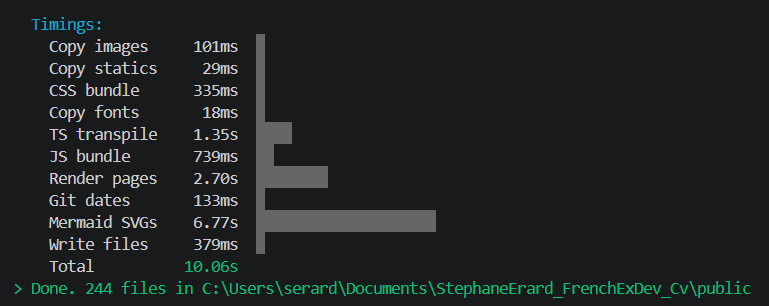
The jsdom Detour
The obvious optimization: skip Chrome entirely. Mermaid is a JavaScript library. Why not run it directly in Node.js with jsdom?
// jsdom approach — renders SVG without Chrome
const dom = new JSDOM('<!DOCTYPE html><html><body></body></html>');
const mermaid = (await import('mermaid')).default;
mermaid.initialize({ startOnLoad: false, theme: 'dark' });
const { svg } = await mermaid.render('test-id', 'graph TD\n  A-->B');
// svg.length: 7607 — it works!
It compiled. It ran. It produced SVGs. 419 diagrams in 72 seconds, zero Chrome processes.
Then I looked at the output:
| jsdom render | Chrome render | |
|---|---|---|
viewBox |
-50 -50 200 150 |
100 -61 2390 569.6 |
width |
200 |
2390 |
| Layout | Nodes stacked on top of each other | Proper flow layout |
The problem: mermaid's layout engine (dagre) calls getBBox() and getComputedTextLength() on SVG elements to measure node sizes before positioning them. jsdom doesn't implement real SVG measurement — these methods return hardcoded zeros or stubs.
// jsdom polyfill — returns fake measurements
SVGElement.prototype.getBBox = function () {
  return { x: 0, y: 0, width: 100, height: 50 }; // always the same
};
Every node gets the same bounding box. Dagre thinks they're all the same size and piles them in one spot. The SVGs are technically valid XML, but visually broken.
Lesson: mermaid needs a real browser for layout. There's no shortcut around getBBox().
The Solution: Single Browser, Concurrent Tabs
The key insight from reading @mermaid-js/mermaid-cli's source code: the renderMermaid function takes a browser instance as its first argument. It creates a new page (tab) for each render and closes it after.
// mermaid-cli's renderMermaid signature
async function renderMermaid(
  browser: Browser,        // ← reusable!
  definition: string,
  outputFormat: 'svg',
  options: { mermaidConfig, backgroundColor, ... }
): Promise<{ data: Uint8Array, title, desc }>
Instead of spawning 838 Chrome processes, I launch one browser and open concurrent tabs:
// New approach: single browser, N concurrent tabs
const browser = await puppeteer.launch({
  headless: 'shell',
  args: ['--no-sandbox', '--disable-setuid-sandbox'],
});

// Each render opens a tab, renders, closes the tab
const { data } = await renderMermaid(browser, source, 'svg', {
  mermaidConfig: { startOnLoad: false, theme: 'dark' },
  backgroundColor: 'transparent',
});

// After all 838 renders:
await browser.close(); // one close, not 838
For each block, dark and light variants render concurrently (2 tabs). Multiple blocks render in parallel (N blocks × 2 tabs = 2N tabs). The concurrency is configurable — defaulting to 8 blocks (16 tabs).

Architecture
The renderer is a standalone module (scripts/lib/mermaid-renderer.ts) with dependency injection for testability.
State Machine
Each block tracks its own lifecycle through a strict state machine:

Transitions are validated — attempting an invalid transition (e.g., Done → Rendering) throws immediately rather than producing silent corruption:
const TRANSITIONS: Record<BlockState, readonly BlockState[]> = {
  [BlockState.Pending]:   [BlockState.Rendering],
  [BlockState.Rendering]: [BlockState.Writing, BlockState.Failed],
  [BlockState.Writing]:   [BlockState.Done, BlockState.Failed],
  [BlockState.Done]:      [],
  [BlockState.Failed]:    [],
};

export function transition(from: BlockState, to: BlockState): BlockState {
  if (!TRANSITIONS[from].includes(to)) {
    throw new Error(`Invalid state transition: ${from} → ${to}`);
  }
  return to;
}
This caught a real bug during development: duplicate block IDs in the input were attempting Rendering → Rendering, which the state machine rejected. The fix (deduplication) was obvious once the error was clear.
DI Interfaces
Two injected interfaces keep the renderer testable without touching the filesystem or launching a browser:
// Wraps Puppeteer — tests can inject a mock
interface MermaidEngine {
  render(id: string, source: string, config: Record<string, unknown>): Promise<{ svg: string }>;
  close(): Promise<void>;
}

// Wraps fs.promises — tests can inject an in-memory store
interface AsyncIO {
  writeFile(path: string, data: string): Promise<void>;
  mkdir(path: string): Promise<void>;
  exists(path: string): Promise<boolean>;
  readDir(path: string): Promise<string[]>;
  unlink(path: string): Promise<void>;
}
Event-Driven Progress
The renderer emits typed events instead of logging directly:
type RendererEvent =
  | { type: 'block:state'; id: string; from: BlockState; to: BlockState }
  | { type: 'progress'; done: number; total: number }
  | { type: 'error'; id: string; error: string };
The caller decides what to do with them — the build script logs progress at 10% intervals, a test suite might collect them into an array for assertions.
Async Pool
Concurrency is managed by a generic async pool — no external dependencies:
async function asyncPool<T>(
  concurrency: number,
  items: T[],
  fn: (item: T) => Promise<void>,
): Promise<void> {
  const executing = new Set<Promise<void>>();
  for (const item of items) {
    const p = fn(item).then(
      () => { executing.delete(p); },
      () => { executing.delete(p); },
    );
    executing.add(p);
    if (executing.size >= concurrency) {
      await Promise.race(executing);
    }
  }
  await Promise.all(executing);
}
Results
Full build rendering all 390 unique diagrams (780 SVGs):
| Metric | Before (mmdc CLI) | After (single browser) |
|---|---|---|
| Chrome processes | 838 | 1 |
| Chrome boot overhead | ~1-2s × 838 | ~3s (once) |
| Concurrent renders | 4 processes | 8 blocks × 2 tabs = 16 tabs |
| Full render time | estimated 15-20min | ~7 min |
| Incremental (5 changed) | ~15s | ~3.4s |
| Memory profile | 4 × 50-100MB Chrome | 1 Chrome + 16 tabs |
The incremental path is unchanged — hash-based caching skips unchanged diagrams. Only modified or missing blocks trigger a render.
What Didn't Work
jsdom for SVG rendering. Pure Node.js mermaid rendering produces syntactically valid SVGs with completely wrong layouts. The root cause is fundamental: jsdom doesn't implement SVG geometry interfaces. getBBox(), getComputedTextLength(), getBoundingClientRect() — these all return zeros or stubs. Mermaid's layout algorithms depend on accurate text and node measurements to position elements.
This isn't a jsdom bug — it's a design boundary. jsdom implements the DOM API, not a rendering engine. SVG layout requires actual pixel-level text measurement, which requires a font rasterizer, which requires a real browser.
Mermaid's parse() works fine in jsdom — the validation script uses it to check syntax without rendering. But render() needs Chrome.
The Meta Touch
This blog post contains mermaid diagrams. Those diagrams were rendered by the exact pipeline described in this post. The state machine that tracked their rendering is the same state machine shown in the state diagram above.
If you're reading this and the diagrams look correct — it works.