Part VIII: The Reactive Pattern
"System.Reactive is powerful. Too powerful."
Rx.NET is one of the most impressive libraries in the .NET ecosystem. It implements the Observable pattern with a composable operator algebra that can express virtually any asynchronous data flow: merging, splitting, buffering, throttling, windowing, grouping, joining, replaying, multicasting, scheduling, error handling, backpressure, and dozens of other transformations. The System.Reactive NuGet package ships over 400 operators. The documentation runs to hundreds of pages. The learning curve is steep and the reward for climbing it is genuine: once you internalize the Rx mental model, you can express data pipelines in a few lines that would take hundreds of lines of imperative code with manual state management, timers, locks, and buffers.
And that is the problem.
Most domain developers do not need 400 operators. They need ten. They need to filter events by a predicate. They need to transform one event type into another. They need to merge two streams. They need to buffer events into batches. They need to throttle a noisy source. They need to deduplicate consecutive identical events. They need to take the first N events. They need to skip the first N events. They need to narrow a polymorphic stream to a specific subtype. And they need all of this to be testable without schedulers, virtual time, and the TestScheduler API that even experienced Rx developers find challenging.
FrenchExDev.Net.Reactive wraps System.Reactive with a domain-oriented facade. The core abstraction is IEventStream<T> -- an interface with two members: Subscribe and AsObservable. Ten extension methods provide the operators that cover the vast majority of real-world use cases. The internal ObservableEventStream<T> adapter ensures that operator chains stay in the IEventStream<T> vocabulary. And TestEventStream<T> from the .Testing package provides a dead-simple test double that records every published event in a list.
This is not a replacement for Rx. It is a curated subset. If you need the full power of System.Reactive -- hot vs cold observables, custom schedulers, replay subjects, windowed joins -- the AsObservable() escape hatch gives you direct access to the underlying IObservable<T>. You can drop into raw Rx for the five percent of cases that need it, and stay in the IEventStream<T> vocabulary for the ninety-five percent that do not.
This chapter covers the complete FrenchExDev.Net.Reactive package: the IEventStream<T> interface and its covariant type parameter, the EventStream<T> mutable publisher, all ten operators with signatures and examples, the ObservableEventStream<T> adapter, the AsObservable() escape hatch, real-world examples covering sensor data processing and domain event aggregation, composition with Mediator and Saga, testing with TestEventStream<T>, DI registration, and a comparison between raw Rx and the IEventStream<T> facade.
The Problem with Raw Rx
Before introducing the IEventStream<T> abstraction, it is worth understanding why wrapping Rx is necessary at all. Rx.NET is a mature, well-tested library. It has been available since 2012. It powers production systems at scale. Why not use it directly?
The answer is not that Rx is bad. The answer is that Rx is a general-purpose reactive programming framework, and general-purpose tools impose general-purpose costs on every consumer -- even those who only need a small fraction of the capability.
Problem 1: API Surface Overload
The System.Reactive package exposes over 400 operators as extension methods on IObservable<T>. When a domain developer types stream. and triggers IntelliSense, they see a wall of methods: Aggregate, All, Amb, Any, Append, AsObservable, Average, Buffer, Case, Cast, Catch, CombineLatest, Concat, Contains, Count, Create, Debounce, DefaultIfEmpty, Defer, Delay, Dematerialize, Distinct, DistinctUntilChanged, Do, DoWhile, ElementAt, Empty, Finally, First, FirstAsync, FirstOrDefault, FlatMap, For, ForEach, Fork, FromAsync, FromEvent, Generate, GroupBy, GroupByUntil, GroupJoin, If, IgnoreElements, Interval, Join, Last, Latest, LongCount, Materialize, Max, MaxBy, Merge, Min, MinBy, Multicast, Never, ObserveOn, OfType, OnErrorResumeNext, Pair, Pairwise, Partition, Prepend, Publish, Range, Reduce, RefCount, Repeat, Replay, Retry, Return, Sample, Scan, Select, SelectMany, SequenceEqual, Share, Single, Skip, SkipLast, SkipUntil, SkipWhile, Start, StartWith, Subscribe, SubscribeOn, Sum, Switch, Synchronize, Take, TakeLast, TakeUntil, TakeWhile, Throttle, Throw, TimeInterval, Timeout, Timer, Timestamp, ToArray, ToDictionary, ToEvent, ToList, ToLookup, ToObservable, ToTask, Using, When, Where, Window, WithLatestFrom, Zip.
That is not a complete list. That is a representative subset. And every single one of those operators appears in IntelliSense every time anyone types a dot after an IObservable<T> reference. The domain developer who wants to filter temperature readings by validity does not need to scroll past Amb, Case, Dematerialize, FlatMap, GroupByUntil, Materialize, Multicast, OnErrorResumeNext, Partition, Publish, RefCount, Replay, and Synchronize to find Where.
This is not a minor annoyance. It is a cognitive tax. Every time a developer encounters an unfamiliar operator in a code review, they have to look it up. Every time a junior developer writes a pipeline, they wonder whether they should be using Throttle or Debounce or Sample (all three do different things, and the names do not make it obvious which one does what). The vast surface area turns a simple "filter and transform" pipeline into a research project.
Problem 2: IObservable in Domain Signatures
When you use Rx directly, IObservable<T> appears in your domain interfaces:
public interface ITemperatureMonitor
{
    IObservable<TemperatureReading> Readings { get; }
}

public interface IOrderEventBus
{
    IObservable<OrderEvent> OrderEvents { get; }
    void Publish(OrderEvent @event);
}
Now every consumer of ITemperatureMonitor and IOrderEventBus needs a using System.Reactive.Linq import. Every consumer needs to know Rx operator names. Every consumer who wants to test their subscription needs TestScheduler or ReplaySubject or one of the other Rx test utilities. The implementation detail -- that you chose Rx as the underlying mechanism -- has leaked into the public contract.
If you later decide to replace Rx with System.Threading.Channels, or with a custom EventEmitter, or with a cloud-based event bus, every consumer that depends on IObservable<T> must change. The interface did not protect you from the implementation.
Problem 3: Disposable Management
Every Rx subscription returns an IDisposable. If you forget to dispose it, the subscription leaks. If you dispose it twice, you might get unexpected behavior depending on the operator chain. Managing subscription lifetimes in a DI container -- where some services are singleton and some are scoped -- requires discipline that Rx itself does not enforce.
In a typical application, you see code like this:
public class AlertService : IDisposable
{
    private readonly IDisposable _subscription;

    public AlertService(IObservable<TemperatureReading> readings)
    {
        _subscription = readings
            .Where(r => r.IsValid)
            .DistinctUntilChanged(r => r.Value)
            .Throttle(TimeSpan.FromSeconds(1))
            .Select(r => new Alert(r.SensorId, r.Value, r.Timestamp))
            .Subscribe(
                onNext: alert => Process(alert),
                onError: ex => Log(ex),
                onCompleted: () => Log("Stream completed"));
    }

    public void Dispose() => _subscription.Dispose();

    // ...
}
The _subscription field. The IDisposable implementation. The Dispose method that delegates to the subscription. This boilerplate exists in every class that subscribes to an IObservable<T>. It is not hard to write. It is hard to remember, and easy to forget. And when you forget, the subscription lives forever, holding references to objects that should have been garbage collected.
Problem 4: The Vocabulary Gap
Domain developers speak a different language than Rx developers. When a domain developer says "filter events," they mean Where. When they say "transform events," they mean Select. When they say "combine two streams," they mean Merge (or maybe CombineLatest or Zip or WithLatestFrom -- and now they have to figure out which one). When they say "batch events," they mean Buffer (or maybe Window -- and those are different).
The Rx operator names are technically precise but not domain-friendly. Select is LINQ vocabulary, not event vocabulary. Where is LINQ vocabulary, not event vocabulary. The FrenchExDev Reactive package renames these to domain-oriented equivalents: Filter instead of Where, Map instead of Select. These are the same names used by every other event streaming library in every other ecosystem: Kafka Streams uses filter and map, RxJava uses filter and map, RxJS uses filter and map. The .NET ecosystem's insistence on LINQ naming (Where, Select) for everything is a historical artifact, not a design principle.
The IEventStream Interface
The core abstraction is a single interface with two members:
namespace FrenchExDev.Net.Reactive;

public interface IEventStream<out T>
{
    IDisposable Subscribe(
        Action<T> onNext,
        Action<Exception>? onError = null,
        Action? onCompleted = null);

    IObservable<T> AsObservable();
}
That is it. Two members. One subscribes to events. The other provides an escape hatch to the full Rx universe.
Covariance
The out keyword on the type parameter is important. IEventStream<out T> is covariant, which means an IEventStream<DerivedEvent> is assignable to a variable of type IEventStream<BaseEvent>:
public record DomainEvent(string Source, DateTimeOffset Timestamp);
public record OrderCreated(string OrderId, string Source, DateTimeOffset Timestamp)
    : DomainEvent(Source, Timestamp);

IEventStream<OrderCreated> orderStream = GetOrderStream();
IEventStream<DomainEvent> domainStream = orderStream; // Compiles -- covariance
This is the same variance that IEnumerable<out T>, IReadOnlyList<out T>, and IObservable<out T> use. It is essential for event stream composition: you want to be able to merge a stream of OrderCreated events with a stream of PaymentReceived events into a stream of DomainEvent events, and covariance makes that possible without explicit casts.
Note that covariance constrains the interface: T can only appear in output positions. This is why IEventStream<T> does not have a Publish(T value) method. Publishing is an input operation -- it puts a T into the stream -- and input operations are contravariant, not covariant. The Publish method lives on EventStream<T>, the concrete class, not on the interface.
This is a deliberate design choice. The producer (the code that publishes events) holds an EventStream<T> reference. The consumer (the code that subscribes to events) holds an IEventStream<T> reference. The consumer cannot publish. The producer can publish and subscribe. The type system enforces the direction of data flow.
public class TemperatureMonitor
{
    // Producer holds the concrete type -- can Publish
    private readonly EventStream<TemperatureReading> _stream = new();

    // Consumer sees the interface -- can only Subscribe
    public IEventStream<TemperatureReading> Readings => _stream;

    public void RecordReading(double value, string sensorId)
    {
        _stream.Publish(new TemperatureReading(sensorId, value, DateTimeOffset.UtcNow));
    }
}
Subscribe
The Subscribe method takes three callbacks: onNext (required), onError (optional), and onCompleted (optional). It returns an IDisposable that unsubscribes when disposed:
IEventStream<TemperatureReading> readings = monitor.Readings;

IDisposable subscription = readings.Subscribe(
    onNext: reading => Console.WriteLine($"Temperature: {reading.Value}C"),
    onError: ex => Console.Error.WriteLine($"Stream error: {ex.Message}"),
    onCompleted: () => Console.WriteLine("Stream completed"));

// Later: unsubscribe
subscription.Dispose();
The optional parameters use default values of null, which means you can subscribe with just the onNext callback:
IDisposable subscription = readings.Subscribe(
    onNext: reading => Console.WriteLine($"Temperature: {reading.Value}C"));
If an error occurs on the stream and no onError callback is provided, the error propagates according to Rx semantics -- typically terminating the subscription. If you care about errors, provide the callback. If you do not, the default behavior is acceptable for most use cases.
AsObservable
The AsObservable() method returns the underlying IObservable<T>. This is the escape hatch. When the ten operators on IEventStream<T> are not enough -- when you need CombineLatest, or GroupBy, or Window, or any of the other 390 operators that the curated surface does not expose -- you drop down to raw Rx:
IEventStream<SensorReading> readings = GetReadings();

// Drop to raw Rx for a complex windowed aggregation
IObservable<double> averages = readings
    .AsObservable()
    .Window(TimeSpan.FromMinutes(5))
    .SelectMany(window => window.Average(r => r.Value));

// Subscribe using Rx directly
averages.Subscribe(avg => Console.WriteLine($"5-min average: {avg}"));
The escape hatch is important because it means IEventStream<T> does not have to be complete. It does not have to expose every Rx operator through a domain-friendly wrapper. It only needs to expose the operators that ninety-five percent of consumers use ninety-five percent of the time. For the remaining five percent, AsObservable() gives full access with zero friction.
The Class Hierarchy
Before diving into each class, here is the complete type hierarchy:

Three implementations. One for production publishing (EventStream<T>). One for operator chaining (ObservableEventStream<T>). One for testing (TestEventStream<T>). The interface is the only type that appears in domain signatures. The implementations are construction details.
EventStream: The Mutable Publisher
EventStream<T> is the concrete class you instantiate when you need to publish events. It is sealed, it implements IEventStream<T> and IDisposable, and it is backed by Rx's Subject<T>:
namespace FrenchExDev.Net.Reactive;

public sealed class EventStream<T> : IEventStream<T>, IDisposable
{
    private readonly Subject<T> _subject = new();

    public void Publish(T value) => _subject.OnNext(value);

    public void Complete() => _subject.OnCompleted();

    public void Error(Exception error) => _subject.OnError(error);

    public IDisposable Subscribe(
        Action<T> onNext,
        Action<Exception>? onError = null,
        Action? onCompleted = null)
    {
        return _subject.Subscribe(
            onNext,
            onError ?? (_ => { }),
            onCompleted ?? (() => { }));
    }

    public IObservable<T> AsObservable() => _subject.AsObservable();

    public void Dispose() => _subject.Dispose();
}
Publish
Publish(T value) sends a single event to all current subscribers. It delegates to Subject<T>.OnNext, which delivers the event synchronously to each subscriber in the order they subscribed. If a subscriber throws an exception, the exception propagates to the caller of Publish. This is standard Rx behavior.
var stream = new EventStream<OrderCreated>();

stream.Subscribe(onNext: e => Console.WriteLine($"Order {e.OrderId} created"));

stream.Publish(new OrderCreated("ORD-001", "web", DateTimeOffset.UtcNow));
// Output: Order ORD-001 created

stream.Publish(new OrderCreated("ORD-002", "api", DateTimeOffset.UtcNow));
// Output: Order ORD-002 created
Complete
Complete() signals that the stream will produce no more events. All current subscribers receive the onCompleted callback. Any subsequent call to Publish is silently ignored (per Rx's Subject<T> contract). This is useful for finite streams -- a batch import that publishes one event per row and then completes when the file ends:
var stream = new EventStream<ImportedRow>();

stream.Subscribe(
    onNext: row => Process(row),
    onCompleted: () => Console.WriteLine("Import complete"));

foreach (var row in ReadCsv("data.csv"))
{
    stream.Publish(row);
}

stream.Complete();
// Output: Import complete
Error
Error(Exception error) signals a terminal failure. All current subscribers receive the onError callback with the exception. The stream is terminated -- no further events, completions, or errors can be sent. This follows the Rx observable contract: a stream produces zero or more OnNext calls, followed by at most one terminal signal (OnCompleted or OnError), and then stops.
var stream = new EventStream<DataPoint>();

stream.Subscribe(
    onNext: point => Store(point),
    onError: ex => LogCritical($"Data pipeline failed: {ex.Message}"));

try
{
    var data = ReadFromSensor();
    stream.Publish(data);
}
catch (SensorException ex)
{
    stream.Error(ex);
    // All subscribers receive the error
    // The stream is now terminated
}
When to Use EventStream vs IEventStream
The rule is simple: producers hold EventStream<T>; consumers hold IEventStream<T>.
The producer is the code that creates events. It needs the Publish, Complete, and Error methods. These methods are on EventStream<T>, not on the interface. The producer instantiates the EventStream<T> and keeps a reference to the concrete type.
The consumer is the code that reacts to events. It needs Subscribe and possibly the operator extensions. These methods are on IEventStream<T>, the interface. The consumer receives the interface through dependency injection or through a property on the producer.
This asymmetry is intentional. It prevents consumers from publishing events that they should only be consuming. The type system enforces the producer/consumer boundary.
// In the domain layer -- producer
public class PaymentGateway : IDisposable
{
    private readonly EventStream<PaymentEvent> _events = new();

    // Consumers see the interface
    public IEventStream<PaymentEvent> Events => _events;

    public async Task<PaymentResult> ProcessPaymentAsync(PaymentRequest request)
    {
        var result = await _gateway.ChargeAsync(request);

        if (result.IsSuccess)
        {
            _events.Publish(new PaymentSucceeded(request.OrderId, result.TransactionId));
        }
        else
        {
            _events.Publish(new PaymentFailed(request.OrderId, result.ErrorCode));
        }

        return result;
    }

    public void Dispose() => _events.Dispose();
}

// In the application layer -- consumer
public class PaymentNotificationService
{
    private readonly IDisposable _subscription;

    public PaymentNotificationService(PaymentGateway gateway)
    {
        _subscription = gateway.Events
            .Filter(e => e is PaymentSucceeded)
            .Subscribe(onNext: e => SendConfirmationEmail(e));
    }
}
The 10 Operators
EventStreamExtensions defines ten static extension methods on IEventStream<T>. Every operator delegates to the corresponding Rx operator on the underlying IObservable<T> and wraps the result back into an IEventStream<T> via the internal ObservableEventStream<T> adapter. Every operator validates its arguments with ArgumentNullException.ThrowIfNull().
The operators are grouped into five categories: transformation, filtering, windowing, timing, and combining. Here is the operator pipeline visualization that shows how they compose:

Each node in that diagram is one operator call. The input type flows left to right: IEventStream<SensorReading> becomes IEventStream<SensorReading> after Filter, stays IEventStream<SensorReading> after DistinctUntilChanged and Throttle, becomes IEventStream<Alert> after Map, becomes IEventStream<IList<Alert>> after Buffer, and finally reaches Subscribe which returns an IDisposable.
Let us walk through each operator.
Transformation: Map
public static IEventStream<TResult> Map<T, TResult>(
    this IEventStream<T> stream,
    Func<T, TResult> mapper)
Delegates to: Observable.Select
Map transforms each event in the stream by applying a function. It is the event stream equivalent of LINQ's Select and Rx's Select. The name Map was chosen because it is the standard name in every other event streaming ecosystem, and because "map" communicates intent more clearly than "select" in an event context.
IEventStream<TemperatureReading> readings = GetReadings();

IEventStream<TemperatureAlert> alerts = readings.Map(reading =>
    new TemperatureAlert(
        SensorId: reading.SensorId,
        Celsius: reading.Value,
        Severity: reading.Value > 100 ? Severity.Critical : Severity.Warning,
        Timestamp: reading.Timestamp));
The input stream produces TemperatureReading events. The Map operator transforms each one into a TemperatureAlert. The output stream produces TemperatureAlert events. The mapping function runs synchronously for each event.
When to use it: Any time you need to transform the shape of events. Domain event to DTO. Raw measurement to enriched measurement. External event to internal event.
// Transform domain events to integration events
IEventStream<IntegrationEvent> integrationEvents = domainEvents
    .Map(domainEvent => new IntegrationEvent(
        Id: Guid.NewGuid(),
        Source: "OrderService",
        Type: domainEvent.GetType().Name,
        Payload: JsonSerializer.Serialize(domainEvent),
        Timestamp: DateTimeOffset.UtcNow));
Filtering: Filter
public static IEventStream<T> Filter<T>(
    this IEventStream<T> stream,
    Func<T, bool> predicate)
Delegates to: Observable.Where
Filter removes events that do not match a predicate. Only events for which the predicate returns true pass through to subscribers. The name Filter was chosen over Where for the same reason Map was chosen over Select: it is the standard name in event streaming, and it communicates intent more clearly in an event context.
IEventStream<TemperatureReading> readings = GetReadings();

// Only readings above the warning threshold
IEventStream<TemperatureReading> warningReadings = readings
    .Filter(r => r.Value > 80.0);

// Only valid readings from a specific sensor
IEventStream<TemperatureReading> sensor42Readings = readings
    .Filter(r => r.IsValid && r.SensorId == "SENSOR-42");
When to use it: Any time you need to select a subset of events based on their content. Filtering by status, by source, by threshold, by type, by any property of the event.
A common pattern is chaining Filter with Map:
IEventStream<CriticalAlert> criticalAlerts = readings
    .Filter(r => r.IsValid)
    .Filter(r => r.Value > 100.0)
    .Map(r => new CriticalAlert(r.SensorId, r.Value, DateTimeOffset.UtcNow));
Multiple Filter calls are composable. Each one narrows the stream further. The Rx engine optimizes this internally.
Filtering: DistinctUntilChanged
public static IEventStream<T> DistinctUntilChanged<T>(
    this IEventStream<T> stream)
Delegates to: Observable.DistinctUntilChanged
DistinctUntilChanged suppresses consecutive duplicate events. If the same value is published twice in a row, the second publication is dropped. If a different value is published and then the original value is published again, the original value passes through -- it is only consecutive duplicates that are suppressed.
var stream = new EventStream<int>();
var received = new List<int>();

stream
    .DistinctUntilChanged()
    .Subscribe(onNext: value => received.Add(value));

stream.Publish(1);  // received: [1]
stream.Publish(1);  // suppressed -- same as last
stream.Publish(2);  // received: [1, 2]
stream.Publish(2);  // suppressed -- same as last
stream.Publish(1);  // received: [1, 2, 1] -- not suppressed, 1 != 2
stream.Publish(3);  // received: [1, 2, 1, 3]
Equality is determined by the default EqualityComparer<T>.Default. For records, this uses value equality. For classes, this uses reference equality unless Equals and GetHashCode are overridden.
When to use it: Sensor data where the same reading arrives repeatedly. Status updates where the status has not actually changed. UI state events where the state is recalculated but often identical.
IEventStream<ConnectionStatus> statusChanges = connectionMonitor.StatusStream
    .DistinctUntilChanged();
// Only fires when the status actually changes, not on every heartbeat
Filtering: OfType
public static IEventStream<TTarget> OfType<TTarget>(
    this IEventStream<object> stream)
Delegates to: Observable.OfType<TTarget>
OfType filters a stream to only include events of a specific type. The source stream must be IEventStream<object> -- a stream of untyped events. The output stream is IEventStream<TTarget>, containing only those events that are instances of TTarget.
IEventStream<object> allDomainEvents = GetDomainEventBus();

// Only order-related events
IEventStream<OrderEvent> orderEvents = allDomainEvents.OfType<OrderEvent>();

// Only payment-related events
IEventStream<PaymentEvent> paymentEvents = allDomainEvents.OfType<PaymentEvent>();
This is particularly useful with polymorphic event buses where multiple event types flow through a single stream:
public interface IDomainEventBus
{
    IEventStream<object> AllEvents { get; }
}

// In the order processing service
public class OrderProcessor
{
    public OrderProcessor(IDomainEventBus bus)
    {
        bus.AllEvents
            .OfType<OrderCreated>()
            .Subscribe(onNext: Handle);
    }

    private void Handle(OrderCreated e)
    {
        // Type-safe -- guaranteed to be OrderCreated
        Console.WriteLine($"Processing order {e.OrderId}");
    }
}
When to use it: When you have a heterogeneous event stream and need to extract events of a specific subtype. Event buses, message queues, multiplexed streams.
Note the constraint: the source must be IEventStream<object>. This is because OfType is a type-narrowing operation. It takes a stream of "anything" and produces a stream of "specifically TTarget." If the source were IEventStream<SomeBaseType>, you would use Filter with a type check instead:
// If source is already typed
IEventStream<DomainEvent> domainEvents = GetDomainEvents();

// Use Filter + Map instead of OfType
IEventStream<OrderCreated> orderCreated = domainEvents
    .Filter(e => e is OrderCreated)
    .Map(e => (OrderCreated)e);
Windowing: Take
public static IEventStream<T> Take<T>(
    this IEventStream<T> stream,
    int count)
Delegates to: Observable.Take
Take produces the first N events from the stream and then completes. After N events have been emitted, the subscription is automatically terminated.
IEventStream<LogEntry> logs = GetLogStream();

// Only the first 100 log entries
logs.Take(100).Subscribe(onNext: entry => Display(entry));
This is useful for sampling, for "first N" queries, and for bounded consumption of potentially infinite streams:
// Sample the first 10 readings from a new sensor to verify calibration
IEventStream<SensorReading> calibrationSample = newSensor.Readings.Take(10);

calibrationSample.Subscribe(
    onNext: reading => Verify(reading),
    onCompleted: () => Console.WriteLine("Calibration sample collected"));
When to use it: When you need a finite number of events from an infinite or long-lived stream. Sampling, pagination of live data, bounded consumption.
Windowing: Skip
public static IEventStream<T> Skip<T>(
    this IEventStream<T> stream,
    int count)
Delegates to: Observable.Skip
Skip ignores the first N events and then passes all subsequent events through. This is the complement of Take.
IEventStream<SensorReading> readings = sensor.Readings;

// Skip the first 5 warmup readings
IEventStream<SensorReading> stableReadings = readings.Skip(5);
A common pattern is combining Skip and Take to extract a window:
// Skip the first 10, then take the next 20
IEventStream<LogEntry> page2 = logStream.Skip(10).Take(20);
When to use it: When the first N events are noise -- sensor warmup periods, initial handshake messages, setup events that should not trigger business logic.
Windowing: Buffer (Count)
public static IEventStream<IList<T>> Buffer<T>(
    this IEventStream<T> stream,
    int count)
Delegates to: Observable.Buffer(int count)
Buffer with a count parameter collects events into batches of a fixed size. Each time the buffer reaches the specified count, it emits the entire batch as an IList<T> and starts a new buffer.
IEventStream<OrderEvent> orders = GetOrderStream();

// Process orders in batches of 50
orders.Buffer(50).Subscribe(onNext: batch =>
{
    Console.WriteLine($"Processing batch of {batch.Count} orders");
    foreach (var order in batch)
    {
        ProcessOrder(order);
    }
});
The buffer emits exactly when the count is reached. If the stream completes before the buffer is full, the remaining events are emitted as a partial batch.
When to use it: Batch inserts to a database. Bulk API calls. Aggregated reports. Any scenario where processing events one at a time is inefficient but processing them in groups is efficient.
// Batch insert sensor readings into the database
readings.Buffer(100).Subscribe(onNext: async batch =>
{
    await _repository.BulkInsertAsync(batch);
    _logger.LogInformation("Inserted {Count} readings", batch.Count);
});
Windowing: Buffer (TimeSpan)
public static IEventStream<IList<T>> Buffer<T>(
    this IEventStream<T> stream,
    TimeSpan timeSpan)
Delegates to: Observable.Buffer(TimeSpan timeSpan)
Buffer with a TimeSpan parameter collects events over a fixed time window. When the window expires, all events collected during that window are emitted as an IList<T>. If no events arrived during the window, an empty list is emitted.
IEventStream<ClickEvent> clicks = GetClickStream();

// Aggregate clicks into 10-second windows
clicks.Buffer(TimeSpan.FromSeconds(10)).Subscribe(onNext: batch =>
{
    Console.WriteLine($"{batch.Count} clicks in the last 10 seconds");
    if (batch.Count > 100)
    {
        RaiseClickFloodAlert();
    }
});
When to use it: Time-based aggregation. Metrics windows. Rate monitoring. Periodic batch processing where the batch interval matters more than the batch size.
// Aggregate error events into 1-minute windows for monitoring
errorStream
    .Buffer(TimeSpan.FromMinutes(1))
    .Filter(batch => batch.Count > 0) // Ignore empty windows
    .Subscribe(onNext: batch =>
    {
        var errorRate = batch.Count;
        _metrics.RecordErrorRate(errorRate);

        if (errorRate > _threshold)
        {
            _alertService.TriggerAlert($"Error rate spike: {errorRate}/min");
        }
    });
Timing: Throttle
public static IEventStream<T> Throttle<T>(
    this IEventStream<T> stream,
    TimeSpan dueTime)
Delegates to: Observable.Throttle
Throttle suppresses events that arrive faster than a specified rate. When an event arrives, Throttle starts a timer of dueTime duration. If another event arrives before the timer expires, the previous event is dropped and the timer restarts with the new event. Only when the timer expires without interruption does the event pass through.
This is technically a "debounce" operation -- it emits the last event after a quiet period. The name Throttle was chosen because that is what Rx.NET calls it, and changing the name would cause confusion for developers who know the Rx API.
IEventStream<SearchQuery> searchQueries = GetSearchQueryStream();

// Only search after the user stops typing for 300ms
IEventStream<SearchQuery> debouncedQueries = searchQueries
    .Throttle(TimeSpan.FromMilliseconds(300));

debouncedQueries.Subscribe(onNext: query => ExecuteSearch(query.Text));
When to use it: Auto-complete search boxes. Sensor data where you only care about the latest reading after a burst. Configuration change detection where rapid successive changes should be collapsed into one. Any "noisy" source where you want to wait for a quiet period before acting.
// Only persist configuration changes after 2 seconds of stability
configChanges
    .Throttle(TimeSpan.FromSeconds(2))
    .Subscribe(onNext: async config =>
    {
        await _repository.SaveConfigAsync(config);
        _logger.LogInformation("Configuration persisted after stabilization");
    });
Combining: Merge
public static IEventStream<T> Merge<T>(
    this IEventStream<T> stream,
    IEventStream<T> other)
Delegates to: Observable.Merge
Merge combines two streams into one. Events from both streams are interleaved in the order they arrive. The merged stream completes only when both source streams have completed. If either source stream errors, the merged stream errors.
IEventStream<PaymentEvent> stripeEvents = GetStripeStream();
IEventStream<PaymentEvent> paypalEvents = GetPayPalStream();

IEventStream<PaymentEvent> allPaymentEvents = stripeEvents.Merge(paypalEvents);

allPaymentEvents.Subscribe(onNext: e =>
    Console.WriteLine($"Payment event from {e.Provider}: {e.Type}"));
You can chain multiple Merge calls to combine more than two streams:
IEventStream<DomainEvent> allEvents = orderEvents
    .Merge(paymentEvents)
    .Merge(inventoryEvents)
    .Merge(shippingEvents);
When to use it: Aggregating events from multiple sources into a single handler. Multi-provider integrations. Fan-in patterns where multiple producers feed a single consumer.
// Merge events from all microservices into a unified audit stream
IEventStream<AuditEvent> auditStream = orderService.Events
    .Map(e => new AuditEvent("Orders", e))
    .Merge(paymentService.Events.Map(e => new AuditEvent("Payments", e)))
    .Merge(inventoryService.Events.Map(e => new AuditEvent("Inventory", e)));

auditStream.Subscribe(onNext: e => _auditLog.Append(e));
Operator Summary Table
Here is the complete operator reference:
| Operator | Signature | Rx Equivalent | Category | Output Type |
|---|---|---|---|---|
Map |
IEventStream<TResult> Map<T, TResult>(Func<T, TResult>) |
Select |
Transformation | IEventStream<TResult> |
Filter |
IEventStream<T> Filter<T>(Func<T, bool>) |
Where |
Filtering | IEventStream<T> |
DistinctUntilChanged |
IEventStream<T> DistinctUntilChanged<T>() |
DistinctUntilChanged |
Filtering | IEventStream<T> |
OfType |
IEventStream<TTarget> OfType<TTarget>() |
OfType |
Filtering | IEventStream<TTarget> |
Take |
IEventStream<T> Take<T>(int) |
Take |
Windowing | IEventStream<T> |
Skip |
IEventStream<T> Skip<T>(int) |
Skip |
Windowing | IEventStream<T> |
Buffer (count) |
IEventStream<IList<T>> Buffer<T>(int) |
Buffer |
Windowing | IEventStream<IList<T>> |
Buffer (time) |
IEventStream<IList<T>> Buffer<T>(TimeSpan) |
Buffer |
Windowing | IEventStream<IList<T>> |
Throttle |
IEventStream<T> Throttle<T>(TimeSpan) |
Throttle |
Timing | IEventStream<T> |
Merge |
IEventStream<T> Merge<T>(IEventStream<T>) |
Merge |
Combining | IEventStream<T> |
Ten operators. Ten corresponding Rx operators. Ten domain-vocabulary names. And the AsObservable() escape hatch for everything else.
The ObservableEventStream Adapter
When you call Filter, Map, or any other operator on an IEventStream<T>, the operator needs to return an IEventStream<T> -- not an IObservable<T>. But the operator delegates to an Rx operator, which returns an IObservable<T>. Something needs to bridge the gap.
That something is ObservableEventStream<T>:
namespace FrenchExDev.Net.Reactive;

internal sealed class ObservableEventStream<T> : IEventStream<T>
{
    private readonly IObservable<T> _observable;

    internal ObservableEventStream(IObservable<T> observable)
    {
        _observable = observable;
    }

    public IDisposable Subscribe(
        Action<T> onNext,
        Action<Exception>? onError = null,
        Action? onCompleted = null)
    {
        return _observable.Subscribe(
            onNext,
            onError ?? (_ => { }),
            onCompleted ?? (() => { }));
    }

    public IObservable<T> AsObservable() => _observable;
}
It is internal. It is sealed. It wraps an IObservable<T> and exposes it through the IEventStream<T> interface. Consumer code never sees this type. They see IEventStream<T> -- the same interface they started with.
This is how the operator implementations work internally. Here is the Filter extension method:
public static IEventStream<T> Filter<T>(
    this IEventStream<T> stream,
    Func<T, bool> predicate)
{
    ArgumentNullException.ThrowIfNull(stream);
    ArgumentNullException.ThrowIfNull(predicate);

    var filtered = stream.AsObservable().Where(predicate);
    return new ObservableEventStream<T>(filtered);
}
And here is Map:
public static IEventStream<TResult> Map<T, TResult>(
    this IEventStream<T> stream,
    Func<T, TResult> mapper)
{
    ArgumentNullException.ThrowIfNull(stream);
    ArgumentNullException.ThrowIfNull(mapper);

    var mapped = stream.AsObservable().Select(mapper);
    return new ObservableEventStream<TResult>(mapped);
}
The pattern is identical for every operator:
- Validate arguments with
ArgumentNullException.ThrowIfNull(). - Call
AsObservable()to get the underlyingIObservable<T>. - Apply the Rx operator.
- Wrap the result in
ObservableEventStream<T>. - Return as
IEventStream<T>.
This pattern has an important consequence: operator chains stay in the IEventStream<T> vocabulary. When you write:
var alerts = readings
    .Filter(r => r.IsValid)
    .DistinctUntilChanged()
    .Throttle(TimeSpan.FromSeconds(1))
    .Map(r => new Alert(r));
Every intermediate variable is IEventStream<T>. The consumer never touches IObservable<T> unless they explicitly call AsObservable(). The domain vocabulary is preserved throughout the entire pipeline.
Why Not Expose IObservable Directly?
You might wonder: why bother with the adapter? Why not just have the operators return IObservable<T> and let consumers call Subscribe on that?
Two reasons.
Reason 1: Vocabulary consistency. If Filter returned IObservable<T>, then the next operator in the chain would need to be an Rx operator, not an IEventStream<T> operator. You would write readings.Filter(r => r.IsValid).Select(r => new Alert(r)) instead of readings.Filter(r => r.IsValid).Map(r => new Alert(r)). The domain vocabulary would break after the first operator call.
Reason 2: Testability. Code that depends on IEventStream<T> can be tested with TestEventStream<T>. Code that depends on IObservable<T> requires Rx test utilities. By keeping everything in the IEventStream<T> world, we keep the testing story simple.
AsObservable() -- The Escape Hatch
The ten operators cover the vast majority of use cases. But Rx has 400+ operators for a reason -- some problems genuinely require more sophisticated solutions. AsObservable() provides the escape hatch.
Example: Windowed Aggregation
Suppose you need to calculate a rolling 5-minute average of sensor readings. There is no Average or Window operator in the IEventStream<T> surface. You drop to raw Rx:
IEventStream<SensorReading> readings = sensor.Readings;

IObservable<double> rollingAverages = readings
    .AsObservable()
    .Window(TimeSpan.FromMinutes(5), TimeSpan.FromMinutes(1)) // 5-min windows, 1-min slide
    .SelectMany(window => window.Average(r => r.Value));

rollingAverages.Subscribe(avg =>
    Console.WriteLine($"5-min rolling average: {avg:F1}C"));
Example: CombineLatest
Suppose you have a temperature stream and a humidity stream, and you want to combine the latest values from both into a comfort index:
IEventStream<double> temperature = tempSensor.Readings.Map(r => r.Value);
IEventStream<double> humidity = humiditySensor.Readings.Map(r => r.Value);

IObservable<ComfortIndex> comfortIndex = Observable.CombineLatest(
    temperature.AsObservable(),
    humidity.AsObservable(),
    (temp, humid) => new ComfortIndex(temp, humid, CalculateIndex(temp, humid)));

comfortIndex.Subscribe(index =>
    Console.WriteLine($"Comfort index: {index.Value} (temp={index.Temperature}, humidity={index.Humidity})"));
Example: Retry with Backoff
Suppose you have an event stream that represents a connection to an external service, and you want to automatically reconnect with exponential backoff:
IEventStream<HeartbeatEvent> heartbeats = connectionMonitor.Heartbeats;

IObservable<HeartbeatEvent> resilientHeartbeats = heartbeats
    .AsObservable()
    .RetryWhen(errors => errors
        .Select((error, attempt) => (error, attempt))
        .SelectMany(x => Observable.Timer(TimeSpan.FromSeconds(Math.Pow(2, x.attempt)))));

resilientHeartbeats.Subscribe(
    onNext: hb => UpdateConnectionStatus(hb),
    onError: ex => LogFinalFailure(ex));
These examples show that AsObservable() is not a theoretical escape hatch -- it is a practical one that gets used in real systems. The key insight is that you only drop to raw Rx when you need it. The ten operators handle the common cases. AsObservable() handles the rest.
Real-World Example: Sensor Data Processing
Let us build a complete sensor data processing pipeline that demonstrates how the operators compose. The scenario: a factory floor has hundreds of temperature sensors. Each sensor publishes readings continuously. We need to:
- Filter out invalid readings (sensor errors, calibration failures).
- Deduplicate consecutive identical readings (noisy sensors that report the same value repeatedly).
- Throttle to at most one reading per second per sensor (reduce load on downstream systems).
- Transform readings into alerts when they exceed thresholds.
- Batch alerts into groups of five for efficient notification delivery.
Here is the complete implementation:
public record TemperatureReading(
    string SensorId,
    double Value,
    bool IsValid,
    DateTimeOffset Timestamp);

public record TemperatureAlert(
    string SensorId,
    double Celsius,
    Severity Severity,
    DateTimeOffset Timestamp);

public enum Severity { Info, Warning, Critical }

public class SensorDataProcessor : IDisposable
{
    private readonly IDisposable _subscription;
    private readonly ILogger<SensorDataProcessor> _logger;

    public SensorDataProcessor(
        IEventStream<TemperatureReading> readings,
        IAlertNotificationService notificationService,
        ILogger<SensorDataProcessor> logger)
    {
        _logger = logger;

        _subscription = readings
            .Filter(r => r.IsValid)
            .DistinctUntilChanged()
            .Throttle(TimeSpan.FromSeconds(1))
            .Filter(r => r.Value > 80.0) // Only readings above warning threshold
            .Map(r => new TemperatureAlert(
                SensorId: r.SensorId,
                Celsius: r.Value,
                Severity: r.Value switch
                {
                    > 120.0 => Severity.Critical,
                    > 100.0 => Severity.Warning,
                    _ => Severity.Info
                },
                Timestamp: r.Timestamp))
            .Buffer(5)
            .Subscribe(
                onNext: batch =>
                {
                    _logger.LogInformation(
                        "Sending {Count} temperature alerts", batch.Count);
                    notificationService.SendBatch(batch);
                },
                onError: ex =>
                {
                    _logger.LogError(ex, "Sensor data pipeline failed");
                });
    }

    public void Dispose() => _subscription.Dispose();
}
That is thirty lines of business logic. The pipeline reads top to bottom: filter invalid readings, deduplicate, throttle, filter by threshold, transform to alerts, batch, and send. Each step is one operator call. The intent is clear from the method names alone.
Compare this to the equivalent raw Rx version:
_subscription = readings.AsObservable()
    .Where(r => r.IsValid)
    .DistinctUntilChanged()
    .Throttle(TimeSpan.FromSeconds(1))
    .Where(r => r.Value > 80.0)
    .Select(r => new TemperatureAlert(
        SensorId: r.SensorId,
        Celsius: r.Value,
        Severity: r.Value switch
        {
            > 120.0 => Severity.Critical,
            > 100.0 => Severity.Warning,
            _ => Severity.Info
        },
        Timestamp: r.Timestamp))
    .Buffer(5)
    .Subscribe(
        onNext: batch => { /* ... */ },
        onError: ex => { /* ... */ });
The Rx version is functionally identical. The differences are cosmetic: Where vs Filter, Select vs Map. But those cosmetic differences matter when a domain developer reads the code. "Filter readings, then map to alerts" reads as natural English. "Where readings, then select alerts" reads as SQL.
Here is the sequence diagram showing how events flow through this pipeline:
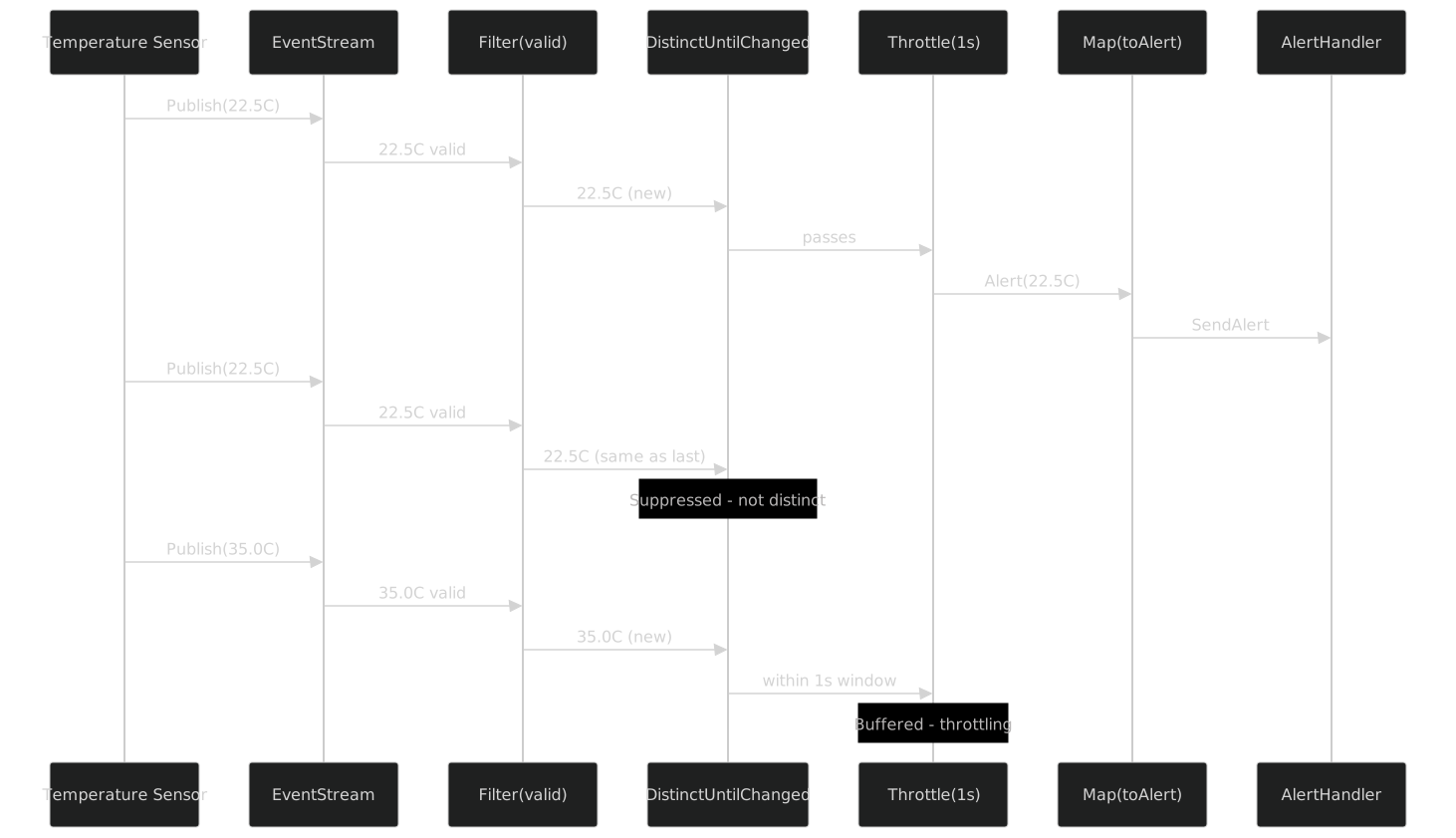
The first reading passes through every stage. The second reading -- identical to the first -- is suppressed by DistinctUntilChanged. The third reading -- different from the second -- passes DistinctUntilChanged but arrives within the throttle window, so Throttle buffers it. When the one-second window expires without another event, the third reading passes through.
Real-World Example: Domain Event Aggregation
The second real-world example demonstrates Merge, OfType, and time-based Buffer in a domain event aggregation scenario.
The scenario: an e-commerce system has multiple bounded contexts -- Orders, Payments, Inventory, Shipping -- each publishing domain events through their own event streams. We need to aggregate all order-related events into 10-second batches for analytics processing.
public abstract record DomainEvent(string Source, DateTimeOffset Timestamp);

public record OrderCreated(string OrderId, string Source, DateTimeOffset Timestamp)
    : DomainEvent(Source, Timestamp);

public record OrderShipped(string OrderId, string TrackingNumber, string Source, DateTimeOffset Timestamp)
    : DomainEvent(Source, Timestamp);

public record PaymentReceived(string OrderId, decimal Amount, string Source, DateTimeOffset Timestamp)
    : DomainEvent(Source, Timestamp);

public record InventoryReserved(string Sku, int Quantity, string Source, DateTimeOffset Timestamp)
    : DomainEvent(Source, Timestamp);
Each bounded context exposes an IEventStream<object> containing its domain events:
public interface IBoundedContextEventBus
{
    IEventStream<object> Events { get; }
}
The aggregation service merges all streams, filters to order-related events, buffers them by time, and processes each batch:
public class OrderEventAggregator : IDisposable
{
    private readonly IDisposable _subscription;

    public OrderEventAggregator(
        IBoundedContextEventBus orderContext,
        IBoundedContextEventBus paymentContext,
        IBoundedContextEventBus inventoryContext,
        IBoundedContextEventBus shippingContext,
        IAnalyticsService analytics,
        ILogger<OrderEventAggregator> logger)
    {
        // Merge all event buses into a single stream
        IEventStream<object> allEvents = orderContext.Events
            .Merge(paymentContext.Events)
            .Merge(inventoryContext.Events)
            .Merge(shippingContext.Events);

        // Filter to order-related events only
        IEventStream<DomainEvent> orderRelatedEvents = allEvents
            .OfType<DomainEvent>()
            .Filter(e => e is OrderCreated or OrderShipped or PaymentReceived);

        // Buffer into 10-second windows
        _subscription = orderRelatedEvents
            .Buffer(TimeSpan.FromSeconds(10))
            .Filter(batch => batch.Count > 0) // Skip empty windows
            .Subscribe(
                onNext: batch =>
                {
                    logger.LogInformation(
                        "Processing analytics batch: {Count} order events in 10s window",
                        batch.Count);

                    var summary = new AnalyticsSummary
                    {
                        WindowStart = batch.Min(e => e.Timestamp),
                        WindowEnd = batch.Max(e => e.Timestamp),
                        OrdersCreated = batch.Count(e => e is OrderCreated),
                        OrdersShipped = batch.Count(e => e is OrderShipped),
                        PaymentsReceived = batch.Count(e => e is PaymentReceived),
                        TotalRevenue = batch
                            .OfType<PaymentReceived>()
                            .Sum(p => p.Amount)
                    };

                    analytics.RecordSummary(summary);
                },
                onError: ex =>
                {
                    logger.LogError(ex, "Event aggregation pipeline failed");
                });
    }

    public void Dispose() => _subscription.Dispose();
}
This pipeline demonstrates the power of composition:
Mergecombines four independent event streams into one.OfType<DomainEvent>narrows fromIEventStream<object>toIEventStream<DomainEvent>.Filterselects only order-related event types.Buffer(TimeSpan)collects events into 10-second windows.Filteron the buffered stream skips empty windows.Subscribeprocesses each batch.
Each operator does one thing. The pipeline reads as a description of the business requirement.
Composing with Other Patterns
The Reactive pattern does not exist in isolation. It composes with the other FrenchExDev patterns to form complete application architectures.
Mediator to EventStream
The Mediator pattern (Part VII) supports notifications: events published to all registered handlers via IMediator.PublishAsync. But mediator notifications are request/response -- they run synchronously (or in Task-based sequence/parallel) and complete. Sometimes you want to bridge mediator notifications into a reactive stream for further processing:
public class MediatorEventBridge<TNotification> : INotificationHandler<TNotification>
    where TNotification : INotification
{
    private readonly EventStream<TNotification> _stream;

    public MediatorEventBridge(EventStream<TNotification> stream)
    {
        _stream = stream;
    }

    public Task Handle(TNotification notification, CancellationToken ct)
    {
        _stream.Publish(notification);
        return Task.CompletedTask;
    }
}
Now mediator notifications flow into the reactive stream, where they can be filtered, throttled, buffered, and transformed using the ten operators:
var orderStream = new EventStream<OrderCreatedNotification>();
var bridge = new MediatorEventBridge<OrderCreatedNotification>(orderStream);

// Register bridge as a notification handler via DI
// Now every OrderCreatedNotification published through the mediator
// also appears in the reactive stream

orderStream
    .Throttle(TimeSpan.FromSeconds(5))
    .Map(n => new AnalyticsEvent("OrderCreated", n.OrderId))
    .Subscribe(onNext: analytics.Track);
This pattern is useful when you want the synchronous, handler-based semantics of Mediator for primary processing, but the reactive, stream-based semantics of IEventStream<T> for secondary concerns like analytics, monitoring, and auditing.
EventStream Feeding Saga Triggers
The Saga pattern (Part IX) orchestrates multi-step workflows with compensation. Sometimes a saga should be triggered by events in a reactive stream rather than by a direct command:
public class OrderFulfillmentTrigger : IDisposable
{
    private readonly IDisposable _subscription;

    public OrderFulfillmentTrigger(
        IEventStream<PaymentReceived> paymentEvents,
        ISagaOrchestrator<OrderFulfillmentContext> sagaOrchestrator)
    {
        _subscription = paymentEvents
            .Filter(p => p.Amount > 0)
            .DistinctUntilChanged()
            .Subscribe(onNext: async payment =>
            {
                var context = new OrderFulfillmentContext(payment.OrderId, payment.Amount);
                await sagaOrchestrator.ExecuteAsync(context);
            });
    }

    public void Dispose() => _subscription.Dispose();
}
The reactive stream filters and deduplicates payment events. When a valid, distinct payment event passes through the pipeline, it triggers the saga orchestrator. The saga handles the multi-step fulfillment workflow (reserve inventory, charge payment, ship order) with compensation on failure. The reactive stream handles the event selection logic. Each pattern does what it is best at.
Clock and Time-Based Operators
The Throttle and Buffer(TimeSpan) operators depend on time. In production, they use the default Rx scheduler, which uses the system clock. In tests, you can provide a custom scheduler through the AsObservable() escape hatch if you need deterministic time control:
// In tests, when you need deterministic time behavior
var testScheduler = new TestScheduler();
var readings = testStream.AsObservable()
    .Throttle(TimeSpan.FromSeconds(1), testScheduler);

testScheduler.AdvanceBy(TimeSpan.FromSeconds(2).Ticks);
For most tests, though, TestEventStream<T> with non-time-based operators is sufficient. The Filter, Map, DistinctUntilChanged, Take, Skip, OfType, and Merge operators are all synchronous and deterministic. Only Throttle and Buffer(TimeSpan) involve time, and those are typically tested at the integration level with real time or with Rx's TestScheduler.
Testing with TestEventStream
TestEventStream<T> lives in the FrenchExDev.Net.Reactive.Testing namespace and is the companion test double for IEventStream<T>. It records every published event in a list, making assertions trivial.
namespace FrenchExDev.Net.Reactive.Testing;

public sealed class TestEventStream<T> : IEventStream<T>, IDisposable
{
    private readonly Subject<T> _subject = new();
    private readonly List<T> _events = new();

    public IReadOnlyList<T> Events => _events;

    public void Publish(T value)
    {
        _events.Add(value);
        _subject.OnNext(value);
    }

    public void Clear() => _events.Clear();

    public IDisposable Subscribe(
        Action<T> onNext,
        Action<Exception>? onError = null,
        Action? onCompleted = null)
    {
        return _subject.Subscribe(
            onNext,
            onError ?? (_ => { }),
            onCompleted ?? (() => { }));
    }

    public IObservable<T> AsObservable() => _subject.AsObservable();

    public void Dispose() => _subject.Dispose();
}
Key Features
Event recording: Every call to Publish adds the event to the internal _events list and also publishes it to the underlying Subject<T>. This means subscribers receive events in real time, and the test can inspect the full history after the fact via the Events property.
Clear: The Clear() method empties the recorded events list. This is useful for multi-phase tests where you want to assert on events from each phase independently.
Dual behavior: TestEventStream<T> acts as both a publisher and a stream. In tests, you use Publish to simulate incoming events and Events to verify what was received. This dual role makes it the only IEventStream<T> implementation where external code can both publish and subscribe -- which is appropriate for tests but not for production code.
Basic Test: Verifying Event Publication
[Fact]
public void Published_events_are_recorded()
{
    using var stream = new TestEventStream<OrderCreated>();

    stream.Publish(new OrderCreated("ORD-001", "web", DateTimeOffset.UtcNow));
    stream.Publish(new OrderCreated("ORD-002", "api", DateTimeOffset.UtcNow));

    Assert.Equal(2, stream.Events.Count);
    Assert.Equal("ORD-001", stream.Events[0].OrderId);
    Assert.Equal("ORD-002", stream.Events[1].OrderId);
}
Testing a Service That Subscribes to Events
Suppose you have a service that subscribes to an IEventStream<OrderCreated> and tracks the total number of orders:
public class OrderCounter
{
    private int _count;

    public OrderCounter(IEventStream<OrderCreated> orders)
    {
        orders.Subscribe(onNext: _ => Interlocked.Increment(ref _count));
    }

    public int Count => _count;
}
Testing this service is straightforward:
[Fact]
public void OrderCounter_increments_on_each_order()
{
    using var stream = new TestEventStream<OrderCreated>();
    var counter = new OrderCounter(stream);

    Assert.Equal(0, counter.Count);

    stream.Publish(new OrderCreated("ORD-001", "web", DateTimeOffset.UtcNow));
    Assert.Equal(1, counter.Count);

    stream.Publish(new OrderCreated("ORD-002", "api", DateTimeOffset.UtcNow));
    Assert.Equal(2, counter.Count);
}
No mocks. No test schedulers. No virtual time. Publish an event, assert the side effect. The test is synchronous and deterministic.
Testing Operator Chains
You can also test operator chains by subscribing to the transformed stream and inspecting the results:
[Fact]
public void Filter_removes_invalid_readings()
{
    using var stream = new TestEventStream<TemperatureReading>();
    var received = new List<TemperatureReading>();

    stream
        .Filter(r => r.IsValid)
        .Subscribe(onNext: r => received.Add(r));

    stream.Publish(new TemperatureReading("S1", 22.5, IsValid: true, DateTimeOffset.UtcNow));
    stream.Publish(new TemperatureReading("S1", -999, IsValid: false, DateTimeOffset.UtcNow));
    stream.Publish(new TemperatureReading("S2", 35.0, IsValid: true, DateTimeOffset.UtcNow));

    Assert.Equal(2, received.Count);
    Assert.Equal(22.5, received[0].Value);
    Assert.Equal(35.0, received[1].Value);
}

[Fact]
public void Map_transforms_readings_to_alerts()
{
    using var stream = new TestEventStream<TemperatureReading>();
    var alerts = new List<TemperatureAlert>();

    stream
        .Filter(r => r.IsValid)
        .Map(r => new TemperatureAlert(r.SensorId, r.Value, Severity.Warning, r.Timestamp))
        .Subscribe(onNext: a => alerts.Add(a));

    stream.Publish(new TemperatureReading("S1", 85.0, IsValid: true, DateTimeOffset.UtcNow));

    Assert.Single(alerts);
    Assert.Equal("S1", alerts[0].SensorId);
    Assert.Equal(85.0, alerts[0].Celsius);
}

[Fact]
public void DistinctUntilChanged_suppresses_consecutive_duplicates()
{
    using var stream = new TestEventStream<int>();
    var received = new List<int>();

    stream
        .DistinctUntilChanged()
        .Subscribe(onNext: v => received.Add(v));

    stream.Publish(1);
    stream.Publish(1);
    stream.Publish(2);
    stream.Publish(2);
    stream.Publish(1);

    Assert.Equal(new[] { 1, 2, 1 }, received);
}
Testing Merge
[Fact]
public void Merge_combines_two_streams()
{
    using var stream1 = new TestEventStream<string>();
    using var stream2 = new TestEventStream<string>();
    var received = new List<string>();

    stream1
        .Merge(stream2)
        .Subscribe(onNext: s => received.Add(s));

    stream1.Publish("from-stream-1");
    stream2.Publish("from-stream-2");
    stream1.Publish("also-from-stream-1");

    Assert.Equal(3, received.Count);
    Assert.Equal("from-stream-1", received[0]);
    Assert.Equal("from-stream-2", received[1]);
    Assert.Equal("also-from-stream-1", received[2]);
}
Testing with Clear
[Fact]
public void Clear_resets_recorded_events()
{
    using var stream = new TestEventStream<int>();

    stream.Publish(1);
    stream.Publish(2);
    Assert.Equal(2, stream.Events.Count);

    stream.Clear();
    Assert.Empty(stream.Events);

    stream.Publish(3);
    Assert.Single(stream.Events);
    Assert.Equal(3, stream.Events[0]);
}
Testing Error Handling
[Fact]
public void Service_handles_stream_errors()
{
    using var stream = new TestEventStream<OrderCreated>();
    var errors = new List<Exception>();

    stream.Subscribe(
        onNext: _ => { },
        onError: ex => errors.Add(ex));

    // The TestEventStream uses Subject<T> internally,
    // so errors propagate through AsObservable()
    // For error testing, use the raw Subject via AsObservable()
    stream.AsObservable().Subscribe(
        onNext: _ => { },
        onError: ex => errors.Add(ex));
}
Testing Complete Pipelines
For end-to-end pipeline tests, TestEventStream<T> composes naturally with the rest of the test infrastructure:
[Fact]
public void SensorDataProcessor_sends_batched_alerts()
{
    // Arrange
    using var readings = new TestEventStream<TemperatureReading>();
    var sentBatches = new List<IList<TemperatureAlert>>();
    var mockNotificationService = new FakeAlertNotificationService(sentBatches);
    var logger = NullLogger<SensorDataProcessor>.Instance;

    using var processor = new SensorDataProcessor(
        readings, mockNotificationService, logger);

    // Act: publish 5 valid, above-threshold readings
    for (int i = 0; i < 5; i++)
    {
        readings.Publish(new TemperatureReading(
            SensorId: $"S{i}",
            Value: 90.0 + i,
            IsValid: true,
            Timestamp: DateTimeOffset.UtcNow));
    }

    // Assert: one batch of 5 alerts
    Assert.Single(sentBatches);
    Assert.Equal(5, sentBatches[0].Count);
    Assert.All(sentBatches[0], alert =>
        Assert.True(alert.Celsius >= 90.0));
}

[Fact]
public void SensorDataProcessor_filters_invalid_readings()
{
    using var readings = new TestEventStream<TemperatureReading>();
    var sentBatches = new List<IList<TemperatureAlert>>();
    var mockNotificationService = new FakeAlertNotificationService(sentBatches);
    var logger = NullLogger<SensorDataProcessor>.Instance;

    using var processor = new SensorDataProcessor(
        readings, mockNotificationService, logger);

    // Publish 3 valid and 2 invalid readings
    readings.Publish(new TemperatureReading("S1", 90.0, IsValid: true, DateTimeOffset.UtcNow));
    readings.Publish(new TemperatureReading("S2", -999, IsValid: false, DateTimeOffset.UtcNow));
    readings.Publish(new TemperatureReading("S3", 95.0, IsValid: true, DateTimeOffset.UtcNow));
    readings.Publish(new TemperatureReading("S4", 0.0, IsValid: false, DateTimeOffset.UtcNow));
    readings.Publish(new TemperatureReading("S5", 100.0, IsValid: true, DateTimeOffset.UtcNow));

    // Buffer of 5 was never filled because only 3 valid readings passed the filter
    // The above-threshold filter further reduces: all 3 pass (90, 95, 100 > 80)
    // But buffer(5) has not been filled, so no batch is emitted yet
    Assert.Empty(sentBatches);

    // Publish 2 more valid above-threshold readings to fill the buffer
    readings.Publish(new TemperatureReading("S6", 85.0, IsValid: true, DateTimeOffset.UtcNow));
    readings.Publish(new TemperatureReading("S7", 88.0, IsValid: true, DateTimeOffset.UtcNow));

    // Now the buffer has 5 items: S1, S3, S5, S6, S7
    Assert.Single(sentBatches);
    Assert.Equal(5, sentBatches[0].Count);
}
These tests are deterministic, fast, and readable. No schedulers. No virtual time. No mock setups with verification counts. Publish events, assert results.
DI Registration
IEventStream<T> and EventStream<T> are typically registered as singletons in the DI container. Event streams are long-lived -- they exist for the lifetime of the application and publish events throughout that lifetime. Scoped or transient registration would create new streams for each scope or each resolution, which would break the pub/sub model.
Using [Injectable]
The simplest registration uses the [Injectable] attribute:
[Injectable(Scope = Scope.Singleton)]
public sealed class OrderEventStream : EventStream<OrderCreated>
{
}
The source generator produces the DI registration:
services.AddSingleton<OrderEventStream>();If you want to register both the concrete type and the interface:
[Injectable(Scope = Scope.Singleton)]
public sealed class OrderEventStream : EventStream<OrderCreated>
{
}

// Manual registration for the interface
services.AddSingleton<IEventStream<OrderCreated>>(sp =>
    sp.GetRequiredService<OrderEventStream>());
Manual Registration
For generic event streams without derived classes:
// Register a singleton EventStream<T>
services.AddSingleton<EventStream<OrderCreated>>();
services.AddSingleton<IEventStream<OrderCreated>>(sp =>
    sp.GetRequiredService<EventStream<OrderCreated>>());

// Register a singleton EventStream<T> for a different event type
services.AddSingleton<EventStream<PaymentReceived>>();
services.AddSingleton<IEventStream<PaymentReceived>>(sp =>
    sp.GetRequiredService<EventStream<PaymentReceived>>());
Multiple Event Streams
A typical application has multiple event streams, one per event type or per bounded context:
public static class EventStreamRegistration
{
    public static IServiceCollection AddEventStreams(this IServiceCollection services)
    {
        // Order events
        services.AddSingleton<EventStream<OrderCreated>>();
        services.AddSingleton<IEventStream<OrderCreated>>(sp =>
            sp.GetRequiredService<EventStream<OrderCreated>>());

        // Payment events
        services.AddSingleton<EventStream<PaymentReceived>>();
        services.AddSingleton<IEventStream<PaymentReceived>>(sp =>
            sp.GetRequiredService<EventStream<PaymentReceived>>());

        // Inventory events
        services.AddSingleton<EventStream<InventoryReserved>>();
        services.AddSingleton<IEventStream<InventoryReserved>>(sp =>
            sp.GetRequiredService<EventStream<InventoryReserved>>());

        return services;
    }
}
Lifetime Considerations
Singleton is the default. Event streams are communication channels. They need to outlive any individual scope. If you register an EventStream<T> as scoped, each scope gets its own stream, and events published in one scope are invisible to subscribers in another scope. This is almost never what you want.
Dispose management. EventStream<T> implements IDisposable. When registered as a singleton, the DI container disposes it when the host shuts down. This disposes the underlying Subject<T>, which completes all active subscriptions. You do not need to manually dispose singleton event streams.
Producer vs consumer registration. The producer (the code that calls Publish) needs the EventStream<T> concrete type. The consumer (the code that calls Subscribe) needs only the IEventStream<T> interface. Register both, as shown above, so the DI container can inject the appropriate type into each class.
Comparison: Raw Rx vs IEventStream
Here is how the two approaches compare across seven dimensions:
| Dimension | Raw System.Reactive | IEventStream<T> |
|---|---|---|
| API surface | 400+ operators | 10 operators + escape hatch |
| Learning curve | Steep: schedulers, hot/cold, subjects, multicast | Gentle: Subscribe, 10 named operators |
| Domain vocabulary | LINQ names (Where, Select) | Event names (Filter, Map) |
| IntelliSense noise | Overwhelming | Minimal |
| Testability | TestScheduler, ReplaySubject | TestEventStream (list-based) |
| Composability | Full (any operator chain) | 10 operators + AsObservable() for the rest |
| Domain signatures | IObservable<T> everywhere | IEventStream<T> everywhere |
| Dependency isolation | Rx types in public API | Rx types hidden behind interface |
| Interop | Native | AsObservable() bridge |
| Covariance | IObservable<out T> | IEventStream<out T> |
The key tradeoff is completeness vs simplicity. Raw Rx gives you everything. IEventStream<T> gives you the ten operators you use every day and an escape hatch for the rest. For most domain code, ten operators is enough. For infrastructure code that needs windowed joins or custom schedulers, AsObservable() is one method call away.
When to Use IEventStream
- Domain event streams where the vocabulary matters
- Services that subscribe to events and should not depend on Rx directly
- Applications where testability without
TestScheduleris a priority - Teams where not every developer knows Rx
When to Use Raw Rx
- Complex windowed aggregations with custom sliding/tumbling windows
- Hot/cold observable distinction matters (replay, multicast, ref-count)
- Custom schedulers for deterministic time-based testing
- Interop with existing Rx-heavy codebases
When to Use Mediator Notifications Instead
The Mediator pattern (Part VII) also supports event-like semantics through INotification and IMediator.PublishAsync. The distinction is:
- Mediator notifications are request/response. The publisher calls
PublishAsyncand awaits all handlers. Error propagation is immediate. There is no stream concept -- each notification is an isolated event. - IEventStream<T> is a continuous stream. Events flow through operator pipelines. Buffering, throttling, deduplication, and merging are native concepts. Error handling follows Rx semantics (terminal errors kill the subscription).
Use Mediator when you need synchronous, handler-based event processing with immediate error propagation. Use IEventStream when you need asynchronous, pipeline-based event processing with operators.
In practice, many applications use both. Mediator dispatches domain events to handlers. One of those handlers bridges events into an IEventStream<T> for secondary processing (analytics, monitoring, auditing). The Mediator handles the "what to do with this event right now" question. The reactive stream handles the "how to process a continuous flow of these events over time" question.
Pitfall 1: Forgetting to Dispose Subscriptions
Every Subscribe call returns an IDisposable. If you do not dispose it, the subscription leaks:
// BAD: subscription leaks
public class LeakyService
{
    public LeakyService(IEventStream<OrderCreated> orders)
    {
        orders.Subscribe(onNext: e => Process(e));
        // The IDisposable is discarded
    }
}

// GOOD: store and dispose the subscription
public class CleanService : IDisposable
{
    private readonly IDisposable _subscription;

    public CleanService(IEventStream<OrderCreated> orders)
    {
        _subscription = orders.Subscribe(onNext: e => Process(e));
    }

    public void Dispose() => _subscription.Dispose();
}
Pitfall 2: Publishing After Complete
After calling Complete() on an EventStream<T>, subsequent Publish calls are silently ignored. This follows the Rx observable contract, but it can be surprising:
var stream = new EventStream<int>();

stream.Subscribe(onNext: v => Console.WriteLine(v));

stream.Publish(1); // Output: 1
stream.Complete();  // Stream terminated
stream.Publish(2);  // Silently ignored -- no output
If you need a stream that can be restarted, create a new EventStream<T> instance.
Pitfall 3: Exceptions in Subscribe Callbacks
If a subscriber's onNext callback throws an exception, the exception propagates to the caller of Publish. If you have multiple subscribers and the first one throws, the remaining subscribers do not receive the event:
var stream = new EventStream<int>();

stream.Subscribe(onNext: v => throw new InvalidOperationException("boom"));
stream.Subscribe(onNext: v => Console.WriteLine(v));

// This throws InvalidOperationException
// The second subscriber never receives the event
stream.Publish(1);
If subscribers might throw, wrap the callback in a try/catch or use Rx's Do operator (via AsObservable()) to add error handling.
Pitfall 4: Blocking in onNext Callbacks
Publish is synchronous. It calls each subscriber's onNext callback in sequence. If a callback blocks -- for example, by making a synchronous HTTP call or writing to a database -- the Publish call blocks until all callbacks complete:
// BAD: blocks the publisher
stream.Subscribe(onNext: e =>
{
    _httpClient.PostAsync(url, content).GetAwaiter().GetResult(); // Blocks!
});

// GOOD: offload async work
stream.Subscribe(onNext: e =>
{
    _ = Task.Run(async () =>
    {
        await _httpClient.PostAsync(url, content);
    });
});
For truly async event processing, consider using AsObservable() with Rx's SelectMany or bridging to System.Threading.Channels.
Pitfall 5: OfType Requires IEventStream
OfType<TTarget> is defined on IEventStream<object>, not on IEventStream<T>. If your source stream is typed, you need to go through AsObservable():
// This does not compile:
IEventStream<DomainEvent> events = GetEvents();
// events.OfType<OrderCreated>(); // Error: OfType requires IEventStream<object>

// Option 1: If your bus is IEventStream<object>, use OfType directly
IEventStream<object> bus = GetEventBus();
IEventStream<OrderCreated> orders = bus.OfType<OrderCreated>();

// Option 2: If your source is typed, use Filter + Map
IEventStream<OrderCreated> orders2 = events
    .Filter(e => e is OrderCreated)
    .Map(e => (OrderCreated)e);
Argument Validation
Every operator validates its arguments with ArgumentNullException.ThrowIfNull(). This is consistent with every other FrenchExDev package -- Guard for domain validation, ThrowIfNull for infrastructure null checks.
// All of these throw ArgumentNullException immediately:
IEventStream<int>? nullStream = null;
nullStream!.Filter(x => true);      // throws: stream is null
stream.Filter(null!);                // throws: predicate is null
stream.Map<int, string>(null!);      // throws: mapper is null
stream.Merge(null!);                 // throws: other is null
Fail fast. Fail loud. No nulls propagating through operator chains to detonate later in a subscriber callback with a confusing stack trace.
Package Structure
The Reactive pattern follows the same package structure as every other FrenchExDev pattern:
FrenchExDev.Net.Reactive/
    IEventStream.cs           -- IEventStream<out T> interface
    EventStream.cs            -- EventStream<T> sealed class
    ObservableEventStream.cs  -- ObservableEventStream<T> internal sealed class
    EventStreamExtensions.cs  -- 10 extension methods

FrenchExDev.Net.Reactive.Testing/
    TestEventStream.cs        -- TestEventStream<T> sealed class
Two packages. One for production. One for testing. The production package depends on System.Reactive. The testing package depends on the production package and on System.Reactive. No other FrenchExDev packages are required. If you want Reactive without Mediator, Saga, Outbox, Guard, Option, Union, Clock, or Mapper, you install FrenchExDev.Net.Reactive and nothing else.
Restored FrenchExDev.Net.Reactive (1 dependency)
  └── System.Reactive
One dependency. One external package. The shallow dependency graph holds.
Summary
The Reactive pattern wraps System.Reactive with a domain-oriented facade that reduces the API surface from 400+ operators to 10, renames LINQ-vocabulary operators to event-vocabulary operators, hides IObservable<T> behind IEventStream<T> in domain signatures, and provides TestEventStream<T> for dead-simple testing without schedulers or virtual time.
Here is how the three approaches compare:
| Dimension | Manual Events (C# events) | Raw System.Reactive | IEventStream<T> |
|---|---|---|---|
| Composability | None -- cannot filter, map, merge | Full -- 400+ operators | Curated -- 10 operators + escape hatch |
| Testability | Raise event, check side effect | TestScheduler, ReplaySubject | TestEventStream (list of events) |
| Vocabulary | C# event/delegate | LINQ (Where, Select) | Domain (Filter, Map) |
| Backpressure | None | Built-in (Rx semantics) | Inherited from Rx |
| Error handling | Unhandled exception in delegate | OnError terminal signal | OnError via Subscribe callback |
| Lifetime | GC-managed (can leak via strong ref) | IDisposable subscription | IDisposable subscription |
| DI integration | Awkward (events are on instances) | IObservable<T> injection | IEventStream<T> injection |
The key takeaway is not that IEventStream<T> replaces Rx. It does not. It is a vocabulary wrapper that makes the ninety-five percent case simple and leaves the five percent case accessible. The ten operators cover filtering, transformation, deduplication, windowing, batching, throttling, combining, and type narrowing. AsObservable() covers everything else.
Three types in the main package. One type in the testing package. Ten operators. One escape hatch. Zero learning curve for developers who have never seen Rx. Full interop for developers who have.
Next in the series: Part IX: The Saga Pattern, where we orchestrate multi-step workflows with SagaOrchestrator<TContext>, ISagaStep<T> execute/compensate pairs, a state machine tracking saga progress, ISagaStore persistence, and reverse-order compensation on failure -- all tested with InMemorySagaStore.