The Invisible Contract
Every single-page application needs its modules to communicate. A scroll spy needs to know when the table of contents has been rendered. A tour guide needs to know when the page is ready. A breadcrumb animation needs to know when the scroll spy has settled on a new heading.
In the browser, the standard mechanism for cross-module communication is the DOM event system. One module dispatches an event:
window.dispatchEvent(new Event('app-ready'));Another module listens for it:
window.addEventListener('app-ready', () => {
  // The page is ready. Start the tour.
});
This works. It has worked since DOM Level 2 Events in the year 2000. It is simple, universal, and built into every browser. The contract between emitter and listener is a single string: 'app-ready'.
And that string is the problem.
No compiler verifies that the emitter's string matches the listener's string. No type system checks that the payload shape matches between producer and consumer. No linter warns when an event is dispatched that no one listens to. No tool detects when a listener waits for an event that no one dispatches.
The contract is invisible.
What "Invisible" Means in Practice
Consider the following scenario. A developer renames an event from 'app-ready' to 'page-ready' because the semantics changed — it now fires after route-level setup, not just initial boot. They update the dispatcher:
// Before
window.dispatchEvent(new Event('app-ready'));

// After
window.dispatchEvent(new Event('page-ready'));
They grep for 'app-ready' and find two other listeners. They update both. The tests pass. The build succeeds. They ship.
Three weeks later, a bug report: "The guided tour doesn't start on first visit." A developer investigates and finds a third listener — in a different file, behind a dynamic import, listening for 'app-ready'. The grep missed it because the string was concatenated:
const prefix = 'app';
const eventName = `${prefix}-ready`;
window.addEventListener(eventName, startTour);
This is not a contrived example. Concatenated event names, template literals, and dynamically constructed strings are common in real codebases. And they make grep unreliable as a verification tool.
The event system's contract is not just invisible — it is ungreppable.
The Type System Cannot Help (By Default)
TypeScript's type system covers a vast surface area. It types function signatures, object shapes, generic constraints, conditional types, mapped types, template literal types. But it does not type dispatchEvent or addEventListener beyond the built-in DOM event map.
When you write:
window.dispatchEvent(new CustomEvent('scrollspy-active', {
  detail: { slug: 'install', path: '/docs/install' }
}));
TypeScript knows that CustomEvent takes a string and an optional CustomEventInit. It does not know that 'scrollspy-active' is a real event. It does not verify that the detail matches what any listener expects. It does not warn if no listener exists.
And on the listener side:
window.addEventListener('scrollspy-active', (ev) => {
  // ev is Event, not CustomEvent<{ slug: string; path: string }>
  // No type narrowing. No payload type. No safety.
  const detail = (ev as CustomEvent).detail;
  console.log(detail.slug); // Runtime prayer
});
The listener receives Event, not CustomEvent<{ slug: string; path: string }>. The developer must cast, and that cast is a lie — it asserts a shape the compiler cannot verify. If the emitter changes the payload from { slug: string; path: string } to { slug: string; href: string }, the listener still compiles, still runs, and detail.path becomes undefined. No error. No warning. Just a undefined that propagates through the application until something visibly breaks.
This is the fundamental problem: the DOM event system is a runtime communication channel with no compile-time contract.
Nine Events, 43 Machines
This site is a custom SPA built as a static site generator. The frontend is structured as a collection of finite state machines — pure functions with no DOM access, no side effects, no dependencies beyond their callback interfaces.
At the time of writing, the codebase contains:
- 43 state machines under
src/lib/*-state.ts - 9 custom events flowing through the event topology
- 10 adapter modules that bridge machines to the DOM
- 27 composition edges connecting machines via imports, events, and coordination
Each machine is a factory function that returns an interface. The factory takes a callbacks object and, optionally, a configuration. The machine manages its own state through closure variables. Every transition is synchronous. Every guard is a pure predicate. Every side effect is delegated to the injected callbacks.
This pattern makes each machine trivially unit-testable — no DOM, no timers, no async, no mocking. But it also means that machines cannot communicate directly. They have no reference to each other. They share no state. The only communication channel between machines is the DOM event system.
And at 43 machines and 9 events, the event topology is no longer something you can hold in your head.
The Nine Events
Here is the complete catalog of custom events in this SPA:
| Event Name | Purpose | Payload |
|---|---|---|
app-ready |
Page load sequence complete | void |
app-route-ready |
Route-level setup complete (SPA navigation settled) | void |
toc-headings-rendered |
Headings panel rendered, ready for scroll spy | void |
toc-active-ready |
Breadcrumb animation reached its active-ready state | void |
toc-animation-done |
TOC stagger animation complete | void |
sidebar-mask-change |
Sidebar mask state toggled | { masked: boolean } |
scrollspy-active |
Scroll spy detected a new active heading | { slug: string; path: string } |
mermaid-config-ready |
Mermaid diagram config loaded | void |
hot-reload:content |
Dev-only: content changed, SPA should refetch | { pages?: string[] } |
Of these nine events, seven carry no payload (void) and two carry typed objects. The simplest events — app-ready, toc-animation-done — are pure signals. The complex ones — scrollspy-active, sidebar-mask-change — carry data that the listener needs to act on.
In a stringly-typed world, every one of these is just a string. The compiler has no opinion about any of them.
The 43 Machines
The machines span six functional domains:
Page lifecycle — machines that manage the boot sequence, route transitions, and readiness signaling:
page-load-state— tracks the page-load lifecycle from fetch to post-processing, with a generation counter for stale-load detectionapp-readiness-state— barrier pattern that firesapp-readywhen all required component signals have been receivedspa-nav-state— classifies navigation intent (hash scroll, toggle headings, full navigation) and manages the fetch → swap lifecycle
Table of contents — machines that control the sidebar TOC behavior:
toc-breadcrumb-state— diff-aware typewriter animation for the breadcrumb pathtoc-scroll-state— 8-state machine that scrolls the TOC to keep the active item visibletoc-expand-state— tracks which TOC sections are expandedtoc-tooltip-state— timer-driven show/hide for TOC item tooltipstoc-category-state— manages category filter toggles
Scroll and navigation — machines that track user position and movement:
scroll-spy-machine— detects the active heading by scroll position or mouse hoverkeyboard-nav-state— modal priority routing for keyboard shortcutssearch-ui-state— search panel open/close with focus managementmobile-sidebar-state— responsive sidebar toggle
Theme and appearance — machines that manage visual configuration:
theme-state— dark/light mode and color themeaccent-palette-state— accent color picker open/closeaccent-preview-state— live color preview before commitdiagram-mode-state— mermaid diagram rendering cycleconsole-font-state— font panel toggletheme-coordinator— palette/preview synchronization
Tour — machines that drive the guided site tour:
tour-state— step sequencing with idle/running/completed/skipped lifecycletour-coordinator— TOC collapse/focus/restore during tourtour-toc-orchestrator— section-level TOC controltour-button-demo-state— step-specific demo factories
Explorer — machines that power the interactive state machine explorer:
explorer-filter-state— text search and category toggleexplorer-selection-state— node hover/select/lockexplorer-detail-state— popover lifecycleexplorer-coordinator— scoped composition of filter, selection, and detailfsm-simulator-state— step-through playback of machine transitionsmachine-popover-state— detail panel management
Plus a dozen more: terminal-dots-state (window chrome), sidebar-resize-state (drag-to-resize), copy-feedback-state (clipboard), overlay-state (modals), various tooltip and animation machines, and the dev-only hot-reload-actions cluster.
Every one of these machines is pure. Every one communicates through callbacks. And the callbacks that cross machine boundaries — the ones that emit or listen to events — all pass through the DOM event system.
The Phantom Event
Let us construct a concrete failure. Here is a simplified version of how app-readiness-state and tour-state communicate in the real codebase:
// In the app-readiness-state adapter (app-static.ts):
const readinessMachine = createAppReadinessMachine({
  onStateChange: (state) => { /* ... */ },
  onReady: () => {
    // All required signals received. Dispatch app-ready.
    window.dispatchEvent(new Event('app-ready'));
  },
});

// In the tour-state adapter (app-shared.ts):
window.addEventListener('app-ready', () => {
  if (tourManager.showAffordance()) {
    // First visit — show the tour pulse
    showTourPulse();
  }
});
This works. The readiness machine fires 'app-ready' when all component signals are received. The tour adapter catches it and arms the first-visit affordance.
Now imagine a refactoring session. Someone decides that 'app-ready' is too generic — it should be 'boot-ready' for the initial load and 'route-ready' for subsequent SPA navigations. They update the readiness adapter:
onReady: () => {
  window.dispatchEvent(new Event('boot-ready')); // renamed
},
But they don't update the tour listener. Why would they? The tour listener is in a different file, possibly even a different entry point (app-shared.ts vs app-static.ts). The developer who renamed the event may not even know the tour listener exists.
The result:
app-readiness-statetransitions toreadyand fires'boot-ready'. Correct.- No one listens to
'boot-ready'. The event is a phantom. - The tour adapter still listens for
'app-ready'. That event never fires. - The guided tour never starts on first visit.
- No error is thrown. No warning is logged. No test fails.
The phantom event is invisible. It exists — the dispatchEvent call executes, the browser creates an Event object, the event propagates through the DOM — but nothing catches it. From the user's perspective, a feature simply stopped working.
Why Tests Don't Catch It
Unit tests for app-readiness-state verify that the machine transitions to ready when all signals are received, and that onReady is called. They pass, because the machine's internal logic is correct — it does call onReady.
Unit tests for tour-state verify that showAffordance() returns the correct value based on first-visit state. They pass, because the tour's internal logic is correct.
What no test verifies is that the event name string in the readiness adapter's onReady callback matches the event name string in the tour adapter's addEventListener. That match is a runtime contract, not a compile-time one. And no unit test exercises that contract because unit tests mock the callbacks — they never wire the actual window.dispatchEvent / window.addEventListener pair.
Integration tests might catch it — if someone wrote an integration test that boots the app and checks that the tour pulse appears. But integration tests are slow, flaky, and sparse. They test the golden path, not every event wiring. And even if they existed, they would catch the bug after it shipped, not before the developer committed the rename.
The fundamental problem is that the connection between dispatchEvent('boot-ready') and addEventListener('app-ready') is verified only at runtime, in a browser, with both modules loaded. Every other form of verification — types, unit tests, linting — is blind to it.
The Cost in Human Time
In a small codebase with two or three events, a phantom event is a five-minute fix. You notice the feature is broken, you grep for the old name, you find the stale listener, you update it.
At 43 machines and 9 events, the cost scales differently:
- Discovery time: the broken feature may not be on the developer's test path. The tour not starting on first visit might go unnoticed for days if the developer always dismisses the tour.
- Investigation time: once discovered, tracing from "tour doesn't start" to "the event name was renamed" requires understanding the event flow across multiple files and entry points.
- Confidence: even after fixing the immediate bug, how does the developer know there aren't other stale listeners for the renamed event? Grep is unreliable (concatenated strings, template literals). Manual inspection of 43 machines is impractical.
- Regression risk: the fix introduces a new string match that will itself drift the next time someone renames an event.
The cost is not proportional to the number of events. It is proportional to the product of events and machines — the number of possible connections in the event graph. With 9 events and 43 machines, there are theoretically 387 possible emitter-event pairs and 387 possible listener-event pairs. The actual wiring uses far fewer — but the developer cannot know which pairs are live without reading every file.
The Drift Problem
Phantom events are the acute form of the problem. The chronic form is drift — the slow divergence of the event contract between emitter and listener over time.
Drift manifests in three ways:
1. Name Drift
The event name changes on one side but not the other. We saw this above with the 'app-ready' → 'boot-ready' rename. Name drift produces phantom events (dispatched but never heard) and stale listeners (waiting for an event that never fires).
2. Payload Drift
The event payload changes on the emitter side but the listener still expects the old shape:
// Emitter (updated):
window.dispatchEvent(new CustomEvent('scrollspy-active', {
  detail: { slug: 'install', href: '/docs/install' }
  //                          ^^^^ was 'path', now 'href'
}));

// Listener (stale):
window.addEventListener('scrollspy-active', (ev) => {
  const { slug, path } = (ev as CustomEvent).detail;
  //            ^^^^ undefined — renamed to 'href'
  updateBreadcrumb(slug, path); // path is undefined
});
Payload drift does not produce silence — the event fires, the listener runs, the handler executes. But the data is wrong. path is undefined, and the breadcrumb updates with "undefined" or crashes downstream. The bug is more subtle than a phantom: the feature appears to work, but the data is corrupt.
3. Semantic Drift
The event's semantics change — it fires at a different point in the lifecycle, or its preconditions change — but the name and payload remain the same. The listener works, the data is correct, but the timing is wrong.
For example, if 'toc-headings-rendered' previously fired after all heading elements were in the DOM but now fires after the headings are created but before they have computed positions, the scroll spy will read stale getBoundingClientRect values and highlight the wrong heading.
Semantic drift is the hardest to detect because the event system itself works correctly — the failure is in the higher-level contract between the event's meaning and the listener's assumptions.
Drift Is Cumulative
The real danger of drift is that it accumulates. One renamed event, one changed payload, one shifted lifecycle moment — each produces a small defect. Over weeks and months of development, the event graph acquires silent mismatches. Each mismatches is a potential bug waiting for the right user path to trigger it.
In a 43-machine codebase, drift is not a question of "if" but "when."
The Event Taxonomy
Not all events behave the same way. Understanding the taxonomy helps explain why a single solution (typed events) addresses all the failure modes.
Lifecycle Signals
Events like app-ready, app-route-ready, and toc-headings-rendered are lifecycle signals. They carry no payload. They fire once per lifecycle phase (boot, route change, TOC render). Their purpose is coordination — telling downstream machines "it is safe to proceed."
Lifecycle signals are the most common category (5 of 9 events). They are also the most dangerous to drift: a missed lifecycle signal means a downstream machine never transitions, and the user sees a feature that simply doesn't activate.
Data Events
Events like scrollspy-active and sidebar-mask-change carry typed payloads. The scroll spy emits { slug: string; path: string } so the listener knows which heading is active. The sidebar mask emits { masked: boolean } so the terminal dots machine can synchronize its visual state.
Data events are vulnerable to payload drift — the shape changes on one side but not the other. They also have a stronger contract than lifecycle signals: the listener depends on specific properties of the payload, not just the event's existence.
Dev-Only Events
Events like hot-reload:content and hot-reload:toc exist only in the development entry point (app-dev.ts). They are never dispatched in production. They carry optional payloads ({ pages?: string[] } for content reload).
Dev-only events have a weaker blast radius — a bug affects the developer, not the user — but they still need typing. A broken hot-reload event means the developer must manually refresh the browser, which adds friction to every code change.
The Common Problem
Despite the taxonomy, all nine events share the same underlying problem: the contract between emitter and listener is a string. Whether the event is a void signal, a data carrier, or a dev-only trigger, the verification gap is the same. No tool checks the match at compile time.
What the Topology Looks Like
The full event topology of this SPA looks like this:
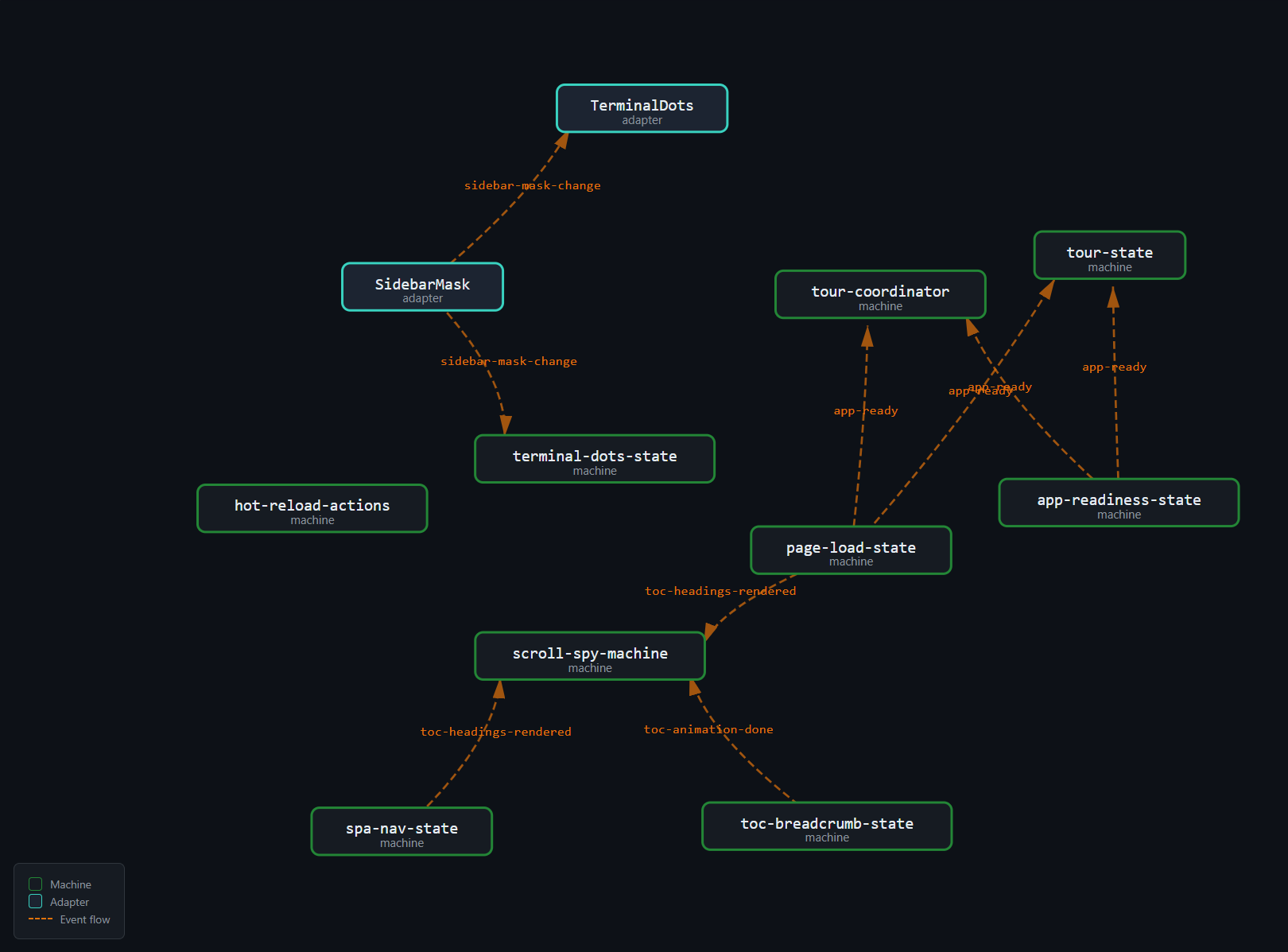
Each teal box is a state machine. Each orange dashed arrow is an event edge — a custom event that connects an emitter to a listener. The graph is rendered by the interactive explorer (Part X), which reads the @FiniteStateMachine decorator metadata and the event topology scanner output to produce this visualization.
Some observations from the graph:
app-readyis the most connected event. It flows frompage-load-stateandapp-readiness-statetotour-state,tour-coordinator, and the application bootstrap. It is the keystone lifecycle signal.toc-headings-renderedcreates a cascade. When the headings panel renders, the scroll spy re-indexes headings, the breadcrumb animation starts, and the TOC scroll machine adjusts. This single event triggers a chain of downstream reactions.sidebar-mask-changecrosses domain boundaries. It originates in the sidebar adapter (theme/layout domain) and reachesterminal-dots-state(window chrome domain). Without a typed contract, the payload{ masked: boolean }could silently change.Most machines are event-isolated. Of the 43 machines, only about a dozen participate in the event topology. The rest communicate exclusively through callbacks — they are wired by the adapter layer and never touch the event system.
The hot-reload cluster is self-contained. The
hot-reload:contentandhot-reload:tocevents are dispatched and listened to within the same module family (hot-reload-actions→ dev adapter). They don't leak into the production event graph.
This is the topology that needs to be correct. Every edge needs to match: the emitter's event name matches the listener's event name, the payload shape matches, and the lifecycle semantics match. At 43 machines and 27 edges, this is not something you can verify by inspection.
The Cost of Silence
The deepest problem with phantom events is not that they break features — it is that they break features silently.
A runtime exception is loud. It appears in the console. It triggers error boundaries. It shows up in monitoring. A phantom event is none of these. It is a dispatchEvent call that executes successfully, creates an Event object, propagates through the DOM, and reaches no listener. The return value is true (the event was not cancelled). There is no indication that anything went wrong.
Consider the failure modes of other programming mistakes:
| Mistake | Signal |
|---|---|
| Call undefined function | TypeError at call site |
| Access missing property | undefined (often caught by TS) |
| Import missing module | Build failure |
| SQL syntax error | Query throws |
| HTTP 404 | Response status code |
| Phantom event | Silence |
The phantom event is the only mistake in this table that produces no signal whatsoever. Every other mistake generates at least one observable artifact — an exception, a build error, a status code, an undefined. The phantom event generates nothing.
This is why phantom events are disproportionately expensive. The cost is not in the fix (usually a one-line rename) but in the discovery. Without a signal, the bug is found only when a human exercises the affected code path and notices the missing behavior. In a 43-machine codebase with multiple entry points and route-dependent initialization, some code paths are exercised rarely. A phantom event in a rarely-tested path can survive for weeks or months.
What We Need
The requirements for a solution are clear:
Compile-time name verification — the event name in
emitmust match the event name inon. A typo must be a compile error, not a runtime phantom.Compile-time payload verification — the detail type in
emitmust match the detail type the listener expects. A payload shape change must propagate to all listeners.Emit/listen scoping — a machine that declares
emits: ['scrollspy-active']should only be able to emitscrollspy-active, not accidentally emitapp-ready. Unauthorized emissions should be compile errors.Topology verification — every emitted event should have at least one listener, and every listened event should have at least one emitter. Orphans should fail the build.
Drift detection — the declared emits/listens in the decorator metadata should match the actual dispatches/listeners in the code. Drift should fail the commit.
Zero runtime cost — the solution should add no overhead to the browser. No runtime type checking, no event validation, no wrapper objects in the hot path.
Preview: The Solution Stack
The solution is four layers deep. Each layer addresses a different failure mode, and together they close every gap in the event contract.
Layer 1: Phantom Types — EventDef<N, D>
Every event is defined as a typed constant:
export const AppReady = defineEvent('app-ready');
export const ScrollspyActive = defineEvent<'scrollspy-active', { slug: string; path: string }>('scrollspy-active');
EventDef<N, D> carries the event name N at runtime (for dispatchEvent) and the payload type D at compile time (for type checking). The D parameter is phantom — it is never accessed at runtime, only used by the compiler to check that emitters and listeners agree on the payload shape.
A typo is now a compile error:
// This does not exist as a constant:
bus.emit(AppRedy); // TS2304: Cannot find name 'AppRedy'
A payload mismatch is now a compile error:
bus.emit(ScrollspyActive, { slug: 'install', href: '/docs/install' });
// TS2345: 'href' does not exist in type '{ slug: string; path: string }'
Layer 2: Scoped Bus — EventBus<TEmits, TListens>
Each machine receives a bus typed with exactly the events it is allowed to emit and listen to:
type ScrollSpyBus = EventBus<
  typeof ScrollspyActive,
  typeof TocHeadingsRendered | typeof TocAnimationDone
>;
A machine with a ScrollSpyBus can emit ScrollspyActive and listen to TocHeadingsRendered and TocAnimationDone. It cannot emit AppReady — that would be a compile error. It cannot listen to SidebarMaskChange — also a compile error.
This is the authorization layer. Even if the event exists as a constant, the machine cannot use it unless its bus type permits it.
Layer 3: Decorator Metadata — @FiniteStateMachine
Every machine declares its event participation in the decorator:
@FiniteStateMachine({
  states: ['mouse', 'scroll'] as const,
  events: ['setDetectionMode'] as const,
  emits: ['scrollspy-active'] as const,
  listens: ['toc-headings-rendered', 'toc-animation-done'] as const,
  // ...
})
export class ScrollSpyMachineFsm {}
The decorator metadata is a declaration — it says what the machine intends to emit and listen to. The build-time tooling reads this metadata via the TypeScript Compiler API and includes it in the extracted state graph (state-machines.json).
Layer 4: Topology Scanner — Drift Detection
The event topology scanner walks every source file, extracts every dispatchEvent and addEventListener call, and cross-references them against the decorator metadata:
- If a machine dispatches an event not declared in its
emits, the scanner reports drift and fails the commit. - If a machine listens to an event not declared in its
listens, the scanner reports drift and fails the commit. - If a declared event has no listener, the scanner reports a phantom.
- If a declared listener has no emitter, the scanner reports an orphan listener.
The scanner produces a committed data/event-map.md file — a living document of the event topology, updated every time the scanner runs.
The Four Layers Together
Layer 1: EventDef<N, D>         → compile-time name + payload verification
Layer 2: EventBus<TEmits, TListens>  → compile-time authorization
Layer 3: @FiniteStateMachine    → declared topology (intent)
Layer 4: Topology Scanner       → verified topology (code matches intent)
Layer 1 catches typos and payload mismatches. Layer 2 catches unauthorized events. Layer 3 declares the intended topology. Layer 4 verifies that the code matches the intent.
No single layer is sufficient. Without Layer 1, event names are strings. Without Layer 2, any machine can emit any event. Without Layer 3, there is no declared topology to verify against. Without Layer 4, the declared topology can drift from the actual code.
Together, they produce a closed verification loop: the compiler checks the types, the decorator declares the intent, the scanner verifies the code matches the intent, and the commit gate blocks any drift.
What This Series Covers
The remaining eleven parts explore each layer in detail:
- Part II introduces
EventDef<N, D>andEventBus<TEmits, TListens>— the compile-time type safety layer. - Part III covers the
@FiniteStateMachinedecorator — the metadata carrier that makes machines self-describing. - Part IV tours the 43 machines — concrete examples of pure state machines with typed event participation.
- Part V examines coordinators and the adapter pattern — how pure machines meet the DOM.
- Parts VI–VII cover the event topology — the nine events mapped, the scanner dissected, the drift detected.
- Parts VIII–X walk through the three-phase build pipeline — transition inference, graph extraction, SVG rendering.
- Part XI connects the event system to feature traceability and the quality gate chain.
- Part XII reflects on advanced patterns, the comparison with xstate, and what was learned.
Each part stands alone as a technical reference, but the series builds progressively — from the type system foundation through the build pipeline to the architectural retrospective.
The goal is not just to document what was built, but to explain why each layer exists, what failure mode it prevents, and what the alternative would cost.
