Part XVI: Philosophy, Comparison, and What Comes Next
7 wrapped binaries, 2 JSON Schema bundles, 1 pattern -- the compiler is the enforcement layer.
Stepping Back
Sixteen parts. Four packages. 97 scraped versions. 32 JSON Schemas. ~500 generated files. This final part steps back from the implementation to examine why we built it this way, how it compares to alternatives, and where it goes next.
The previous fifteen posts were about mechanics -- parsers, generators, builders, executors, YAML renderers, test strategies. This post is about principles. Not abstract design-pattern philosophy, but the three concrete beliefs that determined every architectural decision in this project. I will state them, defend them, compare them to the alternatives, and then lay out the road ahead.
If you have read the full series, you have already seen these principles in action. This post names them.
I should also say: these principles are not novel. "Use the source of truth" is not a controversial take. "Don't duplicate code" is not a controversial take. "Let the compiler help you" is not a controversial take. What is unusual is applying them to infrastructure tooling -- a domain where string concatenation and hand-written YAML are still the default, and where the compiler is typically not involved at all.
Principle 1: The CLI Binary Is the Source of Truth
Not documentation. Not OpenAPI specs. Not hand-written SDKs. The binary itself.
When I started this project, I considered three sources for Docker's API surface:
- Docker's online documentation -- beautiful, thorough, and routinely out of date by one or two point releases. I found flags documented for 24.0 that were actually introduced in 23.0, and flags listed as current that had been removed in 25.0.
- Docker's REST API / OpenAPI spec -- Docker publishes a Swagger spec for the Engine API. It covers container management, image management, volumes, networks. It does not cover
docker build --progress,docker compose watch,docker scout, or any of the plugin commands. The REST API is a subset of what the CLI can do. - The binary's
--helpoutput -- always current, always accurate, always complete. If a flag exists in the binary, it appears in--help. If a flag was removed, it is gone from--help. The binary is its own documentation.
I chose option 3. Not because it is easy -- parsing unstructured help text is significantly harder than reading a Swagger spec -- but because it is the only source that is guaranteed to match what the user can actually type at a terminal.
The Practical Consequence
When Docker 25.0.0 adds a new flag, I run the scraper and the generated API has it. No manual model updates. No waiting for an SDK team to add it. No pull request to a community library. The scraper runs against the binary, the JSON gets committed, the source generator reads it, and the new flag appears as a typed property with [SinceVersion("25.0.0")] on the next build.
// Docker 25.0.0 added --annotation to docker build
// After scraping 25.0.0, this property appears automatically:

/// <summary>
/// Add annotation to the image.
/// </summary>
[SinceVersion("25.0.0")]
[CliOption("--annotation")]
public IReadOnlyList<string>? Annotation { get; init; }

// The builder method is also generated:
public DockerImageBuildCommandBuilder WithAnnotation(IReadOnlyList<string> value)
{
    VersionGuard.EnsureSupported(
        BoundVersion,
        "25.0.0",
        null,
        "--annotation");
    return Set(cmd => cmd with { Annotation = value });
}
I did not write any of that. The scraper found --annotation in Docker 25.0.0's help output. The version differ assigned [SinceVersion("25.0.0")]. The generator emitted the property and the builder method. The VersionGuard call was generated from the version metadata. One scraper run, zero human involvement.
The Gap with Hand-Maintained SDKs
Compare this with Docker.DotNet, the most popular .NET library for Docker. Docker.DotNet is a well-written, well-maintained REST API client. It targets the Docker Engine API, not the CLI. This means:
// Docker.DotNet -- REST API client
// Creating a container through the Engine API:
var response = await client.Containers.CreateContainerAsync(
    new CreateContainerParameters
    {
        Image = "nginx:latest",
        Name = "web",
        HostConfig = new HostConfig
        {
            PortBindings = new Dictionary<string, IList<PortBinding>>
            {
                ["80/tcp"] = new[] { new PortBinding { HostPort = "8080" } }
            }
        }
    });

// No equivalent for:
//   docker build --progress=plain --platform linux/amd64
//   docker compose up --wait --remove-orphans
//   docker scout cves nginx:latest
//   docker buildx bake --set *.platform=linux/amd64
Docker.DotNet models are hand-maintained. When Docker adds a new field to the container creation endpoint, someone has to notice, write the model update, submit a PR, get it reviewed, release a new version. The lag can be weeks or months. For the CLI wrapper, the lag is one scraper run.
This is not a criticism of Docker.DotNet -- it solves a different problem (REST API access) and solves it well. But it illustrates why the binary-as-source-of-truth approach exists: the CLI is a superset of the REST API, and the binary's help output is a superset of any documentation.
Why Not OpenAPI?
Docker does not publish an OpenAPI spec for its CLI. The Engine API has a Swagger spec, but the CLI adds hundreds of flags, several plugin commands (buildx, scout, compose), and behavioral modes (interactive TTY, streaming logs, build progress displays) that have no REST equivalent.
Even for tools that do publish OpenAPI specs, the spec can drift from the binary. I have seen Kubernetes kubectl flags that existed in the binary but were missing from the published API spec for two minor versions. The binary cannot lie about itself. Its help output is generated from its own flag registration code.
$ docker container run --help 2>/dev/null | wc -l
89

$ # 89 lines of flags, each one a real flag in this binary.
$ # Not a documentation page. Not a spec file. The binary itself.
Principle 2: Version Evolution Is Data, Not Code Duplication
The naive approach to multi-version support creates one set of types per version. If you support 40 Docker versions, you get 40 copies of DockerContainerRunCommand -- 48 properties in version 18.09, 51 in version 20.10, 54 in version 24.0, 55 in version 25.0. Each one is a distinct class. You end up with adapter patterns, inheritance hierarchies, or union types to move between them.
That does not scale. Not for 40 versions, and certainly not for the 7 binaries and 2 schema bundles in the ecosystem.
The Naive Approach
// Naive: N types for N versions
DockerContainerRunCommand_v18_09 cmd1 = ...; // 48 properties
DockerContainerRunCommand_v20_10 cmd2 = ...; // 51 properties
DockerContainerRunCommand_v24_00 cmd3 = ...; // 54 properties
DockerContainerRunCommand_v25_00 cmd4 = ...; // 55 properties

// Which one do I use? Can I cast between them?
// What if I want to support "whatever version is installed"?
// Do I need an adapter for each version pair?
// What about the 36 other versions?
This is untenable. 40 versions times 180 commands is 7,200 command classes. The Compose Bundle has 40 model classes across 32 schema versions -- that is 1,280 model classes. The type system drowns in duplication.
The Unified Approach
Our approach: one type per command, with [SinceVersion] and [UntilVersion] annotations on the properties that changed between versions.
// Unified: 1 type + version metadata
public record DockerContainerRunCommand : ICliCommand
{
    // Present since the earliest scraped version
    [CliOption("--name")]
    public string? Name { get; init; }

    [CliOption("--detach")]
    public bool? Detach { get; init; }

    [CliOption("--memory")]
    public string? Memory { get; init; }

    // Added in 19.03.0
    [SinceVersion("19.03.0")]
    [CliOption("--platform")]
    public string? Platform { get; init; }

    // Added in 20.10.0
    [SinceVersion("20.10.0")]
    [CliOption("--cgroupns")]
    public string? CgroupNs { get; init; }

    // Added in 23.0.0
    [SinceVersion("23.0.0")]
    [CliOption("--pull")]
    public string? Pull { get; init; }

    // Added in 25.0.0
    [SinceVersion("25.0.0")]
    [CliOption("--annotation")]
    public IReadOnlyList<string>? Annotation { get; init; }

    // Removed in 25.0.0
    [UntilVersion("25.0.0")]
    [CliOption("--link")]
    public IReadOnlyList<string>? Link { get; init; }

    // ... 47 more properties, most with no version annotations
    //     (present in all scraped versions)
}
55 properties. 7 with [SinceVersion]. 1 with [UntilVersion]. One class. The builder's VersionGuard checks at build time whether the property is valid for the target Docker version. If you call .WithPlatform("linux/amd64") against Docker 18.09, you get an OptionNotSupportedException before any process starts.
How This Scales
When I add Docker 26.0.0 to the scraped versions, the version differ compares 26.0.0's command tree against the unified tree. If 26.0.0 adds a new flag --foo, the unified tree gets a new property with [SinceVersion("26.0.0")]. If 26.0.0 removes an existing flag --bar, the existing property gets [UntilVersion("26.0.0")]. No new classes. No duplication. One diff operation, a few annotations updated.
// Adding version 26.0.0:
// Before: 55 properties, 7 [SinceVersion], 1 [UntilVersion]
// After:  56 properties, 8 [SinceVersion], 1 [UntilVersion]
// Delta:  1 new property with [SinceVersion("26.0.0")]
The same pattern applies to the Compose Bundle. 32 JSON Schema versions produce one ComposeService with 67 properties, each annotated with the schema version range where it exists. Adding schema version 33 is one merge operation, not a new class.
Version Bounds Are Data
The key insight: version bounds are metadata, not type structure. They live on properties as attributes. The source generator reads them. The builder's VersionGuard enforces them. The runtime never sees N type systems -- it sees one type system with annotations.
// The generator emits version checks in builders:
public DockerContainerRunCommandBuilder WithCgroupNs(string value)
{
    VersionGuard.EnsureSupported(
        BoundVersion,          // the detected or configured Docker version
        sinceVersion: "20.10.0",
        untilVersion: null,
        optionName: "--cgroupns");
    return Set(cmd => cmd with { CgroupNs = value });
}

// At builder time (before process launch):
// - Docker 19.03 → OptionNotSupportedException("--cgroupns requires 20.10.0+")
// - Docker 20.10 → OK
// - Docker 25.0  → OK
This is version evolution as data: a tuple of (sinceVersion, untilVersion) carried on each property, enforced by generated code. Not version evolution as code: separate types, adapters, inheritance chains.
Principle 3: The Compiler Is the Enforcement Layer
This is the principle that connects typed Docker to the Contention over Convention philosophy. The argument is simple: if the compiler can catch it, the compiler should catch it. Infrastructure is not exempt.
What the Compiler Catches
Flag typos:
// Raw string: typo compiles, fails at runtime
Process.Start("docker", "run --detatch nginx"); // "detatch" is wrong
// No error until: "unknown flag: --detatch"

// Typed: typo is a compiler error
docker.Container.Run(b => b.WithDetatch(true)); // CS1061: no method 'WithDetatch'
// Compiler error. IDE red squiggle. Immediate feedback.
Version incompatibility:
// Raw string: works on dev machine (Docker 25), fails on CI (Docker 20.10)
Process.Start("docker", "run --annotation key=value nginx");
// No error until CI: "unknown flag: --annotation"

// Typed: caught at builder time
docker.Container.Run(b => b
    .WithAnnotation(["key=value"])  // VersionGuard checks BoundVersion
    .WithImage("nginx"));
// OptionNotSupportedException on Docker < 25.0.0
// Before the process starts. Before CI runs. Before 3am.
YAML property typos:
// Hand-written YAML: typo is silently ignored
// services:
//   web:
//     imge: nginx  # "imge" -- no error, just no image

// Typed: typo is a compiler error
new ComposeServiceBuilder()
    .WithImge("nginx")  // CS1061: no method 'WithImge'
Missing required fields:
// Hand-written YAML: missing "image" is a runtime error from docker compose
// services:
//   web:
//     ports:
//       - "8080:80"
// Error: service "web" has neither an image nor a build context

// Typed: the builder validates before serialization
var service = new ComposeServiceBuilder()
    .WithPorts(["8080:80"])
    .Build();  // ValidationException: service requires Image or Build
The IDE as Infrastructure Documentation
When I type docker.Container.Run(b => b.With, IntelliSense shows me every flag Docker container run accepts. Not the flags from some documentation page -- the flags from the actual scraped binary. With XML doc comments generated from the help text. With version annotations visible in the tooltip.
// IntelliSense shows:
// WithAnnotation(...)     [Since 25.0.0] Add annotation to the image
// WithCgroupNs(...)       [Since 20.10.0] Cgroup namespace to use
// WithCpus(...)           Number of CPUs
// WithDetach(...)         Run container in background
// WithEnv(...)            Set environment variables
// WithEntrypoint(...)     Overwrite the default ENTRYPOINT
// ... 49 more

// No --help needed. No browser tab. No "was it --env or --environment?"
I do not need to remember that --cgroupns was added in Docker 20.10. The generated code knows. I do not need to remember that --link was deprecated. The generated code has [UntilVersion("25.0.0")] and the builder warns me. The compiler catches infrastructure mistakes the same way it catches domain model mistakes.
This is the Contention over Convention thesis applied to infrastructure: make the wrong thing impossible to express, not merely frowned upon.
The Three Principles Applied
Here is the complete pipeline, from binary to developer, with each principle annotating its role:

Left to right: the binary is scraped (Principle 1), versions are merged into data annotations (Principle 2), and the compiler enforces correctness (Principle 3). Every post in this series operates within this pipeline. The parsers serve Principle 1. The version differ serves Principle 2. The generators, builders, and version guards serve Principle 3.
Comparison with Alternatives
Before I compare specific tools, here is the positioning at a glance:
| Approach | Scope | Type Safety | Version Awareness | Compose Spec | CLI Commands | Maintenance |
|---|---|---|---|---|---|---|
| Docker.DotNet | REST API | Full (hand-written) | Single version | No | No | Manual |
| Docker SDK (official) | REST API | Full (hand-written) | Single version | No | No | Docker team |
| Nuke | Build automation | Partial (fluent) | No | No | Partial | Manual |
| Pulumi | IaC (cloud) | Full (generated) | Provider version | Via providers | No | Provider team |
| Terraform | IaC (cloud) | HCL/YAML | Provider version | Via providers | No | Provider team |
| ProcessStartInfo | Raw | None | None | None | Manual | N/A |
| This approach | CLI + Spec | Full (generated) | Multi-version | Full | Full | Automated |
Let me expand on each.
Docker.DotNet
Docker.DotNet is the most mature .NET library for Docker. It is a typed REST API client for the Docker Engine API. Here is what it does and what it does not do:
What it does well:
- Typed access to the Engine API -- containers, images, networks, volumes, system info
- Async/await throughout, with cancellation support
- Streaming support for logs, events, and stats
- Well-tested, actively maintained, used in production by Testcontainers and others
What it cannot do:
- CLI commands: no
docker build --progress=plain, nodocker compose up --wait, nodocker scout - Compose specification: no typed compose files, no service definitions, no YAML generation
- Multi-version awareness: targets one Engine API version at a time, no
[SinceVersion]/[UntilVersion] - Plugin commands: buildx, scout, compose -- none of these are in the Engine API
The scope difference:
// Docker.DotNet: REST API -- creating a container
var response = await client.Containers.CreateContainerAsync(
    new CreateContainerParameters
    {
        Image = "nginx:latest",
        Name = "web",
        HostConfig = new HostConfig
        {
            PortBindings = new Dictionary<string, IList<PortBinding>>
            {
                ["80/tcp"] = new[] { new PortBinding { HostPort = "8080" } }
            }
        }
    });
await client.Containers.StartContainerAsync(
    response.ID,
    new ContainerStartParameters());

// Typed wrapper: CLI -- running a container
var result = await docker.Container.Run(b => b
    .WithDetach(true)
    .WithName("web")
    .WithPublish(["8080:80"])
    .WithImage("nginx:latest"));
Both are typed. Both prevent flag typos. The difference is scope: Docker.DotNet talks to the Docker daemon's HTTP API. The typed wrapper talks to the Docker CLI binary. The CLI can do everything the API can do, plus build commands, compose orchestration, plugin commands, and output formatting options.
They are complementary, not competing. If you need to watch Docker events or stream container stats in a long-running service, Docker.DotNet's streaming API is excellent. If you need to orchestrate docker compose up with typed flags and version awareness in a deployment tool, the CLI wrapper fills that gap.
In fact, the two can coexist in the same project. I use Docker.DotNet for health checks and container inspection in monitoring services (where the REST API's streaming is ideal), and the typed CLI wrapper for build and deployment operations (where the CLI's full command set is needed). Different tools for different layers.
// Coexistence: Docker.DotNet for monitoring, typed wrapper for deployment

// Monitoring service: stream container events via REST API
await foreach (var evt in dockerDotNet.System.MonitorEventsAsync(
    new ContainerEventsParameters(), cancellationToken))
{
    logger.LogInformation("Container {Id}: {Action}", evt.Actor.ID, evt.Action);
}

// Deployment script: build and deploy via typed CLI
await docker.Image.Build(b => b
    .WithTag(["myapp:latest"])
    .WithFile("Dockerfile")
    .WithContext("."));

await dockerCompose.Up(b => b
    .WithDetach(true)
    .WithRemoveOrphans(true)
    .WithWait(true));
Pulumi and Terraform
Pulumi and Terraform are infrastructure-as-code tools. They target cloud resources: VMs, load balancers, DNS records, managed databases, Kubernetes clusters. They have Docker providers that can manage containers, but the abstraction level is fundamentally different.
Pulumi (C# provider):
// Pulumi: cloud-oriented, declarative resource management
var container = new Container("web", new ContainerArgs
{
    Image = image.Latest,
    Ports = new ContainerPortArgs
    {
        Internal = 80,
        External = 8080
    }
});

// Pulumi manages lifecycle: create, update, delete, drift detection
// But: no docker build flags, no compose files, no CLI version awareness
// Targets: AWS ECS, Azure ACI, GCP Cloud Run, Kubernetes
Terraform:
# Terraform: HCL, not C# -- no compiler, no IntelliSense in the IDE
resource "docker_container" "web" {
  image = docker_image.nginx.image_id
  name  = "web"
  ports {
    internal = 80
    external = 8080
  }
}

# HCL has its own type system, but it is not C#
# No IntelliSense, no Roslyn analyzers, no compile-time checks
Where they excel: cloud infrastructure, state management, drift detection, multi-provider orchestration. If you are deploying to AWS ECS or Azure Container Instances, Pulumi is excellent -- especially the C# provider, which has full type safety.
Where they do not apply: local Docker CLI commands. You cannot tell Pulumi to run docker build --progress=plain --platform linux/amd64 -f Dockerfile.dev . with typed flags and version checks. You cannot tell Terraform to generate a docker-compose.yml from typed C# objects. These tools operate at a different layer.
If you are deploying to AWS ECS, use Pulumi. If you are orchestrating Docker containers on a developer machine, a homelab, or a CI pipeline that runs docker compose up, the typed wrapper fills a gap those tools do not address.
Nuke
Nuke is a .NET build automation framework. It has Docker support through DockerTasks:
// Nuke: build automation with partial Docker support
DockerTasks.DockerBuild(s => s
    .SetFile("Dockerfile")
    .SetTag("myapp:latest")
    .SetProcessWorkingDirectory("./src"));

DockerTasks.DockerRun(s => s
    .SetImage("myapp:latest")
    .SetDetach(true)
    .SetName("web"));
What Nuke does:
- Fluent API for common Docker commands (build, run, push, pull)
- Integration with Nuke's build pipeline (dependency graph, logging, error handling)
- Some Compose support (
DockerComposeTasks.DockerComposeUp)
What Nuke does not do:
- Version awareness: no
[SinceVersion], no version guards, no multi-version support - Completeness: supports common flags but not all 2,400+ flags across all commands
- Compose specification: no typed compose files, no
ComposeServicemodel, no YAML generation - Automated maintenance: Nuke's Docker support is hand-written and updated manually
The critical difference: Nuke's Docker support is hand-maintained. Someone on the Nuke team writes the fluent setters for each flag. If Docker adds a flag, Nuke does not have it until a contributor adds it. The typed wrapper has it the moment the scraper runs.
Nuke is a build tool that happens to support Docker. The typed wrapper is a Docker tool that happens to be useful in builds.
To illustrate the gap concretely, consider what happens when Docker 25.0 adds the --annotation flag to docker build. In Nuke, nothing happens -- you wait for a Nuke contributor to add SetAnnotation() to DockerBuildSettings, or you fall back to SetProcessAdditionalArguments("--annotation key=value"), which is just string concatenation with extra steps. In the typed wrapper, the scraper picks it up automatically and the generator emits WithAnnotation() on the next build.
// Nuke: new flag not yet supported
DockerTasks.DockerBuild(s => s
    .SetFile("Dockerfile")
    .SetTag("myapp:latest")
    // No SetAnnotation() -- flag added in Docker 25.0, Nuke hasn't caught up
    .SetProcessAdditionalArguments("--annotation key=value")); // back to strings

// Typed wrapper: new flag available immediately after scraping
docker.Image.Build(b => b
    .WithFile("Dockerfile")
    .WithTag(["myapp:latest"])
    .WithAnnotation(["key=value"])); // generated from Docker 25.0 help output
Raw ProcessStartInfo
This is what Part I showed. The starting point. The baseline.
// Before: the 47 Process.Start calls I started with
var process = Process.Start(new ProcessStartInfo
{
    FileName = "docker",
    Arguments = $"run -d --name {name} --memory {memoryMb}m {image}",
    RedirectStandardOutput = true,
    RedirectStandardError = true,
    UseShellExecute = false
});
await process!.WaitForExitAsync();
var stdout = await process.StandardOutput.ReadToEndAsync();
// stdout is a string. Parse it yourself. Hope the format didn't change.

// After: one of 47 typed API calls
var result = await docker.Container.Run(b => b
    .WithDetach(true)
    .WithName(name)
    .WithMemory($"{memoryMb}m")
    .WithImage(image));
// result is ContainerRunResult. Typed. Parsed. Version-checked.
No type safety. No version awareness. No output parsing. No IntelliSense. No compile-time checks. Every flag is a string. Every output is a string. Every version incompatibility is a 3am page.
47 Process.Start calls became 47 typed API calls. That is the before and after.
Positioning Map
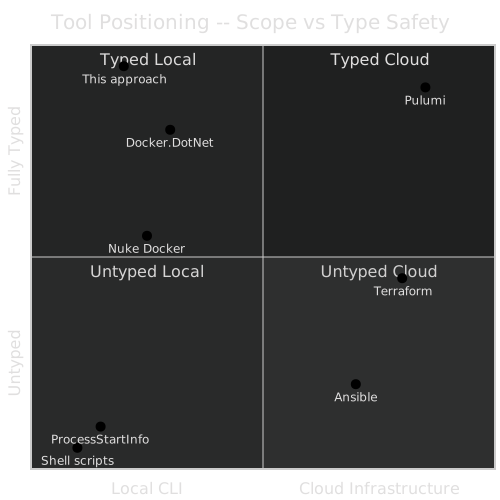
The typed wrapper occupies the top-left: fully typed, local CLI scope. Docker.DotNet is nearby but targets the REST API (slightly different scope). Pulumi is top-right: fully typed, cloud scope. Terraform is middle-right: partially typed (HCL has types but not C# types), cloud scope. ProcessStartInfo and shell scripts are bottom-left: untyped, local.
There is no tool in the top-left corner besides this approach. That is the gap it fills.
What About Testcontainers?
Testcontainers deserves a mention because it is popular in the .NET ecosystem and it uses Docker under the hood. Testcontainers is a testing library: it spins up disposable containers for integration tests. It uses Docker.DotNet internally for the REST API.
// Testcontainers: disposable containers for tests
var container = new ContainerBuilder()
    .WithImage("postgres:16")
    .WithPortBinding(5432, true)
    .WithWaitStrategy(Wait.ForUnixContainer().UntilPortIsAvailable(5432))
    .Build();

await container.StartAsync();
var connectionString = container.GetConnectionString();
// Run tests against real PostgreSQL
await container.DisposeAsync();
Testcontainers is excellent at what it does. But it does not type Docker CLI commands, does not support Compose files, does not have version awareness, and does not cover docker build, docker compose up, or any of the other CLI operations this series addresses. Testcontainers is a testing tool that manages container lifecycle. The typed wrapper is an infrastructure tool that types the full CLI surface.
They coexist naturally: use Testcontainers for integration test containers, use the typed wrapper for build pipelines, deployment scripts, and compose orchestration.
The Maintenance Cost Comparison
This is the comparison that matters most in practice. Not features, but ongoing maintenance burden:
Docker.DotNet:     Manual. Each new Docker Engine API field → manual PR → review → release.
                   Lag: weeks to months.

Nuke:              Manual. Each new Docker flag → manual PR → review → release.
                   Lag: weeks to months. Many flags never added.

Pulumi Docker:     Semi-automated. Provider team generates from Terraform schema.
                   Lag: days to weeks after Terraform provider updates.

This approach:     Automated. Run scraper → commit JSON → build.
                   Lag: minutes. Limited by how fast I run the scraper.
The maintenance cost of hand-written types scales linearly with the number of flags, commands, and versions. The maintenance cost of generated types scales with the number of parser edge cases, which is bounded. After the parser handles cobra's format, every new cobra-based binary is free. After the generator handles version merging, every new version is free. The initial investment is higher. The marginal cost approaches zero.
The Ecosystem Vision
The typed Docker series focused on Docker and Docker Compose, but the pattern is not Docker-specific. The same framework -- scraper, parser, version differ, source generator, builder, executor -- applies to any CLI tool with structured help output.
Here is the current state of the ecosystem:
CLI Wrappers (BinaryWrapper)
| Binary | Versions Scraped | Parser | Status | Generated Files |
|---|---|---|---|---|
| Docker | 40+ | CobraHelpParser | Production | ~200 |
| Docker Compose | 57 | CobraHelpParser | Production | ~150 |
| Podman | 58 | CobraHelpParser | Production | ~386 |
| Podman Compose | 6 | ArgparseHelpParser | Production | ~30 |
| Packer | 7+ | PackerHelpParser | Production | ~80 |
| Vagrant | 7 | VagrantHelpParser | Production | ~40 |
| GitLab CLI | 2+ | GlabHelpParser | In progress | ~60 |
Schema Bundles
| Bundle | Schema Versions | Source | Generated Files |
|---|---|---|---|
| Docker Compose Spec | 32 | JSON Schema | ~80 |
| GitLab Omnibus Config | ~80 | Ruby templates | ~400 |
The Shared Framework
One pattern, one source generator framework, one builder framework -- applied to every binary:
BinaryWrapper (shared framework)
├── Docker           ── [BinaryWrapper("docker")]
├── DockerCompose    ── [BinaryWrapper("docker-compose")]
├── Podman           ── [BinaryWrapper("podman")]
├── PodmanCompose    ── [BinaryWrapper("podman-compose")]
├── Packer           ── [BinaryWrapper("packer")]
├── Vagrant          ── [BinaryWrapper("vagrant")]
└── Glab             ── [BinaryWrapper("glab")]

Builder (shared framework)
├── All of the above      (command builders via AbstractBuilder<T>)
├── DockerCompose.Bundle  (ComposeFileBuilder from JSON Schema)
└── GitLab.Bundle         (GitLabOmnibusConfigBuilder from Ruby templates)
Adding a new binary follows a repeatable process:
Implement
IHelpParser-- or reuse an existing one. CobraHelpParser already handles Docker, Docker Compose, Podman, and any Go CLI built with the cobra framework. ArgparseHelpParser handles Python CLIs. If the new binary uses cobra, step 1 is already done.Run the scraper -- point it at the binary (or a set of binaries across versions), let it recursively call
--helpon every command and subcommand, serialize the command trees to JSON.Add
[BinaryWrapper("name")]-- the source generator reads the JSON, merges versions, emits typed commands, builders, and the client class.
// Adding kubectl support (hypothetical -- cobra-based, parser already works):

// Step 1: Parser -- reuse CobraHelpParser (kubectl uses cobra)
// Step 2: Scrape
//   $ scraper --binary kubectl --versions 1.28,1.29,1.30 --output ./scraped/kubectl

// Step 3: Attribute
[assembly: BinaryWrapper("kubectl",
    ScrapedDataPath = "scraped/kubectl",
    Namespace = "FrenchExDev.Net.Kubectl")]

// After build, the generator emits:
// - KubectlGetPodsCommand, KubectlApplyCommand, KubectlDeleteCommand, ...
// - KubectlGetPodsCommandBuilder, KubectlApplyCommandBuilder, ...
// - KubectlClient with Kubectl.Get.Pods(), Kubectl.Apply(), ...
// - [SinceVersion] / [UntilVersion] on version-specific flags
The same CommandExecutor, IOutputParser, IResultCollector pipeline works for all binaries. The same VersionGuard checks version bounds. The same AbstractBuilder<T> provides fluent APIs. One framework, seven (and counting) typed CLI wrappers.
The Ecosystem Map

Seven binaries in blue (production). GitLab CLI in yellow (in progress). Two schema bundles in green. One shared framework in purple. The same pattern, everywhere.
Short Term
Docker Buildx commands. Buildx is a Docker plugin -- cobra-based, already partially scraped. The CobraHelpParser handles it. The remaining work is integrating the buildx command tree with the Docker client: docker.Buildx.Build(), docker.Buildx.Bake(), docker.Buildx.Imagetools.Inspect().
// Coming soon:
var result = await docker.Buildx.Build(b => b
    .WithPlatform(["linux/amd64", "linux/arm64"])
    .WithPush(true)
    .WithTag(["myapp:latest", "myapp:1.0.0"])
    .WithFile("Dockerfile")
    .WithContext("."));
Additional output parsers. docker compose logs with service-aware parsing -- each log line tagged with the originating service. docker stats with resource metrics as typed records. docker scout cves with vulnerability reports as structured data.
// Service-aware compose log parsing:
await foreach (var log in dockerCompose.Logs.Stream(b => b
    .WithFollow(true)
    .WithTimestamps(true)))
{
    // log is ComposeLogEvent { Service = "web", Timestamp = ..., Message = ... }
    // Not a raw string with the service name embedded in a prefix
}
Compose Bundle runtime validation. Currently, the Compose Bundle validates at build time through the source generator. The next step is runtime validation at serialization time: when rendering a ComposeFile to YAML, check that every property used is valid for the target compose-spec version. If you set depends_on with condition: service_healthy (added in compose-spec 2.1), and you are targeting compose-spec 2.0, the serializer should throw before writing invalid YAML.
Medium Term
Kubernetes CLI (kubectl). kubectl is cobra-based. The CobraHelpParser already handles it. The challenge is scale: kubectl has more commands than Docker, and the resource model is deeper. But the framework is designed for this -- one more [BinaryWrapper("kubectl")] attribute, one scraper run, and the generator does the rest.
Helm CLI. Also cobra-based. helm install, helm upgrade, helm template with typed values, chart references, and release management.
Docker Scout. Security scanning with typed vulnerability reports:
// Medium-term vision:
var report = await docker.Scout.Cves(b => b
    .WithImage("myapp:latest")
    .WithOnlySeverity(["critical", "high"]));

// report is ScoutCvesResult
//   .Vulnerabilities: IReadOnlyList<Vulnerability>
//   .Summary: VulnerabilitySummary { Critical = 2, High = 5, ... }
GitHub CLI (gh). Also cobra-based. gh pr create, gh release create, gh workflow run -- all with typed flags. The scraper and CobraHelpParser already work. The challenge is the sheer number of commands (gh has 100+ subcommands), but that is a scaling challenge, not an architectural one.
// Medium-term vision:
var pr = await gh.Pr.Create(b => b
    .WithTitle("Add new feature")
    .WithBody("Description here")
    .WithBase("main")
    .WithHead("feature/typed-docker")
    .WithLabel(["enhancement"]));

// pr is PrCreateResult { Number = 123, Url = "https://..." }
Long Term
The entire infrastructure toolchain as one typed C# API surface. Every CLI tool your build or deployment pipeline calls -- Docker, Compose, kubectl, Helm, Packer, Vagrant, Terraform CLI, glab, gh -- wrapped with the same pattern, the same generator, the same builder framework.
// The long-term vision:
var docker = services.GetRequiredService<IDockerClient>();
var kubectl = services.GetRequiredService<IKubectlClient>();
var helm = services.GetRequiredService<IHelmClient>();

// Build
await docker.Image.Build(b => b
    .WithTag(["myapp:latest"])
    .WithPlatform("linux/amd64")
    .WithFile("Dockerfile"));

// Push
await docker.Image.Push(b => b
    .WithImage("registry.example.com/myapp:latest"));

// Deploy
await helm.Upgrade(b => b
    .WithRelease("myapp")
    .WithChart("./charts/myapp")
    .WithSet(["image.tag=latest"])
    .WithInstall(true)
    .WithWait(true));

// Verify
var pods = await kubectl.Get.Pods(b => b
    .WithSelector("app=myapp")
    .WithOutput("json"));

// Roll back if needed
await helm.Rollback(b => b
    .WithRelease("myapp")
    .WithRevision(previousRevision)
    .WithWait(true));
Every call typed. Every flag validated. Every version checked. Zero strings. Zero --help lookups. Zero surprises at 3am.
The key realization: this is not about Docker specifically. Docker was the first binary because it had the most pain. But the pattern -- scrape, merge, generate, enforce -- is universal. Any CLI tool with structured help output can be wrapped. Any specification with a schema can be bundled. The compiler does not care whether it is checking Docker flags or kubectl flags or Helm values. It just checks types.
Every CLI tool your CI/CD pipeline calls should be typed. Every configuration file your infrastructure depends on should be generated from schemas. The compiler should be the last line of defense before deployment.
The Numbers
To put the ecosystem in perspective, here are the aggregate numbers across all wrapped binaries and bundles:
Binaries scraped:           7
Schema bundles:             2
Total versions scraped:     97 (CLI) + 112 (schemas) = 209
Total generated files:      ~946
Total generated lines:      ~180,000 (estimated)
Hand-written framework:     ~8,000 lines (parsers, generators, builders, executors)
Ratio:                      ~22:1 generated-to-handwritten

Parser implementations:     5 (Cobra, Argparse, Packer, Vagrant, Glab)
Binaries per parser:
  CobraHelpParser:          4 (Docker, Docker Compose, Podman, GitLab CLI)
  ArgparseHelpParser:       1 (Podman Compose)
  PackerHelpParser:         1 (Packer)
  VagrantHelpParser:        1 (Vagrant)
  GlabHelpParser:           1 (GitLab CLI -- specialized cobra variant)
The 22:1 ratio is the return on investment. 8,000 lines of framework code produce 180,000 lines of typed API. Each new binary adds generated lines without adding framework lines (unless it needs a new parser). Each new version adds version annotations without adding framework lines.
Reflections
Fifteen parts of implementation, now a few paragraphs of hindsight.
What Worked
Scraping --help was more reliable than expected. Cobra's help format is remarkably consistent. Across Docker (Go), Docker Compose (Go), Podman (Go), GitLab CLI (Go), Packer (Go), and Vagrant (Go/Ruby hybrid), the help output follows predictable patterns: section headers, indented flags with type annotations, nested subcommand listings. The CobraHelpParser handles all of the Go-based tools without modification. The only parser variants are for Python's argparse (Podman Compose) and Vagrant's custom format.
Incremental source generators are fast enough. I was worried about IDE performance with ~200 generated files for Docker alone. In practice, the Roslyn incremental generator pipeline caches aggressively. The initial build takes ~2 seconds for 200 files. Subsequent builds -- when the scraped JSON has not changed -- are near-instant because the generator's IncrementalValueProvider detects no input changes and skips emission entirely.
The builder pattern was the right abstraction. AbstractBuilder<T> with Set(Func<T, T>) for immutable record updates, VersionGuard for version checks, and fluent chaining for ergonomics. The same pattern works for CLI command builders and Compose specification builders. One base class, two domains, consistent API. The Builder pattern post covers the general approach.
JSON as intermediate format. Decoupling scraping from generation through JSON files was the best early decision. The scraper runs on a machine with Docker installed. The generator runs on any machine with .NET. The JSON files are committed to the repository, diffable, reviewable. When a new Docker version adds a flag, the diff in the JSON file shows exactly what changed. No binary artifacts, no opaque databases.
// Diffable: Docker 24.0 → 25.0 for "docker container run"
{
  "command": "docker container run",
  "flags": [
    // ... 54 existing flags unchanged ...
+   {
+     "name": "--annotation",
+     "type": "list",
+     "description": "Add annotation to the image"
+   }
  ]
}
What Was Hard
Multi-line help descriptions. Some flags have descriptions that wrap across multiple lines with inconsistent indentation. The parser needed heuristics to distinguish continuation lines from new flag definitions. The rule I settled on: if a line starts with whitespace and does not start with -- or -, it is a continuation of the previous description. This works for 99% of cases. The remaining 1% are handled by a post-processing step that merges orphaned lines.
Union types in JSON Schema. The Compose specification uses oneOf extensively. A ports entry can be a string ("8080:80") or an object ({ target: 80, published: 8080 }). The build property can be a string (context path) or an object (full build configuration). Each oneOf pattern needed custom handling in the schema reader, the type generator, the builder, and the YAML serializer. Six distinct union patterns, each with its own C# representation. Part X covers this in detail.
YAML serialization of union types. Deciding when to use string shorthand versus full object notation. A port 8080:80 should serialize as a string. A port with protocol: udp should serialize as an object. The YAML converter needs to inspect the union value and choose the representation. YamlDotNet's custom converter API is powerful enough, but each union type needs its own converter.
Docker's command aliases. docker run and docker container run are the same command. The scraper finds both. The version differ needs to merge them. The generator needs to emit one command class, not two. The client needs to expose the canonical path (docker.Container.Run()) while accepting the alias in help-text cross-references. Getting the deduplication right across 40 versions took more iterations than I expected.
What I Would Do Differently
Start with fewer versions. I scraped 40 Docker versions on day one. The version merge algorithm was overengineered for 3 versions and just right for 40, but I did not know that at the time. I would start with 10 versions (the last 3 majors plus a few milestones), validate the merge algorithm, then scale to 40. The algorithm itself would not change, but the debugging would be simpler with fewer inputs.
Source-generated YAML converters. I hand-wrote the YamlDotNet converters for each Compose specification union type. There are 12 of them. They follow a pattern. A source generator could emit them from the same schema metadata that generates the model classes. I did not do this because the converters were stable once written and the effort to build a converter generator did not seem justified. In hindsight, with the GitLab Bundle adding another 20+ union types, the generator would have paid for itself. There is a Builder pattern for that too.
Better error messages from VersionGuard. The current OptionNotSupportedException message says "option X requires version Y or later". It could also say: "You are using Docker 20.10. Option X was added in 25.0.0. Consider upgrading Docker, or remove this option." Actionable error messages reduce debugging time. The version metadata is there -- the error message just needs to use it.
What Surprised Me
The binary's help output is a better API spec than any published spec. I went into this expecting to supplement --help scraping with Docker's Swagger spec. I ended up not using the Swagger spec at all. The help output was more complete, more current, and more accurate. This was true for every binary, not just Docker.
Version churn is smaller than it looks. 40 Docker versions sounds like massive churn. In practice, the core commands (run, build, pull, push) change slowly. Most version-to-version diffs add one or two flags. The total number of properties with [SinceVersion] annotations is small relative to the total property count -- roughly 10-15% across all commands. 85% of the API surface has been stable since the earliest scraped version.
Developers use IntelliSense more than documentation. Once the typed API was available, I stopped opening Docker's documentation. IntelliSense became the documentation. The XML comments (generated from help text) were sufficient. The version annotations in tooltips were sufficient. I have not visited docs.docker.com/reference/cli/docker/container/run/ in months. This was the strongest signal that the approach was working: the documentation was embedded in the types.
The Series in One Page
For reference, here is what each part covered and how it maps to the three principles:
| Part | Topic | Principle |
|---|---|---|
| I | The pain: 47 Process.Start calls | Motivation |
| II | Architecture: 4 layers, 4 packages | All three |
| III | Scraping 40+ Docker versions | P1: Binary as source |
| IV | Scraping 57 Compose versions | P1: Binary as source |
| V | CobraHelpParser state machine | P1: Binary as source |
| VI | Roslyn generator + VersionDiffer | P2: Version as data |
| VII | Generated Docker API tour | P3: Compiler enforces |
| VIII | Generated Compose API tour | P3: Compiler enforces |
| IX | Execution, parsing, events | P3: Compiler enforces |
| X | JSON Schema reading | P1 + P2 |
| XI | 32 schemas merged to 1 | P2: Version as data |
| XII | YAML serialization | P3: Compiler enforces |
| XIII | Composable service definitions | P3: Compiler enforces |
| XIV | Full stack, zero YAML | All three |
| XV | 5 testing layers, 400+ tests | Validation |
| XVI (this) | Philosophy, comparison, future | All three |
Every post serves at least one principle. The series is not a random collection of implementation details -- it is the same three ideas applied at different layers of the stack.
Closing
The compiler is the enforcement layer. The binary is the source of truth. Version evolution is data.
These three principles turn Docker from string-typed infrastructure into compile-time-safe infrastructure. They are not specific to Docker -- they apply to any CLI tool, any specification format, any domain where the current approach is "concatenate strings and hope."
Every line of YAML we do not write by hand is a line that cannot have a typo. Every flag we access through IntelliSense is a flag we do not need to look up in documentation. Every version guard that fires at build time is a 3am page that does not happen.
That is the value proposition. Not that it is clever -- but that it is boring. Infrastructure should be boring. The compiler should handle the drama.
7 wrapped binaries. 2 JSON Schema bundles. ~500 generated files. One pattern.
I started this project because I was tired of debugging Process.Start failures at 2am. I ended up with a framework that generates typed APIs for any CLI tool from its own help output. The scope expanded because the pattern worked. Not because I planned it, but because each new binary was cheaper to wrap than the last. Docker was weeks of work. Podman was days. Packer was hours. The framework amortizes.
The series index has the full table of contents. The BinaryWrapper post covers the general pattern that underpins all of this. The Contention over Convention series covers the philosophy in broader terms.
The scraper is waiting for the next binary. The generator is waiting for the next [BinaryWrapper] attribute. The compiler is waiting to catch the next mistake before it reaches production.
That is what comes next.