Part III: Design Time -- Scraping 40+ Docker Versions
40 versions scraped. 180+ commands discovered per version. 2,400+ flags catalogued. All serialized to JSON, all feeding the source generator that turns Docker into a typed C# API.
Before the source generator can emit a single line of C#, it needs data. For Docker, that data is the complete command tree -- every command, subcommand, flag, shorthand, type, and default -- across every version we care about. This is the design-time phase of the BinaryWrapper pipeline: the part that runs once (or occasionally, when Docker ships a new release) and produces the JSON files that drive everything else.
This post walks through the entire scraping pipeline for Docker CLI. How I discover versions from GitHub, how I build isolated containers for each one, how I recursively scrape --help output, and how I handle the surprisingly numerous edge cases that Docker's long history creates.
Version Discovery
The first question is: which Docker versions exist?
Docker's upstream repository is moby/moby on GitHub. Every release gets a Git tag, and the GitHub API exposes them through the releases endpoint. The GitHubReleasesVersionCollector handles this.
public class GitHubReleasesVersionCollector : IVersionCollector
{
    private readonly string _owner;
    private readonly string _repo;
    private readonly HttpClient _http;

    public GitHubReleasesVersionCollector(string owner, string repo)
    {
        _owner = owner;
        _repo = repo;
        _http = new HttpClient();
        _http.DefaultRequestHeaders.UserAgent.ParseAdd("BinaryWrapper/1.0");
    }

    public async IAsyncEnumerable<VersionInfo> CollectAsync(
        VersionCollectorOptions options,
        [EnumeratorCancellation] CancellationToken ct = default)
    {
        var page = 1;
        var hasMore = true;

        while (hasMore)
        {
            var url = $"https://api.github.com/repos/{_owner}/{_repo}/releases"
                    + $"?per_page=100&page={page}";

            var response = await _http.GetAsync(url, ct);
            response.EnsureSuccessStatusCode();

            var releases = await response.Content
                .ReadFromJsonAsync<GitHubRelease[]>(ct);

            if (releases is null || releases.Length == 0)
            {
                hasMore = false;
                continue;
            }

            foreach (var release in releases)
            {
                if (SemVersion.TryParse(release.TagName.TrimStart('v'),
                        SemVersionStyles.Any, out var version))
                {
                    yield return new VersionInfo(version, release.TagName);
                }
            }

            page++;
            hasMore = releases.Length == 100;
        }
    }
}
This gives me every release moby/moby has ever published -- over 200 tags going back to the Docker 1.x days. But I do not need all of them.
Filtering: From 200+ to 40
Three filters narrow the list down to the versions that matter.
Filter 1: Stable only. Release candidates, betas, and alphas are noise. If the semver prerelease segment is non-empty, skip it.
Filter 2: Latest patch per major.minor. Docker 24.0.0 through 24.0.9 all have the same CLI surface -- the patch releases fix bugs in the engine, not in the CLI help text. I only need one representative per minor version, and the latest patch is the safest bet.
Filter 3: Minimum version. Docker 18.09 is the first version where management commands (docker container, docker image, etc.) were stable. Earlier versions have a flat command structure that predates the modern CLI layout. The --min-version flag sets this floor.
public static class VersionFilters
{
    public static IEnumerable<VersionInfo> StableOnly(
        this IEnumerable<VersionInfo> versions)
        => versions.Where(v => string.IsNullOrEmpty(v.Version.Prerelease));

    public static IEnumerable<VersionInfo> LatestPatchPerMinor(
        this IEnumerable<VersionInfo> versions)
        => versions
            .GroupBy(v => (v.Version.Major, v.Version.Minor))
            .Select(g => g.OrderByDescending(v => v.Version).First());

    public static IEnumerable<VersionInfo> MinVersion(
        this IEnumerable<VersionInfo> versions, SemVersion min)
        => versions.Where(v => v.Version.ComparePrecedenceTo(min) >= 0);
}
Applied together:
var versions = await collector.CollectAsync(options)
    .ToListAsync(ct);

var filtered = versions
    .StableOnly()
    .LatestPatchPerMinor()
    .MinVersion(SemVersion.Parse("18.09.0", SemVersionStyles.Any))
    .OrderBy(v => v.Version)
    .ToList();

// Result: 40 versions from 18.09.9 to 27.1.0
The output looks like this:
Discovered 218 releases from moby/moby
After filtering: 40 versions
  18.09.9   19.03.15  20.10.27  23.0.8    24.0.9
  25.0.6    25.1.0    26.0.2    26.1.5    27.0.3
  27.1.0    ...
40 unique major.minor versions spanning seven years of Docker CLI evolution. Each one will be scraped independently, and the source generator will merge them into a single unified type system with [SinceVersion]/[UntilVersion] annotations on every command and flag.

Container-Based Scraping
I need each Docker version's CLI binary to scrape its help output. I cannot install 40 different versions of Docker on one machine. I could download 40 static binaries, but Docker CLI binaries are platform-specific, the download URLs have changed format multiple times over the years, and some older versions are not available as standalone downloads at all.
The solution is containers. For each version, build a lightweight Alpine image that has exactly one Docker CLI binary installed, start a container from that image, and exec --help commands inside it. The Docker CLI does not need a running daemon to print its help text -- it is a client-side operation. This means I can scrape help output from a container that has no Docker socket mounted.
The Pipeline
await new DesignPipelineRunner
{
    VersionCollector = new GitHubReleasesVersionCollector("moby", "moby"),
    RuntimeBinary = "podman",
    Pipeline = new DesignPipeline()
        .UseImageBuild("docker-scrape", "alpine:3.19",
            v => $"apk add --no-cache docker-cli~={v}")
        .UseContainer()
        .UseScraper("docker", HelpParsers.Cobra())
        .Build(),
    OutputDir = "scrape/",
    DefaultParallelism = 4,
    DefaultScrapeParallelism = 4,
}.RunAsync(args);
I use Podman as the runtime binary here because I am scraping Docker CLI itself -- using Docker to scrape Docker would create a bootstrap problem for some versions. Podman is CLI-compatible with Docker for build/run/exec operations, so the pipeline does not care which runtime it uses.
Each middleware in the pipeline has a single responsibility:
UseImageBuild
UseImageBuild generates a Dockerfile for each version and builds it. The Dockerfile is trivially simple:
FROM alpine:3.19
RUN apk add --no-cache docker-cli~=24.0.0
ENTRYPOINT ["sleep", "infinity"]
The lambda v => $"apk add --no-cache docker-cli~={v}" produces the RUN instruction. Alpine's apk package manager supports version pinning with ~=, which matches the major.minor portion -- so docker-cli~=24.0 resolves to the latest patch in the 24.0.x series.
For older versions where Alpine's package repository does not carry the Docker CLI (anything before ~19.03), the pipeline falls back to downloading the static binary directly:
.UseImageBuild("docker-scrape", "alpine:3.19", v =>
{
    var major = v.Major;
    return major >= 19
        ? $"apk add --no-cache docker-cli~={v.Major}.{v.Minor}"
        : $"""
           apk add --no-cache curl
           curl -fsSL https://download.docker.com/linux/static/stable/x86_64/docker-{v}.tgz \
             | tar xz --strip-components=1 -C /usr/local/bin/ docker/docker
           """;
})
The image is tagged docker-scrape:{version} so it can be reused if the scraping is interrupted and restarted.
UseContainer
UseContainer starts a container from the built image and exposes an IContainerExec interface that the scraper uses to run commands inside it:
public interface IContainerExec
{
    Task<ExecResult> ExecAsync(string command, string[] args,
        TimeSpan? timeout = null, CancellationToken ct = default);
}
The container runs sleep infinity so it stays alive while the scraper executes multiple --help commands. After scraping completes, the pipeline stops and removes the container.
UseScraper
UseScraper takes a binary name and an IHelpParser implementation. It recursively calls --help on every command and subcommand, building the complete command tree. The parser for Docker is HelpParsers.Cobra() -- a parser for the Cobra help format that Go CLI tools use. Part V covers CobraHelpParser in detail.
Channel-Based Parallelism
Scraping 40 versions sequentially would take forever. Each version involves building a container image, starting a container, running 180+ --help commands inside it, serializing the result, and cleaning up. Even with fast local builds, that is 2-3 minutes per version -- over two hours total.
The pipeline uses System.Threading.Channels to parallelize across versions. The design is a classic producer-consumer pattern: one producer writes all 40 versions into a channel, and N workers consume them concurrently.
public async Task RunPipelineAsync(IReadOnlyList<VersionInfo> versions,
    int parallelism, CancellationToken ct)
{
    var channel = Channel.CreateUnbounded<VersionInfo>(
        new UnboundedChannelOptions { SingleWriter = true });

    // Producer: feed all versions into the channel
    var producer = Task.Run(async () =>
    {
        foreach (var version in versions)
            await channel.Writer.WriteAsync(version, ct);
        channel.Writer.Complete();
    }, ct);

    // Consumers: N workers process versions concurrently
    var workers = Enumerable.Range(0, parallelism)
        .Select(workerId => ProcessVersionsAsync(
            workerId, channel.Reader, ct))
        .ToArray();

    await producer;
    await Task.WhenAll(workers);
}

private async Task ProcessVersionsAsync(int workerId,
    ChannelReader<VersionInfo> reader, CancellationToken ct)
{
    await foreach (var version in reader.ReadAllAsync(ct))
    {
        _logger.LogInformation("[Worker {Id}] Scraping {Version}...",
            workerId, version.Version);

        var context = new PipelineContext(version, _runtimeBinary);
        await _pipeline.ExecuteAsync(context, ct);
        await SaveJsonAsync(context, ct);
        await context.CleanupAsync(ct);

        _logger.LogInformation("[Worker {Id}] Done {Version}: " +
            "{Commands} commands, {Flags} flags",
            workerId, version.Version,
            context.CommandTree.CountCommands(),
            context.CommandTree.CountFlags());
    }
}
Why channels over Parallel.ForEach? Three reasons.
First, async-native. The pipeline is async end-to-end -- HTTP calls, container exec, file I/O. Parallel.ForEach is designed for CPU-bound work and does not play well with async/await. You end up with .GetAwaiter().GetResult() and thread pool starvation.
Second, backpressure. If I wanted to bound the channel (say, only 8 versions buffered ahead of workers), I get automatic backpressure -- the producer blocks when the channel is full. With Parallel.ForEach, all items are eagerly scheduled.
Third, cancellation. Channels propagate CancellationToken cleanly through ReadAllAsync. Cancelling the token stops the producer and all workers gracefully. With Parallel.ForEach, cancellation requires ParallelOptions.CancellationToken plus manual checking inside the loop body.
The Dashboard
The --dashboard flag enables a live console view that shows progress across all workers:
Docker CLI Scraping — 4 workers — 40 versions
━━━━━━━━━━━━━━━━━━━━━━━━━━━━━━━━━━━━━━━━━━━━━━━━━━━━━
[Worker 0] 24.0.9   ████████████████░░░░  148/180 cmds  2:14
[Worker 1] 23.0.8   █████████████████████  172/172 cmds  2:31 ✓
[Worker 2] 25.0.6   ██████████░░░░░░░░░░   98/185 cmds  1:07
[Worker 3] 20.10.27 ███████████████████░  151/158 cmds  1:54
━━━━━━━━━━━━━━━━━━━━━━━━━━━━━━━━━━━━━━━━━━━━━━━━━━━━━
Completed: 28/40 — Elapsed: 6:42 — ETA: 2:48
Each worker reports its current version, how many commands it has scraped so far versus the total discovered, and the elapsed time. The dashboard uses System.Console cursor manipulation -- nothing fancy, no external dependencies.
Recursive Help Scraping
The core of the pipeline is the recursive scraping algorithm. Given a binary name and an IContainerExec, it discovers the entire command tree by following the help output from the root down.
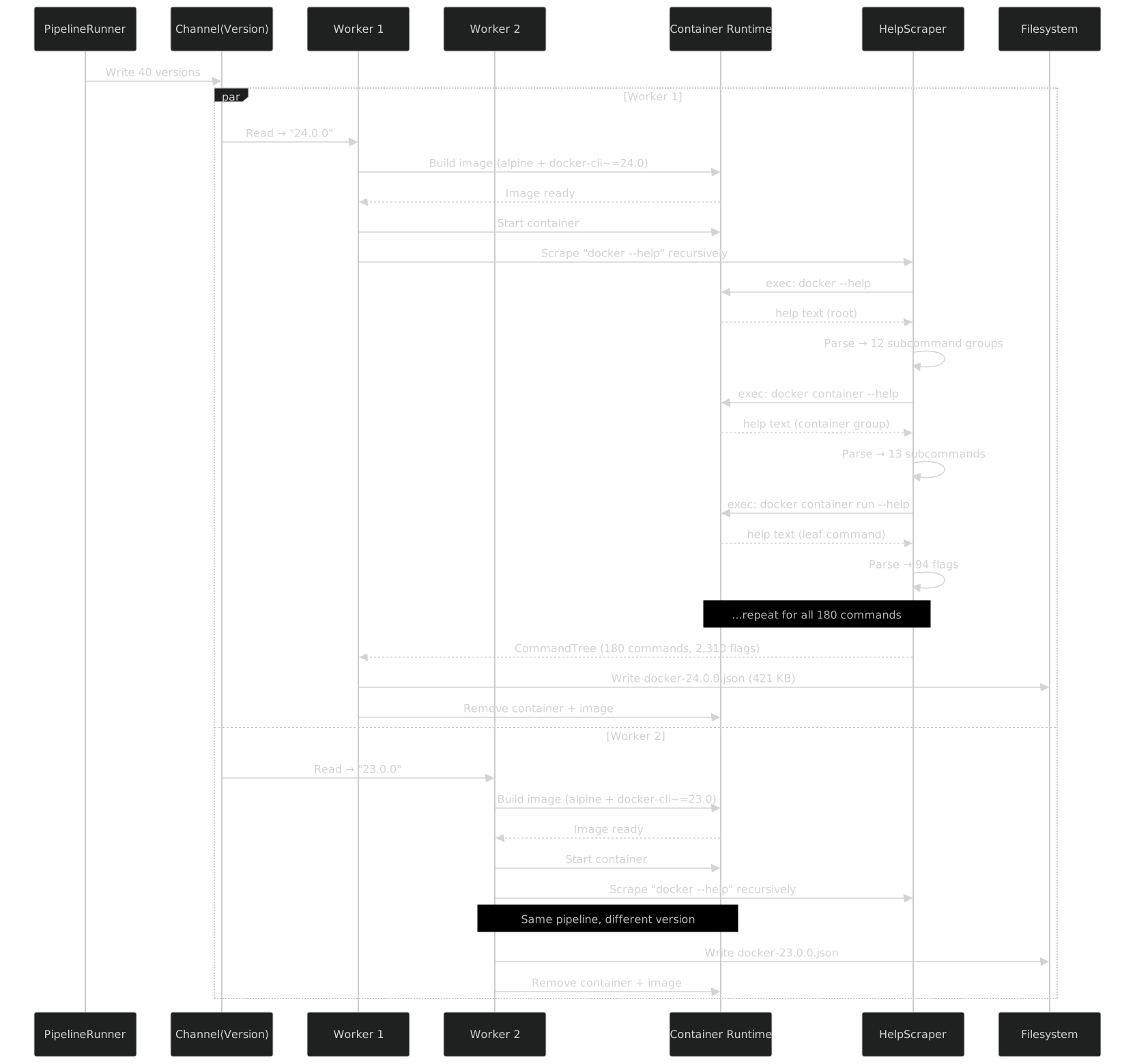
The algorithm starts at the root: docker --help. The parser extracts two things from the help output: a list of subcommand names and a list of flags. Subcommands become branches to recurse into; flags become leaf data attached to the current command node.
public class RecursiveHelpScraper
{
    private readonly IHelpParser _parser;
    private readonly IContainerExec _exec;
    private readonly string _binary;
    private readonly TimeSpan _timeout;
    private readonly SemaphoreSlim _semaphore;

    public RecursiveHelpScraper(string binary, IHelpParser parser,
        IContainerExec exec, int maxParallel = 4,
        TimeSpan? timeout = null)
    {
        _binary = binary;
        _parser = parser;
        _exec = exec;
        _timeout = timeout ?? TimeSpan.FromSeconds(30);
        _semaphore = new SemaphoreSlim(maxParallel);
    }

    public async Task<CommandNode> ScrapeAsync(CancellationToken ct)
    {
        return await ScrapeCommandAsync([], ct);
    }

    private async Task<CommandNode> ScrapeCommandAsync(
        string[] commandPath, CancellationToken ct)
    {
        await _semaphore.WaitAsync(ct);
        try
        {
            var args = [..commandPath, "--help"];
            var result = await _exec.ExecAsync(
                _binary, args, _timeout, ct);

            if (result.ExitCode != 0)
            {
                return CommandNode.Failed(commandPath,
                    result.StdErr);
            }

            var parsed = _parser.Parse(result.StdOut);

            // Recurse into subcommands concurrently
            var subTasks = parsed.SubCommandNames
                .Select(sub => ScrapeCommandAsync(
                    [..commandPath, sub], ct))
                .ToArray();

            // Release semaphore before awaiting children
            // so other commands can proceed
        }
        finally
        {
            _semaphore.Release();
        }

        var subCommands = await Task.WhenAll(subTasks);

        return new CommandNode
        {
            Name = commandPath.Length > 0
                ? commandPath[^1] : _binary,
            Path = commandPath,
            Description = parsed.Description,
            Options = parsed.Options,
            SubCommands = subCommands
                .Where(c => !c.IsFailed)
                .ToImmutableArray(),
        };
    }
}
A few things worth noting.
Parallelism within a version. The SemaphoreSlim limits how many --help commands execute concurrently inside the same container. Docker's CLI is fast, but running 180 execs simultaneously can overwhelm the container runtime. Four concurrent execs per container hits a good balance -- the total scrape time per version drops from ~45 seconds (sequential) to ~12 seconds (4-parallel).
Depth. Docker's command tree is three levels deep: root, group, command. For example: docker (root) -> container (group) -> run (command). But the algorithm handles arbitrary depth. Some future CLI might have tool group subgroup command at four levels. The recursion does not assume a maximum depth.
Termination. The recursion stops when a command has no subcommands in its parsed help output. Leaf commands like docker container run have only flags, no "Available Commands" section. The parser returns an empty subcommand list, and the recursion bottoms out.
The scrape parallelism knob. DefaultScrapeParallelism = 4 in the pipeline runner controls the semaphore. This is independent from DefaultParallelism = 4, which controls how many versions scrape in parallel. So the total concurrency is up to 4 versions x 4 execs per version = 16 concurrent --help calls. On a machine with Podman and an NVMe drive, this keeps all workers busy without thrashing.
JSON Output Structure
Each version produces one JSON file. The filename is docker-{version}.json. The structure mirrors the command tree exactly: a root node with subcommands nested recursively, and each node carrying its flags.
Here is a real excerpt from docker-24.0.0.json, trimmed for readability:
{
  "binaryName": "docker",
  "version": "24.0.0",
  "scrapedAt": "2026-03-15T14:32:00Z",
  "root": {
    "name": "docker",
    "description": "A self-sufficient runtime for containers",
    "options": [
      {
        "longName": "config",
        "description": "Location of client config files",
        "defaultValue": "/root/.docker",
        "valueKind": "single",
        "clrType": "string",
        "isRequired": false
      },
      {
        "longName": "context",
        "shortName": "c",
        "description": "Name of the context to use",
        "valueKind": "single",
        "clrType": "string",
        "isRequired": false
      },
      {
        "longName": "debug",
        "shortName": "D",
        "description": "Enable debug mode",
        "valueKind": "flag",
        "clrType": "bool",
        "isRequired": false
      },
      {
        "longName": "host",
        "shortName": "H",
        "description": "Daemon socket to connect to",
        "valueKind": "list",
        "clrType": "string[]",
        "isRequired": false
      },
      {
        "longName": "log-level",
        "shortName": "l",
        "description": "Set the logging level",
        "defaultValue": "info",
        "valueKind": "single",
        "clrType": "string",
        "isRequired": false
      }
    ],
    "subCommands": [
      {
        "name": "container",
        "description": "Manage containers",
        "options": [],
        "subCommands": [
          {
            "name": "run",
            "description": "Create and run a new container from an image",
            "options": [
              {
                "longName": "detach",
                "shortName": "d",
                "description": "Run container in background and print container ID",
                "valueKind": "flag",
                "clrType": "bool",
                "isRequired": false
              },
              {
                "longName": "env",
                "shortName": "e",
                "description": "Set environment variables",
                "valueKind": "list",
                "clrType": "string[]",
                "isRequired": false
              },
              {
                "longName": "interactive",
                "shortName": "i",
                "description": "Keep STDIN open even if not attached",
                "valueKind": "flag",
                "clrType": "bool",
                "isRequired": false
              },
              {
                "longName": "name",
                "description": "Assign a name to the container",
                "valueKind": "single",
                "clrType": "string",
                "isRequired": false
              },
              {
                "longName": "publish",
                "shortName": "p",
                "description": "Publish a container's port(s) to the host",
                "valueKind": "list",
                "clrType": "string[]",
                "isRequired": false
              },
              {
                "longName": "volume",
                "shortName": "v",
                "description": "Bind mount a volume",
                "valueKind": "list",
                "clrType": "string[]",
                "isRequired": false
              }
            ],
            "subCommands": []
          },
          {
            "name": "ls",
            "description": "List containers",
            "options": [
              {
                "longName": "all",
                "shortName": "a",
                "description": "Show all containers (default shows just running)",
                "valueKind": "flag",
                "clrType": "bool",
                "isRequired": false
              },
              {
                "longName": "format",
                "description": "Format output using a custom template",
                "valueKind": "single",
                "clrType": "string",
                "isRequired": false
              }
            ],
            "subCommands": []
          }
        ]
      },
      {
        "name": "image",
        "description": "Manage images",
        "subCommands": [
          {
            "name": "build",
            "description": "Build an image from a Dockerfile",
            "options": [
              {
                "longName": "tag",
                "shortName": "t",
                "description": "Name and optionally a tag (format: name:tag)",
                "valueKind": "list",
                "clrType": "string[]",
                "isRequired": false
              },
              {
                "longName": "file",
                "shortName": "f",
                "description": "Name of the Dockerfile",
                "valueKind": "single",
                "clrType": "string",
                "isRequired": false
              }
            ],
            "subCommands": []
          }
        ]
      }
    ]
  }
}
The JSON is intentionally verbose. Each field serves a specific purpose in the source generator:
longName is the canonical flag name without the -- prefix. This becomes the C# property name after PascalCase conversion: --detach becomes WithDetach().
shortName is the single-character shorthand without the - prefix. The source generator emits this as metadata so the command builder can use short flags when building argument strings: -d instead of --detach.
valueKind tells the generator what kind of value the flag expects. Three kinds exist:
"flag"-- a boolean toggle with no value.--detachor-d. Maps tobool."single"-- a flag that takes one value.--name mycontainer. Maps tostring(or a more specific CLR type if parseable)."list"-- a flag that can be repeated.--env FOO=bar --env BAZ=qux. Maps tostring[](orIEnumerable<string>in the builder).
clrType is the CLR type the parser inferred from the Go help text. Go's int maps to int, Go's duration maps to TimeSpan, Go's list maps to string[]. The mapping is imperfect -- more on that in Part V.
isRequired is rarely true for Docker flags, but when it is, the generated builder enforces it at build time with a ValidateRequired() check.
A typical Docker version JSON is 300-500 KB with 180+ commands and 2,400+ flags. The entire scrape/ directory for Docker is about 15 MB across all 40 versions.
Edge Cases -- The Interesting Docker-Specific Problems
If Docker's CLI were static and uniform, this section would not exist. But Docker has been evolving for over a decade, and that evolution creates scraping challenges that are more interesting than the happy path.
Command Aliases
docker run is an alias for docker container run. docker build is an alias for docker image build. docker ps is an alias for docker container ls. There are about 20 of these "legacy shorthand" commands that Docker preserves for backward compatibility.
The scraper encounters both forms because both appear in docker --help. The top-level help lists:
Commands:
  run         Create and run a new container from an image
  build       Build an image from a Dockerfile
  ps          List containers
And the management command help lists the same operations under their canonical paths:
Management Commands:
  container   Manage containers
  image       Manage images
The scraper handles this by scraping both paths independently, then detecting aliases through flag-set comparison:
public static class AliasDetector
{
    public static IReadOnlyList<CommandAlias> DetectAliases(
        CommandNode root)
    {
        var aliases = new List<CommandAlias>();
        var leafCommands = root.GetAllLeafCommands().ToList();

        // Group by normalized flag signature
        var groups = leafCommands
            .GroupBy(cmd => ComputeFlagSignature(cmd.Options))
            .Where(g => g.Count() > 1);

        foreach (var group in groups)
        {
            // The command under a management group is canonical
            var canonical = group
                .OrderByDescending(c => c.Path.Length)
                .First();

            foreach (var alias in group.Where(c => c != canonical))
            {
                aliases.Add(new CommandAlias(
                    AliasPath: alias.Path,
                    CanonicalPath: canonical.Path));
            }
        }

        return aliases;
    }

    private static string ComputeFlagSignature(
        ImmutableArray<OptionInfo> options)
        => string.Join("|", options
            .OrderBy(o => o.LongName)
            .Select(o => $"{o.LongName}:{o.ValueKind}"));
}
The signature-based detection works because docker run --help and docker container run --help produce identical flag lists. If two commands at different paths have the same flags, the deeper one is canonical and the shallower one is an alias.
The aliases are recorded in the JSON but the source generator only emits the canonical form. The generated client has Docker.Container.Run() but not a separate top-level Docker.Run(). If someone wants the shorthand, they use Docker.Container.Run() -- the compiler knows the right path.
Commands That Moved Between Groups
Docker 1.13 (released January 2017) introduced management commands. Before 1.13, every command was top-level: docker run, docker build, docker ps, docker images. After 1.13, these were reorganized into groups: docker container run, docker image build, docker container ls, docker image ls.
For backward compatibility, the old top-level forms still work. But the scraper needs to normalize everything to the management command form, because that is the canonical representation going forward.
For versions before 1.13 (which I do not scrape -- my minimum is 18.09), this would require a hardcoded mapping table. For versions 18.09+, the alias detection logic handles it automatically: both forms exist in the help, and the management command form wins because it has the longer path.
The one subtlety: some commands are legitimately top-level even in modern Docker. docker version, docker info, docker login, docker logout have no management group. The alias detector correctly leaves these alone because they have no deeper counterpart.
Hidden and Experimental Commands
Some commands are annotated with [experimental] in the help output:
Management Commands:
  checkpoint  Manage checkpoints [experimental]
  manifest    Manage Docker image manifests and manifest lists [experimental]
The CobraHelpParser captures this annotation and passes it through to the JSON as an isExperimental flag on the command node. The source generator emits a [DockerExperimental] attribute on the corresponding generated class, and the runtime executor can optionally warn when experimental commands are used.
Some commands only appear when DOCKER_CLI_EXPERIMENTAL=enabled is set in the environment. The scraper sets this environment variable for every container to ensure it captures the full command surface:
.UseContainer(options => options
    .WithEnvironment("DOCKER_CLI_EXPERIMENTAL", "enabled")
    .WithEnvironment("DOCKER_BUILDKIT", "1"))
Without this, commands like docker manifest would be invisible in the help output and missing from the JSON entirely.
Plugin Commands
Docker's CLI plugin system allows external binaries to register themselves as subcommands. The two most common plugins are docker buildx (BuildKit-based image building) and docker compose (v2, the Go rewrite of docker-compose).
Plugins are special for two reasons. First, they appear in docker --help under "Management Commands" even though they are separate binaries. Second, their help output format may differ from Docker's built-in commands because each plugin is an independent Go binary with its own cobra configuration.
For Docker Compose as a plugin, I scrape it separately as its own binary with its own pipeline -- that is Part IV. The Docker scraper detects compose plugin commands and excludes them to avoid duplication:
private static readonly HashSet<string> ExcludedPlugins =
    ["compose", "scout", "init", "sbom"];

private bool ShouldScrape(string subcommandName)
    => !ExcludedPlugins.Contains(subcommandName);
For docker buildx, I include it in the Docker scrape because buildx's flags integrate tightly with Docker's build system. The scraper handles it like any other management command -- docker buildx --help returns cobra-formatted help, and the parser handles it fine.
The JSON includes an isPlugin flag on commands that come from plugins, so the source generator can emit appropriate metadata.
Error Handling During Scraping
Things go wrong. Container builds fail because Alpine does not have that Docker CLI version in its package repository. Help output does not match the expected format because an older Docker version uses a non-standard layout. A command hangs forever on --help because of some obscure initialization bug.
The pipeline handles each failure mode:
public class ResilientScraper
{
    private readonly RecursiveHelpScraper _inner;
    private readonly ILogger _logger;

    public async Task<CommandNode> ScrapeWithRecoveryAsync(
        CancellationToken ct)
    {
        try
        {
            return await _inner.ScrapeAsync(ct);
        }
        catch (ContainerBuildException ex)
        {
            // Image build failed -- skip this version entirely
            _logger.LogWarning(
                "Skipping {Version}: container build failed: {Error}",
                ex.Version, ex.Message);
            return CommandNode.Skipped(ex.Version, ex.Message);
        }
    }
}
Container build failures skip that version, log a warning, and continue with others. This happens occasionally for very old versions where the package has been removed from Alpine's repositories.
Help output parse failures produce a partial result. If docker container run --help returns something the parser cannot handle, that command gets a parseWarnings array in the JSON. The source generator can still process the rest of the tree -- one broken leaf does not invalidate 179 working commands.
Timeouts kill the exec after 30 seconds per command. Some Docker versions (particularly 18.09) have commands where --help triggers a daemon connection attempt that hangs if no socket is available. The timeout prevents the pipeline from stalling:
var result = await _exec.ExecAsync(
    _binary, args,
    timeout: TimeSpan.FromSeconds(30),
    ct);

if (result.TimedOut)
{
    _logger.LogWarning("Timeout scraping {Path} in {Version}",
        string.Join(" ", commandPath), version);
    return CommandNode.TimedOut(commandPath);
}
Timed-out commands are recorded in the JSON with a "status": "timeout" field. The source generator treats them as if the command does not exist for that version -- a safe default.
Statistics and Verification
Here is what the scraping pipeline produces across a representative sample of versions:
| Docker Version | Commands | Flags | JSON Size | Scrape Time |
|---|---|---|---|---|
| 18.09.9 | 145 | 1,890 | 312 KB | 14s |
| 19.03.15 | 148 | 1,940 | 328 KB | 13s |
| 20.10.27 | 158 | 2,100 | 378 KB | 12s |
| 23.0.8 | 172 | 2,310 | 421 KB | 11s |
| 24.0.9 | 178 | 2,380 | 438 KB | 11s |
| 25.0.6 | 180 | 2,400 | 445 KB | 10s |
| 26.1.5 | 183 | 2,430 | 452 KB | 10s |
| 27.1.0 | 185 | 2,450 | 460 KB | 10s |
The trend is clear: Docker's CLI surface grows steadily. About 5-10 new commands and 50-100 new flags per major version. The scrape time per version decreases with newer versions because Alpine builds are faster with more recent packages.
Total across all 40 versions: roughly 6,800 commands scraped (with overlap between versions, of course), and 85,000+ flag instances before deduplication. After the source generator merges versions, the unified tree has 185 commands with version annotations on every one.
Incremental Scraping
The --missing flag makes the pipeline idempotent. It checks the output directory for existing JSON files and only scrapes versions that do not have one:
public static IEnumerable<VersionInfo> MissingOnly(
    this IEnumerable<VersionInfo> versions, string outputDir)
    => versions.Where(v =>
        !File.Exists(Path.Combine(outputDir,
            $"docker-{v.Version}.json")));
This means I can run the pipeline after a new Docker release and it only scrapes the new version. The 39 existing JSON files are untouched. A full rescrape of all 40 versions takes about 10 minutes with 4 workers; scraping a single new version takes 15-20 seconds.
Verification
The --verify flag parses all existing JSON files and validates their structure without scraping anything:
public async Task<VerifyResult> VerifyAsync(string outputDir)
{
    var files = Directory.GetFiles(outputDir, "docker-*.json");
    var results = new List<FileVerification>();

    foreach (var file in files)
    {
        try
        {
            var json = await File.ReadAllTextAsync(file);
            var tree = JsonSerializer.Deserialize<CommandTree>(json,
                _jsonOptions);

            var commands = tree!.Root.CountCommands();
            var flags = tree.Root.CountFlags();
            var warnings = tree.Root.CollectWarnings().ToList();

            results.Add(new FileVerification(
                file, commands, flags, warnings.Count,
                IsValid: commands > 0));
        }
        catch (Exception ex)
        {
            results.Add(FileVerification.Invalid(file, ex.Message));
        }
    }

    return new VerifyResult(results);
}
The output looks like:
Verifying 40 JSON files in scrape/
  docker-18.09.9.json    ✓  145 commands, 1,890 flags, 0 warnings
  docker-19.03.15.json   ✓  148 commands, 1,940 flags, 0 warnings
  docker-20.10.27.json   ✓  158 commands, 2,100 flags, 2 warnings
  ...
  docker-27.1.0.json     ✓  185 commands, 2,450 flags, 0 warnings

40/40 valid. 2 total warnings (docker-20.10.27: 2 parse warnings in
  docker trust key, docker trust signer)
The two warnings in 20.10.27 are from docker trust key and docker trust signer -- commands whose help output has a slightly non-standard format. The parser captured them with partial data, flagged the issue, and the source generator handles it gracefully.
The Complete Command Tree
To give a sense of scale, here is the top-level structure of Docker's command tree as of version 27.1.0. This is what the scraper discovers recursively:

docker container run alone has 94 flags. That is 94 things you could misspell, mistype the value for, or use on the wrong version. The source generator turns every one of them into a typed builder method with IntelliSense and version guards. But the source generator is only as good as its input -- and this scraping pipeline is what produces that input.
Putting It Together
The full scraping workflow for Docker is a single command:
dotnet run --project tools/BinaryWrapper.Design -- \
    --binary docker \
    --source github:moby/moby \
    --min-version 18.09.0 \
    --output scrape/docker/ \
    --parallelism 4 \
    --scrape-parallelism 4 \
    --missing \
    --dashboard
Or from the DesignPipelineRunner in C#:
await new DesignPipelineRunner
{
    VersionCollector = new GitHubReleasesVersionCollector("moby", "moby"),
    RuntimeBinary = "podman",
    Pipeline = new DesignPipeline()
        .UseImageBuild("docker-scrape", "alpine:3.19",
            v => v.Major >= 19
                ? $"apk add --no-cache docker-cli~={v.Major}.{v.Minor}"
                : $"apk add --no-cache curl && curl -fsSL " +
                  $"https://download.docker.com/linux/static/stable/" +
                  $"x86_64/docker-{v}.tgz " +
                  $"| tar xz --strip-components=1 -C /usr/local/bin/ " +
                  $"docker/docker")
        .UseContainer(options => options
            .WithEnvironment("DOCKER_CLI_EXPERIMENTAL", "enabled")
            .WithEnvironment("DOCKER_BUILDKIT", "1"))
        .UseScraper("docker", HelpParsers.Cobra())
        .Build(),
    OutputDir = "scrape/docker/",
    DefaultParallelism = 4,
    DefaultScrapeParallelism = 4,
}.RunAsync(args);
This produces 40 JSON files -- one per Docker version -- in the scrape/docker/ directory. The files are checked into the repository alongside the source generator. They are the single source of truth for Docker's CLI surface.
When Docker 28.0 ships, I run the command again with --missing. It discovers the new version from GitHub, builds one container, scrapes 190-something commands in 10 seconds, and writes docker-28.0.0.json. The next build picks it up, the source generator merges it into the unified tree, and every command and flag from 28.0 gets a [SinceVersion("28.0.0")] annotation. The entire update cycle -- from "Docker released a new version" to "my typed API supports it" -- is under a minute.
What This Data Enables
The JSON files are inert data. They do nothing by themselves. Their value comes from what the source generator does with them -- and that is the subject of Part VI.
But even before the source generator enters the picture, the scraped data answers questions that are surprisingly hard to answer otherwise:
- When was
--platformadded todocker container run? (19.03.0) - Which flags did
docker image buildlose between 23.0 and 24.0? (None -- Docker never removes flags, only deprecates) - How many flags does
docker container runhave across all versions? (It started at 78 in 18.09 and grew to 94 by 27.1) - What is the exact set of management command groups in Docker 20.10 versus 25.0? (20.10 has 13 groups; 25.0 has 15 --
buildxandscoutwere added)
These are the kinds of questions the source generator answers automatically by computing version diffs. But having the raw data in JSON means I can also query it with jq for ad-hoc analysis, or feed it to other tools entirely.
40 versions. 180+ commands per version. 2,400+ flags. All serialized to JSON in under 10 minutes with 4 parallel workers.
This data is the input to the source generator -- covered in Part VI. But first, Part IV shows how the same pipeline handles Docker Compose (with its own quirks: binary downloads instead of package installs, a flat command structure, and aggressive version churn in flags). And Part V dives into the CobraHelpParser itself -- the state machine that makes all of this recursive scraping actually work.