Part II: The Four Layers of Typed Docker
4 NuGet packages, 3 source generators, 1 attribute each -- that is the entire typed Docker stack.
In Part I I identified four categories of pain: string-concatenated flags, regex-parsed stdout, hand-written YAML, and version drift across CLI upgrades. Every one of those problems traces back to the same root cause -- the compiler has no visibility into CLI tools or specification files. The solution, then, is to bring both into the type system.
This part maps the architecture. Four layers, bottom to top: Docker CLI wrapper, Docker Compose CLI wrapper, Compose specification types, and service contributors. Each layer is a separate NuGet package. Each generated layer is triggered by a single attribute. Together they form a pipeline that starts with typed C# code and ends with running containers -- no strings, no YAML, no process argument guessing.
If you want the pain, go back to Part I. If you want the full deep-dive on the BinaryWrapper pattern that underpins layers 1 and 2, see BinaryWrapper. If you want the standalone story on the Compose Bundle, see Docker Compose Bundle. This post is the map.
The Stack at a Glance

The dependency arrows point downward. Contributors (Layer 4) compose ComposeFile objects using the typed models from Layer 3. Layer 3 renders those objects to YAML. Layer 2 wraps the docker compose binary and feeds it the YAML. Layer 2 internally delegates to Layer 1 for operations that go straight to the docker binary. Layer 1 spawns the actual process.
Every generated layer follows the same three-phase pipeline: design time produces data files (JSON command trees or JSON Schemas), build time feeds those files to a Roslyn incremental source generator, and runtime uses the generated API. The only layer that breaks this pattern is Layer 4 -- contributors are hand-written, because their value is domain knowledge, not mechanical generation.
Layer 1: Docker CLI Wrapper
FrenchExDev.Net.Docker -- 40+ versions, 180+ commands, ~200 generated files.
This is the foundation. Every docker command and every flag across 40+ versions of the Docker CLI, scraped from --help output, serialized to JSON, and code-generated into sealed C# command classes with fluent builders and version metadata.
The Trigger
One attribute, one partial class:
[BinaryWrapper("docker")]
public partial class DockerDescriptor;
Plus the .csproj wiring that feeds the scraped data to the generator:
<ItemGroup>
  <AdditionalFiles Include="scrape\docker-*.json" />
</ItemGroup>
That is the entire configuration. The Roslyn source generator sees the [BinaryWrapper("docker")] attribute, reads the 40+ JSON files from AdditionalFiles, merges them with VersionDiffer.Merge(), and emits ~200 .g.cs files.
What Gets Generated
Three categories of output:
Command classes -- one sealed class per CLI command, with a typed property for every flag:
// Generated: DockerContainerRunCommand.g.cs
public sealed partial class DockerContainerRunCommand : DockerCommand
{
    public bool Detach { get; init; }
    public string? Name { get; init; }
    public string Image { get; init; } = default!;

    [SinceVersion("19.03.0")]
    public string? Platform { get; init; }

    public IReadOnlyList<string> Publish { get; init; } = [];
    public IReadOnlyDictionary<string, string> Env { get; init; } = new Dictionary<string, string>();
    public IReadOnlyDictionary<string, string> Labels { get; init; } = new Dictionary<string, string>();

    // ... 54 properties total for `docker container run`
}
Fluent builders -- one builder per command, with With* methods and version guards:
// Generated: DockerContainerRunCommandBuilder.g.cs
public sealed partial class DockerContainerRunCommandBuilder
    : CommandBuilder<DockerContainerRunCommand>
{
    public DockerContainerRunCommandBuilder WithDetach(bool value = true)
    {
        _command = _command with { Detach = value };
        return this;
    }

    [SinceVersion("19.03.0")]
    public DockerContainerRunCommandBuilder WithPlatform(string value)
    {
        VersionGuard.Ensure(BinaryVersion, "19.03.0", "Platform");
        _command = _command with { Platform = value };
        return this;
    }

    public DockerContainerRunCommandBuilder WithPublish(string hostPort, string containerPort)
    {
        _command = _command with
        {
            Publish = [.. _command.Publish, $"{hostPort}:{containerPort}"]
        };
        return this;
    }

    // ... one With* method per property
}
The typed client -- nested groups matching Docker's own command hierarchy:
// Generated: DockerClient.g.cs
public sealed partial class DockerClient
{
    public DockerContainerGroup Container { get; }
    public DockerImageGroup Image { get; }
    public DockerNetworkGroup Network { get; }
    public DockerVolumeGroup Volume { get; }
    public DockerSystemGroup System { get; }
    // ... every top-level group
}

public sealed partial class DockerContainerGroup
{
    public Task<TResult> RunAsync<TResult>(
        Action<DockerContainerRunCommandBuilder> configure,
        IOutputParser<ContainerRunEvent> parser,
        IResultCollector<ContainerRunEvent, TResult> collector,
        CancellationToken ct = default) { ... }

    public Task<TResult> LsAsync<TResult>(...) { ... }
    public Task<TResult> InspectAsync<TResult>(...) { ... }
    public Task<TResult> StopAsync<TResult>(...) { ... }
    // ... every container subcommand
}
The Three-Phase Pipeline
Design time: scrape docker --help recursively across 40+ versions. Each version runs inside an Alpine container with a specific Docker CLI installed. CobraHelpParser (the same parser used for Podman, kubectl, and any Go cobra-based CLI) extracts the command tree and serializes it to JSON. Result: docker-20.10.0.json, docker-23.0.0.json, ..., docker-28.0.1.json.
Build time: the Roslyn incremental source generator reads all JSON files, runs VersionDiffer.Merge() to produce a single unified command tree where each command and flag carries [SinceVersion]/[UntilVersion] annotations, then emits sealed command classes, fluent builders, and the nested client.
Runtime: your code calls Docker.Container.Run(b => b.WithDetach(true).WithName("web")). The builder constructs a typed command object. CommandExecutor serializes it to process arguments (docker container run -d --name web), spawns the process, and pipes stdout/stderr through an IOutputParser<TEvent> that emits typed domain events.
Usage
// Run a container with typed flags
var result = await docker.Container.RunAsync(
    b => b
        .WithImage("postgres:16")
        .WithName("my-db")
        .WithDetach(true)
        .WithPublish("5432", "5432")
        .WithEnv("POSTGRES_PASSWORD", "secret")
        .WithHealthCmd("pg_isready -U postgres")
        .WithHealthInterval(TimeSpan.FromSeconds(5)),
    ContainerRunOutputParser.Instance,
    ContainerRunResultCollector.Instance);

Console.WriteLine($"Container started: {result.ContainerId}");
No string concatenation. No argument order sensitivity. No flag typos. The compiler catches WithPlatform() on Docker 18.09 before the process ever starts.
Layer 2: Docker Compose CLI Wrapper
FrenchExDev.Net.DockerCompose -- 57 versions, 37 commands, ~150 generated files.
Layer 2 follows the exact same BinaryWrapper pattern as Layer 1, but targets the docker compose binary instead of docker. Same generator framework, same three-phase pipeline, different command tree shape.
The Trigger
[BinaryWrapper("docker-compose")]
public partial class DockerComposeDescriptor;<ItemGroup>
<AdditionalFiles Include="scrape\docker-compose-*.json" />
</ItemGroup>One attribute, 57 JSON files, ~150 generated C# files.
Key Difference from Layer 1
Docker has deeply nested command groups: docker container run, docker image build, docker network create. The generated client mirrors this hierarchy with DockerContainerGroup, DockerImageGroup, etc.
Docker Compose is flat. There are no groups -- just top-level commands: up, down, build, logs, ps, exec, run, config, watch. The generated client reflects this:
// Generated: DockerComposeClient.g.cs
public sealed partial class DockerComposeClient
{
    // No nested groups -- flat command surface
    public Task<TResult> UpAsync<TResult>(
        Action<DockerComposeUpCommandBuilder> configure, ...) { ... }

    public Task<TResult> DownAsync<TResult>(
        Action<DockerComposeDownCommandBuilder> configure, ...) { ... }

    public Task<TResult> BuildAsync<TResult>(
        Action<DockerComposeBuildCommandBuilder> configure, ...) { ... }

    public Task<TResult> LogsAsync<TResult>(
        Action<DockerComposeLogsCommandBuilder> configure, ...) { ... }

    public Task<TResult> PsAsync<TResult>(
        Action<DockerComposePsCommandBuilder> configure, ...) { ... }

    // ... 37 commands total
}
The other major difference is global flags. Docker Compose has flags that apply to every command -- --project-directory, --file, --project-name, --profile, --env-file. These get generated as properties on a shared base class, not duplicated per command:
// Generated: DockerComposeCommand.g.cs (base class)
public abstract partial class DockerComposeCommand : Command
{
    public IReadOnlyList<string> File { get; init; } = [];
    public string? ProjectName { get; init; }
    public string? ProjectDirectory { get; init; }
    public IReadOnlyList<string> Profile { get; init; } = [];
    public string? EnvFile { get; init; }

    [SinceVersion("2.21.0")]
    public string? Progress { get; init; }
}
The Three-Phase Pipeline
Same pattern, different binary:
Design time: scrape docker compose --help across 57 versions. Docker Compose is distributed as a standalone binary (not a package), so the scraper downloads release binaries from GitHub instead of installing packages. 57 versions from v2.0.0 to v5.1.0, each producing a JSON command tree.
Build time: the same BinaryWrapper Roslyn generator reads the 57 JSON files, merges them, and emits ~150 generated files -- command classes, builders, and the flat client.
Runtime: your code calls DockerCompose.Up(...), the builder constructs a typed command, CommandExecutor spawns docker compose up, and output parsers stream typed events back.
Usage
// Deploy a compose stack with typed flags
var result = await dockerCompose.UpAsync(
    b => b
        .WithFile("docker-compose.yml")
        .WithDetach(true)
        .WithWait(true)              // [SinceVersion("2.1.1")]
        .WithWaitTimeout(120)        // [SinceVersion("2.18.0")]
        .WithRemoveOrphans(true)
        .WithBuild(true),
    ComposeUpOutputParser.Instance,
    ComposeUpResultCollector.Instance);

foreach (var service in result.Services)
{
    Console.WriteLine($"  {service.Name}: {service.State}");
}// Tail logs with streaming events
await dockerCompose.LogsAsync(
b => b
.WithFollow(true)
.WithTail(50)
.WithTimestamps(true)
.WithServices("web", "db"),
ComposeLogsOutputParser.Instance,
new ComposeLogsStreamCollector(line =>
{
Console.WriteLine($"[{line.Service}] {line.Timestamp}: {line.Message}");
}));The version story matters here. Docker Compose has been churning flags aggressively -- --wait appeared in 2.1.1, --watch in 2.22.0, --dry-run in 2.14.0, --progress in 2.21.0. Without [SinceVersion] guards, you discover these version mismatches at runtime, typically when a CI runner has an older compose binary than your development machine. With the typed API, the builder throws OptionNotSupportedException at the point of configuration, before the process is spawned.
Layer 3: Compose Specification Types
FrenchExDev.Net.DockerCompose.Bundle -- 32 JSON Schema versions, 40 model classes, 40 builders, ~80 generated files.
This layer is fundamentally different from Layers 1 and 2. Those wrap CLI binaries -- they type the commands you run. Layer 3 types the data those commands consume. It types the Docker Compose specification itself: the structure of a docker-compose.yml file, as defined by the official JSON Schemas published in the compose-spec/compose-go GitHub repository.
This is not a CLI wrapper. It is a schema wrapper. Different source, different generator, different output.
The Trigger
[ComposeBundle]
public partial class ComposeBundleDescriptor;<ItemGroup>
<AdditionalFiles Include="schemas\compose-spec-*.json" />
</ItemGroup>The [ComposeBundle] attribute triggers a different source generator than the [BinaryWrapper] attribute. The BinaryWrapper generator reads command tree JSON and emits command classes. The ComposeBundle generator reads JSON Schema files and emits model classes.
What Gets Generated
Model classes -- one class per compose specification type, with every property from every schema version:
// Generated: ComposeService.g.cs
public sealed partial record ComposeService
{
    public string? Image { get; init; }
    public ComposeServiceBuild? Build { get; init; }
    public IReadOnlyList<string> Command { get; init; } = [];
    public IReadOnlyDictionary<string, string> Environment { get; init; }
        = new Dictionary<string, string>();
    public IReadOnlyList<ComposeServicePort> Ports { get; init; } = [];
    public IReadOnlyList<ComposeServiceVolume> Volumes { get; init; } = [];
    public IReadOnlyDictionary<string, ComposeServiceDependsOn> DependsOn { get; init; }
        = new Dictionary<string, ComposeServiceDependsOn>();
    public ComposeServiceHealthcheck? Healthcheck { get; init; }
    public ComposeServiceDeploy? Deploy { get; init; }
    public IReadOnlyList<string> Networks { get; init; } = [];
    public ComposeServiceLogging? Logging { get; init; }

    [SinceVersion("1.19.0")]
    public ComposeServiceDevelop? Develop { get; init; }

    [SinceVersion("2.5.0")]
    public ComposeServiceProvider? Provider { get; init; }

    [SinceVersion("2.7.1")]
    public IReadOnlyList<ComposeServiceModel> Models { get; init; } = [];

    // ... 67 properties total
}
Fluent builders -- one builder per model class:
// Generated: ComposeServiceBuilder.g.cs
public sealed partial class ComposeServiceBuilder
    : ModelBuilder<ComposeService>
{
    public ComposeServiceBuilder WithImage(string value) { ... }
    public ComposeServiceBuilder WithBuild(Action<ComposeServiceBuildBuilder> configure) { ... }
    public ComposeServiceBuilder WithEnvironment(string key, string value) { ... }
    public ComposeServiceBuilder WithPort(string host, string container) { ... }
    public ComposeServiceBuilder WithVolume(Action<ComposeServiceVolumeBuilder> configure) { ... }
    public ComposeServiceBuilder WithDependsOn(string service, string condition) { ... }
    public ComposeServiceBuilder WithHealthcheck(Action<ComposeServiceHealthcheckBuilder> configure) { ... }
    // ... one With* per property, nested builders for complex types
}
The ComposeFile builder -- the top-level entry point:
// Generated: ComposeFileBuilder.g.cs
public sealed partial class ComposeFileBuilder
    : ModelBuilder<ComposeFile>
{
    public ComposeFileBuilder WithService(string name, Action<ComposeServiceBuilder> configure) { ... }
    public ComposeFileBuilder WithNetwork(string name, Action<ComposeNetworkBuilder> configure) { ... }
    public ComposeFileBuilder WithVolume(string name, Action<ComposeVolumeBuilder> configure) { ... }
    public ComposeFileBuilder WithSecret(string name, Action<ComposeSecretBuilder> configure) { ... }
    public ComposeFileBuilder WithConfig(string name, Action<ComposeConfigBuilder> configure) { ... }
}
The Three-Phase Pipeline
Design time: download all JSON Schema releases from the compose-spec/compose-go GitHub repository. Filter to the latest patch per major.minor version -- that gives 32 schema files, from v1.0.9 through v2.10.1. Each schema is the official JSON Schema that defines the structure of a docker-compose.yml for that release.
Build time: the Roslyn incremental source generator reads all 32 schemas, parses them with SchemaReader (handling $ref resolution, oneOf flattening, and inline type naming), then passes them through SchemaVersionMerger which produces a single unified type system. Each property in the merged output carries version bounds. Three emitters then produce C#: ModelClassEmitter for the record types, BuilderEmitter for the fluent builders, VersionMetadataEmitter for the [SinceVersion]/[UntilVersion] attributes.
Runtime: your code builds a ComposeFile using the typed builder API. When you are done, call Render() to produce a YAML string that you can write to disk or pass directly to the Docker Compose CLI from Layer 2.
Usage
// Build a compose file with 2 services, purely in C#
var composeFile = new ComposeFileBuilder()
    .WithService("db", s => s
        .WithImage("postgres:16")
        .WithEnvironment("POSTGRES_DB", "myapp")
        .WithEnvironment("POSTGRES_USER", "admin")
        .WithEnvironment("POSTGRES_PASSWORD", "secret")
        .WithPort("5432", "5432")
        .WithVolume(v => v
            .WithSource("pgdata")
            .WithTarget("/var/lib/postgresql/data")
            .WithType("volume"))
        .WithHealthcheck(h => h
            .WithTest("CMD-SHELL", "pg_isready -U admin")
            .WithInterval(TimeSpan.FromSeconds(5))
            .WithTimeout(TimeSpan.FromSeconds(3))
            .WithRetries(5))
        .WithRestart("unless-stopped"))
    .WithService("web", s => s
        .WithImage("myapp:latest")
        .WithBuild(b => b
            .WithContext(".")
            .WithDockerfile("Dockerfile"))
        .WithPort("8080", "80")
        .WithDependsOn("db", "service_healthy")
        .WithEnvironment("DATABASE_URL", "postgresql://admin:secret@db:5432/myapp")
        .WithRestart("unless-stopped"))
    .WithVolume("pgdata", v => v
        .WithDriver("local"))
    .Build();

// Render to YAML
string yaml = composeFile.Render();
That produces:
services:
  db:
    image: postgres:16
    environment:
      POSTGRES_DB: myapp
      POSTGRES_USER: admin
      POSTGRES_PASSWORD: secret
    ports:
      - "5432:5432"
    volumes:
      - type: volume
        source: pgdata
        target: /var/lib/postgresql/data
    healthcheck:
      test: ["CMD-SHELL", "pg_isready -U admin"]
      interval: 5s
      timeout: 3s
      retries: 5
    restart: unless-stopped
  web:
    image: myapp:latest
    build:
      context: .
      dockerfile: Dockerfile
    ports:
      - "8080:80"
    depends_on:
      db:
        condition: service_healthy
    environment:
      DATABASE_URL: postgresql://admin:secret@db:5432/myapp
    restart: unless-stopped

volumes:
  pgdata:
    driver: local
No hand-written YAML. No indentation mistakes. No discovering that depends_on with conditions requires a map, not a list. The builder API makes the structure explicit. For the full deep-dive on schema reading and version merging, see Docker Compose Bundle.
Layer 4: Service Contributors
N contributors, one interface, composable by design.
Layers 1 through 3 are generated. Layer 4 is not. Contributors are hand-written classes that encapsulate domain knowledge about specific services -- what image to use, what environment variables to set, what healthcheck to configure, what volumes to mount, what networks to join, what dependencies to declare.
The Interface
public interface IComposeFileContributor
{
    void Contribute(ComposeFile composeFile);
}
One interface. One method. One responsibility: add your service definition to the compose file. The contributor does not know about the other contributors. It does not know about the YAML. It does not know about the Docker Compose CLI. It only knows about the typed ComposeFile model from Layer 3.
Why Hand-Written?
I could have made this generated too -- templates, metadata files, some kind of service catalog DSL. I chose not to. The value of a contributor is not mechanical -- it is knowing that PostgreSQL needs pg_isready for its healthcheck, that Redis should use redis-cli ping, that Traefik needs its API dashboard on port 8080 and its entry points on 80 and 443, that GitLab needs 27 environment variables and 4 volumes to run correctly.
That knowledge comes from reading documentation, debugging failed deployments, and iterating on production configurations. No generator can scrape it. The right tool for this layer is a human writing a class.
Example: PostgresContributor
public class PostgresContributor : IComposeFileContributor
{
    private readonly PostgresOptions _options;

    public PostgresContributor(PostgresOptions options)
    {
        _options = options;
    }

    public void Contribute(ComposeFile composeFile)
    {
        composeFile.AddService(_options.ServiceName, s => s
            .WithImage($"postgres:{_options.Version}")
            .WithEnvironment("POSTGRES_DB", _options.Database)
            .WithEnvironment("POSTGRES_USER", _options.User)
            .WithEnvironment("POSTGRES_PASSWORD", _options.Password)
            .WithPort(_options.HostPort.ToString(), "5432")
            .WithVolume(v => v
                .WithSource($"{_options.ServiceName}-data")
                .WithTarget("/var/lib/postgresql/data")
                .WithType("volume"))
            .WithHealthcheck(h => h
                .WithTest("CMD-SHELL", $"pg_isready -U {_options.User}")
                .WithInterval(TimeSpan.FromSeconds(5))
                .WithTimeout(TimeSpan.FromSeconds(3))
                .WithRetries(10))
            .WithRestart("unless-stopped"));

        composeFile.AddVolume($"{_options.ServiceName}-data", v => v
            .WithDriver("local"));
    }
}
Everything that makes this PostgreSQL service production-ready is in one class: the image, the environment, the volume, the healthcheck, the restart policy. Change the PostgreSQL version? Change _options.Version. Need a different healthcheck interval? One line. Need to add shared_buffers tuning? Add a WithCommand(...) call.
Example: TraefikContributor
public class TraefikContributor : IComposeFileContributor
{
    private readonly TraefikOptions _options;

    public TraefikContributor(TraefikOptions options)
    {
        _options = options;
    }

    public void Contribute(ComposeFile composeFile)
    {
        composeFile.AddService("traefik", s => s
            .WithImage($"traefik:{_options.Version}")
            .WithCommand("--api.dashboard=true")
            .WithCommand("--providers.docker=true")
            .WithCommand("--providers.docker.exposedbydefault=false")
            .WithCommand($"--entrypoints.web.address=:{_options.HttpPort}")
            .WithCommand($"--entrypoints.websecure.address=:{_options.HttpsPort}")
            .WithPort(_options.HttpPort.ToString(), _options.HttpPort.ToString())
            .WithPort(_options.HttpsPort.ToString(), _options.HttpsPort.ToString())
            .WithPort("8080", "8080")
            .WithVolume(v => v
                .WithSource("/var/run/docker.sock")
                .WithTarget("/var/run/docker.sock")
                .WithType("bind")
                .WithReadOnly(true))
            .WithLabel("traefik.enable", "true")
            .WithLabel("traefik.http.routers.dashboard.rule",
                $"Host(`traefik.{_options.Domain}`)")
            .WithRestart("unless-stopped"));
    }
}
Composition
Contributors are registered in the DI container and composed at runtime:
// Registration
services.AddSingleton<IComposeFileContributor, PostgresContributor>();
services.AddSingleton<IComposeFileContributor, RedisContributor>();
services.AddSingleton<IComposeFileContributor, TraefikContributor>();
services.AddSingleton<IComposeFileContributor, AppServiceContributor>();

// Composition
var composeFile = new ComposeFile();

foreach (var contributor in contributors)
{
    contributor.Contribute(composeFile);
}
Each contributor is self-contained. Each contributor is testable in isolation -- pass a fresh ComposeFile, call Contribute, assert the service was added with the right properties. No YAML parsing. No integration test required to verify that the PostgreSQL healthcheck is correct.
For the GitLab-specific contributors (27 environment variables, 4 volumes, SMTP relay, Traefik integration), see GitLab Docker Compose.
How the Layers Connect
The layers are not just stacked -- they form a pipeline. Here is the full flow from typed C# to running containers:
// Step 1: Contributors build a ComposeFile (Layer 4 → Layer 3)
var composeFile = new ComposeFile();

foreach (var contributor in contributors)
{
    contributor.Contribute(composeFile);
}

// Step 2: ComposeFile renders to YAML (Layer 3 → string)
string yaml = composeFile.Render();

// Step 3: Write YAML to a temp file
var tempPath = Path.Combine(Path.GetTempPath(), "docker-compose.yml");
await File.WriteAllTextAsync(tempPath, yaml);

// Step 4: Docker Compose CLI deploys the stack (Layer 2)
var result = await dockerCompose.UpAsync(
    b => b
        .WithFile(tempPath)
        .WithDetach(true)
        .WithWait(true)
        .WithRemoveOrphans(true),
    ComposeUpOutputParser.Instance,
    ComposeUpResultCollector.Instance);

// Step 5: Typed events stream back
foreach (var service in result.Services)
{
    Console.WriteLine($"  {service.Name}: {service.State}");
    // Output:
    //   db: Running (healthy)
    //   redis: Running (healthy)
    //   traefik: Running
    //   web: Running
}
The request flow, step by step:
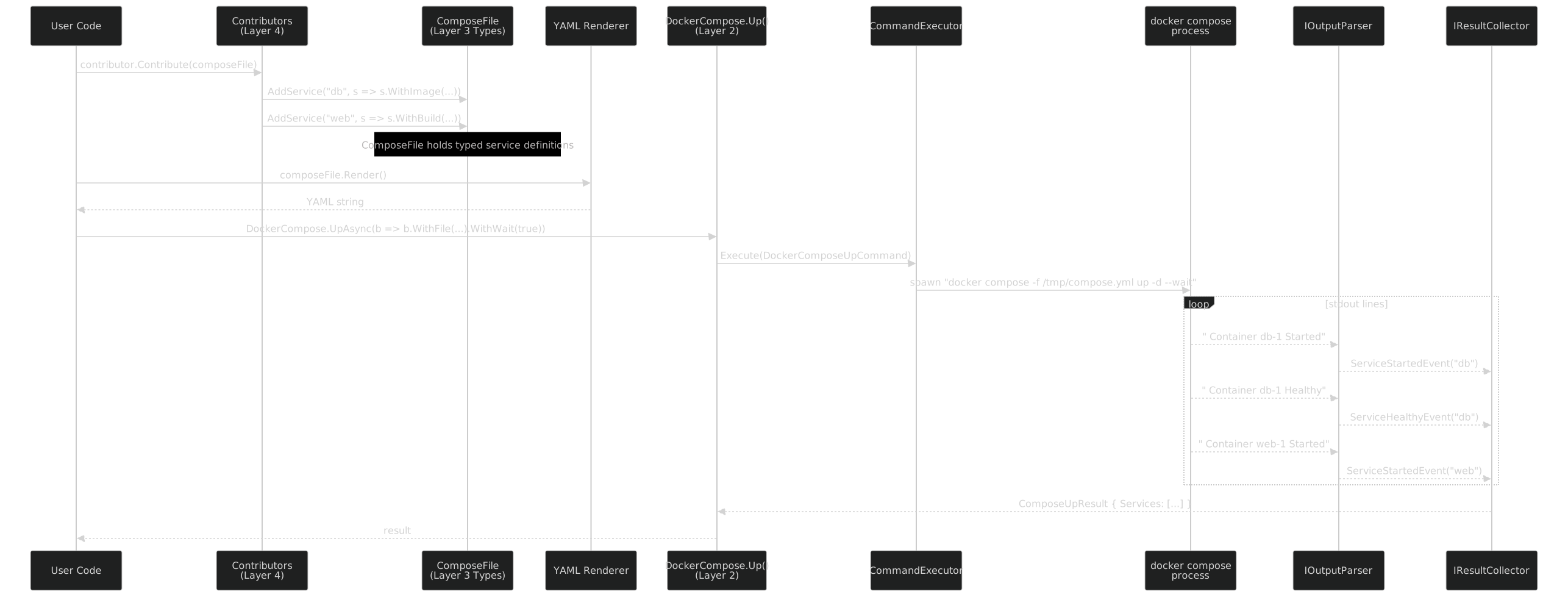
The key insight: every boundary between layers is typed. Contributors build typed ComposeFile objects, not YAML strings. The YAML renderer produces valid YAML from the typed model, not from string templates. The Docker Compose CLI wrapper builds typed command objects, not argument strings. The output parser produces typed events, not raw text. At no point in this pipeline does a human need to reason about string formatting, argument ordering, or output patterns.
The Three-Phase Pipeline Per Layer
Every generated layer follows the same lifecycle. The patterns are identical; only the inputs and outputs differ.
| Layer | Design Time | Build Time | Runtime |
|---|---|---|---|
| Docker CLI | Scrape docker --help across 40+ versions |
Roslyn: JSON command trees --> commands, builders, client | Docker.Container.Run() --> CommandExecutor --> process |
| Compose CLI | Scrape docker compose --help across 57 versions |
Roslyn: JSON command trees --> commands, builders, client | DockerCompose.Up() --> CommandExecutor --> process |
| Compose Bundle | Download 32 JSON Schemas from GitHub | Roslyn: schemas --> merge 32 to 1 --> models, builders | ComposeFileBuilder --> ComposeFile --> YAML |
| Contributors | (none -- hand-written) | (none -- hand-written) | contributor.Contribute(composeFile) |
Design time is a one-time operation. You run it when you want to add support for a new version of the binary or schema. Build time runs on every compilation -- the Roslyn incremental generator is fast enough that you do not notice it (under 2 seconds for ~200 files). Runtime is where your application code lives.
The uniformity is intentional. Once you understand the pipeline for Layer 1, Layers 2 and 3 are the same mental model with different data. Layer 4 breaks the pattern deliberately -- contributors are the seam where generated infrastructure meets hand-written domain knowledge.
Project Structure
The monorepo layout maps directly to the layer architecture:
FrenchExDev_i2/Net/FrenchExDev/
├── Docker/
│   ├── src/FrenchExDev.Net.Docker/
│   │   ├── DockerDescriptor.cs                 # [BinaryWrapper("docker")]
│   │   └── scrape/docker-*.json                # 40+ versioned command trees
│   └── test/FrenchExDev.Net.Docker.Tests/
│       ├── CommandTests/                        # Generated command assertions
│       ├── BuilderTests/                        # Fluent builder verification
│       └── ParserTests/                         # Output parser fixtures
│
├── DockerCompose/
│   ├── src/FrenchExDev.Net.DockerCompose/
│   │   ├── DockerComposeDescriptor.cs           # [BinaryWrapper("docker-compose")]
│   │   └── scrape/docker-compose-*.json         # 57 versioned command trees
│   ├── src/FrenchExDev.Net.DockerCompose.Bundle/
│   │   ├── ComposeBundleDescriptor.cs           # [ComposeBundle]
│   │   └── schemas/compose-spec-*.json          # 32 JSON Schema versions
│   ├── src/FrenchExDev.Net.DockerCompose.Bundle.SourceGenerator/
│   │   ├── ComposeBundleGenerator.cs            # Roslyn incremental generator
│   │   ├── SchemaReader.cs                      # JSON Schema parser ($ref, oneOf)
│   │   └── SchemaVersionMerger.cs               # 32 versions → 1 merged schema
│   └── test/FrenchExDev.Net.DockerCompose.Tests/
│       ├── CommandTests/
│       ├── BundleTests/                         # Round-trip YAML validation
│       └── SchemaTests/                         # Schema parsing edge cases
│
├── BinaryWrapper/                               # Shared generator framework
│   ├── src/FrenchExDev.Net.BinaryWrapper/
│   │   ├── CommandExecutor.cs                   # Process spawning + output piping
│   │   ├── BinaryBinding.cs                     # Binary resolution + version detect
│   │   └── VersionGuard.cs                      # Runtime version enforcement
│   ├── src/FrenchExDev.Net.BinaryWrapper.SourceGenerator/
│   │   ├── BinaryWrapperGenerator.cs            # Roslyn incremental generator
│   │   ├── VersionDiffer.cs                     # Multi-version merge algorithm
│   │   ├── CommandEmitter.cs                    # Sealed command class generation
│   │   ├── BuilderEmitter.cs                    # Fluent builder generation
│   │   └── ClientEmitter.cs                     # Typed client generation
│   └── src/FrenchExDev.Net.BinaryWrapper.Attributes/
│       ├── BinaryWrapperAttribute.cs            # [BinaryWrapper("docker")]
│       ├── SinceVersionAttribute.cs             # [SinceVersion("19.03.0")]
│       └── UntilVersionAttribute.cs             # [UntilVersion("23.0.0")]
│
└── Builder/                                     # Shared builder framework
    └── src/FrenchExDev.Net.Builder/
        ├── CommandBuilder.cs                    # Base class for command builders
        └── ModelBuilder.cs                      # Base class for model builders
Notice the symmetry. Docker/ and DockerCompose/ are structurally identical -- both have a descriptor, both have scraped JSON, both use the same BinaryWrapper source generator. The Compose Bundle breaks the pattern because it has its own dedicated source generator (ComposeBundleGenerator) since it reads JSON Schemas instead of command trees.
The BinaryWrapper/ and Builder/ directories are shared infrastructure. They are not Docker-specific -- the same BinaryWrapperGenerator powers the Podman wrapper, the Packer wrapper, the Vagrant wrapper, and any future CLI wrapper. One generator framework, many consumers.
Package Dependencies
The NuGet dependency graph shows how the packages compose:

The dashed arrows are analyzer references -- the source generators are shipped as Roslyn analyzers, not runtime dependencies. They run at build time and produce code; they are not present at runtime.
Key observations:
Docker and DockerCompose share the same generator. Both reference BinaryWrapper.SourceGenerator as an analyzer. The generator does not know it is generating Docker commands versus Compose commands -- it reads JSON command trees and emits C#. The binary name comes from the [BinaryWrapper("docker")] attribute.
The Compose Bundle has its own generator. It cannot reuse the BinaryWrapper generator because the input format is different -- JSON Schemas versus command tree JSON. So it has a dedicated ComposeBundleGenerator that understands $ref, oneOf, allOf, and the version merging algorithm.
All three generated packages share the Builder framework. FrenchExDev.Net.Builder provides the base CommandBuilder<T> and ModelBuilder<T> classes. This is the same builder infrastructure used across the entire FrenchExDev ecosystem -- the Builder pattern post covers it in depth.
Contributors have no package dependency. They are just classes that implement IComposeFileContributor against the Bundle types. They live in the consuming application, not in a separate package.
In a consumer's .csproj, the full stack looks like this:
<ItemGroup>
  <!-- Layer 1: Docker CLI -->
  <PackageReference Include="FrenchExDev.Net.Docker" Version="1.0.0" />

  <!-- Layer 2: Compose CLI -->
  <PackageReference Include="FrenchExDev.Net.DockerCompose" Version="1.0.0" />

  <!-- Layer 3: Compose Bundle -->
  <PackageReference Include="FrenchExDev.Net.DockerCompose.Bundle" Version="1.0.0" />

  <!-- Layer 4: Contributors are your own code -- no package needed -->
</ItemGroup>
Three package references. The source generators, attributes, and builder framework are pulled in transitively. The consumer sees three packages and gets the entire typed Docker stack.
What Each Layer Buys You
It is worth being explicit about what you gain at each level, because you do not have to adopt all four layers at once.
Layer 1 alone gives you typed Docker commands. No more Process.Start("docker", "container run -d ..."). You get IntelliSense on every flag, compile-time version checking, and structured output parsing. If you only interact with the Docker CLI directly and never write compose files, this is all you need.
Layer 1 + Layer 2 adds Docker Compose orchestration. You can docker compose up with typed flags and get streaming events back. You still write docker-compose.yml by hand, but you execute it through a typed API.
Layers 1 + 2 + 3 replaces hand-written YAML. You build compose files in C# with full IntelliSense and the compiler catches structural errors (is depends_on a list or a map? the builder knows). You render to YAML and pass it to the typed Compose CLI.
All four layers gives you the full pipeline: self-contained, testable service definitions composed at runtime, rendered to YAML, deployed through typed commands, with structured events streaming back. Zero YAML in the repository. Zero string concatenation anywhere in the stack.
// Layer 1 only
await docker.Container.RunAsync(
    b => b.WithImage("nginx").WithDetach(true).WithPublish("80", "80"),
    parser, collector);

// Layers 1 + 2
await dockerCompose.UpAsync(
    b => b.WithFile("docker-compose.yml").WithDetach(true).WithWait(true),
    parser, collector);

// Layers 1 + 2 + 3
var file = new ComposeFileBuilder()
    .WithService("web", s => s.WithImage("nginx").WithPort("80", "80"))
    .Build();
string yaml = file.Render();
await dockerCompose.UpAsync(b => b.WithFile(yaml).WithWait(true), parser, collector);

// All four layers
var file = new ComposeFile();
contributors.ForEach(c => c.Contribute(file));
string yaml = file.Render();
await dockerCompose.UpAsync(b => b.WithFile(yaml).WithWait(true), parser, collector);
Each layer removes one category of manual, error-prone work. Adopt them incrementally or all at once -- the architecture supports both.
The Numbers
A summary of what the generators produce, because the scale matters:
| Metric | Docker CLI | Compose CLI | Compose Bundle | Total |
|---|---|---|---|---|
| Versions scraped/downloaded | 40+ | 57 | 32 | 129 |
| Generated files | ~200 | ~150 | ~80 | ~430 |
| Commands / Model classes | 180+ | 37 | 40 | 257 |
| Builders | 180+ | 37 | 40 | 257 |
| Properties (largest class) | 54 | 28 | 67 | -- |
| Source generator trigger | 1 attribute | 1 attribute | 1 attribute | 3 attributes |
| Generator runtime | <2s | <1s | <1s | <4s |
That is ~430 generated files from 3 attributes and 129 versioned data files. The generators run in under 4 seconds combined, which is fast enough to be invisible in the IDE.
What is Coming
This post is the map. The rest of the series is the territory.
Design time (Parts III-V) covers how the data files are produced -- scraping Docker across 40+ versions, scraping Docker Compose across 57 versions, and the CobraHelpParser that makes it all work:
- Part III: Design Time -- Scraping 40+ Docker Versions
- Part IV: Design Time -- Scraping 57 Docker Compose Versions
- Part V: CobraHelpParser -- Parsing Go CLI Help Output
Build time (Parts VI-VIII) covers the Roslyn source generators -- how they read JSON, merge versions, and emit C#:
- Part VI: Build Time -- The Source Generator for CLI Commands
- Part VII: The Generated Docker API -- A Tour
- Part VIII: The Generated Docker Compose API
Runtime (Part IX) covers execution, parsing, and events:
The Compose Bundle (Parts X-XII) deep-dives into JSON Schema reading, version merging, and YAML rendering:
- Part X: The Compose Bundle -- Downloading and Reading 32 Schemas
- Part XI: Schema Version Merging -- 32 to 1
- Part XII: From ComposeFile to docker-compose.yml
Putting it together (Parts XIII-XIV) covers the contributor pattern and the full end-to-end flow:
- Part XIII: The Contributor Pattern -- Composable Service Definitions
- Part XIV: End to End -- A Complete Typed Docker Stack
Testing and philosophy (Parts XV-XVI) cover the testing strategy and the design principles behind all of this:
- Part XV: Testing Strategy -- From Parser to Deployment
- Part XVI: Philosophy, Comparison, and What Comes Next
Next up: Part III -- how to scrape docker --help across 40+ versions of the Docker CLI, from inside Alpine containers, without losing your mind.
This is Part II of the Typed Docker series. The architecture described here is production code running in the FrenchExDev.Net monorepo -- the numbers are from the current build, not aspirational targets.