Part I: Three Files and Five Thousand Lines
The fastest way to create unmaintainable software is to let state live wherever it's convenient.
The Original Architecture
The site launched in March 2026 as three JavaScript files loaded via <script> tags:
index.html
├── js/
│   ├── app.js                ← ~3,500 lines: SPA routing, TOC, scroll spy, everything
│   ├── markdown-renderer.js  ← ~1,500 lines: marked.js + Mermaid + code blocks
│   └── theme-switcher.js     ← ~600 lines: color/OS mode persistence
├── content/                  ← All content as markdown
├── css/style.css             ← 1,270 lines of themed CSS
└── toc.json                  ← Generated sidebar structure
No framework. No bundler. No module system. Each file was an IIFE that attached its public API to window:
// theme-switcher.js
(function() {
  const THEMES = ['dark', 'light', 'system'];
  let currentTheme = localStorage.getItem('theme') || 'dark';

  function setTheme(theme) {
    document.documentElement.setAttribute('data-theme', theme);
    localStorage.setItem('theme', theme);
    currentTheme = theme;
  }

  window.ThemeSwitcher = { setTheme, getTheme: () => currentTheme };
})();
This worked. The site loaded fast, rendered markdown, navigated between pages, highlighted code, and looked like a terminal. Visitors saw a polished product.
Developers saw a time bomb.
The Problem: Implicit State
The heart of app.js was a function called loadPage(). It was responsible for fetching content, swapping the DOM, updating the URL, resetting scroll spy, closing the headings panel, and updating the TOC highlight. All in one function. All touching the DOM directly.
Here is what the navigation logic looked like, reconstructed from the original code:
let isFetching = false;
let loadGeneration = 0;
let headingsOpen = false;
let currentPath = '';

async function loadPage(targetPath, hash, href) {
  // Stale-request guard (hand-rolled)
  const thisGen = ++loadGeneration;

  // Same page? Handle hash scroll or headings toggle
  if (targetPath === currentPath) {
    if (hash) {
      const el = document.getElementById(hash);
      if (el) el.scrollIntoView({ behavior: 'smooth' });
      history.replaceState(null, '', href);
      return;
    }
    // No hash, same page → toggle headings panel
    toggleHeadingsPanel();
    return;
  }

  // Different page → full navigation
  isFetching = true;
  updateLoadingSpinner(true);

  // Close headings if open (but don't wait for animation)
  if (headingsOpen) {
    headingsPanel.classList.remove('open');
    headingsOpen = false;
  }

  try {
    const response = await fetch(`content/${targetPath}`);
    if (!response.ok) throw new Error(`${response.status}`);

    // Stale check — another loadPage() may have started
    if (loadGeneration !== thisGen) return;

    const html = await response.text();

    // Stale check again — fetch may have taken time
    if (loadGeneration !== thisGen) return;

    // Swap content
    document.getElementById('content').innerHTML = renderMarkdown(html);
    currentPath = targetPath;

    // Update TOC
    document.querySelectorAll('.toc-item').forEach(el => {
      el.classList.toggle('active', el.dataset.path === targetPath);
    });

    // Update URL
    history.pushState(null, '', href);

    // Reset scroll spy
    scrollSpyActive = null;
    resetScrollSpy();

    // Post-processing: syntax highlighting, mermaid, copy buttons
    highlightCodeBlocks();
    await processMermaid();
    wireCodeCopyButtons();

    // Scroll to hash if present
    if (hash) {
      const el = document.getElementById(hash);
      if (el) el.scrollIntoView({ behavior: 'smooth' });
    }

  } catch (err) {
    console.error('loadPage failed:', err);
  } finally {
    isFetching = false;
    updateLoadingSpinner(false);
  }
}
Count the concerns in this single function:
- Navigation classification (same page vs different page)
- Hash scroll behavior
- Headings panel management
- Fetch lifecycle
- Stale-request detection
- DOM content swap
- TOC highlight update
- History API management
- Scroll spy reset
- Post-processing (highlight, mermaid, copy buttons)
- Error handling
- Loading spinner
Twelve concerns. One function. And every one of them touches the DOM.
The Twelve Concerns Diagram
Here's the call graph for a single click. One user action triggers twelve concerns, all in one function:

Every box is a side effect. Every box touches the DOM. Every box runs in the same function scope, sharing closure variables. A bug in "Process Mermaid" can affect "Reset scroll spy" because they share state through scrollSpyActive and currentPath.
State Scattered Across Closures
The implicit state was not limited to loadPage(). Throughout app.js, booleans accumulated:
let headingsOpen = false;
let isFetching = false;
let scrollSpyActive = null;
let isResizing = false;
let resizeStartX = 0;
let resizeStartWidth = 0;
let sidebarWidth = 280;
let userHasResized = false;
let paletteOpen = false;
let activeAccentColor = 'green';
let tourRunning = false;
let tourStep = -1;
let copyTimeout = null;
let tooltipTimer = null;
Each boolean was a single bit of a state machine that nobody drew. The valid transitions were implicit -- enforced (or not) by if chains scattered across event handlers:
function handleSidebarMouseDown(e) {
  if (isResizing) return;  // Guard
  isResizing = true;
  resizeStartX = e.clientX;
  resizeStartWidth = sidebar.offsetWidth;
  document.addEventListener('mousemove', handleSidebarMouseMove);
  document.addEventListener('mouseup', handleSidebarMouseUp);
}

function handleSidebarMouseMove(e) {
  if (!isResizing) return;  // Guard
  const newWidth = resizeStartWidth + (e.clientX - resizeStartX);
  const clamped = Math.max(180, Math.min(window.innerWidth * 0.5, newWidth));
  sidebar.style.width = `${clamped}px`;
}

function handleSidebarMouseUp() {
  if (!isResizing) return;  // Guard
  isResizing = false;
  userHasResized = true;
  localStorage.setItem('sidebarWidth', sidebar.offsetWidth);
  document.removeEventListener('mousemove', handleSidebarMouseMove);
  document.removeEventListener('mouseup', handleSidebarMouseUp);
}
This is a state machine. It has two states (idle and dragging), two transitions (startDrag and endDrag), and a side effect (moveDrag). But the structure is invisible. The state is a boolean. The transitions are event handlers. The guards are if statements. And the side effects -- DOM manipulation, localStorage, event listener management -- are mixed into the transition logic.
Race Conditions
The generation counter in loadPage() was a real bug fix, not defensive programming. Here is what happened without it:
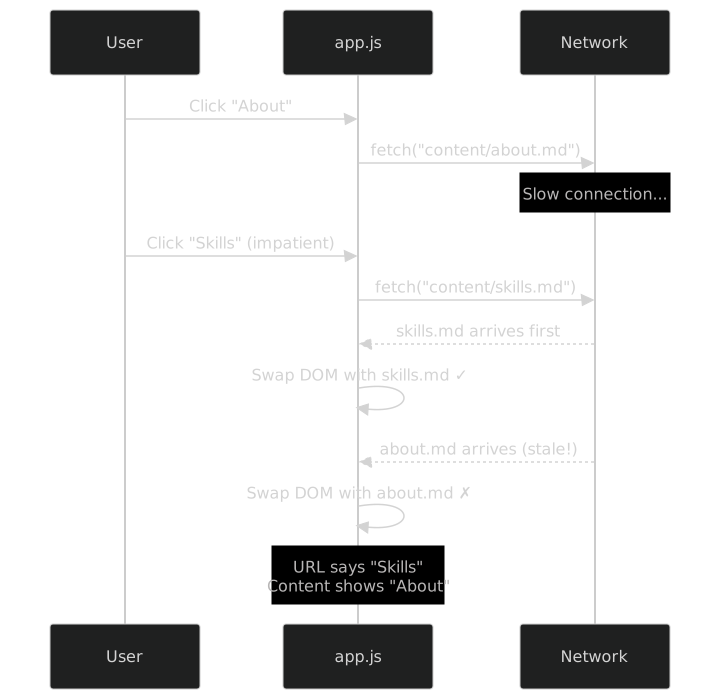
The generation counter (++loadGeneration at the start, loadGeneration !== thisGen before swap) solved this. But it was a hand-rolled solution to a problem that state machines solve structurally: you cannot be in two states at once. If the SPA navigation machine is in state fetching for page B, the fetch completion for page A is rejected because the generation doesn't match -- not through a manual check, but because the machine's state makes it impossible.
The Copy Button Problem
Here is another example. Copy-to-clipboard needs four states: idle, copying, success, and error. The original implementation:
function wireCodeCopyButtons() {
  document.querySelectorAll('.copy-btn').forEach(btn => {
    btn.addEventListener('click', async () => {
      const code = btn.closest('pre').querySelector('code').textContent;
      btn.textContent = '📋';  // "copying" visual

      try {
        await navigator.clipboard.writeText(code);
        btn.textContent = '✅';
      } catch {
        btn.textContent = '❌';
      }

      // Auto-reset after 2 seconds
      setTimeout(() => {
        btn.textContent = '📋';
      }, 2000);
    });
  });
}
Looks fine. But click the button twice quickly:
- First click: state = copying, starts clipboard write
- Second click: state = copying again, starts another clipboard write
- First setTimeout fires: resets button to idle
- Second clipboard write completes: sets button to success
- Second setTimeout fires: resets button to idle
The button blinks incoherently because the timeout from the first click interferes with the second click's lifecycle. The fix in the original code was to track the timeout ID and clear it:
let copyTimeouts = new WeakMap();  // per-button timeout tracking

function wireCodeCopyButtons() {
  document.querySelectorAll('.copy-btn').forEach(btn => {
    btn.addEventListener('click', async () => {
      // Cancel previous timeout
      const existing = copyTimeouts.get(btn);
      if (existing) clearTimeout(existing);

      // ... copy logic ...

      copyTimeouts.set(btn, setTimeout(() => {
        btn.textContent = '📋';
        copyTimeouts.delete(btn);
      }, 2000));
    });
  });
}
More code. More implicit state. The WeakMap is a state store. The timeout ID is a state variable. The clearTimeout is a guard. And if you want to test this? You need a DOM, a clipboard API mock, and timer manipulation. For a copy button.
The Testing Wall
The most damaging consequence of implicit, DOM-coupled state was that nothing was testable. Every function in app.js assumed it could reach into the DOM:
function updateActiveItem(path) {
  document.querySelectorAll('.toc-item').forEach(el => {
    el.classList.toggle('active', el.dataset.path === path);
  });
}
To test this function, you need:
- A DOM (jsdom or a real browser)
- HTML fixtures with
.toc-itemelements that havedata-pathattributes - CSS class verification
For a function that answers one question: "given a list of items and a path, which one is active?" That question is a pure function. The DOM is just the rendering layer. But the original code didn't separate the two.
This meant:
- Zero unit tests. Not by choice -- by architecture.
- Manual testing only. Click through every page, resize the sidebar, try the copy button, check the tooltip, verify scroll spy.
- Regression by surprise. Every change to the TOC scroll behavior risked breaking the headings panel because they shared closure variables.
- Fear of refactoring. Without tests, refactoring was a gamble.
The TOC Scroll Nightmare
The worst offender was the TOC sidebar scroll behavior. When scroll spy detected a new active heading, the sidebar needed to:
- Scroll the corresponding TOC item into view
- Expand its headings panel
- Check if the expanded panel was clipped below the viewport
- Scroll again if clipped
Here is a simplified version of what the original code looked like:
function scrollTocToActive(activeItem) {
  const tocRect = tocEl.getBoundingClientRect();
  const itemRect = activeItem.getBoundingClientRect();

  // Is the item off-screen?
  if (itemRect.top < tocRect.top || itemRect.bottom > tocRect.bottom) {
    activeItem.scrollIntoView({ behavior: 'smooth', block: 'center' });

    // Wait for scroll to finish (guess the duration)
    setTimeout(() => {
      // Expand headings if needed
      const headingsPanel = activeItem.querySelector('.headings');
      if (headingsPanel) {
        headingsPanel.classList.add('open');

        // Wait for CSS animation (guess the duration again)
        setTimeout(() => {
          // Check if children are clipped
          const panelRect = headingsPanel.getBoundingClientRect();
          if (panelRect.bottom > tocRect.bottom) {
            headingsPanel.scrollIntoView({ behavior: 'smooth', block: 'end' });
          }
        }, 350);  // Matches CSS transition? Maybe?
      }
    }, 500);  // Matches scroll duration? Who knows?
  }
}
Nested setTimeout with hardcoded delays. If the CSS animation duration changed, the code broke silently. If the scroll was faster or slower than 500ms, the children check happened at the wrong time. If the user scrolled the sidebar manually during the sequence, the programmatic scroll fought with the user's scroll.
This function was untestable, fragile, and wrong. It was also the most complex behavior on the site. In Part IV, we'll see how it becomes an 8-state machine with geometry injection and user scroll locking -- but here, it's a nested setTimeout mess.
The Coupling Problem
Every function in app.js could reach into every other function's state through shared closure variables. The scroll spy callback updated the TOC highlight, which triggered the scroll-to-active behavior, which expanded the headings panel, which resized the panel height, which affected the scroll spy threshold.

A circular dependency. Change one thing, and the ripple could go all the way around and come back. This is why "fear of refactoring" was real -- you couldn't touch the headings panel code without risking the scroll spy, and you couldn't fix the scroll spy without understanding the panel resize.
The state machine extraction broke this cycle. Each machine has exactly one responsibility. The wiring layer connects them, but the connections are explicit and visible -- not hidden in shared closure variables.
The Pattern We Needed
What would it take to make this code testable?
- Separate state from side effects. The state machine decides what to do. The wiring layer does how.
- Inject dependencies. DOM access, timers, storage, fetch -- all injected as callbacks.
- Make transitions explicit. Not
if (isResizing)-- butstate === 'dragging'. - Make interfaces typed. Not "this function takes some callbacks" -- but
SpaNavCallbackswith 9 named, typed callback functions.
The result is a factory function:
export function createSpaNavMachine(callbacks: SpaNavCallbacks): SpaNavMachine {
  let state: SpaNavState = 'idle';
  // ...

  function navigate(targetPath, currentPath, hash, href) {
    const navType = classifyNavigation(targetPath, currentPath, hash);
    if (navType === 'hashScroll') {
      callbacks.scrollToHash(hash!);
      callbacks.pushHistory(href, true);
      return;
    }
    // ...
  }

  return { navigate, fetchComplete, transitionEnd, abort, getState: () => state };
}
No DOM. No fetch. No history API. The machine calls callbacks.scrollToHash(hash) -- and the test provides a mock. The machine calls callbacks.pushHistory(href, true) -- and the test records it. The machine's getState() returns 'idle' or 'fetching' or 'swapping' -- and the test asserts against it.
This is the pattern. The next five parts show how it plays out across 15 machines, from the simplest (47 lines) to the most complex (163 lines), and how TypeScript and testing infrastructure make it trustworthy.
The Tooltip Timer Leak
One more example. The TOC tooltip shows on hover with a delay:
let tooltipTimer = null;

function setupTooltips() {
  document.querySelectorAll('.toc-item').forEach(item => {
    item.addEventListener('mouseenter', () => {
      tooltipTimer = setTimeout(() => {
        showTooltip(item.dataset.title, item.getBoundingClientRect());
      }, 650);
    });

    item.addEventListener('mouseleave', () => {
      clearTimeout(tooltipTimer);
      hideTooltip();
    });
  });
}
The bug: tooltipTimer is a single variable shared across all TOC items. If the user moves the mouse quickly from item A to item B:
mouseenteron A → setstooltipTimerto timer-1mouseenteron B → setstooltipTimerto timer-2 (timer-1 is leaked!)mouseleaveon A → clearstooltipTimer(which is now timer-2)- timer-1 fires → shows tooltip for A (but mouse is on B)
The fix in the original code was to track timers per element using a WeakMap. But that's more implicit state scattered across closures. The state machine approach (Part IV) handles this by design: pointerEnter() cancels any pending timer before scheduling a new one. The machine's state variable tells you exactly what's happening at any moment.
Counting the Hidden State Machines
Let's count how many implicit state machines were hiding in app.js:
| Behavior | Variables | States (implicit) | States (extracted machine) |
|---|---|---|---|
| Navigation | isFetching, loadGeneration, currentPath |
~4 | SpaNavMachine: 5, PageLoadMachine: 6 |
| Sidebar resize | isResizing, resizeStartX, resizeStartWidth, userHasResized |
2 | SidebarResizeMachine: 2 |
| Copy feedback | copyTimeout (WeakMap) |
4 | CopyFeedbackMachine: 4 |
| TOC expand | Various section state booleans | 2/section | TocExpandMachine: 2/section |
| Headings panel | headingsOpen, animation state |
~4 | HeadingsPanelMachine: 5 |
| TOC scroll | scrollTimeout, nested callbacks |
~6 | TocScrollMachine: 8 |
| Tooltip | tooltipTimer, tooltipVisible |
3 | TocTooltipMachine: 3 |
| Scroll spy | scrollSpyActive, detectionMode |
2 | ScrollSpyMachine (pure functions) |
| Tour | tourRunning, tourStep |
3 | TourStateMachine: 4 |
| Accent palette | paletteOpen, activeColor |
2 | AccentPaletteMachine: 2 |
| Font size | currentFontSize |
5 | FontSizeManager: 5 steps |
| Zoom/pan | zoom, panX, panY, dragging, lastX, lastY |
2 | ZoomPanState (reducer) |
| Keyboard | (scattered if-chains) | — | KeyboardNavState (pure functions) |
| Breadcrumbs | (not extracted — inline DOM) | — | TocBreadcrumbMachine (pure functions) |
14 implicit state machines. 15 explicit ones (the breadcrumb was added during extraction). Every boolean, every timer ID, every "is this thing open?" check was a fragment of a state machine that nobody drew.
Making them explicit didn't add complexity. It revealed the complexity that was already there — and made it manageable.
What's Next
Part II: The Pattern -- Factory, Closures, Callbacks introduces the architecture with the four simplest machines. We start small so the pattern is clear before the complexity arrives.
