Part XIV: End to End -- A Complete Typed Docker Stack
Zero YAML files in the repository. Zero string concatenation. One dotnet run and the entire stack is up.
This is the payoff. Thirteen parts of pipeline, generators, parsers, and type systems converge here into a single developer experience: define your infrastructure in C#, run one command, and the entire stack comes up -- typed, validated, version-aware. All four layers from Part II working together.
I am going to walk through a complete real-world scenario -- a .NET web application backed by PostgreSQL and Redis, fronted by Traefik, accompanied by a background worker -- deployed entirely from C#. Not a toy example. Not a demo. The actual pattern running in my monorepo, with every service defined as a typed contributor, every CLI interaction wrapped and parsed, and every change tracked by the compiler.
Then I am going to show what happens when you change something. Add a port. Rename a volume. Upgrade PostgreSQL. Add conditional monitoring. Each change flows through the same pipeline: edit C#, compile, generate YAML, deploy. The compiler catches the typo. The builder catches the version mismatch. The contributor pattern makes it composable.
Finally, I am going to show how downstream projects in the monorepo consume the same infrastructure -- the homelab stack, the GitLab stack -- all building on the same contributor interface and the same generated types.
The Scenario
Five services, three volumes, two networks, zero YAML files checked in:
| Service | Image | Role |
|---|---|---|
| web | Custom build (ASP.NET Core API) | The application |
| worker | Custom build (.NET background service) | Async job processing |
| db | postgres:16 |
Primary database |
| cache | redis:7-alpine |
Session and response cache |
| proxy | traefik:v3.1 |
Reverse proxy with HTTPS termination |
Three volumes: pgdata, redisdata, traefik-certs. Two networks: frontend (proxy + web) and backend (web + worker + db + cache). The proxy is the only service exposed to the host. Everything else communicates over Docker networks.
This is a bread-and-butter web deployment. Nothing exotic. I have seen this exact topology in a dozen .NET projects -- a web API with a database, a cache, a reverse proxy, and maybe a worker or two. The point is not the stack architecture -- it is that every piece of this stack is typed, composable, and compiler-checked. The architecture is deliberately ordinary so the tooling can shine.
If you can type this stack, you can type any Compose stack. The same patterns apply to 3 services or 30.
Step 1: Define Contributors
Each service is an IComposeFileContributor -- one class, one method, one service. I covered the pattern in depth in Part XIII. Here are the five contributors for this stack, abbreviated to the essential shape.
PostgresContributor
public sealed class PostgresContributor : IComposeFileContributor
{
    private readonly PostgresOptions _options;

    public PostgresContributor(IOptions<PostgresOptions> options) =>
        _options = options.Value;

    public void Contribute(ComposeFile file)
    {
        file.Services![ServiceNames.Db] = new ComposeServiceBuilder()
            .WithImage($"postgres:{_options.Version}")
            .WithEnvironment(new Dictionary<string, string>
            {
                ["POSTGRES_USER"] = _options.User,
                ["POSTGRES_PASSWORD"] = _options.Password,
                ["POSTGRES_DB"] = _options.Database
            })
            .WithVolumes([$"{VolumeNames.PgData}:/var/lib/postgresql/data"])
            .WithNetworks([NetworkNames.Backend])
            .WithHealthcheck(new ComposeHealthcheckBuilder()
                .WithTest(["CMD-SHELL", "pg_isready -U ${POSTGRES_USER}"])
                .WithInterval("10s")
                .WithTimeout("5s")
                .WithRetries(5))
            .WithRestart("unless-stopped")
            .Build();

        file.Volumes![VolumeNames.PgData] = new ComposeVolumeBuilder().Build();
    }
}
RedisContributor
public sealed class RedisContributor : IComposeFileContributor
{
    public void Contribute(ComposeFile file)
    {
        file.Services![ServiceNames.Cache] = new ComposeServiceBuilder()
            .WithImage("redis:7-alpine")
            .WithCommand(["redis-server", "--appendonly", "yes", "--maxmemory", "256mb"])
            .WithVolumes([$"{VolumeNames.RedisData}:/data"])
            .WithNetworks([NetworkNames.Backend])
            .WithHealthcheck(new ComposeHealthcheckBuilder()
                .WithTest(["CMD", "redis-cli", "ping"])
                .WithInterval("10s")
                .WithTimeout("3s")
                .WithRetries(3))
            .WithRestart("unless-stopped")
            .Build();

        file.Volumes![VolumeNames.RedisData] = new ComposeVolumeBuilder().Build();
    }
}
AppServiceContributor
public sealed class AppServiceContributor : IComposeFileContributor
{
    private readonly AppOptions _options;

    public AppServiceContributor(IOptions<AppOptions> options) =>
        _options = options.Value;

    public void Contribute(ComposeFile file)
    {
        file.Services![ServiceNames.Web] = new ComposeServiceBuilder()
            .WithBuild(new ComposeBuildBuilder()
                .WithContext("./src/WebApi")
                .WithDockerfile("Dockerfile")
                .WithTarget("final"))
            .WithPorts([$"{_options.HostPort}:80"])
            .WithEnvironment(new Dictionary<string, string>
            {
                ["ASPNETCORE_ENVIRONMENT"] = _options.Environment,
                ["ConnectionStrings__Default"] =
                    $"Host={ServiceNames.Db};Database=app;Username=app;Password=secret",
                ["Redis__ConnectionString"] = $"{ServiceNames.Cache}:6379"
            })
            .WithNetworks([NetworkNames.Frontend, NetworkNames.Backend])
            .WithDependsOn(new Dictionary<string, ComposeDependsOnCondition>
            {
                [ServiceNames.Db] = ComposeDependsOnCondition.ServiceHealthy,
                [ServiceNames.Cache] = ComposeDependsOnCondition.ServiceHealthy
            })
            .WithLabels(new Dictionary<string, string>
            {
                ["traefik.enable"] = "true",
                ["traefik.http.routers.web.rule"] = "Host(`app.localhost`)",
                ["traefik.http.services.web.loadbalancer.server.port"] = "80"
            })
            .WithHealthcheck(new ComposeHealthcheckBuilder()
                .WithTest(["CMD-SHELL", "curl -f http://localhost:80/health || exit 1"])
                .WithInterval("15s")
                .WithTimeout("5s")
                .WithRetries(3)
                .WithStartPeriod("30s"))
            .WithRestart("unless-stopped")
            .Build();
    }
}
WorkerServiceContributor
public sealed class WorkerServiceContributor : IComposeFileContributor
{
    public void Contribute(ComposeFile file)
    {
        file.Services![ServiceNames.Worker] = new ComposeServiceBuilder()
            .WithBuild(new ComposeBuildBuilder()
                .WithContext("./src/Worker")
                .WithDockerfile("Dockerfile")
                .WithTarget("final"))
            .WithEnvironment(new Dictionary<string, string>
            {
                ["ConnectionStrings__Default"] =
                    $"Host={ServiceNames.Db};Database=app;Username=app;Password=secret",
                ["Redis__ConnectionString"] = $"{ServiceNames.Cache}:6379"
            })
            .WithNetworks([NetworkNames.Backend])
            .WithDependsOn(new Dictionary<string, ComposeDependsOnCondition>
            {
                [ServiceNames.Db] = ComposeDependsOnCondition.ServiceHealthy,
                [ServiceNames.Cache] = ComposeDependsOnCondition.ServiceHealthy
            })
            .WithRestart("unless-stopped")
            .Build();
    }
}
No ports. The worker does not listen -- it pulls from a queue. It only needs the backend network.
TraefikContributor
public sealed class TraefikContributor : IComposeFileContributor
{
    public void Contribute(ComposeFile file)
    {
        file.Services![ServiceNames.Proxy] = new ComposeServiceBuilder()
            .WithImage("traefik:v3.1")
            .WithCommand([
                "--api.insecure=true",
                "--providers.docker=true",
                "--providers.docker.exposedbydefault=false",
                "--entrypoints.web.address=:80",
                "--entrypoints.websecure.address=:443"
            ])
            .WithPorts(["80:80", "443:443", "8081:8080"])
            .WithVolumes(["/var/run/docker.sock:/var/run/docker.sock:ro",
                          $"{VolumeNames.TraefikCerts}:/certs"])
            .WithNetworks([NetworkNames.Frontend])
            .WithRestart("unless-stopped")
            .Build();

        file.Volumes![VolumeNames.TraefikCerts] = new ComposeVolumeBuilder().Build();
    }
}
The Constants
Every contributor references the same constants:
public static class ServiceNames
{
    public const string Db = "db";
    public const string Cache = "cache";
    public const string Web = "web";
    public const string Worker = "worker";
    public const string Proxy = "proxy";
}

public static class VolumeNames
{
    public const string PgData = "pgdata";
    public const string RedisData = "redisdata";
    public const string TraefikCerts = "traefik-certs";
}

public static class NetworkNames
{
    public const string Frontend = "frontend";
    public const string Backend = "backend";
}
These look trivial. They are the most important code in the entire stack. Every time a contributor references ServiceNames.Db in a connection string, a depends_on, or a network configuration, the compiler guarantees the name is consistent. Change the constant once -- every reference updates. Typo in the constant name -- compiler error. Typo in a YAML string -- silent misconfiguration discovered at 3am. That is the entire thesis of this series in three static classes.
DI Registration
builder.Services.Configure<PostgresOptions>(builder.Configuration.GetSection("Postgres"));
builder.Services.Configure<AppOptions>(builder.Configuration.GetSection("App"));

builder.Services.AddSingleton<IComposeFileContributor, PostgresContributor>();
builder.Services.AddSingleton<IComposeFileContributor, RedisContributor>();
builder.Services.AddSingleton<IComposeFileContributor, AppServiceContributor>();
builder.Services.AddSingleton<IComposeFileContributor, WorkerServiceContributor>();
builder.Services.AddSingleton<IComposeFileContributor, TraefikContributor>();

builder.Services.AddSingleton<ComposeFileFactory>();
Six lines of DI. That is the entire stack definition. Want to add a service? Register another contributor. Want to remove Redis? Comment out one line. The ComposeFileFactory iterates all IComposeFileContributor instances, calls Contribute(), and returns the assembled ComposeFile.
Step 2: Compose the ComposeFile
One line:
var file = factory.Create();What does file contain at this point?
- 5 services:
proxy,web,worker,db,cache - 3 volumes:
pgdata,redisdata,traefik-certs - 2 networks:
frontend,backend
Each service is a fully typed ComposeService object with every property set through a builder. No nulls hiding in string fields. No missing commas in YAML arrays. No indentation errors. The ComposeFile is an in-memory object graph that has already been validated by the C# type system -- every port mapping is a string that went through a builder method, every depends_on condition is an enum value, every healthcheck interval is a typed duration string.
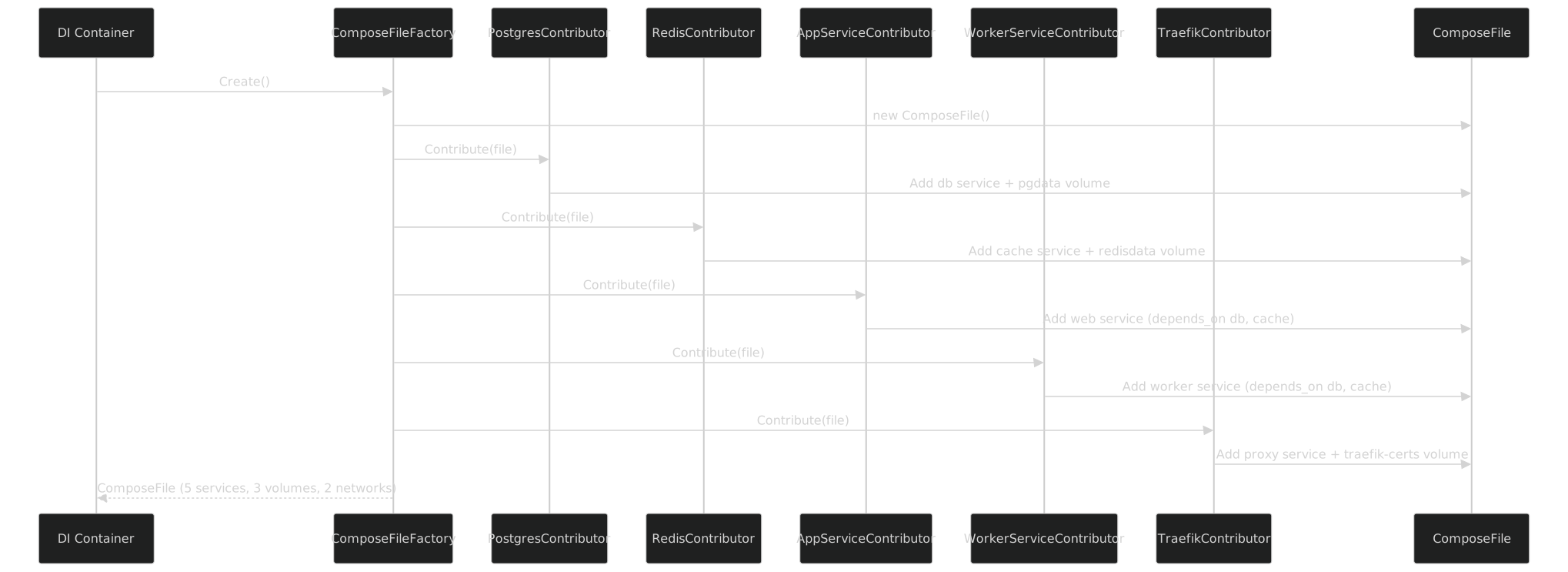
Five contributors executed in order. Each one owns its service definition completely. No contributor needs to know about any other contributor -- they share names through constants and the ComposeFile is the integration point.
Step 3: Render to YAML
var yaml = ComposeFileSerializer.Serialize(file);
await File.WriteAllTextAsync("docker-compose.yml", yaml);
Two lines. The ComposeFileSerializer from Part XII walks the ComposeFile object graph and emits valid YAML using YamlDotNet with custom type converters for union types, conditional properties, and version-aware omission.
Here is the complete generated output:
# Generated by FrenchExDev.Net.DockerCompose.Bundle
# 5 services, 3 volumes, 2 networks
# Generated at 2026-04-05T14:23:01Z

services:
  db:                                          # PostgresContributor
    image: postgres:16
    environment:
      POSTGRES_USER: app
      POSTGRES_PASSWORD: secret
      POSTGRES_DB: app
    volumes:
      - pgdata:/var/lib/postgresql/data
    networks:
      - backend
    healthcheck:
      test: ["CMD-SHELL", "pg_isready -U ${POSTGRES_USER}"]
      interval: 10s
      timeout: 5s
      retries: 5
    restart: unless-stopped

  cache:                                       # RedisContributor
    image: redis:7-alpine
    command: ["redis-server", "--appendonly", "yes", "--maxmemory", "256mb"]
    volumes:
      - redisdata:/data
    networks:
      - backend
    healthcheck:
      test: ["CMD", "redis-cli", "ping"]
      interval: 10s
      timeout: 3s
      retries: 3
    restart: unless-stopped

  web:                                         # AppServiceContributor
    build:
      context: ./src/WebApi
      dockerfile: Dockerfile
      target: final
    ports:
      - "8080:80"
    environment:
      ASPNETCORE_ENVIRONMENT: Development
      ConnectionStrings__Default: "Host=db;Database=app;Username=app;Password=secret"
      Redis__ConnectionString: "cache:6379"
    networks:
      - frontend
      - backend
    depends_on:
      db:
        condition: service_healthy
      cache:
        condition: service_healthy
    labels:
      traefik.enable: "true"
      traefik.http.routers.web.rule: "Host(`app.localhost`)"
      traefik.http.services.web.loadbalancer.server.port: "80"
    healthcheck:
      test: ["CMD-SHELL", "curl -f http://localhost:80/health || exit 1"]
      interval: 15s
      timeout: 5s
      retries: 3
      start_period: 30s
    restart: unless-stopped

  worker:                                      # WorkerServiceContributor
    build:
      context: ./src/Worker
      dockerfile: Dockerfile
      target: final
    environment:
      ConnectionStrings__Default: "Host=db;Database=app;Username=app;Password=secret"
      Redis__ConnectionString: "cache:6379"
    networks:
      - backend
    depends_on:
      db:
        condition: service_healthy
      cache:
        condition: service_healthy
    restart: unless-stopped

  proxy:                                       # TraefikContributor
    image: traefik:v3.1
    command:
      - "--api.insecure=true"
      - "--providers.docker=true"
      - "--providers.docker.exposedbydefault=false"
      - "--entrypoints.web.address=:80"
      - "--entrypoints.websecure.address=:443"
    ports:
      - "80:80"
      - "443:443"
      - "8081:8080"
    volumes:
      - /var/run/docker.sock:/var/run/docker.sock:ro
      - traefik-certs:/certs
    networks:
      - frontend
    restart: unless-stopped

volumes:
  pgdata:
  redisdata:
  traefik-certs:

networks:
  frontend:
  backend:
Ninety-seven lines of YAML. Not one of them hand-written. Every line traces back to a typed builder call in a specific contributor. The inline comments show which contributor produced which section -- that is actual output from the serializer when annotation mode is enabled.
Step 4: Execute with the Typed CLI
Now we have a YAML file on disk. Time to bring it up. The Docker Compose CLI wrapper from Part VIII and the execution engine from Part IX take over.
// Detect the docker-compose binary
var composeBinding = await BinaryBinding.DetectAsync("docker-compose");
var compose = DockerCompose.Create(composeBinding);
var executor = new CommandExecutor(new SystemProcessRunner());

// Build images first (web and worker are custom Dockerfiles)
var buildCmd = compose.Build(b => b
    .WithFile(["docker-compose.yml"])
    .WithNoCache(false)
    .WithPull(true));

await executor.ExecuteAsync(composeBinding, buildCmd);
Console.WriteLine("Images built.");
Every method call is typed. WithFile takes string[] because compose supports multiple files. WithNoCache takes bool because it is a boolean flag. WithPull takes bool. No string concatenation. No "was it --no-cache or --nocache?" The generator already verified the flag name against 57 versions of Docker Compose.
Now start the stack:
var upCmd = compose.Up(b => b
    .WithFile(["docker-compose.yml"])
    .WithDetach(true)
    .WithWait(true)
    .WithBuild(true));
WithWait(true) tells Compose to wait for health checks to pass before returning. That flag was added in Compose v2.1.1 -- the generated code carries [SinceVersion("2.1.1")] on it. If you were running an older Compose, the version guard would throw OptionNotSupportedException at build time, not at 3am when the deploy script silently ignores the unknown flag and returns immediately, leaving you with containers that are "running" but not yet accepting connections.
WithBuild(true) tells Compose to build images before starting -- equivalent to --build on the command line. Without it, Compose uses cached images, which is usually what you want. With it, you get fresh builds on every deploy. The flag is explicit in the code, not hidden in a shell alias or Makefile target that someone added two years ago and nobody remembers.
Step 5: Stream Events
The CommandExecutor can stream typed events from the process output. This is the execution + parsing pipeline from Part IX applied to docker compose up:
await foreach (var evt in executor.StreamAsync(composeBinding, upCmd, new ComposeUpParser()))
{
    switch (evt)
    {
        case ComposeServiceCreated c:
            Console.WriteLine($"  Created {c.Service}");
            break;
        case ComposeServiceStarted s:
            Console.WriteLine($"  started {s.Service} ({s.Seconds:F1}s)");
            break;
        case ComposeServiceHealthy h:
            Console.WriteLine($"  healthy {h.Service}");
            break;
        case ComposeStackReady r:
            Console.WriteLine($"\nAll {r.ServiceCount} services ready!");
            break;
    }
}
The ComposeUpParser implements IOutputParser<ComposeUpEvent>. It reads the structured output from docker compose up and emits typed domain events. Not strings. Not regex matches. Sealed record types with properties.
Console output:
  Created proxy
  Created db
  Created cache
  Created web
  Created worker
  started db (0.5s)
  started cache (0.3s)
  healthy db
  healthy cache
  started web (2.1s)
  started worker (1.8s)
  started proxy (0.4s)

All 5 services ready!
Every line corresponds to a typed event. Downstream code can react to specific events -- wait for the database to be healthy before running migrations, log the startup time per service, alert if any service takes longer than a threshold. All without parsing strings.
The ComposeUpParser handles the messy reality of docker compose up output -- which mixes service creation messages, pull progress, build output, and health check status across multiple output formats depending on the Compose version and terminal mode. The parser normalizes all of that into a clean event stream. The consuming code never sees the raw text. It pattern-matches on sealed record types. If Docker Compose changes its output format in a future version, the parser is the only code that needs to change -- not every consumer.
Step 6: Health Check
Once the stack is up, verify the state:
var psCmd = compose.Ps(b => b
    .WithFormat("json")
    .WithFile(["docker-compose.yml"]));

var result = await executor.ExecuteAsync<ContainerListEvent, ContainerListResult>(
    composeBinding, psCmd, new ContainerListParser(), new ContainerListCollector());

foreach (var container in result.Containers)
{
    Console.WriteLine($"{container.Service,-12} {container.State,-10} " +
                      $"{container.Health,-10} {container.Ports}");
}
Output:
proxy        running    healthy    0.0.0.0:80->80/tcp, 0.0.0.0:443->443/tcp, 0.0.0.0:8081->8080/tcp
web          running    healthy    0.0.0.0:8080->80/tcp
worker       running    -
db           running    healthy    5432/tcp
cache        running    healthy    6379/tcp
ContainerListParser parses the JSON output from docker compose ps --format json. ContainerListCollector aggregates the parsed events into a ContainerListResult with a typed Containers collection. Each container has Service, State, Health, and Ports as typed properties -- not extracted from a table-formatted string with column-width guessing.
The worker shows - for health because it has no healthcheck defined. That is intentional -- it is a background job processor, not a service that accepts connections. The absence is visible in the typed output, not hidden behind an empty string.
Step 7: Logs (Filtered by Service)
var logsCmd = compose.Logs(b => b
    .WithFile(["docker-compose.yml"])
    .WithFollow(false)
    .WithTail("20")
    .WithTimestamps(true)
    .WithServices(["web"]));

await foreach (var line in executor.StreamLinesAsync(composeBinding, logsCmd))
{
    Console.WriteLine(line);
}
Output:
web-1  | 2026-04-05T14:23:05.123Z info: Microsoft.Hosting.Lifetime[14]
web-1  |       Now listening on: http://[::]:80
web-1  | 2026-04-05T14:23:05.124Z info: Microsoft.Hosting.Lifetime[0]
web-1  |       Application started. Press Ctrl+C to shut down.
web-1  | 2026-04-05T14:23:05.124Z info: Microsoft.Hosting.Lifetime[0]
web-1  |       Hosting environment: Development
WithServices(["web"]) is typed as string[]. The WithTail accepts a string because Compose allows both numeric values and "all". The generator mirrors what the CLI accepts -- it does not try to be smarter than the binary.
Step 8: Teardown
var downCmd = compose.Down(b => b
    .WithFile(["docker-compose.yml"])
    .WithVolumes(false)       // Keep data volumes -- do NOT nuke pgdata
    .WithRemoveOrphans(true));

await executor.ExecuteAsync(composeBinding, downCmd);
Console.WriteLine("Stack is down.");
WithVolumes(false) is the critical line. In hand-written shell scripts, it is terrifyingly easy to forget --volumes or accidentally include it. Here, the intent is explicit in the code and visible in code review. The builder method is named, not a flag string.
Hand-Written vs Generated Comparison
Side by side, the generated YAML and the YAML I would have written by hand are identical. Same keys, same values, same indentation (YamlDotNet handles that), same ordering (alphabetical within each service section).
But only one of them has:
- Compiler-checked property names. Mistype
healtcheckin C# and the compiler tells you. Mistype it in YAML and you discover it when the container has no health check anddepends_on: service_healthyhangs forever. - IntelliSense. Every builder method shows its documentation, its version range, and its value type. YAML gives you nothing -- or a schema plugin that is two versions behind.
- Version annotations.
WithStartPeriod()carries[SinceVersion("3.1")]on the Compose specification side. If you target an older spec version, the serializer warns. YAML does not. - Testable contributors. Each contributor is a class with a single method. Unit test it by calling
Contribute()with a freshComposeFileand asserting the result. Test the whole stack by registering all contributors and asserting the YAML output. Try unit testing a YAML file. - Refactoring support. Rename
ServiceNames.DbtoServiceNames.Databaseand every reference updates -- connection strings, depends_on, network configurations. Renamedbin YAML and you get to grep.
The generated YAML is a build artifact, like a .dll. You do not check in your .dll. You do not check in your YAML.
There is a subtler benefit. When the YAML is generated, you can git diff it after every change to the contributors. The diff shows exactly what changed in the infrastructure -- not what changed in the code, but what changed in the output. That is a powerful code review tool. A reviewer can look at the C# change (one line in a contributor) and the YAML diff (one line in the output) and confirm they match. If the YAML diff is larger than expected, something surprising happened in a contributor. If the YAML diff is empty, the C# change had no infrastructure effect. Either way, the diff tells the truth.
The Change-Compile-Deploy Loop
This is where the payoff compounds. Every change to the infrastructure follows the same tight loop:

Let me walk through four concrete scenarios.
Scenario 1: Add a Port Mapping
The web service needs HTTPS directly (not just through Traefik):
// AppServiceContributor -- one line added
.WithPorts([$"{_options.HostPort}:80", "443:443"])
Rebuild. Generate. Diff:
 services:
   web:
     ports:
       - "8080:80"
+      - "443:443"
One line in C#. One line in YAML. The diff is exactly what I expect. No stray whitespace changes, no reordering of unrelated keys, no accidental modification of a different service because I was editing in the wrong YAML block.
Scenario 2: Rename a Volume
The volume name pgdata needs to become postgres-data for consistency:
public static class VolumeNames
{
    public const string PgData = "postgres-data";  // Changed from "pgdata"
    // ...
}
Rebuild. The compiler shows zero errors -- because every contributor references VolumeNames.PgData, not the string "pgdata". The YAML diff:
 services:
   db:
     volumes:
-      - pgdata:/var/lib/postgresql/data
+      - postgres-data:/var/lib/postgresql/data

 volumes:
-  pgdata:
+  postgres-data:
Two changes, both automatic. If any contributor had hardcoded "pgdata" instead of using the constant, the generated YAML would have a dangling volume reference -- a volume used by a service but not declared in the volumes: section. With constants, that cannot happen. The constant is the single source of truth.
Now consider what happens in YAML. You do a find-and-replace for pgdata. Did you catch the one in the volume declaration? The one in the service mount? The one in the backup script that references the Docker volume by name? What about the monitoring dashboard that queries Docker volume stats by name? Find-and-replace does not understand YAML structure. It does not understand cross-file references. It does not understand that pgdata:/var/lib/postgresql/data contains the volume name before the colon. The C# compiler does understand C# structure. It knows that VolumeNames.PgData is a const string used in 4 locations, and all 4 update when the value changes.
Scenario 3: Upgrade PostgreSQL
The team wants PostgreSQL 17:
// In appsettings.json or configuration
builder.Services.Configure<PostgresOptions>(o => o.Version = "17");
YAML diff:
 services:
   db:
-    image: postgres:16
+    image: postgres:17
One configuration change. One line in the YAML. But the deployment needs the container recreated to pick up the new image:
var upCmd = compose.Up(b => b
    .WithDetach(true)
    .WithWait(true)
    .WithForceRecreate(true));  // Force recreate to pull new image
WithForceRecreate(true) is explicit. In a shell script, this is the difference between docker compose up -d (does not recreate if config hasn't changed) and docker compose up -d --force-recreate (always recreates). Forgetting the flag means the old container keeps running with the old image. Here, the intent is a named method, not a flag string buried in an argument list.
Scenario 4: Add Conditional Monitoring
The stack should include Prometheus and Grafana, but only when monitoring is enabled:
if (config.GetValue<bool>("EnableMonitoring"))
{
    builder.Services.AddSingleton<IComposeFileContributor, PrometheusContributor>();
    builder.Services.AddSingleton<IComposeFileContributor, GrafanaContributor>();
}
When the flag is set, two more contributors run. Two more services appear in the YAML. When the flag is not set, the YAML has five services. No YAML if-else. No template engine. No Jinja2. No Helm. No {{ if .Values.monitoring.enabled }}. Just C# conditional logic that every .NET developer already knows how to write, test, and debug.
The monitoring contributors are self-contained. PrometheusContributor adds its service, its volume for data persistence, its network membership, and its scrape configuration. GrafanaContributor adds its service, its volume for dashboards, its depends_on for Prometheus, and its provisioning labels. Neither contributor knows about the other five services. They just contribute to the shared ComposeFile.
That is the contributor pattern at work. Composition over configuration. DI over templates.
And because the monitoring contributors are registered through DI, they are also testable in isolation. Unit test PrometheusContributor by calling Contribute() with a fresh ComposeFile and asserting it added a service named prometheus with the correct scrape configuration. Unit test GrafanaContributor by asserting it declares a depends_on for prometheus. Test the full stack with monitoring enabled by registering all seven contributors and asserting the YAML contains seven services: entries. None of these tests require Docker. They are pure object construction and assertion.
Downstream Consumers in the Monorepo
This stack is one of several in the monorepo that use the same infrastructure. The contributor pattern and the generated types are shared across all of them.
The Homelab Stack
My homelab runs 8 services: GitLab, PostgreSQL, Redis, Traefik, MinIO, Gitea, Drone CI, and a private container registry. All using the same IComposeFileContributor interface. Each contributor is a separate class in the monorepo -- some are shared (PostgreSQL, Redis, Traefik are reused across stacks), some are stack-specific (GitLab, Drone CI).
The homelab's DI registration:
// Shared infrastructure
builder.Services.AddSingleton<IComposeFileContributor, PostgresContributor>();
builder.Services.AddSingleton<IComposeFileContributor, RedisContributor>();
builder.Services.AddSingleton<IComposeFileContributor, TraefikContributor>();

// Storage
builder.Services.AddSingleton<IComposeFileContributor, MinioContributor>();
builder.Services.AddSingleton<IComposeFileContributor, RegistryContributor>();

// Git infrastructure
builder.Services.AddSingleton<IComposeFileContributor, GiteaContributor>();
builder.Services.AddSingleton<IComposeFileContributor, GitLabContributor>();

// CI/CD
builder.Services.AddSingleton<IComposeFileContributor, DroneCiContributor>();

builder.Services.AddSingleton<ComposeFileFactory>();
Nine lines. Eight services. The same factory.Create() call. The same ComposeFileSerializer.Serialize() call. The same compose.Up() call. Different stack, same pipeline.
The PostgresContributor is literally the same class from the web stack above -- just configured differently through PostgresOptions. Different database name, different credentials, same contributor code. That is reuse at the infrastructure level, not at the YAML snippet level. In YAML world, reuse means copying a block from one file to another and changing three values. Six months later, the original has a new healthcheck interval and the copy does not. In contributor world, reuse means referencing the same class and passing different options. The healthcheck interval is defined once, in the contributor.
The GitLab Stack
The GitLab deployment from the GitLab Docker Compose series uses 5 contributors. The GitLabContributor alone generates 50+ lines of GITLAB_OMNIBUS_CONFIG environment variables -- all typed through a GitLabOptions configuration object:
public sealed class GitLabContributor : IComposeFileContributor
{
    private readonly GitLabOptions _options;

    public GitLabContributor(IOptions<GitLabOptions> options) =>
        _options = options.Value;

    public void Contribute(ComposeFile file)
    {
        var omnibusConfig = new OmnibusConfigBuilder()
            .WithExternalUrl(_options.ExternalUrl)
            .WithSmtp(_options.Smtp)
            .WithRegistry(_options.Registry)
            .WithPages(_options.Pages)
            .WithBackup(_options.Backup)
            .Build();

        file.Services![ServiceNames.GitLab] = new ComposeServiceBuilder()
            .WithImage($"gitlab/gitlab-ce:{_options.Version}")
            .WithHostname(_options.Hostname)
            .WithEnvironment(new Dictionary<string, string>
            {
                ["GITLAB_OMNIBUS_CONFIG"] = omnibusConfig
            })
            .WithPorts([
                $"{_options.HttpPort}:80",
                $"{_options.HttpsPort}:443",
                $"{_options.SshPort}:22"
            ])
            .WithVolumes([
                $"{VolumeNames.GitLabConfig}:/etc/gitlab",
                $"{VolumeNames.GitLabLogs}:/var/log/gitlab",
                $"{VolumeNames.GitLabData}:/var/opt/gitlab"
            ])
            .WithNetworks([NetworkNames.Frontend, NetworkNames.Backend])
            .WithDependsOn(new Dictionary<string, ComposeDependsOnCondition>
            {
                [ServiceNames.Db] = ComposeDependsOnCondition.ServiceHealthy,
                [ServiceNames.Cache] = ComposeDependsOnCondition.ServiceHealthy
            })
            .WithShm("256m")
            .WithRestart("unless-stopped")
            .Build();

        file.Volumes![VolumeNames.GitLabConfig] = new ComposeVolumeBuilder().Build();
        file.Volumes![VolumeNames.GitLabLogs] = new ComposeVolumeBuilder().Build();
        file.Volumes![VolumeNames.GitLabData] = new ComposeVolumeBuilder().Build();
    }
}
The OmnibusConfigBuilder is a separate typed builder that constructs the multi-line configuration string from typed options. No string concatenation. No semicolons in the wrong place. Change the SMTP configuration in GitLabOptions and the omnibus config string updates correctly -- because the builder knows the format, not the developer.
Shared ComposeFile Model
Every consumer -- the web stack, the homelab, the GitLab deployment -- uses the same generated ComposeFile, ComposeService, ComposeVolume, ComposeNetwork, and their builders. All generated from the same 32 JSON Schema versions by the same ComposeBundle.SourceGenerator.
Update the Bundle -- say a new compose-spec schema adds a runtime property to services -- and every consumer gets the new property on their next build. The source generator adds WithRuntime() to ComposeServiceBuilder. Contributors that need it can start using it. Contributors that do not need it are unaffected. No manual model updates. No breaking changes. The generator handles the evolution.
One source generator, N consuming projects. That is the leverage.
This is the architectural payoff of the layered design from Part II. Layer 3 (the Bundle) is shared infrastructure. Layer 4 (the contributors) is per-project domain knowledge. The layers are independent -- you can update the Bundle without touching any contributor, and you can write new contributors without understanding the source generator. The interface boundary is clean: ComposeFile, ComposeService, and their builders. Everything else is implementation detail.
Compare this to the alternative: every project maintains its own YAML files, its own template engine, its own variable substitution scheme. When the compose specification adds a new property, every project has to learn about it independently. When a team discovers a healthcheck pattern that works well, they copy-paste it across repositories. When a volume naming convention changes, someone sends a Slack message and hopes everyone greps their YAML correctly.
The Complete Program
Here is the complete Program.cs that ties everything together -- from contributor registration through YAML generation to deployment:
using Microsoft.Extensions.Configuration;
using Microsoft.Extensions.DependencyInjection;
using Microsoft.Extensions.Hosting;
using FrenchExDev.Net.DockerCompose;
using FrenchExDev.Net.DockerCompose.Bundle;
using FrenchExDev.Net.BinaryWrapper;

var builder = Host.CreateApplicationBuilder(args);

// Configure services from appsettings.json
builder.Services.Configure<PostgresOptions>(builder.Configuration.GetSection("Postgres"));
builder.Services.Configure<AppOptions>(builder.Configuration.GetSection("App"));

// Register contributors -- each one owns one service
builder.Services.AddSingleton<IComposeFileContributor, PostgresContributor>();
builder.Services.AddSingleton<IComposeFileContributor, RedisContributor>();
builder.Services.AddSingleton<IComposeFileContributor, AppServiceContributor>();
builder.Services.AddSingleton<IComposeFileContributor, WorkerServiceContributor>();
builder.Services.AddSingleton<IComposeFileContributor, TraefikContributor>();

// Conditional monitoring
if (builder.Configuration.GetValue<bool>("EnableMonitoring"))
{
    builder.Services.AddSingleton<IComposeFileContributor, PrometheusContributor>();
    builder.Services.AddSingleton<IComposeFileContributor, GrafanaContributor>();
}

builder.Services.AddSingleton<ComposeFileFactory>();

var host = builder.Build();
var factory = host.Services.GetRequiredService<ComposeFileFactory>();

// --- Generate ---
var file = factory.Create();
var yaml = ComposeFileSerializer.Serialize(file);
await File.WriteAllTextAsync("docker-compose.yml", yaml);
Console.WriteLine($"Generated docker-compose.yml " +
    $"({yaml.Split('\n').Length} lines, {file.Services!.Count} services)");

// --- Deploy ---
var binding = await BinaryBinding.DetectAsync("docker-compose");
var compose = DockerCompose.Create(binding);
var executor = new CommandExecutor(new SystemProcessRunner());

// Build custom images
await executor.ExecuteAsync(binding, compose.Build(b => b
    .WithFile(["docker-compose.yml"])
    .WithPull(true)));
Console.WriteLine("Images built.");

// Start the stack
var upCmd = compose.Up(b => b
    .WithFile(["docker-compose.yml"])
    .WithDetach(true)
    .WithWait(true)
    .WithBuild(true));

await foreach (var evt in executor.StreamAsync(binding, upCmd, new ComposeUpParser()))
{
    switch (evt)
    {
        case ComposeServiceCreated c:
            Console.WriteLine($"  Created {c.Service}");
            break;
        case ComposeServiceStarted s:
            Console.WriteLine($"  started {s.Service} ({s.Seconds:F1}s)");
            break;
        case ComposeServiceHealthy h:
            Console.WriteLine($"  healthy {h.Service}");
            break;
        case ComposeStackReady r:
            Console.WriteLine($"\nAll {r.ServiceCount} services ready!");
            break;
    }
}

// --- Verify ---
var psCmd = compose.Ps(b => b
    .WithFormat("json")
    .WithFile(["docker-compose.yml"]));
var result = await executor.ExecuteAsync<ContainerListEvent, ContainerListResult>(
    binding, psCmd, new ContainerListParser(), new ContainerListCollector());

Console.WriteLine();
Console.WriteLine($"{"Service",-12} {"State",-10} {"Health",-10} Ports");
Console.WriteLine(new string('-', 60));
foreach (var container in result.Containers)
{
    Console.WriteLine($"{container.Service,-12} {container.State,-10} " +
                      $"{container.Health,-10} {container.Ports}");
}
Forty-five lines of code. Five services deployed, health-checked, and verified. No YAML authored. No shell scripts. No string concatenation. No regex parsing.
The output:
Generated docker-compose.yml (97 lines, 5 services)
Images built.
  Created proxy
  Created db
  Created cache
  Created web
  Created worker
  started db (0.5s)
  started cache (0.3s)
  healthy db
  healthy cache
  started web (2.1s)
  started worker (1.8s)
  started proxy (0.4s)

All 5 services ready!

Service      State      Health     Ports
------------------------------------------------------------
proxy        running    healthy    0.0.0.0:80->80/tcp, 0.0.0.0:443->443/tcp
web          running    healthy    0.0.0.0:8080->80/tcp
worker       running    -
db           running    healthy    5432/tcp
cache        running    healthy    6379/tcp
One dotnet run. That is the developer experience.
A new team member clones the repository, runs dotnet run --project src/Deploy, and has a full development stack running in under a minute. They do not need to understand Docker Compose syntax. They do not need to know which version of the compose specification supports start_period on healthchecks. They do not need to remember whether environment variables use = or : as the separator in YAML. They run a .NET application. The application does the rest.
When they need to change the stack -- add a service, change a port, modify a healthcheck -- they write C#. Their IDE gives them IntelliSense on every builder method. The compiler catches their mistakes immediately. The generated YAML diff shows exactly what changed. There is no gap between "I think I configured this correctly" and "I know I configured this correctly." The compiler bridges that gap.
The Deployed Architecture

Two networks enforce isolation. The proxy and web service share the frontend network -- that is the only path from the internet to the application. The web service, worker, database, and cache share the backend network. The proxy cannot reach the database. The worker cannot be reached from the internet. Network topology is defined in C# through the contributor pattern, not discovered by reading YAML.
The volumes are external to the containers -- PostgreSQL data survives docker compose down, Redis data survives restarts, and Traefik certificates persist across proxy rebuilds. The WithVolumes(false) in the teardown step is what preserves them. In YAML-land, forgetting --volumes on docker compose down is a rite of passage. In typed-land, the flag is a named parameter with a boolean value, visible in code review and enforced by the compiler.
Every arrow in this diagram corresponds to a typed reference in the contributor code. The web service's ConnectionStrings__Default uses ServiceNames.Db, which resolves to "db" -- the Docker DNS name for the database container on the shared network. If someone renames the database service, the constant changes, and every connection string updates. If someone removes the database contributor, every depends_on referencing ServiceNames.Db still compiles (it is a constant, not a runtime reference) -- but the generated YAML will have a depends_on pointing to a service that does not exist, and docker compose up will catch it immediately with a clear error.
What This Replaces
Let me be explicit about what is no longer in the repository:
- No
docker-compose.ymlchecked in. It is generated on every build. The source of truth is the C# contributors. - No
docker-compose.override.ymlfor dev vs prod. Configuration differences are inappsettings.Development.jsonandappsettings.Production.json, read by the contributor throughIOptions<T>. - No
.envfile for Compose variable substitution. Environment variables are set explicitly in the contributor code from typed configuration. - No shell scripts for
docker compose up. TheProgram.cshandles the entire lifecycle. - No Makefile targets for
build,up,down,logs,ps. Each operation is a method call on the typed Compose client.
Five files eliminated. One Program.cs added. The net reduction in files is four. The net reduction in "things that can silently break" is incalculable.
I want to emphasize point 2. The docker-compose.override.yml pattern is Docker's built-in answer to environment differences. You define the base in docker-compose.yml and the overrides in docker-compose.override.yml. For simple cases it works. For anything beyond that -- say, the database needs a different volume driver in CI versus local, or the web service needs an extra environment variable in staging -- you end up with docker-compose.ci.yml, docker-compose.staging.yml, docker-compose.prod.yml, and a COMPOSE_FILE environment variable that lists them all in the right order. Miss one file in the list and the merge is wrong. Include them in the wrong order and the later file overrides the earlier one in unexpected ways.
With typed contributors, there is no merge. There is one ComposeFile, assembled from contributors that read their configuration from the standard .NET configuration system. appsettings.json for defaults, appsettings.Development.json for local, environment variables for CI, Azure Key Vault or AWS Secrets Manager for production. The contributor does not care where the value comes from. It reads IOptions<PostgresOptions> and builds the service. The configuration system handles the layering. The contributor handles the composition. Neither has to know about the other.
When Not to Do This
I should be honest about the trade-offs.
If you have a three-line docker-compose.yml with one service and no health checks, this is overkill. Write the YAML by hand. It will take two minutes.
If your team does not use .NET, none of this helps. The typed API is C#. The contributors are C#. The source generators are Roslyn. This is a .NET solution to a .NET problem.
If you are managing infrastructure at cloud scale with dozens of environments and hundreds of services, you probably want Pulumi, Terraform, or a dedicated IaC tool. This is for the developer's local stack, the team's shared development environment, the CI pipeline, the homelab -- the scale where Docker Compose is the right tool and YAML is the only thing standing between you and type safety.
If you need non-.NET team members to edit the infrastructure, the C# code is a barrier. YAML is universally readable. C# is not. I would argue that YAML is universally misreadable -- everyone can read it, few can edit it correctly -- but that is a different argument.
For that scale -- and in my experience, that is 80% of Docker Compose usage in .NET shops -- this approach eliminates an entire class of bugs. The class where a typo in a YAML key is syntactically valid but semantically wrong, and you do not find out until runtime. The class where an indentation error turns a service-level property into a top-level property and Compose silently ignores it. The class where a volume name is spelled differently in the service mount and the volume declaration, and Docker creates two volumes instead of one.
Closing
Zero YAML files checked into the repository. Zero string concatenation. One dotnet run and five services come up, health-checked and networked.
The compiler caught the typo. The builder caught the version mismatch. The contributor pattern made it composable. The source generator made it possible.
Thirteen parts of infrastructure: scraping CLIs (Part III, Part IV), parsing help output (Part V), generating typed commands (Part VI, Part VII, Part VIII), reading JSON Schemas (Part X), merging version histories (Part XI), rendering YAML (Part XII), streaming events (Part IX), composing services (Part XIII). All of it converges into a single developer experience: change C#, compile, deploy.
The feedback loop is tight. The error messages come from the compiler, not from Docker at 3am. The infrastructure is code -- not code that generates strings, but code that generates typed objects that serialize to strings. That distinction is everything.
I started this series in Part I with 47 Process.Start() calls and a 3am debugging session caused by unstructured text flowing between unrelated code paths. This post ends with a 45-line program that deploys five services with full type safety, version awareness, and structured event streaming. The 47 calls are gone. The 3am sessions are gone. The YAML is gone. What remains is C# -- the same language I use for domain models, API controllers, and business logic -- now also used for infrastructure.
Part XV shows how all of this is tested -- from parser fixtures to FakeProcessRunner integration tests -- without a Docker daemon.