Part 01 — What is an IDE? A bundle of language services, bounded
Before designing a meta-DSL that produces VSCode extensions, the first honest question is: what does a VSCode extension even do? Or, one level up: what is an IDE? If the target we plan to generate is fuzzy, the generator will be fuzzy. If the target is a finite, inspectable bundle of services, each with a named protocol and a named producer, the generator has a chance of being small, correct, and teachable.
This article bounds the target. It is the reference every later article points back to when it says "the service" or "the LSP capability" or "the extension surface". The bound is deliberately narrow — the real VSCode extension API exposes several hundred entry points; we will commit to a subset of roughly twenty, chosen because they are what a DSL author actually needs and because they map cleanly onto a design the meta-DSL can generate.
A brief genealogy — what moved from the compiler into the editor
The word IDE hides a long history of concern-migration. In the early days of interactive computing, the compiler was a separate program you ran from the command line, and the editor knew nothing about the language you were editing — it saw lines of text, nothing else. Diagnostics appeared, if at all, in a terminal after a full build cycle. Navigation meant grepping. Completion meant remembering.
Smalltalk-80 (Xerox PARC, 1980) is often cited as the first environment where the boundary dissolved: the class browser, the inspector, the debugger, the compiler, and the editor were the same program, sharing the same live object graph. You were not editing files, you were editing the system. Turbo Pascal (Borland, 1983) popularised the idea on commodity hardware: a single executable that combined a text editor, a compiler, and a run button, where F5 took you from source to running program without ever touching a shell. The acronym IDE — Integrated Development Environment — dates from roughly this moment, and it named the move that was already happening: concerns the compiler used to own (parsing, type-checking, symbol resolution) migrated into the editor, in service of features the editor could not provide without them (error underlines, go-to-definition, inline types).
Emacs and Vim took a different trajectory: rather than bundle a specific language's intelligence, they exposed enough extension surface that third-party modes could supply language-specific behaviour per major mode. The price was fragmentation — every language's support was written against a different extension API, by different authors, with different conventions. Eclipse (IBM, 2001) then unified a subset of that fragmentation for the JVM world, with a shared platform where language support lived in plugins that conformed to a common contract. IntelliJ IDEA did likewise, with a stronger bet on program analysis.
VSCode (Microsoft, 2015) is the descendant that matters here. Its core contribution was not the editor itself — Monaco, the editor engine, is a refinement of decades of work on browser-based text editing — but the explicit, documented extension API plus the adoption of an open protocol for language intelligence: the Language Server Protocol, announced in 2016. Before LSP, every editor re-implemented every language's integration. After LSP, a single language server could serve VSCode, Neovim, Emacs, Sublime, Zed, Helix, and any future editor that implemented the protocol. This is the inflection that makes our meta-DSL tractable: we are not targeting VSCode in isolation; we are targeting a protocol that happens to have VSCode as its reference consumer.
The taxonomy — a bundle of roughly twenty services
An IDE, operationalised, is a finite bundle of services. The table below is the series' reference taxonomy — every later article refers back to it when it names an IDE-like capability. The Purpose column names what the service does for the human at the keyboard; the Where it lives column names which VSCode subsystem owns it; the LSP capability column names the protocol method that carries the service across the editor/server boundary, when one exists.
| Service | Purpose | Where it lives (VSCode) | LSP capability |
|---|---|---|---|
| Syntax highlighting | Token-level colour and basic structure | TextMate grammar (static) + semantic tokens (dynamic) | textDocument/semanticTokens |
| Diagnostics | Errors, warnings, information inline in the editor | Language server | textDocument/publishDiagnostics |
| Completion | Context-aware suggestions on identifiers and keywords | Language server | textDocument/completion |
| Hover | Type, documentation, or summary on mouse-over | Language server | textDocument/hover |
| Go-to-definition | Jump from a symbol reference to its declaration | Language server | textDocument/definition |
| Go-to-type / implementation | Jump to the type or concrete implementation | Language server | textDocument/typeDefinition, textDocument/implementation |
| Find references | Every usage of a symbol across the workspace | Language server | textDocument/references |
| Rename symbol | Workspace-wide, semantically correct rename | Language server | textDocument/rename |
| Signature help | Parameter hints as you type inside a call | Language server | textDocument/signatureHelp |
| Formatting | Document or range normalisation | Language server or dedicated formatter | textDocument/formatting, textDocument/rangeFormatting |
| Code actions | Refactors and quick-fixes (autofix of diagnostics) | Language server | textDocument/codeAction |
| CodeLens | Inline actionable annotations above a line | Language server | textDocument/codeLens |
| Inlay hints | Inline type or name annotations between tokens | Language server | textDocument/inlayHint |
| Folding | Structural fold regions | Language server | textDocument/foldingRange |
| Document symbols / outline | Navigable tree of the current file's structure | Language server | textDocument/documentSymbol |
| Workspace symbols | Project-wide symbol search by name | Language server | workspace/symbol |
| Snippets | Parametric boilerplate insertion | Extension manifest (contributes.snippets) |
— (editor-local) |
| Task running / executor | Run, test, build from the command palette | Extension (TaskProvider) |
— (editor-local) |
| Debugging | Breakpoints, stepping, watch, inspection | Debug Adapter (separate process) | — (DAP, a distinct protocol) |
| File icons, themes, bracket matching | Cosmetic and structural presentation | VSCode core + extension contributions | — |
Twenty rows are not twenty independent features. Read carefully, the table organises the IDE's surface into three zones.
The first zone, the largest, is language intelligence delivered through a language server: thirteen of the twenty capabilities are LSP methods. They are all implementations of the same pattern — the editor ships a text-change notification, the server answers with a structured response, the editor renders it. The pattern is so uniform that, once a server exists for a language, supporting most of these capabilities is a matter of implementing the relevant handler. This is one of the reasons the meta-DSL we are designing can be reasonably economical: generating a language server scaffold means wiring thirteen handlers, and each handler is a pure function of the language's semantic model.
The second zone, smaller but still central, is editor-local contributions: snippets, task providers, debug adapters, file icons, themes. These are declared in the extension manifest (package.json's contributes.* fields) and run either statically (themes) or via extension code that lives in the same process as the editor host. They do not traverse a protocol, they are local participants.
The third zone is presentation and UI plumbing: bracket matching, bracket pair colourisation, folding in the absence of a server, simple regex-driven highlighting. VSCode ships sane defaults for these; they become interesting only when the language has pair conventions the default cannot infer.
The meta-DSL has to cover the first two zones end to end. The third zone is, by default, implemented for free once the extension declares a language identifier and a TextMate scope.

Two protocols, one extension — LSP versus DAP
It is easy to conflate the two standards that live next to each other in a modern editor extension; the meta-DSL will have to treat them separately.
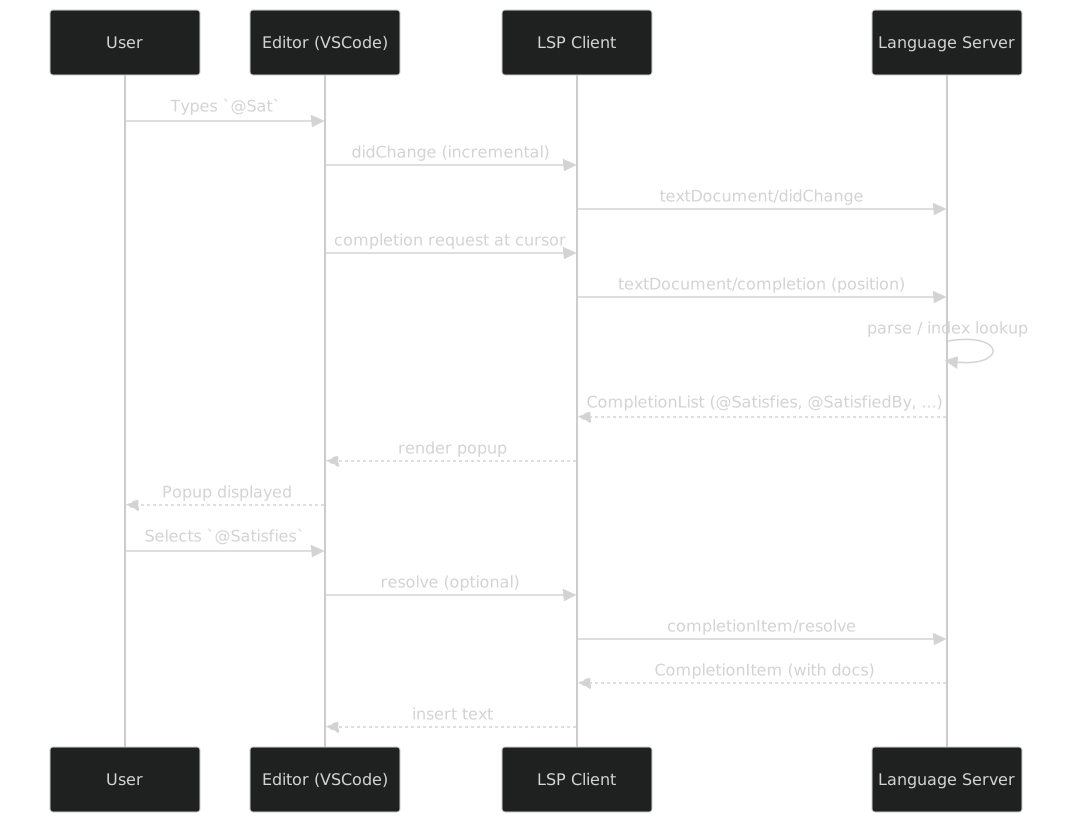
The Language Server Protocol (LSP) is stateful, bidirectional, and document-centric. The client (the editor) opens a document, pushes every edit as a notification, and queries the server for semantic answers. The server maintains per-document state: a parse tree, a symbol index, a diagnostic set. Protocol methods are organised under textDocument/* (per-document), workspace/* (multi-document), and a handful of lifecycle messages (initialize, shutdown). LSP is how knowing things about the code gets into the editor.
The Debug Adapter Protocol (DAP) is structurally similar — JSON-RPC, editor-and-adapter roles — but it serves a different purpose. The client launches or attaches to a running program through a debug adapter, and the adapter reports threads, stack frames, variables, and hit breakpoints. DAP is how observing a program's execution gets into the editor. Breakpoints, stepping, watch expressions, the variables panel, the call stack — all DAP.
The two protocols are specified independently, standardised independently, and implemented by different server processes even when a single extension ships both. For the meta-DSL, this matters for scoping: we will generate the LSP side (it is near-uniform across DSLs — parse, answer, rinse, repeat) and we will expose the task-execution side (via VSCode's TaskProvider, which is the simplest form of "run this DSL file"), but we will not generate a debug adapter in this series. Most DSLs do not need one; the few that do — Catala, for instance, if you want to step through rule application — earn a bespoke implementation that no reasonable meta-DSL should try to templatise from a spec.
TextMate grammars versus semantic tokens — layered highlighting
Syntax highlighting is the one service that does not reduce cleanly to a single LSP call. VSCode uses two layers, and a well-specified DSL extension participates in both.
The TextMate grammar layer is static. A grammar is a JSON file declaring regular expressions that match tokens and context-sensitive rules that match structural constructs (a block, a list of arguments, a string literal). TextMate grammars are portable — they are the same format Sublime Text, Atom, and GitHub.com's syntax-highlighting frontend consume — and they run without a language server, without parsing, without any semantic knowledge of the language. The downside is exactly that shallowness: a TextMate grammar cannot tell a function call from a type constructor if the surface syntax does not distinguish them.
The semantic tokens layer is dynamic. The language server responds to textDocument/semanticTokens/full with a sequence of (line, column, length, token type, modifiers) tuples, and the editor layers that colouring on top of the TextMate output. Semantic tokens know that User in const u: User = ... is a type and that User in new User() is a constructor, because the server has the symbol index to tell them apart. The two layers combine: TextMate provides the cheap, always-on, first-paint colouring; semantic tokens refine it once the server has parsed the file.
For the meta-DSL, this means the @Token decorators on a spec map to the TextMate layer (cheap, regex-driven, universal), while semantic tokens — if the DSL wants them — require a named LSP feature we will treat like any other (@LspFeature('semanticTokens')). The baseline, the thing generated for every DSL by default, is the TextMate layer. Semantic tokens are the opt-in refinement.
What the meta-DSL will generate, restated
With the taxonomy and the two protocols laid out, the scope of the meta-DSL can now be restated without ambiguity. It will generate, from a single decorated spec.ts:
- the extension manifest (
package.jsonwithcontributes.languages,.grammars,.snippets,.commands,.taskDefinitions,activationEvents), - the TextMate grammar (
syntaxes/<id>.tmLanguage.json), derived mechanically from the@Tokenand@Ruledecorators, - the snippets file (
snippets/<id>.json), derived from@Snippet, - the language-configuration (brackets, comments, auto-closing pairs) from a small structured declaration in
@Language, - the LSP server scaffold (
src/server.ts) with handlers wired to each@LspFeaturemethod on the spec class, - the extension host entry (
src/extension.ts) that starts the language client and registers the task provider, - the task provider (one entry per
@Executormethod) that surfaces the DSL's run/test/build commands in the VSCode task palette.
It will not generate a debug adapter. It will not generate semantic tokens unless the spec explicitly asks via an @LspFeature('semanticTokens') declaration. It will not generate themes, file icons, or bracket pair colourisation — those come from VSCode defaults once the language is declared.
This is the bounded subset we commit to for the whole series. When a later article says "the extension", it means exactly this. When it says "IDE-like services", it means the union of LSP capabilities plus snippets plus the task-executor surface, nothing more.
Business visible, plumbing hidden — the posture for the whole series
One last point, and it is a posture rather than a capability. Everything in the taxonomy above is plumbing. A DSL author who wants to ship their language in VSCode should not have to think about TextMate JSON, nor about contributes.grammars, nor about vscode-languageclient initialisation options, nor about the difference between workspace/symbol and textDocument/documentSymbol. They should think about their tokens, their rules, their snippets, their diagnostics, their executor — the business of their DSL. The meta-DSL's job is to make the business expressible and to keep the plumbing invisible.
This posture is the one thing that separates the approach we will develop from the two closest alternatives — writing the extension by hand (all plumbing, no leverage) and grammar-first tools like Langium (where the DSL author has to learn a second DSL — the grammar DSL — before they can express their own). Neither alternative is wrong. They have just picked different things to hide. Our bet is that hiding the VSCode extension API entirely, and surfacing only the domain-specific decorators on a single TypeScript class, is the right trade-off for the kind of small, typed DSLs this monorepo already produces — packages/requirements, packages/typed-fsm, and the ones Appareil et compilateur will add.
Part 02 turns the telescope around: we have described what an IDE can provide; next we ask what a DSL typically needs from it, which of those twenty services are load-bearing for a real DSL, and which are nice-to-have. That question shapes the meta-DSL's surface more than the taxonomy above does, because the meta-DSL only has to generate what DSLs actually ask for.
Build counterpart
The taxonomy above is picked up by the companion build series, Ide.Dsl — Build, which turns each service into a concrete emitter slice across fifteen articles. The closest pairing is Build 01 — Bootstrapping @frenchexdev/ide-dsl: it instantiates the "business-visible decorators over hidden plumbing" posture as six TC39-standard decorators and a module-load registry, and pins the package skeleton that the rest of the build series fills in.