Advanced Patterns and Retrospective
Part IV toured representative machines from each domain — toggle, timer, compound boolean, generation counter, barrier gate, navigation classifier. Parts V through XI built the infrastructure that makes those machines discoverable, verifiable, and traceable: coordinators, adapters, the event topology, drift detection, the three-phase build pipeline, and the quality gate chain.
This final part steps back from the infrastructure and returns to the machines themselves. Five patterns that did not fit neatly into Part IV's domain tour deserve their own treatment because they represent design decisions — choices between alternative representations — rather than domain-specific behavior. After those patterns, an honest comparison with xstate, and then the retrospective: what went right, what was over-engineered, and what the 44th machine would look like.
Compound State — When Booleans Beat Enums
The default representation for a state machine's state is an enum or a string union:
type AccentPaletteState = 'closed' | 'open';
type PageLoadState = 'idle' | 'loading' | 'rendering' | 'postProcessing' | 'done' | 'error';
One type, one dimension, one value at a time. This works when the state space is a single axis. But some machines track two partially-independent dimensions simultaneously. TerminalDots is the clearest example.
The TerminalDots State Space
TerminalDots controls the three "traffic light" buttons in the terminal header — minimize, maximize, close. It tracks two concerns:
- Is the sidebar masked? — the minimize button toggles this.
- Is focus mode active? — the maximize button toggles this.
These two concerns are partially independent. The sidebar can be masked without focus mode (the user clicked minimize). Focus mode always implies a masked sidebar (focus mode hides the sidebar to create a distraction-free reading area). But focus mode without a masked sidebar is invalid — it would show a sidebar while claiming to be in focus mode.
The state space is a 2x2 boolean grid:
| sidebarMasked | focusMode | Valid? | Meaning |
|---|---|---|---|
| false | false | yes | Initial — sidebar visible, normal mode |
| true | false | yes | Sidebar hidden via minimize |
| true | true | yes | Focus mode active (sidebar also hidden) |
| false | true | no | Focus mode without hiding sidebar — invariant violation |
Three valid combinations and one invalid combination.
Why Not an Enum?
An enum would eliminate the invalid combination at the type level:
type TerminalDotsEnum = 'normal' | 'sidebarMasked' | 'focusMode';Three variants, no invalid fourth. This is tempting. But consider the transitions:
// With an enum:
function minimize(): void {
  if (state === 'focusMode') {
    // Exiting focus mode: go back to normal
    state = 'normal';
  } else if (state === 'normal') {
    state = 'sidebarMasked';
  } else if (state === 'sidebarMasked') {
    state = 'normal';
  }
}
Every transition is a three-way branch. The enum conflates two independent decisions (is the sidebar masked? is focus mode active?) into a single axis. The code has to reconstruct the two dimensions from the combined value on every transition.
With booleans, the same logic is direct:
// With booleans:
function minimize(): void {
  if (state.focusMode) {
    // Exiting focus mode also unmasks the sidebar
    callbacks.setFocusMode(false);
    callbacks.setSidebarMasked(false);
    setState({ sidebarMasked: false, focusMode: false });
    return;
  }
  const nextMasked = !state.sidebarMasked;
  callbacks.setSidebarMasked(nextMasked);
  setState({ sidebarMasked: nextMasked, focusMode: false });
}
The invariant — focusMode implies sidebarMasked — is enforced by one if statement in the maximize function, not by the type system. But the transitions read as what they are: toggling one dimension, with a constraint on the other.
The Decision Rule

TerminalDots has two dimensions, one invalid combination out of four, and the invariant is a single check. Booleans win.
ZoomPanState has three continuous dimensions (zoom, panX, panY) plus a boolean (dragging) plus two cursor coordinates (lastX, lastY). No enum could represent this. The state is a plain object with six fields:
export interface ZoomPanState {
  zoom: number;
  panX: number;
  panY: number;
  dragging: boolean;
  lastX: number;
  lastY: number;
}
The general principle: when the state space is the cartesian product of independent dimensions, represent it as a record of fields. When it is a linear sequence of mutually exclusive phases, represent it as a union. When it is a mix — a phase axis with per-phase data — use a discriminated union.
Compound State in the Decorator
The @FiniteStateMachine decorator always uses a flat states array:
@FiniteStateMachine({
  states: ['normal', 'focus', 'closed'] as const,
  // ...
})
export class TerminalDotsStateFsm {}
The decorator projects the compound boolean space onto named states for the build pipeline. The extractor and the explorer do not need to understand booleans — they see three named states and five transitions. The compound representation lives inside the factory function where it makes the transition logic readable. The linear projection lives in the decorator where it makes the architecture scannable.
This is a deliberate separation: the machine's internal representation optimizes for correctness and readability. The decorator's representation optimizes for tooling and visualization. They do not need to match.
Barrier Synchronization — AppReadiness as a Join
Part IV introduced AppReadiness as a barrier gate: pending until all required signals arrive, then ready. The pattern deserves a deeper look because it generalizes to any situation where "ready" means "all prerequisites met."
The Core Mechanism
export type ReadinessEvent =
  | 'navPanePainted'
  | 'markdownOutputRendered';

export const REQUIRED_EVENTS: readonly ReadinessEvent[] = [
  'navPanePainted',
  'markdownOutputRendered',
] as const;

export function createAppReadinessMachine(
  callbacks: AppReadinessCallbacks,
): AppReadinessMachine {
  let state: AppReadinessState = 'pending';
  const received = new Set<ReadinessEvent>();

  function checkReady(): void {
    for (const req of REQUIRED_EVENTS) {
      if (!received.has(req)) return;
    }
    transition('ready');
    callbacks.onReady();
  }

  return {
    signal(event: ReadinessEvent): void {
      if (state === 'ready') return;  // already done for this cycle
      received.add(event);
      checkReady();
    },
    reset(): void {
      received.clear();
      transition('pending');
    },
    // ...
  };
}
Three properties make this a proper barrier:
- Idempotent signals —
received.add(event)is a Set operation. SignalingnavPanePaintedtwice is the same as signaling it once. - All-of semantics —
checkReadyiteratesREQUIRED_EVENTSand short-circuits on the first missing signal. The barrier only opens when the set is complete. - Resettable —
reset()clears the set and transitions back to pending, ready for the next SPA navigation cycle.
The Barrier Flow
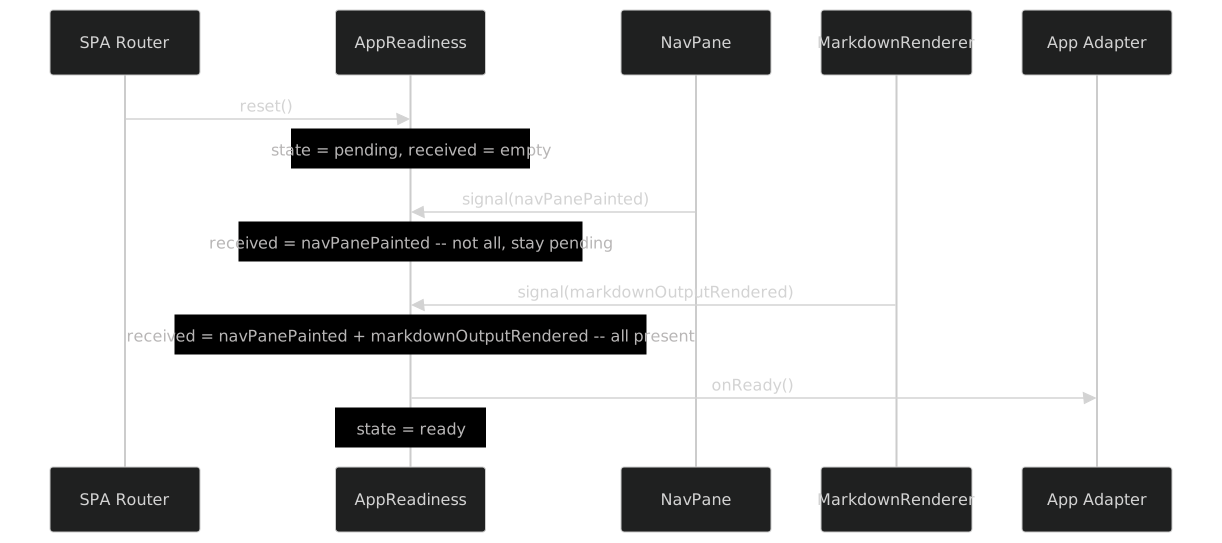
The order of signals does not matter. If markdownOutputRendered arrives first and navPanePainted second, the result is the same. The barrier is order-independent.
Why Not a Counter?
A simpler implementation would count signals:
// Anti-pattern: counting instead of tracking
let count = 0;
function signal(): void {
  count++;
  if (count >= REQUIRED_EVENTS.length) { onReady(); }
}
This fails because it is not idempotent. If a component signals twice — which happens in edge cases like hot-reload or rapid SPA transitions — the counter reaches the threshold prematurely. The Set-based approach is immune to duplicates.
The Guard in the Decorator
The decorator expresses the barrier as guarded transitions:
transitions: [
  { from: 'pending', to: 'ready',   on: 'navPanePainted',        when: 'allReceived' },
  { from: 'pending', to: 'ready',   on: 'markdownOutputRendered', when: 'allReceived' },
  { from: 'pending', to: 'pending', on: 'navPanePainted',        when: 'notAllReceived' },
  { from: 'pending', to: 'pending', on: 'markdownOutputRendered', when: 'notAllReceived' },
  { from: 'ready',   to: 'pending', on: 'reset' },
] as const,
guards: ['allReceived', 'notAllReceived'] as const,
Every signal has two possible outcomes: if all are received, transition to ready; otherwise stay pending. The guards are mutually exclusive. This is a complete specification — no unhandled signal-in-state combination.
Generalizing the Barrier
The pattern applies anywhere you need to wait for N independent prerequisites:
- Boot sequence — wait for DOM ready + fonts loaded + initial fetch complete
- Multi-panel layout — wait for all panels to report their measured heights before computing the final layout
- Multi-step wizard validation — wait for all sections to validate before enabling the submit button
- Test setup — wait for mock server + browser context + fixture data before running the test
The implementation is always the same: a Set of required items, idempotent marking, and a check-all gate. The only variation is what "reset" means — some barriers fire once and never reset; others reset on every cycle.
Generation Counters — Taming Concurrent Loads
PageLoad uses a monotonic generation counter to solve the classic concurrent-fetch race condition. This is the pattern that prevents page A's late-arriving response from overwriting page B's already-rendered content.
The Race Condition
The user navigates to page A. A fetch begins. Before the response arrives, the user navigates to page B. A second fetch begins. Page B's response arrives and renders. Then page A's response arrives — late. Without protection, page A's content overwrites page B's content, and the URL says "/page-b" while the viewport shows page A.
This is not hypothetical. On a slow connection or a large markdown file, the time between navigation and render can be hundreds of milliseconds. A fast-clicking user can easily trigger it.
The Counter
export function createPageLoadMachine(callbacks: PageLoadCallbacks): PageLoadMachine {
  let state: PageLoadState = 'idle';
  let generation = 0;

  function startLoad(): number {
    const gen = ++generation;
    transition('loading');
    return gen;
  }

  function markRendering(gen: number): boolean {
    if (isStale(gen, generation)) {
      callbacks.onStale(gen, generation);
      return false;
    }
    if (state !== 'loading') return false;
    transition('rendering');
    return true;
  }

  // markPostProcessing, markDone, markError follow the same pattern
  // ...
}
The protocol is simple:
startLoad()increments the counter and returns the new value. The caller stashes this value.- Every subsequent method (
markRendering,markPostProcessing,markDone) receives the stashed generation. - If
gen !== currentGeneration, the load is stale — a newer navigation has started. The method returnsfalseand the load silently dies.
The Stale Detection Sequence
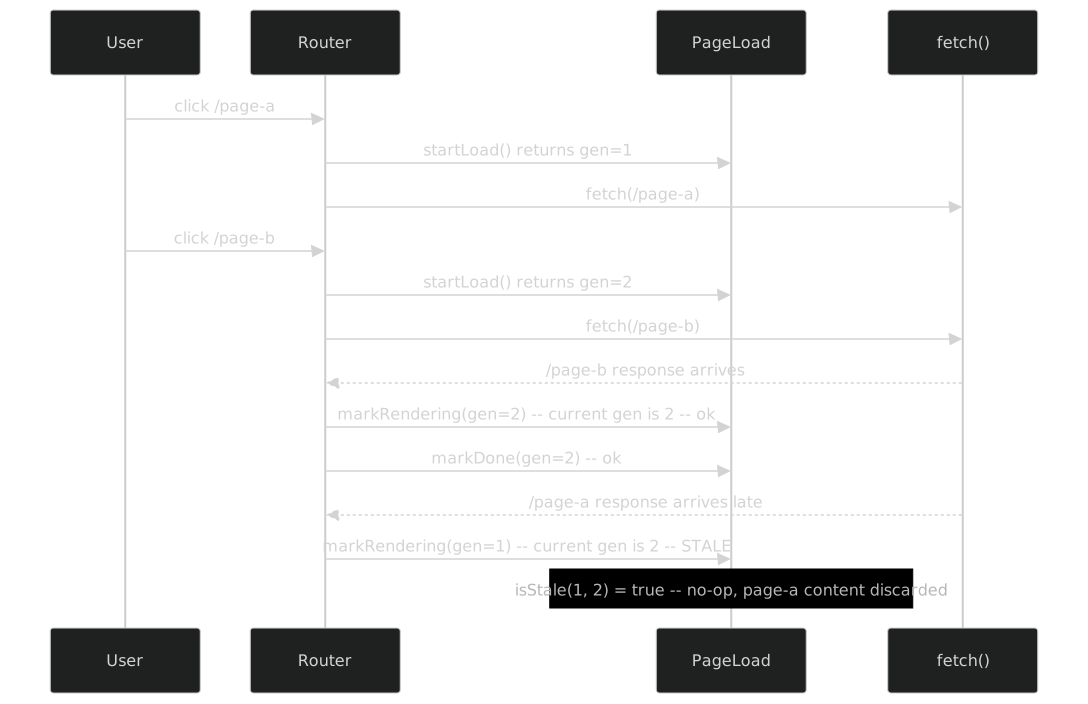
The key insight: isStale is a pure function that takes two numbers and returns a boolean. It does not need machine state. It does not need closure access. It is exported separately so callers who do not use the full machine can still check staleness:
export function isStale(gen: number, currentGen: number): boolean {
  return gen !== currentGen;
}
Why a Counter, Not a Token?
An alternative is to use a unique token (e.g., Symbol() or crypto.randomUUID()) instead of a monotonic counter. The semantics are identical — if token !== currentToken, the load is stale. But a counter has one advantage: the onStale callback receives both the stale generation and the current generation, and the difference tells you how many navigations happened in between. onStale(1, 3) means two navigations happened since this load started. That is useful telemetry.
The Pattern Beyond Page Loads
Generation counters appear in any situation with cancelable async operations:
- Search-as-you-type — each keystroke starts a new search. If results from keystroke N-2 arrive after results from keystroke N, they are stale.
- Image lazy-loading — if the user scrolls past an image before it loads, the load is stale and can be aborted.
- Animation frames — if a new animation starts before the previous one completes, the previous frame callbacks should be discarded.
The implementation is always the same: monotonic counter, stash the generation at the start, check it at every step.
The Immutable Reducer Alternative
Every machine in the codebase except one follows the factory pattern: a createXxxMachine(callbacks) function that returns an object with methods, using closure variables for state. ZoomPanState is the exception.
The Reducer Pattern
export interface ZoomPanState {
  zoom: number;
  panX: number;
  panY: number;
  dragging: boolean;
  lastX: number;
  lastY: number;
}

export function createInitialState(): ZoomPanState {
  return { zoom: 1, panX: 0, panY: 0, dragging: false, lastX: 0, lastY: 0 };
}

export function zoomIn(state: ZoomPanState): ZoomPanState {
  return { ...state, zoom: clampZoom(state.zoom * ZOOM_FACTOR) };
}

export function zoomOut(state: ZoomPanState): ZoomPanState {
  return { ...state, zoom: clampZoom(state.zoom / ZOOM_FACTOR) };
}

export function startDrag(state: ZoomPanState, x: number, y: number): ZoomPanState {
  return { ...state, dragging: true, lastX: x, lastY: y };
}

export function moveDrag(state: ZoomPanState, x: number, y: number): ZoomPanState {
  if (!state.dragging) return state;
  return {
    ...state,
    panX: state.panX + (x - state.lastX),
    panY: state.panY + (y - state.lastY),
    lastX: x,
    lastY: y,
  };
}

export function endDrag(state: ZoomPanState): ZoomPanState {
  return { ...state, dragging: false };
}
Each function takes the current state (and optional input) and returns a new state. No mutation. No closure. No callbacks. The caller — the adapter — holds the mutable binding:
// In the adapter:
let viewState = createInitialState();

container.addEventListener('wheel', (e) => {
  e.preventDefault();
  viewState = wheelZoom(viewState, e.deltaY);
  applyTransform(viewState);
});

container.addEventListener('pointerdown', (e) => {
  viewState = startDrag(viewState, e.clientX, e.clientY);
});
The adapter owns mutation. The reducer owns logic. The separation is absolute.
Why a Reducer Here?
ZoomPanState has properties that make the reducer pattern superior to the factory pattern:
Serialization — the state is frequently serialized for the FSM simulator overlay, debug panels, and snapshot comparison. A plain object is trivially JSON-serializable. A factory's closure state is not accessible from outside.
Comparison — the adapter sometimes needs to check if a transition changed anything:
if (viewState === prevState) return;. With immutable objects, reference equality is a free check. With mutable closure state, you need to compare field by field.Restoration — when the overlay closes and reopens, the state resets to initial. With a reducer, this is
viewState = createInitialState(). With a factory, you need areset()method that reinitializes every closure variable.Snapshotting — the
getZoomPanSnapshotfunction returns a frozen copy for external consumers who should not be able to mutate the state:
export function getZoomPanSnapshot(state: ZoomPanState): DeepReadonly<ZoomPanState> {
  const copy: ZoomPanState = {
    zoom: state.zoom,
    panX: state.panX,
    panY: state.panY,
    dragging: state.dragging,
    lastX: state.lastX,
    lastY: state.lastY,
  };
  return Object.freeze(copy) as DeepReadonly<ZoomPanState>;
}
With a factory, this would require exposing every field through getters and then copying them. With a reducer, the state is already an object — freezing it is one line.
The Decision: Factory vs Reducer

In this codebase, 42 machines use factories and 1 uses reducers. The ratio reflects the reality that most machines need callbacks — they need to notify the adapter when something changes. ZoomPanState is the rare case where the adapter polls the state after every input rather than receiving callbacks. The reducer pattern is not better or worse — it is the right tool for this specific case.
How the Reducer Appears in the Decorator
The decorator does not care whether the machine is a factory or a reducer. It sees the same metadata:
@FiniteStateMachine({
  states: ['idle', 'dragging'] as const,
  events: ['zoomIn', 'zoomOut', 'setZoom', 'reset', 'startDrag', 'updateDrag', 'endDrag'] as const,
  transitions: [
    { from: 'idle',     to: 'dragging', on: 'startDrag' },
    { from: 'dragging', to: 'dragging', on: 'updateDrag' },
    { from: 'dragging', to: 'idle',     on: 'endDrag' },
  ] as const,
  // ...
})
export class ZoomPanStateFsm {}
The build pipeline extracts states, transitions, emits, listens — all declarative metadata. Whether the runtime implementation uses a factory or a reducer is invisible to the tooling. This is the payoff of the decorator-as-database approach: the metadata layer is independent of the implementation strategy.
Panel Events — Shared Close Predicates
Not every reusable behavior needs to be a state machine. panel-events.ts is a module of pure predicate functions shared by every popover-style machine in the codebase — accent palette, font panel, overlay, search dropdown, and more.
The Predicates
export function shouldCloseOnKeydown(state: OpenableState, key: string): boolean {
  if (!state.open) return false;
  return key === 'Escape';
}

export function shouldCloseOnDocumentClick(
  state: OpenableState,
  target: EventTarget | null,
  panelEl: Element | null,
  buttonEl: Element | null,
): boolean {
  if (!state.open) return false;
  if (!panelEl) return false;
  if (!(target instanceof Node)) return false;
  if (panelEl.contains(target)) return false;
  if (buttonEl && (target === buttonEl || buttonEl.contains(target))) return false;
  return true;
}
These are not machines. They have no state, no transitions, no lifecycle. They are input classifiers — pure functions that take an event and a context and return a boolean. The machine decides what to do with that boolean (typically if (shouldClose) machine.close()). The predicate decides whether the input qualifies as a close trigger.
Why Shared Predicates?
Every popover in the application needs the same close behavior: Escape key closes, click outside closes, click inside does not close, click on the toggle button does not close (because the toggle handler will fire separately). Before panel-events.ts, every adapter implemented this logic independently. The implementations were almost identical, but "almost" is the problem — one adapter forgot to check buttonEl.contains(target), which caused double-toggling when the user clicked the button to close the panel.
Extracting the predicates into shared functions eliminated the duplication and the bug simultaneously. The adapter code becomes minimal:
// In the adapter:
document.addEventListener('keydown', (e) => {
  if (shouldCloseOnKeydown(machine.getState(), e.key)) {
    machine.close();
  }
});

document.addEventListener('click', (e) => {
  if (shouldCloseOnDocumentClick(machine.getState(), e.target, panelEl, buttonEl)) {
    machine.close();
  }
});
The adapter attaches DOM listeners. The predicate classifies the input. The machine transitions. Three concerns, three modules, zero coupling between them.
The attachToggleButton Helper
panel-events.ts also exports a helper that wires a button to a toggle machine and returns a disposer:
export function attachToggleButton(
  btn: Element,
  machine: { toggle(): void },
): () => void {
  const handler = (): void => { machine.toggle(); };
  btn.addEventListener('click', handler);
  return () => btn.removeEventListener('click', handler);
}
The disposer pattern — return a function that undoes the setup — is essential for SPA navigation. When the user navigates away from a page, all listeners must be removed. Returning the disposer from the wiring function means the adapter does not need to remember the handler reference separately.
Timer Injection — scheduleTick and cancelTick as DI
Tooltip machines need to show a tooltip after a delay (e.g., 300ms) and hide it after another delay (a grace period, e.g., 200ms). The machine needs timers. But timers are side effects — setTimeout, requestAnimationFrame, clearTimeout — and pure machines do not perform side effects. The solution is dependency injection through callbacks.
The Tooltip Machine's Timer Interface
export interface TooltipCallbacks<TData> {
  onShow: (data: TData) => void;
  onHide: () => void;
  onBeginLeave: () => void;
  onUpdate: (data: TData) => void;
  onSchedule: (delayMs: number, purpose: 'show' | 'hide') => void;
  onCancel: () => void;
}
The machine never calls setTimeout. Instead, it calls onSchedule(300, 'show') — "I need a timer. Call my show() method in 300ms." The adapter decides how to implement that:
// In the adapter — real implementation:
let timerId: number | undefined;

const callbacks: TooltipCallbacks<HeadingData> = {
  onSchedule(delayMs, _purpose) {
    timerId = window.setTimeout(() => {
      if (_purpose === 'show') machine.show();
      else machine.hide();
    }, delayMs);
  },
  onCancel() {
    if (timerId !== undefined) {
      clearTimeout(timerId);
      timerId = undefined;
    }
  },
  // ...other callbacks
};// In the test — fake implementation:
let scheduledCallback: (() => void) | null = null;
const callbacks: TooltipCallbacks<string> = {
onSchedule(_delayMs, purpose) {
scheduledCallback = () => {
if (purpose === 'show') machine.show();
else machine.hide();
};
},
onCancel() {
scheduledCallback = null;
},
// ...stubs
};
// Test: advance time by calling the callback directly
machine.pointerEnter('heading-1');
expect(machine.getState()).toBe('waiting');
scheduledCallback!(); // "time passes"
expect(machine.getState()).toBe('visible');The test has no setTimeout, no fakeTimers, no jest.advanceTimersByTime. It calls the scheduled callback directly. The machine does not know or care whether the timer is real, fake, or instant. It asked for a delay; it got its show() called. The contract is fulfilled.
The State Machine with Timer Injection
The tooltip machine's state diagram has four states. The transitions between waiting and visible are timer-driven, but the machine itself only sees method calls:
function pointerEnter(data: TData): void {
  if (state === 'hidden') {
    pendingData = data;
    state = 'waiting';
    callbacks.onSchedule(config.showDelay, 'show');
  } else if (state === 'leaving') {
    // Fading out — cancel grace timer, restore to visible
    callbacks.onCancel();
    pendingData = data;
    state = 'visible';
    callbacks.onUpdate(data);
  }
  // ...
}

function pointerLeave(): void {
  if (state === 'waiting') {
    callbacks.onCancel();
    state = 'hidden';
    pendingData = null;
  } else if (state === 'visible') {
    state = 'leaving';
    callbacks.onBeginLeave();
    callbacks.onSchedule(config.leaveGrace, 'hide');
  }
}
onSchedule requests a timer. onCancel cancels it. The machine calls these at the right moments — when entering waiting, when leaving waiting prematurely, when starting the grace period, when the grace period is interrupted by a new pointerEnter. The adapter maps these to real timers. The test maps them to direct function calls.
Why Not requestAnimationFrame?
Some adapters use requestAnimationFrame instead of setTimeout for the show delay — it aligns the tooltip appearance with the next paint frame, preventing a layout-then-paint-then-tooltip flash. The machine does not care. It calls onSchedule(300, 'show') and the adapter decides:
// rAF-based adapter:
onSchedule(delayMs, purpose) {
  const start = performance.now();
  function tick(now: number) {
    if (now - start >= delayMs) {
      if (purpose === 'show') machine.show();
      else machine.hide();
    } else {
      timerId = requestAnimationFrame(tick);
    }
  }
  timerId = requestAnimationFrame(tick);
},
The machine's logic is identical regardless of the timer implementation. This is the fundamental benefit of timer injection: the scheduling policy is an adapter concern, not a machine concern. The machine owns the "when" (show after entering, hide after leaving); the adapter owns the "how" (setTimeout, requestAnimationFrame, test fake).
Comparison with xstate
This codebase implements 43 state machines without xstate — no library, no runtime, no actors. The comparison is not academic; xstate was evaluated early in the project and rejected. An honest retrospective requires acknowledging where the rejection was right and where it was wrong.
Where xstate Would Have Been Better
Formal statechart visualization. xstate has Stately Studio — a visual editor where you draw statecharts and it generates code. This codebase has the interactive explorer, but it was built from scratch over three phases. The explorer works well, but it required ~2,000 lines of custom tooling (extractor, renderer, cache, hydration). Stately Studio would have provided visualization out of the box.
Hierarchical states. xstate supports nested states natively — a parent state with child states, where the child inherits the parent's event handlers. This codebase uses flat coordinators instead. TourCoordinator orchestrates three flat machines by calling their methods in sequence. With xstate, the tour could be a single hierarchical machine with nested states for each step. Whether the hierarchical version would be simpler is debatable — but the option would have been there.
Parallel states. AppReadiness is a hand-rolled parallel join. xstate has native parallel states — multiple child machines that run concurrently, and the parent transitions when all children reach a final state. The hand-rolled version is 40 lines; the xstate version would be a declaration. The code saving is modest, but the intent would be clearer.
Type generation from machine definition. xstate v5 generates TypeScript types from the machine definition — events, context, state values. This codebase defines types and machine definitions separately, which creates a maintenance surface. When a new state is added, the type union and the decorator's states array must both be updated. xstate collapses them into one source.
Devtools. xstate has an inspector that shows state transitions in real time, with a timeline and event log. The FSM simulator in the explorer provides a subset of this functionality, but building it was significant effort.
Where the Custom Approach Won
Zero dependencies. The production bundle includes no state machine library. No xstate (35KB minified), no @xstate/inspect, no @xstate/react (not applicable here, but illustrative of the ecosystem weight). Each machine is 50-200 lines of plain TypeScript that compiles to plain JavaScript.
Pure functions. Every machine is a function that takes callbacks and returns an object. There is no runtime interpreter, no service lifecycle, no machine.start() / machine.stop(), no event queue. The machine is its own interpreter — you call a method, the state changes, callbacks fire. There is no indirection.
Total control over the extraction pipeline. The three-phase build pipeline — infer transitions from JSDoc, extract the full graph via the TypeScript Compiler API, render to SVG via elkjs — is custom. It reads decorators, not xstate machine definitions. It extracts precisely the metadata this codebase needs. With xstate, the extraction would be tied to xstate's machine format, and extending it (e.g., adding feature links to requirements) would mean fighting the library's API.
Simple DI. Callbacks, not actors. The adapter passes onShow, onHide, onSchedule — plain functions. xstate uses actions, guards, and services — a richer model, but one that requires learning xstate's specific vocabulary and execution model. For a team of one, callbacks are faster to write, faster to debug, and faster to test.
Small bundle. Each machine compiles to 50-200 lines of JavaScript. The total weight of all 43 machines is less than xstate's runtime alone. For a static site where every kilobyte is visible in the Lighthouse score, this matters.
Trivially testable. Testing a custom machine: create it with stub callbacks, call methods, assert state. No interpret(), no service.start(), no waitFor(). The tests read as direct method calls:
const machine = createPageLoadMachine(stubCallbacks);
const gen = machine.startLoad();
expect(machine.getState().state).toBe('loading');
machine.markRendering(gen);
expect(machine.getState().state).toBe('rendering');
No library ceremony. No async. No event interpretation. The test is synchronous and deterministic.
The Verdict
For this codebase — a static site with SPA navigation, no server-side state, no actor model, no inter-service communication — the custom approach was the right call. The machines are simple (2-8 states each), the interactions are local (callbacks, not distributed events), and the testing model is direct (method calls, not interpreted events).
For a different codebase — a full-stack application with complex workflows, server-side state synchronization, multi-step forms with branching logic, or a team of five developers who need a shared modeling language — xstate's formal model, devtools, and type generation would be worth the dependency.
The decision is not "custom vs xstate." It is "what does this specific codebase need?" This one needed zero dependencies, pure testability, and a custom extraction pipeline. Another would need formal statecharts, visual editors, and a shared vocabulary. The answer depends on the context, not on the technology.
Compile-Time Safety via Phantom Types
EventDef<N, D> and EventBus<TEmits, TListens> eliminated an entire class of bugs. Before phantom types, a typo in an event name produced a phantom event — dispatched by one module, listened to by nobody. The result was silence: no error, no warning, no test failure, just a feature that stopped working. After phantom types, a typo is a compile error. The compiler catches it before the code runs.
The cost was small — three type definitions, a factory function, and bus type aliases on machines that participate in the event topology. The payoff was large — zero phantom events in over a year of development.
Pure Testability
No machine imports document, window, setTimeout, or any browser API. Every side effect is injected through callbacks. This means every machine is testable in Node.js, with no JSDOM, no Puppeteer, no browser launcher. The unit test suite runs in under two seconds.
The coverage numbers reflect this: src/lib/ has 98%+ coverage. The remaining 2% is unreachable defensive code — guards that protect against impossible states, included for safety but never triggered in practice.
The Topology Scanner as a Permanent Ratchet
Once the topology scanner passed with zero drift, every subsequent commit was checked against the same standard. The scanner is a ratchet — it only moves in one direction. You can add new events and update the metadata, and the scanner will verify the addition. You cannot remove an event and forget to update the metadata — the scanner will catch it.
This is the difference between a one-time audit and a continuous gate. An audit finds problems at a point in time. A gate prevents problems from being introduced at any point in time.
Decorator Metadata as Self-Documentation
The @FiniteStateMachine decorator on each companion class serves as structured documentation. Every machine declares its states, transitions, emits, listens, guards, and feature link in a format that is simultaneously human-readable (open the file, read the decorator) and machine-readable (the extractor parses it via the TypeScript Compiler API).
This eliminates the drift between documentation and implementation. The decorator is the documentation, and the build pipeline reads it as data. When a machine's states change, the decorator changes with it — because the decorator is the source of truth for the build pipeline, not a secondary artifact that can fall out of sync.
The Interactive Explorer
The state-machine explorer — an SVG diagram with every machine as a clickable node, every event as a routed edge, and per-machine statechart popovers with an interactive simulator — makes the architecture visible. A new developer can open the explorer, see the full topology, click any machine, and understand its states and transitions without reading a line of code.
This is the payoff of the three-phase build pipeline: source code becomes an interactive diagram. The architecture is not hidden in files — it is rendered on screen, updated automatically, and verified by the topology scanner.
scope Metadata on Decorators
Several decorators include a scope property — 'singleton', 'per-page', 'per-element'. This metadata was intended for the extractor to classify machines by lifecycle. In practice, the extractor does not use it. The explorer does not display it. No scanner checks it. It is dead metadata — present in the source, never queried.
The scope information is still useful as documentation — reading scope: 'singleton' tells a developer that AppReadiness is created once and reused across navigations. But as machine-readable metadata, it has no consumer. The 44th machine would omit it.
Guard Isolation Testing
Some machines declare guards in their decorators — 'allReceived', 'notAllReceived', 'staleGeneration'. The guards are implemented as inline conditions in the factory function. They are tested transitively through the machine's method tests — calling signal() with all events tests allReceived, calling it with one event tests notAllReceived.
But they are not tested in isolation. No test calls allReceived(received, required) as a standalone function, because no such function exists — the guard is an if statement inside checkReady. Exporting every guard as a named function would increase testability at the cost of fragmenting the machine's logic across multiple exports. The transitive coverage is sufficient; the isolation testing would have been over-engineering.
The Composition Graph JSON
fsm-composition.json contains the full graph in a D3-compatible format — nodes with x/y positions, edges with source/target IDs. It is consumed by the explorer for rendering. But the explorer also has access to state-machines.json, which contains the same information in a more structured format. The composition graph is a derived artifact — useful for the specific D3 rendering code, but redundant with the source-of-truth JSON.
The mermaid diagrams generated by the build pipeline are more readable for humans. The state-machines.json is more useful for tooling. The composition graph sits between them — less readable than mermaid, less structured than the JSON. If starting over, the explorer would consume state-machines.json directly and compute positions at render time.
Section D of the Topology Scanner
The topology scanner's report has four sections: A (pivot table), B (drift detection), C (adapter sites), and D (semantic gaps). Section D is a hand-curated list of known architectural gaps — events that the scanner cannot verify because they involve dynamic dispatch or runtime-only patterns.
In practice, Section D is rarely updated. When a new gap is found, it gets fixed rather than documented. The section exists as an escape hatch — a place to acknowledge known imperfections — but the escape hatch has rarely been needed because the system's other gates (type checking, unit tests, E2E tests) catch the issues that Section D was meant to track.
What the 44th Machine Would Look Like
After 43 machines and all the infrastructure described in this series, adding the 44th machine is mechanical. The scaffolding takes five minutes. Here is the recipe.
Step 1: Create the State Module
Create src/lib/new-feature-state.ts:
export type NewFeatureState = 'idle' | 'active' | 'done';

export interface NewFeatureCallbacks {
  onStateChange: (state: NewFeatureState, prev: NewFeatureState) => void;
  onActivate: () => void;
  onComplete: () => void;
}

export interface NewFeatureMachine {
  activate(): void;
  complete(): void;
  reset(): void;
  getState(): NewFeatureState;
}

export function createNewFeatureMachine(
  callbacks: NewFeatureCallbacks,
): NewFeatureMachine {
  let state: NewFeatureState = 'idle';

  function transition(next: NewFeatureState): void {
    if (next === state) return;
    const prev = state;
    state = next;
    callbacks.onStateChange(next, prev);
  }

  return {
    activate(): void {
      if (state !== 'idle') return;
      transition('active');
      callbacks.onActivate();
    },
    complete(): void {
      if (state !== 'active') return;
      transition('done');
      callbacks.onComplete();
    },
    reset(): void {
      transition('idle');
    },
    getState: () => state,
  };
}
Step 2: Add the Decorator
import { FiniteStateMachine } from './finite-state-machine';

@FiniteStateMachine({
  states: ['idle', 'active', 'done'] as const,
  events: ['activate', 'complete', 'reset'] as const,
  description: 'Manages the new feature lifecycle.',
  transitions: [
    { from: 'idle',   to: 'active', on: 'activate' },
    { from: 'active', to: 'done',   on: 'complete' },
    { from: 'done',   to: 'idle',   on: 'reset' },
    { from: 'active', to: 'idle',   on: 'reset' },
  ] as const,
  emits:   [] as const,
  listens: [] as const,
  guards:  [] as const,
  feature: { id: 'NEW-FEATURE', ac: 'fullLifecycle' } as const,
})
export class NewFeatureStateFsm {}
Step 3: Add Bus Type (If Needed)
If the machine participates in the event topology — emitting or listening to custom events — add a bus type alias:
import type { EventBus } from './event-bus';
import { SomeEvent } from './events';

export type NewFeatureBus = EventBus<typeof SomeEvent, never>;
Step 4: Wire in the Adapter
Add the machine to the appropriate entry file (app-shared.ts, app-static.ts, etc.) with callback wiring and DOM listeners.
Step 5: Run the Pipeline
npm run build:state-graphThe machine appears in the explorer — a new node in the SVG, with its states, transitions, and feature link visible in the popover.
npm run scan:event-topologyIf the machine declares emits or listens, the topology scanner verifies that the corresponding events exist and that the adapter correctly dispatches or subscribes. Zero drift.
Step 6: Write Tests
import { expect } from 'vitest';
import { FeatureTest, Verifies } from '../../requirements/decorators';
import { NewFeatureFeature } from '../../requirements/features/new-feature';
import { createNewFeatureMachine } from './new-feature-state';

function setup() {
  const callbacks = {
    onStateChange: vi.fn(),
    onActivate: vi.fn(),
    onComplete: vi.fn(),
  };
  return { machine: createNewFeatureMachine(callbacks), callbacks };
}

@FeatureTest(NewFeatureFeature)
class NewFeatureMachineTests {
  @Verifies<NewFeatureFeature>('startsIdle')
  'starts idle'() {
    const { machine } = setup();
    expect(machine.getState()).toBe('idle');
  }

  @Verifies<NewFeatureFeature>('idleToActiveToDone')
  'transitions idle -> active -> done'() {
    const { machine, callbacks } = setup();
    machine.activate();
    expect(machine.getState()).toBe('active');
    expect(callbacks.onActivate).toHaveBeenCalled();
    machine.complete();
    expect(machine.getState()).toBe('done');
    expect(callbacks.onComplete).toHaveBeenCalled();
  }
}
Total time from "I need a new machine" to "it appears in the explorer with passing tests": about five minutes. The infrastructure built over Parts I through XI makes adding a machine trivial. The 44th machine benefits from every scanner, every gate, every visualization that the first 43 required.
The Event System as a Platform
The system described in this series is self-reinforcing. Each new machine makes the architecture more visible, not more opaque. Here is why:
Every new feature gets a machine. The factory pattern, callback injection, and pure testability are the default. No developer writes DOM-coupled state management because the alternative is simpler.
The machine gets a decorator. The
@FiniteStateMachinemetadata is not optional — it is the source of truth for the build pipeline. Adding the decorator is one of the five steps.The decorator feeds the graph. The extractor walks every source file and finds every decorator. The new machine appears in
state-machines.jsonautomatically.The topology scanner ensures the event contract stays valid. If the new machine emits or listens, the scanner checks it. If it does not, the scanner ignores it. No manual configuration.
The explorer shows the architecture to anyone who opens the page. The SVG updates on the next build. The new node is clickable. The popover shows states, transitions, and the feature link.
The compliance scanner links machines to business requirements. The
feature: { id: '...', ac: '...' }link is checked by the quality gate chain. An orphan machine without a feature link is flagged.
The result is a system where adding code makes the architecture clearer, not murkier. The explorer is not a diagram someone drew once and forgot — it is generated from source code on every build. The topology is not a document someone wrote — it is verified on every commit. The feature links are not comments — they are structured metadata checked by a scanner.
This is what "self-documenting architecture" actually means: not that the code is its own documentation (it is not — you still need prose, diagrams, and examples), but that the documentation is generated from the code and verified to stay in sync. The twelve parts of this series describe how that system works. The source code in this repository is the system itself.
Forty-three machines. Nine typed events. Ten adapter nodes. Twenty-seven composition edges. One topology scanner. One three-phase build pipeline. One interactive explorer. Zero drift.
This concludes the twelve-part series on typed events and finite state machines. The complete source code is in this repository — every machine, every event, every scanner, every test.