Part VII: The Generated Docker API -- A Tour
DockerContainerRunCommandalone has 54 typed properties -- every flag fromdocker run --helpacross 40 versions.
What You Never Read
The source generator from Part VI emits ~200 files. But the developer never reads those files -- they interact with IntelliSense. This part is a tour of what that experience looks like.
I'll show the generated code in detail, because understanding what's generated helps you trust it. When I adopt a code generation tool and the output is opaque, I spend more time fighting it than using it. So here is the full tour: command classes, builders, version guards, client structure. No pseudo-code. Everything you see here is representative of what the Roslyn generator actually emits -- the same patterns, the same naming, the same level of detail.
The goal is simple: after reading this post, you should be able to predict exactly what the generator will produce for any command. No surprises. The generated code is boring on purpose.
The Monster: DockerContainerRunCommand
docker container run is the most complex Docker command. It has accumulated flags across 40 versions -- from the original Docker 17.x through the latest 27.x releases. The source generator merges all of them into a single class with [SinceVersion] and [UntilVersion] attributes marking when each flag appeared or was removed.
Here is a substantial excerpt of DockerContainerRunCommand.g.cs. This is not the full class -- that would be 300+ lines -- but it shows the patterns:
// <auto-generated>
// Generated by FrenchExDev.Net.BinaryWrapper.SourceGenerator
// From 40 scraped versions of docker (17.06.0 - 27.3.1)
// Command: docker container run
// Total options: 54
// </auto-generated>
#nullable enable
namespace FrenchExDev.Net.Docker.Commands;
/// <summary>
/// Typed representation of the <c>docker container run</c> command.
/// Creates and runs a new container from an image.
/// </summary>
public sealed class DockerContainerRunCommand : ITypedCommand
{
/// <summary>The command path segments: ["container", "run"].</summary>
public static IReadOnlyList<string> CommandPath { get; } =
new[] { "container", "run" };
/// <summary>Run container in background and print container ID.</summary>
public bool? Detach { get; init; }
/// <summary>Assign a name to the container.</summary>
public string? Name { get; init; }
/// <summary>Container image to run.</summary>
public string? Image { get; init; }
/// <summary>Publish a container's port(s) to the host.</summary>
public IReadOnlyList<string>? Publish { get; init; }
/// <summary>Set environment variables.</summary>
public IReadOnlyList<string>? Env { get; init; }
/// <summary>Bind mount a volume.</summary>
public IReadOnlyList<string>? Volume { get; init; }
/// <summary>Restart policy to apply when a container exits.</summary>
public string? Restart { get; init; }
/// <summary>Connect a container to a network.</summary>
public string? Network { get; init; }
/// <summary>Set meta data on a container.</summary>
public IReadOnlyList<string>? Label { get; init; }
/// <summary>Working directory inside the container.</summary>
public string? Workdir { get; init; }
/// <summary>Username or UID (format: <name|uid>[:<group|gid>]).</summary>
public string? User { get; init; }
/// <summary>Override the key sequence for detaching a container.</summary>
public string? DetachKeys { get; init; }
/// <summary>Add a custom host-to-IP mapping (host:ip).</summary>
public IReadOnlyList<string>? AddHost { get; init; }
/// <summary>Memory limit.</summary>
public string? Memory { get; init; }
/// <summary>Memory soft limit.</summary>
public string? MemoryReservation { get; init; }
/// <summary>Swap limit equal to memory plus swap: -1 to enable unlimited swap.</summary>
public string? MemorySwap { get; init; }
/// <summary>Number of CPUs.</summary>
public double? Cpus { get; init; }
/// <summary>CPU shares (relative weight).</summary>
public long? CpuShares { get; init; }
/// <summary>CPUs in which to allow execution (0-3, 0,1).</summary>
public string? CpusetCpus { get; init; }
/// <summary>Keep STDIN open even if not attached.</summary>
public bool? Interactive { get; init; }
/// <summary>Allocate a pseudo-TTY.</summary>
public bool? Tty { get; init; }
/// <summary>Automatically remove the container when it exits.</summary>
public bool? Rm { get; init; }
/// <summary>Give extended privileges to this command.</summary>
public bool? Privileged { get; init; }
/// <summary>Read-only root filesystem.</summary>
public bool? ReadOnly { get; init; }
/// <summary>Set the PID namespace mode.</summary>
public string? Pid { get; init; }
/// <summary>Set the IPC namespace mode.</summary>
public string? Ipc { get; init; }
/// <summary>
/// Set the target platform for the container (e.g., linux/amd64, linux/arm64).
/// </summary>
[SinceVersion("19.03.0")]
public string? Platform { get; init; }
/// <summary>
/// Cgroup namespace to use (host|private).
/// 'host': Run the container in the Docker host's cgroup namespace.
/// 'private': Run the container in its own private cgroup namespace.
/// </summary>
[SinceVersion("20.10.0")]
public string? CgroupnsMode { get; init; }
/// <summary>Container health check command.</summary>
[SinceVersion("17.09.0")]
public string? HealthCmd { get; init; }
/// <summary>Time between running the check (ms|s|m|h) (default 0s).</summary>
[SinceVersion("17.09.0")]
public string? HealthInterval { get; init; }
/// <summary>Maximum time to allow one check to run (ms|s|m|h) (default 0s).</summary>
[SinceVersion("17.09.0")]
public string? HealthTimeout { get; init; }
/// <summary>Consecutive failures needed to report unhealthy.</summary>
[SinceVersion("17.09.0")]
public int? HealthRetries { get; init; }
/// <summary>Start period for the container to initialize (ms|s|m|h) (default 0s).</summary>
[SinceVersion("17.09.0")]
public string? HealthStartPeriod { get; init; }
/// <summary>Disable any container-specified HEALTHCHECK.</summary>
[SinceVersion("17.09.0")]
public bool? NoHealthcheck { get; init; }
/// <summary>Add Linux capabilities.</summary>
public IReadOnlyList<string>? CapAdd { get; init; }
/// <summary>Drop Linux capabilities.</summary>
public IReadOnlyList<string>? CapDrop { get; init; }
/// <summary>Add an annotation to the container (passed through to the OCI runtime).</summary>
[SinceVersion("25.0.0")]
public IReadOnlyList<string>? Annotation { get; init; }
/// <summary>Security options.</summary>
public IReadOnlyList<string>? SecurityOpt { get; init; }
/// <summary>Mount a tmpfs directory.</summary>
public IReadOnlyList<string>? Tmpfs { get; init; }
/// <summary>Overwrite the default ENTRYPOINT of the image.</summary>
public string? Entrypoint { get; init; }
/// <summary>Override the default CMD of the image.</summary>
public IReadOnlyList<string>? Command { get; init; }
/// <summary>Add a host device to the container.</summary>
public IReadOnlyList<string>? Device { get; init; }
/// <summary>Set DNS servers.</summary>
public IReadOnlyList<string>? Dns { get; init; }
/// <summary>Set DNS search domains.</summary>
public IReadOnlyList<string>? DnsSearch { get; init; }
/// <summary>Logging driver for the container.</summary>
public string? LogDriver { get; init; }
/// <summary>Log driver options.</summary>
public IReadOnlyList<string>? LogOpt { get; init; }
/// <summary>Container hostname.</summary>
public string? Hostname { get; init; }
/// <summary>Container domain name.</summary>
public string? Domainname { get; init; }
/// <summary>Expose a port or a range of ports.</summary>
public IReadOnlyList<string>? Expose { get; init; }
/// <summary>Publish all exposed ports to random ports.</summary>
public bool? PublishAll { get; init; }
/// <summary>Set the container init process (tini).</summary>
[SinceVersion("18.06.0")]
public bool? Init { get; init; }
/// <summary>Signal to stop the container.</summary>
public string? StopSignal { get; init; }
/// <summary>Timeout (in seconds) to stop a container.</summary>
public int? StopTimeout { get; init; }
/// <summary>
/// Add link to another container (DEPRECATED).
/// </summary>
[Obsolete("The --link flag is deprecated. Use user-defined networks instead.")]
public IReadOnlyList<string>? Link { get; init; }
/// <summary>
/// Serializes all set properties into a list of command-line arguments.
/// </summary>
public IReadOnlyList<string> ToArguments()
{
var args = new List<string>();
args.AddRange(CommandPath);
if (Detach == true) args.Add("--detach");
if (Name is not null) { args.Add("--name"); args.Add(Name); }
if (Interactive == true) args.Add("--interactive");
if (Tty == true) args.Add("--tty");
if (Rm == true) args.Add("--rm");
if (Privileged == true) args.Add("--privileged");
if (ReadOnly == true) args.Add("--read-only");
if (Init == true) args.Add("--init");
if (PublishAll == true) args.Add("--publish-all");
if (NoHealthcheck == true) args.Add("--no-healthcheck");
if (Publish is { Count: > 0 })
foreach (var v in Publish) { args.Add("--publish"); args.Add(v); }
if (Env is { Count: > 0 })
foreach (var v in Env) { args.Add("--env"); args.Add(v); }
if (Volume is { Count: > 0 })
foreach (var v in Volume) { args.Add("--volume"); args.Add(v); }
if (Label is { Count: > 0 })
foreach (var v in Label) { args.Add("--label"); args.Add(v); }
if (AddHost is { Count: > 0 })
foreach (var v in AddHost) { args.Add("--add-host"); args.Add(v); }
if (CapAdd is { Count: > 0 })
foreach (var v in CapAdd) { args.Add("--cap-add"); args.Add(v); }
if (CapDrop is { Count: > 0 })
foreach (var v in CapDrop) { args.Add("--cap-drop"); args.Add(v); }
if (Annotation is { Count: > 0 })
foreach (var v in Annotation) { args.Add("--annotation"); args.Add(v); }
if (SecurityOpt is { Count: > 0 })
foreach (var v in SecurityOpt) { args.Add("--security-opt"); args.Add(v); }
if (Tmpfs is { Count: > 0 })
foreach (var v in Tmpfs) { args.Add("--tmpfs"); args.Add(v); }
if (Device is { Count: > 0 })
foreach (var v in Device) { args.Add("--device"); args.Add(v); }
if (Dns is { Count: > 0 })
foreach (var v in Dns) { args.Add("--dns"); args.Add(v); }
if (DnsSearch is { Count: > 0 })
foreach (var v in DnsSearch) { args.Add("--dns-search"); args.Add(v); }
if (LogOpt is { Count: > 0 })
foreach (var v in LogOpt) { args.Add("--log-opt"); args.Add(v); }
if (Expose is { Count: > 0 })
foreach (var v in Expose) { args.Add("--expose"); args.Add(v); }
if (Command is { Count: > 0 })
foreach (var v in Command) { args.Add(v); }
if (Restart is not null) { args.Add("--restart"); args.Add(Restart); }
if (Network is not null) { args.Add("--network"); args.Add(Network); }
if (Workdir is not null) { args.Add("--workdir"); args.Add(Workdir); }
if (User is not null) { args.Add("--user"); args.Add(User); }
if (DetachKeys is not null) { args.Add("--detach-keys"); args.Add(DetachKeys); }
if (Memory is not null) { args.Add("--memory"); args.Add(Memory); }
if (MemoryReservation is not null) { args.Add("--memory-reservation"); args.Add(MemoryReservation); }
if (MemorySwap is not null) { args.Add("--memory-swap"); args.Add(MemorySwap); }
if (Cpus is not null) { args.Add("--cpus"); args.Add(Cpus.Value.ToString()); }
if (CpuShares is not null) { args.Add("--cpu-shares"); args.Add(CpuShares.Value.ToString()); }
if (CpusetCpus is not null) { args.Add("--cpuset-cpus"); args.Add(CpusetCpus); }
if (Pid is not null) { args.Add("--pid"); args.Add(Pid); }
if (Ipc is not null) { args.Add("--ipc"); args.Add(Ipc); }
if (Platform is not null) { args.Add("--platform"); args.Add(Platform); }
if (CgroupnsMode is not null) { args.Add("--cgroupns"); args.Add(CgroupnsMode); }
if (HealthCmd is not null) { args.Add("--health-cmd"); args.Add(HealthCmd); }
if (HealthInterval is not null) { args.Add("--health-interval"); args.Add(HealthInterval); }
if (HealthTimeout is not null) { args.Add("--health-timeout"); args.Add(HealthTimeout); }
if (HealthRetries is not null) { args.Add("--health-retries"); args.Add(HealthRetries.Value.ToString()); }
if (HealthStartPeriod is not null) { args.Add("--health-start-period"); args.Add(HealthStartPeriod); }
if (Entrypoint is not null) { args.Add("--entrypoint"); args.Add(Entrypoint); }
if (LogDriver is not null) { args.Add("--log-driver"); args.Add(LogDriver); }
if (Hostname is not null) { args.Add("--hostname"); args.Add(Hostname); }
if (Domainname is not null) { args.Add("--domainname"); args.Add(Domainname); }
if (StopSignal is not null) { args.Add("--stop-signal"); args.Add(StopSignal); }
if (StopTimeout is not null) { args.Add("--stop-timeout"); args.Add(StopTimeout.Value.ToString()); }
// Image must come last (before Command), as per Docker CLI convention
if (Image is not null) args.Add(Image);
return args;
}
}That is a lot of code. And that is the point. Somebody has to write it. It is either me, by hand, maintaining 54 flag-to-argument mappings across version upgrades -- or the source generator, which reads the JSON and emits it in under 50 milliseconds. I prefer the generator.
The Contrast: DockerImagePullCommand
Not every command is a monster. docker image pull has 5 flags:
/// <summary>
/// Typed representation of the <c>docker image pull</c> command.
/// Downloads an image from a registry.
/// </summary>
public sealed class DockerImagePullCommand : ITypedCommand
{
    public static IReadOnlyList<string> CommandPath { get; } =
        new[] { "image", "pull" };

    /// <summary>Download all tagged images in the repository.</summary>
    public bool? AllTags { get; init; }

    /// <summary>Skip image verification.</summary>
    public bool? DisableContentTrust { get; init; }

    /// <summary>Set platform if server is multi-platform capable.</summary>
    [SinceVersion("19.03.0")]
    public string? Platform { get; init; }

    /// <summary>Suppress verbose output.</summary>
    public bool? Quiet { get; init; }

    /// <summary>Image name and optionally a tag or digest.</summary>
    public string? Image { get; init; }

    public IReadOnlyList<string> ToArguments()
    {
        var args = new List<string>();
        args.AddRange(CommandPath);

        if (AllTags == true) args.Add("--all-tags");
        if (DisableContentTrust == true) args.Add("--disable-content-trust");
        if (Platform is not null) { args.Add("--platform"); args.Add(Platform); }
        if (Quiet == true) args.Add("--quiet");
        if (Image is not null) args.Add(Image);

        return args;
    }
}
Same pattern. Same structure. 5 properties instead of 54. The generator does not care -- it applies the same template to every command in the tree.
Design Decisions in the Generated Command Classes
Every design choice in the generated code is deliberate. Let me walk through them:
Sealed classes. Every generated command class is sealed. No inheritance. No virtual dispatch. No one can subclass DockerContainerRunCommand and override behavior. This is infrastructure -- it should be predictable and final. Sealed classes also give the JIT better inlining opportunities, though that is a secondary benefit.
init properties. Every property uses init instead of set. Once a command is constructed, it is immutable. You cannot accidentally mutate a command after building it. This matters because the same command object might be logged, inspected, retried, or passed across threads. Immutability means no synchronization, no defensive copies.
Nullable types everywhere. Every property is nullable. bool?, string?, int?, IReadOnlyList<string>?. This is intentional: every flag is optional. The ToArguments() method only emits flags that are non-null. If you do not set Detach, the --detach flag does not appear in the output. This maps directly to how CLI tools work -- absent flags use the binary's defaults.
XML doc comments from help text. Every property has a <summary> extracted from the binary's --help output. When you hover over WithDetach() in Visual Studio or Rider, you see "Run container in background and print container ID" -- the exact description Docker ships. No manual documentation. No drift. If Docker changes the description in a new version, the next scrape picks it up.
[SinceVersion] and [UntilVersion] attributes. These are informational on the command class -- they tell you when a flag was introduced. The enforcement happens in the builder (via VersionGuard), not on the command itself. The attributes exist on the command class for documentation: IntelliSense shows them, and tools that inspect attributes can use them.
[Obsolete] for deprecated flags. When CobraHelpParser detects (DEPRECATED) in a flag's description (see Part V), the generator emits [Obsolete] on the property. The compiler warns you. You can still use the flag -- deprecated does not mean removed -- but the warning is visible.
ToArguments() handles all formatting. Boolean flags become --flag. String values become --flag value (two separate entries in the list). List values repeat: --env FOO=1 --env BAR=2. Integer and numeric values are converted with .ToString(). The developer never constructs argument strings. They set properties, and the method does the rest.
Image/positional arguments come last. Docker's CLI convention puts the image name after all flags, and the command arguments after the image. ToArguments() respects this ordering. The developer does not need to know that docker run --name web nginx:latest bash requires that specific ordering -- the generated code enforces it.
DockerContainerRunCommandBuilder
The command class is immutable. The builder is where you set values. Here is a substantial excerpt of DockerContainerRunCommandBuilder.g.cs:
// <auto-generated>
// Generated by FrenchExDev.Net.BinaryWrapper.SourceGenerator
// Builder for: docker container run
// </auto-generated>

#nullable enable

namespace FrenchExDev.Net.Docker.Builders;

/// <summary>
/// Fluent builder for <see cref="DockerContainerRunCommand"/>.
/// </summary>
public sealed class DockerContainerRunCommandBuilder
    : AbstractBuilder<DockerContainerRunCommand>
{
    private readonly SemanticVersion? _detectedVersion;

    public DockerContainerRunCommandBuilder(SemanticVersion? detectedVersion = null)
    {
        _detectedVersion = detectedVersion;
    }

    private bool? _detach;
    private string? _name;
    private string? _image;
    private List<string>? _publish;
    private List<string>? _env;
    private List<string>? _volume;
    private string? _restart;
    private string? _network;
    private List<string>? _label;
    private string? _workdir;
    private string? _user;
    private string? _memory;
    private string? _memoryReservation;
    private double? _cpus;
    private long? _cpuShares;
    private bool? _interactive;
    private bool? _tty;
    private bool? _rm;
    private bool? _privileged;
    private bool? _readOnly;
    private string? _platform;
    private string? _cgroupnsMode;
    private string? _healthCmd;
    private string? _healthInterval;
    private string? _healthTimeout;
    private int? _healthRetries;
    private string? _healthStartPeriod;
    private bool? _noHealthcheck;
    private List<string>? _capAdd;
    private List<string>? _capDrop;
    private List<string>? _annotation;
    private string? _entrypoint;
    private List<string>? _command;
    private string? _hostname;
    private string? _stopSignal;
    private int? _stopTimeout;
    private bool? _init;
    // ... remaining fields follow the same pattern

    /// <summary>Run container in background and print container ID.</summary>
    public DockerContainerRunCommandBuilder WithDetach(bool value = true)
    {
        _detach = value;
        return this;
    }

    /// <summary>Assign a name to the container.</summary>
    public DockerContainerRunCommandBuilder WithName(string value)
    {
        _name = value;
        return this;
    }

    /// <summary>Container image to run.</summary>
    public DockerContainerRunCommandBuilder WithImage(string value)
    {
        _image = value;
        return this;
    }

    /// <summary>Publish a container's port(s) to the host.</summary>
    public DockerContainerRunCommandBuilder WithPort(string value)
    {
        _publish ??= new List<string>();
        _publish.Add(value);
        return this;
    }

    /// <summary>Publish container port(s) to the host (multiple).</summary>
    public DockerContainerRunCommandBuilder WithPort(IEnumerable<string> values)
    {
        _publish ??= new List<string>();
        _publish.AddRange(values);
        return this;
    }

    /// <summary>Set an environment variable.</summary>
    public DockerContainerRunCommandBuilder WithEnv(string value)
    {
        _env ??= new List<string>();
        _env.Add(value);
        return this;
    }

    /// <summary>Set environment variables (multiple).</summary>
    public DockerContainerRunCommandBuilder WithEnv(IEnumerable<string> values)
    {
        _env ??= new List<string>();
        _env.AddRange(values);
        return this;
    }

    /// <summary>Bind mount a volume.</summary>
    public DockerContainerRunCommandBuilder WithVolume(string value)
    {
        _volume ??= new List<string>();
        _volume.Add(value);
        return this;
    }

    /// <summary>Bind mount volumes (multiple).</summary>
    public DockerContainerRunCommandBuilder WithVolume(IEnumerable<string> values)
    {
        _volume ??= new List<string>();
        _volume.AddRange(values);
        return this;
    }

    /// <summary>Set meta data on a container (key=value).</summary>
    public DockerContainerRunCommandBuilder WithLabel(string value)
    {
        _label ??= new List<string>();
        _label.Add(value);
        return this;
    }

    /// <summary>Set meta data on a container (key and value separately).</summary>
    public DockerContainerRunCommandBuilder WithLabel(string key, string value)
    {
        _label ??= new List<string>();
        _label.Add($"{key}={value}");
        return this;
    }

    /// <summary>Restart policy to apply when a container exits.</summary>
    public DockerContainerRunCommandBuilder WithRestart(string value)
    {
        _restart = value;
        return this;
    }

    /// <summary>Memory limit.</summary>
    public DockerContainerRunCommandBuilder WithMemory(string value)
    {
        _memory = value;
        return this;
    }

    /// <summary>
    /// Set the target platform for the container (e.g., linux/amd64, linux/arm64).
    /// </summary>
    [SinceVersion("19.03.0")]
    public DockerContainerRunCommandBuilder WithPlatform(string value)
    {
        VersionGuard.EnsureOptionSupported(
            _detectedVersion,
            commandPath: "container.run",
            optionName: "platform",
            sinceVersion: SemanticVersion.Parse("19.03.0"),
            untilVersion: null);
        _platform = value;
        return this;
    }

    /// <summary>
    /// Cgroup namespace to use (host|private).
    /// </summary>
    [SinceVersion("20.10.0")]
    public DockerContainerRunCommandBuilder WithCgroupnsMode(string value)
    {
        VersionGuard.EnsureOptionSupported(
            _detectedVersion,
            commandPath: "container.run",
            optionName: "cgroupns",
            sinceVersion: SemanticVersion.Parse("20.10.0"),
            untilVersion: null);
        _cgroupnsMode = value;
        return this;
    }

    /// <summary>Container health check command.</summary>
    [SinceVersion("17.09.0")]
    public DockerContainerRunCommandBuilder WithHealthCmd(string value)
    {
        VersionGuard.EnsureOptionSupported(
            _detectedVersion,
            commandPath: "container.run",
            optionName: "health-cmd",
            sinceVersion: SemanticVersion.Parse("17.09.0"),
            untilVersion: null);
        _healthCmd = value;
        return this;
    }

    /// <summary>Add an annotation to the container.</summary>
    [SinceVersion("25.0.0")]
    public DockerContainerRunCommandBuilder WithAnnotation(string value)
    {
        VersionGuard.EnsureOptionSupported(
            _detectedVersion,
            commandPath: "container.run",
            optionName: "annotation",
            sinceVersion: SemanticVersion.Parse("25.0.0"),
            untilVersion: null);
        _annotation ??= new List<string>();
        _annotation.Add(value);
        return this;
    }

    /// <summary>Keep STDIN open even if not attached.</summary>
    public DockerContainerRunCommandBuilder WithInteractive(bool value = true)
    {
        _interactive = value;
        return this;
    }

    /// <summary>Allocate a pseudo-TTY.</summary>
    public DockerContainerRunCommandBuilder WithTty(bool value = true)
    {
        _tty = value;
        return this;
    }

    /// <summary>Automatically remove the container when it exits.</summary>
    public DockerContainerRunCommandBuilder WithRm(bool value = true)
    {
        _rm = value;
        return this;
    }

    /// <summary>Set the container init process (tini).</summary>
    [SinceVersion("18.06.0")]
    public DockerContainerRunCommandBuilder WithInit(bool value = true)
    {
        VersionGuard.EnsureOptionSupported(
            _detectedVersion,
            commandPath: "container.run",
            optionName: "init",
            sinceVersion: SemanticVersion.Parse("18.06.0"),
            untilVersion: null);
        _init = value;
        return this;
    }

    /// <summary>Add Linux capabilities.</summary>
    public DockerContainerRunCommandBuilder WithCapAdd(string value)
    {
        _capAdd ??= new List<string>();
        _capAdd.Add(value);
        return this;
    }

    /// <summary>Drop Linux capabilities.</summary>
    public DockerContainerRunCommandBuilder WithCapDrop(string value)
    {
        _capDrop ??= new List<string>();
        _capDrop.Add(value);
        return this;
    }

    /// <summary>Overwrite the default ENTRYPOINT of the image.</summary>
    public DockerContainerRunCommandBuilder WithEntrypoint(string value)
    {
        _entrypoint = value;
        return this;
    }

    /// <summary>Container hostname.</summary>
    public DockerContainerRunCommandBuilder WithHostname(string value)
    {
        _hostname = value;
        return this;
    }

    protected override DockerContainerRunCommand CreateInstance()
    {
        return new DockerContainerRunCommand
        {
            Detach = _detach,
            Name = _name,
            Image = _image,
            Publish = _publish?.AsReadOnly(),
            Env = _env?.AsReadOnly(),
            Volume = _volume?.AsReadOnly(),
            Restart = _restart,
            Network = _network,
            Label = _label?.AsReadOnly(),
            Workdir = _workdir,
            User = _user,
            Memory = _memory,
            MemoryReservation = _memoryReservation,
            Cpus = _cpus,
            CpuShares = _cpuShares,
            Interactive = _interactive,
            Tty = _tty,
            Rm = _rm,
            Privileged = _privileged,
            ReadOnly = _readOnly,
            Platform = _platform,
            CgroupnsMode = _cgroupnsMode,
            HealthCmd = _healthCmd,
            HealthInterval = _healthInterval,
            HealthTimeout = _healthTimeout,
            HealthRetries = _healthRetries,
            HealthStartPeriod = _healthStartPeriod,
            NoHealthcheck = _noHealthcheck,
            CapAdd = _capAdd?.AsReadOnly(),
            CapDrop = _capDrop?.AsReadOnly(),
            Annotation = _annotation?.AsReadOnly(),
            Entrypoint = _entrypoint,
            Command = _command?.AsReadOnly(),
            Hostname = _hostname,
            StopSignal = _stopSignal,
            StopTimeout = _stopTimeout,
            Init = _init,
            // ... remaining properties
        };
    }
}
Builder Design Patterns
There are five distinct With*() patterns in the generated builders, each driven by the property type from the parsed command model:
Pattern 1: Boolean flag with default. WithDetach(bool value = true). The default parameter means you can write .WithDetach() as a shorthand for .WithDetach(true). This reads naturally: "with detach" means "detach is on."
Pattern 2: Simple string. WithName(string value). One value, one assignment. No accumulation.
Pattern 3: List accumulation (single). WithPort(string value). Adds one value to a list. The list is lazily allocated. Call it multiple times to add multiple ports: .WithPort("80:80").WithPort("443:443").
Pattern 4: List accumulation (batch). WithPort(IEnumerable<string> values). Adds multiple values at once. Both overloads coexist on every list property. Use whichever is more readable.
Pattern 5: Dictionary-style. WithLabel(string key, string value). Formats as key=value and adds to the list. Also has a WithLabel(string value) overload for pre-formatted strings. This pattern applies to --label, --build-arg, --env (when used as key=value), and similar flags.
Every With*() method returns this for fluent chaining. Every method has the same XML doc comment as the corresponding property on the command class. The builder is the primary API surface -- developers interact with it more than with the command class directly.
The AbstractBuilder<T> base class provides the Build() method that calls CreateInstance() and wraps the result in Result<DockerContainerRunCommand>. The Result<T> type is the standard success/failure monad from the FrenchExDev.Net ecosystem -- see the Builder Pattern post for the full explanation. In short: if validation fails (missing required image, for example), Build() returns a failure result instead of throwing.
The VersionGuard Deep Dive
This is where the typed approach pays for itself most dramatically. Let me show you both sides.
The Typed Version
var binding = new BinaryBinding(
    new BinaryIdentifier("docker"),
    executablePath: "/usr/bin/docker",
    detectedVersion: SemanticVersion.Parse("18.09.0"));

var client = Docker.Create(binding);

// This compiles fine...
var cmd = client.Container.Run(b => b
    .WithDetach(true)
    .WithName("web")
    .WithPlatform("linux/arm64")  // Throws HERE -- before any process starts
    .WithImage("nginx:latest"));
The WithPlatform() call throws immediately:
OptionNotSupportedException: Option 'platform' on command 'container.run'
requires Docker >= 19.03.0, but detected version is 18.09.0.
The --platform flag was added in Docker 19.03.0.
The exception fires at builder time. No process was spawned. No container was half-created. The stack trace points directly at the line where you called .WithPlatform(). The message tells you exactly what version you need and what version you have.
The Raw Approach
// Raw approach -- no error until Docker runs
var process = Process.Start("docker",
    "run -d --platform linux/arm64 --name web nginx:latest");
await process!.WaitForExitAsync();
var stderr = await process.StandardError.ReadToEndAsync();
// Docker 18.09: "unknown flag: --platform"
// Or worse: silently ignored in some intermediate versions
// Or even worse: accepted but with different semantics
Three failure modes, depending on the exact Docker patch version:
"unknown flag: --platform"-- at least this is clear, but you only learn at runtime- Silently ignored -- the flag is accepted but does nothing, the container runs on the wrong platform, and you debug for an hour wondering why arm64 images are crashing
- Different semantics -- in some intermediate builds,
--platformexisted but only fordocker pull, not fordocker run
The typed wrapper collapses all three failure modes into one: a compile-time-adjacent exception at the point of flag construction, with a message that says exactly what went wrong.
The VersionGuard Implementation
public static class VersionGuard
{
    /// <summary>
    /// Ensures that an option is supported by the detected binary version.
    /// Throws <see cref="OptionNotSupportedException"/> if the version is
    /// outside the supported range.
    /// </summary>
    /// <param name="detectedVersion">
    /// The version detected from the binary. If null, all guards are skipped.
    /// </param>
    /// <param name="commandPath">
    /// The dot-separated command path (e.g., "container.run").
    /// </param>
    /// <param name="optionName">
    /// The option name without dashes (e.g., "platform").
    /// </param>
    /// <param name="sinceVersion">
    /// The version when this option was introduced. Null if always present.
    /// </param>
    /// <param name="untilVersion">
    /// The version when this option was removed. Null if still present.
    /// </param>
    public static void EnsureOptionSupported(
        SemanticVersion? detectedVersion,
        string commandPath,
        string optionName,
        SemanticVersion? sinceVersion,
        SemanticVersion? untilVersion)
    {
        // No version info -- skip all guards.
        // This is the "I don't care about version safety" escape hatch.
        if (detectedVersion is null)
            return;

        if (sinceVersion is not null && detectedVersion < sinceVersion)
        {
            throw new OptionNotSupportedException(
                optionName,
                commandPath,
                sinceVersion,
                detectedVersion,
                $"Option '{optionName}' on command '{commandPath}' " +
                $"requires Docker >= {sinceVersion}, " +
                $"but detected version is {detectedVersion}. " +
                $"The --{optionName} flag was added in Docker {sinceVersion}.");
        }

        if (untilVersion is not null && detectedVersion > untilVersion)
        {
            throw new OptionNotSupportedException(
                optionName,
                commandPath,
                untilVersion,
                detectedVersion,
                $"Option '{optionName}' on command '{commandPath}' " +
                $"was removed after Docker {untilVersion}, " +
                $"but detected version is {detectedVersion}.");
        }
    }
}
The key design choice: null detectedVersion skips all guards. If you construct a BinaryBinding without a version, you get no version safety. This is intentional. Sometimes you are writing scripts and you know the Docker version is fine and you do not want to add version detection overhead. The typed API still helps with flag names and argument formatting -- you just lose the version safety net.
This means the version guard is opt-in by default, which is the right trade-off. If you want safety, pass the version. If you do not, do not. The same code works either way.
The Client Factory
The entry point is a static factory:
// <auto-generated>
// Generated by FrenchExDev.Net.BinaryWrapper.SourceGenerator
// Client for: docker
// Groups: 14 | Total commands: 85+
// </auto-generated>

#nullable enable

namespace FrenchExDev.Net.Docker;

/// <summary>
/// Factory for creating a typed Docker client.
/// </summary>
public static class Docker
{
    /// <summary>
    /// Creates a new <see cref="DockerClient"/> bound to the specified binary.
    /// </summary>
    public static DockerClient Create(BinaryBinding binding) => new(binding);
}
The Client Class
/// <summary>
/// Typed client for Docker CLI commands.
/// Mirrors the nested command group structure of the Docker CLI.
/// </summary>
public partial class DockerClient
{
    private readonly BinaryBinding _binding;

    public DockerClient(BinaryBinding binding)
    {
        _binding = binding ?? throw new ArgumentNullException(nameof(binding));
    }

    /// <summary>Manage containers.</summary>
    public DockerContainerGroup Container => new(_binding);

    /// <summary>Manage images.</summary>
    public DockerImageGroup Image => new(_binding);

    /// <summary>Manage networks.</summary>
    public DockerNetworkGroup Network => new(_binding);

    /// <summary>Manage volumes.</summary>
    public DockerVolumeGroup Volume => new(_binding);

    /// <summary>Manage Docker.</summary>
    public DockerSystemGroup System => new(_binding);

    /// <summary>Manage contexts.</summary>
    public DockerContextGroup Context => new(_binding);

    /// <summary>Manage plugins.</summary>
    public DockerPluginGroup Plugin => new(_binding);

    /// <summary>Manage trust on Docker images.</summary>
    public DockerTrustGroup Trust => new(_binding);

    /// <summary>Manage Swarm.</summary>
    public DockerSwarmGroup Swarm => new(_binding);

    /// <summary>Manage Swarm nodes.</summary>
    public DockerNodeGroup Node => new(_binding);

    /// <summary>Manage Swarm services.</summary>
    public DockerServiceGroup Service => new(_binding);

    /// <summary>Manage Docker stacks.</summary>
    public DockerStackGroup Stack => new(_binding);

    /// <summary>Manage Docker secrets.</summary>
    public DockerSecretGroup Secret => new(_binding);

    /// <summary>Manage Docker configs.</summary>
    public DockerConfigGroup Config => new(_binding);

    /// <summary>Manage Docker image manifests and manifest lists.</summary>
    public DockerManifestGroup Manifest => new(_binding);

    /// <summary>Docker Buildx.</summary>
    public DockerBuildxGroup Buildx => new(_binding);
}
Sixteen groups. Each group is a separate generated class. Each group holds commands specific to that Docker subcommand namespace. The _binding flows through every group so that every builder has access to the detected version for VersionGuard checks.
One Group in Detail: DockerContainerGroup
/// <summary>
/// Command group for <c>docker container</c> subcommands.
/// </summary>
public partial class DockerContainerGroup
{
    private readonly BinaryBinding _binding;

    public DockerContainerGroup(BinaryBinding binding)
    {
        _binding = binding;
    }

    /// <summary>Create and run a new container from an image.</summary>
    public DockerContainerRunCommand Run(
        Action<DockerContainerRunCommandBuilder> configure)
    {
        var builder = new DockerContainerRunCommandBuilder(
            _binding.DetectedVersion);
        configure(builder);
        return builder.Build().Value;
    }

    /// <summary>List containers.</summary>
    public DockerContainerLsCommand Ls(
        Action<DockerContainerLsCommandBuilder> configure)
    {
        var builder = new DockerContainerLsCommandBuilder(
            _binding.DetectedVersion);
        configure(builder);
        return builder.Build().Value;
    }

    /// <summary>Stop one or more running containers.</summary>
    public DockerContainerStopCommand Stop(
        Action<DockerContainerStopCommandBuilder> configure)
    {
        var builder = new DockerContainerStopCommandBuilder(
            _binding.DetectedVersion);
        configure(builder);
        return builder.Build().Value;
    }

    /// <summary>Start one or more stopped containers.</summary>
    public DockerContainerStartCommand Start(
        Action<DockerContainerStartCommandBuilder> configure)
    {
        var builder = new DockerContainerStartCommandBuilder(
            _binding.DetectedVersion);
        configure(builder);
        return builder.Build().Value;
    }

    /// <summary>Execute a command in a running container.</summary>
    public DockerContainerExecCommand Exec(
        Action<DockerContainerExecCommandBuilder> configure)
    {
        var builder = new DockerContainerExecCommandBuilder(
            _binding.DetectedVersion);
        configure(builder);
        return builder.Build().Value;
    }

    /// <summary>Fetch the logs of a container.</summary>
    public DockerContainerLogsCommand Logs(
        Action<DockerContainerLogsCommandBuilder> configure)
    {
        var builder = new DockerContainerLogsCommandBuilder(
            _binding.DetectedVersion);
        configure(builder);
        return builder.Build().Value;
    }

    /// <summary>Return low-level information on Docker objects.</summary>
    public DockerContainerInspectCommand Inspect(
        Action<DockerContainerInspectCommandBuilder> configure)
    {
        var builder = new DockerContainerInspectCommandBuilder(
            _binding.DetectedVersion);
        configure(builder);
        return builder.Build().Value;
    }

    /// <summary>Remove one or more containers.</summary>
    public DockerContainerRmCommand Rm(
        Action<DockerContainerRmCommandBuilder> configure)
    {
        var builder = new DockerContainerRmCommandBuilder(
            _binding.DetectedVersion);
        configure(builder);
        return builder.Build().Value;
    }

    /// <summary>Create a new container.</summary>
    public DockerContainerCreateCommand Create(
        Action<DockerContainerCreateCommandBuilder> configure)
    {
        var builder = new DockerContainerCreateCommandBuilder(
            _binding.DetectedVersion);
        configure(builder);
        return builder.Build().Value;
    }

    /// <summary>Pause all processes within one or more containers.</summary>
    public DockerContainerPauseCommand Pause(
        Action<DockerContainerPauseCommandBuilder> configure)
    {
        var builder = new DockerContainerPauseCommandBuilder(
            _binding.DetectedVersion);
        configure(builder);
        return builder.Build().Value;
    }

    /// <summary>Unpause all processes within one or more containers.</summary>
    public DockerContainerUnpauseCommand Unpause(
        Action<DockerContainerUnpauseCommandBuilder> configure)
    {
        var builder = new DockerContainerUnpauseCommandBuilder(
            _binding.DetectedVersion);
        configure(builder);
        return builder.Build().Value;
    }

    /// <summary>Display a live stream of container resource usage statistics.</summary>
    public DockerContainerStatsCommand Stats(
        Action<DockerContainerStatsCommandBuilder> configure)
    {
        var builder = new DockerContainerStatsCommandBuilder(
            _binding.DetectedVersion);
        configure(builder);
        return builder.Build().Value;
    }

    /// <summary>Display the running processes of a container.</summary>
    public DockerContainerTopCommand Top(
        Action<DockerContainerTopCommandBuilder> configure)
    {
        var builder = new DockerContainerTopCommandBuilder(
            _binding.DetectedVersion);
        configure(builder);
        return builder.Build().Value;
    }
}
Thirteen commands in the container group. Each method follows the same pattern: create a builder, pass the detected version, invoke the configure delegate, build, return the command. The Action<TBuilder> parameter is what gives the fluent b => b.WithDetach(true).WithName("web") syntax.

The nesting mirrors Docker's own command structure. When you type docker container run in a terminal, the mental model is: Docker -> container subcommand -> run action. The client mirrors that exactly: client.Container.Run(...). This is not a coincidence -- the source generator reads the command tree from the scraped JSON and produces groups for every node that has children.
The IntelliSense Experience
This is the part I care about most, because this is what a developer actually interacts with day to day. Nobody opens DockerContainerRunCommand.g.cs. They type code and let IntelliSense guide them.
Here is the experience, step by step:
Step 1: Client Discovery
You type client. and IntelliSense shows:
Container    Manage containers.
Image        Manage images.
Network      Manage networks.
Volume       Manage volumes.
System       Manage Docker.
Context      Manage contexts.
Plugin       Manage plugins.
Trust        Manage trust on Docker images.
Swarm        Manage Swarm.
Node         Manage Swarm nodes.
Service      Manage Swarm services.
Stack        Manage Docker stacks.
Secret       Manage Docker secrets.
Config       Manage Docker configs.
Manifest     Manage Docker image manifests and manifest lists.
Buildx       Docker Buildx.
Every group has a description pulled from Docker's help text. You do not need to remember whether it is docker network or docker net. IntelliSense tells you.
Step 2: Command Discovery
You type client.Container. and IntelliSense shows:
Run          Create and run a new container from an image.
Ls           List containers.
Stop         Stop one or more running containers.
Start        Start one or more stopped containers.
Exec         Execute a command in a running container.
Logs         Fetch the logs of a container.
Inspect      Return low-level information on Docker objects.
Rm           Remove one or more containers.
Create       Create a new container.
Pause        Pause all processes within one or more containers.
Unpause      Unpause all processes within one or more containers.
Stats        Display a live stream of container resource usage statistics.
Top          Display the running processes of a container.
Again, descriptions from Docker itself. You do not need to remember docker container ls versus docker ps (they are the same, but the generated API uses the canonical path).
Step 3: Flag Discovery
You type client.Container.Run(b => b. and IntelliSense shows all 54 With*() methods:
WithAddHost          Add a custom host-to-IP mapping (host:ip).
WithAnnotation       Add an annotation to the container.              [Since 25.0.0]
WithCapAdd           Add Linux capabilities.
WithCapDrop          Drop Linux capabilities.
WithCgroupnsMode     Cgroup namespace to use (host|private).          [Since 20.10.0]
WithCommand          Override the default CMD of the image.
WithCpus             Number of CPUs.
WithCpuShares        CPU shares (relative weight).
WithCpusetCpus       CPUs in which to allow execution (0-3, 0,1).
WithDetach           Run container in background and print container ID.
WithDevice           Add a host device to the container.
WithDns              Set DNS servers.
WithDnsSearch        Set DNS search domains.
WithDomainname       Container domain name.
WithEntrypoint       Overwrite the default ENTRYPOINT of the image.
WithEnv              Set environment variables.
WithExpose           Expose a port or a range of ports.
WithHealthCmd        Container health check command.                  [Since 17.09.0]
WithHostname         Container hostname.
WithImage            Container image to run.
WithInit             Set the container init process (tini).           [Since 18.06.0]
WithInteractive      Keep STDIN open even if not attached.
WithLabel            Set meta data on a container.
WithLogDriver        Logging driver for the container.
WithLogOpt           Log driver options.
WithMemory           Memory limit.
WithName             Assign a name to the container.
WithNetwork          Connect a container to a network.
WithPlatform         Set the target platform.                         [Since 19.03.0]
WithPort             Publish a container's port(s) to the host.
WithPrivileged       Give extended privileges to this command.
...
Every flag. Every description. Version annotations visible in the tooltip. No guessing. No docker container run --help in a separate terminal.
Step 4: Version Warnings in the Tooltip
When you hover over WithPlatform, the tooltip shows:
DockerContainerRunCommandBuilder.WithPlatform(string value)

Set the target platform for the container (e.g., linux/amd64, linux/arm64).

[SinceVersion("19.03.0")]
The [SinceVersion] attribute is visible in the IDE. You know before you type it that this flag requires Docker 19.03.0 or later. And if your binding has a version older than that, the VersionGuard will throw at runtime.
This is the dividend of extracting help text into XML doc comments and version metadata into attributes. The IDE becomes the documentation. The documentation is always accurate because it comes from the binary itself.
BinaryBinding and Version Detection
Everything flows from the BinaryBinding. It carries three pieces of information: the binary identifier, the path to the executable, and the optional detected version.
// Option 1: Explicit version -- you know what Docker version is installed
var binding = new BinaryBinding(
    new BinaryIdentifier("docker"),
    executablePath: "/usr/bin/docker",
    detectedVersion: SemanticVersion.Parse("24.0.7"));

var client = Docker.Create(binding);
// All VersionGuard checks use 24.0.7

// Option 2: Auto-detect from the binary itself
var binding = await BinaryBinding.DetectAsync("docker");
// Runs: docker --version
// Stdout: "Docker version 24.0.7, build afdd53b"
// Parses: SemanticVersion(24, 0, 7)
// Sets executablePath from PATH resolution

var client = Docker.Create(binding);
// VersionGuard uses the detected version

// Option 3: No version -- skip all guards
var binding = new BinaryBinding(
    new BinaryIdentifier("docker"),
    executablePath: "/usr/bin/docker");

var client = Docker.Create(binding);
// All VersionGuard checks are skipped (detectedVersion is null)
// You still get typed flags and argument formatting
// You just lose the version safety net
Option 2 is the recommended path for most scenarios. The DetectAsync method runs the binary with --version, parses the output using the version parser registered for that binary identifier, and resolves the executable path. One await, and you have a fully version-aware client.
Option 3 is the escape hatch. Scripts, prototypes, situations where you do not care about version compatibility. The typed API still helps -- you cannot misspell --detatch because there is no WithDetatch() method (the correct spelling is WithDetach). You just do not get the "this flag requires version X" safety.
Option 1 is for deterministic environments. CI/CD pipelines, Docker-in-Docker setups, containers with a known Docker version. You hardcode the version and get deterministic VersionGuard behavior without the overhead of running docker --version.
Real Usage Examples
Enough generated code. Let me show what it looks like when you use it.
1. Run a Container
var cmd = client.Container.Run(b => b
    .WithDetach(true)
    .WithName("web")
    .WithImage("nginx:latest")
    .WithPort(["80:80", "443:443"])
    .WithRestart("unless-stopped")
    .WithEnv(["NGINX_HOST=example.com", "NGINX_PORT=80"])
    .WithLabel("app", "frontend")
    .WithLabel("env", "production")
    .WithNetwork("frontend"));

// cmd.ToArguments() produces:
// ["container", "run", "--detach", "--name", "web",
//  "--publish", "80:80", "--publish", "443:443",
//  "--restart", "unless-stopped",
//  "--env", "NGINX_HOST=example.com", "--env", "NGINX_PORT=80",
//  "--label", "app=frontend", "--label", "env=production",
//  "--network", "frontend", "nginx:latest"]
No string concatenation. No argument ordering mistakes. The WithLabel(key, value) overload handles the = formatting. The image goes at the end automatically.
2. Build an Image
var cmd = client.Image.Build(b => b
    .WithTag(["myapp:latest", "myapp:1.0.0"])
    .WithFile("Dockerfile.production")
    .WithBuildArg(["VERSION=1.0.0", "ENV=production", "COMMIT=a1b2c3d"])
    .WithNoCache(true)
    .WithPull(true)
    .WithPath("."));

// cmd.ToArguments() produces:
// ["image", "build", "--tag", "myapp:latest", "--tag", "myapp:1.0.0",
//  "--file", "Dockerfile.production",
//  "--build-arg", "VERSION=1.0.0", "--build-arg", "ENV=production",
//  "--build-arg", "COMMIT=a1b2c3d",
//  "--no-cache", "--pull", "."]
3. Create a Network
var cmd = client.Network.Create(b => b
    .WithDriver("bridge")
    .WithSubnet(["172.20.0.0/16"])
    .WithGateway(["172.20.0.1"])
    .WithIpRange(["172.20.240.0/20"])
    .WithLabel("purpose", "frontend-isolation")
    .WithName("frontend"));

// cmd.ToArguments() produces:
// ["network", "create", "--driver", "bridge",
//  "--subnet", "172.20.0.0/16", "--gateway", "172.20.0.1",
//  "--ip-range", "172.20.240.0/20",
//  "--label", "purpose=frontend-isolation", "frontend"]
4. List Containers with Filters
var cmd = client.Container.Ls(b => b
    .WithAll(true)
    .WithFormat("json")
    .WithFilter(["status=running", "label=app=frontend"])
    .WithNoTrunc(true));

// cmd.ToArguments() produces:
// ["container", "ls", "--all", "--format", "json",
//  "--filter", "status=running", "--filter", "label=app=frontend",
//  "--no-trunc"]
The --format json flag is critical. Combined with the typed output parser (covered in Part IX), this gives you structured data instead of table-formatted strings. But even without the output parser, the command itself is typed -- no chance of writing --format=json (wrong syntax for some Docker versions) or --format Json (wrong case).
5. Exec into a Container
var cmd = client.Container.Exec(b => b
    .WithInteractive(true)
    .WithTty(true)
    .WithUser("root")
    .WithWorkdir("/app")
    .WithEnv(["DEBUG=1"])
    .WithContainer("web")
    .WithCommand(["bash", "-c", "apt update && apt install -y curl"]));

// cmd.ToArguments() produces:
// ["container", "exec", "--interactive", "--tty",
//  "--user", "root", "--workdir", "/app",
//  "--env", "DEBUG=1", "web",
//  "bash", "-c", "apt update && apt install -y curl"]
6. A Version-Aware Build with Buildx
var cmd = client.Buildx.Build(b => b
    .WithPlatform(["linux/amd64", "linux/arm64"])
    .WithTag(["registry.example.com/myapp:latest"])
    .WithPush(true)
    .WithCache("type=registry,ref=registry.example.com/myapp:cache")
    .WithBuildArg(["TARGETPLATFORM"])
    .WithPath("."));

// If detected version < 19.03.0 (when buildx was introduced):
// OptionNotSupportedException on the .Buildx property access itself
What Happens at the Boundary
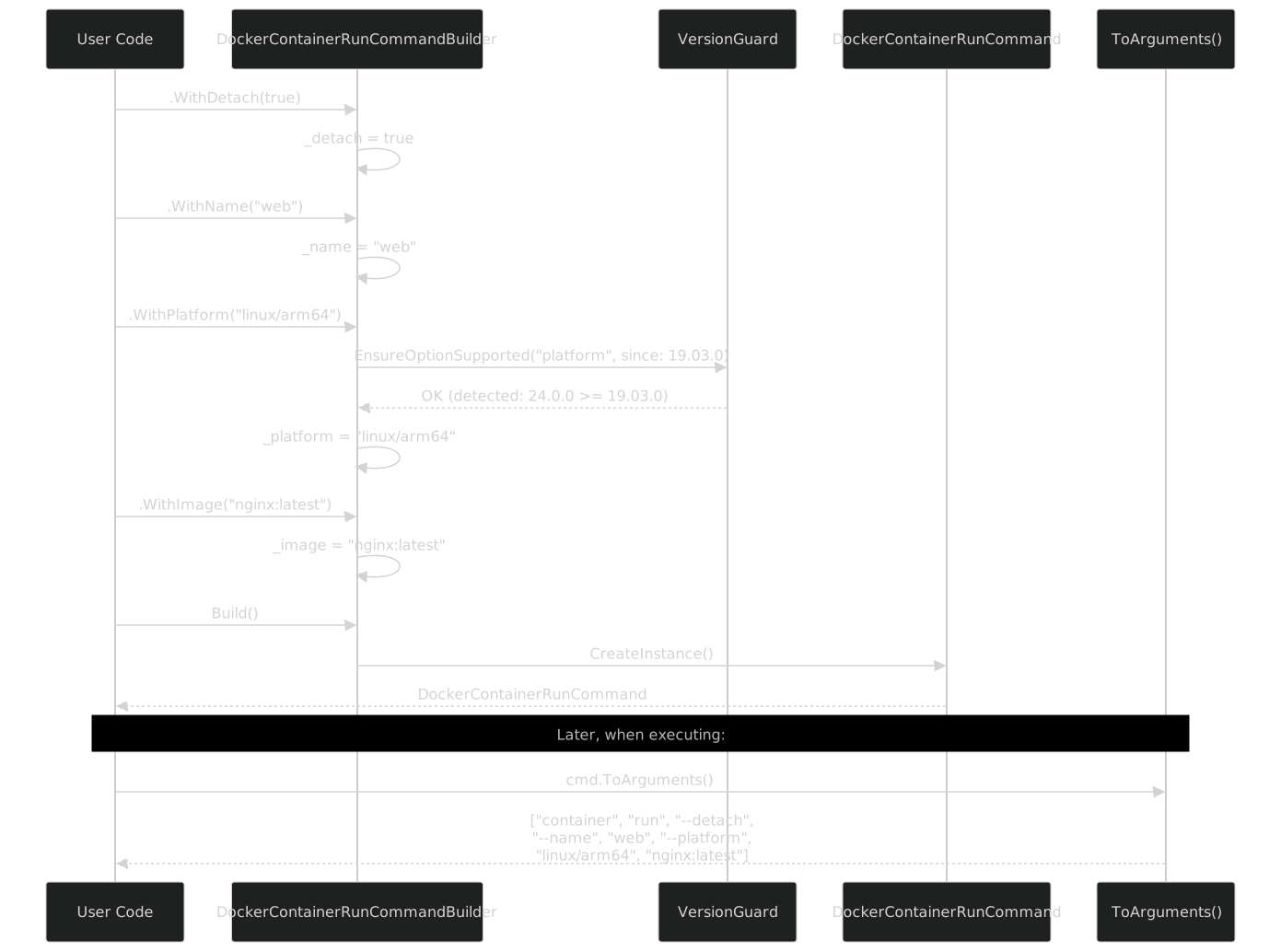
The boundary between "builder time" and "execution time" is deliberate. VersionGuard checks happen at builder time -- when you call .WithPlatform(). Argument serialization happens later, when ToArguments() is called. This separation means:
- Fail fast. Version errors surface at the point of flag configuration, not at process execution.
- Inspect before execute. You can call
cmd.ToArguments()and log/inspect the arguments without actually running Docker. This is invaluable for debugging and testing. - Serialize independently. The command object is a plain data object. You can serialize it, pass it across threads, store it in a queue, or compare two commands for equality.
The CommandExecutor (covered in Part IX) takes the ITypedCommand and calls ToArguments() internally. But you never have to -- the command is a self-contained description of what to run, separate from the act of running it.
Generated Output Stats for Docker
Here is the full accounting of what the generator produces for the Docker CLI:
| Command Group | Commands | Properties (total) | Builders | Version-Guarded Properties |
|---|---|---|---|---|
| container | 13 | 184 | 13 | 28 |
| image | 8 | 62 | 8 | 11 |
| network | 6 | 38 | 6 | 5 |
| volume | 5 | 22 | 5 | 3 |
| system | 4 | 16 | 4 | 2 |
| context | 4 | 14 | 4 | 4 |
| buildx | 8 | 86 | 8 | 34 |
| plugin | 5 | 18 | 5 | 2 |
| trust | 3 | 12 | 3 | 0 |
| swarm | 4 | 24 | 4 | 6 |
| node | 5 | 16 | 5 | 2 |
| service | 6 | 42 | 6 | 12 |
| stack | 5 | 22 | 5 | 8 |
| secret | 4 | 12 | 4 | 2 |
| config | 4 | 12 | 4 | 2 |
| manifest | 5 | 18 | 5 | 3 |
| Total | 89 | 598 | 89 | 124 |
89 command classes. 89 builder classes. 598 typed properties across all commands. 124 of those properties have VersionGuard calls in their builders -- meaning 124 flags that exist in some Docker versions but not others, and the guard catches the mismatch before the process starts.
Plus: 1 client class, 16 group classes, the VersionGuard static class, and the ITypedCommand interface. That is ~200 generated .g.cs files total, all emitted in under 2 seconds during a build.
The Numbers in Context
598 properties means 598 opportunities for a typo in a string-concatenation approach. 598 flag-to-argument mappings that would need manual maintenance as Docker releases new versions. 124 version-sensitive flags that would require 124 hand-written if (version >= ...) checks in a hand-coded wrapper.
The source generator handles all 598 -- and updates them when a new Docker version is scraped and the JSON is regenerated. The cost is one [BinaryWrapper("docker")] attribute.
Why Sealed, Why Init, Why This Way
I want to address the design choices more directly, because every one of them has an alternative that I considered and rejected.
Why sealed? The alternative is virtual methods and inheritance. Some code generators produce base classes with virtual members so consumers can override behavior. I tried this. It was a mistake. People override ToArguments() to "fix" argument ordering, then file bugs when the next generator run reverts their changes. Sealed means the generated code is the code. If it is wrong, fix the generator, not the output.
Why init instead of set? The alternative is mutable command objects. Some builders produce mutable DTOs that you set properties on directly. The problem is downstream: if you pass a mutable command to a logger and a retry handler and an executor, any of them could mutate it. With init, the command is frozen after construction. The builder is the only mutable phase.
Why IReadOnlyList<string> for list properties, not List<string>? Because List<string> is mutable. Even on an init property, the list itself can be modified after construction. IReadOnlyList<string> prevents that. The builder uses List<string> internally (for Add() calls), then wraps it with .AsReadOnly() in CreateInstance().
Why nullable everything? Because every Docker flag is optional. I considered using a Required attribute for flags that are always needed (like the image in docker run), but Docker itself does not enforce this at the CLI parsing level -- it prints a usage error at runtime. The typed wrapper should not be stricter than the tool it wraps. Required-ness is validated in the builder's Build() method if needed, not by the type system on the command class.
Why bool? instead of bool? Because false and "not specified" are different things. --detach=false is a valid Docker argument (it explicitly disables detach mode). If Detach were bool with a default of false, the ToArguments() method could not distinguish "the user did not set this" from "the user explicitly set this to false." bool? with null as the default lets ToArguments() emit the flag only when explicitly set.
Comparison: What You Write vs. What Is Generated
Let me close with a before-and-after that spans the full stack.
Before (47 Process.Start calls, as described in Part I):
public async Task DeployWebServer(string image, string name, int port)
{
    // Create network (hope the flag name is right)
    await RunDocker($"network create --driver bridge frontend");

    // Run container (hope the flag order is right)
    await RunDocker(
        $"run -d --name {name} " +
        $"--network frontend " +
        $"-p {port}:80 " +
        $"--restart unless-stopped " +
        $"--memory 512m " +
        $"--label app=web " +
        $"--health-cmd \"curl -f http://localhost/ || exit 1\" " +
        $"--health-interval 30s " +
        $"{image}");
}

private async Task RunDocker(string args)
{
    var process = Process.Start(new ProcessStartInfo
    {
        FileName = "docker",
        Arguments = args,
        RedirectStandardOutput = true,
        RedirectStandardError = true,
        UseShellExecute = false,
    });
    await process!.WaitForExitAsync();
    if (process.ExitCode != 0)
    {
        var stderr = await process.StandardError.ReadToEndAsync();
        throw new Exception($"Docker failed: {stderr}");
    }
}
After:
public async Task DeployWebServer(string image, string name, int port)
{
    var networkCmd = client.Network.Create(b => b
        .WithDriver("bridge")
        .WithName("frontend"));

    var runCmd = client.Container.Run(b => b
        .WithDetach(true)
        .WithName(name)
        .WithNetwork("frontend")
        .WithPort($"{port}:80")
        .WithRestart("unless-stopped")
        .WithMemory("512m")
        .WithLabel("app", "web")
        .WithHealthCmd("curl -f http://localhost/ || exit 1")
        .WithHealthInterval("30s")
        .WithImage(image));

    await executor.ExecuteAsync(networkCmd);
    await executor.ExecuteAsync(runCmd);
}
Same behavior. Same Docker commands. But now every flag name is checked by the compiler. Every version-sensitive flag is guarded. Every argument is formatted correctly. The IDE shows descriptions. The code is greppable -- WithHealthCmd is a method call, not a substring in an interpolated string.
And if someone upgrades Docker and a flag changes? The next scrape updates the JSON, the generator updates the code, and the compiler tells you what broke. Not a runtime error at 2am. A build error at your desk.
Closing
54 typed properties on one command class. VersionGuard that catches version drift before the process starts. Nested client groups that mirror Docker's own command structure. 89 command builders that produce immutable command objects with ToArguments() serialization. This is what 40 JSON files and a source generator produce.
The developer writes client.Container.Run(b => b.WithDetach(true).WithName("web").WithImage("nginx")). The generator wrote everything behind that dot -- the client, the group, the builder, the command, the arguments, the version guard. ~200 files of generated code that nobody reads but everybody uses, through IntelliSense, every day.
The same pattern applies to Docker Compose -- Part VIII shows its generated API, which is structurally different (flat command groups instead of nested, plus global flags that propagate to every command) but built from the same generator. The differences are instructive: they show how the same source generator adapts to different CLI structures while maintaining the same developer experience.
Previous: Part VI: Build Time -- The Source Generator for CLI Commands | Next: Part VIII: The Generated Docker Compose API
Back to series index