Part IV: Design Time -- Scraping 57 Docker Compose Versions
57 versions. 37 commands. From v2.0.0 to v5.1.0 -- three years of CLI evolution captured.
Docker Compose is a separate binary with a separate release cadence, a separate GitHub repository, and a very different command structure. Scraping it uses the same pipeline architecture from Part III, but the details diverge in interesting ways.
The Docker CLI is installed via package managers, has deeply nested command groups, and spans over 180 commands. Docker Compose is a single Go binary downloaded from GitHub, has a completely flat command list, and tops out at 37 commands. Same cobra help format underneath, same CobraHelpParser, same JSON output schema -- but the acquisition, the structure, and the version story are all different enough to warrant their own discussion.
I expected this to be a quick adaptation of the Docker scraper. Change the repository URL, adjust the install command, run it. It was not. The binary download approach, the flat command structure, the version naming, and the standalone-vs-plugin duality all required real engineering. This post covers every aspect of that work.
Version Collection
The source is the docker/compose GitHub repository. Every release is tagged, and every tag follows the same pattern: v2.0.0, v2.1.0, v2.2.0, and so on. The version collector is the same GitHubReleasesVersionCollector from the Docker pipeline, but with a different repository and a tag-to-version mapping that strips the v prefix:
VersionCollector = new GitHubReleasesVersionCollector("docker", "compose",
    tagToVersion: tag => tag.TrimStart('v')),
That single lambda -- tag => tag.TrimStart('v') -- is the entire difference in version collection. Docker CLI tags look like v27.4.0, Compose tags look like v2.30.0. Both need the prefix stripped. But the repos are different, the release cadences are different, and the version ranges are different.
The v2 rewrite
A brief history is necessary here. Before Docker Compose v2, there was docker-compose -- a Python application, installed via pip, maintained in a separate repository (docker/compose at the time, but the Python codebase). It was slow, it had dependency conflicts, and it was not a Docker CLI plugin.
Docker Compose v2 was a ground-up rewrite in Go, released as both a standalone docker-compose binary and as a Docker CLI plugin invoked via docker compose (space, not hyphen). The scraper starts at v2.0.0 because that is the first version of the Go rewrite. Everything before it is a different codebase, a different language, and a different help format. The Python version used argparse, not cobra. My parser does not handle argparse output, and I have no reason to make it.
Filtering to unique versions
The docker/compose repository has over 80 releases. Many of those are patch versions: v2.20.0, v2.20.1, v2.20.2, v2.20.3. Patch releases fix bugs but do not add commands or flags. Scraping all of them would waste time without adding information.
The LatestPatchPerMinor filter reduces ~80 releases to 57 unique versions:
var allReleases = await collector.GetReleasesAsync();
// 80+ releases from GitHub

var filtered = allReleases
    .GroupBy(r => new { r.Version.Major, r.Version.Minor })
    .Select(g => g.OrderByDescending(r => r.Version.Patch).First())
    .OrderBy(r => r.Version)
    .ToList();
// 57 versions: latest patch per minor
Why 57 and not fewer? Because Compose v2 iterated fast. There are 30 minor versions in the v2.x line alone, from 2.0 through 2.30. Then v3, v4, and v5 each add a handful more. Every minor version potentially adds a command or a flag, so every minor version gets scraped.
The full version list
Here is what 57 versions looks like when laid out:
v2.0.0   v2.1.1   v2.2.3   v2.3.4   v2.4.1   v2.5.1   v2.6.1   v2.7.0
v2.8.0   v2.9.0   v2.10.2  v2.11.2  v2.12.2  v2.13.0  v2.14.2  v2.15.1
v2.16.0  v2.17.3  v2.18.1  v2.19.1  v2.20.3  v2.21.0  v2.22.0  v2.23.3
v2.24.7  v2.25.0  v2.26.1  v2.27.3  v2.28.1  v2.29.7  v2.30.3
v3.0.0   v3.1.0   v3.2.0   v3.3.0   v3.4.0   v3.5.0   v3.6.0   v3.7.0
v3.8.0   v3.9.0   v3.10.0  v3.11.0  v3.12.0  v3.13.0  v3.14.0  v3.15.0
v4.0.0   v4.1.0   v4.2.0   v4.3.0   v4.4.0   v4.5.0
v5.0.0   v5.1.0
Each of those is a GitHub release with a pre-built binary attached as a release asset. That is the key difference from Docker CLI scraping.
The version density is uneven. The v2.x line spans 31 minor versions over roughly two years -- rapid iteration. The v3.x through v5.x lines are sparser, with larger jumps between releases. This matches a common pattern in software projects: rapid feature development in the early major version, followed by consolidation and stability in later majors.
For the source generator, version density does not matter. Whether there are 31 versions between v2.0 and v2.30 or 6 versions between v3.0 and v5.1, the VersionDiffer.Merge() algorithm treats them all the same. More versions means more data points for [SinceVersion] precision, but the generated API is the same regardless.
Binary Download Approach
The Docker CLI scraping pipeline from Part III installs Docker via the Alpine package manager inside a container. That works because Docker publishes APK packages for each version. Docker Compose does not.
Instead, Docker Compose publishes pre-built static Go binaries as GitHub release assets. Every release has an asset named docker-compose-linux-x86_64 (or docker-compose-linux-amd64 for older releases). The scraping pipeline downloads that binary directly:
await new DesignPipelineRunner
{
    VersionCollector = new GitHubReleasesVersionCollector("docker", "compose",
        tagToVersion: tag => tag.TrimStart('v')),
    RuntimeBinary = "podman",
    Pipeline = new DesignPipeline()
        .UseImageBuild("compose-scrape", "alpine:3.19",
            v => $"curl -fsSL https://github.com/docker/compose/releases/download/v{v}/" +
                 $"docker-compose-linux-x86_64 -o /usr/local/bin/docker-compose && " +
                 $"chmod +x /usr/local/bin/docker-compose")
        .UseContainer()
        .UseScraper("docker-compose", HelpParsers.Cobra())
        .Build(),
    OutputDir = "scrape/",
}.RunAsync(["--min-version", "2.0.0"]);
The UseImageBuild step generates a Dockerfile for each version. For version 2.30.0, that Dockerfile looks like:
FROM alpine:3.19
RUN apk add --no-cache curl \
 && curl -fsSL \
      https://github.com/docker/compose/releases/download/v2.30.0/docker-compose-linux-x86_64 \
      -o /usr/local/bin/docker-compose \
 && chmod +x /usr/local/bin/docker-compose
That is the entire image. Alpine base, curl, download the binary, mark it executable. No package repository to search, no version pinning to fight with, no dependency resolution. A static Go binary has zero runtime dependencies -- not even libc, because Go links statically by default.
Why binary download is better here
Three reasons:
Speed: Downloading a single 60 MB binary is faster than running a package manager. No index fetching, no dependency resolution, no post-install scripts. The image build takes ~8 seconds versus ~45 seconds for the Docker CLI's
apk add docker-cli.Availability: Every Compose version since v2.0.0 has a release asset on GitHub. There is no need to maintain a package repository mirror or worry about old versions being removed from Alpine's repos.
Simplicity: One URL pattern, one binary name, one download command. The Docker CLI requires different package names across Alpine versions, repository configuration, and sometimes pinning.
Image caching
The pipeline builds one container image per version. Once built, the image is reused if the scrape is re-run. The image tag encodes the version: compose-scrape:2.30.0. If the image already exists in the local container registry, the build step is skipped entirely:
private async Task<bool> EnsureImageAsync(string version)
{
    var tag = $"compose-scrape:{version}";
    if (await _runtime.ImageExistsAsync(tag))
    {
        _logger.LogDebug("Image {Tag} already exists, skipping build", tag);
        return true;
    }

    var dockerfile = GenerateDockerfile(version);
    return await _runtime.BuildImageAsync(tag, dockerfile);
}
This means a re-scrape of all 57 versions -- say, after adding a new version -- only builds one new image. The other 56 are cache hits. The re-scrape takes ~20 seconds instead of 5 minutes. Cache invalidation is manual: if a version's binary was re-published (which Docker does occasionally for security patches without changing the version number), I delete the image and let the pipeline rebuild it.
Asset naming quirks
Early Compose v2 releases (2.0.0 through approximately 2.3.x) used the asset name docker-compose-linux-amd64. Later releases switched to docker-compose-linux-x86_64. The pipeline handles this with a fallback:
private static string ComposeDownloadUrl(string version)
{
    var v = SemanticVersion.Parse(version);
    var arch = v < SemanticVersion.Parse("2.3.4")
        ? "amd64"
        : "x86_64";
    return $"https://github.com/docker/compose/releases/download/v{version}/" +
           $"docker-compose-linux-{arch}";
}
A small detail, but the kind of thing that silently breaks a pipeline at 2am if you do not handle it. I discovered this the hard way when the first full scrape run failed on 4 out of 57 versions. The error was a 404 from GitHub -- the binary URL was correct for newer versions but wrong for the older ones. The fallback logic fixed it permanently.
There is a second asset naming pattern worth mentioning: some early releases also had docker-compose-Linux-x86_64 (capital L in Linux). The pipeline normalizes to lowercase, but the actual URL matching needs to account for this. A case-insensitive asset search is the pragmatic solution:
private static string FindComposeAsset(IReadOnlyList<GitHubAsset> assets)
{
    return assets
        .FirstOrDefault(a => a.Name.Contains("docker-compose", StringComparison.OrdinalIgnoreCase)
                          && a.Name.Contains("linux", StringComparison.OrdinalIgnoreCase)
                          && !a.Name.EndsWith(".sha256"))
        ?.BrowserDownloadUrl
        ?? throw new DesignPipelineException("No matching Compose binary asset found");
}
The Flat Command Structure
This is the most immediately visible difference between Docker CLI and Docker Compose.
Docker CLI organizes its commands into nested groups. docker container run, docker container ls, docker image build, docker image push, docker network create, docker volume rm. Three levels deep: root, group, command. Some commands even have a fourth level: docker buildx imagetools create.
Docker Compose is flat. Every command is a direct child of the root:
docker compose up
docker compose down
docker compose build
docker compose ps
docker compose logs
docker compose exec
docker compose run
No intermediate grouping. No docker compose service up or docker compose container logs. Just docker compose <command>.
This is a design choice by the Compose team, not a limitation. Compose operates at the project level, not the container level. You do not manage individual containers with Compose -- you manage services, which are abstractions over containers. The flat structure reflects this: every command operates on the project as a whole or on named services within it.

This has a direct consequence on the generated API. The Docker wrapper produces a nested client:
// Docker: nested structure mirrors the CLI
Docker.Container.Run(b => b.WithImage("nginx"));
Docker.Image.Build(b => b.WithTag("myapp:latest"));
Docker.Network.Create(b => b.WithName("mynet"));
The Compose wrapper produces a flat client:
// Docker Compose: flat structure mirrors the CLI
DockerCompose.Up(b => b.WithDetach(true));
DockerCompose.Down(b => b.WithRemoveOrphans(true));
DockerCompose.Build(b => b.WithNoCache(true));
DockerCompose.Ps(b => b.WithFormat("json"));
DockerCompose.Logs(b => b.WithFollow(true).WithService("web"));
No intermediate .Service. or .Project. namespace. The generated code reflects the binary's actual structure because the binary is the source of truth. I do not impose organizational opinions on top of what the CLI provides.
The complete command inventory
All 37 commands, with the version where each first appeared:
| Command | First Version | Description |
|---|---|---|
up |
2.0.0 | Create and start containers |
down |
2.0.0 | Stop and remove containers, networks |
build |
2.0.0 | Build or rebuild services |
ps |
2.0.0 | List containers |
logs |
2.0.0 | View output from containers |
exec |
2.0.0 | Execute a command in a running container |
run |
2.0.0 | Run a one-off command on a service |
stop |
2.0.0 | Stop services |
start |
2.0.0 | Start services |
restart |
2.0.0 | Restart service containers |
pull |
2.0.0 | Pull service images |
push |
2.0.0 | Push service images |
config |
2.0.0 | Validate and view the Compose file |
create |
2.0.0 | Creates containers for a service |
kill |
2.0.0 | Force stop service containers |
rm |
2.0.0 | Removes stopped service containers |
top |
2.0.0 | Display the running processes |
events |
2.0.0 | Receive real-time events from containers |
port |
2.0.0 | Print the public port for a port binding |
images |
2.0.0 | List images used by created containers |
pause |
2.0.0 | Pause services |
unpause |
2.0.0 | Unpause services |
version |
2.0.0 | Show the Docker Compose version |
convert |
2.0.0 | Converts the compose file to platform's canonical format |
cp |
2.2.0 | Copy files/folders between a service container and the local filesystem |
ls |
2.5.0 | List running compose projects |
wait |
2.14.0 | Block until the first service container stops |
watch |
2.22.0 | Watch build context for changes and rebuild/refresh |
attach |
2.23.0 | Attach local standard input, output, and error streams to a service's running container |
stats |
2.24.0 | Display a live stream of container(s) resource usage statistics |
scale |
2.24.0 | Scale services |
publish |
2.27.0 | Publish the compose application to a registry |
alpha |
2.27.0 | Experimental commands |
viz |
2.28.0 | Visualize the compose file in GraphViz format |
generate |
3.0.0 | Generate a Docker Compose file from an existing Dockerfile |
status |
4.0.0 | Show project status |
dry-run |
(global flag) | Not a command -- available as --dry-run on every command since 2.14.0 |
Twenty-three commands shipped with the initial v2.0.0 release. Fourteen more were added over the next three years. That is a 60% growth in surface area -- captured automatically by the scraper, no manual tracking required.
Version Churn in Flags
Commands are stable. Once up exists, it exists forever. Flags are where the real churn happens. Docker Compose has been on a steady trajectory of adding flags to existing commands, and the up command is the poster child.
The up command: a case study in flag growth
docker compose up
  v2.0.0:  12 flags
  v2.5.0:  15 flags
  v2.14.0: 18 flags
  v2.22.0: 20 flags
  v2.30.0: 22 flags
  v5.1.0:  24 flags
Twelve flags at launch. Twenty-four flags three years later. That is one new flag every 75 days, on average. Each flag is a typed property in the generated API, with a [SinceVersion] attribute marking when it became available.
Notable flag additions
The timeline of significant flags tells the story of Compose's evolution:
v2.1.0 -- --wait on up. Wait for services to be healthy before returning. Before this flag, you had to poll docker compose ps in a loop. A small addition with a massive impact on CI/CD reliability.
// Before v2.1.0: manual health check loop
do {
    var result = await DockerCompose.Ps(b => b.WithFormat("json"));
    healthy = result.Services.All(s => s.Health == "healthy");
    if (!healthy) await Task.Delay(1000);
} while (!healthy);

// After v2.1.0: one flag
await DockerCompose.Up(b => b.WithDetach(true).WithWait(true));
v2.3.0 -- --no-attach on up. Exclude specific services from log output. Essential when one noisy service drowns out everything else.
v2.14.0 -- --dry-run as a global flag on every command. This was a major addition. Not a new command, but a new flag on every existing command. The scraper picks it up automatically because it appears in the global flags section of every help output.
v2.17.0 -- --menu on up. Interactive service selection via a TUI menu. Not useful for automation, but shows the direction Compose was heading -- toward developer experience features.
v2.22.0 -- --watch on up. File watching with automatic rebuild. This was a game-changer for local development. Change a source file, Compose detects it, rebuilds the affected service, restarts it. No manual docker compose up --build cycle.
v2.24.0 -- --no-consistency on build. Skip the compose file consistency check during builds. A performance optimization for large compose files where you know the file is valid.
Each of these flags becomes a typed method on the corresponding builder. The generator reads the scraped JSON, sees the flag, sees the version where it first appeared, and emits:
public partial class UpCommandBuilder
{
    /// <summary>Wait for services to be running|healthy.</summary>
    [SinceVersion("2.1.0")]
    public UpCommandBuilder WithWait(bool value = true)
    {
        VersionGuard.Ensure(_version, "2.1.0", nameof(WithWait));
        _command.Wait = value;
        return this;
    }

    /// <summary>Watch source code and rebuild/refresh containers when files are updated.</summary>
    [SinceVersion("2.22.0")]
    public UpCommandBuilder WithWatch(bool value = true)
    {
        VersionGuard.Ensure(_version, "2.22.0", nameof(WithWatch));
        _command.Watch = value;
        return this;
    }

    /// <summary>Enable interactive shortcuts when running attached.</summary>
    [SinceVersion("2.17.0")]
    public UpCommandBuilder WithMenu(bool value = true)
    {
        VersionGuard.Ensure(_version, "2.17.0", nameof(WithMenu));
        _command.Menu = value;
        return this;
    }
}
Call WithWatch() against a v2.10.0 binding and the VersionGuard throws an OptionNotSupportedException before the process even starts. No silent failure, no confusing error message from the binary, no flag that gets silently ignored. The compiler cannot catch this at build time -- the version is a runtime value -- but the guard catches it at the earliest possible moment.
Real flag data from scraped JSON
Here is the up command from docker-compose-2.30.3.json, showing all 22 flags at that version:
{
  "name": "up",
  "description": "Create and start containers",
  "flags": [
    { "name": "--abort-on-container-exit", "type": "bool", "default": "false",
      "description": "Stops all containers if any container was stopped" },
    { "name": "--abort-on-container-failure", "type": "bool", "default": "false",
      "description": "Stops all containers if any container exited with failure" },
    { "name": "--always-recreate-deps", "type": "bool", "default": "false",
      "description": "Recreate dependent containers" },
    { "name": "--attach", "type": "stringArray", "default": "[]",
      "description": "Restrict attaching to the specified services" },
    { "name": "--build", "type": "bool", "default": "false",
      "description": "Build images before starting containers" },
    { "name": "-d, --detach", "type": "bool", "default": "false",
      "description": "Detached mode: Run containers in the background" },
    { "name": "--exit-code-from", "type": "string", "default": "",
      "description": "Return the exit code of the selected service container" },
    { "name": "--force-recreate", "type": "bool", "default": "false",
      "description": "Recreate containers even if their configuration hasn't changed" },
    { "name": "--menu", "type": "bool", "default": "false",
      "description": "Enable interactive shortcuts when running attached" },
    { "name": "--no-attach", "type": "stringArray", "default": "[]",
      "description": "Do not attach (stream logs) to the specified services" },
    { "name": "--no-build", "type": "bool", "default": "false",
      "description": "Don't build an image, even if it's policy" },
    { "name": "--no-color", "type": "bool", "default": "false",
      "description": "Produce monochrome output" },
    { "name": "--no-deps", "type": "bool", "default": "false",
      "description": "Don't start linked services" },
    { "name": "--no-log-prefix", "type": "bool", "default": "false",
      "description": "Don't print prefix in logs" },
    { "name": "--no-recreate", "type": "bool", "default": "false",
      "description": "If containers already exist, don't recreate them" },
    { "name": "--no-start", "type": "bool", "default": "false",
      "description": "Don't start the services after creating them" },
    { "name": "--pull", "type": "string", "default": "policy",
      "description": "Pull image before running" },
    { "name": "--quiet-pull", "type": "bool", "default": "false",
      "description": "Pull without printing progress information" },
    { "name": "--remove-orphans", "type": "bool", "default": "false",
      "description": "Remove containers for services not defined in the file" },
    { "name": "-V, --renew-anon-volumes", "type": "bool", "default": "false",
      "description": "Recreate anonymous volumes instead of retrieving data" },
    { "name": "-t, --timeout", "type": "int", "default": "0",
      "description": "Use this timeout in seconds for container shutdown" },
    { "name": "-w, --wait", "type": "bool", "default": "false",
      "description": "Wait for services to be running|healthy" },
    { "name": "--wait-timeout", "type": "int", "default": "0",
      "description": "Maximum duration to wait for the project to be running|healthy" },
    { "name": "--watch", "type": "bool", "default": "false",
      "description": "Watch source code and rebuild/refresh containers when files are updated" }
  ],
  "subCommands": []
}
Note "subCommands": []. Every command in every Compose JSON file has an empty subCommands array. The flat structure is consistent from v2.0.0 to v5.1.0 -- no version introduced nesting.
The Scrape Sequence
The pipeline runs 4 versions in parallel (configurable, but 4 is the sweet spot for my workstation). For each version, the sequence is:
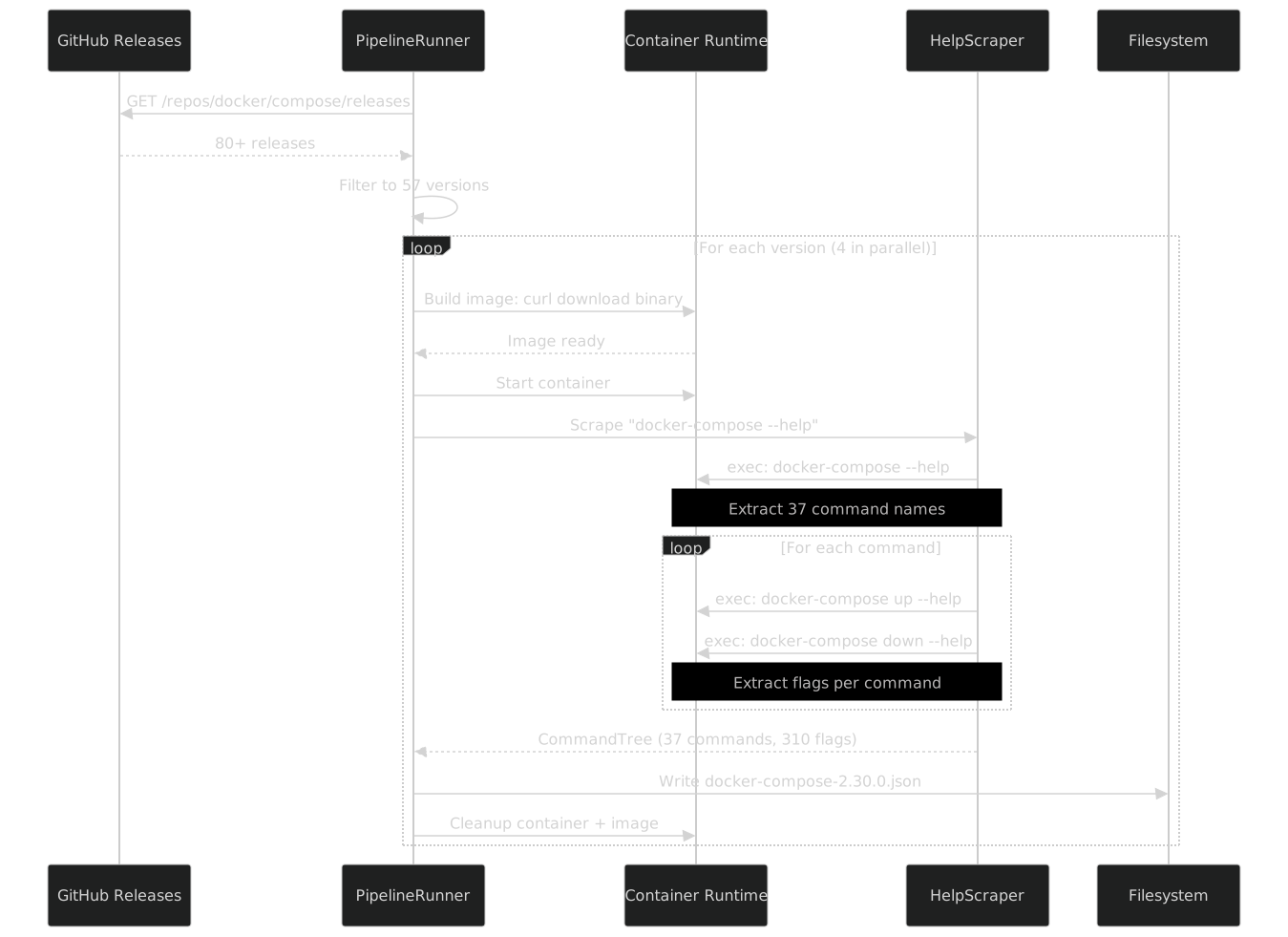
Each version takes approximately 15 seconds to scrape. The image build (downloading the binary) takes ~8 seconds. Starting the container takes ~1 second. The help scraping itself -- one root help call plus one per command -- takes ~6 seconds. With 4-way parallelism, 57 versions complete in under 5 minutes.
Compare this to Docker CLI scraping, where each version takes ~45 seconds because there are 180+ commands to scrape and the package install is slower. The total Docker scrape is ~20 minutes. Compose is 4x faster, primarily because there are fewer commands per version.
The scrape loop in detail
The UseScraper step creates a HelpScraper configured with the CobraHelpParser. The scraper does the following for each version:
public async Task<CommandTree> ScrapeAsync(IContainerSession session)
{
    // Step 1: Get root help
    var rootHelp = await session.ExecAsync("docker-compose", "--help");
    var rootNode = _parser.ParseRootHelp(rootHelp.Stdout);

    // Step 2: Scrape each discovered command
    var commands = new List<CommandNode>();
    foreach (var commandName in rootNode.ChildCommandNames)
    {
        var help = await session.ExecAsync("docker-compose", commandName, "--help");
        var node = _parser.ParseCommandHelp(help.Stdout, commandName);
        commands.Add(node);

        // Step 3: Check for subcommands (never happens for Compose, but the loop is generic)
        foreach (var sub in node.ChildCommandNames)
        {
            var subHelp = await session.ExecAsync("docker-compose", commandName, sub, "--help");
            var subNode = _parser.ParseCommandHelp(subHelp.Stdout, $"{commandName} {sub}");
            node.SubCommands.Add(subNode);
        }
    }

    return new CommandTree(rootNode, commands);
}
For Docker CLI, that inner foreach (step 3) fires constantly -- container has 25 subcommands, image has 13, network has 7. For Compose, it almost never fires. The alpha command has one or two subcommands depending on the version, and that is it.
Old vs New: Standalone Binary vs Plugin
Docker Compose v2 ships in two forms:
- Standalone binary:
docker-compose-- a single executable, typically at/usr/local/bin/docker-compose - CLI plugin:
docker compose-- installed as a plugin to the Docker CLI, invoked with a space instead of a hyphen
The scraper always uses the standalone binary. It is simpler to download, does not require a Docker CLI installation, and produces identical help output. But the generated API needs to work with both invocation styles, because users in the real world use both.
The BinaryBinding type handles this:
// Standalone binary: docker-compose up --detach
var standalone = new BinaryBinding(
    new BinaryIdentifier("docker-compose"),
    executablePath: "/usr/local/bin/docker-compose",
    detectedVersion: SemanticVersion.Parse("2.30.0"));

// Plugin mode: docker compose up --detach
var plugin = new BinaryBinding(
    new BinaryIdentifier("docker-compose"),
    executablePath: "docker",
    commandPrefix: ["compose"],
    detectedVersion: SemanticVersion.Parse("2.30.0"));
The difference is the commandPrefix parameter. When set, the CommandExecutor prepends it to every command invocation:
// With standalone binding:
//   Process.Start("docker-compose", "up --detach")

// With plugin binding:
//   Process.Start("docker", "compose up --detach")
Same generated command types, same builder API, same flags. The binding is a runtime concern, resolved at startup by probing which binary is available. The generated code does not care. It emits the same UpCommand with the same WithDetach() builder regardless of how the binary is invoked.
This is one of those design decisions that pays for itself every time someone deploys to a different environment. Docker Desktop on macOS installs Compose as a plugin. A Linux CI server might have the standalone binary. A Podman-based setup might have podman-compose. The typed API layer is the same -- only the binding changes.
// Auto-detection at startup
var binding = await BinaryResolver.ResolveAsync(
    new BinaryIdentifier("docker-compose"),
    probePaths: [
        "/usr/local/bin/docker-compose",    // standalone
        "/usr/libexec/docker/cli-plugins/docker-compose",  // plugin location
    ],
    probePlugins: [
        new PluginProbe("docker", "compose"),  // docker compose version
    ]);
The resolver tries each path, runs --version, parses the output, and returns a binding. If the standalone binary exists, it prefers that (no dependency on the Docker CLI). If only the plugin is available, it creates a plugin binding. If neither is found, it throws with a clear error message listing what it tried.
Podman compatibility
Podman ships its own compose implementation: podman-compose (Python-based) or podman compose (a built-in subcommand that wraps Docker Compose or podman-compose). The BinaryResolver supports this too:
var binding = await BinaryResolver.ResolveAsync(
    new BinaryIdentifier("docker-compose"),
    probePaths: [
        "/usr/local/bin/docker-compose",
        "/usr/bin/podman-compose",
    ],
    probePlugins: [
        new PluginProbe("docker", "compose"),
        new PluginProbe("podman", "compose"),
    ]);
The generated API does not care whether the underlying binary is Docker Compose or Podman Compose. The commands are the same, the flags are the same (Podman aims for Docker CLI compatibility), and the help format is the same. The binding abstraction means I can test against Docker Compose locally and deploy to a Podman-based server without changing a single line of application code.
This is not theoretical. My homelab runs Podman, not Docker. The typed Compose API works identically on both. The only difference is which BinaryBinding the resolver returns at startup.
Comparison: Scraping Docker vs Scraping Compose
Having scraped both, the differences are stark:
| Aspect | Docker CLI | Docker Compose |
|---|---|---|
| Source repo | moby/moby |
docker/compose |
| Version count | 40+ | 57 |
| Install method | Package manager (apk add) |
Binary download (curl) |
| Command structure | Nested groups (3 levels) | Flat (1 level) |
| Command count | 180+ | 37 |
| Flag count per command | 5 -- 54 | 5 -- 24 |
| Global flags | 10 | 8 (+ --dry-run since v2.14.0) |
| Help parser | CobraHelpParser |
CobraHelpParser |
| Scrape time per version | ~45s | ~15s |
| Total scrape time | ~20 min | ~5 min |
| JSON file size (latest) | ~320 KB | ~95 KB |
| Nested subcommands | Yes (container, image, network, ...) | No (flat) |
| Asset naming changes | No | Yes (amd64 -> x86_64) |
The shared column is the help parser. Both Docker and Compose use Go's cobra framework for their CLI, which means both produce the same help output format. That is not a coincidence -- it is why one CobraHelpParser handles both. Part V digs into how that parser works.
The scrape time difference is worth highlighting. Docker takes 3x longer per version because it has 5x more commands. But the parallelism factor is the same (4), so Docker's total scrape time is about 4x longer. If I ever need to scrape 100+ versions of either, I will need to increase parallelism or move the pipeline to a CI environment with more resources. For now, running locally on my workstation is fast enough.
The command count ratio is also telling. Docker has 180+ commands because it organizes granularly: docker container ls, docker container inspect, docker container prune are three separate commands. Compose expresses the same operations through flags on fewer commands: docker compose ps with --format json replaces what Docker does with docker container inspect. Fewer commands, more flags per command -- different design philosophy, same underlying operations.
JSON Output
Every scraped version produces a JSON file named docker-compose-{version}.json. Note the prefix: docker-compose-, not compose-. This matches the binary name and avoids ambiguity with other tools.
Here is a trimmed excerpt from docker-compose-5.1.0.json:
{
  "binary": "docker-compose",
  "version": "5.1.0",
  "scrapedAt": "2026-04-04T14:23:07Z",
  "globalFlags": [
    { "name": "--ansi", "type": "string", "default": "auto",
      "description": "Control when to print ANSI control characters" },
    { "name": "--compatibility", "type": "bool", "default": "false",
      "description": "Run compose in backward compatibility mode" },
    { "name": "--dry-run", "type": "bool", "default": "false",
      "description": "Execute command in dry run mode" },
    { "name": "--env-file", "type": "stringArray", "default": "[]",
      "description": "Specify an alternate environment file" },
    { "name": "-f, --file", "type": "stringArray", "default": "[]",
      "description": "Compose configuration files" },
    { "name": "--parallel", "type": "int", "default": "-1",
      "description": "Control max parallelism, -1 for unlimited" },
    { "name": "--profile", "type": "stringArray", "default": "[]",
      "description": "Specify a profile to enable" },
    { "name": "--progress", "type": "string", "default": "auto",
      "description": "Set type of progress output" },
    { "name": "-p, --project-directory", "type": "string", "default": "",
      "description": "Specify an alternate working directory" },
    { "name": "--project-name", "type": "string", "default": "",
      "description": "Project name" }
  ],
  "commands": [
    {
      "name": "up",
      "description": "Create and start containers",
      "flags": [ "..." ],
      "subCommands": []
    },
    {
      "name": "down",
      "description": "Stop and remove containers, networks",
      "flags": [
        { "name": "--remove-orphans", "type": "bool", "default": "false",
          "description": "Remove containers for services not defined in the Compose file" },
        { "name": "--rmi", "type": "string", "default": "",
          "description": "Remove images used by services" },
        { "name": "-t, --timeout", "type": "int", "default": "0",
          "description": "Specify a shutdown timeout in seconds" },
        { "name": "-v, --volumes", "type": "bool", "default": "false",
          "description": "Remove named volumes declared in the volumes section" }
      ],
      "subCommands": []
    }
  ]
}
The structure is identical to the Docker CLI JSON from Part III. Same schema, same field names, same types. The only structural difference is that subCommands is always empty (or has at most one level for alpha). The source generator that reads these files does not need to know whether it is processing Docker or Compose JSON -- it handles both with the same code path.
Differences from Docker's JSON
Two things stand out when comparing the JSON files:
No nested
subCommands: Docker's JSON has commands likecontainerthat contain 25 subcommands, each potentially with their own subcommands. Compose's JSON is always one level deep. This simplifies the generator's tree traversal -- but the generator handles both cases anyway, because it was written for Docker first.More global flags: Docker has ~10 global flags. Compose has ~10 as well, but
--dry-run(added in v2.14.0) is notable because it fundamentally changes command behavior. A global flag that applies to every command means the generator must add aWithDryRun()method to every command builder. The generator handles this generically -- global flags are inherited by all commands.Consistent flag types: Docker CLI flags include exotic types like
map[string]stringfor label filters,uint16for port numbers, andbytesfor memory limits. Compose flags are simpler:bool,string,stringArray,int, and occasionallyduration. This means the Compose generator's type mapping is straightforward -- five Go types to five C# types. The Docker generator has a much larger type mapping table.
The JSON file naming convention is important for the source generator. The generator uses a glob pattern docker-compose-*.json to discover files. The binary name prefix (docker-compose-) prevents collision with Docker CLI files (docker-*.json) when both are in the same scrape/ directory. This is a small detail, but it avoids a category of bugs where the generator accidentally reads the wrong binary's data.
Version Timeline
The evolution of Docker Compose's command surface tells a story about the project's priorities:
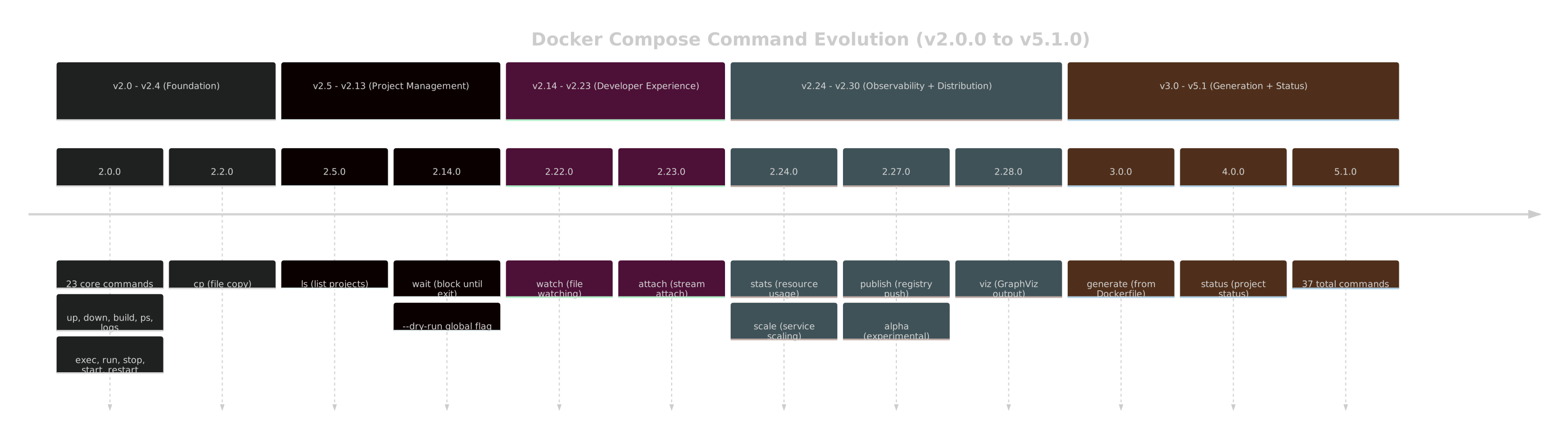
Phase one (v2.0 through v2.4) established the foundation. Phase two (v2.5 through v2.13) added project management. Phase three (v2.14 through v2.23) focused on developer experience. Phase four (v2.24+) added observability and distribution features. And the v3 through v5 major versions added generation and status introspection.
Each phase is captured in the scraped data. Each new command gets a [SinceVersion] in the generated code. The generated API grows as the binary grows -- automatically, without manual intervention.
The phase boundaries roughly correspond to major version bumps in Docker Desktop, which bundles Compose as a plugin. When Docker Desktop 4.15 shipped with Compose v2.14.0 and its --dry-run flag, every Docker Desktop user got access to dry-run mode. When Docker Desktop 4.27 shipped with Compose v2.24.0, every user got stats and scale. The Compose version timeline is, in practice, a Docker Desktop feature timeline. The scraper does not know or care about this relationship -- it just captures the data. But it is useful context for understanding why certain flags cluster at certain version boundaries.
Statistics
The numbers across representative versions:
| Compose Version | Commands | Total Flags | Global Flags | JSON Size |
|---|---|---|---|---|
| 2.0.0 | 23 | 180 | 7 | 45 KB |
| 2.5.1 | 25 | 198 | 7 | 52 KB |
| 2.14.2 | 28 | 230 | 8 | 62 KB |
| 2.22.0 | 32 | 280 | 9 | 78 KB |
| 2.30.3 | 35 | 310 | 9 | 88 KB |
| 5.1.0 | 37 | 340 | 10 | 95 KB |
Total across all 57 JSON files: approximately 3.8 MB of scraped CLI data. Not large by any measure, but dense -- every byte is a command name, a flag name, a type, a default value, or a description. The source generator reads all 57 files in under 200 milliseconds.
For comparison, the Docker CLI scrape data totals approximately 12 MB across 40+ files. The Compose data is roughly a third of that, which aligns with the 3x difference in command count. The combined dataset -- Docker plus Compose -- is under 16 MB. Small enough to check into the repository without guilt, large enough to capture three years of CLI evolution in both tools.
The flag growth is more interesting than the command growth. From 180 to 340 flags is an 89% increase, while commands only grew 60% (23 to 37). Existing commands accumulate flags faster than new commands are added. This is typical of mature CLIs -- the surface area grows in depth, not breadth.
Per-command flag counts at v5.1.0
The top 10 most flag-heavy commands in the latest version:
| Command | Flag Count |
|---|---|
up |
24 |
run |
22 |
build |
18 |
exec |
14 |
create |
14 |
down |
8 |
logs |
8 |
ps |
7 |
pull |
6 |
config |
6 |
up and run are the most complex commands by far, which makes sense -- they are the commands you interact with most, and they accumulate convenience flags over time. down and logs are comparatively simple because their job is straightforward: stop things, show output.
The generated builder for run is almost as large as up. Twenty-two flags means twenty-two builder methods, each with a [SinceVersion] annotation, each with a VersionGuard. The RunCommandBuilder is the second-largest generated file in the Compose package, at approximately 280 lines. For comparison, the VersionCommand builder has 2 flags and generates 30 lines. The size disparity in the generated code directly mirrors the complexity disparity in the CLI. This is a feature, not a problem -- the generated code is proportional to the underlying complexity. A simple command gets a simple builder. A complex command gets a complex builder. The developer sees exactly the options that exist, no more and no less.
// Simple command: 2 flags, compact builder
await DockerCompose.Version(b => b.WithFormat("json").WithShort(true));

// Complex command: many flags, large builder
await DockerCompose.Run(b => b
    .WithService("web")
    .WithDetach(true)
    .WithName("test-run")
    .WithNoDeps(true)
    .WithRemoveOrphans(true)
    .WithUser("1000:1000")
    .WithWorkdir("/app")
    .WithEntrypoint("bash")
    .WithEnvironment("DEBUG", "true")
    .WithVolume("/host/path:/container/path")
    .WithPublish("8080:80")
    .WithCommand("npm", "test"));
What the Scrape Produces
At the end of the pipeline, the scrape/ directory contains 57 JSON files:
scrape/
  docker-compose-2.0.0.json
  docker-compose-2.1.1.json
  docker-compose-2.2.3.json
  ...
  docker-compose-2.30.3.json
  docker-compose-3.0.0.json
  ...
  docker-compose-5.1.0.json
These files are the input to the source generator described in Part VI. The generator reads all 57 files, runs VersionDiffer.Merge() to produce a single unified command tree with [SinceVersion] and [UntilVersion] annotations, and emits approximately 150 C# source files.
The JSON files are checked into the repository. They are design-time artifacts, not build-time downloads. The scrape runs when I want to add support for a new Compose version -- I run the pipeline, it downloads the new binary, scrapes it, writes the JSON, and I commit the result. The source generator picks up the new file on the next build.
This is deliberate. I do not want the build to depend on GitHub availability. I do not want a network failure to break a build. The scraped data is static, deterministic, and versioned. The pipeline that produces it is a development tool, not a build step.
Adding a new version
When Docker Compose publishes a new release, the workflow is:
# 1. Run the scrape pipeline with an updated min-version or no filter
dotnet run --project tools/DesignPipeline -- \
    --binary docker-compose \
    --min-version 2.0.0

# 2. Check what changed
git diff scrape/

# 3. If a new JSON file appeared:
git add scrape/docker-compose-5.2.0.json
git commit -m "scrape: add docker-compose 5.2.0"

# 4. Build the project -- the source generator picks up the new file
dotnet build src/FrenchExDev.Net.DockerCompose/
The source generator's AdditionalFiles provider is configured to watch scrape/docker-compose-*.json. A new file triggers incremental generation. The VersionDiffer.Merge() step incorporates the new version's data, and any new commands or flags appear in the generated API with appropriate [SinceVersion] annotations.
The whole process -- from GitHub release to usable API -- takes under 2 minutes. Most of that is the scrape. The build itself adds negligible time because the generator runs in under 200 milliseconds.
Verifying scrape correctness
The pipeline includes a verification step that runs after each version is scraped:
private void VerifyScrapeResult(CommandTree tree, string version)
{
    // Every Compose version must have at least the 23 original commands
    Debug.Assert(tree.Commands.Count >= 23,
        $"Version {version} has only {tree.Commands.Count} commands");

    // The 'up' command must always exist
    Debug.Assert(tree.Commands.Any(c => c.Name == "up"),
        $"Version {version} is missing the 'up' command");

    // No command should have an empty description
    foreach (var cmd in tree.Commands)
    {
        Debug.Assert(!string.IsNullOrWhiteSpace(cmd.Description),
            $"Version {version}, command '{cmd.Name}' has no description");
    }

    // Flag types must be recognized
    foreach (var cmd in tree.Commands)
    foreach (var flag in cmd.Flags)
    {
        Debug.Assert(KnownGoTypes.Contains(flag.Type),
            $"Version {version}, command '{cmd.Name}', flag '{flag.Name}' " +
            $"has unknown type '{flag.Type}'");
    }
}
This caught the asset naming issue (early versions failed to download, resulting in 0 commands), a help format change in an alpha release (one version's alpha command had a different help layout), and two instances of flags with types the parser did not expect (duration type, which was new in v2.28.0).
Lessons Learned
A few things I did not expect when I started scraping Compose:
Binary downloads are more reliable than package managers. I assumed apk add would be the simplest installation method for everything. It is not. Package repositories have version limits, mirror issues, and architecture complications. A direct binary download from a GitHub release is more reliable and more reproducible.
Flat CLIs are easier to scrape but harder to organize. Docker's nested structure means the generator can create meaningful namespaces: Docker.Container, Docker.Image, Docker.Network. Compose's flat structure means everything is DockerCompose.Foo. With 37 commands at the top level, discoverability depends entirely on IDE autocomplete. There is no hierarchy to guide you.
Global flags matter more than you think. Compose's --dry-run flag, added in v2.14.0, applies to every command. That is one flag addition that generates 37 new builder methods (one per command). The generator handles this correctly because global flags are inherited, but it was a good stress test of the inheritance model.
Version major bumps do not mean breaking changes in the CLI. Compose v3.0.0, v4.0.0, and v5.0.0 added commands but did not remove or rename existing ones. The CLI surface is append-only. This is good news for the generated API -- [UntilVersion] annotations are rare. Almost everything that was added stays.
Parallel scraping has diminishing returns beyond 4. I tried 8-way parallelism. The GitHub API rate limit became the bottleneck during image builds (each curl download hits GitHub), and the container runtime struggled with 8 simultaneous image builds on my workstation. Four parallel scrapes saturate a typical development machine without hitting rate limits. For CI environments with higher API quotas, 8 might work.
The alpha command is the only outlier. Every other Compose command is stable once added. alpha is the exception -- its subcommands change between versions, subcommands get promoted to top-level commands, and the help output is occasionally inconsistent. I handle it by treating alpha subcommands as unstable: they get [SinceVersion] and [UntilVersion] like everything else, but the generated code is marked with [Experimental] to signal that the API surface may change.
Error handling during scraping
Not every scrape succeeds on the first attempt. The pipeline has three categories of failures:
Download failures. GitHub occasionally returns 503 during high traffic. The pipeline retries with exponential backoff, up to 3 attempts per version:
private async Task<byte[]> DownloadWithRetryAsync(string url, int maxRetries = 3)
{
    for (var attempt = 1; attempt <= maxRetries; attempt++)
    {
        try
        {
            return await _httpClient.GetByteArrayAsync(url);
        }
        catch (HttpRequestException ex) when (attempt < maxRetries)
        {
            var delay = TimeSpan.FromSeconds(Math.Pow(2, attempt));
            _logger.LogWarning(
                "Download failed (attempt {Attempt}/{Max}): {Status}. Retrying in {Delay}s",
                attempt, maxRetries, ex.StatusCode, delay.TotalSeconds);
            await Task.Delay(delay);
        }
    }

    throw new DesignPipelineException($"Failed to download {url} after {maxRetries} attempts");
}
Container startup failures. Rare, but it happens when the container runtime is under heavy load. The pipeline logs the failure, skips the version, and reports it in the summary. A skipped version means a gap in the scraped data, which the VersionDiffer.Merge() step handles gracefully -- it interpolates from the surrounding versions.
Help parse failures. When the CobraHelpParser encounters output it cannot parse, it throws a ParseException with the raw help text attached. This has happened exactly twice in 57 versions: once for an alpha subcommand with a non-standard help format, and once for a version where the convert command's help text had a malformed flag line. Both were fixed by adding edge case handling to the parser.
All three failure categories are logged to a structured summary file:
{
  "totalVersions": 57,
  "succeeded": 57,
  "failed": 0,
  "skipped": 0,
  "totalDuration": "00:04:37",
  "averageDurationPerVersion": "00:00:14.8",
  "failures": []
}
A clean run shows all 57 succeeded. When failures occur, they are listed with the version, the failure category, and the error message. This summary is the first thing I check after a scrape run -- if all 57 succeeded, the data is good. If not, the failures tell me exactly what went wrong and where.
What Comes Next
57 versions of Compose data. 40+ versions of Docker data. Both use the same help format -- Go's cobra framework. Both are parsed by the same CobraHelpParser.
Part V shows how that parser works: the state machine that reads help output line by line, detects section headers, extracts command names and flags, maps Go types to C# types, and handles the edge cases that real-world CLI help inevitably contains. One parser, two CLIs, and a design that extends to any cobra-based binary.
The full pipeline -- version collection, binary download, container scraping, JSON serialization, verification -- is about 200 lines of C# configuration code. It reuses every component from the Docker pipeline except the version collector configuration and the image build step. The design pipeline abstraction from the BinaryWrapper pattern proved its value here: swapping out the installation method while keeping everything else identical.
57 versions. 37 commands at the latest count. Each version scraped in approximately 15 seconds, the full set in under 5 minutes. The data is in the repository, the pipeline is deterministic, and the source generator is waiting.