Coordinators and the Adapter Pattern
Part IV toured eight machines across six domains. Every machine was pure: closure state, callback injection, zero DOM access. The question that immediately follows is mechanical. If forty-three machines know nothing about the DOM and nothing about each other, who wires them together? Who collapses the TOC when the tour begins? Who synchronizes the accent preview when the palette opens? Who dispatches app-ready when the readiness barrier gate fires?
Two roles, two patterns, two layers:
Coordinators orchestrate multiple machines through direct method calls. They live in
src/lib/alongside the machines they coordinate. They are themselves pure — no DOM, no events, no side effects beyond calling machine methods and returning operation lists.Adapters bridge machines to the DOM. They live in the entry files (
app-shared.ts,app-static.ts,theme-switcher.ts,tour.ts). They are the only code in the system that touchesdocument,window,querySelector, oraddEventListener. They import pure machines, create typed buses, read DOM positions, and apply machine output as DOM mutations.
This part examines both layers in detail: three coordinators, the hexagonal port system in external.ts, the composition root in app-shared.ts, a concrete adapter walkthrough for ScrollSpy, the delegated phantom pattern, and the 10 adapter nodes that appear in the state graph.
The Coordination Problem
Consider the guided tour. When a user clicks "Start Tour," four things must happen in sequence:
- The tour manager advances to step 1.
- The TOC sidebar collapses all open sections (so the user can focus on the highlighted target).
- The button demo machine starts animating the step's target element.
- The demo resolution map is consulted to find which demo factory handles this step.
These four concerns involve three separate machines (tour-state, tour-toc-orchestrator, tour-button-demo-state) and a lookup table. No single machine should know about all three others. Direct imports between machines would create a dependency web:
tour-state ──imports──> tour-toc-orchestrator
tour-state ──imports──> tour-button-demo-state
tour-state ──imports──> demo resolution map
Three import edges from one machine to three others. Multiply this by every cross-machine interaction in the codebase — theme palette syncing with preview, explorer filter syncing with selection and detail — and the dependency graph becomes a dense mesh where changing one machine ripples through five others.
The solution is indirection via a coordinator. The coordinator imports the machines; the machines import nothing. The dependency arrows all point inward:

The coordinator is the only node with outward edges. The machines remain leaf nodes — pure, independent, testable in isolation.
TourCoordinator — TOC Collapse/Focus/Restore
The TourCoordinator is the simplest of the three coordinators. Its job: orchestrate TOC section state during the guided tour. The full source is 86 lines, including the @FiniteStateMachine decorator. Here is the interface:
export interface TourCoordinator {
  /** Tour just started — collapse all TOC sections, return ops. */
  onTourBegin(toc: TocState): TourCoordinationResult;
  /** Tour moved to a new step — focus the relevant section, return ops. */
  onStepFocus(sectionId: string | null, toc: TocState): TourCoordinationResult;
  /** Tour ended — restore TOC to pre-tour state, return ops. */
  onTourEnd(toc: TocState): TourCoordinationResult;
  /** Resolve which demo factory id to run for a given step id, if any. */
  resolveDemoId(stepId: string, demoMap: ReadonlyMap<string, string>): string | null;
}
Three orchestration methods and one lookup method. Every method takes the current TOC state as input and returns a TourCoordinationResult — a data object containing TocOps:
export interface TocOps {
  toOpen: string[];
  toClose: string[];
}
The coordinator never mutates DOM. It returns lists of section IDs to open and close. The adapter applies these lists to the actual DOM elements.
The Factory
export function createTourCoordinator(deps: TourCoordinatorDeps): TourCoordinator {
  const { tocOrchestrator } = deps;

  function onTourBegin(toc: TocState): TourCoordinationResult {
    return { tocOps: tocOrchestrator.begin(toc.openSectionIds) };
  }

  function onStepFocus(sectionId: string | null, toc: TocState): TourCoordinationResult {
    return { tocOps: tocOrchestrator.focus(sectionId, toc.openSectionIds) };
  }

  function onTourEnd(toc: TocState): TourCoordinationResult {
    return { tocOps: tocOrchestrator.end(toc.openSectionIds) };
  }

  function resolveDemoId(
    stepId: string,
    demoMap: ReadonlyMap<string, string>,
  ): string | null {
    return demoMap.get(stepId) ?? null;
  }

  return { onTourBegin, onStepFocus, onTourEnd, resolveDemoId };
}
The coordinator delegates to TourTocOrchestrator — a separate machine that manages the snapshot/restore logic:
begin(currentlyOpen)— snapshots the currently-open section IDs into aTourTocSnapshot, then returns{ toOpen: [], toClose: [...currentlyOpen] }(collapse everything).focus(targetSectionId, currentlyOpen)— closes all sections except the target, opens the target if it is not already open.end(currentlyOpen)— compares the current state against the snapshot and returns the diff that restores the original layout.
The TourTocOrchestrator itself is a pure machine with two states (idle, touring) and three events (begin, focus, end). The coordinator wraps it, adding the demo resolution concern. Composition through delegation, not inheritance.
The Statechart

The coordinator's states are declared in the @FiniteStateMachine decorator:
@FiniteStateMachine({
  states: ['idle', 'touring', 'stepping'] as const,
  events: ['beginTour', 'focusStep', 'endTour'] as const,
  transitions: [
    { from: 'idle',     to: 'touring',  on: 'beginTour' },
    { from: 'touring',  to: 'stepping', on: 'focusStep' },
    { from: 'stepping', to: 'stepping', on: 'focusStep' },
    { from: 'stepping', to: 'idle',     on: 'endTour' },
    { from: 'touring',  to: 'idle',     on: 'endTour' },
  ] as const,
  listens: ['app-ready'] as const,
  description: 'Orchestrates tour manager, TOC orchestrator, and button demo coordination.',
  feature: { id: 'TOUR-COORD', ac: 'coordinatesTocDuringTour' } as const,
  scope: 'singleton',
})
export class TourCoordinatorFsm {}
Note the self-transition: stepping -> stepping on focusStep. The user can advance through multiple tour steps without leaving the stepping state — each step triggers a new TOC focus operation, but the coordinator's own lifecycle state does not change.
Why a Separate Orchestrator?
One might ask: why not put the snapshot/restore logic directly in the coordinator? The answer is separation of concerns and test granularity.
The TourTocOrchestrator has its own unit tests that verify snapshot behavior in isolation — what happens when begin is called twice, when end is called without begin, when focus receives a null section ID. These tests do not need a coordinator. They test the snapshot algorithm directly.
The TourCoordinator has its own tests that verify the orchestration sequence — that onTourBegin returns collapse-all ops, that onStepFocus returns the correct focus ops, that resolveDemoId handles missing entries. These tests mock the orchestrator.
Two machines, two test suites, two concerns. The coordinator pattern makes this decomposition natural.
ThemeCoordinator — Palette/Preview Synchronization
The theme system has a coordination problem: when the accent color palette opens, the preview machine must activate so that hovering over swatches shows a live preview. When the palette closes, the preview must commit or revert. And when the diagram mode cycles, the tooltip (if visible) must update its label.
These are two separate synchronization flows:
- Palette <-> Preview:
openPalette->preview.open(baseline),hoverSwatch->preview.hover(accent),leaveSwatch->preview.leave(),closePalette->preview.close(). - Diagram mode -> Tooltip: if the tooltip is visible when diagram mode cycles, push the new label to it.
The ThemeCoordinator captures both:
export interface ThemeCoordinator extends PalettePreviewSync, DiagramTooltipSync {}

export interface PalettePreviewSync {
  onPaletteOpen(baseline: AccentKey): void;
  onPaletteClose(): void;
  onSwatchHover(accent: AccentKey): void;
  onSwatchLeave(): void;
}

export interface DiagramTooltipSync {
  shouldUpdateTooltip(tooltipState: string, newModeLabel: string): string | null;
}
The factory delegates palette events to the AccentPreviewMachine:
export function createThemeCoordinator(deps: ThemeCoordinatorDeps): ThemeCoordinator {
  const { preview } = deps;

  function onPaletteOpen(baseline: AccentKey): void {
    preview.open(baseline);
  }

  function onPaletteClose(): void {
    preview.close();
  }

  function onSwatchHover(accent: AccentKey): void {
    preview.hover(accent);
  }

  function onSwatchLeave(): void {
    preview.leave();
  }

  function shouldUpdateTooltip(
    tooltipState: string,
    newModeLabel: string,
  ): string | null {
    if (tooltipState === 'visible' || tooltipState === 'leaving') {
      return newModeLabel;
    }
    return null;
  }

  return {
    onPaletteOpen, onPaletteClose,
    onSwatchHover, onSwatchLeave,
    shouldUpdateTooltip,
  };
}
The shouldUpdateTooltip method is a pure decision function. Given the current tooltip state and the new label, it returns the label if the tooltip is visible (and therefore should update), or null if the tooltip is hidden (and therefore should be left alone). No side effects. The adapter reads the return value and, if non-null, calls the tooltip machine's updateLabel method.
The Statechart

The decorator mirrors the actual state flow:
@FiniteStateMachine({
  states: ['idle', 'palette-open', 'previewing'] as const,
  events: ['openPalette', 'closePalette', 'hoverSwatch', 'leaveSwatch', 'cycleDiagramMode'] as const,
  transitions: [
    { from: 'idle',          to: 'palette-open', on: 'openPalette' },
    { from: 'palette-open',  to: 'previewing',   on: 'hoverSwatch' },
    { from: 'previewing',    to: 'palette-open',  on: 'leaveSwatch' },
    { from: 'palette-open',  to: 'idle',          on: 'closePalette' },
    { from: 'previewing',    to: 'idle',          on: 'closePalette' },
  ] as const,
  description: 'Orchestrates palette <-> preview and diagram mode <-> tooltip coordination.',
  feature: { id: 'THEME-COORD', ac: 'coordinatesPalettePreview' } as const,
  scope: 'singleton',
})
export class ThemeCoordinatorFsm {}
Note that cycleDiagramMode appears in the events array but has no transition. It is a passthrough event — the coordinator receives it, calls shouldUpdateTooltip, and returns a value. The state does not change. This is a valid pattern: the decorator documents all events the coordinator responds to, even those that do not cause state transitions.
ExplorerCoordinator — Scoped Composition
The state-machines explorer is the most complex widget on the site. It renders an interactive SVG graph of all 43 machines and their edges, with filtering, selection, detail panels, and popovers. Four sub-machines manage its state:
ExplorerFilterMachine— text search and kind toggles (machine, adapter, event).ExplorerSelectionMachine— hover, click, focus tracking.ExplorerDetailMachine— side panel open/close/pin.MachinePopoverMachine— per-node popover (states, emits, listens).
The ExplorerCoordinator composes them:
export interface ExplorerCoordinator {
  /** Selection changed — open or close the detail panel. */
  onSelectionChange(selectedId: string | null): string | null;
  /** Reset all machines to initial state. */
  resetAll(): void;
  /** Compute which node ids are visible given current filter state. */
  computeVisibleIds(nodes: ReadonlyArray<FilterableNode>): Set<string>;
}
Three methods, four machines, zero DOM. The factory:
export function createExplorerCoordinator(
  deps: ExplorerCoordinatorDeps,
): ExplorerCoordinator {
  const { selection, detail, filter, popover } = deps;

  function onSelectionChange(selectedId: string | null): string | null {
    if (selectedId) {
      detail.open(selectedId);
      return selectedId;
    }
    detail.close();
    return null;
  }

  function resetAll(): void {
    filter.reset();
    selection.clear();
    detail.close();
    popover.close();
  }

  function computeVisibleIds(nodes: ReadonlyArray<FilterableNode>): Set<string> {
    const visible = new Set<string>();
    for (const node of nodes) {
      if (filter.matches(node)) visible.add(node.id);
    }
    return visible;
  }

  return { onSelectionChange, resetAll, computeVisibleIds };
}
The onSelectionChange method is the coupling point: when the selection machine reports a new selection, the coordinator opens the detail panel. When selection clears, the coordinator closes the detail panel. Without the coordinator, the selection machine would need to import the detail machine — a direct coupling that makes independent testing harder.
The resetAll method demonstrates cascade coordination: a single "reset" gesture must propagate to four machines. The coordinator provides a single call site for this cascade.
The computeVisibleIds method is a pure computation: given a list of nodes and the current filter state, it returns the set of visible IDs. The adapter uses this set to toggle CSS visibility on SVG elements.
The Statechart

The explorer coordinator is the only coordinator with scope: 'scoped' in its decorator. Why? Because the explorer widget can be mounted and unmounted (it appears only on the state-machines page). The coordinator's lifecycle is tied to the widget's lifecycle, not to the application's. When the user navigates away from the explorer page, the coordinator and its four sub-machines are all garbage collected.
This is in contrast to TourCoordinator and ThemeCoordinator, which are scope: 'singleton' — they exist for the entire application lifecycle because the tour can be started from any page and the theme switcher is always present in the header.
The Coordinator Pattern — Summary
All three coordinators follow the same template:
- Interface: a small set of orchestration methods, each taking pure data input.
- Factory: receives dependencies (sub-machines) via a
Depsinterface. - Implementation: method calls to sub-machines and pure computations. No DOM, no events, no globals.
- Decorator:
@FiniteStateMachinemetadata for the topology graph. - Companion class: empty
*Fsmclass carrying the decorator.
The dependency direction is always coordinator -> machines, never the reverse. Machines do not know they are being coordinated.
| Coordinator | Sub-machines | Scope | Key operation |
|---|---|---|---|
| TourCoordinator | tour-toc-orchestrator | singleton | Snapshot/restore TOC sections |
| ThemeCoordinator | accent-preview-state | singleton | Palette <-> preview sync |
| ExplorerCoordinator | filter, selection, detail, popover | scoped | Reset cascade, visibility computation |
The Rule: FSMs Never Touch DOM
The coordinators are pure. The machines are pure. But the application runs in a browser. Something must touch the DOM. The architecture's fundamental rule is: only adapters touch the DOM; FSMs never do.
This is not a guideline or a best-effort convention. It is enforced by the type system through src/lib/external.ts — the hexagonal port layer.
external.ts — The Hexagonal Port Layer
Every machine in src/lib/ depends on narrow interfaces defined in external.ts, never on the real browser globals. The file defines 17 port interfaces across four categories:
Browser-world ports:
/** `element.classList` — narrow. */
export interface ClassListLike {
  add(...names: string[]): void;
  remove(...names: string[]): void;
  contains(name: string): boolean;
  toggle(name: string, force?: boolean): boolean;
}

/** `element.style` as a port — read/write CSS properties without pulling HTMLElement. */
export interface StyleLike {
  setProperty(name: string, value: string, priority?: string): void;
  removeProperty(name: string): string;
  getPropertyValue(name: string): string;
}

/** Minimum element surface — attribute, classList, event listeners. */
export interface ElementLike {
  classList: ClassListLike;
  setAttribute(name: string, value: string): void;
  getAttribute(name: string): string | null;
  removeAttribute(name: string): void;
  addEventListener(type: string, listener: (ev: Event) => void, opts?: AddEventListenerOptions | boolean): void;
  removeEventListener?(type: string, listener: (ev: Event) => void, opts?: EventListenerOptions | boolean): void;
  dispatchEvent?(ev: Event): boolean;
}
Timing and animation ports:
/** Scheduler port — replaces setTimeout / setInterval / requestAnimationFrame. */
export interface Scheduler {
  setTimeout(fn: () => void, ms: number): Cancel;
  setInterval(fn: () => void, ms: number): Cancel;
  requestAnimationFrame?(fn: (t: number) => void): Cancel;
}

/** Wall clock port — replaces Date.now(). */
export interface Clock {
  now(): number;
}
Networking ports:
/** fetch port. */
export interface Fetcher {
  (url: string, init?: FetchInit): Promise<FetchResponse>;
}
Composite dep bags:
/** A factory that wires a DOM interaction typically needs these. */
export interface BrowserDeps {
  window: WindowLike;
  storage: KeyValueStorage;
  scheduler: Scheduler;
  clipboard?: Clipboard;
  logger?: Logger;
}
The file header states the rule explicitly:
Rule: a factory that imports
document/window/localStorage/fetchdirectly is a SOLID violation. Always take the capability as a dep.
What This Buys
Unit testability without jsdom. A test creates a plain object that satisfies
ClassListLike— no browser environment needed. The machine under test receives a fakeclassListand callsadd()andremove()on it. The test inspects the fake.Explicit capability surface. A machine that takes
{ classList: ClassListLike }as a dependency declares exactly what it touches. A machine that takes{ window: WindowLike }declares a broader surface. The type signature is the documentation.Substitutability. In dev mode, the
Schedulerport can be backed by realsetTimeout. In tests, it can be backed by a manual-advance fake. In SSR (if it ever becomes relevant), it can be a no-op. The machine's code does not change.Build-time detection. The topology scanner can verify that
src/lib/*.tsfiles never import fromdocumentorwindowdirectly — any direct import is flagged as a violation.
The port pattern in external.ts is the boundary between pure and impure. Everything inside src/lib/ is pure. Everything outside — the adapters — is impure. The ports are the interface between the two worlds.
WindowLike, LocationLike, HistoryLike
The SPA navigation machines need to read window.location and call history.pushState. But they do not need the full Window interface. They need:
export interface WindowLike {
  location: LocationLike;
  history: HistoryLike;
  matchMedia?: MatchMedia;
  innerWidth: number;
  innerHeight: number;
  scrollX: number;
  scrollY: number;
  addEventListener(type: string, listener: (ev: Event) => void, opts?: AddEventListenerOptions | boolean): void;
  removeEventListener?(type: string, listener: (ev: Event) => void, opts?: EventListenerOptions | boolean): void;
}
In tests, a WindowLike is a plain object with a few properties. In production, it is window cast to WindowLike. The cast is safe because window structurally satisfies the interface — TypeScript's structural typing does the rest.
app-shared.ts — The Composition Root
If external.ts defines the boundary, app-shared.ts is where the boundary is crossed. This file is the composition root — the single place where pure machines meet the real DOM.
What It Does
app-shared.ts is approximately 3,000 lines (the largest file in the codebase). It has three responsibilities:
Import all machines. Every machine in
src/lib/that the shared layer needs is imported at the top of the file — scroll spy, zoom-pan, copy feedback, terminal dots, sidebar resize, version check, TOC tooltip, analytics consent, and more.Create the typed event bus. A single
EventBusinstance backed bywindow:
const eventBus = createEventBus<
  typeof ScrollspyActive | typeof TocHeadingsRendered | typeof TocAnimationDone |
  typeof TocActiveReady | typeof SidebarMaskChange | typeof AppReady,
  typeof ScrollspyActive | typeof TocHeadingsRendered | typeof TocAnimationDone |
  typeof TocActiveReady | typeof SidebarMaskChange | typeof AppReady
>(window as unknown as EventTargetLike);
The type parameters enumerate every event the shared layer emits and listens to. This is the single source of truth for the shared bus — adding a new event requires updating this union. The compiler rejects any bus.emit(NewEvent) call if NewEvent is not in the TEmits union.
- Wire adapter functions. For each machine, a function creates the machine instance, subscribes to DOM events, reads DOM state, calls machine methods, and applies machine output back to the DOM. These functions are the adapters.
The Adapter Structure
Every adapter in app-shared.ts follows a recognizable pattern:
function createSomethingAdapter(rootEl: HTMLElement): void {
  // 1. Query DOM elements
  const buttonEl = rootEl.querySelector('.some-button');
  if (!buttonEl) return;

  // 2. Create the pure machine
  const machine = createSomeMachine({
    onStateChange: (state, prev) => {
      // 3. Apply state changes to DOM
      rootEl.classList.toggle('active', state === 'open');
    },
    onSomeCallback: () => {
      // 4. Perform DOM side effects
      buttonEl.setAttribute('aria-expanded', 'true');
    },
  });

  // 5. Wire DOM events to machine methods
  buttonEl.addEventListener('click', () => machine.toggle());

  // 6. Wire bus events (if the machine participates in the topology)
  eventBus.on(SomeEvent, (detail) => machine.handleEvent(detail));
}
Six steps, always in the same order: query, create, apply, side-effect, wire DOM, wire bus. The adapter is the bridge. The machine is the logic. The DOM is the I/O.
Why One Big File?
An obvious question: why not split the adapters into separate files? The answer is pragmatic. The adapters share the eventBus instance, the track() analytics function, several DOM utility functions (fadeOutContent, fadeInContent, toggleOverlay), and the window globals they expose. Splitting them would require either a shared module for these utilities (adding a new import layer) or passing them as parameters to each adapter (adding boilerplate without adding clarity).
The file is large, but it is flat — no class hierarchy, no deep nesting. Each adapter function is independent. The file's length is a consequence of having many adapters, not of complex internal structure.
Concrete Adapter Walkthrough: ScrollSpy
To make the adapter pattern concrete, let us trace the scroll spy adapter from DOM event to bus emission. This is the adapter that tracks which heading the user is currently reading and highlights it in the sidebar TOC.
The Pure Machine (Recap)
The ScrollSpyMachine in src/lib/scroll-spy-machine.ts is a stateless transition function — it does not hold closure state like other machines. Each call to transition() takes a TransitionInput and returns a SpyState:
export function transition(input: TransitionInput): SpyState {
  const activeSlug = detectActiveSlug(
    input.headings,
    input.threshold ?? 60,
    input.detectionMode,
    input.hoveredSlug,
  );
  if (!activeSlug) {
    return { activeSlug: null, matchSlug: null, hrefSlug: null, changed: false };
  }
  const { matchSlug, hrefSlug } = resolveToTocEntry(
    activeSlug, input.currentPath, input.slugFormat, input.tocEntryExists,
  );
  return { activeSlug, matchSlug, hrefSlug, changed: activeSlug !== input.previousSlug };
}
Pure input, pure output. No DOM, no events, no side effects. The machine has two detection modes:
mouse: the active heading is the one the mouse cursor is hovering over (determined bymouseenter/mouseleaveon.heading-blockelements).scroll: the active heading is the last heading whose top position is at or above a 60px threshold from the content container's top (the classic scroll-spy algorithm).
The Adapter (In app-shared.ts)
The adapter wraps this pure function in approximately 160 lines of DOM-specific code. Here is its structure:
interface ScrollSpyHandle {
  setup: () => void;
  pause: () => void;
}

function createScrollSpy(
  contentEl: HTMLElement,
  outputEl: HTMLElement,
  currentPathGetter: () => string,
  slugFormat: 'slug' | 'path::slug',
): ScrollSpyHandle {
  let cleanup: (() => void) | null = null;
  let paused = false;
  let previousSlug: string | null = null;

  function pause(): void { /* ... */ }
  function setup(): void { /* ... */ }

  return { setup, pause };
}
The adapter returns a ScrollSpyHandle with two methods: setup() (called after content loads) and pause() (called during SPA navigation to prevent stale scroll events).
Step 1: Read DOM Positions
Inside setup(), the adapter queries all headings and converts them to pure data:
const headingEls = outputEl.querySelectorAll('h1[id], h2[id], h3[id], h4[id]');

function readHeadingPositions(): HeadingPosition[] {
  const containerTop = contentEl.getBoundingClientRect().top;
  return [...headingEls].map(h => ({
    id: h.id,
    top: h.getBoundingClientRect().top - containerTop,
  }));
}
This is the DOM-to-data bridge. getBoundingClientRect() is a DOM API that returns pixel positions. The adapter reads them and converts to a HeadingPosition[] — the pure data format the machine expects. After this function call, no DOM knowledge leaks into the machine.
Step 2: Define the TOC Lookup
The machine needs to know whether a slug has a corresponding entry in the TOC sidebar. The adapter provides this as a closure:
function tocEntryExists(hrefSlug: string): boolean {
  return !!document.querySelector(`.toc-heading[href="#${CSS.escape(hrefSlug)}"]`);
}
Another DOM query, wrapped as a pure-looking function. The machine receives it as a tocEntryExists callback — it does not know this callback touches the DOM.
Step 3: Call the Pure Transition
The adapter's tick() function is the hot path — called on every scroll event, mouse move, and TOC re-render:
function tick(): void {
  if (ticking || paused) return;
  ticking = true;
  requestAnimationFrame(() => {
    ticking = false;
    if (paused) return;
    const state = scrollSpyTransition({
      headings: readHeadingPositions(),
      threshold: 60,
      detectionMode,
      hoveredSlug,
      currentPath,
      slugFormat,
      tocEntryExists,
      previousSlug,
    });
    if (state.activeSlug) previousSlug = state.activeSlug;
    applyState(state);
  });
}
The requestAnimationFrame throttling is an adapter concern — the machine does not know about frame timing. The ticking flag prevents redundant frame requests. The actual computation is a single call: scrollSpyTransition(input).
Step 4: Apply Output to DOM
The applyState function takes the machine's output and mutates the DOM:
function applyState(state: SpyState): void {
  if (!state.activeSlug) return;
  eventBus.emit(ScrollspyActive, { slug: state.activeSlug, path: currentPath });
  if (!state.hrefSlug) return;

  const headingLink = document.querySelector(
    `.toc-heading[href="#${CSS.escape(state.hrefSlug)}"]`
  ) as HTMLElement | null;
  if (!headingLink || headingLink.classList.contains('active')) return;

  document.querySelectorAll('.toc-heading').forEach(
    (el: Element) => el.classList.remove('active')
  );
  headingLink.classList.add('active');

  // Scroll the TOC sidebar to keep the active heading visible
  const tocEl = document.getElementById('toc');
  if (tocEl) {
    const tocRect = tocEl.getBoundingClientRect();
    const linkRect = headingLink.getBoundingClientRect();
    if (linkRect.top < tocRect.top || linkRect.bottom > tocRect.bottom) {
      const zoom = getDocumentZoom();
      tocEl.scrollTo({
        top: tocEl.scrollTop + ((linkRect.top - tocRect.top) - tocRect.height / 3) / zoom,
        behavior: 'smooth',
      });
    }
  }
  history.replaceState(null, '', `#${state.hrefSlug}`);
  track('scroll_depth', { page: currentPath, heading: state.activeSlug });
}
This is the impure part. The adapter:
- Emits
ScrollspyActiveon the typed bus (so other machines can react). - Updates CSS classes on TOC elements (active heading highlighting).
- Scrolls the TOC sidebar to keep the active item visible.
- Updates the URL hash via
history.replaceState. - Tracks the scroll depth for analytics.
Five side effects, all contained within the adapter. The machine returned { activeSlug: 'install', matchSlug: 'install', hrefSlug: 'install', changed: true } — a data object with no opinions about how it should be applied.
Step 5: Wire Detection Mode
The adapter manages detection mode switching through DOM event listeners:
// Scroll-based detection
contentEl.addEventListener('scroll', () => {
  detectionMode = 'scroll';
  hoveredSlug = null;
  tick();
}, { passive: true });

// Mouse-based detection
headingBlocks.forEach((b: Element) => {
  b.addEventListener('mouseenter', (e: Event) => {
    if (paused) return;
    const slug = (e.currentTarget as HTMLElement).dataset.slug;
    if (!slug) return;
    detectionMode = 'mouse';
    hoveredSlug = slug;
    tick();
  });
  b.addEventListener('mouseleave', () => {
    detectionMode = 'scroll';
    hoveredSlug = null;
  });
});
The mode switching logic is adapter-level: the machine does not decide when to switch modes. The adapter reads DOM events (scroll, mouseenter, mouseleave), updates local variables (detectionMode, hoveredSlug), and passes them to the machine on the next tick().
Step 6: Subscribe to Bus Events
The scroll spy must re-index when the TOC re-renders (new headings may have been added):
const unsubHeadings = eventBus.on(TocHeadingsRendered, onTocHeadingsReady);
const unsubAnimation = eventBus.on(TocAnimationDone, onTocEvent);
Two subscriptions on the typed bus. These are declared in the machine's @FiniteStateMachine decorator as listens: ['toc-headings-rendered', 'toc-animation-done']. The adapter fulfills the declaration by subscribing on the machine's behalf.
The Reduction
The scroll spy adapter is approximately 160 lines. The pure transition function at its center is approximately 30 lines. The ratio is roughly 5:1 — five lines of adapter code for every line of pure logic. This ratio is typical across the codebase. The adapters are larger because they handle:
- DOM queries and position calculations
- Event listener management (attach, detach, cleanup)
requestAnimationFramethrottling- CSS class mutations
- URL hash updates
- Analytics tracking
- Bus event subscriptions and unsubscriptions
None of these concerns belong in the machine. All of them are necessary for the machine to function in a browser. The adapter is the price of purity — and the reward is a machine that can be tested with a three-line unit test:
const state = transition({
  headings: [{ id: 'intro', top: 0 }, { id: 'install', top: 200 }],
  threshold: 60,
  detectionMode: 'scroll',
  currentPath: '/docs/getting-started',
  slugFormat: 'slug',
  tocEntryExists: (slug) => slug === 'intro' || slug === 'install',
});
expect(state.activeSlug).toBe('intro');
No browser. No DOM. No setup. No teardown.
The Delegated Phantom Pattern
The scroll spy adapter reveals a pattern that the topology scanner must understand: delegated emission.
The ScrollSpyMachineFsm decorator declares:
emits: ['scrollspy-active'] as const,But the machine itself — the transition() function in src/lib/scroll-spy-machine.ts — never calls bus.emit(). It cannot. It is a pure function that returns a SpyState object. It has no access to the bus.
The adapter is the one that calls eventBus.emit(ScrollspyActive, { slug, path }). The machine declares the event as its own emission, but the adapter dispatches it on the machine's behalf.
This is the delegated phantom pattern. The name comes from the topology scanner's terminology:
Covered: the machine's
emitsdeclaration matches a directdispatchEvent/bus.emit()call in the machine's own file. This is the straightforward case.Phantom: the machine's
emitsdeclaration has no matching dispatch call anywhere in the codebase. This is a bug — a stale declaration, or a missing implementation.Delegated: the machine's
emitsdeclaration has no matching dispatch in the machine's own file, but a matching dispatch exists in an adapter file. The machine is not lying about its emission — the adapter dispatches on its behalf.
The scanner resolves phantoms to delegated status by cross-referencing:
// Resolve phantoms -> delegated: if an adapter file dispatches/listens the
// same event, the machine's declaration is fulfilled by the adapter, not by
// a direct AST call inside the machine's own file. Mark as 'delegated'.
const adapterSitesByKindEvent = new Map<string, AstSite[]>();
for (const s of sites) {
  if (s.file.startsWith('src/lib/')) continue; // only adapter files
  const key = `${s.kind}|${s.eventName}`;
  const arr = adapterSitesByKindEvent.get(key) ?? [];
  arr.push(s);
  adapterSitesByKindEvent.set(key, arr);
}
for (const row of rows) {
  if (row.status !== 'phantom') continue;
  const adapterSites = adapterSitesByKindEvent.get(`${row.kind}|${row.eventName}`);
  if (adapterSites && adapterSites.length > 0) {
    const files = [...new Set(adapterSites.map(s => s.file))].join(', ');
    row.status = 'delegated';
    row.detail += ` — delegated via ${files}`;
  }
}
The algorithm is straightforward:
- Partition all AST dispatch/listen sites into library files (
src/lib/) and adapter files (everything else). - For each phantom (a declaration with no matching library-file call), check whether an adapter file has a matching call.
- If yes, reclassify from
phantomtodelegatedand annotate with the adapter file path.
The Delegation Chain
The full delegation chain for scrollspy-active:

- The decorator declares
emits: ['scrollspy-active']. - The machine computes the result via
transition()— pure, no emission. - The adapter reads the result and calls
eventBus.emit(ScrollspyActive, { slug, path }). - The event bus wraps the call in
target.dispatchEvent(new CustomEvent('scrollspy-active', { detail })). - The
CustomEventis dispatched onwindow.
The machine takes credit for the emission (the decorator says it emits the event). The adapter does the actual work. The topology scanner verifies that the delegation chain is complete.
Another Example: AppReadiness
The AppReadinessFsm decorator declares:
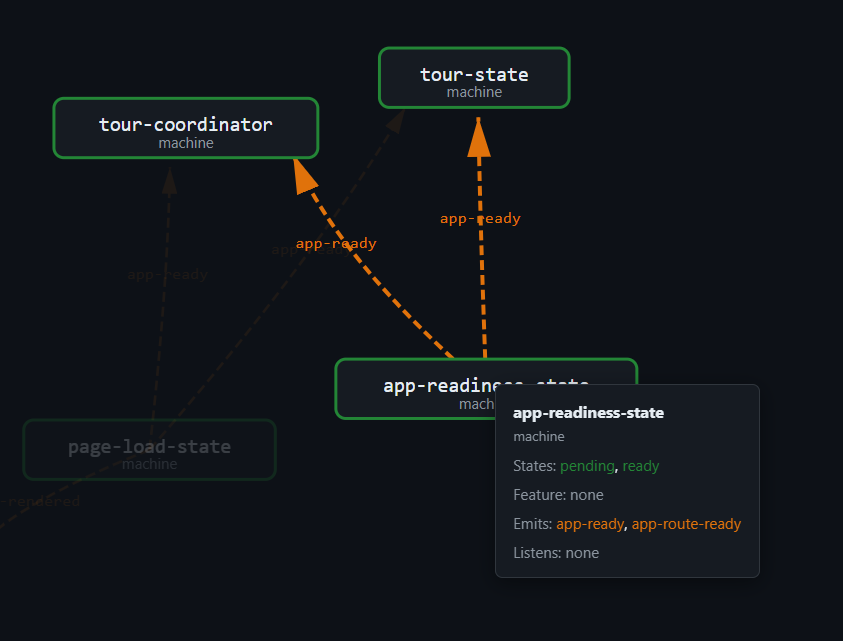
emits: ['app-ready', 'app-route-ready'] as const,The machine itself — createAppReadinessMachine() — never calls bus.emit(). It fires callbacks.onReady() when the barrier gate opens. The adapter in app-static.ts wires the callback:
const readinessMachine = createAppReadinessMachine({
  onStateChange: () => {},
  onReady: () => {
    (window as any).__appReady = true;
    (window as any).__appRouteVersion = ((window as any).__appRouteVersion ?? 0) + 1;
    staticBus.emit(AppReady);
    staticBus.emit(AppRouteReady);
  },
});
The callback emits two events on the staticBus. The machine declared both events. The adapter dispatches both. The scanner marks both as delegated.
Why Not Let Machines Emit Directly?
If machines had access to the bus, they could emit events themselves. No delegation needed. The declaration and the dispatch would live in the same file. The scanner's job would be simpler.
But giving machines bus access would break purity. The machine would need an EventBus dependency — which means it needs an EventTargetLike, which means it needs window. The machine stops being a pure function. It becomes an adapter-dependent module that cannot be tested without creating a bus (and therefore an EventTarget mock).
The delegation pattern preserves the machine's purity at the cost of a slight indirection. The topology scanner absorbs the complexity by resolving delegated phantoms automatically. The trade-off is worth it: 43 machines that are testable with plain objects, at the cost of a scanner that needs to look in two places instead of one.
The 10 Adapter Nodes
The state graph in data/state-machines.json includes adapters as first-class nodes alongside machines. Each adapter node has the same structural shape:
interface AdapterNode {
  id: string;          // "adapter:ScrollSpy"
  name: string;        // "ScrollSpy"
  file: string;        // "src/app-shared.ts"
  machines: string[];  // ["machine:scroll-spy-machine", "machine:tooltip-state"]
  emits: string[];     // ["scrollspy-active"]
  listens: string[];   // ["toc-headings-rendered", "toc-animation-done"]
  category: 'adapter'; // discriminant
}
The machines array lists the machine IDs that the adapter imports and wires. The emits and listens arrays list the custom events the adapter dispatches or subscribes to. The category discriminant distinguishes adapters from machines in the graph.
Here are the 10 adapter nodes extracted by the Phase 2 pipeline:
| Adapter | File | Machines Wired | Emits | Listens |
|---|---|---|---|---|
| AnalyticsConsent | app-shared.ts | — | — | — |
| ContentLinkTooltip | app-shared.ts | scroll-spy-machine, tooltip-state | — | pointerover, pointerout |
| SidebarMask | app-shared.ts | — | sidebar-mask-change | dblclick |
| SidebarResize | app-shared.ts | scroll-spy-machine, sidebar-resize-state, zoom-pan-state | — | — |
| TerminalDots | app-shared.ts | terminal-dots-state | — | sidebar-mask-change |
| TocTooltip | app-shared.ts | scroll-spy-machine, toc-scroll-tooltip-state, toc-tooltip-state | — | — |
| VersionCheck | app-shared.ts | version-check-state | — | — |
| VersionNewsTooltip | app-shared.ts | tooltip-state | — | — |
| ScrollSpy | app-shared.ts | scroll-spy-machine | scrollspy-active | toc-headings-rendered, toc-animation-done |
| PageLoad | app-static.ts | page-load-state, app-readiness-state | app-ready, toc-headings-rendered | scrollspy-active |
The adapters live in two files: app-shared.ts (8 adapters for shared functionality) and app-static.ts (2 adapters for static-mode entry wiring). The boundary is clear: app-shared.ts handles presentation-layer adapters (tooltips, sidebar, scroll spy); app-static.ts handles lifecycle adapters (page load, readiness).
Edges
The graph includes import edges from adapters to machines:
{
  "from": "adapter:SidebarResize",
  "to": "machine:sidebar-resize-state",
  "kind": "imports"
}
These edges are what the interactive explorer renders as connections between adapter nodes (orange) and machine nodes (teal). They make the composition visible: which adapter owns which machine, which events flow through which adapter.
Composition Root Overview
The full composition picture — 43 machines, 3 coordinators, 10 adapters, 1 event bus:

The arrows all point from adapters toward pure code. Machines never reach outward. The bus is the only shared communication channel, and its type parameters ensure that only declared events can flow through it.
The Architecture in Three Sentences
Machines are pure functions with closure state, parameterized by
external.tsports, declaring their contracts via@FiniteStateMachinedecorators.Coordinators compose machines through direct method calls, living in
src/lib/alongside the machines, adding no DOM dependency.Adapters in entry files bridge machines to the DOM: they create buses, read positions, wire listeners, dispatch events on behalf of machines, and apply machine output as DOM mutations.
The topology scanner verifies the connections. The type system enforces the boundaries. The decorator metadata makes the architecture visible. And the delegated phantom pattern ensures that even indirect emission chains — machine declares, adapter dispatches — are tracked and validated.
Part VI narrows the focus to the nine events that flow through this architecture: what they carry, who emits them, who listens, and how they compose into the three event flows (cold boot, SPA navigation, sidebar mask) that drive the entire site.
Continue to Part VI: The Event Topology — Nine Events, One Living Map →