Part X: The Outbox Pattern
"SaveChanges and publish event -- what if publish fails?"
Every distributed system eventually faces the same question. You save an order to the database. You publish an OrderCreated event to the message broker. These are two separate operations, targeting two separate infrastructure components, and they do not share a transaction boundary. If the database write succeeds and the broker publish fails, the order exists but no downstream system knows about it. If the broker publish succeeds and the database write fails, downstream systems react to an event describing an order that does not exist. Either way, the system is inconsistent, and no amount of retry logic, error handling, or hope fixes the fundamental problem: two writes to two systems cannot be made atomic without a coordination protocol.
This is the dual-write problem, and it is one of the most common sources of subtle bugs in distributed architectures. It does not manifest as a crash or an exception. It manifests as a customer who placed an order but never received a confirmation email. It manifests as an inventory count that drifts from the actual stock level by one unit every few hundred orders. It manifests as a payment that was charged but never recorded in the ledger. These bugs are intermittent, difficult to reproduce, and expensive to diagnose because they only occur when the second write fails -- which happens rarely enough that it passes all testing but frequently enough that it matters at scale.
The Outbox pattern solves this by eliminating the second write entirely. Instead of writing to the database and then publishing to the broker, you write the domain state and the events to the database in the same transaction. A background processor reads the stored events and publishes them to the broker asynchronously. If the processor fails, it retries. If it crashes, it picks up where it left off on restart. The events are durable because they are in the database. The domain state and the events are consistent because they were committed atomically. The broker is eventually consistent because the processor will keep trying until it succeeds.
This chapter covers the complete FrenchExDev.Net.Outbox package: the OutboxMessage entity with retry tracking, the IHasDomainEvents interface for domain event capture, the OutboxInterceptor that hooks into EF Core's SaveChangesInterceptor to convert domain events into outbox messages within the same transaction, the IOutbox abstraction and its EfCoreOutbox implementation, the IOutboxProcessor interface and OutboxProcessorOptions configuration, the OutboxMessageConfiguration for EF Core fluent mapping, the InMemoryOutbox test double, real-world examples, composition with the other eight FrenchExDev patterns, and an honest comparison between direct publish and the outbox approach.
The Dual-Write Problem
To understand why the outbox pattern exists, you need to understand why the obvious approach -- save to the database, then publish to the broker -- fails. The failure mode is subtle and deserves a thorough explanation.
The Obvious Approach
Here is how most developers first implement domain event publishing:
public class OrderService
{
    private readonly AppDbContext _db;
    private readonly IMessageBroker _broker;

    public OrderService(AppDbContext db, IMessageBroker broker)
    {
        _db = db;
        _broker = broker;
    }

    public async Task CreateOrderAsync(CreateOrderCommand command, CancellationToken ct)
    {
        var order = Order.Create(
            command.CustomerId,
            command.Items,
            command.ShippingAddress);

        _db.Orders.Add(order);
        await _db.SaveChangesAsync(ct);

        // Publish the event AFTER the database write
        await _broker.PublishAsync(new OrderCreated(
            order.Id,
            order.CustomerId,
            order.TotalAmount,
            order.CreatedAt), ct);
    }
}
Two writes. Two systems. No shared transaction. Let us trace the failure modes.
Failure Mode 1: Broker Publish Fails
The database write succeeds. The broker publish throws a timeout exception, a connection refused error, or any of the dozens of transient failures that message brokers experience. The order is persisted. The event is lost. No downstream system -- email service, inventory service, analytics pipeline, audit log -- knows the order was created.
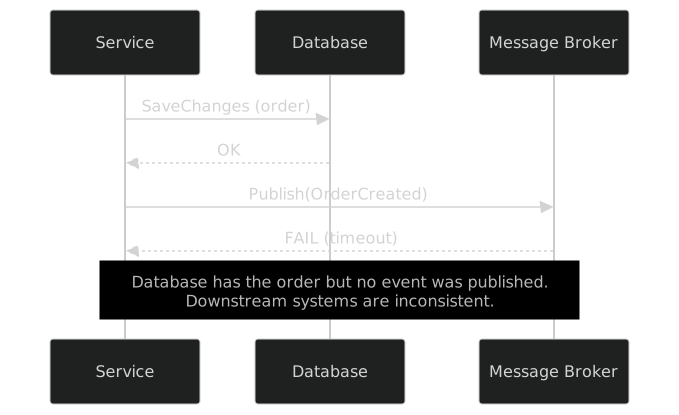
The developer adds retry logic, which helps with transient failures but not with persistent failures (broker down for minutes, network partition, misconfigured firewall). Retries also introduce a new problem: if the first publish succeeded but the acknowledgment was lost, the retry publishes a duplicate event. Downstream systems receive OrderCreated twice.
Failure Mode 2: Service Crashes After Database Write
The database write succeeds. The process crashes before the publish call executes. The order is persisted. The event is gone. There is nothing to retry because the process that was supposed to retry no longer exists.
_db.Orders.Add(order);
await _db.SaveChangesAsync(ct);

// Process crashes here -- OOM, deployment, hardware failure

await _broker.PublishAsync(new OrderCreated(...), ct); // Never reached
No amount of in-process retry logic helps with this scenario. The event was never stored anywhere durable. It existed only in the call stack of a process that no longer exists.
Failure Mode 3: Publish First, Then Save
Some developers try reversing the order: publish the event first, then save to the database:
await _broker.PublishAsync(new OrderCreated(
    orderId, customerId, totalAmount, createdAt), ct);

_db.Orders.Add(order);
await _db.SaveChangesAsync(ct); // What if this fails?
Now the failure mode is inverted. If the database write fails, downstream systems react to an event describing an order that does not exist. The inventory service reserves stock for a phantom order. The email service sends a confirmation for an order that was never placed. The analytics pipeline records revenue that was never earned. This is worse than the original problem because ghost events cause active harm, while missing events cause passive omission.
Failure Mode 4: Distributed Transactions (2PC)
The textbook solution is a distributed transaction using the two-phase commit protocol (2PC). In practice, 2PC has severe limitations: most message brokers (RabbitMQ, Kafka, Azure Service Bus, Amazon SQS) do not participate in XA transactions; the protocol requires multiple round trips and holds locks on all participants; system availability drops to the product of all participants' availability; and the DTC is notoriously difficult to operate. The industry consensus, articulated in Pat Helland's "Life beyond Distributed Transactions" (2007), is that distributed transactions do not scale and should be avoided in favor of local transactions with compensating actions.
The Fundamental Insight
The dual-write problem has a simple root cause: you are trying to atomically update two different systems (database and broker) without a shared transaction boundary. The outbox pattern eliminates one of the two systems from the atomic operation. Instead of:
- Write domain state to database.
- Publish event to broker.
You do:
- Write domain state and event to database (same transaction).
- Background processor reads event from database and publishes to broker (separate, retryable operation).
Step 1 is atomic because it is a single database transaction. Step 2 is safe because it is idempotent and retryable: if it fails, the event stays in the database and the processor tries again later. The worst case is delayed delivery, not lost events.
The Outbox Solution
The outbox pattern works by storing domain events as rows in an "outbox" table within the same database transaction that persists the domain state. A background processor polls the outbox table, publishes pending events to the message broker, and marks them as processed.
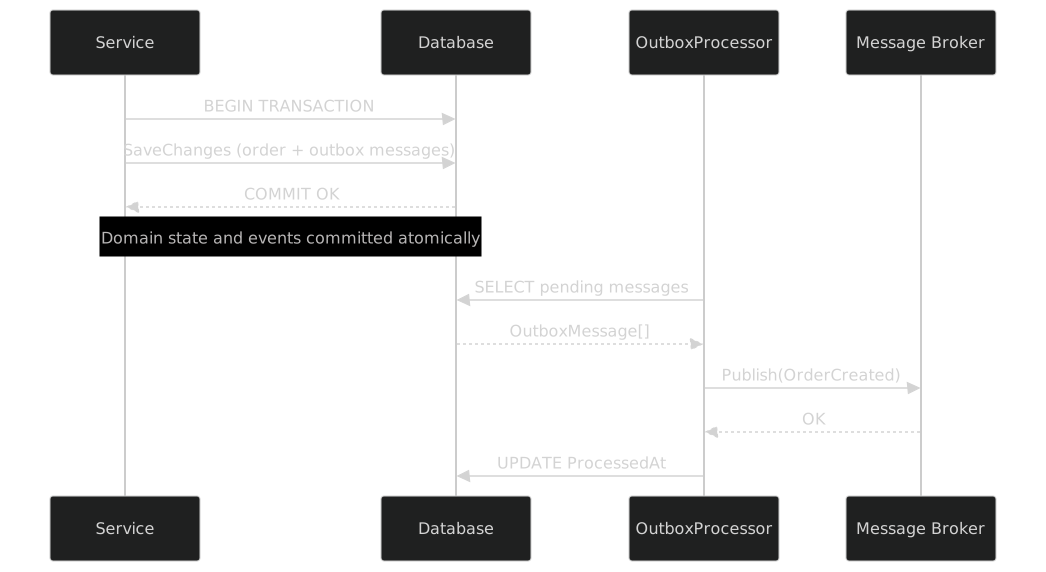
This diagram shows the two-phase nature of the pattern:
Phase 1: Atomic Capture. The service writes the order and the outbox messages in the same database transaction. If the transaction commits, both are durable. If it rolls back, neither exists. There is no window of inconsistency.
Phase 2: Async Publish. The background processor reads unprocessed messages from the outbox table and publishes them to the broker. This is a separate operation that happens after the transaction has committed. If it fails, the messages stay in the database and the processor tries again on the next polling cycle. If the processor crashes, the messages survive in the database and are picked up when the processor restarts.
The tradeoff is latency. With direct publish, the event reaches the broker immediately (if the publish succeeds). With the outbox, the event reaches the broker on the next polling cycle -- up to PollingInterval seconds later. In exchange, you get a guarantee that the event will be published eventually, which direct publish cannot offer.
For most business scenarios, the tradeoff is excellent. An order confirmation email that arrives five seconds after the order is placed is indistinguishable from one that arrives instantly. An inventory reservation that happens five seconds later is perfectly acceptable. The rare scenario that requires sub-second event delivery is better served by a dedicated, synchronous notification mechanism that supplements (not replaces) the outbox.
OutboxMessage: The Persistent Event
The OutboxMessage class is the database representation of a domain event that has been captured but not yet published to the message broker. It is a plain entity class with no behavior -- a data carrier that the outbox infrastructure reads and writes.
namespace FrenchExDev.Net.Outbox;

public sealed class OutboxMessage
{
    public Guid Id { get; set; } = Guid.NewGuid();
    public string Type { get; set; } = string.Empty;
    public string Payload { get; set; } = string.Empty;
    public DateTimeOffset CreatedAt { get; set; } = DateTimeOffset.UtcNow;
    public DateTimeOffset? ProcessedAt { get; set; }
    public int Attempts { get; set; }
    public string? LastError { get; set; }
}
Seven properties. Each one serves a specific purpose in the outbox lifecycle.
Id
A Guid primary key, defaulting to Guid.NewGuid(). The GUID ensures uniqueness across database instances, which matters if you are running multiple replicas that share a database. Sequential GUIDs (like SQL Server's NEWSEQUENTIALID()) would reduce index fragmentation, but the outbox table is a hot table with frequent inserts and deletes, so fragmentation is less of a concern than it would be on a long-lived reference table.
The Id also serves as an idempotency key. When the processor publishes a message to the broker, it can include the Id in the message headers. The consumer can use the Id to deduplicate messages that arrive more than once (which can happen if the processor publishes successfully but crashes before marking the message as processed).
Type
The assembly-qualified name of the domain event type. This string is used by the processor to deserialize the Payload back into a strongly-typed object:
var eventType = System.Type.GetType(message.Type);
var domainEvent = JsonSerializer.Deserialize(message.Payload, eventType!);
Assembly-qualified names are verbose but guarantee uniqueness and enable deserialization without a type registry. The alternative -- short names like "OrderCreated" -- requires a mapping dictionary, which is one more thing to maintain and one more thing that can get out of sync. The MaxLength(512) constraint in the EF mapping is generous enough for any realistic assembly-qualified name.
Payload
The JSON serialization of the domain event. System.Text.Json.JsonSerializer.Serialize produces this string at capture time (in the interceptor). JsonSerializer.Deserialize consumes it at publish time (in the processor).
The payload is stored as a string, not as a byte[] or a binary JSON column: human-readable (you can SELECT and read it directly), portable across SQL Server, PostgreSQL, MySQL, and SQLite, and simple (no custom value converters).
CreatedAt
The timestamp when the outbox message was created, defaulting to DateTimeOffset.UtcNow. This is used for ordering (the processor should publish older messages before newer ones to preserve causal ordering within the same entity) and for retention (the processor can delete messages older than RetentionPeriod).
DateTimeOffset rather than DateTime because it preserves the offset in geographically distributed deployments.
ProcessedAt
A nullable DateTimeOffset that records when the processor successfully published the message to the broker. null means the message has not been processed yet. The processor queries for messages where ProcessedAt IS NULL to find pending work.
After processing, the message is retained for RetentionPeriod (default: 7 days) for diagnostic purposes before cleanup deletes it.
Attempts
The number of times the processor has tried to publish this message. Starts at 0. Incremented on each failed attempt. The processor skips messages where Attempts >= MaxRetryAttempts -- they are dead-lettered and require manual intervention.
The retry count prevents infinite retry loops. After MaxRetryAttempts (default: 3) failed attempts, the processor skips the message and moves on.
LastError
The error message from the most recent failed publish attempt. Nullable because it is null until the first failure. Capped at MaxLength(4000) in the EF mapping to prevent unbounded storage from long exception stack traces.
LastError is diagnostic information. It tells you why a message failed to publish, which is essential for triaging dead-lettered messages. Typical values: "Connection refused", "Timeout expired", "Serialization error: cannot deserialize type 'MyApp.Domain.Events.OrderCreatedV2'".
The Lifecycle
An outbox message progresses through a simple lifecycle:
Created. The interceptor creates the message during
SaveChanges.ProcessedAt = null,Attempts = 0,LastError = null.Processing. The processor picks up the message and attempts to publish it.
Processed. The publish succeeds.
ProcessedAt = DateTimeOffset.UtcNow.Retrying. The publish fails.
Attempts++,LastError = ex.Message. The processor will try again on the next cycle.Dead-lettered.
Attempts >= MaxRetryAttempts. The processor skips this message. Manual intervention required.Cleaned up.
ProcessedAt IS NOT NULL AND ProcessedAt < (UtcNow - RetentionPeriod). A cleanup job deletes the row.
The lifecycle is implicit in the combination of ProcessedAt, Attempts, and MaxRetryAttempts. No explicit Status enum -- adding one would create a synchronization burden with the other fields.
IHasDomainEvents: The Entity Contract
The outbox interceptor needs to know which entities have domain events to capture. The IHasDomainEvents interface is that contract:
namespace FrenchExDev.Net.Outbox.EntityFramework;

public interface IHasDomainEvents
{
    IReadOnlyList<object> DomainEvents { get; }
    void ClearDomainEvents();
}
Two members. DomainEvents returns the list of events that the entity has raised since it was last persisted. ClearDomainEvents empties that list. The interceptor reads DomainEvents, converts each one to an OutboxMessage, and then calls ClearDomainEvents so that the events are not captured again on the next SaveChanges call.
Why object?
The DomainEvents property returns IReadOnlyList<object>, not IReadOnlyList<IDomainEvent> or IReadOnlyList<INotification>. This is deliberate. The outbox does not care what type the domain events are. It serializes them to JSON and stores the assembly-qualified type name. Any class, record, or struct can be a domain event. There is no marker interface requirement, no base class requirement, no attribute requirement.
This means you can use the outbox with events from any library: MediatR INotification objects, FrenchExDev INotification objects, plain records, plain classes. The outbox is event-type-agnostic.
The Aggregate Root Pattern
The standard way to implement IHasDomainEvents is through an aggregate root base class:
public abstract class AggregateRoot : IHasDomainEvents
{
    private readonly List<object> _events = [];

    public IReadOnlyList<object> DomainEvents => _events;

    public void ClearDomainEvents() => _events.Clear();

    protected void RaiseDomainEvent(object domainEvent) => _events.Add(domainEvent);
}
Four members. A private list for storage. A read-only view for the interceptor. A clear method for cleanup. A protected method for subclasses to raise events.
The protected access modifier on RaiseDomainEvent is important. It means only the aggregate itself can raise events. External code cannot fabricate events and inject them into the aggregate's event list. The aggregate is the single source of truth for what happened, and it controls its own event stream.
Using the Aggregate Root
Domain entities inherit from AggregateRoot and call RaiseDomainEvent in their domain methods:
public class Order : AggregateRoot
{
    public Guid Id { get; private set; }
    public Guid CustomerId { get; private set; }
    public decimal TotalAmount { get; private set; }
    public OrderStatus Status { get; private set; }

    private readonly List<OrderLine> _lines = [];
    private Order() { } // EF Core

    public static Order Create(Guid customerId, IEnumerable<OrderLine> lines,
        string shippingAddress)
    {
        var order = new Order
        {
            Id = Guid.NewGuid(), CustomerId = customerId,
            Status = OrderStatus.Pending, CreatedAt = DateTimeOffset.UtcNow
        };

        foreach (var line in lines) order._lines.Add(line);
        order.TotalAmount = order._lines.Sum(l => l.Quantity * l.UnitPrice);

        order.RaiseDomainEvent(new OrderCreatedEvent(
            order.Id, order.CustomerId, order.TotalAmount, order.CreatedAt));
        return order;
    }

    public void Confirm()
    {
        if (Status != OrderStatus.Pending)
            throw new InvalidOperationException($"Cannot confirm in {Status}");
        Status = OrderStatus.Confirmed;
        RaiseDomainEvent(new OrderConfirmedEvent(Id, DateTimeOffset.UtcNow));
    }

    public void Cancel(string reason)
    {
        if (Status is OrderStatus.Shipped or OrderStatus.Delivered)
            throw new InvalidOperationException($"Cannot cancel in {Status}");
        Status = OrderStatus.Cancelled;
        RaiseDomainEvent(new OrderCancelledEvent(Id, reason, DateTimeOffset.UtcNow));
    }

    public void Ship(string trackingNumber)
    {
        if (Status != OrderStatus.Confirmed)
            throw new InvalidOperationException($"Cannot ship in {Status}");
        Status = OrderStatus.Shipped;
        RaiseDomainEvent(new OrderShippedEvent(Id, trackingNumber, DateTimeOffset.UtcNow));
    }
}
Each state transition raises a domain event. These events are not published immediately -- they are stored in the aggregate's _events list and wait there until SaveChanges is called, at which point the OutboxInterceptor captures them. This is the key insight: domain events are raised during domain logic, not during persistence. The aggregate does not know about the outbox, the interceptor, the database, or the broker.
Domain Event Records
The domain events themselves are simple records with no behavior:
public sealed record OrderCreatedEvent(
    Guid OrderId,
    Guid CustomerId,
    decimal TotalAmount,
    DateTimeOffset CreatedAt);

public sealed record OrderConfirmedEvent(
    Guid OrderId,
    DateTimeOffset ConfirmedAt);

public sealed record OrderCancelledEvent(
    Guid OrderId,
    string Reason,
    DateTimeOffset CancelledAt);

public sealed record OrderShippedEvent(
    Guid OrderId,
    string TrackingNumber,
    DateTimeOffset ShippedAt);
Records are ideal for domain events because they are immutable, have value equality, and have a concise syntax. Each event captures the facts of what happened -- the OrderId, the relevant data, and the timestamp -- without any behavior. They are data transfer objects that describe state changes.
The Class Hierarchy
Here is the complete type hierarchy of the outbox package:

The diagram shows the two main flows:
Capture flow (left side). The
OutboxInterceptorscans entities implementingIHasDomainEventsand createsOutboxMessageinstances. This happens insideSaveChanges, within the same transaction.Storage abstraction (right side).
IOutboxdefines how messages are stored.EfCoreOutboxstores them via EF Core.InMemoryOutboxstores them in memory for testing.IOutboxProcessorreads from the store and publishes to the broker.
OutboxInterceptor: The EF Core Integration
The OutboxInterceptor is where the pattern comes together. It is a sealed class that extends EF Core's SaveChangesInterceptor, hooking into the SaveChanges and SaveChangesAsync pipelines to capture domain events before the transaction commits.
SaveChangesInterceptor Overview
EF Core provides an interceptor pipeline that allows external code to observe and modify the behavior of SaveChanges. The SaveChangesInterceptor base class defines two pairs of methods:
SavingChanges/SavingChangesAsync: called beforeSaveChangesexecutes.SavedChanges/SavedChangesAsync: called afterSaveChangescompletes successfully.
The OutboxInterceptor overrides the Saving pair -- the "before" hooks -- because it needs to add outbox messages to the context before the transaction commits. If it used the "after" hooks, the outbox messages would be saved in a separate transaction, which defeats the entire purpose.
The ConvertDomainEventsToOutboxMessages Method
The core logic lives in a single private method:
public sealed class OutboxInterceptor : SaveChangesInterceptor
{
    public override InterceptionResult<int> SavingChanges(
        DbContextEventData eventData,
        InterceptionResult<int> result)
    {
        if (eventData.Context is not null)
        {
            ConvertDomainEventsToOutboxMessages(eventData.Context);
        }

        return base.SavingChanges(eventData, result);
    }

    public override ValueTask<InterceptionResult<int>> SavingChangesAsync(
        DbContextEventData eventData,
        InterceptionResult<int> result,
        CancellationToken cancellationToken = default)
    {
        if (eventData.Context is not null)
        {
            ConvertDomainEventsToOutboxMessages(eventData.Context);
        }

        return base.SavingChangesAsync(eventData, result, cancellationToken);
    }

    private static void ConvertDomainEventsToOutboxMessages(DbContext context)
    {
        // Step 1: Find all tracked entities that implement IHasDomainEvents
        var entitiesWithEvents = context.ChangeTracker
            .Entries<IHasDomainEvents>()
            .Where(e => e.Entity.DomainEvents.Count > 0)
            .Select(e => e.Entity)
            .ToList();

        // Step 2: Convert each domain event to an OutboxMessage
        var messages = new List<OutboxMessage>();

        foreach (var entity in entitiesWithEvents)
        {
            foreach (var domainEvent in entity.DomainEvents)
            {
                var message = new OutboxMessage
                {
                    Type = domainEvent.GetType().AssemblyQualifiedName!,
                    Payload = JsonSerializer.Serialize(domainEvent, domainEvent.GetType()),
                    CreatedAt = DateTimeOffset.UtcNow
                };

                messages.Add(message);
            }

            // Step 3: Clear the events so they are not captured again
            entity.ClearDomainEvents();
        }

        // Step 4: Add all messages to the OutboxMessages DbSet
        if (messages.Count > 0)
        {
            context.Set<OutboxMessage>().AddRange(messages);
        }
    }
}
Let us walk through the four steps.
Step 1: Scan the ChangeTracker. ChangeTracker.Entries<IHasDomainEvents>() returns all tracked entities implementing the interface, regardless of EntityState. The .Where filter skips entities with no pending events. The .ToList() materializes before we modify the collection.
Step 2: Serialize each event. domainEvent.GetType().AssemblyQualifiedName captures the concrete runtime type, not object. JsonSerializer.Serialize(domainEvent, domainEvent.GetType()) uses the runtime type so that all properties are serialized -- without the type parameter, the serializer would use the compile-time type (object) and produce an empty {}.
Step 3: Clear events. ClearDomainEvents() prevents the next SaveChanges from capturing the same events again. It is called after iterating (not during), which is safe because the events are already copied into the messages list.
Step 4: Add to context. context.Set<OutboxMessage>().AddRange(messages) adds the outbox messages inside the SavingChanges interceptor -- before the actual database write. EF Core includes them in the same transaction as the domain entities.
The Interceptor Flow
Here is the complete flow from domain event to outbox message:
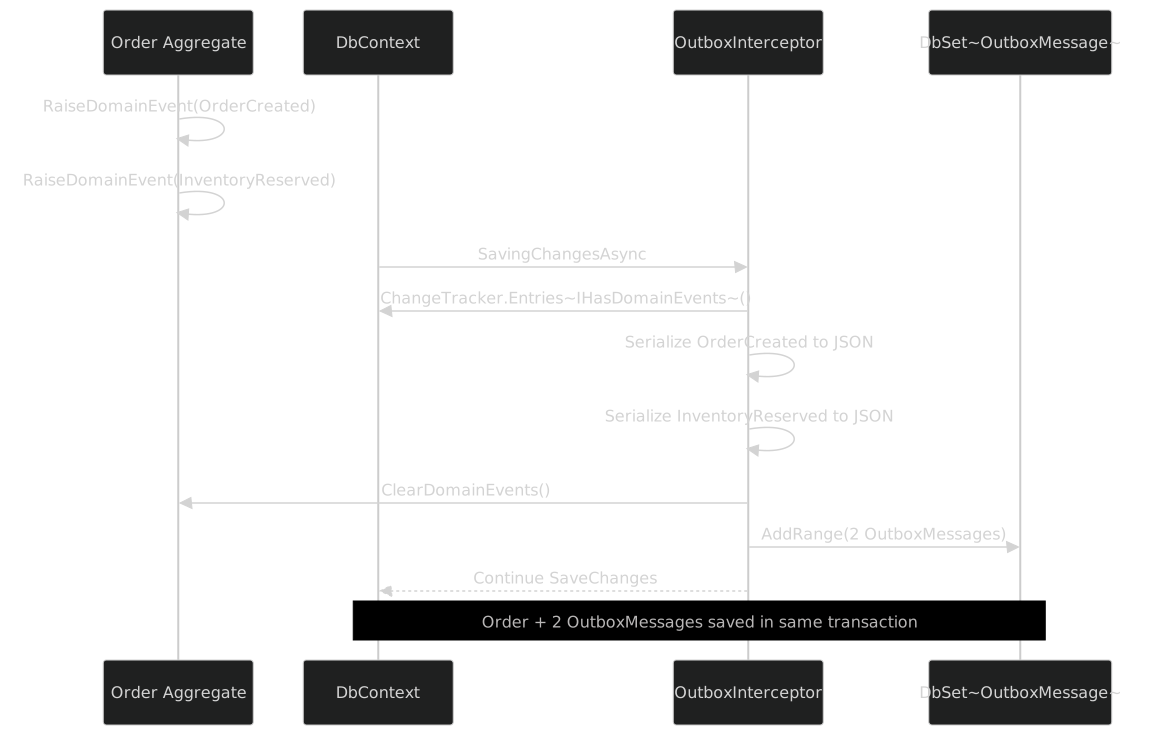
The key observation is timing. The entity raises events during domain logic (before SaveChanges). The interceptor captures them during SaveChanges (before the database write). The database commits them atomically (the domain state and the outbox messages in one transaction). At no point is there a window where the domain state is committed but the events are not.
Registering the Interceptor
The interceptor is registered when configuring the DbContext:
services.AddDbContext<AppDbContext>((sp, options) =>
{
    options.UseSqlServer(connectionString);
    options.AddInterceptors(new OutboxInterceptor());
});
The interceptor is stateless -- ConvertDomainEventsToOutboxMessages is a static method -- so a single instance can be safely shared across all DbContext instances.
Multiple SaveChanges Calls
If a service calls SaveChanges multiple times within the same scope, each call captures only the events raised since the previous ClearDomainEvents(). Events are never captured twice:
public async Task ProcessAsync(CancellationToken ct)
{
    var order = Order.Create(customerId, lines, address);
    _db.Orders.Add(order);
    await _db.SaveChangesAsync(ct); // Captures OrderCreatedEvent

    order.Confirm();
    await _db.SaveChangesAsync(ct); // Captures OrderConfirmedEvent
}
OutboxMessageConfiguration: The EF Mapping
The OutboxMessageConfiguration class configures how OutboxMessage is mapped to the database:
public class OutboxMessageConfiguration : IEntityTypeConfiguration<OutboxMessage>
{
    public void Configure(EntityTypeBuilder<OutboxMessage> builder)
    {
        builder.ToTable("OutboxMessages");

        builder.HasKey(m => m.Id);

        builder.Property(m => m.Type)
            .IsRequired()
            .HasMaxLength(512);

        builder.Property(m => m.Payload)
            .IsRequired();

        builder.Property(m => m.CreatedAt)
            .IsRequired();

        builder.Property(m => m.Attempts)
            .IsRequired();

        builder.Property(m => m.LastError)
            .HasMaxLength(4000);
    }
}
The mapping is straightforward: an explicit table name (avoiding EF Core's pluralization conventions), Type capped at 512 characters (generous for any assembly-qualified name), Payload with no max length (nvarchar(max) / text), ProcessedAt nullable (the absence of IsRequired makes it nullable by convention), and LastError capped at 4000 characters to capture the useful portion of exception messages without unbounded storage.
Apply the configuration in OnModelCreating via modelBuilder.ApplyConfiguration(new OutboxMessageConfiguration()) or ApplyConfigurationsFromAssembly. In production, add an index for the processor's polling query:
builder.HasIndex(m => new { m.ProcessedAt, m.Attempts })
    .HasDatabaseName("IX_OutboxMessages_ProcessedAt_Attempts");
This composite index supports the query WHERE ProcessedAt IS NULL AND Attempts < @MaxRetryAttempts ORDER BY CreatedAt ASC without a table scan.
IOutbox and EfCoreOutbox: The Storage Abstraction
The IOutbox interface abstracts how outbox messages are stored:
namespace FrenchExDev.Net.Outbox;

public interface IOutbox
{
    Task StoreAsync(OutboxMessage message, CancellationToken ct = default);
}
One method. StoreAsync takes an OutboxMessage and persists it. The interface does not specify where or how -- that is the implementation's concern.
Why a Separate Interface?
The interceptor handles the automatic capture path -- domain events from IHasDomainEvents entities. IOutbox handles the manual path -- explicitly storing a message from code that does not go through SaveChanges:
public class NotificationService
{
    private readonly IOutbox _outbox;

    public NotificationService(IOutbox outbox) => _outbox = outbox;

    public async Task ScheduleReminderAsync(
        Guid userId, string message, CancellationToken ct)
    {
        var outboxMessage = new OutboxMessage
        {
            Type = typeof(ReminderScheduled).AssemblyQualifiedName!,
            Payload = JsonSerializer.Serialize(
                new ReminderScheduled(userId, message, DateTimeOffset.UtcNow)),
        };

        await _outbox.StoreAsync(outboxMessage, ct);
    }
}
Both mechanisms end up with rows in the same OutboxMessages table, processed by the same IOutboxProcessor.
EfCoreOutbox Implementation
The EfCoreOutbox is the production implementation of IOutbox:
namespace FrenchExDev.Net.Outbox.EntityFramework;

public sealed class EfCoreOutbox : IOutbox
{
    private readonly DbContext _dbContext;

    public EfCoreOutbox(DbContext dbContext)
    {
        _dbContext = dbContext;
    }

    public async Task StoreAsync(OutboxMessage message, CancellationToken ct = default)
    {
        _dbContext.Set<OutboxMessage>().Add(message);
        await _dbContext.SaveChangesAsync(ct);
    }
}
The implementation is minimal: add the message to the DbSet and save. The SaveChangesAsync call creates a new transaction if one is not already active, which means the message is durably stored.
EfCoreOutbox takes a DbContext (not a specific derived type), making it reusable across different contexts. Register as scoped because it depends on DbContext, which is scoped:
services.AddScoped<IOutbox, EfCoreOutbox>();When called inside an explicit transaction, the outbox message participates in that transaction -- if it rolls back, the message is discarded along with the domain state. Atomic. Consistent.
IOutboxProcessor: The Background Worker
The IOutboxProcessor interface defines the background processing contract:
namespace FrenchExDev.Net.Outbox;

public interface IOutboxProcessor
{
    Task ProcessPendingAsync(CancellationToken ct = default);
}
One method. ProcessPendingAsync reads pending messages from the outbox, publishes them to the message broker, and marks them as processed. The implementation decides how to query for pending messages, how to publish them, and how to handle failures.
OutboxProcessorOptions
The processor's behavior is configured via OutboxProcessorOptions:
namespace FrenchExDev.Net.Outbox;

public class OutboxProcessorOptions
{
    public TimeSpan PollingInterval { get; set; } = TimeSpan.FromSeconds(5);
    public int BatchSize { get; set; } = 100;
    public int MaxRetryAttempts { get; set; } = 3;
    public TimeSpan RetentionPeriod { get; set; } = TimeSpan.FromDays(7);
}
Four settings. PollingInterval (5s default) balances latency against database load. BatchSize (100 default) at 5-second intervals gives a throughput ceiling of 1,200 messages per minute -- increase batch size or decrease interval for higher throughput. MaxRetryAttempts (3 default) dead-letters consistently failing messages so the processor does not loop forever. RetentionPeriod (7 days default) provides a diagnostic window before cleanup deletes processed messages.
The Processing Loop
A typical processor implementation runs as a BackgroundService. Each polling cycle creates a new DI scope (so the DbContext is fresh), resolves the IOutboxProcessor, and calls ProcessPendingAsync. A try-catch prevents a single failure from crashing the processor:
public class OutboxProcessorService : BackgroundService
{
    private readonly IServiceScopeFactory _scopeFactory;
    private readonly OutboxProcessorOptions _options;
    private readonly ILogger<OutboxProcessorService> _logger;

    public OutboxProcessorService(
        IServiceScopeFactory scopeFactory,
        IOptions<OutboxProcessorOptions> options,
        ILogger<OutboxProcessorService> logger)
    {
        _scopeFactory = scopeFactory;
        _options = options.Value;
        _logger = logger;
    }

    protected override async Task ExecuteAsync(CancellationToken stoppingToken)
    {
        while (!stoppingToken.IsCancellationRequested)
        {
            try
            {
                await using var scope = _scopeFactory.CreateAsyncScope();
                var processor = scope.ServiceProvider
                    .GetRequiredService<IOutboxProcessor>();
                await processor.ProcessPendingAsync(stoppingToken);
            }
            catch (OperationCanceledException)
                when (stoppingToken.IsCancellationRequested) { break; }
            catch (Exception ex)
            {
                _logger.LogError(ex, "Outbox processing failed. Retrying.");
            }

            await Task.Delay(_options.PollingInterval, stoppingToken);
        }
    }
}
ProcessPendingAsync Implementation
A typical implementation of ProcessPendingAsync:
public sealed class EfCoreOutboxProcessor : IOutboxProcessor
{
    private readonly AppDbContext _db;
    private readonly IMessageBroker _broker;
    private readonly OutboxProcessorOptions _options;
    private readonly ILogger<EfCoreOutboxProcessor> _logger;

    public EfCoreOutboxProcessor(
        AppDbContext db,
        IMessageBroker broker,
        IOptions<OutboxProcessorOptions> options,
        ILogger<EfCoreOutboxProcessor> logger)
    {
        _db = db;
        _broker = broker;
        _options = options.Value;
        _logger = logger;
    }

    public async Task ProcessPendingAsync(CancellationToken ct = default)
    {
        var messages = await _db.OutboxMessages
            .Where(m => m.ProcessedAt == null)
            .Where(m => m.Attempts < _options.MaxRetryAttempts)
            .OrderBy(m => m.CreatedAt)
            .Take(_options.BatchSize)
            .ToListAsync(ct);

        if (messages.Count == 0)
        {
            return;
        }

        _logger.LogDebug("Processing {Count} outbox messages", messages.Count);

        foreach (var message in messages)
        {
            try
            {
                var eventType = System.Type.GetType(message.Type);

                if (eventType is null)
                {
                    message.Attempts = _options.MaxRetryAttempts; // Dead-letter
                    message.LastError = $"Cannot resolve type: {message.Type}";
                    _logger.LogError(
                        "Cannot resolve type {Type} for outbox message {Id}",
                        message.Type, message.Id);
                    continue;
                }

                var domainEvent = JsonSerializer.Deserialize(
                    message.Payload, eventType);

                if (domainEvent is null)
                {
                    message.Attempts = _options.MaxRetryAttempts; // Dead-letter
                    message.LastError = "Deserialization returned null";
                    _logger.LogError(
                        "Deserialization returned null for outbox message {Id}",
                        message.Id);
                    continue;
                }

                await _broker.PublishAsync(domainEvent, ct);

                message.ProcessedAt = DateTimeOffset.UtcNow;
                _logger.LogDebug(
                    "Published outbox message {Id} ({Type})",
                    message.Id, message.Type);
            }
            catch (Exception ex)
            {
                message.Attempts++;
                message.LastError = ex.Message;
                _logger.LogWarning(ex,
                    "Failed to process outbox message {Id} (attempt {Attempt}/{Max})",
                    message.Id, message.Attempts, _options.MaxRetryAttempts);
            }
        }

        await _db.SaveChangesAsync(ct);
    }
}
The algorithm: fetch pending messages ordered by CreatedAt, process each one (resolve type, deserialize, publish), mark successes with ProcessedAt, increment Attempts on failures, dead-letter unresolvable types, and call SaveChangesAsync once at the end for all updates in a single round trip.
The Processing Flow

The loop is intentionally simple: sequential processing within a batch preserves causal order, single-threaded processing avoids row contention, and batch-level SaveChanges reduces database round trips. For higher throughput, run multiple processor instances with partitioning rather than adding concurrency within a single instance.
Cleanup
A separate cleanup method deletes processed messages older than RetentionPeriod using ExecuteDeleteAsync (EF Core 7+), which issues a single DELETE statement without loading entities into memory:
public async Task CleanupAsync(CancellationToken ct)
{
    var cutoff = DateTimeOffset.UtcNow - _options.RetentionPeriod;

    await _db.OutboxMessages
        .Where(m => m.ProcessedAt != null && m.ProcessedAt < cutoff)
        .ExecuteDeleteAsync(ct);
}
Run cleanup on a separate timer (once per hour or once per day) or at the end of every Nth polling cycle.
Real-World Example: Order Created Event
Let us trace a complete scenario from domain action to broker delivery, using all the components we have discussed.
Step 1: Define the Domain Event
public sealed record OrderCreatedEvent(
    Guid OrderId,
    Guid CustomerId,
    decimal TotalAmount,
    IReadOnlyList<OrderLineDto> Lines,
    string ShippingAddress,
    DateTimeOffset CreatedAt);

public sealed record OrderLineDto(
    string Sku,
    int Quantity,
    decimal UnitPrice);
The event captures all the facts that downstream systems need: the order ID, the customer, the total, the line items, the shipping address, and the timestamp. It uses DTOs for the line items because the downstream systems do not need the full OrderLine entity -- they need a projection of it.
Step 2: The Aggregate Raises the Event
public class Order : AggregateRoot
{
    // Properties and backing fields omitted for brevity

    public static Order Create(
        Guid customerId,
        IEnumerable<OrderLineInput> inputs,
        string shippingAddress)
    {
        Guard.Against.NullOrEmpty(customerId, nameof(customerId));
        Guard.Against.Null(inputs, nameof(inputs));
        Guard.Against.NullOrWhiteSpace(shippingAddress, nameof(shippingAddress));

        var order = new Order
        {
            Id = Guid.NewGuid(),
            CustomerId = customerId,
            ShippingAddress = shippingAddress,
            Status = OrderStatus.Pending,
            CreatedAt = DateTimeOffset.UtcNow
        };

        foreach (var input in inputs)
        {
            Guard.Against.NullOrWhiteSpace(input.Sku, nameof(input.Sku));
            Guard.Against.NegativeOrZero(input.Quantity, nameof(input.Quantity));
            Guard.Against.Negative(input.UnitPrice, nameof(input.UnitPrice));

            order._lines.Add(new OrderLine(
                input.Sku, input.Quantity, input.UnitPrice));
        }

        order.TotalAmount = order._lines.Sum(l => l.Quantity * l.UnitPrice);

        // Raise the domain event
        order.RaiseDomainEvent(new OrderCreatedEvent(
            order.Id,
            order.CustomerId,
            order.TotalAmount,
            order._lines.Select(l => new OrderLineDto(
                l.Sku, l.Quantity, l.UnitPrice)).ToList(),
            order.ShippingAddress,
            order.CreatedAt));

        return order;
    }
}
Note the use of Guard.Against from the Guard pattern (Part IV) for input validation. The domain event is raised at the end of the factory method, after all state has been set. The event captures a snapshot of the order at creation time.
Step 3: The Service Saves the Aggregate
public class CreateOrderHandler : IRequestHandler<CreateOrderCommand, Result<OrderDto>>
{
    private readonly AppDbContext _db;
    private readonly IMapper<Order, OrderDto> _mapper;

    public CreateOrderHandler(AppDbContext db, IMapper<Order, OrderDto> mapper)
    {
        _db = db;
        _mapper = mapper;
    }

    public async Task<Result<OrderDto>> Handle(
        CreateOrderCommand command, CancellationToken ct)
    {
        var order = Order.Create(
            command.CustomerId,
            command.Items,
            command.ShippingAddress);

        _db.Orders.Add(order);
        await _db.SaveChangesAsync(ct);
        // ^^^ OutboxInterceptor fires here:
        //     1. Scans ChangeTracker for IHasDomainEvents
        //     2. Finds Order with 1 domain event (OrderCreatedEvent)
        //     3. Serializes to OutboxMessage
        //     4. Clears domain events
        //     5. Adds OutboxMessage to context
        //     6. EF Core commits Order + OutboxMessage in same transaction

        return Result.Ok(_mapper.Map(order));
    }
}
This handler uses the Mediator pattern (Part VII) as a command handler and the Mapper pattern (Part VI) for the response transformation. The critical line is await _db.SaveChangesAsync(ct) -- this triggers the interceptor.
Step 4: The Processor Publishes
After the transaction commits, the database contains the order row and the outbox message row -- both written atomically. Within 5 seconds (the default PollingInterval), the OutboxProcessorService wakes up, fetches the pending message, resolves the type, deserializes the payload, publishes to the broker, and sets ProcessedAt. The message broker then delivers the OrderCreatedEvent to independent subscribers: email service, inventory service, analytics pipeline, audit log.
The Complete Flow
The controller delegates to the mediator, which dispatches through the behavior pipeline to the handler, which creates the aggregate and saves it (triggering the interceptor). The outbox is invisible to the controller, the handler, and the aggregate. It is infrastructure.
Composing with Other Patterns
The outbox pattern does not exist in isolation. It composes naturally with the other eight FrenchExDev patterns, each one contributing a specific capability.
Guard: Input Validation in the Processor
The processor deserializes messages from JSON. The deserialized objects might not satisfy the broker's requirements (e.g., a missing required field because the event schema changed between serialization and deserialization). Guard validates the deserialized event before publishing:
var domainEvent = JsonSerializer.Deserialize(message.Payload, eventType);

Guard.Against.Null(domainEvent, nameof(domainEvent));

if (domainEvent is OrderCreatedEvent orderCreated)
{
    Guard.Against.NullOrEmpty(orderCreated.OrderId, nameof(orderCreated.OrderId));
    Guard.Against.NegativeOrZero(
        orderCreated.TotalAmount, nameof(orderCreated.TotalAmount));
}

await _broker.PublishAsync(domainEvent, ct);
Option: Handling Missing Entities
When the processor needs to enrich an outbox message with data from the database (e.g., looking up a customer name to include in the published event), Option models the possibility that the entity no longer exists:
var customer = await _customers.FindByIdAsync(orderCreated.CustomerId, ct);

var enrichedEvent = customer.Match(
    some: c => orderCreated with { CustomerName = c.Name },
    none: () => orderCreated with { CustomerName = "Unknown" });

await _broker.PublishAsync(enrichedEvent, ct);
Clock: Deterministic Timestamps
Injecting IClock into the interceptor and processor (instead of using DateTimeOffset.UtcNow directly) allows FakeClock to control time in tests. Set the starting point, advance by PollingInterval, and assert on CreatedAt / ProcessedAt values deterministically.
Mediator: Notification Publishing
The processor can use the mediator's PublishAsync to dispatch deserialized events as notifications within the same process, before or instead of sending them to an external broker:
// Publish in-process via Mediator
if (domainEvent is INotification notification)
{
    await _mediator.PublishAsync(notification, ct);
}

// Also publish to external broker
await _broker.PublishAsync(domainEvent, ct);
This allows local subscribers (logging, cache invalidation, in-memory projections) to react to the event without going through the external broker.
Saga: Multi-Step Orchestration
Saga completion events are excellent candidates for the outbox. When a saga completes, it produces a result event that downstream systems need to know about:
public class OrderFulfillmentSaga : ISagaStep<OrderFulfillmentContext>
{
    public async Task ExecuteAsync(OrderFulfillmentContext context, CancellationToken ct)
    {
        // Execute fulfillment steps...

        // Raise completion event on the aggregate
        context.Order.RaiseDomainEvent(new OrderFulfilledEvent(
            context.Order.Id,
            context.TrackingNumber,
            DateTimeOffset.UtcNow));
    }
}
The saga raises the event on the aggregate. The interceptor captures it. The processor publishes it. The saga does not need to know about the outbox.
Reactive: Event Stream Integration
The processor can feed published events into an EventStream<object> for local reactive processing. Subscribers then use the reactive operators (Filter, Map, Buffer, Throttle) from Part VIII:
allEvents
    .OfType<OrderCreatedEvent>()
    .Buffer(TimeSpan.FromMinutes(1))
    .Subscribe(batch =>
        _analytics.RecordOrderBatch(batch.Count, batch.Sum(e => e.TotalAmount)));
Mapper: Event Transformation
When the internal domain event format differs from the external contract format, the Mapper pattern (Part VI) transforms between them before the processor publishes to the broker:
if (domainEvent is OrderCreatedEvent internalEvent)
{
    var externalEvent = _mapper.Map(internalEvent);
    await _broker.PublishAsync(externalEvent, ct);
}
Testing with InMemoryOutbox
The InMemoryOutbox is the test double for IOutbox. It stores messages in a ConcurrentBag<OutboxMessage> and exposes them via a Messages property:
namespace FrenchExDev.Net.Outbox.Testing;

public sealed class InMemoryOutbox : IOutbox
{
    private readonly ConcurrentBag<OutboxMessage> _messages = [];

    public IReadOnlyCollection<OutboxMessage> Messages => _messages.ToArray();

    public Task StoreAsync(OutboxMessage message, CancellationToken ct = default)
    {
        _messages.Add(message);
        return Task.CompletedTask;
    }
}
The implementation is intentionally simple:
- ConcurrentBag for thread safety. Multiple concurrent callers can store messages without coordination.
- Messages returns a snapshot (
ToArray()) to prevent test code from seeing mutations during assertion. - StoreAsync is synchronous (returns
Task.CompletedTask) because there is no I/O.
Testing Domain Event Capture
The most common test scenario is verifying that a domain action produces the expected outbox messages. This requires testing through the OutboxInterceptor, which means using an EF Core in-memory database or SQLite:
public class OrderOutboxTests : IAsyncLifetime
{
    private AppDbContext _db = null!;

    public async Task InitializeAsync()
    {
        var options = new DbContextOptionsBuilder<AppDbContext>()
            .UseInMemoryDatabase(Guid.NewGuid().ToString())
            .AddInterceptors(new OutboxInterceptor())
            .Options;

        _db = new AppDbContext(options);
        await _db.Database.EnsureCreatedAsync();
    }

    public async Task DisposeAsync() => await _db.DisposeAsync();

    [Fact]
    public async Task CreateOrder_stores_outbox_message()
    {
        // Arrange
        var order = Order.Create(
            Guid.NewGuid(),
            [new OrderLineInput("SKU-001", 2, 29.99m)],
            "123 Main St, Springfield");

        // Act
        _db.Orders.Add(order);
        await _db.SaveChangesAsync();

        // Assert
        var messages = await _db.OutboxMessages.ToListAsync();

        Assert.Single(messages);
        Assert.Contains("OrderCreatedEvent", messages[0].Type);
        Assert.Null(messages[0].ProcessedAt);
        Assert.Equal(0, messages[0].Attempts);
    }

    [Fact]
    public async Task CreateOrder_clears_domain_events_after_save()
    {
        // Arrange
        var order = Order.Create(
            Guid.NewGuid(),
            [new OrderLineInput("SKU-001", 2, 29.99m)],
            "123 Main St, Springfield");

        // Act
        _db.Orders.Add(order);
        await _db.SaveChangesAsync();

        // Assert
        Assert.Empty(order.DomainEvents);
    }

    [Fact]
    public async Task Multiple_events_produce_multiple_outbox_messages()
    {
        // Arrange
        var order = Order.Create(
            Guid.NewGuid(),
            [new OrderLineInput("SKU-001", 1, 49.99m)],
            "456 Oak Ave, Shelbyville");

        _db.Orders.Add(order);
        await _db.SaveChangesAsync(); // 1 event: OrderCreated

        order.Confirm();
        await _db.SaveChangesAsync(); // 1 event: OrderConfirmed

        order.Ship("TRACK-123");
        await _db.SaveChangesAsync(); // 1 event: OrderShipped

        // Assert
        var messages = await _db.OutboxMessages
            .OrderBy(m => m.CreatedAt)
            .ToListAsync();

        Assert.Equal(3, messages.Count);
        Assert.Contains("OrderCreatedEvent", messages[0].Type);
        Assert.Contains("OrderConfirmedEvent", messages[1].Type);
        Assert.Contains("OrderShippedEvent", messages[2].Type);
    }
}
Testing with InMemoryOutbox Directly
When testing application services that use IOutbox directly (without the interceptor), the InMemoryOutbox provides a simpler test setup:
public class NotificationServiceTests
{
    [Fact]
    public async Task ScheduleReminder_stores_outbox_message()
    {
        // Arrange
        var outbox = new InMemoryOutbox();
        var service = new NotificationService(outbox);

        // Act
        await service.ScheduleReminderAsync(
            Guid.NewGuid(), "Your trial expires tomorrow");

        // Assert
        Assert.Single(outbox.Messages);

        var message = outbox.Messages.First();
        Assert.Contains("ReminderScheduled", message.Type);

        var payload = JsonSerializer.Deserialize<ReminderScheduled>(
            message.Payload);
        Assert.Equal("Your trial expires tomorrow", payload!.Message);
    }

}
Testing the Processor
Testing the processor requires mocking the broker (or using a test double) and verifying that messages are marked as processed:
public class OutboxProcessorTests : IAsyncLifetime
{
    private AppDbContext _db = null!;
    private FakeMessageBroker _broker = null!;
    private EfCoreOutboxProcessor _processor = null!;

    public async Task InitializeAsync()
    {
        var options = new DbContextOptionsBuilder<AppDbContext>()
            .UseInMemoryDatabase(Guid.NewGuid().ToString())
            .Options;

        _db = new AppDbContext(options);
        _broker = new FakeMessageBroker();

        _processor = new EfCoreOutboxProcessor(
            _db,
            _broker,
            Options.Create(new OutboxProcessorOptions()),
            NullLogger<EfCoreOutboxProcessor>.Instance);

        await _db.Database.EnsureCreatedAsync();
    }

    public async Task DisposeAsync() => await _db.DisposeAsync();

    [Fact]
    public async Task ProcessPending_publishes_and_marks_processed()
    {
        // Arrange
        var message = new OutboxMessage
        {
            Type = typeof(OrderCreatedEvent).AssemblyQualifiedName!,
            Payload = JsonSerializer.Serialize(
                new OrderCreatedEvent(
                    Guid.NewGuid(), Guid.NewGuid(), 99.99m,
                    [], "123 Main St", DateTimeOffset.UtcNow)),
        };

        _db.OutboxMessages.Add(message);
        await _db.SaveChangesAsync();

        // Act
        await _processor.ProcessPendingAsync();

        // Assert
        var updated = await _db.OutboxMessages.FindAsync(message.Id);
        Assert.NotNull(updated!.ProcessedAt);
        Assert.Equal(0, updated.Attempts);
        Assert.Null(updated.LastError);
        Assert.Single(_broker.PublishedEvents);
    }

    [Fact]
    public async Task ProcessPending_increments_attempts_on_failure()
    {
        // Arrange
        _broker.ShouldFail = true;

        var message = new OutboxMessage
        {
            Type = typeof(OrderCreatedEvent).AssemblyQualifiedName!,
            Payload = JsonSerializer.Serialize(
                new OrderCreatedEvent(
                    Guid.NewGuid(), Guid.NewGuid(), 99.99m,
                    [], "123 Main St", DateTimeOffset.UtcNow)),
        };

        _db.OutboxMessages.Add(message);
        await _db.SaveChangesAsync();

        // Act
        await _processor.ProcessPendingAsync();

        // Assert
        var updated = await _db.OutboxMessages.FindAsync(message.Id);
        Assert.Null(updated!.ProcessedAt);
        Assert.Equal(1, updated.Attempts);
        Assert.NotNull(updated.LastError);
    }

    [Fact]
    public async Task ProcessPending_skips_dead_lettered_messages()
    {
        // Arrange
        var message = new OutboxMessage
        {
            Type = typeof(OrderCreatedEvent).AssemblyQualifiedName!,
            Payload = JsonSerializer.Serialize(
                new OrderCreatedEvent(
                    Guid.NewGuid(), Guid.NewGuid(), 99.99m,
                    [], "123 Main St", DateTimeOffset.UtcNow)),
            Attempts = 3 // Already at max
        };

        _db.OutboxMessages.Add(message);
        await _db.SaveChangesAsync();

        // Act
        await _processor.ProcessPendingAsync();

        // Assert
        Assert.Empty(_broker.PublishedEvents);
    }

}
The FakeMessageBroker is a simple test double:
public class FakeMessageBroker : IMessageBroker
{
    private readonly List<object> _events = [];

    public bool ShouldFail { get; set; }
    public IReadOnlyList<object> PublishedEvents => _events;

    public Task PublishAsync(object @event, CancellationToken ct = default)
    {
        if (ShouldFail)
            throw new InvalidOperationException("Broker is down");

        _events.Add(@event);
        return Task.CompletedTask;
    }
}
Testing Transactional Consistency
The most important test is verifying that domain state and outbox messages are committed atomically:
[Fact]
public async Task Transaction_rollback_removes_outbox_messages_too()
{
    // Arrange
    var options = new DbContextOptionsBuilder<AppDbContext>()
        .UseSqlite("DataSource=:memory:")
        .AddInterceptors(new OutboxInterceptor())
        .Options;

    await using var db = new AppDbContext(options);
    await db.Database.OpenConnectionAsync();
    await db.Database.EnsureCreatedAsync();

    await using var transaction = await db.Database.BeginTransactionAsync();

    var order = Order.Create(
        Guid.NewGuid(),
        [new OrderLineInput("SKU-001", 1, 29.99m)],
        "123 Main St");

    db.Orders.Add(order);
    await db.SaveChangesAsync(); // Interceptor fires, adds outbox message

    // Act: Roll back the transaction
    await transaction.RollbackAsync();

    // Assert: Both order and outbox message are gone
    Assert.Empty(await db.Orders.ToListAsync());
    Assert.Empty(await db.OutboxMessages.ToListAsync());
}
This test uses SQLite (not the in-memory provider) because the EF Core in-memory provider does not support transactions. The test demonstrates the core guarantee: if the transaction rolls back, the outbox messages are rolled back too. No ghost events.
Comparison: Direct Publish vs Outbox
Here is an honest comparison of the two approaches:
| Dimension | Direct Publish | Outbox Pattern |
|---|---|---|
| Consistency | At-most-once (if publish fails, event is lost) | At-least-once (event is published eventually) |
| Latency | Immediate (synchronous with the request) | Delayed (up to PollingInterval) |
| Complexity | Low (one call to the broker) | Medium (interceptor, processor, outbox table) |
| Retry handling | Manual (in-process retry with all its issues) | Built-in (Attempts + MaxRetryAttempts) |
| Crash recovery | Event lost if process crashes | Event survives in database |
| Duplicate delivery | Possible with retries | Possible (processor may publish twice) |
| Database coupling | None (broker-only) | Tight (outbox table in same database) |
| Testing | Mock the broker | InMemoryOutbox + in-memory database |
| Monitoring | Broker metrics only | Database queries on OutboxMessages table |
| Debugging | Check broker logs | SELECT from OutboxMessages (human-readable JSON) |
Use direct publish for fire-and-forget notifications, high-frequency telemetry, and scenarios where sub-millisecond latency matters more than consistency. Use the outbox for order processing, payment, inventory, audit, compliance -- any scenario where a lost event means business harm.
The At-Least-Once Guarantee
The outbox guarantees at-least-once delivery, not exactly-once delivery. The processor may publish a message, crash before marking it as processed, and publish the same message again on restart. Consumers must be idempotent -- they track processed message IDs (using OutboxMessage.Id as an idempotency key) and skip duplicates. The outbox handles the producer side (at-least-once delivery). The consumer handles the deduplication side (idempotent processing). Together, they approximate exactly-once semantics.
Message Ordering Considerations
The outbox pattern provides ordering guarantees within certain boundaries but not universally. Understanding these boundaries is important for designing correct systems.
Within a single SaveChanges call: Events from a single entity are captured in the order they were raised (DomainEvents is a List<object>, which preserves insertion order). The processor publishes them in CreatedAt ASC order.
Across SaveChanges calls: Different calls have different CreatedAt timestamps. The processor orders by CreatedAt ASC, so earlier transactions are published first.
Across entities: If two entities raise events in the same SaveChanges, the order depends on ChangeTracker enumeration order, which is not guaranteed. Use explicit sequence numbers if cross-entity ordering matters.
Across processor instances: No global ordering. Each instance publishes its batch in order, but batches may interleave.
For most scenarios, ordering within a single entity is sufficient. The email service does not care whether OrderCreated for order A is published before or after OrderCreated for order B. It cares that OrderCreated for order A is published before OrderShipped for order A -- and the outbox guarantees this.
Database Load
The outbox table is a hot table with continuous inserts, polls, and deletes. Key mitigations: index the polling query (composite on ProcessedAt, Attempts), partition by time if the database supports it (drop partitions instead of deleting rows), isolate the table on a separate tablespace, and tune PollingInterval to match your throughput requirements.
Monitoring
The outbox table is its own monitoring dashboard:
-- Pending messages (not yet processed)
SELECT COUNT(*) FROM OutboxMessages WHERE ProcessedAt IS NULL;

-- Dead-lettered messages (exceeded retry limit)
SELECT COUNT(*) FROM OutboxMessages
WHERE ProcessedAt IS NULL AND Attempts >= 3;

-- Average processing latency
SELECT AVG(DATEDIFF(SECOND, CreatedAt, ProcessedAt))
FROM OutboxMessages
WHERE ProcessedAt IS NOT NULL
AND CreatedAt > DATEADD(HOUR, -1, GETUTCDATE());
Alert on pending count exceeding a threshold (processor falling behind), dead-lettered count exceeding zero (consistent failures), and processing latency exceeding a threshold (overload).
Schema Versioning
When a domain event's schema changes, the outbox may contain messages serialized with the old schema. Three strategies: (1) additive changes only -- add new properties with defaults, never remove or rename (System.Text.Json handles this transparently); (2) versioned event types -- create OrderCreatedEventV2 and handle both types in the processor; (3) custom JsonConverter that normalizes old schemas to the latest version. The first strategy covers the vast majority of cases.
Package Structure
FrenchExDev.Net.Outbox/
    OutboxMessage.cs            -- OutboxMessage sealed class
    IOutbox.cs                  -- IOutbox interface
    IOutboxProcessor.cs         -- IOutboxProcessor interface
    OutboxProcessorOptions.cs   -- OutboxProcessorOptions class

FrenchExDev.Net.Outbox.EntityFramework/
    IHasDomainEvents.cs                 -- IHasDomainEvents interface
    OutboxInterceptor.cs                -- OutboxInterceptor sealed class
    EfCoreOutbox.cs                     -- EfCoreOutbox sealed class
    OutboxMessageConfiguration.cs       -- IEntityTypeConfiguration<OutboxMessage>

FrenchExDev.Net.Outbox.Testing/
    InMemoryOutbox.cs           -- InMemoryOutbox sealed class
Three packages. One for the core abstractions (OutboxMessage, IOutbox, IOutboxProcessor, OutboxProcessorOptions). One for the EF Core integration (IHasDomainEvents, OutboxInterceptor, EfCoreOutbox, OutboxMessageConfiguration). One for testing (InMemoryOutbox).
The core package has no dependency on EF Core. If you want to implement IOutbox with a different persistence mechanism (Dapper, ADO.NET, MongoDB), you depend on FrenchExDev.Net.Outbox and nothing else.
The EF Core package depends on Microsoft.EntityFrameworkCore and FrenchExDev.Net.Outbox. It provides the interceptor, the DbContext-based outbox, the entity configuration, and the IHasDomainEvents interface.
The testing package depends on FrenchExDev.Net.Outbox only. It does not depend on EF Core because InMemoryOutbox does not use a database.
FrenchExDev.Net.Outbox
  └── (no external dependencies)

FrenchExDev.Net.Outbox.EntityFramework
  ├── FrenchExDev.Net.Outbox
  └── Microsoft.EntityFrameworkCore

FrenchExDev.Net.Outbox.Testing
  └── FrenchExDev.Net.Outbox
Three packages. One external dependency (EF Core, only in the EntityFramework package). The shallow dependency graph holds.
Summary
The Outbox pattern eliminates the dual-write problem by storing domain events in the same database transaction as the domain state and publishing them asynchronously via a background processor.
Here is a recap of each component and its role:
OutboxMessage is a sealed entity class with seven properties:
Id(GUID),Type(assembly-qualified name),Payload(JSON),CreatedAt,ProcessedAt(nullable),Attempts, andLastError(nullable). It is the durable representation of a domain event waiting to be published.IHasDomainEvents is the contract that entities implement to participate in automatic event capture. Two members:
DomainEvents(the list of pending events) andClearDomainEvents(clears the list after capture). The standard implementation is anAggregateRootbase class with aprotected RaiseDomainEventmethod.OutboxInterceptor is a sealed
SaveChangesInterceptorthat hooks into EF Core'sSaveChanges/SaveChangesAsyncpipeline. It scans theChangeTrackerforIHasDomainEventsentities, serializes each domain event to JSON, createsOutboxMessageinstances, clears the entity's domain events, and adds the messages to theDbContext-- all before the transaction commits.IOutbox / EfCoreOutbox is the manual storage path.
IOutbox.StoreAsyncpersists anOutboxMessagefor scenarios where the interceptor path does not apply (explicit integration events, scheduled messages).IOutboxProcessor defines the background processing contract.
ProcessPendingAsyncfetches pending messages, deserializes them, publishes them to the broker, and updatesProcessedAtor incrementsAttempts. Configured viaOutboxProcessorOptions:PollingInterval(5s),BatchSize(100),MaxRetryAttempts(3),RetentionPeriod(7d).OutboxMessageConfiguration maps
OutboxMessageto the database with explicit table name, column constraints, and max lengths.InMemoryOutbox is the test double: a
ConcurrentBag-backed implementation that stores messages in memory and exposes them viaMessagesfor assertions.
The pattern provides an at-least-once delivery guarantee: every event that is committed to the database will eventually be published to the broker. It does not provide exactly-once delivery -- consumers must handle duplicate events with idempotent processing. The tradeoff is latency: events are published asynchronously, up to PollingInterval seconds after the domain write.
Three packages. One external dependency. Seven properties on the core entity. Two methods on the interceptor. One method on the processor. One method on the test double. The outbox is infrastructure that stays invisible to the domain -- aggregates raise events, interceptors capture them, processors publish them, and the domain code never mentions the outbox.
Next in the series: Part XI: Composition, where we combine all nine patterns in a single subscription renewal scenario -- Guard validates at the API boundary, Option models the subscription lookup, Union models three renewal paths, Mapper transforms between layers, Clock calculates expiration dates, Mediator dispatches through a behavior pipeline, Saga orchestrates payment and provisioning, Outbox guarantees event delivery, and Reactive streams feed analytics subscribers.