Part X: The Compose Bundle -- Downloading and Reading 32 Schemas
32 JSON Schema versions, 67 definitions, 400+ properties -- downloaded in 6 seconds, read in 200ms.
The Shift
Parts III through IX covered the CLI side -- wrapping docker commands. We scraped help text, parsed it, diffed it across versions, generated typed builders, and executed them against real binaries. That entire pipeline operates on one premise: the CLI is the source of truth for what Docker does.
Now we shift to the specification side. The Docker Compose file format is defined by a JSON Schema that evolves across releases. The CLI wrappers tell you how to invoke docker compose up. The specification types tell you what goes inside the YAML that docker compose up reads. Two different sources of truth, two different pipelines, one unified type system.
This part and Part XI show how 32 schema versions become one unified C# type system. This is the deep dive that Docker Compose Bundle deferred.
The Problem: A Moving Schema
The Docker Compose specification is published as JSON Schema in the compose-spec/compose-go repository on GitHub. It is the canonical definition of what a docker-compose.yml file can contain. Every property, every type, every constraint is declared there.
The problem is that it moves.
Between v1.0.9 (the earliest version with a machine-readable schema) and v2.10.1 (the latest at time of writing), the specification has gone through 32 distinct minor versions. Here is what changed:
v1.0.9   Initial machine-readable schema
         services, networks, volumes, configs, secrets

v1.6.0   Added: services.develop (watch mode)
v1.7.0   Added: services.deploy.placement.max_replicas_per_node
v1.8.0   Added: services.deploy.resources.pids
v1.9.0   Added: services.annotations
v1.12.0  Added: services.oom_score_adj
v1.16.0  Added: services.deploy.resources.reservations.devices
v1.19.0  Added: services.develop.watch (file watching rules)
v1.20.0  Deprecated: top-level "version" field
v2.0.0   Major revision: stricter validation, removed legacy aliases
v2.1.0   Added: services.build.additional_contexts
v2.3.0   Added: services.build.privileged
v2.5.0   Added: services.provider (external service providers)
v2.7.1   Added: services.models (AI/ML model mounts)
v2.9.0   Added: services.gpus
v2.10.1  Added: services.deploy.resources.reservations.memory_swap
That is not a complete list -- just the highlights. New properties appear, existing properties gain new sub-fields, union types get additional variants, and occasionally a property is deprecated. The schema is alive and it evolves on its own schedule, independent of the Docker Compose CLI.
Why Not Just Target the Latest Schema?
Because your Docker Compose might be v2.1.0. Or v1.12.0. Or any of the 32 versions in between.
If I generate types from only the latest schema, I get a ComposeService class with properties like Provider and Models that exist only since v2.5.0 and v2.7.1 respectively. A developer running Docker Compose v2.1.0 would set those properties, the YAML would include them, and Docker Compose would silently ignore them. No error. No warning. Just a property that does nothing, discovered at 3am when the service fails to connect to the provider you thought you configured.
The approach: download ALL schemas, parse ALL of them, merge them into one type system, and annotate every property with [SinceVersion] and [UntilVersion] bounds. The generated code knows when every property was introduced and when it was removed. The runtime can warn -- or throw -- when you set a property that your Docker Compose version does not support.
This post covers the first half: downloading and reading. Part XI covers the merge.
Design-Time Download Pipeline
The pattern is the same as Part III and Part IV: a design-time CLI tool that runs once, fetches everything, and writes the results to disk for the source generator to consume at build time.
Version Collection
The GitHubReleasesVersionCollector targets compose-spec/compose-go -- the repository that owns the specification. Not docker/compose (that is the CLI implementation). The specification is maintained separately, and its releases follow their own cadence.
var collector = new GitHubReleasesVersionCollector("compose-spec", "compose-go");
var allVersions = await collector.CollectVersionsAsync();
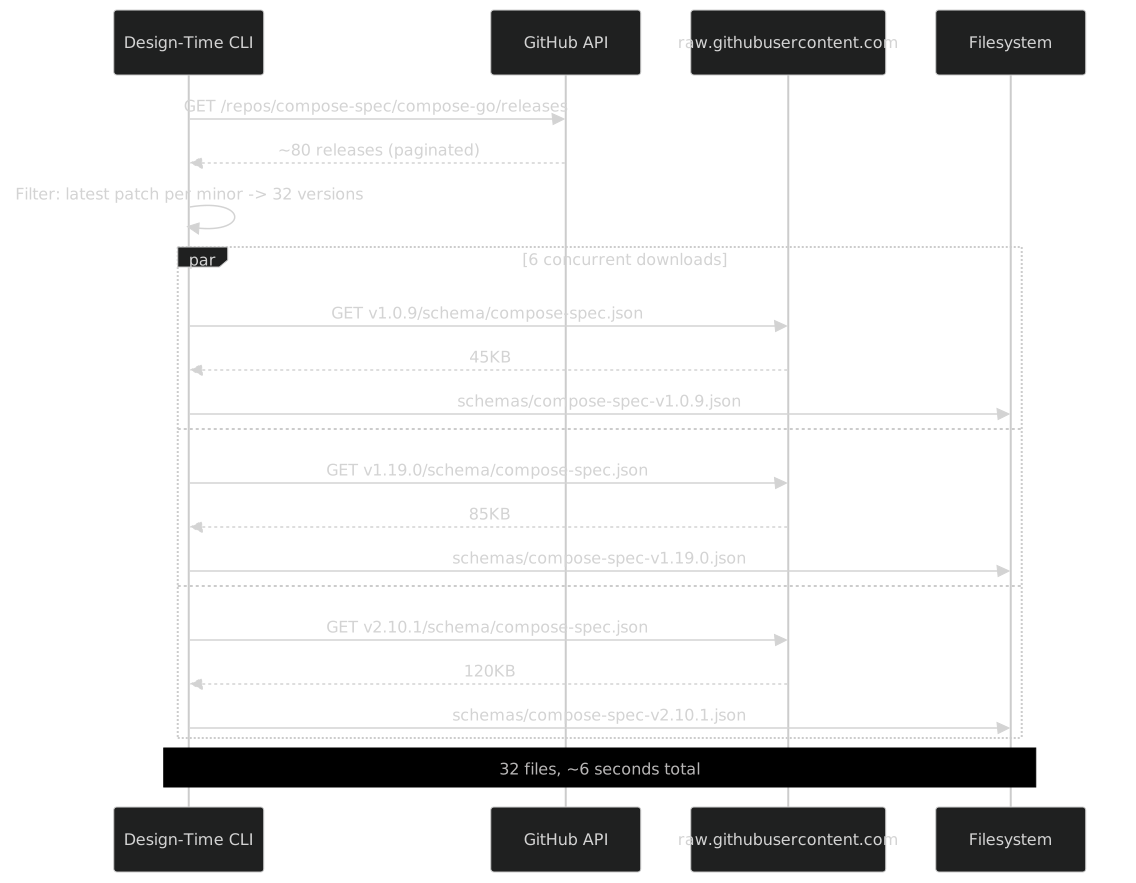
At the time of writing, compose-spec/compose-go has approximately 80 releases. Most of those are patch versions that fix schema validation bugs or tooling issues without changing the specification itself. I do not need 80 schemas -- I need one per minor version, specifically the latest patch per minor. The same LatestPatchPerMinor filter from Part IV:
var latestPerMinor = allVersions
    .Select(v => ComposeSchemaVersion.Parse(v))
    .GroupBy(v => (v.Major, v.Minor))
    .Select(g => g.OrderByDescending(v => v.Patch).First())
    .OrderBy(v => v)
    .ToList();

// ~80 releases → 32 schema versions
Why 32? Because there are 22 minor versions in the v1.x line (1.0 through 1.21), 10 in the v2.x line (2.0 through 2.10), and the latest patch of each has a potentially different schema.
The Full Version List
Here are all 32 versions that the pipeline downloads:
v1.0.9    v1.1.0    v1.2.0    v1.3.0    v1.4.2
v1.5.1    v1.6.0    v1.7.0    v1.8.3    v1.9.0
v1.10.0   v1.11.0   v1.12.0   v1.13.0   v1.14.2
v1.15.0   v1.16.1   v1.17.0   v1.18.0   v1.19.0
v1.20.3   v1.21.0   v2.0.0    v2.1.0    v2.2.0
v2.3.4    v2.4.0    v2.5.0    v2.7.1    v2.8.0
v2.9.0    v2.10.1
Some gaps are intentional -- versions like v2.6.x had no schema changes relative to v2.5.0.
Parallel Download with Rate Limiting
Each schema lives at a predictable URL in the repository. The download is embarrassingly parallel, but I limit concurrency to 6 to be a responsible API citizen:
public async Task DownloadSchemasAsync(
    List<ComposeSchemaVersion> versions,
    string outputDirectory,
    bool missingOnly = true)
{
    var semaphore = new SemaphoreSlim(6);
    var httpClient = new HttpClient();
    httpClient.DefaultRequestHeaders.UserAgent.ParseAdd("ComposeBundle/1.0");

    var tasks = versions.Select(async version =>
    {
        var outputPath = Path.Combine(outputDirectory,
            $"compose-spec-v{version}.json");

        // --missing flag: skip versions already cached
        if (missingOnly && File.Exists(outputPath))
            return;

        await semaphore.WaitAsync();
        try
        {
            var url = $"https://raw.githubusercontent.com/compose-spec/compose-go/"
                    + $"v{version}/schema/compose-spec.json";

            var json = await httpClient.GetStringAsync(url);

            // Validate it is actually JSON Schema before writing
            var doc = JsonDocument.Parse(json);
            if (!doc.RootElement.TryGetProperty("type", out _) &&
                !doc.RootElement.TryGetProperty("$ref", out _))
            {
                throw new InvalidOperationException(
                    $"Schema v{version} does not look like JSON Schema");
            }

            await File.WriteAllTextAsync(outputPath, json);
        }
        finally
        {
            semaphore.Release();
        }
    });

    await Task.WhenAll(tasks);
}
Why 6 concurrent requests? GitHub's raw content CDN has rate limits, and even if it didn't, hammering it with 32 concurrent requests feels rude. At 6 concurrent, the entire download completes in about 6 seconds on a reasonable connection. That is fast enough for a design-time tool that runs once a month.
The --missing Flag
The missingOnly parameter is important for incremental runs. When compose-spec ships a new release -- say v2.11.0 -- I run the download tool again. It checks the schemas/ directory, finds that 32 files already exist, and only downloads the one new file. Without this flag, I would re-download everything on every invocation.
The design-time CLI exposes this as --missing. Running it fresh:
$ dotnet run -- download-schemas --output schemas/
Found 32 schema versions
Downloaded 32 new schemas
Total schemas on disk: 32
Running it again a month later, after v2.11.0 ships:
$ dotnet run -- download-schemas --output schemas/
Found 33 schema versions
Downloaded 1 new schemas
Total schemas on disk: 33
Six seconds versus less than one. That is the value of caching.
File Sizes Tell a Story
The schema files range from 45KB (v1.0.9) to 120KB (v2.10.1). That growth is not accidental -- it reflects three years of specification evolution. Early schemas had about 200 properties across 25 definitions. The latest has over 400 properties across 67 definitions. The specification has nearly tripled in surface area.
v1.0.9     45 KB    ~200 properties    ~25 definitions
v1.6.0     52 KB    ~220 properties    ~28 definitions
v1.12.0    60 KB    ~250 properties    ~32 definitions
v1.19.0    78 KB    ~310 properties    ~42 definitions
v2.0.0     85 KB    ~330 properties    ~48 definitions
v2.5.0    102 KB    ~370 properties    ~58 definitions
v2.10.1   120 KB    ~400 properties    ~67 definitions
Every one of those new properties and definitions needs to end up as a typed C# property with version bounds. That is the merge step in Part XI. First, we need to read them.
JSON Schema 101
Before diving into SchemaReader, a quick primer on JSON Schema as used by compose-spec. If you already know JSON Schema, skip ahead. If you know TypeScript's type system, JSON Schema is the serialized equivalent.
The compose-spec uses six concepts:
type: the fundamental kind --string,integer,boolean,number,object,arrayproperties: named fields on an object, each with its own schema and optionalrequiredlist$ref: a pointer to another definition ("$ref": "#/definitions/service") -- JSON Schema's type alias. Circular references are possible (service->depends_on->service)oneOf: a union type -- the value matches exactly one listed schema. Compose-spec uses this extensively:buildisstring | object,portsitems arestring | object,depends_onisstring[] | objectadditionalProperties: whether an object allows unlisted properties. Compose-spec uses this forx-*extension fields on every objectpatternProperties: regex-matched property names ("^x-": {}captures all extension fields)
That is the full subset. No allOf, no anyOf, no if/then/else, no $dynamicRef. The specification authors kept it simple, and that simplicity is what makes SchemaReader feasible as a single-pass parser.
SchemaReader Deep Dive
SchemaReader is the core of the Bundle pipeline's design-time phase. It takes a JSON Schema file and transforms it into SchemaModel -- my internal representation that strips away JSON Schema's indirection and produces something that code generators can consume directly.
The SchemaModel
public record SchemaModel
{
    public string Name { get; init; } = "";
    public SchemaKind Kind { get; init; }
    public List<SchemaProperty> Properties { get; init; } = [];
    public SchemaModel? ItemsSchema { get; init; }
    public List<SchemaModel> OneOfSchemas { get; init; } = [];
    public string? RefPath { get; init; }
    public string? ClrType { get; init; }
    public string? Description { get; init; }
    public bool AllowsAdditionalProperties { get; init; }
}

public record SchemaProperty(
    string Name,
    string JsonName,
    string? Description,
    SchemaModel Schema,
    bool IsRequired);

public enum SchemaKind
{
    Primitive,
    Object,
    Array,
    Union,
    Ref,
    Null
}
SchemaModel is recursive. An Object has Properties, each of which has a Schema, which might itself be an Object with its own Properties. An Array has an ItemsSchema. A Union has OneOfSchemas. A Ref has a RefPath that points to a definition.
SchemaProperty carries two names: Name (the PascalCase C# name) and JsonName (the original snake_case name from the schema). The generator uses Name for the property name and JsonName for the [JsonPropertyName] attribute.
SchemaKind is deliberately minimal. There are six kinds, and the code generator switches on them. No SchemaKind.StringOrObject -- unions are always represented as a list of schemas, and the flattening logic decides what C# type to emit.
The Parser Entry Point
public class SchemaReader
{
    private readonly Dictionary<string, SchemaModel> _definitionCache = new();
    private readonly Dictionary<string, bool> _resolving = new();

    public SchemaFileModel ReadSchema(string filePath)
    {
        var json = File.ReadAllText(filePath);
        var doc = JsonDocument.Parse(json);
        var root = doc.RootElement;

        // Parse all definitions first (they can be referenced by $ref)
        var definitions = new Dictionary<string, SchemaModel>();
        if (root.TryGetProperty("definitions", out var defs))
        {
            foreach (var def in defs.EnumerateObject())
            {
                var model = ParseSchema(def.Value, root, def.Name);
                definitions[def.Name] = model;
                _definitionCache[$"#/definitions/{def.Name}"] = model;
            }
        }

        // Parse the root schema (which is the compose file itself)
        var rootModel = ParseSchema(root, root, "ComposeFile");

        return new SchemaFileModel(rootModel, definitions);
    }
}
The two-pass approach matters. First, parse all definitions and cache them by their $ref path. Then parse the root schema. When the root schema or any sub-schema references #/definitions/service, the cache already has the answer. This eliminates the need for forward-declaration or lazy resolution in most cases.
The exception is circular references. More on that shortly.
ParseSchema: The Core Method
This is the method that everything calls. It examines a JSON element, determines what kind of schema it is, and returns the appropriate SchemaModel:
private SchemaModel ParseSchema(
    JsonElement element,
    JsonElement root,
    string contextName)
{
    // $ref takes priority -- resolve it immediately
    if (element.TryGetProperty("$ref", out var refProp))
    {
        var refPath = refProp.GetString()!;
        return ResolveRef(refPath, root, contextName);
    }

    // oneOf -- union type
    if (element.TryGetProperty("oneOf", out var oneOf))
    {
        var schemas = oneOf.EnumerateArray()
            .Select((e, i) => ParseSchema(e, root, $"{contextName}Option{i}"))
            .ToList();

        return new SchemaModel
        {
            Name = contextName,
            Kind = SchemaKind.Union,
            OneOfSchemas = schemas
        };
    }

    // Determine the type
    var type = element.TryGetProperty("type", out var typeProp)
        ? typeProp.GetString()
        : null;

    return type switch
    {
        "object" => ParseObject(element, root, contextName),
        "array" => ParseArray(element, root, contextName),
        "string" => new SchemaModel
        {
            Name = contextName,
            Kind = SchemaKind.Primitive,
            ClrType = "string"
        },
        "integer" => new SchemaModel
        {
            Name = contextName,
            Kind = SchemaKind.Primitive,
            ClrType = "long"
        },
        "number" => new SchemaModel
        {
            Name = contextName,
            Kind = SchemaKind.Primitive,
            ClrType = "double"
        },
        "boolean" => new SchemaModel
        {
            Name = contextName,
            Kind = SchemaKind.Primitive,
            ClrType = "bool"
        },
        "null" => new SchemaModel
        {
            Name = contextName,
            Kind = SchemaKind.Null,
            ClrType = null
        },
        _ => ParseObject(element, root, contextName)
        // If no type is specified, assume object (common in compose-spec)
    };
}
The order matters. $ref is checked first because a schema element can have both $ref and other properties -- JSON Schema says $ref takes precedence and all sibling properties are ignored. oneOf is checked next because union types do not have a type property.
The fallback case -- _ => ParseObject(...) -- handles a common pattern in compose-spec where a definition has properties but no explicit type. Technically this is valid JSON Schema (the type defaults to "any"), but in compose-spec it always means "object."

$ref Resolution
Most $ref references in compose-spec follow the pattern #/definitions/{name}. The resolution is straightforward -- navigate the JSON path and parse the target:
private SchemaModel ResolveRef(
    string refPath,
    JsonElement root,
    string contextName)
{
    // Check the cache first
    if (_definitionCache.TryGetValue(refPath, out var cached))
        return cached;

    // Circular reference detection
    if (_resolving.ContainsKey(refPath))
    {
        // Return a placeholder that will be resolved later
        return new SchemaModel
        {
            Name = contextName,
            Kind = SchemaKind.Ref,
            RefPath = refPath
        };
    }

    _resolving[refPath] = true;

    try
    {
        // "#/definitions/service" → ["definitions", "service"]
        var segments = refPath.TrimStart('#', '/').Split('/');
        var current = root;

        foreach (var segment in segments)
        {
            if (!current.TryGetProperty(segment, out var next))
                throw new InvalidOperationException(
                    $"Cannot resolve $ref path: {refPath}");
            current = next;
        }

        var model = ParseSchema(current, root, contextName);
        _definitionCache[refPath] = model;
        return model;
    }
    finally
    {
        _resolving.Remove(refPath);
    }
}
The circular reference handling is the interesting part. Compose-spec has several circular references. The most obvious one:
service → depends_on → map of service references → serviceWhen ResolveRef detects that it is already resolving a particular $ref path (the _resolving dictionary), it returns a placeholder SchemaModel with Kind = SchemaKind.Ref and the original path. The code generator knows how to handle these -- it emits a string reference (the service name) instead of trying to inline the full service definition.
In practice, compose-spec has three circular reference chains:
1. service → depends_on → service
2. service → extends → service
3. network → ipam → ipam_config → (self-referencing)
All three are handled by the same placeholder mechanism. The code generator resolves them to string keys -- which is what Docker Compose itself does at runtime.
ParseObject: Properties and Extensions
private SchemaModel ParseObject(
    JsonElement element,
    JsonElement root,
    string contextName)
{
    var properties = new List<SchemaProperty>();
    var required = new HashSet<string>();

    // Collect required property names
    if (element.TryGetProperty("required", out var reqArray))
    {
        foreach (var req in reqArray.EnumerateArray())
            required.Add(req.GetString()!);
    }

    // Parse each property
    if (element.TryGetProperty("properties", out var props))
    {
        foreach (var prop in props.EnumerateObject())
        {
            var propertyName = prop.Name;
            var pascalName = ToPascalCase(propertyName);
            var inlineName = GenerateInlineClassName(contextName, propertyName);

            var description = prop.Value.TryGetProperty("description", out var desc)
                ? desc.GetString()
                : null;

            var schema = ParseSchema(prop.Value, root, inlineName);

            properties.Add(new SchemaProperty(
                Name: pascalName,
                JsonName: propertyName,
                Description: description,
                Schema: schema,
                IsRequired: required.Contains(propertyName)));
        }
    }

    // Check for additionalProperties / patternProperties
    var allowsAdditional = false;
    if (element.TryGetProperty("additionalProperties", out var addProps))
    {
        allowsAdditional = addProps.ValueKind == JsonValueKind.True
            || addProps.ValueKind == JsonValueKind.Object;
    }
    if (element.TryGetProperty("patternProperties", out _))
    {
        allowsAdditional = true;
    }

    return new SchemaModel
    {
        Name = contextName,
        Kind = SchemaKind.Object,
        Properties = properties,
        AllowsAdditionalProperties = allowsAdditional,
        Description = element.TryGetProperty("description", out var d)
            ? d.GetString() : null
    };
}
The allowsAdditional flag is critical. When it is true, the code generator adds a Dictionary<string, object?> Extensions property to the generated class. Every compose object supports x-* extension fields, so nearly every generated class gets this dictionary.
The inlineName parameter deserves attention. When I parse the build property of ComposeService, the inline name is ComposeServiceBuildConfig. That name flows down to the generated class. I will cover the naming algorithm in detail shortly.
ParseArray: Items Schema
private SchemaModel ParseArray(
    JsonElement element,
    JsonElement root,
    string contextName)
{
    SchemaModel? items = null;

    if (element.TryGetProperty("items", out var itemsElement))
    {
        items = ParseSchema(itemsElement, root, $"{contextName}Item");
    }

    return new SchemaModel
    {
        Name = contextName,
        Kind = SchemaKind.Array,
        ItemsSchema = items
    };
}
Arrays are simple. The only complexity comes when the items themselves are union types -- ports contains items that are string | object. That is handled by ParseSchema returning a Union, which then gets flattened.
oneOf Flattening -- The Six Patterns
This is where SchemaReader earns its keep. JSON Schema's oneOf maps to C# union types, and C# does not have first-class union types. Every oneOf in compose-spec must be reduced to a single C# type. The question is: which one?
I analyzed every oneOf in all 32 schema versions and found six recurring patterns. Each pattern has a deterministic mapping to C#:
| # | Pattern | JSON Schema | C# Type | Compose Example |
|---|---|---|---|---|
| 1 | string | object | oneOf: [{type: string}, {type: object, ...}] |
The object type (nullable) | build |
| 2 | string | array | oneOf: [{type: string}, {type: array}] |
List<string>? |
dns |
| 3 | string | integer | oneOf: [{type: string}, {type: integer}] |
int? |
cpus (early versions) |
| 4 | string | boolean | oneOf: [{type: string}, {type: boolean}] |
bool? |
read_only |
| 5 | null | $ref | oneOf: [{type: null}, {$ref: "..."}] |
The ref type (nullable) | healthcheck |
| 6 | array of string | object | items: {oneOf: [{type: string}, {type: object}]} |
List<TypedObject>? |
ports |
Why string Is Always the "Shorthand"
In every compose-spec union that includes string, the string variant is the shorthand form and the other variant is the full form. For example:
# Shorthand (string):
build: ./app

# Full form (object):
build:
  context: ./app
  dockerfile: Dockerfile.prod
  target: production
Both are valid. The YAML parser in Docker Compose normalizes the shorthand to the full form at parse time. My type system only needs the full form -- if someone writes the shorthand in YAML, Docker Compose expands it before it reaches my code. And if someone constructs a ComposeFile in C#, they use the typed object form:
service.Build = new ComposeServiceBuildConfig
{
    Context = "./app",
    Dockerfile = "Dockerfile.prod",
    Target = "production"
};
So the rule is: when one variant is string and the other is something more specific, take the more specific one. The string is just syntactic sugar.
The Flattening Logic
private SchemaModel FlattenOneOf(
    List<SchemaModel> schemas,
    string propertyName)
{
    // Step 1: Remove "null" entries -- they just make the property nullable
    var nonNull = schemas
        .Where(s => s.Kind != SchemaKind.Null)
        .ToList();

    // null | type → just the type (property is already nullable in C#)
    if (nonNull.Count == 1)
        return nonNull[0];

    // Step 2: Identify the variants
    var str = nonNull.FirstOrDefault(s =>
        s.Kind == SchemaKind.Primitive && s.ClrType == "string");
    var obj = nonNull.FirstOrDefault(s =>
        s.Kind == SchemaKind.Object);
    var arr = nonNull.FirstOrDefault(s =>
        s.Kind == SchemaKind.Array);
    var integer = nonNull.FirstOrDefault(s =>
        s.Kind == SchemaKind.Primitive && s.ClrType is "int" or "long");
    var boolean = nonNull.FirstOrDefault(s =>
        s.Kind == SchemaKind.Primitive && s.ClrType == "bool");
    var refModel = nonNull.FirstOrDefault(s =>
        s.Kind == SchemaKind.Ref);

    // Step 3: Pattern matching -- order matters

    // Pattern 1: string | object → take the object
    if (str is not null && obj is not null && nonNull.Count == 2)
        return obj;

    // Pattern 2: string | array → take the array
    if (str is not null && arr is not null && nonNull.Count == 2)
        return arr;

    // Pattern 3: string | integer → take the integer
    if (str is not null && integer is not null && nonNull.Count == 2)
        return integer;

    // Pattern 4: string | boolean → take the boolean
    if (str is not null && boolean is not null && nonNull.Count == 2)
        return boolean;

    // Pattern 5: null | $ref → take the ref
    if (refModel is not null && nonNull.Count == 1)
        return refModel;

    // Pattern 6: multiple complex types → take the most complex
    // (This handles edge cases like string | object | array)
    return nonNull
        .OrderByDescending(s => s.Properties?.Count ?? 0)
        .ThenByDescending(s => s.Kind == SchemaKind.Object ? 1 : 0)
        .First();
}
The fallback (Pattern 6) exists for safety but fires rarely. In 32 schema versions, I have encountered exactly two cases where a oneOf had more than two non-null variants: services.volumes[].source (string | object | null, which reduces to object after null removal) and a deprecated services.logging.options variant in v1.x that was cleaned up in v2.0.
Pattern 1 in Detail: The build Case
The build property is the canonical example of string | object. Here is the actual JSON Schema from v2.10.1 (abbreviated):
{
  "build": {
    "oneOf": [
      { "type": "string" },
      {
        "type": "object",
        "properties": {
          "context": { "type": "string" },
          "dockerfile": { "type": "string" },
          "dockerfile_inline": { "type": "string" },
          "args": { "oneOf": [{ "type": "object" }, { "type": "array" }] },
          "ssh": { "oneOf": [{ "type": "object" }, { "type": "array" }] },
          "cache_from": { "type": "array", "items": { "type": "string" } },
          "no_cache": { "type": "boolean" },
          "target": { "type": "string" },
          "shm_size": { "oneOf": [{ "type": "integer" }, { "type": "string" }] },
          "privileged": { "type": "boolean" },
          "labels": { "oneOf": [{ "type": "object" }, { "type": "array" }] },
          "platforms": { "type": "array" },
          "additional_contexts": { "type": "object" },
          "secrets": { "$ref": "#/definitions/service_config_or_secret" }
        },
        "additionalProperties": false,
        "patternProperties": { "^x-": {} }
      }
    ]
  }
}
SchemaReader sees oneOf: [string, object]. Pattern 1 fires. The string variant is discarded. The object variant becomes ComposeServiceBuildConfig with 20+ properties.
But notice: the object variant itself contains nested unions. args is object | array. shm_size is integer | string. labels is object | array. Each of those triggers another round of flattening:
args: object | array -- object wins (Pattern 1 variant: the object isDictionary<string, string?>, the array isList<string>-- take the dictionary because it preserves key-value semantics)shm_size: integer | string -- integer wins (Pattern 3)labels: object | array -- object wins (same rationale as args)
This is why ParseSchema is recursive and why FlattenOneOf handles each pattern independently. The recursion bottoms out at primitives and $ref terminals.
Pattern 6 in Detail: The ports Case
The ports property is the most complex array type in compose-spec. Its items are string | object:
# String form:
ports:
  - "8080:80"
  - "443:443/tcp"

# Object form:
ports:
  - target: 80
    published: 8080
    protocol: tcp
    mode: host
  - target: 443
    published: 443
    protocol: tcp
The items schema has a oneOf: [string, object]. Pattern 1 fires at the items level, picks the object, and generates ComposeServicePortsConfig:
public partial class ComposeServicePortsConfig
{
    public string? Name { get; set; }
    public int? Target { get; set; }
    public string? HostIp { get; set; }
    public string? Published { get; set; }
    public string? Protocol { get; set; }
    public string? AppProtocol { get; set; }
    public string? Mode { get; set; }
    public Dictionary<string, object?>? Extensions { get; set; }
}
The parent property becomes List<ComposeServicePortsConfig>?. No string variant needed -- the object form captures everything the string shorthand can express.
The services.build Transformation -- End to End
Let me trace the entire path for the build property, from JSON Schema to generated C#. This is the single most complex property in the specification.
Step 1: SchemaReader Encounters build
The root schema has services as a patternProperties map (service names are keys). Each value references #/definitions/service. The service definition has 67 properties. One of them is build.
SchemaReader parses build and sees oneOf. It calls ParseSchema for each variant:
- Variant 0:
{ "type": "string" }-->SchemaModel { Kind = Primitive, ClrType = "string" } - Variant 1:
{ "type": "object", "properties": { ... } }--> recurse into ParseObject
FlattenOneOf fires. Pattern 1: string | object --> take the object.
Step 2: The Object Gets a Name
The context chain is: ComposeFile --> ComposeService --> property build. The inline class name is ComposeServiceBuildConfig (the Config suffix is added to property-named types to avoid collision with the property itself).
Step 3: Nested Unions Are Flattened
Inside the build object, args has its own oneOf:
{ "type": "object", "additionalProperties": { "type": "string" } }--> Dictionary{ "type": "array", "items": { "type": "string" } }--> List
This is a Dictionary | List union. Neither is a string, so the six patterns do not directly match. The fallback picks the Dictionary (more complex -- it has key-value semantics).
shm_size has oneOf: [integer, string]. Pattern 3: take the integer. But wait -- shm_size is interesting because the string form can be "2gb" (human-readable size). The integer form is bytes. My code generator maps this to long? and provides a ShmSizeString property for the human-readable form. This is a special case handled by the merge step, not SchemaReader.
Step 4: The Generated Class
/// <summary>
/// Build configuration for a compose service.
/// </summary>
public partial class ComposeServiceBuildConfig
{
    /// <summary>
    /// Either a path to a directory containing a Dockerfile, or a URL to a git repository.
    /// </summary>
    [JsonPropertyName("context")]
    public string? Context { get; set; }

    /// <summary>
    /// Alternate Dockerfile.
    /// </summary>
    [JsonPropertyName("dockerfile")]
    public string? Dockerfile { get; set; }

    /// <summary>
    /// Content of the Dockerfile, specified inline.
    /// </summary>
    [JsonPropertyName("dockerfile_inline")]
    public string? DockerfileInline { get; set; }

    /// <summary>
    /// Build arguments.
    /// </summary>
    [JsonPropertyName("args")]
    public Dictionary<string, string?>? Args { get; set; }

    [JsonPropertyName("ssh")]
    public Dictionary<string, string?>? Ssh { get; set; }

    [JsonPropertyName("cache_from")]
    public List<string>? CacheFrom { get; set; }

    [JsonPropertyName("cache_to")]
    public List<string>? CacheTo { get; set; }

    [JsonPropertyName("no_cache")]
    public bool? NoCache { get; set; }

    [JsonPropertyName("target")]
    public string? Target { get; set; }

    [JsonPropertyName("shm_size")]
    public long? ShmSize { get; set; }

    [JsonPropertyName("privileged")]
    [SinceVersion("2.3.0")]
    public bool? Privileged { get; set; }

    [JsonPropertyName("labels")]
    public Dictionary<string, string?>? Labels { get; set; }

    [JsonPropertyName("platforms")]
    public List<string>? Platforms { get; set; }

    [JsonPropertyName("additional_contexts")]
    [SinceVersion("2.1.0")]
    public Dictionary<string, string?>? AdditionalContexts { get; set; }

    // ... 8 more properties: pull, network, extra_hosts,
    //     isolation, tags, secrets, ulimits, extensions ...

    [JsonExtensionData]
    public Dictionary<string, object?>? Extensions { get; set; }
}
Twenty properties. Two [SinceVersion] annotations (from the merge step). Full XML documentation from schema descriptions. [JsonPropertyName] for serialization. [JsonExtensionData] for the extensions dictionary. This is what SchemaReader produces -- or rather, what SchemaReader's output enables the code generator to produce.

Inline Type Naming
When SchemaReader encounters a nested object inside a property, it generates an inline class. The naming algorithm determines what that class is called.
The Algorithm
private string GenerateInlineClassName(string parentName, string propertyName)
{
    var pascal = ToPascalCase(propertyName);

    // Special suffixes for common patterns
    if (pascal == parentName)
        return $"{parentName}Config"; // Avoid collision

    return $"{parentName}{pascal}";
}

private string ToPascalCase(string snakeCase)
{
    return string.Concat(
        snakeCase.Split('_', '-')
            .Select(part => part.Length > 0
                ? char.ToUpper(part[0]) + part[1..]
                : ""));
}
ToPascalCase handles the snake_case-to-PascalCase conversion that compose-spec requires. JSON Schema property names like dockerfile_inline become DockerfileInline. Properties with hyphens like extra-hosts (rare in compose-spec, but present in some definitions) become ExtraHosts.
The collision check handles cases where a property name matches its parent class name. In practice, this does not happen in compose-spec, but the guard is there for safety.
The Naming Tree
The naming follows the property path through the schema. Here is the complete tree for the most important types:

The names are readable and predictable. When you type ComposeService in your IDE and press ., IntelliSense shows Build of type ComposeServiceBuildConfig. Navigate into that, and you see Args, CacheFrom, Target -- all with their types. The naming convention means you can guess the class name from the property path without looking it up.
Twenty-five inline classes from 67 definitions. The rest are primitives, arrays of primitives, or dictionaries that do not need their own class. The mermaid diagram above shows the full tree -- every inline class name is deterministic from the property path.
additionalProperties and patternProperties
Every object definition in compose-spec allows extension fields. This is a core design principle of the specification: any object can carry arbitrary x-* properties for tool-specific configuration. The JSON Schema expresses this with additionalProperties and patternProperties.
The Three Patterns
// Pattern A: additionalProperties: true (allow anything)
{
  "type": "object",
  "properties": { "image": { "type": "string" } },
  "additionalProperties": true
}

// Pattern B: patternProperties with x- regex (extension fields only)
{
  "type": "object",
  "properties": { "image": { "type": "string" } },
  "additionalProperties": false,
  "patternProperties": { "^x-": {} }
}

// Pattern C: Both (typed map with extension support)
{
  "type": "object",
  "additionalProperties": { "type": "string" },
  "patternProperties": { "^x-": {} }
}
Pattern A is for loose bags -- top-level extension objects. Pattern B is the most common -- every service, network, volume, etc. has typed properties plus x-* extensions. Pattern C is for string-valued dictionaries (labels, environment, build.args) that also support extensions.
The generated C# uses [JsonExtensionData] from System.Text.Json. Any JSON property that does not map to a C# property ends up in the Extensions dictionary. During serialization, everything in Extensions is written back. Round-trip fidelity is preserved.
Pure Dictionary Detection
Compose-spec also has properties that are typed dictionaries rather than structured objects -- environment, labels, sysctls. The JSON Schema uses additionalProperties with a type constraint and no named properties. SchemaReader recognizes this pattern:
// In ParseObject:
var hasProperties = element.TryGetProperty("properties", out var props)
    && props.EnumerateObject().Any();
var hasAdditional = element.TryGetProperty("additionalProperties", out var addProps)
    && addProps.ValueKind != JsonValueKind.False;

if (!hasProperties && hasAdditional && addProps.ValueKind == JsonValueKind.Object)
{
    // No named properties + additionalProperties → pure dictionary
    var valueSchema = ParseSchema(addProps, root, $"{contextName}Value");
    return new SchemaModel
    {
        Name = contextName,
        Kind = SchemaKind.Object,
        ClrType = $"Dictionary<string, {valueSchema.ClrType ?? "object"}>",
        AllowsAdditionalProperties = true
    };
}
The key insight: if an object has no named properties and only additionalProperties, it is not a structured type -- it is a dictionary. The code generator emits Dictionary<string, T> instead of a class.
Error Handling and Edge Cases
SchemaReader is parsing third-party JSON Schemas over which I have no control. Defensive parsing is not optional. Three guards:
Unknown type values. The
typeswitch has a default arm that throwsSchemaReaderException. Never fired against compose-spec, but if v3 introduces a new type keyword, the reader fails loudly instead of silently producing garbage.Missing definitions. If a
$refpath segment does not exist in the document, the reader throws with the full path and the missing segment. This fired exactly once -- during development, when a corrupted download was an HTML 404 page instead of JSON. The validation check in the downloader prevents this now.Deeply nested types. Compose-spec goes at most 5 levels deep (ComposeFile -> ComposeService -> ComposeDeployment -> ComposeDeploymentResources -> ComposeDeploymentResourcesReservations -> ...Devices). I track depth for diagnostics and warn above 10 levels. The warning has never fired against compose-spec -- it exists for reuse with other schemas like Kubernetes CRDs.
Putting It All Together: Reading 32 Schemas
With SchemaReader implemented, the design-time pipeline reads all 32 downloaded schemas:
public async Task<List<VersionedSchema>> ReadAllSchemasAsync(
    string schemasDirectory)
{
    var files = Directory.GetFiles(schemasDirectory, "compose-spec-v*.json")
        .OrderBy(f => ComposeSchemaVersion.Parse(
            Path.GetFileNameWithoutExtension(f).Replace("compose-spec-v", "")))
        .ToList();

    var results = new List<VersionedSchema>();

    foreach (var file in files)
    {
        var version = ComposeSchemaVersion.Parse(
            Path.GetFileNameWithoutExtension(file).Replace("compose-spec-v", ""));

        var reader = new SchemaReader();
        var schema = reader.ReadSchema(file);

        results.Add(new VersionedSchema(version, schema));
    }

    return results;
}

public record VersionedSchema(
    ComposeSchemaVersion Version,
    SchemaFileModel Schema);
Note that I create a fresh SchemaReader for each file. The definition cache and circular reference tracker are per-schema -- definitions in v1.0.9 are not shared with v2.10.1. Each schema is self-contained.
The sequential loop is intentional. Parallel parsing is possible but unnecessary -- 32 schemas parse in ~200ms total. The bottleneck is the download, not the parsing.
The Output
After reading all 32 schemas, I have 32 VersionedSchema objects. Each contains a SchemaFileModel with:
- A root
SchemaModelrepresenting the compose file itself - A dictionary of named definitions (service, network, volume, etc.)
- Every property in every definition parsed into
SchemaModelwith resolved$refreferences, flattenedoneOfunions, and inline type names
Here is what the v2.10.1 schema looks like after parsing:
ComposeFile (Object)
├── services: Map<string, ComposeService>
│   └── ComposeService (Object, 67 properties)
│       ├── image: string
│       ├── build: ComposeServiceBuildConfig (Object, 20 properties)
│       ├── command: List<string>
│       ├── ports: List<ComposeServicePortsConfig> (Object, 7 properties)
│       ├── volumes: List<ComposeServiceVolumesConfig> (Object, 6 properties)
│       │   ├── bind: ComposeServiceVolumesConfigBind (Object, 4 properties)
│       │   ├── volume: ComposeServiceVolumesConfigVolume (Object, 3 properties)
│       │   ├── tmpfs: ComposeServiceVolumesConfigTmpfs (Object, 2 properties)
│       │   └── image: ComposeServiceVolumesConfigImage (Object, 2 properties)
│       ├── deploy: ComposeDeployment (Object, 8 properties)
│       │   ├── resources: ComposeDeploymentResources (Object, 2 properties)
│       │   │   ├── limits: ComposeDeploymentResourcesLimits (Object, 5 properties)
│       │   │   └── reservations: ComposeDeploymentResourcesReservations (Object, 5 properties)
│       │   └── placement: ComposeDeploymentPlacement (Object, 3 properties)
│       ├── healthcheck: ComposeHealthcheck (Object, 6 properties)
│       ├── develop: ComposeDevelopment (Object, 1 property)
│       │   └── watch: List<ComposeDevelopmentWatchItem> (Object, 4 properties)
│       ├── provider: ComposeServiceProvider (Object, 3 properties)
│       ├── environment: Dictionary<string, string?>
│       ├── labels: Dictionary<string, string?>
│       ├── depends_on: Dictionary<string, ComposeServiceDependsOnConfig>
│       └── ... (50+ more properties)
├── networks: Map<string, ComposeNetwork>
├── volumes: Map<string, ComposeVolume>
├── configs: Map<string, ComposeConfig>
└── secrets: Map<string, ComposeSecret>
Sixty-seven properties on ComposeService alone. Twenty-five inline classes. All with resolved references, flattened unions, and deterministic names. One SchemaReader, one pass, ~6ms per schema.
Statistics
| Metric | Value |
|---|---|
| Schema versions downloaded | 32 |
| Total releases checked | ~80 |
| Download concurrency | 6 |
| Download time (all 32) | ~6 seconds |
| Smallest schema file | 45 KB (v1.0.9) |
| Largest schema file | 120 KB (v2.10.1) |
| Definitions per schema (v1.0.9) | ~25 |
| Definitions per schema (v2.10.1) | ~67 |
| Total properties (v1.0.9) | ~200 |
| Total properties (v2.10.1) | 400+ |
| oneOf unions (v2.10.1) | ~15 |
| Inline classes generated | ~25 |
| Circular reference chains | 3 |
| Parse time (single schema) | ~6ms |
| Parse time (all 32 schemas) | ~200ms |
| Lines of code (SchemaReader) | ~450 |
Closing
32 schemas downloaded. Each one parsed into SchemaModel with $ref resolution, oneOf flattening, and inline type naming. 200ms to read them all. The six union patterns cover every oneOf in the specification. The naming algorithm produces readable, predictable class names from nested property paths.
But we have 32 separate schema trees. ComposeService in v1.0.9 has 40 properties. ComposeService in v2.10.1 has 67. The develop property exists in v1.19.0+ but not before. The provider property exists in v2.5.0+ but not before. The version field is present in v1.0.9 and deprecated in v1.20.0+.
How do you merge 32 separate trees into one unified type system where every property carries its version bounds?
Part XI: Schema Version Merging -- 32 to 1 shows how SchemaVersionMerger fuses them into one type system with [SinceVersion] and [UntilVersion] on every property, every class, and every enum value.