Part III: Navigation and Interaction Machines
Two machines orchestrate every page transition. Six more handle everything a user can interact with outside the TOC. None of them know about the DOM.
Part II introduced the pattern with four simple machines. Now we apply it to the core of the site: SPA navigation. Then we survey six interaction machines that handle everything from guided tours to keyboard shortcuts. Along the way, we'll see three variations on the pattern.
SpaNavMachine: Three Paths Through One Click
Every link click on this site goes through the SPA navigation machine. But not every click is the same navigation:
export function classifyNavigation(
  targetPath: string,
  currentPath: string,
  hash: string | null,
): NavigationType {
  if (targetPath === currentPath) {
    return hash ? 'hashScroll' : 'toggleHeadings';
  }
  return 'fullNavigation';
}
Three return values. Three completely different behaviors:
- hashScroll — Same page, hash present. Scroll to the anchor. No fetch, no DOM swap, no state transition. The machine stays in
idle. - toggleHeadings — Same page, no hash. Toggle the inner headings panel. Again, no state transition. The machine stays in
idle. - fullNavigation — Different page. Fetch content, close headings, swap DOM, update history. Full state machine cycle.
This is a pure classification function. It takes three strings and returns a discriminated union. No side effects. No machine state needed. It lives outside the factory function because it's useful independently -- the wiring layer calls it to decide which CSS transitions to prepare.
The Full Navigation State Diagram
For fullNavigation, the machine walks through five states:

The closingHeadings state exists because of a UX requirement: when navigating to a new page, the inner headings panel (if open) should animate closed before the content swaps. The machine doesn't do the animation -- it calls callbacks.closeHeadings() which returns true if headings were open. If they were, the machine enters closingHeadings and waits for the DOM adapter to call transitionEnd() when the CSS transition completes.
This is a pattern we'll see again in Part IV: CSS animation as state. The machine models the animation duration as a state, not a timer. The DOM fires the event when the animation ends. The machine doesn't need to know how long the animation takes.
The Callbacks Interface
The SpaNavMachine has nine callbacks -- more than any other machine:
export interface SpaNavCallbacks {
  onStateChange: (state: SpaNavState, prev: SpaNavState) => void;
  scrollToHash: (hash: string) => void;
  toggleHeadings: () => void;
  startFetch: (targetPath: string) => void;
  closeHeadings: () => boolean;
  swapContent: (html: string, targetPath: string) => void;
  updateActiveItem: (targetPath: string) => void;
  pushHistory: (href: string, replace: boolean) => void;
  postSwap: (targetPath: string, hash: string | null) => void;
}
Nine callbacks. Zero DOM references. The machine tells the wiring layer what to do:
- "Scroll to this hash"
- "Start fetching this path"
- "Close the headings panel and tell me if they were open"
- "Swap the content area with this HTML"
- "Push this URL to history"
- "Run post-swap processing (syntax highlight, mermaid, copy buttons)"
The wiring layer in app-static.ts provides the how: querySelector, innerHTML, history.pushState, etc. The machine is 192 lines. The wiring layer adds the DOM knowledge. Together they replace the 100-line loadPage() function from Part I -- but now the 192-line machine is fully testable without a browser.
Short-Circuit Paths
The hashScroll and toggleHeadings paths don't transition the state machine at all:
function navigate(targetPath, currentPath, hash, href): void {
  const navType = classifyNavigation(targetPath, currentPath, hash);

  if (navType === 'hashScroll') {
    callbacks.scrollToHash(hash!);
    callbacks.pushHistory(href, true);
    return;  // Stay in idle
  }

  if (navType === 'toggleHeadings') {
    callbacks.toggleHeadings();
    return;  // Stay in idle
  }

  // Full navigation — enter the state machine
  pendingTargetPath = targetPath;
  pendingHash = hash;
  pendingHref = href;
  transition('fetching');
  callbacks.startFetch(targetPath);
}
Short-circuits call callbacks directly and return. No state change. No pending data. The machine's getState() still returns 'idle'. This is intentional: hash scrolling and heading toggling are instantaneous operations. They don't have loading states, error states, or race conditions. They don't need a state machine. The machine handles them as convenience -- one entry point for all link clicks, classification decides the path.
PageLoadMachine: The Generation Counter
The generation counter pattern from Part I's loadPage() gets its own machine:

Every step after startLoad() requires passing the generation ID back:
export function createPageLoadMachine(callbacks: PageLoadCallbacks): PageLoadMachine {
  let state: PageLoadState = 'idle';
  let generation = 0;

  function checkStale(gen: number): boolean {
    if (isStale(gen, generation)) {
      callbacks.onStale(gen, generation);
      return true;
    }
    return false;
  }

  function startLoad(): number {
    const gen = ++generation;
    transition('loading');
    return gen;
  }

  function markRendering(gen: number): boolean {
    if (checkStale(gen)) return false;
    if (state !== 'loading') return false;
    transition('rendering');
    return true;
  }

  // markPostProcessing and markDone follow the same pattern
}
The isStale() function is a pure helper:
export function isStale(gen: number, currentGen: number): boolean {
  return gen !== currentGen;
}
Here's the scenario it handles:
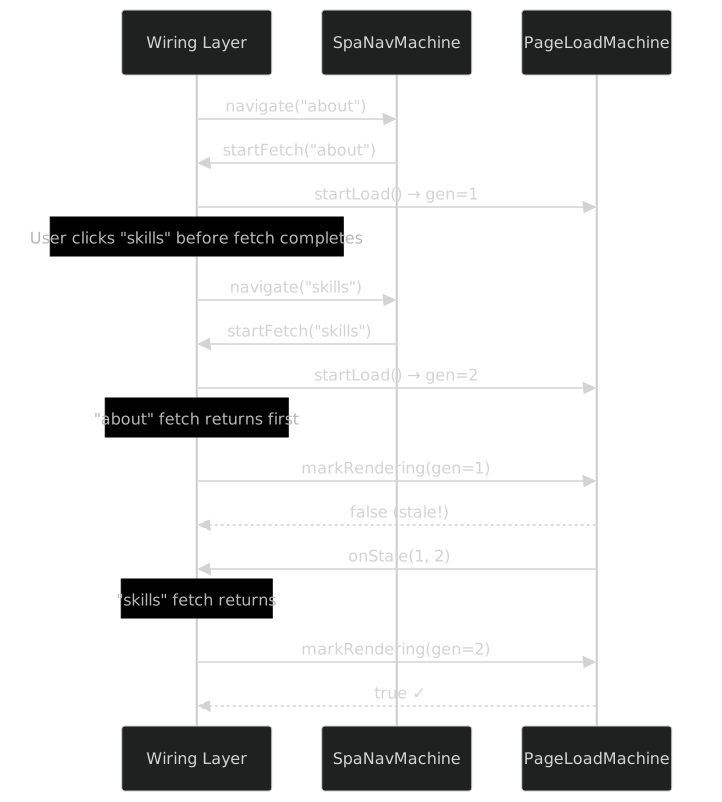
The machine doesn't know what's being loaded. It doesn't know about fetch or pages. It just knows: "you gave me generation 1, but the current generation is 2, so your request is stale." The wiring layer handles the rest.
Composition: SpaNav Drives PageLoad
These two machines are independent. Neither imports the other. Neither holds a reference to the other. They compose at the wiring layer:
// In app-static.ts
const spaNav = createSpaNavMachine({
  onStateChange: (state) => { /* update loading spinner */ },
  startFetch: async (path) => {
    const gen = pageLoad.startLoad();  // PageLoad enters "loading"
    const html = await fetch(`content/${path}`).then(r => r.text());
    spaNav.fetchComplete(html);         // SpaNav enters "swapping"
    pageLoad.markRendering(gen);        // PageLoad enters "rendering"
  },
  swapContent: (html) => {
    contentEl.innerHTML = html;
    pageLoad.markPostProcessing(gen);   // PageLoad enters "postProcessing"
    // ... highlight, mermaid, copy buttons ...
    pageLoad.markDone(gen);             // PageLoad enters "done"
  },
  // ... other callbacks
});
SpaNav says "start fetching." The wiring layer calls PageLoad's startLoad(). SpaNav says "swap content." The wiring layer calls PageLoad's markRendering(). The two machines are composed through the wiring layer, not through direct coupling.
This pattern -- machines composed at the wiring layer -- is fundamental to the architecture. In Part IV, we'll see five TOC machines composed the same way.
TourStateMachine: Step Navigation
The guided tour has four states and step-by-step navigation:

export function createTourManager(options: TourManagerOptions): TourManager {
  const steps = options.steps;
  let state: TourState = 'idle';
  let stepIndex = -1;

  function start(): void {
    if (state === 'running') return;  // Guard
    transition('running');
    if (steps.length === 0) { end(true); return; }
    changeStep(0);
  }

  function next(): void {
    if (state !== 'running') return;
    if (stepIndex >= steps.length - 1) { end(true); return; }
    changeStep(stepIndex + 1);
  }

  function prev(): void {
    if (state !== 'running') return;
    if (stepIndex <= 0) return;
    changeStep(stepIndex - 1);
  }

  function end(completed: boolean): void {
    if (state !== 'running') return;
    stepIndex = -1;
    transition(completed ? 'completed' : 'skipped');
    options.markCompleted();
  }
  // ...
}
The tour machine introduces step management alongside state management. The stepIndex is not a state -- it's data that changes within the running state. The machine tracks both: getState() returns { state, stepIndex, stepCount }.
The showAffordance() method shows a pulse animation and tooltip on first visit:
function showAffordance(): boolean {
  if (!options.isFirstVisit()) return false;
  options.onAffordanceChange('pulse', true);
  options.onAffordanceChange('tooltip', true);
  return true;
}
The isFirstVisit() callback checks localStorage. The onAffordanceChange() callback adds/removes CSS classes. The machine doesn't know about either.
ScrollSpyMachine: Pure Functions, No Factory
The scroll spy breaks from the factory pattern. It's not a createXxxMachine() factory -- it's a collection of pure functions:
export function detectByScroll(
  headings: HeadingPosition[],
  threshold: number,
): string | null {
  let active: string | null = null;
  for (const h of headings) {
    if (h.top <= threshold) active = h.id;
    else break;
  }
  if (!active && headings.length) active = headings[0]!.id;
  return active;
}

export function detectActiveSlug(
  headings: HeadingPosition[],
  threshold: number,
  detectionMode: DetectionMode,
  hoveredSlug?: string | null,
): string | null {
  if (detectionMode === 'mouse' && hoveredSlug) return hoveredSlug;
  return detectByScroll(headings, threshold);
}

export function resolveToTocEntry(
  slug: string,
  currentPath: string,
  slugFormat: 'slug' | 'path::slug',
  tocEntryExists: (hrefSlug: string) => boolean,
): { matchSlug: string | null; hrefSlug: string | null } {
  let matchSlug: string | null = slug;
  while (matchSlug) {
    const hrefSlug = slugFormat === 'path::slug'
      ? `${currentPath}::${matchSlug}`
      : matchSlug;
    if (tocEntryExists(hrefSlug)) return { matchSlug, hrefSlug };
    const lastSep = matchSlug.lastIndexOf('--');
    matchSlug = lastSep > 0 ? matchSlug.substring(0, lastSep) : null;
  }
  return { matchSlug: null, hrefSlug: null };
}

export function transition(input: TransitionInput): SpyState {
  const activeSlug = detectActiveSlug(
    input.headings, input.threshold ?? 60,
    input.detectionMode, input.hoveredSlug,
  );
  if (!activeSlug) {
    return { activeSlug: null, matchSlug: null, hrefSlug: null, changed: false };
  }
  const { matchSlug, hrefSlug } = resolveToTocEntry(
    activeSlug, input.currentPath, input.slugFormat, input.tocEntryExists,
  );
  return { activeSlug, matchSlug, hrefSlug, changed: activeSlug !== input.previousSlug };
}
No closure. No factory. No internal state. The caller (the wiring layer) calls transition() on every scroll event, passing the current headings positions and getting back the active slug. The wiring layer tracks the previous slug and applies the highlight.
Why no factory? Because scroll spy has no internal state that persists between calls. Each call is a pure computation: "given these heading positions, this threshold, and this detection mode, which heading is active?" The answer depends entirely on the input, not on what happened before.
This is the first of three pattern variations:
- Factory-with-closure (most machines):
createXxxMachine(callbacks)returns an interface. State lives in closures. - Pure functions (ScrollSpy, TocBreadcrumb): No factory, no state. Functions take input, return output.
- Immutable reducer (ZoomPanState): Functions take state and return new state. No closures, no mutation.
Slug Hierarchy Resolution
The resolveToTocEntry() function deserves attention. Headings in the content use hierarchical slugs separated by --:
install--linux--ubuntu → install--linux → installNot every heading has a TOC entry. The function walks up the hierarchy until it finds one that exists. The tocEntryExists callback checks the actual TOC data. This means the scroll spy can highlight the correct TOC item even when the active heading is a deeply nested sub-heading.
ZoomPanState: The Immutable Reducer
The zoom/pan overlay for Mermaid diagrams uses a third pattern: immutable state transformations.
export interface ZoomPanState {
  zoom: number;
  panX: number;
  panY: number;
  dragging: boolean;
  lastX: number;
  lastY: number;
}

export function createInitialState(): ZoomPanState {
  return { zoom: 1, panX: 0, panY: 0, dragging: false, lastX: 0, lastY: 0 };
}

export function zoomIn(state: ZoomPanState): ZoomPanState {
  return { ...state, zoom: clampZoom(state.zoom * ZOOM_FACTOR) };
}

export function zoomOut(state: ZoomPanState): ZoomPanState {
  return { ...state, zoom: clampZoom(state.zoom / ZOOM_FACTOR) };
}

export function startDrag(state: ZoomPanState, x: number, y: number): ZoomPanState {
  return { ...state, dragging: true, lastX: x, lastY: y };
}

export function moveDrag(state: ZoomPanState, x: number, y: number): ZoomPanState {
  if (!state.dragging) return state;
  return {
    ...state,
    panX: state.panX + (x - state.lastX),
    panY: state.panY + (y - state.lastY),
    lastX: x, lastY: y,
  };
}

export function computeTransform(state: ZoomPanState): string {
  return `translate(${state.panX}px, ${state.panY}px) scale(${state.zoom})`;
}
No factory. No closures. No callbacks. Each function takes the current state and returns a new state. The caller manages the state variable:
// In the wiring layer
let zpState = createInitialState();

overlay.addEventListener('wheel', (e) => {
  zpState = wheelZoom(zpState, e.deltaY);
  diagram.style.transform = computeTransform(zpState);
});

zoomInBtn.addEventListener('click', () => {
  zpState = zoomIn(zpState);
  diagram.style.transform = computeTransform(zpState);
});
Why this pattern instead of a factory? Because multiple overlays can share the same functions. Each overlay has its own zpState variable, but they all use the same zoomIn, zoomOut, startDrag, moveDrag functions. There's no per-instance configuration, no per-instance callbacks. The functions are universal transformations on a data structure.
This is the reducer pattern, familiar from Redux and React's useReducer. It works well when:
- State is a simple data record
- Transformations are uniform (same functions for every instance)
- There are no callbacks (no side effects beyond returning new state)
- The caller manages state persistence
KeyboardNavState: The Router
The keyboard navigation handler is not a state machine at all -- it's a routing layer:
export type ModalLayer =
  | 'tour' | 'cvModal' | 'accentPalette'
  | 'helpModal' | 'hireModal' | 'sidebar';

const MODAL_PRIORITY: readonly ModalLayer[] = [
  'tour', 'cvModal', 'accentPalette', 'helpModal', 'hireModal', 'sidebar',
] as const;

export function getTopModal(openModals: Set<ModalLayer>): ModalLayer | null {
  for (const layer of MODAL_PRIORITY) {
    if (openModals.has(layer)) return layer;
  }
  return null;
}

export function handleKey(
  key: string,
  modifiers: KeyModifiers,
  openModals: Set<ModalLayer>,
): Action | null {
  if (key === 'Escape') {
    const modal = getTopModal(openModals);
    if (modal === null) return null;
    return { type: 'closeModal', modal };
  }

  if (modifiers.ctrl) {
    if (key === '=' || key === '+') return { type: 'fontSizeChange', delta: 1 };
    if (key === '-') return { type: 'fontSizeChange', delta: -1 };
    return null;
  }

  if (modifiers.alt) {
    if (key === 's') return { type: 'focusSidebar' };
    if (key === 'c') return { type: 'focusContent' };
    return null;
  }

  if (key === '[') return { type: 'focusSidebar' };
  if (key === ']') return { type: 'focusContent' };
  if (key === '?') return { type: 'toggleHelp' };

  return null;
}
No state. No callbacks. A pure function that maps (key, modifiers, openModals) → Action | null. The wiring layer calls handleKey() on every keydown event and dispatches the returned action.
The modal priority is the most interesting part. When multiple modals are open, Escape closes the highest-priority one. The priority order is an array, iterated from first (highest) to last (lowest). getTopModal() returns the first match. This eliminates the cascade of if (tourOpen) ... else if (cvModalOpen) ... else if (paletteOpen) ... that the original code used.
Pattern Variations Summary

When to use which:
| Pattern | Use when | State management | Side effects |
|---|---|---|---|
| Factory + closure | Machine has internal state that persists between events | Closure variables | Via callbacks |
| Pure functions | Each call is independent; no state between calls | Caller manages | Return values |
| Immutable reducer | Multiple instances share logic; state is a simple record | Caller manages; state = fn(state) |
Return values |
Most machines use the factory pattern because most behaviors have persistent state (the current page, the drag position, the tour step). Scroll spy and keyboard navigation don't -- they're stateless computations. Zoom/pan uses reducers because multiple overlays share the same transformation logic.
Machine Interactions at the Wiring Layer
Parts II and III have introduced 11 machines. None of them know about each other. But they interact through the wiring layer in app-shared.ts and app-static.ts.
Here are the key composition points:
Navigation → Everything
When SpaNavMachine completes a fullNavigation:
// In the postSwap callback
postSwap: (targetPath, hash) => {
  // 1. Reset scroll spy for the new page
  scrollSpyState = transition({
    headings: getContentHeadings(),
    threshold: 60,
    detectionMode: 'scroll',
    currentPath: targetPath,
    slugFormat: 'path::slug',
    tocEntryExists: (slug) => tocHasEntry(slug),
    previousSlug: null,
  });

  // 2. Activate the new TOC item
  tocExpand.activateItem(getSectionId(targetPath));

  // 3. Scroll the TOC to show the active item
  tocScroll.activate({
    isItemVisible: isElementVisible(getActiveItem(), tocEl),
    hasChildren: hasHeadings(targetPath),
  });

  // 4. Update keyboard nav context
  openModals.delete('sidebar');

  // 5. Scroll to hash if present
  if (hash) {
    const el = document.getElementById(hash);
    if (el) el.scrollIntoView({ behavior: 'smooth' });
  }
}
One callback triggers five machine interactions. But each interaction is a single method call with clear inputs. The wiring layer is glue code -- no complex logic, just connecting outputs to inputs.
Keyboard → Multiple Machines
When KeyboardNavState returns an action:
const action = handleKey(event.key, { ctrl: event.ctrlKey, alt: event.altKey }, openModals);
if (!action) return;

event.preventDefault();

switch (action.type) {
  case 'closeModal':
    if (action.modal === 'accentPalette') palette.close();
    if (action.modal === 'helpModal') closeHelpModal();
    if (action.modal === 'hireModal') closeHireModal();
    if (action.modal === 'tour') tourManager.end(false);
    if (action.modal === 'sidebar') closeSidebar();
    openModals.delete(action.modal);
    break;
  case 'fontSizeChange':
    fontManager.change(action.delta);
    break;
  case 'focusSidebar':
    tocEl.focus();
    break;
  case 'focusContent':
    contentEl.focus();
    break;
  case 'toggleHelp':
    toggleHelpModal();
    break;
}
The keyboard handler returns a pure action. The wiring layer dispatches it to the correct machine or DOM operation. The keyboard handler doesn't know about the palette machine or the font manager. It just says "close the accent palette" or "change font size by +1" and the wiring layer handles it.
This is the command pattern -- actions are data, not function calls. The keyboard handler produces commands. The wiring layer consumes them. They're independently testable.
Testing Composition
Testing individual machines is straightforward (Part VI covers this in detail). But how do you test that two machines compose correctly?
You don't test them together. You test each machine in isolation, then you test the wiring layer with E2E tests. The composition is:
Unit tests → verify each machine's transitions independently
E2E tests → verify the wiring layer connects them correctly
For example, the SpaNavMachine test verifies that fetchComplete(html) transitions to swapping and calls swapContent(html, path). The PageLoadMachine test verifies that startLoad() returns a generation ID and markRendering(gen) rejects stale IDs. Neither test knows about the other machine.
The E2E test for navigation clicks a TOC link, waits for content to load, and verifies that the new content appears. If either machine has a bug, the E2E test fails. If the wiring layer connects them wrong, the E2E test fails. The E2E test doesn't know about state machines at all — it just verifies the user experience.
This two-layer approach is fundamental to the architecture. You don't need integration tests for state machine composition. You need:
- Unit tests that fully cover each machine's transition logic
- E2E tests that verify the user-facing behavior end to end
The wiring layer is thin enough that these two layers catch everything. No intermediate integration test layer needed.
The Abort Pattern
One important pattern shared by SpaNavMachine and PageLoadMachine: aborting in-progress operations.
SpaNavMachine has an abort() method:
function abort(): void {
  if (state === 'idle' || state === 'settled') return;
  pendingHtml = null;
  pendingTargetPath = null;
  pendingHash = null;
  pendingHref = null;
  transition('idle');
}
This is used when the user navigates away before the current navigation completes. The wiring layer calls abort() on the old navigation before starting the new one. The machine clears all pending data and returns to idle.
PageLoadMachine achieves the same effect differently — through the generation counter. There's no explicit abort(). Starting a new load (startLoad()) bumps the generation, which makes all in-progress operations stale. They don't need to be canceled; they cancel themselves when they try to proceed with a stale generation.
Two approaches to the same problem:
- Explicit abort (SpaNavMachine): caller cancels the operation
- Implicit staleness (PageLoadMachine): new operation invalidates old ones automatically
The staleness approach is cleaner when operations are sequential (one load after another). The explicit abort approach is better when the caller needs to ensure cleanup (clearing pending data).
What's Next
We've covered the simple machines (Part II) and the medium-complexity machines (this part). Everything so far has had at most 5 states.
Part IV: The TOC Machine Cluster is the complexity climax. Five machines. One sidebar. The TocScrollMachine has 8 states. The HeadingsPanelMachine models CSS animations as state. And the wiring diagram that connects them all is the most complex composition in the project.
Simple → complex. The pattern holds.