Part 34: A Real Workload Deployment — Acme's .NET API End to End
"git push. Wait sixty seconds. Open the browser. The new version is live."
Why
Acts III through V have built the cluster, the components, and the platform. This part is the payoff: a real workload deployed end-to-end via everything we have built. Acme's acme-api — an ASP.NET Core minimal API — is the example. The full chain:
- Source code in DevLab GitLab
- CI in DevLab runs the build, pushes the image to DevLab's GitLab registry
- ArgoCD inside the acme cluster watches the GitOps repo
- ArgoCD detects a new image tag, reconciles
- The new pods come up, replace the old ones
- cert-manager has already issued the cert
- external-dns has already created the DNS record
- The browser hits
https://api.acme.laband sees the new version
The thesis: end-to-end, this whole chain takes about 90 seconds from git push to "the new version is live". Every step is automated. The user only types git push.
The Helm chart
# charts/acme-api/Chart.yaml
apiVersion: v2
name: acme-api
description: Acme's ASP.NET Core API
type: application
version: 0.1.0
appVersion: "1.4.7"# charts/acme-api/values.yaml
image:
repository: registry.acme.lab/acme/acme-api
tag: "" # set per-overlay
pullPolicy: IfNotPresent
replicaCount: 3
resources:
requests:
cpu: 200m
memory: 256Mi
limits:
cpu: 1000m
memory: 512Mi
ingress:
enabled: true
className: nginx
host: api.acme.lab
annotations:
cert-manager.io/cluster-issuer: homelab-ca
tls: true
env:
- name: ASPNETCORE_URLS
value: http://+:8080
- name: ASPNETCORE_ENVIRONMENT
value: Production
envFromSecret:
- name: acme-api-db
keys:
ConnectionStrings__Postgres: connection_string
probes:
liveness: /healthz
readiness: /ready
autoscaling:
enabled: true
minReplicas: 3
maxReplicas: 10
targetCpuUtilization: 50
podDisruptionBudget:
minAvailable: 2
networkPolicy:
enabled: true
ingress:
- from:
- namespaceSelector:
matchLabels:
kubernetes.io/metadata.name: ingress-nginx
ports:
- port: 8080
egress:
- to:
- namespaceSelector:
matchLabels:
kubernetes.io/metadata.name: acme-data
podSelector:
matchLabels:
cnpg.io/cluster: acme-pg
ports:
- port: 5432The chart's templates produce a Deployment, Service, Ingress, HorizontalPodAutoscaler, PodDisruptionBudget, and NetworkPolicy. Standard Helm chart shape.
The ArgoCD Application
apps/acme-api/acme-api.yaml is generated by homelab k8s argocd add-app acme-api ...:
apiVersion: argoproj.io/v1alpha1
kind: Application
metadata:
  name: acme-api
  namespace: argocd
  finalizers:
    - resources-finalizer.argocd.argoproj.io
spec:
  project: default
  source:
    repoURL: https://gitlab.acme.lab/frenchexdev/devlab-gitops.git
    targetRevision: main
    path: charts/acme-api
    helm:
      valueFiles:
        - values.yaml
        - ../../environments/prod/acme-api-values.yaml
  destination:
    server: https://kubernetes.default.svc
    namespace: acme-prod
  syncPolicy:
    automated:
      prune: true
      selfHeal: true
    syncOptions:
      - CreateNamespace=false
      - ApplyOutOfSyncOnly=true
The Application points at the chart in the GitOps repo, applies the per-environment values overlay, and is auto-synced. ArgoCD polls the repo every 3 minutes (or immediately when a webhook fires).
The CI pipeline
public static GitLabCiPipeline AcmeApiCi() => new GitLabCiPipelineBuilder()
    .WithStages("build", "test", "publish", "deploy")
    .WithJob(new JobBuilder("build-image")
        .WithStage("build")
        .WithImage("docker:24")
        .WithService("docker:24-dind")
        .WithVariable("CI_REGISTRY", "registry.acme.lab")
        .WithScript(
            "docker login $CI_REGISTRY -u $CI_REGISTRY_USER -p $CI_REGISTRY_PASSWORD",
            "docker build -t $CI_REGISTRY/acme/acme-api:$CI_COMMIT_SHA -t $CI_REGISTRY/acme/acme-api:latest .",
            "docker push $CI_REGISTRY/acme/acme-api:$CI_COMMIT_SHA",
            "docker push $CI_REGISTRY/acme/acme-api:latest"))

    .WithJob(new JobBuilder("update-gitops")
        .WithStage("deploy")
        .WithImage("alpine/git:latest")
        .WithRules(r => r.OnDefaultBranch())
        .WithScript(
            "git clone https://oauth2:$GITOPS_TOKEN@gitlab.acme.lab/frenchexdev/devlab-gitops.git",
            "cd devlab-gitops",
            "yq e '.image.tag = \"'$CI_COMMIT_SHA'\"' -i environments/prod/acme-api-values.yaml",
            "git config user.email ci@acme.lab",
            "git config user.name 'GitLab CI'",
            "git add -A && git commit -m 'chore: bump acme-api to '$CI_COMMIT_SHA",
            "git push"))
    .Build();
Two CI jobs:
- build-image — builds the Docker image, tags it with the commit SHA, pushes to the in-cluster registry.
- update-gitops — bumps the image tag in the per-environment values overlay in the GitOps repo, commits, pushes.
Step 2 is the trigger that makes ArgoCD notice. Within 60 seconds of the git push to the GitOps repo, ArgoCD detects the change, runs helm template with the new values, computes the diff, and rolls the deployment.
The Mermaid view of the full flow
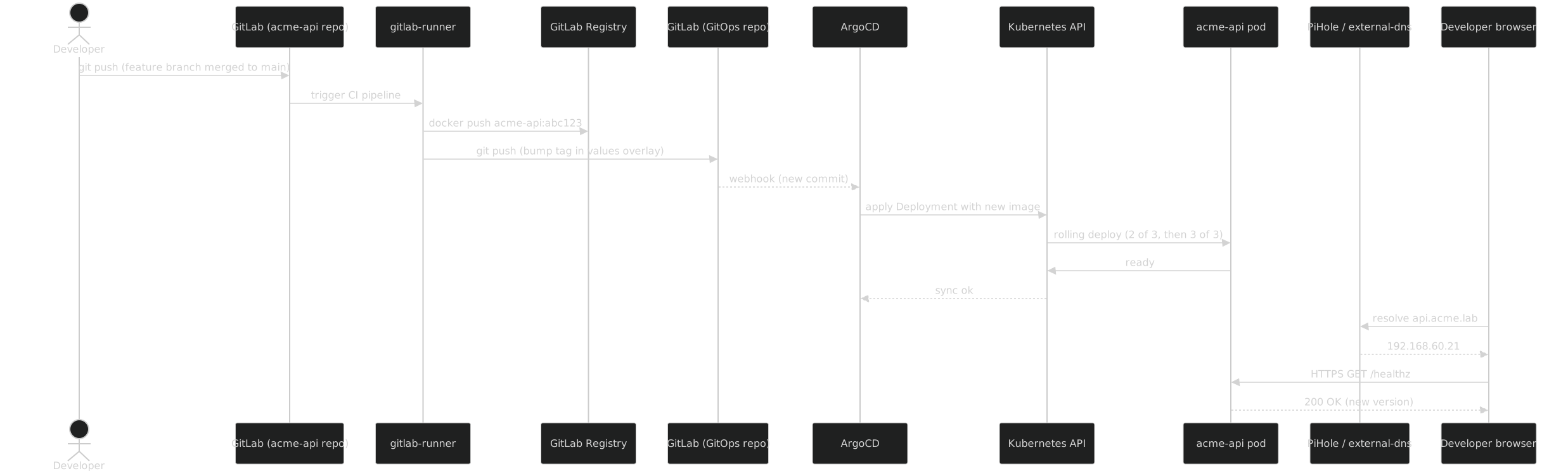
End-to-end: ~90 seconds. The developer types git push, walks to the coffee machine, comes back, the new version is live.
What this gives you that "kubectl apply -f deploy.yaml" doesn't
A direct kubectl apply works. It also requires the developer to run kubectl manually, against the right context, with the right manifest version, on the right environment. Mistakes happen.
The full ArgoCD + GitOps repo + CI flow gives you, for the same surface area:
- Deployment is git-driven so the desired state is in version control
- Rolling deploys with PDB and HPA baked into the chart
- Cert and DNS automation so HTTPS works on the new version
- Audit trail in git (every commit shows who deployed what when)
- Roll-forward by reverting the GitOps commit
- Same pattern in production because the production cluster also runs ArgoCD against the same kind of repo
The bargain pays back the first time you git revert a deploy and ArgoCD rolls back the workload in 60 seconds without you touching kubectl.
End of Act V
Acme has a real GitLab, a real Postgres, a real MinIO, real observability, real backups, real ArgoCD, and a real workload deploying end-to-end. Globex gets the same stack with a few different choices (HA topology, Spring Boot images instead of .NET, Strimzi Kafka). Both clients live on the same workstation.
Act VI is where the multi-client story becomes operational: how the freelancer actually switches between Acme and Globex during a workday, how they fit on a 128 GB box, how kubeconfig juggling works in practice, and how cross-client networking is enforced (or rather, prevented).