The Event Topology — Nine Events, One Living Map
Parts II through V built the stack from bottom to top: phantom types for compile-time event contracts, a decorator for machine metadata, a tour of the 43 pure machines, and the adapter layer that wires them to the DOM. But none of those parts answered the question that matters most at the system level: what talks to what?
That question is the event topology. Not the type of a single event. Not the states of a single machine. The full graph — every emitter, every event, every listener — laid out as a map that a developer can read in sixty seconds and know exactly what will happen when app-ready fires.
This part catalogs the nine custom events, walks through three representative event flows (cold boot, SPA navigation, sidebar mask toggle), explains the module-private vs shared event distinction, and revisits the phantom problem from Part V — why pure machines cannot dispatch events and how the adapter layer bridges the gap without breaking the topology scanner's invariants.
By the end of this part, you will be able to look at the topology map and answer three questions for any event: who sends it, who receives it, and what happens next. The map is the reading guide for the entire architecture. Everything that follows — the drift scanner (Part VII), the build pipeline (Parts VIII-X), the quality gates (Part XI) — operates on this map.
What Is Event Topology?
A topology in this context is the set of all (emitter, event, listener) triples in the application. Each triple is a directed edge: emitter dispatches event, listener receives event. The topology is not a type. It is not a runtime object. It is a static property of the source code — it can be computed by reading the source, without running the application.
Why does the topology matter? Because every edge is a contract. When the emitter changes the event name, the listener breaks. When the emitter changes the payload shape, the listener receives garbage. When the emitter stops dispatching, the listener waits forever. When a new emitter starts dispatching the same event name with a different semantic meaning, the listener acts on a signal it was never designed to handle. And none of these failures produce errors. They produce silence — the most expensive kind of bug (Part I).
The topology makes the implicit explicit. It turns invisible event contracts into a visible, queryable, verifiable graph.
A topology is a static analysis artifact — it exists at build time, not at runtime. You can compute it without running the application. This matters because it means the topology can be verified by automated tooling (Part VII) without spinning up a browser, without executing JavaScript, and without depending on timing or environment.
At a small scale — two modules, one event — these risks are trivial. At the scale of this site — 43 machines, 9 custom events, 10 adapter nodes, 13 directed edges — they are real. The topology is the map that makes them visible.

The diagram above is the topology in its simplest form: emitters on the left, events in the center, listeners on the right. Every arrow is a contract. Every contract can drift. The rest of this part makes each contract concrete.
The Nine Custom Events
The site uses exactly nine custom events dispatched on window. Seven live in the shared registry (src/lib/events.ts). Two are module-private (src/lib/hot-reload-actions.ts). Together they form the complete cross-machine communication surface.
| # | Event | Emitters | Listeners | Payload | Scope |
|---|---|---|---|---|---|
| 1 | app-ready |
page-load-state, app-readiness-state |
tour-state, tour-coordinator |
void |
Shared |
| 2 | app-route-ready |
app-readiness-state |
(app bootstrap) | void |
Shared |
| 3 | toc-headings-rendered |
page-load-state, spa-nav-state |
scroll-spy-machine |
void |
Shared |
| 4 | toc-active-ready |
toc-breadcrumb-state |
(adapter internal) | void |
Shared |
| 5 | toc-animation-done |
toc-breadcrumb-state |
scroll-spy-machine |
void |
Shared |
| 6 | sidebar-mask-change |
(sidebar adapter) | terminal-dots-state |
{ masked: boolean } |
Shared |
| 7 | scrollspy-active |
scroll-spy-machine |
(expand headings, breadcrumb) | { slug: string; path: string } |
Shared |
| 8 | mermaid-config-ready |
(mermaid adapter) | (diagram rendering) | void |
Shared |
| 9 | hot-reload:content |
hot-reload-actions |
(dev SPA nav) | { pages?: string[] } |
Private |
A few things to notice.
Most events carry no payload. Six of the nine are void — they are pure signals, coordination pulses that say "something happened" without saying what. Only three carry data: sidebar-mask-change (a boolean), scrollspy-active (a slug and a path), and hot-reload:content (an optional page list). This is not an accident. The machines are pure and their state is closure-scoped. The events coordinate timing, not data transfer. Data flows through callbacks, not event payloads.
Most machines do not participate. Of 43 machines, only about a dozen appear in the topology. The rest are self-contained — they receive input through their factory callbacks and never need to coordinate with other machines. The event topology is a sparse graph, not a dense one. The participation rate — roughly 12 out of 43, or 28% — is healthy. A topology where every machine talks to every other machine would be a coupling disaster. Sparse is correct.
Parenthesized listeners are adapter-internal. When the table says (adapter internal) or (app bootstrap), it means the listener is inline code in app-static.ts or app-shared.ts, not a named machine. The adapter layer is the DOM boundary (Part V). Listeners that live there are wiring logic, not state machines.
Multi-emitter events are the exception. Only two events have more than one emitter: app-ready (emitted by both page-load-state and app-readiness-state) and toc-headings-rendered (emitted by both page-load-state and spa-nav-state). Both cases reflect the two entry paths into the same downstream cascade: cold boot and SPA navigation. The remaining seven events have exactly one emitter each. A single-emitter design is easier to reason about — there is one source of truth for when the event fires.
Event naming is semantic, not structural. The names describe what happened, not who dispatched or how. toc-headings-rendered means "the headings panel is ready for interaction." It does not say "page-load-state finished building headings" — because the same event also fires when spa-nav-state rebuilds headings after a route change. The name is a contract on the post-condition, not on the source.
Event-by-Event Deep Dive
A brief annotation for each event, beyond what the table captures:
app-ready is the master readiness signal. It fires exactly once per page-load cycle (cold boot or post-SPA-navigation). The AppReadinessMachine (barrier gate, Part IV) waits for all required component signals (markdownOutputRendered, navPanePainted) before transitioning to ready and emitting this event. Downstream listeners can assume: the DOM is painted, the content is rendered, the sidebar is populated. Everything a user-facing feature needs is available.
app-route-ready is a sibling of app-ready with a different audience. Where app-ready is consumed by user-facing features (the tour), app-route-ready is consumed by framework-level code in the app bootstrap — code that needs to know "the route is settled" for analytics, scroll restoration, or URL hash processing. Separating the two prevents the tour from depending on framework internals and vice versa.
toc-headings-rendered fires after the headings panel in the sidebar is rebuilt. This is the critical synchronization point for the ScrollSpy: it cannot index heading positions if the headings panel has not been rendered (because the panel's presence affects layout, shifting heading positions). Two emitters produce this event — page-load-state during cold boot and spa-nav-state during SPA navigation — but the listener does not need to know which one fired. The post-condition is identical: headings are in the DOM and their positions are measurable.
toc-active-ready fires mid-animation, when the breadcrumb typewriter has reached the point where the active heading's text is visible. This is an internal synchronization event — the adapter uses it to update aria labels and focus indicators before the full animation completes. No external machine listens to it. It exists because the animation has two semantically distinct phases: "the text is readable" (mid-animation) and "the animation is finished" (end-of-animation). The first matters for accessibility. The second matters for layout stability.
toc-animation-done fires when the breadcrumb stagger animation completes. ScrollSpy listens to this event specifically to re-index heading positions. Why? Because the breadcrumb animation changes the sidebar's scroll height, which can shift heading positions if the sidebar has a scrollbar. ScrollSpy needs positions measured after the animation settles, not during it. This event is the "all clear" signal.
sidebar-mask-change is the simplest event in the topology. One boolean. One emitter. One listener. It exists because the sidebar resize handle and the terminal dots header are in different files, different DOM subtrees, and different state machines. Without this event, the terminal dots would need to poll the sidebar's CSS class — an inversion of control that couples the listener to the emitter's implementation details.
scrollspy-active is the richest payload in the topology: { slug: string; path: string }. The slug identifies the active heading within the current page. The path identifies the current page. Together they form a unique identifier for the active heading across the entire site. Listeners use this to update the breadcrumb, expand the relevant heading section in the sidebar, and scroll the TOC to keep the active heading visible. The event fires on every non-null transition — if the user scrolls past three headings, three events fire.
mermaid-config-ready fires when the Mermaid diagram library's configuration is loaded and applied. Diagram rendering blocks on this event — a diagram rendered before the config is ready might use wrong colors, fonts, or theme settings. In practice, the config loads fast (it is a JSON object), so this event fires early in the boot sequence. But the event ensures correctness even on slow connections or large configs.
hot-reload:content is the dev-mode-only event. When the dev server detects a content file change, it sends a WebSocket message. The hot-reload-actions module receives the message, determines the reload strategy, and dispatches this event with an optional pages array listing which pages changed. The dev-mode SPA navigation logic listens and refetches only the changed pages. In production, this event does not exist — the hot-reload client is excluded from the production bundle.
Event Definitions in Code
The shared events are defined in a single file:
// src/lib/events.ts

import { defineEvent } from './event-bus';

// ── Page lifecycle ──────────────────────────────────────────────
export const AppReady = defineEvent('app-ready');
export const AppRouteReady = defineEvent('app-route-ready');

// ── TOC lifecycle ───────────────────────────────────────────────
export const TocHeadingsRendered = defineEvent('toc-headings-rendered');
export const TocActiveReady = defineEvent('toc-active-ready');
export const TocAnimationDone = defineEvent('toc-animation-done');

// ── Sidebar ─────────────────────────────────────────────────────
export const SidebarMaskChange = defineEvent<
  'sidebar-mask-change', { masked: boolean }
>('sidebar-mask-change');

// ── ScrollSpy ───────────────────────────────────────────────────
export const ScrollspyActive = defineEvent<
  'scrollspy-active', { slug: string; path: string }
>('scrollspy-active');

// ── Mermaid ─────────────────────────────────────────────────────
export const MermaidConfigReady = defineEvent('mermaid-config-ready');
Each defineEvent() call returns an EventDef<N, D> constant — a phantom-typed token that carries the event name at runtime and the payload type at compile time (Part II). The file is the shared registry: any machine that needs to emit or listen to one of these events imports the constant by name. No strings. No guessing. No copy-paste of event name literals across files.
Event Lifecycle Domains
The nine events cluster into four lifecycle domains. This clustering is not enforced by the code — it is a semantic property visible in the topology:
Page lifecycle — app-ready, app-route-ready. These fire once per page load (cold boot) or once per SPA navigation (route change). They gate downstream initialization: the tour waits for app-ready, the app bootstrap waits for app-route-ready.
TOC lifecycle — toc-headings-rendered, toc-active-ready, toc-animation-done. These fire in sequence during sidebar panel updates. The headings panel renders, the breadcrumb animates to the active heading, the animation completes. ScrollSpy uses toc-headings-rendered and toc-animation-done as re-index signals — it needs stable heading positions, which are only stable after the animation finishes.
Sidebar — sidebar-mask-change. Fires when the user double-clicks the resize handle to toggle focus mode. A single boolean payload. A single listener (TerminalDots) updates its label.
ScrollSpy — scrollspy-active. Fires on every non-null scroll-spy transition. Carries the active heading's slug and the page path. Listeners update the breadcrumb, expand the relevant heading section, and scroll the TOC to keep the active heading visible.
Mermaid — mermaid-config-ready. A late-initialization signal for diagram rendering. Fires once per page load after the Mermaid library configuration is applied. This event exists because Mermaid config depends on the active theme (light/dark), and the theme may not be resolved at the time diagrams start rendering.
Hot-reload (dev only) — hot-reload:content. A dev-mode signal that triggers incremental page refetch. Never fires in production. The event carries an optional pages array so listeners can refetch only what changed rather than reloading the entire page.
Domain Boundaries as Firebreaks
The domain clustering creates natural firebreaks in the topology. An event in the TOC lifecycle domain (toc-headings-rendered) does not cascade into the sidebar domain (sidebar-mask-change). An event in the page lifecycle domain (app-ready) does not cascade into the mermaid domain (mermaid-config-ready). The domains are independent causal chains.
The one exception is scrollspy-active, which bridges the TOC lifecycle and the scroll/navigation domains. ScrollSpy is the hub that connects the two: it listens to TOC events (toc-headings-rendered, toc-animation-done) and emits a scroll/navigation event (scrollspy-active). This makes ScrollSpy the most connected machine in the topology — three event edges (two inbound, one outbound). All other machines have at most two edges.
If a topology bug causes cascading failures, ScrollSpy is the most likely propagation point. The topology scanner pays special attention to it: any change to ScrollSpy's emits or listens arrays triggers a full topology re-verification, not just a local check.
Event Flow Walkthrough: Cold Boot
The topology table tells you what connects to what. But a table does not tell you when and why. For that, you need a walkthrough — a step-by-step trace through the event cascade for a specific scenario.
The cold boot is the most complex scenario. It involves the most machines, the most events, and the tightest coordination. If you understand the cold boot, you understand the topology.
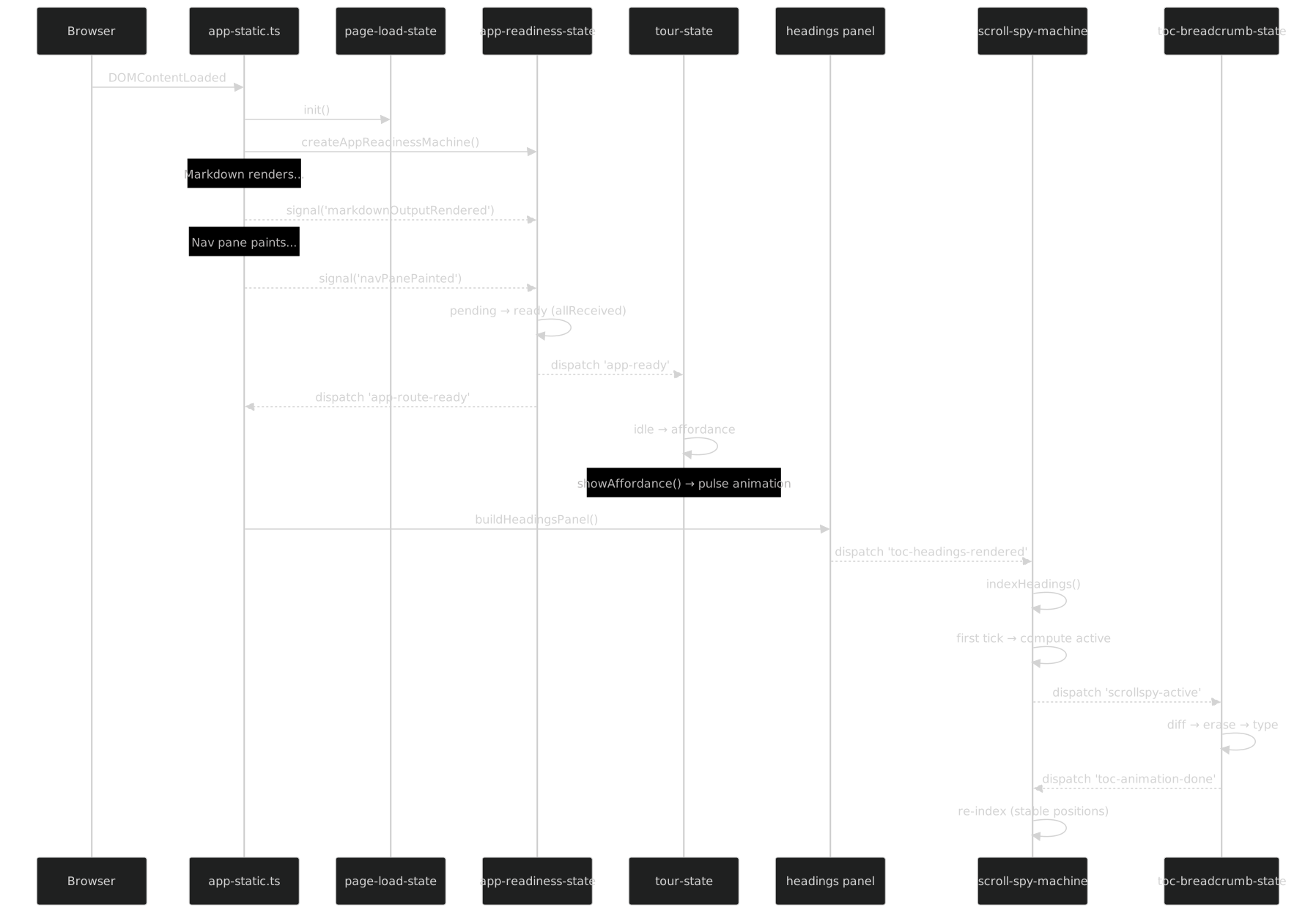
Step by step
Step 1: Browser loads page. The browser fetches index.html, parses it, loads app.min.js. When DOMContentLoaded fires, app-static.ts begins initialization. It creates the PageLoadState machine (generation counter, Part IV) and the AppReadinessMachine (barrier gate, Part IV).
Step 2: Markdown renders. The main content pane processes markdown through the render pipeline. When rendering completes, the adapter in app-static.ts calls appReadiness.signal('markdownOutputRendered'). The AppReadiness machine receives the signal and stores it in its internal Set<ReadinessEvent>. It checks: are all required events received? The set is { markdownOutputRendered }. The required set is { markdownOutputRendered, navPanePainted }. Not all received. The machine stays in pending.
Step 3: Nav pane paints. The sidebar navigation tree renders. The adapter calls appReadiness.signal('navPanePainted'). The machine stores it. The set is now { markdownOutputRendered, navPanePainted }. All received. The guard allReceived passes. The machine transitions from pending to ready.
Step 4: AppReadiness fires app-ready and app-route-ready. The onReady callback in the adapter dispatches both events on window via the typed bus. Two events, two distinct downstream effects.
Step 5: Tour listener fires. The tour-state machine listens for app-ready (declared in its @FiniteStateMachine decorator: listens: ['app-ready']). When the event arrives, the tour transitions from idle to affordance and calls showAffordance() — the pulsing button that invites first-time visitors to start the guided tour. The tour-coordinator also listens for app-ready and initializes its coordination state.
Step 6: Headings panel builds. Meanwhile (sequentially in the same tick, but logically downstream from markdown rendering), the headings panel is built. This constructs the list of heading links in the sidebar. When the panel is ready, the adapter dispatches toc-headings-rendered.
Step 7: ScrollSpy re-indexes. The scroll-spy-machine listens for toc-headings-rendered (declared: listens: ['toc-headings-rendered', 'toc-animation-done']). When the event arrives, it re-indexes heading positions — measuring each heading's offsetTop to build the position map used for scroll detection. After indexing, it computes the first active heading based on the current scroll position and emits scrollspy-active with { slug, path }.
Step 8: Breadcrumb animates. The breadcrumb adapter listens for scrollspy-active. It receives the new active heading slug and path, computes the diff against the previous breadcrumb text (common prefix algorithm, Part IV), and starts the erase-then-type animation. When the animation reaches the point where the active text is visible, it dispatches toc-active-ready. When the full animation completes, it dispatches toc-animation-done.
Step 9: ScrollSpy re-indexes again. The scroll-spy-machine listens for toc-animation-done. Why? Because the breadcrumb animation changes the height of the sidebar content, which shifts heading positions. ScrollSpy needs stable positions to compute the active heading accurately. It re-indexes after the animation settles. No event is emitted this time — the active heading has not changed, so the spy suppresses the redundant scrollspy-active.
This nine-step cascade involves five machines, four custom events, and two lifecycle domains (page lifecycle and TOC lifecycle). Every step is driven by an event. Every event is typed. Every emitter/listener pair is declared in decorator metadata. And the topology scanner (Part VII) verifies the complete graph on every commit.
Cold Boot Timing Analysis
The cascade is sequential — each event triggers the next — but it is fast. The entire sequence, from DOMContentLoaded to the final toc-animation-done, completes in roughly 200–400ms on a modern machine. The bottleneck is the breadcrumb typewriter animation (step 8), which is intentionally slowed for visual effect. The non-animated steps (steps 1–7) complete in under 50ms total.
This matters for testing. The Playwright E2E tests for the cold boot sequence do not wait for arbitrary timeouts. They wait for specific events:
// E2E test: wait for the topology's terminal event
await page.evaluate(() =>
  new Promise<void>(resolve =>
    window.addEventListener('toc-animation-done', () => resolve(), { once: true })
  )
);
The test does not know how long the animation takes. It does not use page.waitForTimeout(500). It waits for the event that the topology says will fire last. If the topology changes — if a new event is added downstream of toc-animation-done — the test will need to wait for the new terminal event. The topology map tells the test author which event that is.
Why the Re-Index After Animation?
Step 9 deserves special attention because it reveals a subtle layout interaction. When the breadcrumb animates, it changes the text content of the breadcrumb bar. If the new text is longer than the old text, the bar may grow in height (or the text may wrap). If the bar grows, the sidebar content below it shifts down. If the sidebar has a scrollbar, the scrollable area's total height changes. This means every heading's offsetTop — measured relative to the sidebar scroll container — shifts by the height delta.
ScrollSpy indexes heading positions by measuring offsetTop. If it uses positions measured before the animation, the measurements are stale. The spy would activate the wrong heading for a given scroll position. The solution: wait for toc-animation-done, then re-index. The cost is one extra querySelectorAll + position measurement pass. The benefit is correct scroll spy behavior after every breadcrumb animation.
This is a concrete example of why the event topology exists. Without toc-animation-done, ScrollSpy would need to either poll for layout changes (expensive, racy) or assume positions are stable (wrong). The event makes the dependency explicit and the timing correct.
Event Flow Walkthrough: SPA Navigation
The cold boot cascade fires once. SPA navigation fires on every internal link click. The flow is shorter but structurally similar — it reuses the same events and the same machines, but with a reset step at the beginning.
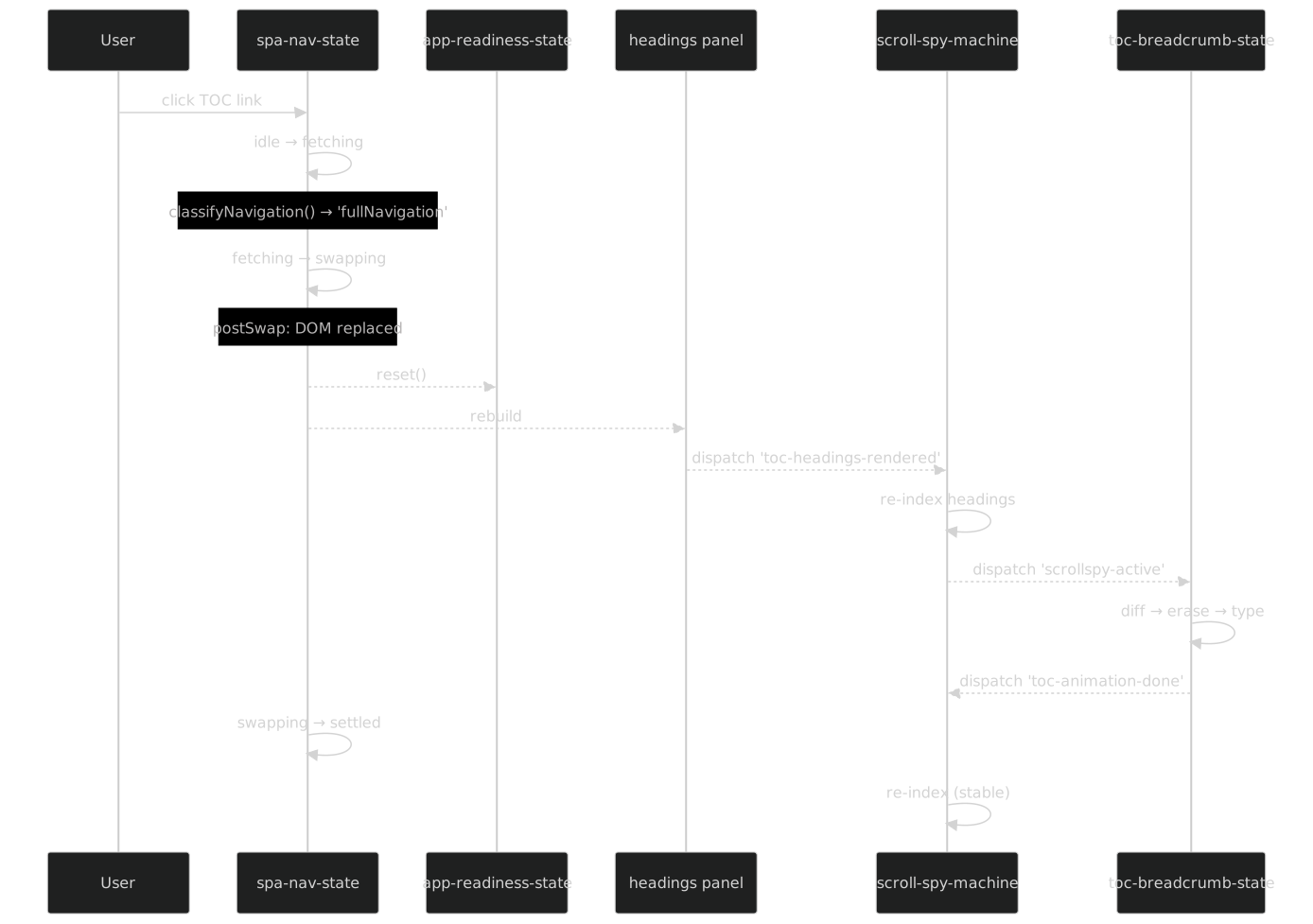
Step by step
Step a: User clicks a TOC link. The click handler in app-shared.ts intercepts the navigation. It calls classifyNavigation() — a pure function (Part IV) that examines the target URL relative to the current URL and returns one of three discriminated types: hashScroll (same page, different anchor), toggleHeadings (same page, headings toggle), or fullNavigation (different page). For a TOC link to a different article, the result is fullNavigation.
Step b: SpaNav transitions through its states. The spa-nav-state machine (Part IV) transitions: idle → fetching (the adapter starts a fetch() for the new page's HTML). When the fetch resolves, the machine transitions to swapping. During the swap, the adapter replaces the content pane's innerHTML with the fetched content.
Step c: postSwap fires. After the DOM swap, the adapter runs the postSwap sequence. This includes: resetting the AppReadiness machine (appReadiness.reset() — transitions ready back to pending), rebuilding the headings panel from the new content, and re-running content post-processing (syntax highlighting, mermaid rendering, image lazy loading).
Step d: Headings re-render dispatches toc-headings-rendered. This is the same event as cold boot step 6. The adapter in app-static.ts dispatches it after rebuilding the headings panel. From here, the cascade is identical to cold boot steps 7–9: ScrollSpy re-indexes, emits scrollspy-active, Breadcrumb animates, emits toc-animation-done, ScrollSpy re-indexes again.
Step e: SpaNav settles. After the postSwap cascade completes, the SpaNav machine transitions from swapping to settled, then (on the next microtask) back to idle, ready for the next navigation. The settled state exists to give downstream listeners a clean synchronization point — any code that needs "the page is fully navigated" can check for spa-nav-state === 'settled'.
The key insight: SPA navigation and cold boot converge at toc-headings-rendered. Everything downstream of that event is the same code path. This is not a coincidence — it is a design consequence of event-driven architecture. The events define the contract. The source of the event (cold boot vs SPA nav) is irrelevant to the listeners.
Convergence at toc-headings-rendered
This convergence is worth examining closely, because it is the topology's most important structural property. Consider the alternative: without a shared event, the cold boot path and the SPA navigation path would each need to call ScrollSpy's re-index function directly. That means two call sites. When you change the re-index API, you update two places. When you add a step between "headings rendered" and "scroll spy indexes," you add it in two places. The code diverges. The behavior diverges. Bugs appear in one path but not the other.
With the event, there is one listener. ScrollSpy listens for toc-headings-rendered and re-indexes. Period. It does not know or care whether the event came from cold boot or SPA navigation. The adapter for cold boot dispatches the event after building the headings panel. The adapter for SPA navigation dispatches the same event after rebuilding the headings panel post-swap. The downstream behavior is identical because the downstream code is identical — it is one listener, not two.
This is the diamond pattern in event topologies: two source paths converge through a single event to a single downstream cascade. The diamond is the shape you want. A fork — where the two paths trigger different downstream logic — is the shape you avoid.
The Generation Counter and Stale Navigation
There is one subtlety the walkthrough above glosses over: what happens when the user clicks a second link before the first SPA navigation finishes?
The spa-nav-state machine handles this with a guard. If the machine is in fetching or swapping when a new navigation starts, the guard rejects the new navigation. The user's click is swallowed. The first navigation completes, and the event cascade proceeds normally.
But the page-load-state machine adds another layer of protection: the generation counter (Part IV). Each navigation increments a monotonic counter. When the fetch resolves, the adapter checks: does the fetch's generation match the current generation? If not, the fetch is stale — another navigation superseded it. The adapter discards the stale result without swapping the DOM. No events fire. No cascade begins. The stale navigation is invisible.
The generation counter does not appear in the event topology. It is a guard, not an event. But it protects the topology's invariants: every toc-headings-rendered event corresponds to a valid, non-stale DOM swap. Without it, a race condition could cause the cascade to fire with stale headings, and ScrollSpy would index the wrong content.
The Navigation Classification Branch
Not every click produces the full cascade. classifyNavigation() routes clicks to three different paths:

Only the fullNavigation path triggers the event cascade. hashScroll scrolls to an anchor on the current page — no fetch, no DOM swap, no events. toggleHeadings expands or collapses the headings panel for the current page — a local UI toggle, no navigation. The classification function is the first gate. If it returns hashScroll or toggleHeadings, the event topology is silent.
Event Flow Walkthrough: Sidebar Mask Toggle
The third walkthrough is the simplest. It involves one event, one emitter, one listener, and one boolean.

Step by step
Step a: User double-clicks the resize handle. The sidebar supports drag-to-resize (managed by sidebar-resize-state). A double-click on the resize handle triggers focus mode — the sidebar collapses completely, giving the content pane the full viewport width.
Step b: SidebarMask.toggle() dispatches sidebar-mask-change. The sidebar adapter calls SidebarMask.toggle(), which sets the CSS class on the layout container and dispatches sidebar-mask-change with { masked: true } via the typed bus.
Step c: TerminalDots adapter listens. The terminal-dots-state machine manages the decorative terminal dots in the header bar. Its @FiniteStateMachine decorator declares listens: ['sidebar-mask-change']. The adapter receives the event, extracts detail.masked, and calls syncSidebarMasked(true) on the machine.
Step d: TerminalDots updates its labels. When the sidebar is masked, the terminal dots switch to focus-mode labels: "Show sidebar" (to exit focus mode) and "Exit focus mode" (to restore the layout). The compound boolean state (Part IV) — { focusMode: true, sidebarMasked: true } — determines the label set. The invariant holds: focusMode implies sidebarMasked.
This flow is a textbook example of event-driven decoupling. The sidebar adapter does not know that terminal dots exist. Terminal dots do not know that the sidebar has a resize handle. They communicate through a single typed event. If you remove terminal dots from the codebase, the sidebar still works. If you add a new listener for sidebar-mask-change — say, a minimap that hides during focus mode — you add it without touching the sidebar code.
The Compound Boolean Invariant
The terminal dots state is a compound boolean (Part IV): two booleans with an invariant. The full state space is:
{ focusMode: false, sidebarMasked: false }  // normal layout
{ focusMode: false, sidebarMasked: true }   // impossible (invariant violation)
{ focusMode: true,  sidebarMasked: false }  // impossible (invariant violation)
{ focusMode: true,  sidebarMasked: true }   // focus mode active
The invariant is: focusMode implies sidebarMasked. You cannot be in focus mode without the sidebar being masked. And you cannot have the sidebar masked without being in focus mode (in this machine's domain — the sidebar can be collapsed for other reasons, but the terminal dots only care about focus mode).
When sidebar-mask-change { masked: true } arrives, the terminal dots machine transitions to { focusMode: true, sidebarMasked: true }. When sidebar-mask-change { masked: false } arrives, both flags reset to false. The invariant is maintained by construction: the two flags always move together.
The compound boolean pattern matters here because it shows that even the simplest event in the topology — one boolean, one emitter, one listener — can trigger nontrivial state logic in the listener. The topology tells you what is connected. The machine tells you what happens when the connection fires.
Why Not Use CSS?
A natural question: why dispatch a custom event at all? The sidebar mask is a CSS class on the layout container. Terminal dots could just watch the class with a MutationObserver. No event, no bus, no topology edge.
This would work at the DOM level, but it would break the architecture at the machine level. The terminal-dots-state machine is pure — it has no DOM access (Part V). It cannot create a MutationObserver. It receives input through callbacks. The adapter creates the callback bridge. The event is the mechanism that triggers the adapter, which triggers the callback, which triggers the machine.
Without the event, the adapter would need to set up a MutationObserver on the layout container, filter for the specific class change, extract the boolean, and call the machine's syncSidebarMasked(). This is more code, more DOM coupling, and more fragility (what if the class name changes?). The event is a cleaner contract: one name, one boolean, one addEventListener call in the adapter.
Module-Private vs Shared Events
The seven shared events live in src/lib/events.ts. They are imported by name wherever they are needed. But the event system is open/closed: any module can define its own events using the same defineEvent() factory, without touching the shared registry.
The hot-reload module does exactly that:
// src/lib/hot-reload-actions.ts

import {
  defineEvent,
  createEventBus,
  type EventBus,
  type EventTargetLike,
} from './event-bus';

// ── Event definitions — owned by this module ────────────────────

/** Content-only hot-reload: SPA refetches the changed pages. */
export const HotReloadContent = defineEvent<
  'hot-reload:content', { pages?: string[] }
>('hot-reload:content');

/** TOC-only hot-reload: TOC widget refetches its index. */
export const HotReloadToc = defineEvent('hot-reload:toc');

/** Bus type for this module's emissions. */
export type HotReloadEmitBus = EventBus<
  typeof HotReloadContent | typeof HotReloadToc, never
>;
Three things to notice:
Ownership is explicit. The comment says "owned by this module." These events are not shared infrastructure. They are internal to the hot-reload subsystem. The HotReloadContent constant is exported — any module could import it — but the semantic contract is clear: these events are owned by hot-reload-actions.ts and consumed by the dev-mode SPA navigation logic. Production builds do not include the hot-reload client, so these events never fire in production.
The bus type is scoped. HotReloadEmitBus is typed with exactly the two events this module emits and never for listens. The module creates its own bus instance via createEventBus() and dispatches through it. The bus type prevents accidental emission of shared events through the hot-reload bus.
The colon convention. Shared events use hyphens: app-ready, toc-animation-done. Module-private events use a colon prefix: hot-reload:content, hot-reload:toc. This is a naming convention, not a type-level enforcement — the type system does not care about the string content. But the convention makes it easy to see at a glance which events are shared and which are module-scoped.
The Open/Closed Design
The distinction between shared and private events is a consequence of the defineEvent() design (Part II). Because defineEvent() is a standalone factory — not a method on a central registry — any module can create new events without modifying events.ts. The shared file is closed for modification but the event system is open for extension.
This means the topology can grow without central coordination. A new module that needs a new event creates its own EventDef constant, types its bus accordingly, and starts emitting. The topology scanner (Part VII) will pick it up automatically — it scans all source files, not just the shared registry.

The two groups have different ownership semantics but identical type-level guarantees. A HotReloadContent event is exactly as type-safe as an AppReady event. The difference is organizational, not structural.
What About hot-reload:toc?
The table at the beginning of this part lists nine events, but only nine rows. hot-reload:toc is the tenth defineEvent() call in the codebase. Why is it not in the table?
Because it is a coordination event within the hot-reload module itself. When the dev server sends a toc-strategy reload message, hot-reload-actions.ts dispatches hot-reload:toc via the bus. The listener is inline code in the hot-reload client — the same module that dispatched the event. It is a self-loop: the emitter and the listener are the same file. Self-loops do appear in the topology scanner's output, but they are not cross-machine edges. They are internal wiring. The table catalogs cross-machine communication — the contracts that can drift — not self-contained implementation details.
If you count hot-reload:toc as a cross-machine event, the table has ten rows. The series says nine because nine events cross machine boundaries in the topology graph.
The Ownership Graph
The distinction between shared and module-private events creates a two-tier ownership model. Shared events are collectively owned: any change to their name, payload, or semantics affects every emitter and every listener. Module-private events are locally owned: changes affect only the module that defines them.
This has implications for change management. Renaming app-ready to page-ready requires updating every machine that emits it, every machine that listens to it, every test that waits for it, and every adapter that dispatches it. The topology scanner will catch any mismatches — that is its job — but the blast radius is wide. Renaming hot-reload:content to hot-reload:pages requires updating hot-reload-actions.ts and the dev-mode SPA navigation listener. Two files. The blast radius is local.
The design principle: keep the shared event set small and stable. Add new shared events rarely. When a new cross-module coordination need arises, first consider whether it can be handled with callbacks through an existing adapter. Only add a shared event when the coordination genuinely crosses machine boundaries and cannot be modeled as a callback dependency.
Event Versioning
The current system has no formal versioning. Event names are strings. If you change a payload from { masked: boolean } to { masked: boolean; reason: string }, the change is backward-compatible (existing listeners ignore the new field). But if you change { masked: boolean } to { mode: 'focus' | 'collapsed' }, the change is breaking. Existing listeners expecting detail.masked will read undefined.
The type system catches this at compile time — sidebar-mask-change is defined with { masked: boolean } as the phantom type parameter. Changing the type forces all emitters and listeners to update or the build fails. But this is a hard break, not a migration path. There is no versioned event schema, no backward-compatible evolution, no schema registry.
For a single-developer site with 9 events, this is fine. The type system is the version system. For a large team with 90 events, you would want something more formal — event schemas with version numbers, backward-compatible evolution rules, and a deprecation protocol. The topology scanner could enforce version compatibility as an additional invariant. This system does not need that. But the architecture is ready for it — EventDef<N, D> could carry a version parameter without changing the bus implementation.
The key takeaway: the defineEvent() factory is the single source of truth for event identity. Every emitter imports the constant. Every listener imports the constant. There is no string-matching across files. If the constant changes, every import site sees the change. If the type parameter changes, every emit and every listener handler sees the type error. The constant is the contract. The factory is the registry. The type system is the enforcer.
The Phantom Problem Revisited
Part V introduced the phantom problem: pure state machines have no access to the DOM. They do not import window. They do not call dispatchEvent(). They do not call addEventListener(). Their @FiniteStateMachine decorator declares emits: ['app-ready'] and listens: ['toc-animation-done'], but these are metadata — strings in an object literal — not executable code.
So how do events actually get dispatched?
The adapter creates a typed EventBus (Part II), passes it as a dependency, and the bus translates to DOM events. But the adapter is the one calling bus.emit(), not the machine. The machine calls a callback — callbacks.onReady() — and the adapter's implementation of that callback calls bus.emit(AppReady).
This creates a gap in the topology. The machine says emits: ['app-ready']. The source code of the machine contains no dispatchEvent call and no bus.emit call. The actual bus.emit(AppReady) lives in the adapter, which is in app-static.ts or app-shared.ts. A naive topology scanner — one that only looks for bus.emit() and bus.on() calls — would see the adapter as the emitter and miss the machine's declaration entirely.
The topology scanner (Part VII) solves this with delegated dispatch resolution. When it finds a bus.emit(AppReady) call in an adapter file, it checks: does the call site correspond to a callback that a machine's decorator declared as an emitted event? If yes, the scanner marks the edge as "delegated" — the machine is the semantic emitter, the adapter is the physical emitter. The topology report shows both: the machine as the source of the edge and the adapter as the dispatch site.
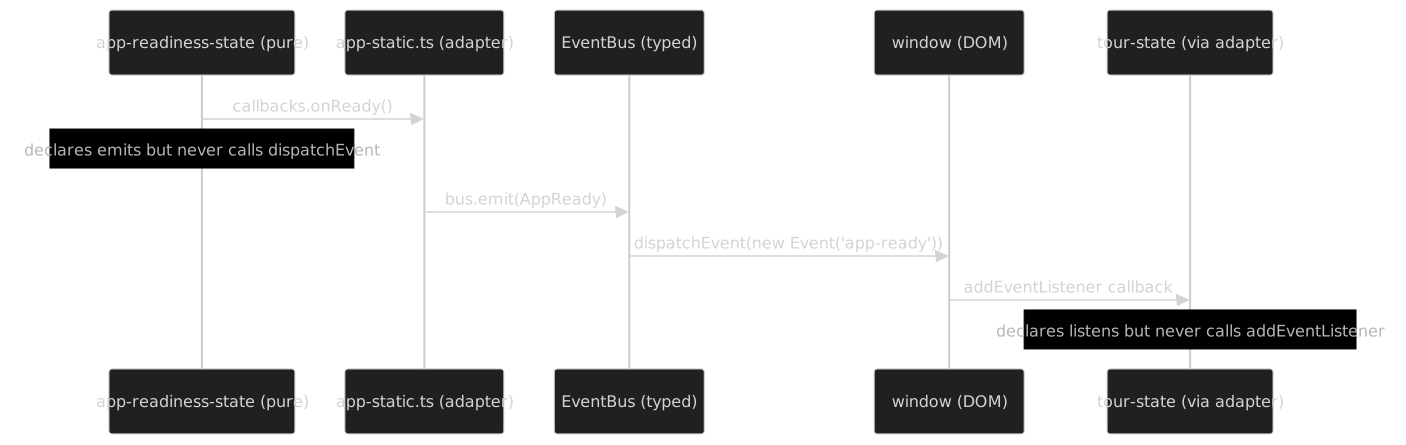
The sequence diagram above makes the delegation explicit. The machine and the listener are on the outer edges — they declare contracts but never touch the DOM. The adapter and the bus are in the middle — they translate between pure callbacks and DOM events. The topology scanner sees all four layers and connects them.
Delegation in Code
To make the delegation concrete, here is the actual pattern from the app-readiness-state adapter in app-static.ts:
// In app-static.ts (adapter)

const readinessBus = createEventBus<
  typeof AppReady | typeof AppRouteReady, never
>(window);

const appReadiness = createAppReadinessMachine({
  onStateChange(state, prev) {
    // Log for debugging — no side effects
    console.debug(`[readiness] ${prev} → ${state}`);
  },
  onReady() {
    // This is the delegation point:
    // The machine calls onReady() when it transitions to 'ready'.
    // The adapter translates that callback into two typed event dispatches.
    readinessBus.emit(AppReady);
    readinessBus.emit(AppRouteReady);
  },
});
The machine calls callbacks.onReady(). The adapter's implementation of onReady calls readinessBus.emit(AppReady). The bus translates that to window.dispatchEvent(new Event('app-ready')). Three layers: machine → adapter → bus → DOM. The machine's decorator says emits: ['app-ready', 'app-route-ready']. The adapter makes it happen.
The topology scanner sees: (1) the decorator declares emits: ['app-ready'], (2) the adapter calls readinessBus.emit(AppReady). It connects the two: the machine is the semantic emitter, the adapter at line N of app-static.ts is the physical dispatch site. The edge is delegated, not phantom.
Why Not Give Machines a Bus Directly?
An obvious alternative: instead of callbacks, give each machine a typed bus at construction time. The machine calls this.bus.emit(AppReady) directly. No adapter needed. No delegation. The topology scanner sees bus.emit() in the machine file and the edge is clean.
This would work. It would simplify the scanner. But it would break the purity contract that makes the machines testable. A machine that calls bus.emit() is a machine that depends on an EventTarget — which, in the browser, is window. In unit tests, you would need to provide a fake EventTarget. This is not hard (a simple EventTarget polyfill works), but it is a dependency. The machine is no longer a pure function that takes callbacks and returns an API. It is an object with a bus dependency.
The current design — callbacks out, bus in the adapter — keeps the machine pure. The callback is a plain function. In tests, you pass a spy. In production, you pass the adapter's bus-dispatching implementation. The machine does not know or care which one it receives. Purity is preserved. Testability is preserved. The cost is a one-hop delegation that the topology scanner resolves.
The Scanner's Resolution Algorithm
The topology scanner resolves delegated dispatches in three steps (detailed fully in Part VII):
Collect machine declarations. Walk all
@FiniteStateMachinedecorators and extractemitsandlistensarrays.Collect actual dispatches. Walk all source files for
bus.emit()andbus.on()calls. Record the file, line, and event name for each.Match delegated dispatches. For each
bus.emit()in an adapter file, check if the event name appears in a machine'semitsdeclaration. If yes, mark the edge as delegated: the machine is the semantic emitter, the adapter is the physical dispatch site.
The result is a complete topology where every declared emits edge has a corresponding physical dispatch, and every physical dispatch has a corresponding declared emits or is flagged as undeclared. Undeclared dispatches — adapter code that emits an event not declared by any machine — are flagged as semantic gaps and reported as warnings.
Four Topology Invariants
The topology scanner enforces four invariants (detailed fully in Part VII, previewed here):
Invariant 1: No phantom emitters. Every event in a machine's emits array must have a corresponding bus.emit() call in its adapter. If a machine declares emits: ['app-ready'] but no adapter dispatches app-ready, the machine is emitting into the void. The scanner flags it.
Invariant 2: No phantom listeners. Every event in a machine's listens array must have a corresponding bus.on() call in its adapter. If a machine declares listens: ['toc-animation-done'] but no adapter sets up the listener, the machine will never receive the event it expects. The scanner flags it.
Invariant 3: No undeclared emissions. Every bus.emit() call must correspond to a machine's emits declaration. If an adapter calls bus.emit(SomeEvent) but no machine's decorator lists SomeEvent in its emits, the emission is undeclared — it works at runtime but is invisible to the topology. The scanner flags it as a semantic gap.
Invariant 4: No orphan events. Every defined event (every defineEvent() call) must have at least one emitter and at least one listener. An event with an emitter but no listener is a signal into the void. An event with a listener but no emitter is a listener waiting forever. Both are flagged.
These four invariants, together, guarantee that the topology map is complete and accurate. No event can be dispatched without being declared. No declaration can exist without being dispatched. No listener can wait for an event that no one sends. The topology is closed — it accounts for every edge.
When the Topology Is Not Enough
The topology tells you what is connected and in what order. It does not tell you everything. Three things the topology cannot capture:
Timing constraints. The topology says ScrollSpy listens for toc-headings-rendered. It does not say "ScrollSpy must re-index within 16ms to avoid a visible flicker." Timing constraints are performance requirements, not structural ones. They live in the test suite, not the topology.
Payload semantics. The topology says scrollspy-active carries { slug: string; path: string }. It does not say "the slug must be a valid heading ID in the current page's DOM." Payload semantics are runtime invariants. The type system catches shape mismatches (wrong field name, wrong type). The topology catches routing mismatches (wrong emitter, wrong listener). Neither catches semantic mismatches — a slug that is syntactically valid but points to a heading that was removed. For that, you need runtime assertions or E2E tests that verify the slug corresponds to a real DOM element.
Conditional dispatch. The topology says app-readiness-state emits app-ready. It does not say "only when all required signals have been received." The guard condition — the allReceived check — is internal to the machine. The topology scanner sees the declaration and the dispatch, not the guard. This is by design: the topology is a structural graph, not an execution trace. Guards are the machine's concern. The topology's concern is that the edge exists and is wired correctly.
These limitations are not flaws. They are scope boundaries. The topology answers "what is connected to what." The machine answers "under what conditions." The type system answers "with what shape." The test suite answers "does it actually work." Each layer has its domain. The topology map is one layer — but it is the layer that makes all the others navigable.
Reading the Topology Map
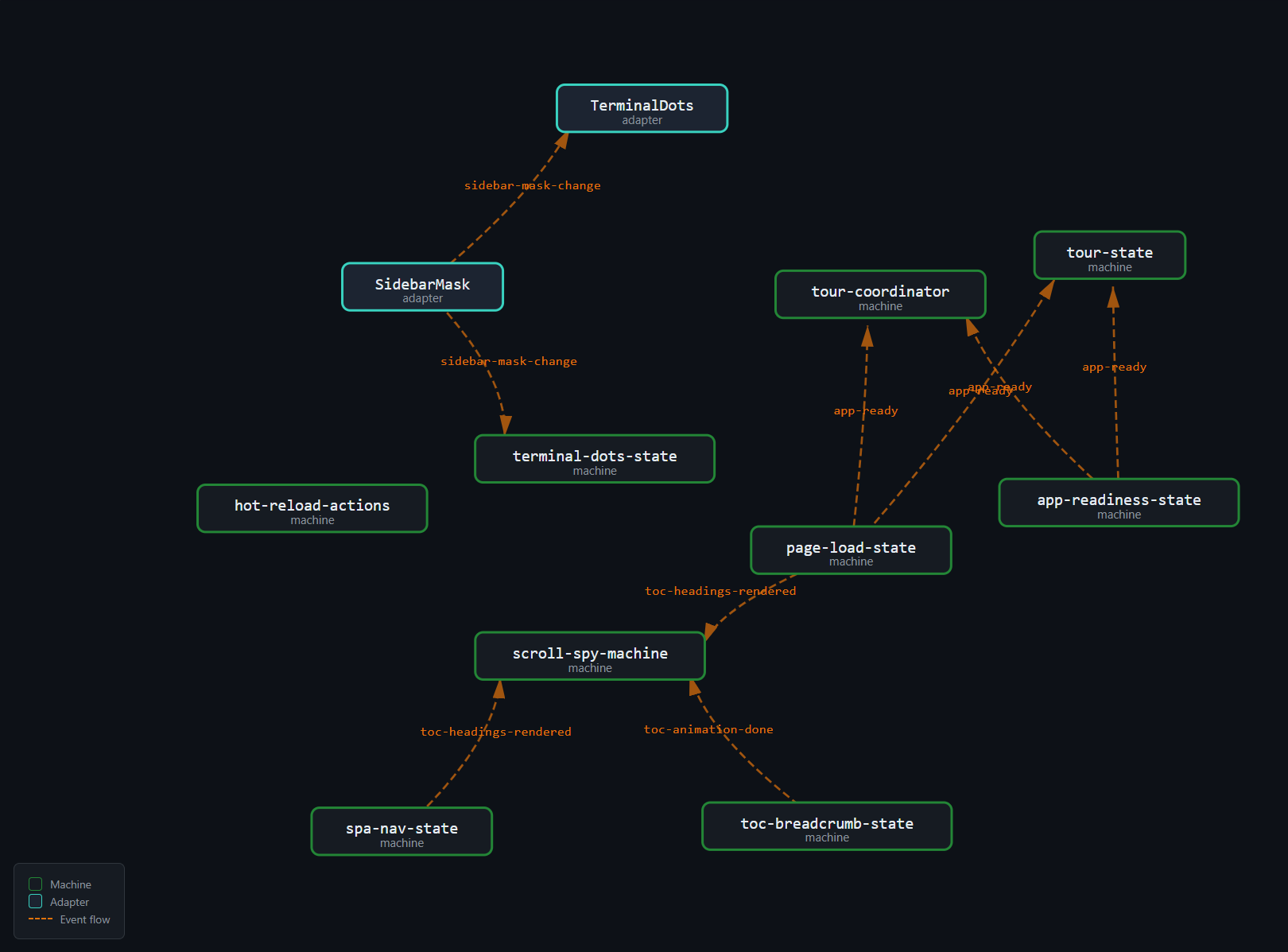
The image above is the full topology rendered by the interactive explorer (Part X). A few tips for reading it:
Orange dashed arrows are event edges. They connect an emitter node to a listener node through an event name label. Follow an orange arrow to see who talks to whom.
Teal boxes are machine nodes. Each box represents one of the 43 state machines. The box label includes the machine name and its state count.
Adapter nodes are distinct. The 10 adapter nodes (from app-static.ts and app-shared.ts) are shown with a different shape or color. They sit between the pure machines and the event edges, making the delegation visible.
Clusters correspond to domains. The page-lifecycle machines cluster together. The TOC machines cluster together. The event edges cross clusters — that is the point. Events are the cross-domain coordination mechanism.
Most machines have no event edges. The majority of the 43 machines appear as isolated nodes — no orange arrows in or out. They communicate through callbacks only. The event topology is a sparse overlay on the full machine graph.
The direction tells you causality. An arrow from app-readiness-state to tour-state through app-ready means: when AppReadiness transitions to ready, Tour transitions from idle to affordance. The arrow is causal. Reading the map left-to-right gives you the causal chain. Reading it right-to-left gives you the dependency chain: Tour depends on AppReadiness, but AppReadiness does not know Tour exists.
Counting Edges
The topology has exactly 13 directed edges (emitter → event → listener):
| Emitter | Event | Listener |
|---|---|---|
| page-load-state | app-ready | tour-state |
| page-load-state | app-ready | tour-coordinator |
| app-readiness-state | app-ready | tour-state |
| app-readiness-state | app-ready | tour-coordinator |
| app-readiness-state | app-route-ready | app bootstrap |
| page-load-state | toc-headings-rendered | scroll-spy-machine |
| spa-nav-state | toc-headings-rendered | scroll-spy-machine |
| toc-breadcrumb-state | toc-active-ready | adapter internal |
| toc-breadcrumb-state | toc-animation-done | scroll-spy-machine |
| sidebar adapter | sidebar-mask-change | terminal-dots-state |
| scroll-spy-machine | scrollspy-active | breadcrumb + headings |
| mermaid adapter | mermaid-config-ready | diagram rendering |
| hot-reload-actions | hot-reload:content | dev SPA nav |
Thirteen edges for 43 machines. The edge-to-node ratio is 0.30 — well below the threshold where event graphs become "spaghetti." For comparison, a fully connected graph of 43 nodes would have 1,806 edges. The topology is 0.7% of the theoretical maximum. Sparse is healthy.
The Topology as a Living Document
The topology map is not a static diagram. It is regenerated by the build pipeline (Part X) from the state-machines.json extraction (Part IX), which is itself generated from the decorator metadata (Part III). When a developer adds a new event, adds a new emitter, or changes a listener, the map updates automatically on the next build.
The topology scanner (Part VII) goes further: it verifies the map against the actual source code. If the map says machine X emits event Y, but no bus.emit(Y) call exists in X's adapter, the scanner flags the drift. If a bus.emit(Z) call exists that no machine declares, the scanner flags the gap. The map is not just documentation — it is a verified contract.
This is the fundamental difference between a topology diagram drawn in a wiki and the topology map in this system. The wiki diagram drifts the moment someone forgets to update it. The topology map cannot drift because it is generated from the same source code it describes, and any mismatch fails the build.
Using the Topology for Debugging
When a feature breaks, the topology map is the first diagnostic tool. The question "why did the tour stop showing?" becomes a graph traversal:
- Tour listens to
app-ready. app-readyis emitted byapp-readiness-state.app-readiness-statetransitions toreadywhen all signals are received.- Signals are
markdownOutputRenderedandnavPanePainted. - Check: is one of these signals missing?
The topology gives you the causal chain. You trace the arrows backward from the broken feature to the root cause. Without the map, you would search the codebase for "app-ready" and hope you find all the relevant files. With the map, you follow the edges.
This works because the topology is complete and verified. There are no hidden event dispatches that the map does not show. There are no undeclared listeners that the scanner missed. The map is the territory.
A concrete example: after a refactor, the tour stopped appearing on first visit. The topology walkthrough revealed:
- Tour listens to
app-ready— check, the listener exists. app-readyis emitted byapp-readiness-state— check.- AppReadiness needs
markdownOutputRenderedandnavPanePainted. - Both signals are sent by adapters in
app-static.ts— check. - But the navPane adapter was moved to a
requestAnimationFramecallback during the refactor — the signal now fires one frame later. - The AppReadiness machine transitions to
readycorrectly, but the tour'sshowAffordance()callback runs before the layout is stable, and the pulsing button appears at position (0, 0) instead of its target element.
The root cause was not a missing event or a broken transition. It was a timing shift in a signal. The topology map did not catch it (timing is not structural), but it narrowed the search from "the tour is broken, why?" to "the navPanePainted signal timing changed." Five minutes instead of an hour.
Using the Topology for Impact Analysis
Before making a change, the topology map tells you the blast radius. If you want to change the payload of scrollspy-active from { slug: string; path: string } to { slug: string; path: string; index: number }, the map shows you: one emitter (scroll-spy-machine), one listener set (breadcrumb + headings). Two places to update. The type system will catch mismatches, but the map tells you the scope before you start.
For event removals, the map is even more useful. If you want to remove toc-active-ready (because the mid-animation synchronization is no longer needed), the map shows: one emitter (toc-breadcrumb-state), one listener (adapter internal). Remove the emitter's dispatch, remove the listener's handler, remove the EventDef constant. The scanner will confirm: no remaining references to toc-active-ready. The event is cleanly removed.
Without the map, removing an event requires a global text search for the event name — and hope that no one used a variable instead of the string literal. With the topology scanner's AST-based analysis, the search is structural, not textual.
Testing the Topology
The topology is not just a documentation tool — it is a testable property. The E2E test suite includes tests that verify event cascades end-to-end:
// Verify the cold boot cascade completes
test('cold boot fires app-ready followed by scrollspy-active', async ({ page }) => {
  const events: string[] = [];

  await page.evaluate(() => {
    const log: string[] = [];
    window.addEventListener('app-ready', () => log.push('app-ready'));
    window.addEventListener('scrollspy-active', () => log.push('scrollspy-active'));
    (window as any).__eventLog = log;
  });

  await page.goto('/');
  await page.waitForFunction(
    () => (window as any).__eventLog?.includes('scrollspy-active'),
    { timeout: 5000 }
  );

  const log = await page.evaluate(() => (window as any).__eventLog);
  expect(log).toContain('app-ready');
  expect(log).toContain('scrollspy-active');
  expect(log.indexOf('app-ready')).toBeLessThan(log.indexOf('scrollspy-active'));
});
This test verifies two topology properties: (1) both events fire during cold boot, and (2) app-ready fires before scrollspy-active. The ordering constraint comes from the topology — app-ready is upstream of toc-headings-rendered, which is upstream of scrollspy-active. The test turns the topology diagram into a falsifiable assertion.
Unit tests verify individual machines in isolation. E2E tests verify the topology. Together they cover the full stack: the machine transitions (unit), the adapter wiring (integration), and the event cascades (E2E).
The topology also guides test design. When writing a new E2E test, the topology map tells you which events to wait for: find the terminal event of the cascade you are testing, wait for it, and assert the post-condition. No arbitrary setTimeout. No polling. No fragile timing. The topology's terminal events are natural synchronization points for tests.
For the SPA navigation cascade, the terminal event is toc-animation-done. For the cold boot, it is also toc-animation-done (the last event in the chain). For the sidebar mask toggle, it is sidebar-mask-change itself (there is no downstream cascade). Each flow has a well-defined endpoint. Each endpoint is a typed event. Each typed event is a stable, refactoring-safe test hook.
Summary: The Nine Contracts
The event topology of this site consists of nine cross-machine events, four lifecycle domains, 13 directed edges, and roughly a dozen participating machines out of 43 total. The topology is sparse — most machines are self-contained. The events coordinate timing, not data. The adapters bridge the gap between pure machines and the DOM event system. The topology scanner verifies the complete graph on every commit.
Three flows illustrate how events cascade:
Cold boot: AppReadiness barrier waits for
markdownOutputRendered+navPanePainted→ transitions to ready → emitsapp-ready+app-route-ready→ tour arms → headings render → emitstoc-headings-rendered→ ScrollSpy indexes → emitsscrollspy-active→ breadcrumb animates → emitstoc-active-ready→toc-animation-done→ ScrollSpy re-indexes with stable positions.SPA navigation: SpaNav classifies click →
fullNavigation→ fetch → swap → readiness reset → headings rebuild → emitstoc-headings-rendered→ same cascade as cold boot from that point onward. The diamond pattern: two source paths, one convergence event, one downstream cascade.Sidebar mask toggle: double-click resize handle →
sidebar-mask-change { masked: true }→ TerminalDots updates compound boolean → labels reflect focus mode. One event, one boolean, zero ambiguity.
The shared/private distinction is organizational, not structural. Seven events in src/lib/events.ts are shared infrastructure — cross-machine contracts that any module can import. Two events in src/lib/hot-reload-actions.ts are module-private — dev-mode-only coordination that production never sees. Both use the same defineEvent() factory, the same phantom types, the same bus interface. The open/closed design means new events can appear in any module without modifying the shared registry.
The phantom problem — pure machines declaring events they cannot dispatch — is resolved by adapter delegation. The machine calls a callback. The adapter's callback implementation calls bus.emit(). The bus dispatches on window. The topology scanner tracks both the semantic emitter (the machine's emits declaration) and the physical dispatch site (the adapter's bus.emit() call), matching delegated dispatches to their declaring machines and flagging any mismatches.
The topology map — the full graph of all 43 machines, 9 events, and 13 edges — is generated by the build pipeline and verified by the scanner. It is not documentation. It is a contract. It cannot drift because it is computed from the source code and any mismatch fails the build.
The next part takes this further: what happens when the topology does drift? The topology scanner runs on every commit, walks the AST, and fails the build when it finds phantoms, gaps, or undeclared dispatches. Part VII details the scanner's algorithm, its four invariants, and the time it caught a real bug before it reached production.
Continue to Part VII: Drift Detection — The Topology Scanner →