Part 37: Kubeconfig Juggling
"The wrong context is the most expensive 200 OK in IT. We make the right one obvious."
Why
Part 09 defined IKubeconfigStore. This part is about the user experience of switching between many contexts on the same workstation. Specifically: how the freelancer running three clients knows which one their next kubectl command is going to hit, and how the architecture makes "wrong cluster" mistakes hard to make.
The thesis: homelab k8s use-context <name> is the canonical switch verb. It writes the new context to ~/.kube/config AND to a small marker file at ~/.homelab/active-context. Shell prompts read the marker file and display the active context. The combination prevents the wrong-cluster disaster — not because mistakes are impossible, but because the mistake is visible before you make it.
The verb
$ homelab k8s use-context acme
✓ kubectl context switched to 'acme'
✓ active context written to ~/.homelab/active-context
✓ kubeconfig at ~/.kube/config now has 3 contexts (acme, globex, personal)

$ kubectl config current-context
acme

$ cat ~/.homelab/active-context
acme
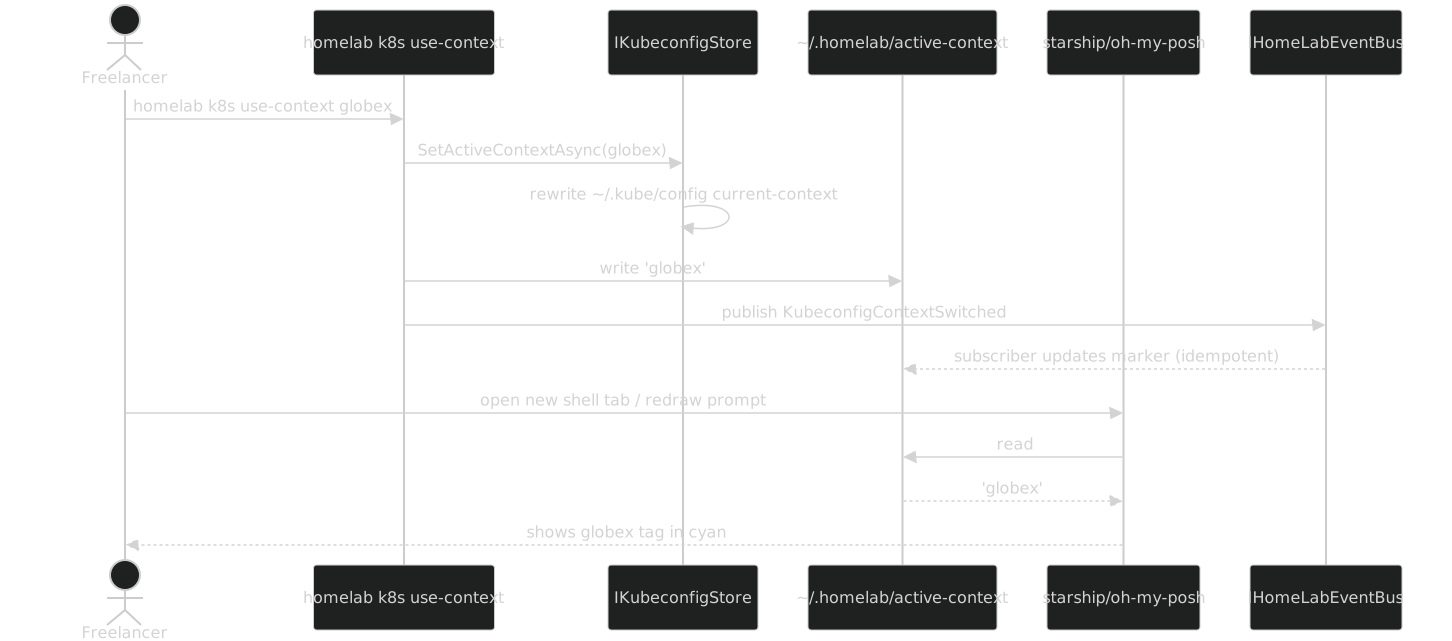
The verb is the standard thin shell from Part 11. The handler in the lib calls IKubeconfigStore.SetActiveContextAsync(name), then writes the marker file, then publishes a KubeconfigContextSwitched event.
The shell prompt integration
The marker file is the cheapest possible way for the shell prompt to know the active context. Reading a 5-byte file is one syscall. Polling kubectl config current-context parses 8 KB of YAML and takes ~80ms. The first method is invisible to the user; the second introduces a noticeable lag on every prompt redraw.
Sample starship config:
[custom.k8s]
command = "cat ~/.homelab/active-context 2>/dev/null"
when = "test -f ~/.homelab/active-context"
format = "[$output](bold cyan) "
Sample oh-my-posh config:
{
  "type": "command",
  "style": "powerline",
  "powerline_symbol": "\uE0B0",
  "foreground": "#ffffff",
  "background": "#0086b3",
  "properties": {
    "shell": "bash",
    "command": "cat ~/.homelab/active-context 2>/dev/null"
  }
}
Sample bash PS1:
__k8s_ctx() { cat ~/.homelab/active-context 2>/dev/null; }
PS1='[\u@\h \W \[\033[1;36m\]$(__k8s_ctx)\[\033[0m\]]\$ '
In all three cases, the prompt shows the active context as a coloured tag. The freelancer always sees acme or globex or personal before typing the next kubectl command.
The Mermaid view
Helpful aliases
A common shell alias makes context switching painless:
alias hk='homelab k8s'
alias hka='homelab k8s use-context acme'
alias hkg='homelab k8s use-context globex'
alias hkp='homelab k8s use-context personal'
And a kubectl alias that always shows the context in stderr:
function kc() {
    local ctx=$(cat ~/.homelab/active-context 2>/dev/null)
    echo "[ctx: $ctx]" >&2
    kubectl "$@"
}
alias kubectl=kc
The kc wrapper prints [ctx: globex] to stderr before every command, so even if the shell prompt is not configured, the context is announced inline.
What about kubectx?
kubectx (ouvre dans une nouvelle fenêtre) is the popular tool for switching contexts. kubectx acme does the same thing as homelab k8s use-context acme, plus a fzf-style picker if you run it without arguments. K8s.Dsl integrates: it does not re-implement kubectx; it lets the user use kubectx if they prefer, and provides the marker file regardless.
$ kubectx acme    # uses kubectx, does NOT update the marker file
$ cat ~/.homelab/active-context
globex            # still says globex; the prompt is wrong now
To fix this, K8s.Dsl ships an optional homelab k8s install-kubectx-hook verb that adds a small wrapper around kubectx to update the marker file:
$ homelab k8s install-kubectx-hook
✓ wrote ~/.local/bin/kubectx-with-marker
✓ added alias to ~/.bashrc: alias kubectx='kubectx-with-marker'
ℹ source your shell config or open a new terminal
After this, both kubectx and homelab k8s use-context keep the marker file in sync.
What this gives you that hand-managing kubectl contexts doesn't
Hand-managing is kubectl config use-context acme plus remembering that you switched. The remembering is the failure mode — three context switches a day means you forget which one you are on at least once.
The K8s.Dsl approach gives you, for the same surface area:
- One verb to switch
- A marker file that any prompt can read in microseconds
- An event bus signal for richer integrations
- A kubectx hook for users who already use kubectx
- A wrapped kubectl that announces the context before every command
The bargain pays back the first time you almost ran kubectl delete deployment payments against the wrong cluster and the prompt's globex tag stopped you.