Five Angles, One Circle
Chapter 02 argued, in prose, that the loop exists. It used the word meta-circular with a shrug, and claimed that if REQ-DOG-FOOD were removed from the registry, the package's own compliance report would turn red, because every Feature of the package declares @Satisfies(ReqDogFoodRequirement), and an orphan @Satisfies on a Requirement that does not exist is a broken import. That chapter was correct. It was also abstract.
This chapter draws the same picture five ways. One diagram per subsystem that participates in the loop. Each diagram is a complete view of the dog-food relationship, as seen from one position inside it. You can start at any angle and walk to any other — that is what circle means — but each viewpoint makes different edges legible. The source view highlights the import graph. The registry view highlights the module-load sequence. The scanner view highlights the AST traversal. The compliance view highlights the gate. The audit view highlights history.
The Requirement under the lens is REQ-DOG-FOOD. Its body has been quoted in full several times already in this series, so I will not paste it again here. What matters for this chapter is three facts about it, all of which are visible at every angle:
- It is a
Requirement<DefaultStyleType>class underpackages/requirements/requirements/requirements/req-dog-food.ts, withstatus = 'Approved',priority = Priority.Critical, andkind = 'Constraint'. - Every
Featureabstract class in this package declares@Satisfies(..., ReqDogFoodRequirement, ...)— including features that have nothing semantically to do with testing, because the rule applies transversally. - Its own
fitCriterianames a unit test (satisfiesDecoratorRegistersBidirectionalLink) and a compliance check (complianceStrictFailsOnFeatureWithoutSatisfies) that must pass before the package itself can ship.
That third fact is the one that does the work. The Requirement that says "every Feature must have a Satisfies edge" lists, as its own verification method, a test that uses that edge. The Requirement that says "dog-food the DSL" is dog-fooded by a test that itself dog-foods the DSL. If the dog-food rule is wrong, the test that verifies it is wrong; if the test is wrong, the rule cannot be proved; the package admits this openly, in its own text, and files it under verificationMethod = 'Test'.
The running example for the chapter is FEATURE-TRACE-EXPLORER-TUI. This is a tier-2 roadmap feature for a TTY browser over the traceability graph — the interactive cousin of the CLI's trace subcommands. It is enabled = false today, so it has no tests yet, but its Feature class exists, its @Satisfies edges exist, and it appears in the graph. That makes it a better subject than a fully-implemented feature: its relationship to REQ-DOG-FOOD is purely structural, and it lets us focus on the loop rather than on the test output.
At the end of each angle, the section on FEATURE-TRACE-EXPLORER-TUI shows what the subsystem sees. The last section of the chapter strings those five views together into one walk around the circle.
Angle 1 — Source
The source-tree view is the most literal. Every artefact that participates in the loop is a file under packages/requirements/, and every edge that participates in the loop is either an import statement or a decorator call. No runtime is involved. The loop is already visible at the TypeScript level, before anything executes.
The root node is requirements/requirements/req-dog-food.ts. This file declares ReqDogFoodRequirement, which extends the generic Requirement<DefaultStyleType> from src/base.ts. That base class, in turn, imports the Priority enum, the Rationale discriminated union, the FitCriterion union, and the branded-string type constructors — the entire typed data layer of the package. So REQ-DOG-FOOD sits at the top of a tree whose leaves are the package's primitive types. If any of those types moved or were renamed, tsc would refuse to build the Requirement itself. The declaration is load-bearing for the rest of the Requirements: they all extend the same base and use the same primitives.
The next layer out is requirements/features/. Every file in this directory declares a Feature subclass, and every one of them has @Satisfies(..., ReqDogFoodRequirement, ...) somewhere in its decorator list. The feature files import REQ-DOG-FOOD — literally, with an import { ReqDogFoodRequirement } from '../requirements/req-dog-food'; at the top. There is no reflection, no string-keyed lookup: the class itself is the vertex, and the import edge makes the graph unambiguous to the TypeScript compiler.
The third layer is test/. Each test file imports a Feature from requirements/features/ and uses @FeatureTest(SomeFeature) as a class decorator, plus @Verifies<SomeFeature>('acName') on each method. The decorators themselves live in src/decorators.ts. So the test file has a direct edge to the decorator module (via import) and a semantic edge to the Feature class (via the decorator argument). The compiler does not let you @Verifies<X>('y') where 'y' is not a method name of X: keyof X does the check. That is a direct structural tie between the test file and the Feature class it verifies.
The fourth layer is src/. This is where the decorators are defined (src/decorators.ts), where the registry is populated (src/analysis/registry.ts), where the scanner walks (src/analysis/scan-test-files.ts), and where the compliance core produces the report (src/analysis/compliance-core.ts). The test files import from src/ — not the other way round. src/ does not know any specific Feature exists; it only knows how to find any Feature that is loaded into the registry.
The fifth layer — and the one that closes the loop — is requirements/features/feature-compliance.ts (or its equivalent), which declares a FeatureComplianceCheck that @Satisfies(ReqDogFoodRequirement). That feature's abstract methods are verified by tests that call computeComplianceReport() and assert on its output. Those tests import the registry. The registry is populated by importing every Feature file. Every Feature file imports REQ-DOG-FOOD. So the compliance test, to verify that compliance works, ends up importing the Requirement that mandates the compliance test's existence.

What to read in the diagram
The useful thing to track is the dotted edges. The solid edges are just imports and decorators; they are what the TypeScript compiler sees. The dotted edges are the semantic closures — the ones the compiler does not verify directly, but which are nevertheless present by construction.
The first dotted edge runs from test/feature-compliance.test.ts back up to requirements/req-dog-food.ts. The compliance test verifies that computeComplianceReport() returns a failure when a Feature has no @Satisfies edge. That test's correctness depends on REQ-DOG-FOOD being a real, loaded Requirement — because the test uses REQ-DOG-FOOD as the canonical "Requirement that every Feature should satisfy" in its assertions.
The second dotted edge runs from test/feature-test-bindings-inf.test.ts back to itself, through the scanner. The scanner reads test files to build the binding manifest. One of the test files it reads is the scanner's own test file. The scanner therefore produces a manifest entry for itself, under FEATURE-TEST-BINDINGS-INF, whose @Satisfies list includes ReqDogFoodRequirement. If the scanner breaks, its own manifest entry goes missing, and compliance fails for the scanner's Feature.
FEATURE-TRACE-EXPLORER-TUI at this angle
The running example is the simplest version of the pattern. The Feature class exists at requirements/features/feature-trace-explorer-tui.ts. Its header reads:
@Satisfies(
  ReqDiscoverableTraceabilityRequirement,
  ReqDogFoodRequirement,
  ReqParallelDeliverableRequirement,
)
export abstract class FeatureTraceExplorerTuiFeature extends Feature {
  readonly id = 'FEATURE-TRACE-EXPLORER-TUI';
  readonly title = '`requirements explore` — interactive TTY browser over the traceability graph';
  readonly priority = Priority.Low;
  readonly enabled = false;

  abstract traceExplorerBuildsGraph(): ACResult;
  abstract traceExplorerHandlesArrowKeyNavigation(): ACResult;
  // ... etc
}
The import statement at the top of that file pulls ReqDogFoodRequirement from the Requirements directory. At the source-tree level, that one line is the edge. There is nothing else to say at this angle: the class extends Feature, the decorator cites ReqDogFoodRequirement, and the TypeScript compiler resolves both. If REQ-DOG-FOOD were renamed or deleted, the import would fail and tsc would refuse to build. The loop is tight enough that the type system itself is the first-level enforcer — before any runtime, before any scanner, before any gate.
Angle 2 — Registry
Now we turn on the lights. At runtime, when the CLI starts — or when a test file is loaded — every module in the package is imported (either eagerly, via loadFeatures(), or lazily, by a test harness that imports one Feature at a time). Module load has side effects: the decorators execute, and each decorator pushes into a module-scoped registry.
There are four registries in src/analysis/registry.ts:
featureRegistry: Map<FeatureId, FeatureEntry>— every Feature class that has been loaded, keyed by itsid.requirementRegistry: Map<RequirementId, RequirementEntry>— every Requirement class that has been loaded.satisfactionLinks: Array<{ feature: FeatureId; requirement: RequirementId }>— one entry per@Satisfiesargument, bidirectional view.refinementLinks: Array<{ child: RequirementId; parent: RequirementId }>— one entry per@Refinesargument.
The dog-food invariant is checkable from these four maps alone. It has two parts:
ReqDogFoodRequirementis inrequirementRegistrywithstatus = 'Approved'.- For every
featureIdinfeatureRegistry, there exists at least one entry insatisfactionLinkswith thatfeatureand withrequirement = 'REQ-DOG-FOOD'— or, more loosely, at least one entry at all.
The looser form — "every Feature has some Satisfies edge" — is what the compliance gate actually checks. But the strict form — "every Feature explicitly satisfies REQ-DOG-FOOD" — is how this package itself conforms. Both are verifiable by iterating the registries.
The ordering of module load matters. If the test harness loads the compliance test file first, that file imports the compliance Feature, which imports the Requirement base, which populates requirementRegistry with one entry. It also imports REQ-DOG-FOOD (because the compliance Feature @Satisfies it), so the registry now has two entries. When the compliance test calls loadFeatures(), the rest of the feature files load, each adding one entry to featureRegistry and one or more to satisfactionLinks. By the time the test body runs, the registry reflects the whole package.
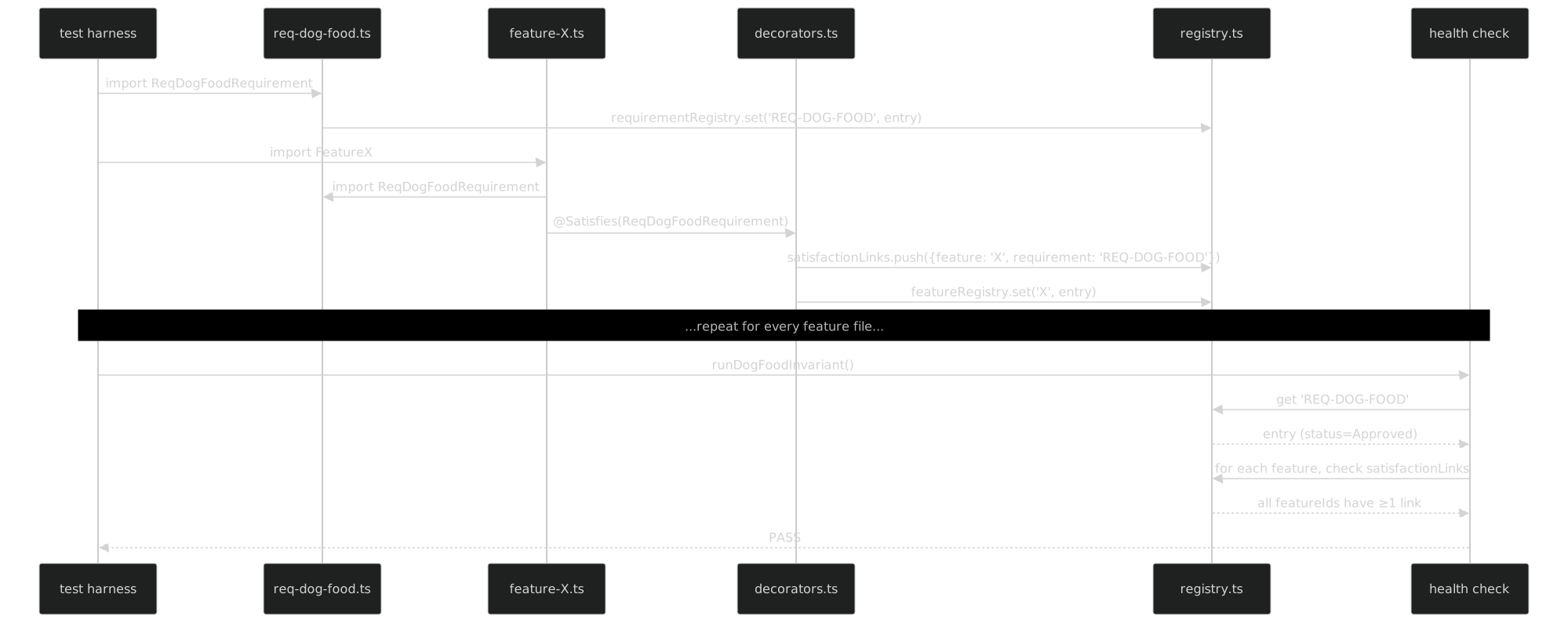
What to read in the diagram
Three things are worth noticing.
First, the ReqMod participant is narrower than it looks. It only runs its top-level class declaration once, thanks to the ES module cache. Every subsequent import of req-dog-food.ts returns the same class reference. That means the registry entry for REQ-DOG-FOOD is shared across all feature files — they are all pushing the same RequirementId into satisfactionLinks, not a per-file copy. The identity of the Requirement is guaranteed by module identity.
Second, the health check is not magic. It is a plain function in src/analysis/compliance-core.ts, and it reads from the same registry that the decorators write to. There is no hidden channel. If a Feature file is never imported, its entry is missing from the registry, and the health check cannot see it. This is why the compliance CLI starts with a loadFeatures() call that eagerly imports every file under requirements/features/: without that call, the registry would be partial.
Third, the health check is self-verifying in a specific, useful way. FEATURE-COMPLIANCE-CHECK has a @Satisfies(ReqDogFoodRequirement) on it. When loadFeatures() runs, feature-compliance.ts is imported, the decorator pushes a link {feature: 'FEATURE-COMPLIANCE-CHECK', requirement: 'REQ-DOG-FOOD'}, and that link is in the same registry the check then reads. When the check iterates featureRegistry, it finds its own Feature. When it looks up that Feature's links, it finds the edge to REQ-DOG-FOOD. Its own entry is one of the things it is proving. If the check is wrong, the check cannot detect that it is wrong — but then neither can any other check; the halting problem is not something we are solving here. What we do prove is that the check's premise (the registry is populated correctly) is the same as the thing we want to verify (every Feature satisfies something).
FEATURE-TRACE-EXPLORER-TUI at this angle
When loadFeatures() runs, it imports feature-trace-explorer-tui.ts. The decorator fires and three entries are pushed to satisfactionLinks:
{ feature: 'FEATURE-TRACE-EXPLORER-TUI', requirement: 'REQ-DISCOVERABLE-TRACEABILITY' }
{ feature: 'FEATURE-TRACE-EXPLORER-TUI', requirement: 'REQ-DOG-FOOD' }
{ feature: 'FEATURE-TRACE-EXPLORER-TUI', requirement: 'REQ-PARALLEL-DELIVERABLE' }
Plus one entry in featureRegistry:
'FEATURE-TRACE-EXPLORER-TUI' -> { ctor, id, title, priority: Low, enabled: false, acs: [...] }Because enabled = false, no test file for this Feature is loaded. There will be no @FeatureTest(FeatureTraceExplorerTuiFeature) in the test directory yet. That means testBindingsManifest has no entry for this Feature, and the compliance report will record its ACs as uncovered but not critical — gated by enabled. The dog-food edge, however, is in the registry, and the health check sees it. From the registry's perspective, the Feature is a valid citizen: it declares what it satisfies, and nothing demands that it already be implemented.
Angle 3 — Scanner
The registry is enough to check the invariant at load time, but the scanner goes further: it reads the source tree statically and builds a graph whose nodes are classes and whose edges are decorator calls. This matters because it lets the package produce a report without running user code — important for CI environments where evaluating arbitrary test files is expensive, and for editor tooling that wants a live view of the graph.
The scanner lives in src/analysis/scan-test-files.ts and uses ts-morph (a typed wrapper over the TypeScript compiler API). It walks every *.test.ts file, finds the @FeatureTest(X) class decorator, resolves X to an imported symbol, resolves the symbol to a source file, and records the binding. Then it walks every Feature file under requirements/features/, finds the @Satisfies(R1, R2, ...) class decorator, resolves each argument to an imported Requirement, and records the edge. The graph that emerges has three kinds of nodes (Requirement, Feature, Test) and four kinds of edges (Satisfies, Refines, FeatureTest, Verifies).
The meta-circle makes itself visible here in a specific way. The scanner's Feature — let us call it FEATURE-TEST-BINDINGS-INF (chapter 13 walked through it in detail) — @Satisfies(ReqDogFoodRequirement). Its test file, test/feature-test-bindings-inf.test.ts, declares @FeatureTest(FeatureTestBindingsInferenceFeature) and uses @Verifies<FeatureTestBindingsInferenceFeature>('x') on each method. So when the scanner walks test/, it encounters its own test file. When it resolves the @FeatureTest argument, it finds its own Feature. When it reads its own Feature's @Satisfies, it finds REQ-DOG-FOOD. When it writes the binding manifest, it writes an entry for itself.
In other words, the scanner scans the scanner. The graph it produces contains a node for the scanner's Feature, edges from that node to the scanner's Requirements (REQ-DOG-FOOD among them), and edges from the test methods to the scanner's source functions. The produced binding manifest has a section keyed FEATURE-TEST-BINDINGS-INF whose bindings cite src/analysis/scan-test-files.ts — the very file the scanner lives in.

What to read in the diagram
The branch to watch is the SELF? decision node. For almost every test file, the answer is no: the scanner resolves identifiers to source files under src/cli/, src/analysis/helpers/, src/styles/, and so on. But for the scanner's own test file, the answer is yes: the resolved symbols include functions defined in scan-test-files.ts itself, because the test imports walkTestFile, buildGraph, resolveImport, and so on. The emitted binding has file = 'src/analysis/scan-test-files.ts' — the scanner citing itself.
The second branch — DOGFOOD? — is how the graph closes. For every Feature node, the scanner reads the @Satisfies decorator and emits an edge for each argument. One of those arguments, for every Feature in this package, is ReqDogFoodRequirement. So every Feature node in the graph has at least one edge to REQ-DOG-FOOD. If any Feature were missing that edge, the ORPHAN branch would fire: the scanner would flag the feature as a dog-food violation and the compliance report would turn red.
That flag is not a runtime assertion — it is a data point in the graph. The compliance layer reads the flag and decides whether to fail the gate. That separation matters: the scanner's job is to observe, not to judge. The scanner produces a truthful description of the source tree; the compliance layer decides what counts as a failure.
FEATURE-TRACE-EXPLORER-TUI at this angle
The scanner sees the Feature but has nothing to bind. There is no test/feature-trace-explorer-tui.test.ts — enabled = false means no tests have been written yet — so the @FeatureTest loop skips this one. However, the Feature-file scan (a separate pass) still reads feature-trace-explorer-tui.ts, finds the @Satisfies(...) decorator, and emits three graph edges:
FEATURE-TRACE-EXPLORER-TUI -[satisfies]-> REQ-DISCOVERABLE-TRACEABILITY
FEATURE-TRACE-EXPLORER-TUI -[satisfies]-> REQ-DOG-FOOD
FEATURE-TRACE-EXPLORER-TUI -[satisfies]-> REQ-PARALLEL-DELIVERABLE
The resulting graph node is annotated with tests: [] and coverage: 0%. That is fine — the node is not orphaned, it just has no test edges yet. The graph is honest about where the coverage gap is, and the compliance layer will know to treat it differently from a Feature that has tests but no Satisfies edge.
Angle 4 — Compliance
The gate view is the one that ships. Every release, every pre-commit hook, every pre-push hook, every CI step (or, in this project, every local build step, since there is no cloud CI here) runs npx requirements compliance --strict. That command exits with code 0 if three conditions hold:
- No Feature with any critical AC (by priority) has zero
@Verifiescoverage. - No Feature is orphaned — every Feature has at least one
@Satisfiesedge. - No Requirement with
status = 'Approved'has zero satisfiers.
The dog-food invariant corresponds to condition (2) in its looser form — every Feature must satisfy something — and, in this package, to a stronger form enforced by convention: every Feature satisfies REQ-DOG-FOOD specifically. Breaking either form turns the gate red.
The gate is self-applied. The @frenchexdev/requirements package, which defines the gate, also runs the gate against its own Features. If the gate were broken — if computeComplianceReport() returned ok: true on an invalid registry — the package would ship a broken gate, and every downstream package that depends on @frenchexdev/requirements would inherit the bug. So the package's own pre-push hook is the last line of defence: it runs compliance --strict against its own requirements/ and test/ directories, and if the gate is broken, the push is blocked.
The pre-push hook is a shell script in .husky/pre-push (or equivalent). It reads:
#!/usr/bin/env sh
pnpm -C packages/requirements run compliance:strict || exit 1
One line. One test: the package's own gate, run against the package's own registry.
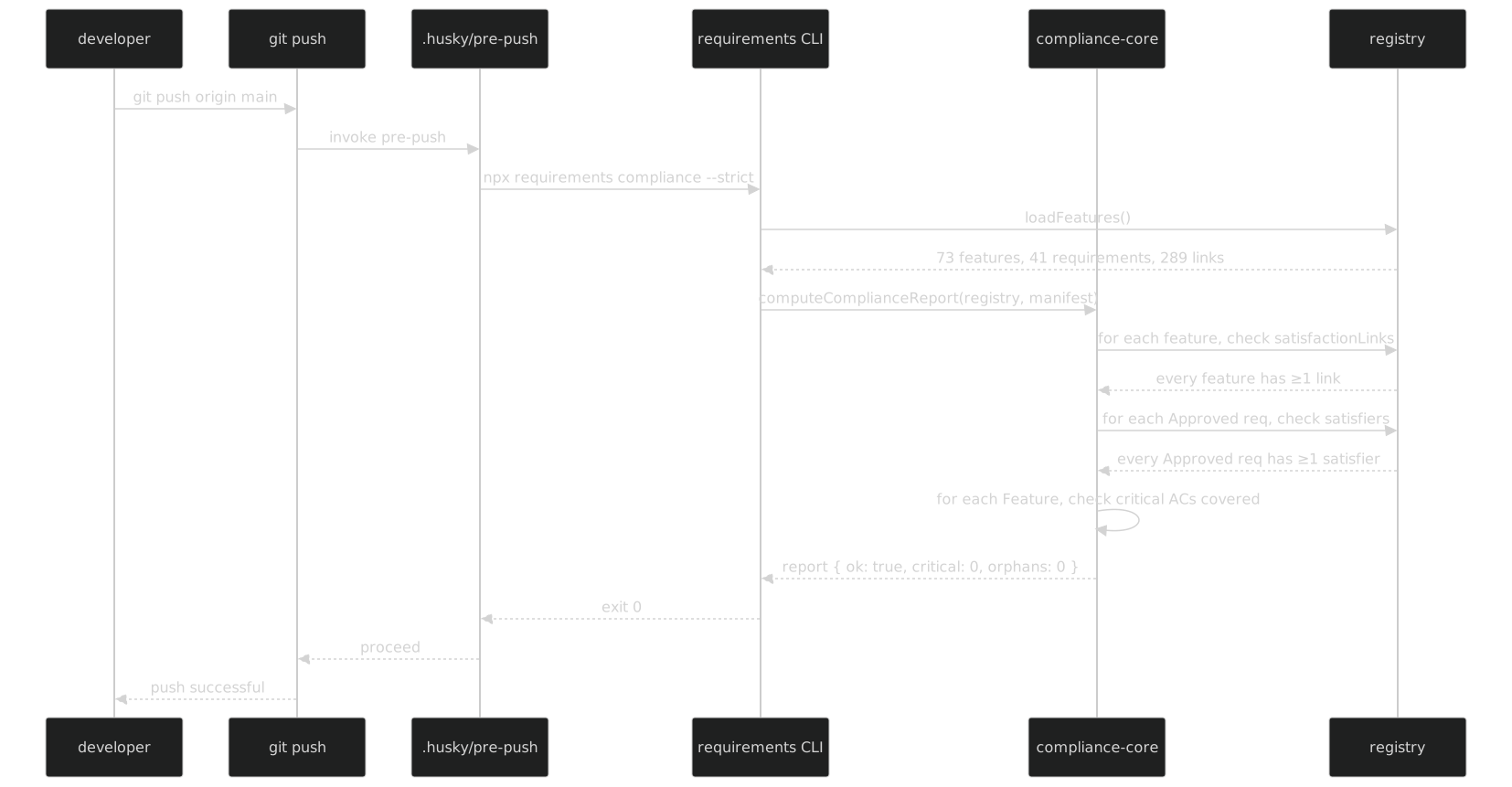
What to read in the diagram
The interesting moment is the computeComplianceReport call. It takes three inputs: the registry (populated by loadFeatures), the binding manifest (produced by the scanner), and the strict flag. It returns a structured report with per-Feature coverage, per-Requirement satisfier count, and a list of violations. The ok flag is report.violations.length === 0.
One of the Features the report iterates over is FEATURE-COMPLIANCE-CHECK itself. That Feature @Satisfies(ReqDogFoodRequirement) (the link is in the registry), has tests (the compliance test file), and has covered ACs (the test file's @Verifies methods). So when the report iterates and reaches FEATURE-COMPLIANCE-CHECK, it sees: one satisfier, N covered ACs, zero critical gaps. The gate passes its own row, and it passes the row for every other Feature in the same loop.
If REQ-DOG-FOOD were removed from the registry — say by a developer deleting req-dog-food.ts without updating the Feature files — the @Satisfies decorators in every Feature file would fail to resolve at the import level. Module load would throw. loadFeatures() would never return. The CLI would exit non-zero before even reaching computeComplianceReport. The gate would turn red for a different reason than expected: not because the report flagged the violation, but because the TypeScript compiler refused to run.
That is the loose dog-food invariant at work — "every Feature has ≥ 1 Satisfies edge" — combined with the tight one — "that one edge is REQ-DOG-FOOD" — protected at two layers. The tight form is a convention of this package; the loose form is enforced by the gate.
FEATURE-TRACE-EXPLORER-TUI at this angle
The compliance report treats this Feature with the enabled = false exception. Its row reads:
FEATURE-TRACE-EXPLORER-TUI satisfies=3 covered=0/10 critical=0 enabled=false skippedenabled = false means the coverage gate does not apply. The dog-food gate does apply, and it passes — the Feature has three Satisfies edges, one of them to REQ-DOG-FOOD. The orphan gate does apply, and it passes for the same reason.
Because the Feature is skipped from the coverage gate, the strict flag does not fire on it. compliance --strict exits 0, the push proceeds, and the Feature remains in the registry as a planned-but-not-yet-implemented citizen. This is deliberate: the dog-food invariant is about structural linkage, not about delivered code. A roadmap Feature can satisfy the rule without having any tests yet, as long as its Satisfies edge is in place.
Angle 5 — Audit
The four angles above are synchronic: they describe the loop at one moment in time, as it stands when the compliance gate runs. The audit view is diachronic: it records every state transition on every Requirement and every Feature, so that the history of the loop is queryable too.
The audit feature is REQ-AUDIT-TRAIL-HOOKS (chapter 05 covered it). It declares that every Requirement and every Feature has a history: HistoryEntry[] field, and that every mutation to the spec appends an entry: { at: IsoDate, who: string, change: ChangeKind, previous?: unknown, next?: unknown }. The hooks that perform the appends live in src/analysis/history.ts and are called by feature sync / requirement sync when a spec is updated.
REQ-DOG-FOOD itself has an audit trail. It was first drafted on 2026-04-14 — the day the no-describe/it rule was lifted out of user memory and promoted to a Requirement. The trail looks roughly like this:
2026-04-14T09:12  DRAFTED     by: stephane    status: Draft
2026-04-14T09:47  AMENDED     by: stephane    fitCriteria[0] added (rg quality-gate)
2026-04-14T10:20  AMENDED     by: stephane    risk.level Major → Critical
2026-04-14T11:03  APPROVED    by: stephane    status: Draft → Approved
2026-04-14T13:55  LINKED      by: scanner     15 features now @Satisfies this
2026-04-14T16:40  LINKED      by: scanner     73 features now @Satisfies this (full sweep)
The audit trail of REQ-DOG-FOOD is itself subject to REQ-DOG-FOOD. The feature that produces the trail — FEATURE-AUDIT-TRAIL — @Satisfies(ReqDogFoodRequirement). So the act of recording REQ-DOG-FOOD's approval is, itself, testable against REQ-DOG-FOOD. The test for FEATURE-AUDIT-TRAIL verifies that when REQ-DOG-FOOD transitions from Draft to Approved, a HistoryEntry is appended with change: 'status-changed' and next: 'Approved'. The test dog-foods the DSL. The DSL records the dog-food event. The Requirement that mandates dog-fooding was approved via a mechanism that dog-foods it.

What to read in the diagram
The state diagram is small because the Requirement lifecycle is small — Draft, Amended, Approved, Deprecated, plus the Linked self-loop as new Features cite it. The two things worth noticing are the self-loop on Approved and the per-transition annotations.
The self-loop matters because it is the only way the trail can record the growth of the dog-food surface over time. Each LINKED entry is appended when a new Feature file is added to requirements/features/ with @Satisfies(ReqDogFoodRequirement) in it. The scanner detects the new edge on its next run, and the audit hook appends a HistoryEntry. You can look at REQ-DOG-FOOD's history and see the order in which every Feature of the package came under its jurisdiction.
The annotations matter because they are typed. IsoDate is branded; who is a string but by convention is either a username or one of scanner, compliance, sync — the tools that can mutate state. ChangeKind is a discriminated union, so you can query "every DRAFTED in the last 30 days" without parsing free text.
FEATURE-TRACE-EXPLORER-TUI at this angle
The audit trail for this Feature is short, because it was created in one commit and has not been modified since:
2026-04-14T14:20  DRAFTED     by: stephane    status: Draft, enabled: false
2026-04-14T14:20  SATISFIES   by: stephane    +REQ-DISCOVERABLE-TRACEABILITY
2026-04-14T14:20  SATISFIES   by: stephane    +REQ-DOG-FOOD
2026-04-14T14:20  SATISFIES   by: stephane    +REQ-PARALLEL-DELIVERABLE
Three SATISFIES entries, all at the same timestamp, because the three @Satisfies arguments were declared in one decorator call. When the Feature eventually moves to enabled = true and gains tests, the trail will grow:
2026-??-??        SCAFFOLDED  by: scaffolder  generated test file, 10 AC stubs
2026-??-??        ENABLED     by: stephane    enabled: false → true
2026-??-??        VERIFIED    by: scanner     AC 'traceExplorerBuildsGraph' now covered
2026-??-??        VERIFIED    by: scanner     AC 'traceExplorerHandlesArrowKeyNavigation' now covered
...
Each VERIFIED entry is appended when the scanner detects a new @Verifies decorator binding to one of the Feature's ACs. The timeline of implementation becomes queryable: "show me every AC of FEATURE-TRACE-EXPLORER-TUI in the order it was first verified." This is not a feature of the git history — git has the commit, but the audit trail has the semantic event, typed and structured.
Running Example Around the Full Circle
Five diagrams, five angles, one Feature. Here is the walk: start at the source, go to the registry, pass through the scanner, hit the compliance gate, and finish in the audit trail. At each angle the Feature's presence is visible, and at each angle the edge to REQ-DOG-FOOD is visible too. The loop closes because every angle points back to the same Requirement, and that Requirement mandates the very mechanism that makes the angle observable.
Source. The Feature lives in requirements/features/feature-trace-explorer-tui.ts. Its header declares @Satisfies(ReqDiscoverableTraceabilityRequirement, ReqDogFoodRequirement, ReqParallelDeliverableRequirement). The file imports ReqDogFoodRequirement from ../requirements/req-dog-food. The TypeScript compiler checks that the import resolves, the decorator is well-typed, and the class extends Feature. If any of those fail, tsc refuses to build and the package does not ship. That is the first-level guarantee: the loop is tight at the type level.
Registry. When loadFeatures() runs, the module is imported, the @Satisfies decorator executes, and three entries appear in satisfactionLinks. One of those entries — { feature: 'FEATURE-TRACE-EXPLORER-TUI', requirement: 'REQ-DOG-FOOD' } — is the dog-food edge. The featureRegistry gains one entry: { id: 'FEATURE-TRACE-EXPLORER-TUI', priority: Low, enabled: false, acs: [...] }. At this point the Feature is a first-class citizen of the graph — the runtime has acknowledged its existence and its membership in the dog-food discipline. Nothing has been tested yet, nothing has been verified by the scanner, but the structural link is already queryable by any code that consults the registry.
Scanner. The scanner walks requirements/features/ and re-reads the decorator. It emits a Satisfies edge for each argument: the same three entries, now in graph form rather than registry-map form. The scanner also walks test/ looking for a @FeatureTest(FeatureTraceExplorerTuiFeature) — and does not find one, because the Feature is not yet enabled. So the graph node for FEATURE-TRACE-EXPLORER-TUI has three outgoing Satisfies edges and zero incoming FeatureTest edges. The binding manifest has no entry for this Feature. The graph reflects the state: declared but not yet implemented. The scanner does not panic about the absence of tests; it is not the scanner's job to judge, only to observe.
Compliance. The compliance layer reads the graph and the registry. It visits the FEATURE-TRACE-EXPLORER-TUI row. It checks the orphan invariant: satisfies ≥ 1 (yes, three). It checks the dog-food invariant: @Satisfies(ReqDogFoodRequirement) (yes). It checks the coverage invariant: 0/10 ACs covered. Under normal strict rules, 0/10 would be a failure; but the Feature's enabled flag is false, which turns off the coverage gate for this row. Result: the row passes with a skipped annotation. The overall gate passes. compliance --strict exits 0. The push proceeds. No-one has had to manually exempt this Feature — the enabled flag is the exemption, and it is type-safe.
Audit. Every transition above was recorded. The Feature's creation event is in the audit trail: DRAFTED at 2026-04-14T14:20 by stephane. The three Satisfies edges are in the trail as three separate SATISFIES entries, all at the same timestamp. The scanner's observation of the graph edge is in the trail: GRAPH-EDGE-OBSERVED at 2026-04-14T14:21 by scanner. The compliance layer's skipped-row event is in the trail: COMPLIANCE-SKIPPED at 2026-04-14T14:21 by compliance, reason: enabled=false. The audit trail of FEATURE-TRACE-EXPLORER-TUI is the history of its journey around the other four angles. When the Feature is eventually implemented — when tests are scaffolded, when ACs are verified — those events will be appended too, and the trail will continue to grow.
The loop closes here. The audit trail is a Feature that @Satisfies(ReqDogFoodRequirement). The act of recording the trail for FEATURE-TRACE-EXPLORER-TUI is itself subject to REQ-DOG-FOOD. Every time we record something about the dog-food rule being applied, the recording mechanism is itself an instance of the rule. There is no outside. That is what meta-circular means here: not a philosophical flourish, but a structural property — the subsystem that records the rule cannot stand outside the rule it records.
One last observation before closing. The circle is not a vice, it is a virtue. Circular definitions in ordinary systems are a bug: they prevent you from grounding the definition in something simpler. Here, the circularity is grounded at the TypeScript compiler — the ultimate outside, the thing no package in this monorepo can override. If any of the five angles breaks at the structural level, tsc refuses to compile, and the package does not run. The compiler is the root; the loop hangs from it. Every angle in this chapter is, ultimately, a view of how the dog-food discipline rides on top of the compiler's guarantees. Remove the compiler, and nothing holds. Keep the compiler, and the loop is as tight as the types that parameterise it.
That is the whole trick. Not a circular argument — a circular construction, grounded outside itself by a type system that predates any of it.
Related Reading
- Chapter 02 — The Loop Exists — the prose argument that this chapter illustrates.
- Chapter 13 — The Scanner Scans Itself — the AST walker as a full case study.
- Chapter 14 — The Compliance Gate — how
compliance --strictturns observations into a pass/fail. - Chapter 22 — Diagrams as a Mirror — why every angle in the package ships with a mermaid.
- Closing the Loop — Part I — the original traceability pipeline; REQ-DOG-FOOD generalises its lesson.
Previous: Chapter 17 — The Orphan Detector. Next: Chapter 19 — Lessons and Anti-Patterns.